Page 265 of 640
265
2-3. Operating the lights and windshield wipers
PRIUS_OM_OM47857U_DVD_(U)
2
When driving
■
The rear window wiper and w asher can be operated when
The “POWER” switch is in ON mode.
■ If no washer fluid sprays
Check that the washer nozzles are not blocked if there is washer fluid in the
washer fluid reservoir.
Ty p e B
Intermittent window
wiper operation
Normal window wiper
operation
Washer/wiper dual
operation
Washer/wiper dual
operation
Page 266 of 640
266 2-3. Operating the lights and windshield wipers
PRIUS_OM_OM47857U_DVD_(U)
NOTICE
■When the rear window is dry
Do not use the wiper, as it may damage the rear window.
■ When the washer fluid tank is empty
Do not operate the switch continually as the washer fluid pump may over-
heat.
Page 267 of 640
267
2-3. Operating the lights and windshield wipers
PRIUS_OM_OM47857U_DVD_(U)
2
When driving
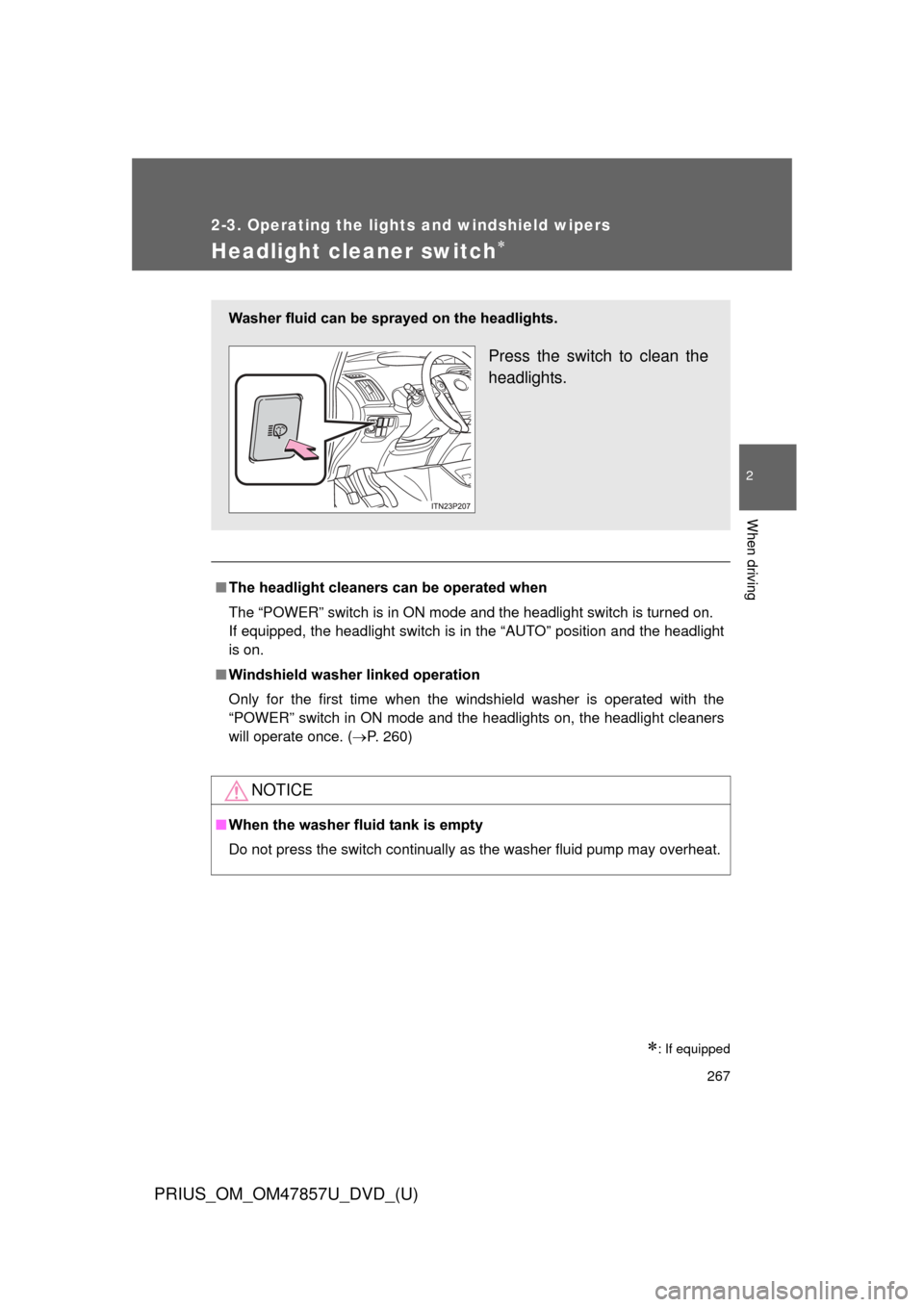
Headlight cleaner switch
: If equipped
■The headlight cleaners can be operated when
The “POWER” switch is in ON mode and the headlight switch is turned on.
If equipped, the headlight switch is in the “AUTO” position and the headlight
is on.
■ Windshield washer linked operation
Only for the first time when the windshield washer is operated with the
“POWER” switch in ON mode and the headlights on, the headlight cleaners
will operate once. ( P. 260)
NOTICE
■When the washer fluid tank is empty
Do not press the switch continually as the washer fluid pump may overhea\
t.
Washer fluid can be sprayed on the headlights.
Press the switch to clean the
headlights.
Page 283 of 640
283
2-4. Using other
driving systems
PRIUS_OM_OM47857U_DVD_(U)
2
When driving
■Radar sensor and grille cover
Always keep the sensor and grille cover clean to ensure that the vehicle-t\
o-
vehicle distance control operates properly. (Some obstructions, such as
snow, ice and plastic objects, cannot be detected by the obstruction sensor.)
Dynamic radar cruise control (vehicle-to-vehicle distance control mode) will
be canceled if dirt is detected. (Constant speed control mode can be used).
■ Warning lights, messages and buzze rs for dynamic radar cruise con-
trol
Warning lights, warning messages and buzzers are used to indicate a sys-
tem malfunction or to inform the driver of the need for caution while driving.
Grille cover
Radar sensor
Page 296 of 640

296 2-4. Using other driving systems
PRIUS_OM_OM47857U_DVD_(U)
●When the lane markers are yellow (These may be more difficult for the
system to recognize compared to white markers.)
● When the lane markers are broken, “Botts’ dots”, “Raised pavement
marker” or stones
● When lane markers are obscured or partially obscured by sand, dirt, etc.
● When there are shadows on the road running parallel with lane markers,
or if a shadow covers the lane markers
● When driving on a particularly bright road surface, such as concrete
● When driving on a road surface that is bright due to reflected light
● When driving in a location where the light level changes rapidly, such as
the entrance to or exit from a tunnel
● When sunlight or the headlights of oncoming vehicles are shining directly
into the camera lens
● When driving on roads that are branching or merging
● When driving on a road surface that is wet due to rain, previous rainfall,
standing water, etc.
● When the vehicle experiences strong up-and-down motion such as when
driving on an extremely rough road or on a seam in the pavement
● When headlight brightness at nighttime is reduced due to dirt on the
lenses, or when the headlights are misaligned
● When driving with a strong crosswind
● When driving on winding roads or roads that are uneven
● When driving on rough or unpaved roads
■ When changing the tires
Depending on the tires used, sufficient performance may not be maintain-
able.
■ Warning messages for LKA
Warning messages are used to indicate a system malfunction or to inform
the driver of the need for caution while driving. (P. 516, 520)
Page 298 of 640

298 2-4. Using other driving systems
PRIUS_OM_OM47857U_DVD_(U)
NOTICE
■To prevent damage to or incorr ect operation of the LKA system
● Do not modify the headlights or attach stickers to the surface of the lights.
● Do not modify the suspension or sun visor, or replace them with non-genu-
ine parts.
● Do not install or place anything on the hood or the grille. Also, do not install
a grille guard (bull bars, kangaroo bar etc.).
● Do not modify the sun visor or replace it with anything other than a genu-
ine Toyota product.
● If your windshield needs repairs, contact your Toyota dealer.
■ Camera sensor (P. 289)
Observe the following to ensure that the LKA system functions correctly.
●Keep the windshield clean at all times.
Performance could be affected if the windshield is dirty, or if raindrops,
condensation or ice are adhering to the windshield.
● When adjusting the rear view mirror, make sure that it does not block the
camera lens.
● Do not attach window tinting to the windshield.
● Do not install an antenna in front of the camera lens.
● If the windshield is fogged up, use the windshield defogger to remove fog
from the windshield.
When it is cold, using the heater with air blowing to the feet may allow the
upper part of the windshield to fog up. This will have a negative effect on
the images.
●Do not attach a sticker or other items to
the windshield near the camera sensor.
● Do not install or place anything near the
camera.
Page 305 of 640

305
2-4. Using other driving systems
PRIUS_OM_OM47857U_DVD_(U)
2
When driving
Hill-start assist control
■Hill-start assist control operating conditions
●The system operates in the following situations:
• The shift position is in a position other than P.
• The parking brake is not applied.
• The accelerator pedal is not depressed.
● Hill-start assist control cannot be operated while the slip indicator light is
illuminated.
■ Hill-start assist control
●While hill-start assist control is operating, the brakes remain automati-
cally applied after the driver releases the brake pedal. The stop lights and
the high mounted stoplight turn on.
● Hill-start assist control operates for about 2 seconds after the brake pedal
is released.
● If the slip indicator does not flash and the buzzer does not sound when
the brake pedal is further depressed, slightly reduce the pressure on the
brake pedal (do not allow the vehicl e to roll backward) and then firmly
depress it again. If the system still does not operate, check if the operat-
ing conditions explained above have been met.
Hill-start assist control helps to prevent the vehicle from rolling
backwards when starting on an incline or slippery slope.
To engage hill-start assist con-
trol, further depress the brake
pedal when the vehicle is
stopped completely.
A buzzer will sound once to
indicate the system is acti-
vated. The slip indicator will
also start flashing.
Page 311 of 640

311
2-4. Using other
driving systems
PRIUS_OM_OM47857U_DVD_(U)
2
When driving
■Obstacles not detected
The sensor cannot detect plastic obstacles such as traffic cones. There may
also be occasions when the sensor cannot detect pedestrians, animals,
bicycles, motorcycles, trees, or snowdrifts.
■ Situations in which the pre-collis ion system does not function properly
The system may not function effectively in situations such as the following:
● On roads with sharp bends or uneven surfaces
● If a vehicle suddenly moves in front of your vehicle, such as at an inter-
section
● If a vehicle suddenly cuts in front of your vehicle, such as when overtak-
ing
● In inclement weather such as heavy rain, fog, snow or sand storms
● When your vehicle is skidding with the VSC system off
● When an extreme change in vehicle height occurs
● When the axis of the radar is out of adjustment
■ Automatic cancelation of the pre-collision system
When a malfunction occurs due to sensor contamination, etc. that results in
the sensors being unable to detect obstacles, the pre-collision system will be
automatically disabled. In this case, the system will not activate even if there
is a collision possibility.
■ When there is a malfunction in the system, or if th e system is tempo-
rarily unusable
Warning lights and/or warning messages will turn on or flash. ( P. 502, 516)



2
When driving
■Radar sensor and grille cover
Always keep the sensor and grille cover clean to ensure that the vehicle-t\
o-
vehicle d")