Page 155 of 563

154 2-1. Driving procedures
CAUTION
●Do not shift the shift lever to R while the vehicle is moving forward.
Doing so can damage the transmission and may result in a loss of vehicle\
control.
● Do not shift the shift lever to D while the vehicle is moving backward.
Doing so can damage the transmission and may result in a loss of vehicle\
control.
● Moving the shift lever to N while the vehicle is moving will disengage the
hybrid system. Engine braking is not available with the hybrid system dis-
engaged.
● During normal driving, do not turn off the hybrid system. Turning the hybrid
system off while driving will not cause loss of steering or braking control,
however, power assist to the steering will be lost. This will make it more
difficult to steer smoothly, so you should pull over and stop the vehicle as
soon as it is safe to do so.
In the event of an emergency, such as if it becomes impossible to stop the
vehicle in the normal way: P. 493
● Use engine braking (shift position B) to maintain a safe speed when driv-
ing down a steep hill.
Using the brakes continuously may cause the brakes to overheat and lose
effectiveness. ( P. 176)
● Do not adjust the positions of the steering wheel, the seat, or the inside or
outside rear view mirrors while driving.
Doing so may result in a loss of vehicle control that can cause accidents,
resulting in death or serious injury.
● Always check that all passengers' arms, heads or other parts of their body
are not outside the vehicle, as this may result in death or serious injury.
● Do not drive in excess of the speed limit. Even if the legal speed limit per-
mits it, do not drive over 85 mph (140 km/h) unless your vehicle has high-
speed capability tires. Driving over 85 mph (140 km/h) may result in tire
failure, loss of control and possible injury. Be sure to consult a tire dealer
to determine whether the tires on your vehicle are high-speed capability
tires or not before driving at such speeds.
Page 160 of 563

159
2-1. Driving procedures
2
When driving
NOTICE
■
Avoiding damage to vehicle parts
●Do not turn the steering wheel fully in either direction and hold it there for
an extended period of time.
Doing so may damage the power steering motor.
● When driving over bumps in the road, drive as slowly as possible to avoid
damaging the wheels, underside of the vehicle, etc.
■ If you get a flat tire while driving
A flat or damaged tire may cause the following situations. Hold the steering
wheel firmly and gradually depress the brake pedal to slow down the vehicle.
●It may be difficult to control your vehicle.
● The vehicle will make abnormal sounds or vibrations.
● The vehicle will lean abnormally.
Information on what to do in case of a flat tire ( P. 463)
■ When encountering flooded roads
Do not drive on a road that has flooded after heavy rain etc. Doing so may
cause the following serious damage to the vehicle:
●Engine stalling
● Short in electrical components
● Engine damage caused by water immersion
In the event that you drive on a flooded road and the vehicle is flooded, be
sure to have your Toyota dealer check the following:
● Brake function
● Changes in quantity and quality of oil and fluid used for the engine, hybrid
transmission, etc.
● Lubricant condition of the bearings and suspension joints (where possi-
ble), and the function of all joints, bearings, etc.
Page 162 of 563
161
2-1. Driving procedures
2
When driving
■
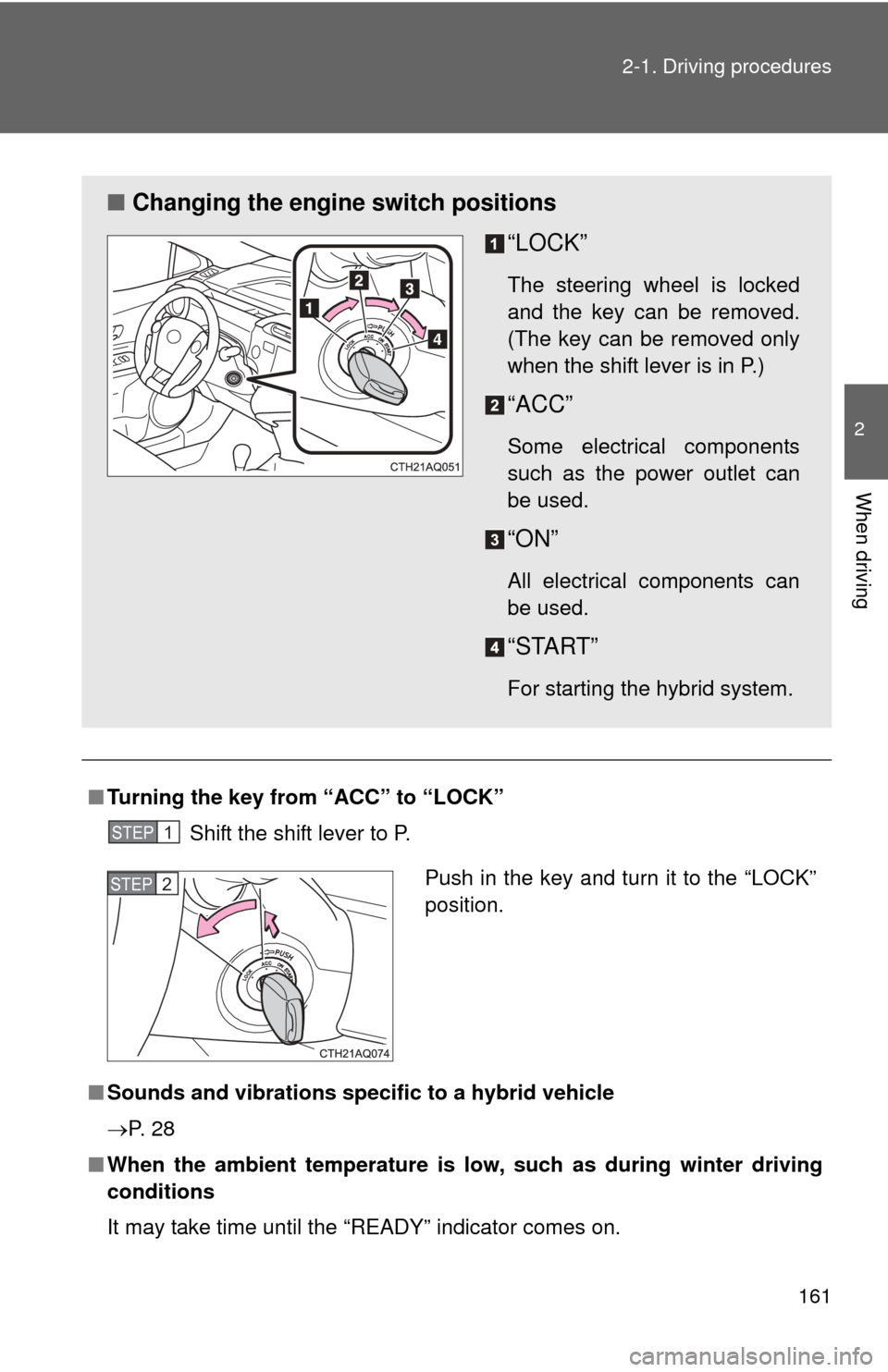
Turning the key from “ACC” to “LOCK”
Shift the shift lever to P.
■ Sounds and vibrations specific to a hybrid vehicle
P. 2 8
■ When the ambient temperature is low, such as during winter driving
conditions
It may take time until the “READY” indicator comes on.
■ Changing the engine switch positions
“LOCK”
The steering wheel is locked
and the key can be removed.
(The key can be removed only
when the shift lever is in P.)
“ACC”
Some electrical components
such as the power outlet can
be used.
“ON”
All electrical components can
be used.
“START”
For starting the hybrid system.
STEP1
Push in the key and turn it to the “LOCK”
position.STEP2
Page 163 of 563

162 2-1. Driving procedures
■If the hybrid system does not start (vehicles with immobilizer system)
The immobilizer system may not have been deactivated. ( P. 110)
Contact your Toyota dealer.
■ When the steering lock cannot be released
■ If the “READY” indicator does not come on
If the “READY” indicator does not come on when you turn the engine switch
with the shift lever in P and the brake pedal depressed, contact your Toyota
dealer immediately.
■ If the hybrid system is malfunctioning
P. 448
■ Key reminder function
A buzzer sounds if the driver’s door is opened while the engine switch is in
the “LOCK” or “ACC” position to remind you to remove the key.
CAUTION
■When starting the hybrid system
Always start the hybrid system while sitting in the driver’s seat. Do not
depress the accelerator pedal while starting the hybrid system under any cir-
cumstances.
Doing so may cause an accident resulting in death or serious injury.
■ Caution when driving
Do not turn the engine switch to the “LOCK” position while driving. If, in an
emergency, you must turn the hybrid system off while the vehicle is moving,
turn the engine switch only to the “ACC” position to stop the hybrid system.
An accident may result if the hybrid system is stopped while driving.
(P. 493)
When starting the hybrid system, the
engine switch may seem stuck in the
“LOCK” position. To free it, turn the key
while turning the steering wheel slightly
left and right.
Page 169 of 563
168 2-1. Driving procedures
■Notes for the entry function
P. 5 6
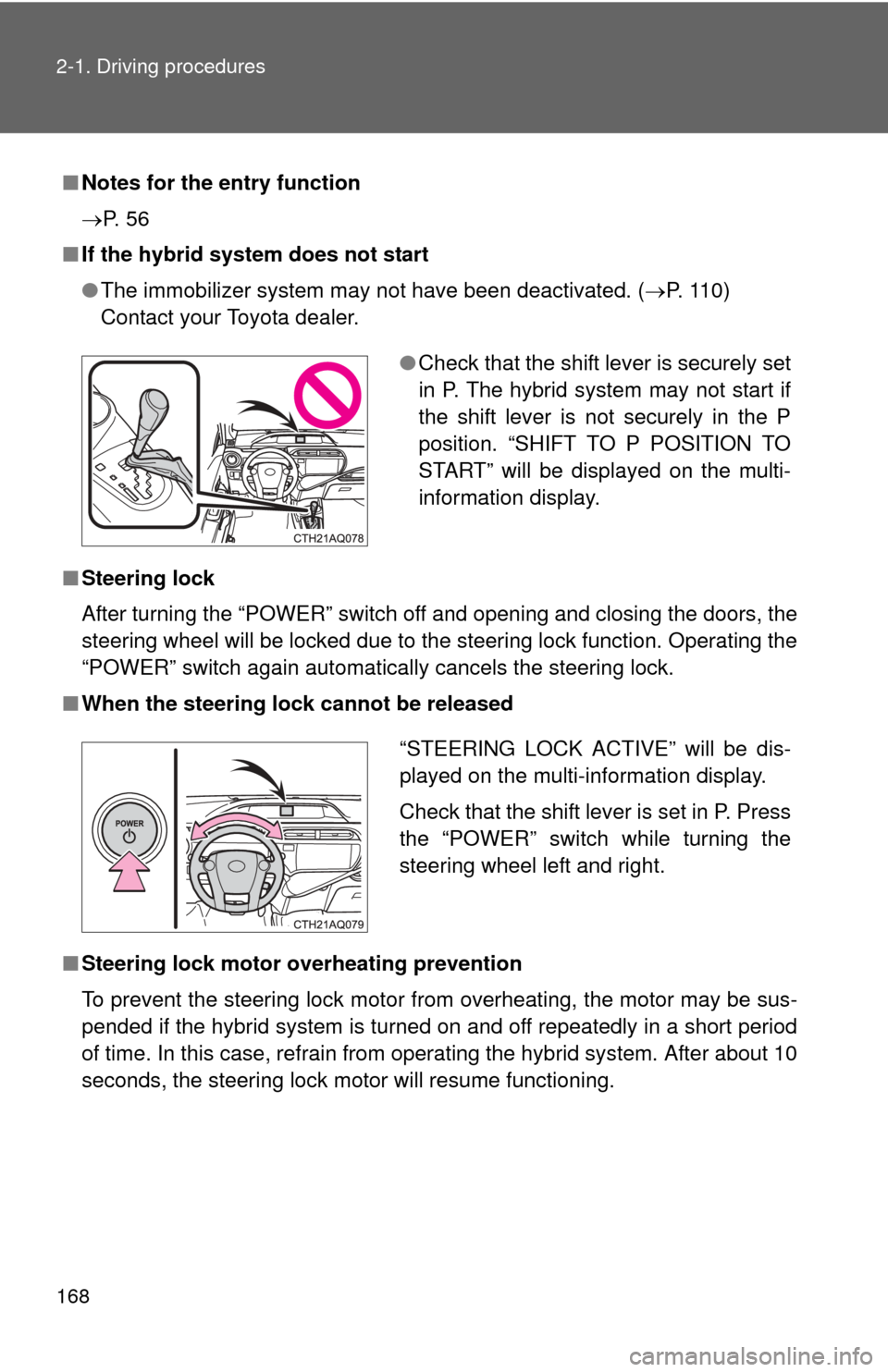
■ If the hybrid system does not start
●The immobilizer system may not have been deactivated. ( P. 110)
Contact your Toyota dealer.
■ Steering lock
After turning the “POWER” switch off and opening and closing the doors, the
steering wheel will be locked due to the steering lock function. Operating the
“POWER” switch again automatically cancels the steering lock.
■ When the steering lock cannot be released
■ Steering lock motor overheating prevention
To prevent the steering lock motor from overheating, the motor may be sus-
pended if the hybrid system is turned on and off repeatedly in a short period
of time. In this case, refrain from operating the hybrid system. After about 10
seconds, the steering lock motor will resume functioning.
● Check that the shift lever is securely set
in P. The hybrid system may not start if
the shift lever is not securely in the P
position. “SHIFT TO P POSITION TO
START” will be displayed on the multi-
information display.
“STEERING LOCK ACTIVE” will be dis-
played on the multi-information display.
Check that the shift lever is set in P. Press
the “POWER” switch while turning the
steering wheel left and right.
Page 181 of 563
180
2-1. Driving procedures
Hor n
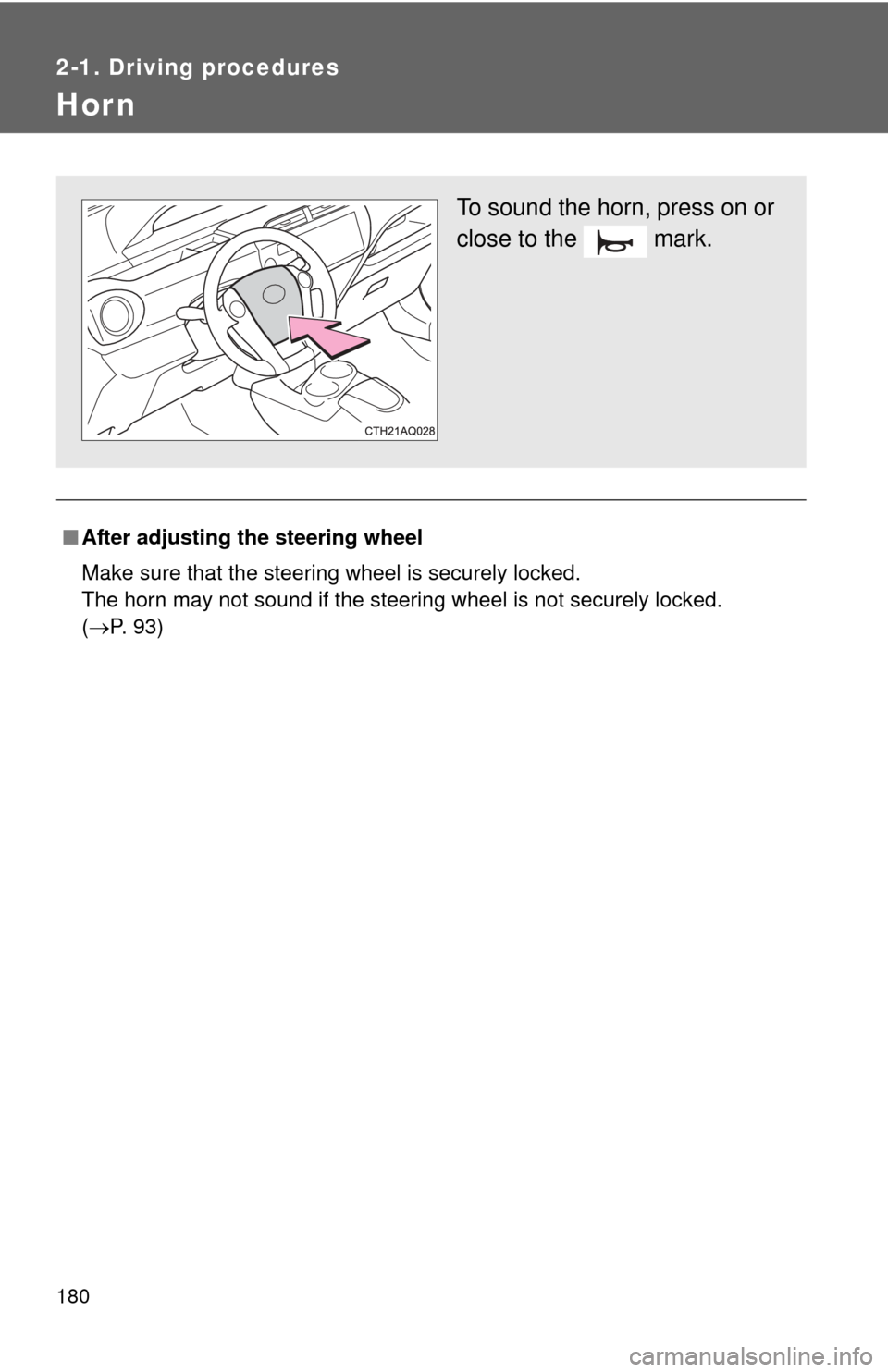
■After adjusting the steering wheel
Make sure that the steering wheel is securely locked.
The horn may not sound if the steering wheel is not securely locked.
(P. 93)
To sound the horn, press on or
close to the mark.
Page 189 of 563
188 2-2. Instrument cluster
Touch tracer display (vehicles with Display Audio system)
When a steering wheel switch is
touched, an illustration of the
switch is shown on the screen,
helping the driver to confirm
which switch they are touching
without needing to look down at
their hands.
The touch tracer display can be
turned off. ( P. 199)
If an audio/navigation system is
used that is not compatible with
the steering switches in this vehi-
cle, the audio switch display may
not operate correctly.
Switching the display
Press the “DISP” switch on the
steering wheel to change the dis-
played item. The “TRIP” switch
may also be used for certain
items.
Page 199 of 563
198 2-2. Instrument cluster
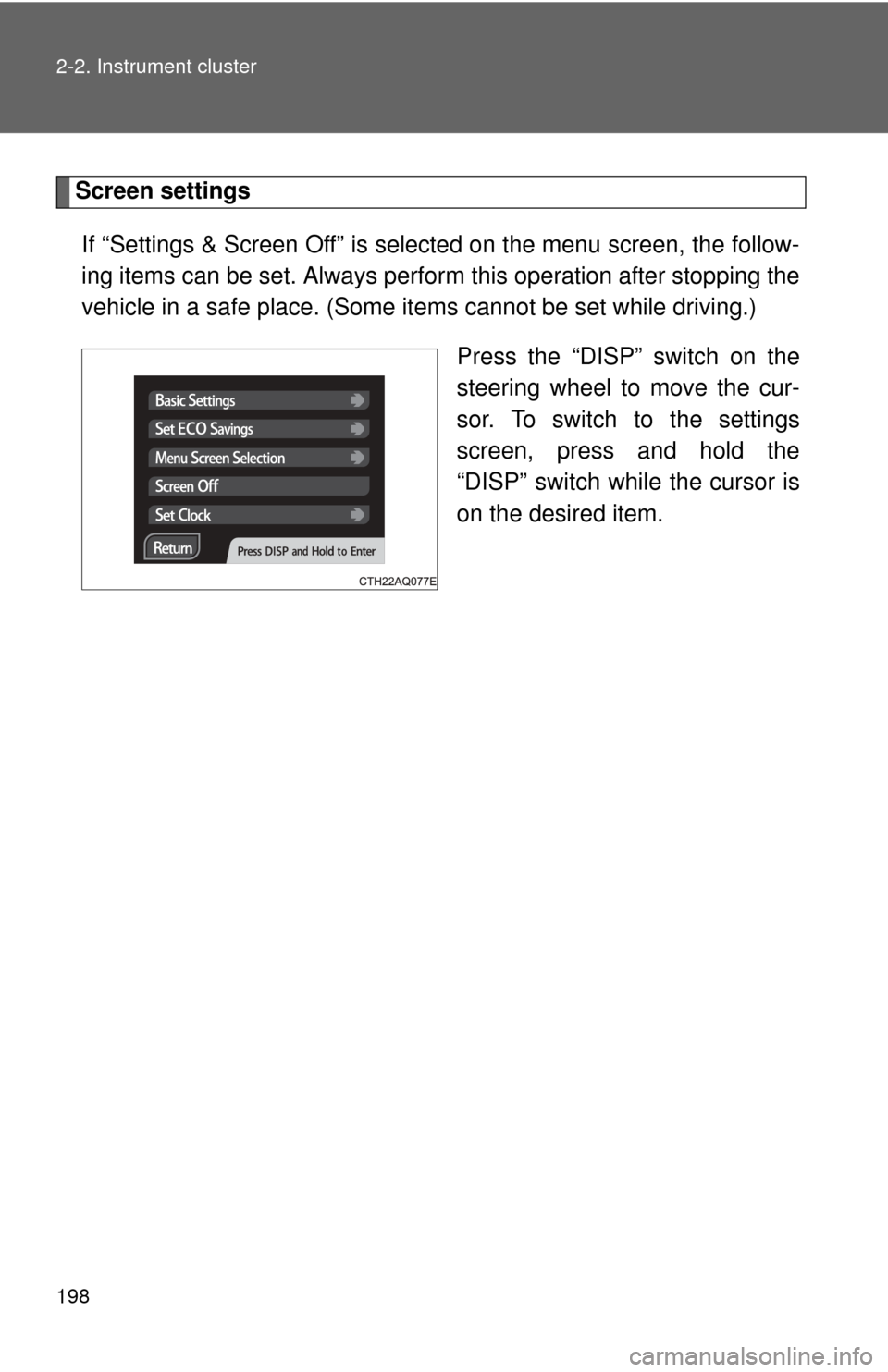
Screen settingsIf “Settings & Screen Off” is selected on the menu screen, the follow-
ing items can be set. Always perform this operation after stopping the
vehicle in a safe place. (Some it ems cannot be set while driving.)
Press the “DISP” switch on the
steering wheel to move the cur-
sor. To switch to the settings
screen, press and hold the
“DISP” switch while the cursor is
on the desired item.