Page 376 of 620
376 3-4. Using the storage features
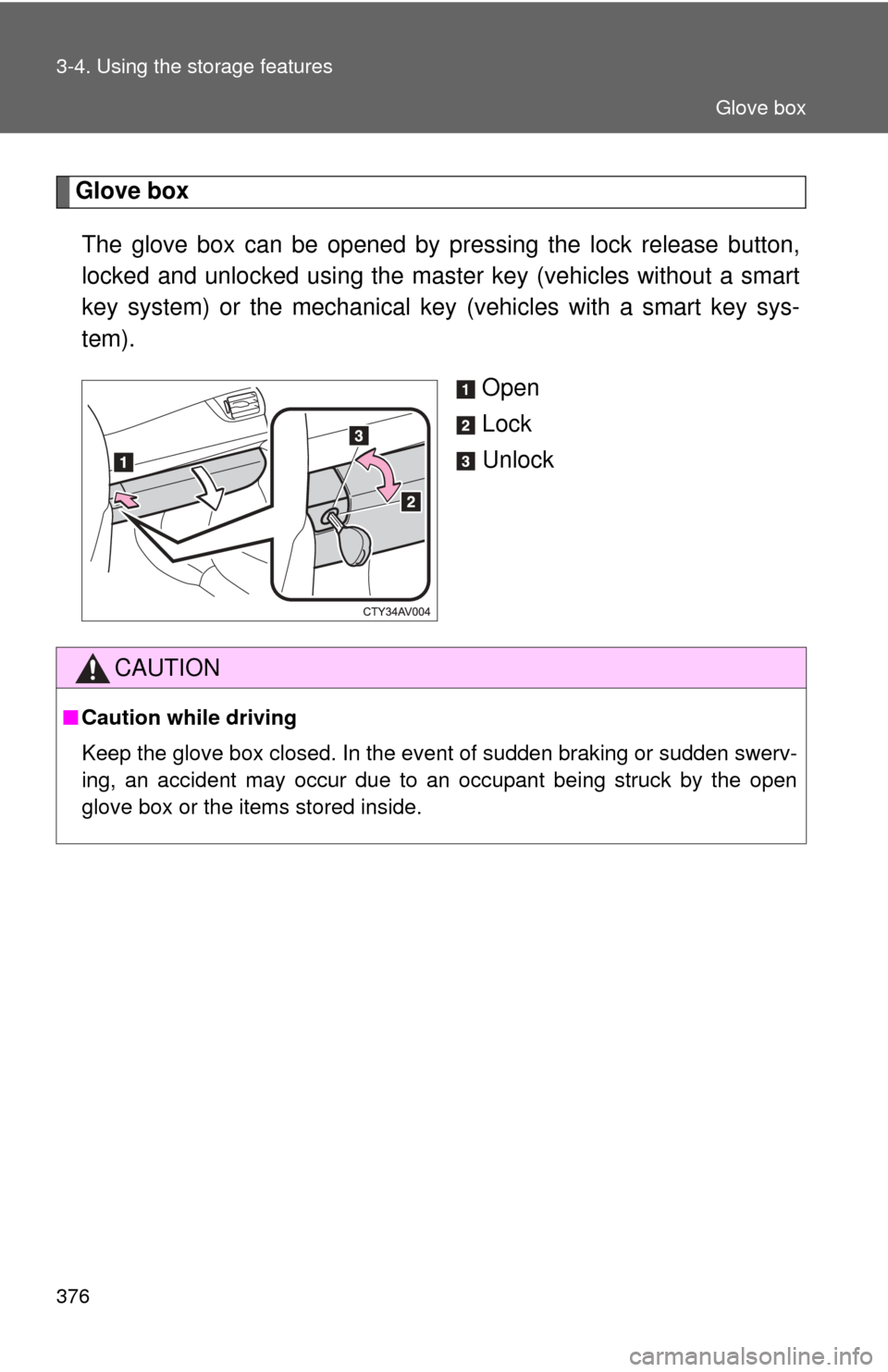
Glove boxThe glove box can be opened by pr essing the lock release button,
locked and unlocked using the master key (vehicles without a smart
key system) or the mechanical key (vehicles with a smart key sys-
tem).
Open
Lock
Unlock
CAUTION
■Caution while driving
Keep the glove box closed. In the event of sudden braking or sudden swerv-
ing, an accident may occur due to an occupant being struck by the open
glove box or the items stored inside.
Glove box
Page 386 of 620
386
3-5. Other interior features
Clock
■The clock is displayed when
Vehicles without a smart key system
The engine switch is in the “ACC” or “ON” position.
Vehicles with a smart key system
The “ENGINE START STOP” switch is in ACCESSORY or IGNITION ON
mode.
■ When disconnecting and reco nnecting battery terminals
The time display will automatically be set to 1:00.
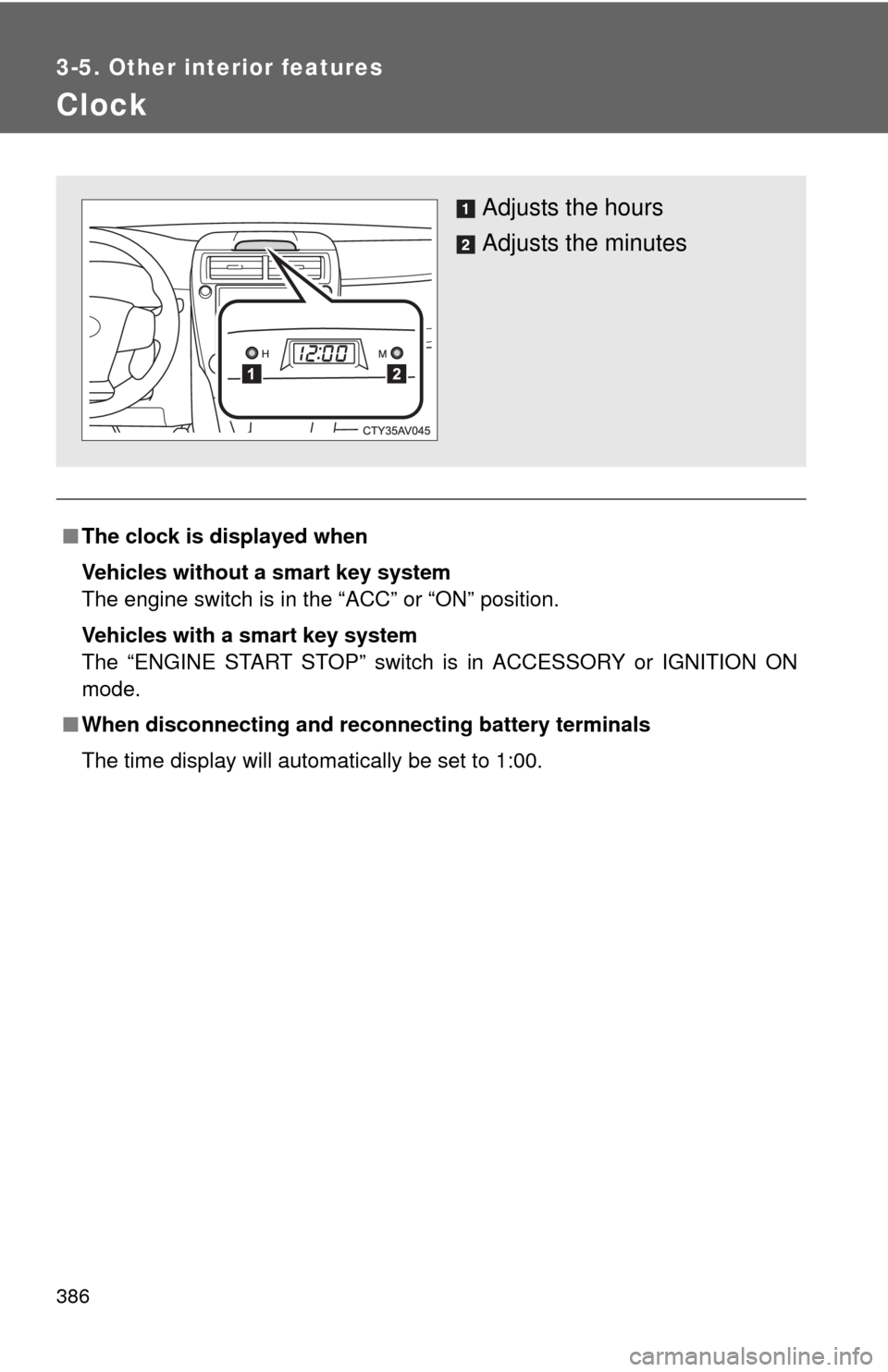
Adjusts the hours
Adjusts the minutes
Page 387 of 620
387
3-5. Other interior features
3
Interior features
Outside temperature display
■The outside temperatur e is displayed when
Vehicles without a smart key system
The engine switch is in the “ON” position.
Vehicles with a smart key system
The “ENGINE START STOP” switch is in IGNITION ON mode.
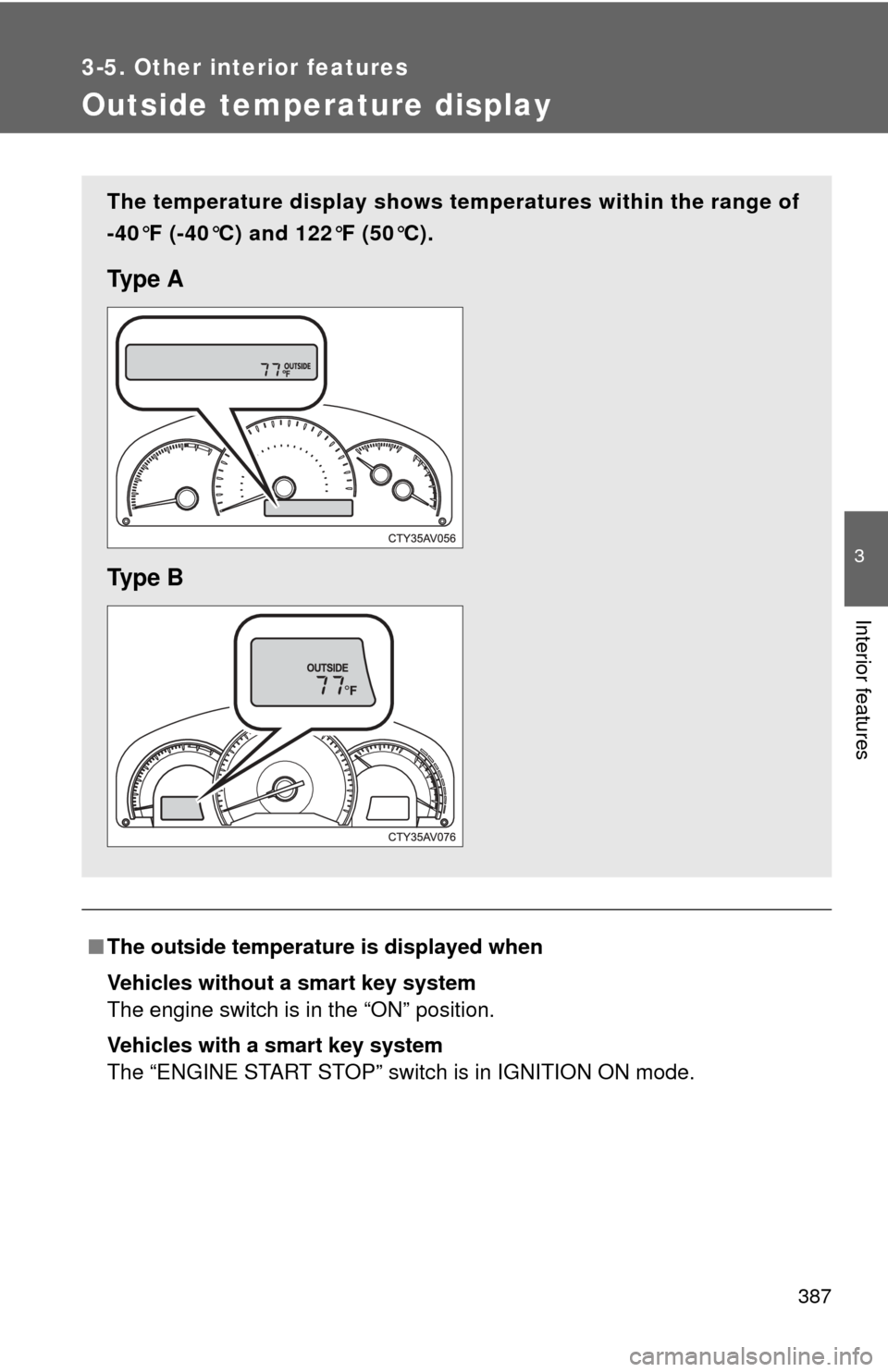
The temperature display shows te mperatures within the range of
-40°F (-40°C) and 122°F (50°C).
Ty p e A
Ty p e B
Page 391 of 620
391
3-5. Other interior features
3
Interior features
■
The power outlet can be used when
Vehicles without a smart key system
The engine switch is in the “ACC” or “ON” position.
Vehicles with a smart key system
The “ENGINE START STOP” switch is in ACCESSORY or IGNITION ON
mode.
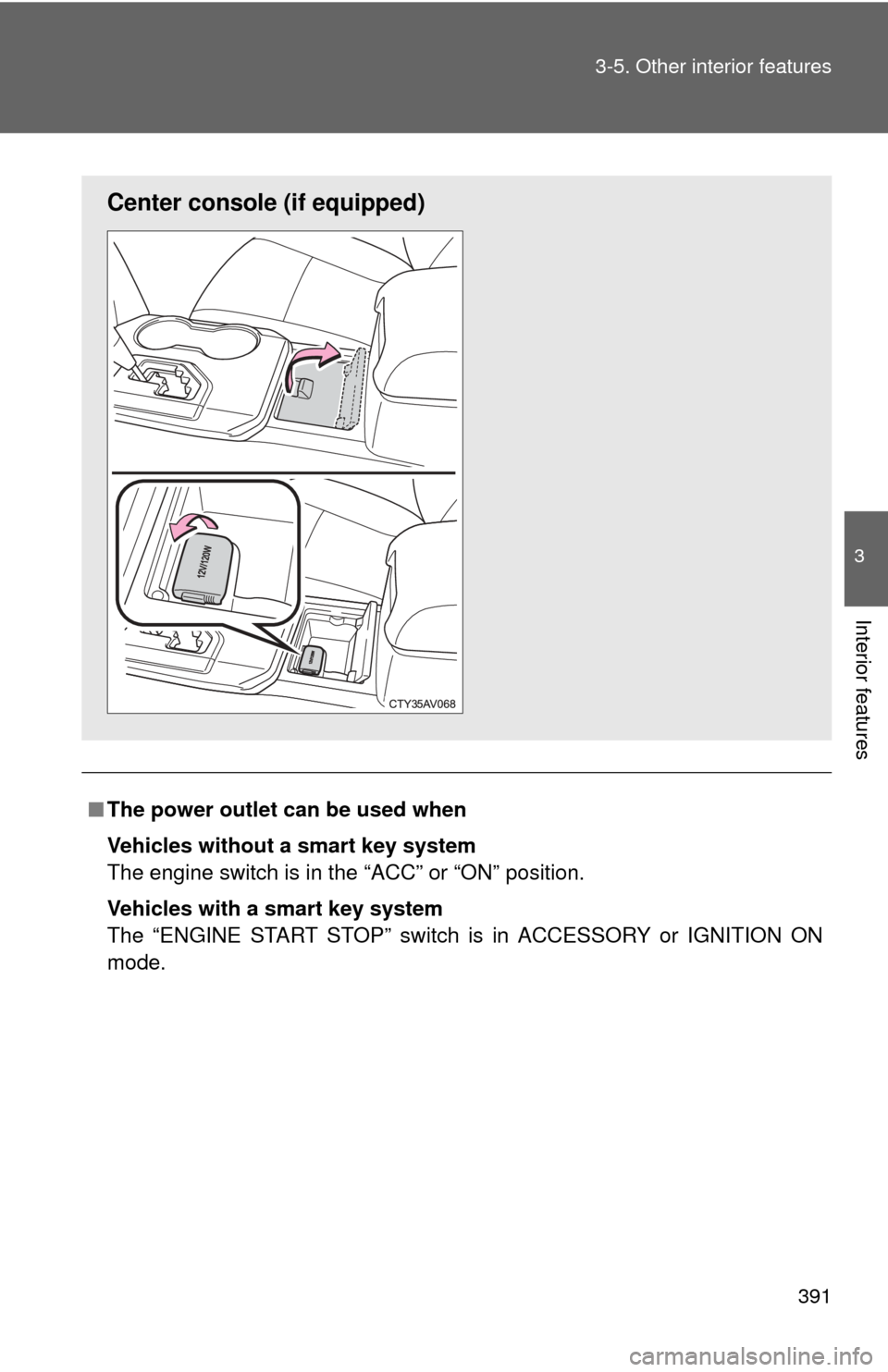
Center consol e (if equipped)
Page 393 of 620
393
3-5. Other interior features
3
Interior features
Seat heaters
■The seat heaters can be used when
Vehicles without a smart key system
The engine switch is in the “ON” position.
Vehicles with a smart key system
The “ENGINE START STOP” switch is in IGNITION ON mode.
■ When not in use
Move the dial fully backward. The indicator light turns off.
On
The indicator light comes on.
Adjusts the seat tempera-
ture
The further you move the dial
forward, the warmer the seat
becomes.
Driver’s seat Front
passenger’s seat
: If equipped
Page 406 of 620

406 3-5. Other interior features
■Before programming
●Install a new battery in the remote control transmitter.
● The battery side of the remote control transmitter must be pointed away
from the HomeLink
button.
■ To prevent battery discharge
Vehicles without a smart key system:
HomeLink
will turn off if a door has not been opened and closed for 20 min-
utes or the engine switch is left turned off. (After which programming cannot
be completed.) Open and close a door or turn the engine switch to the
“ACC” position to turn HomeLink
on. We recommend programming while
the engine switch is in the “ACC” position.
Vehicles with a smart key system:
HomeLink
will turn off if a door has not been opened and closed for 20 min-
utes or the “ENGINE START STOP” switch is left turned off. (After which pro-
gramming cannot be completed.) Open and close a door or turn the
“ENGINE START STOP” switch to ACCESSORY mode to turn HomeLink
on. We recommend programming while the “ENGINE START STOP” switch
is in ACCESSORY mode.
■ Certification for the garage door opener
U.S.A.
FCC ID: CB2051AHL4/CB251AHL4NR
NOTE:
This device complies with Part 15 of the FCC Rules. Operation is subject to
the following two conditions: (1) this device may not cause harmful interfer-
ence, and (2) this device must accept any interference received, including
interference that may cause undesired operation.
FCC WARNING:
Changes or modifications not expressly approved by the party responsible
for compliance could void the user's authority to operate the equipment.
Canada
IC ID: 051AHL4/51AHL4NR
NOTE:
Operation is subject to the following two conditions: (1) this device may not
cause interference, and (2) this device must accept any interference, includ-
ing interference that may cause undesired operation of the device.
Page 415 of 620

415
3-5. Other interior features
3
Interior features
Safety Connect LE
D light Indicators
When the “ENGINE START STOP” switch is turned to IGNITION ON
mode (vehicles with a smart key system) or the engine switch is
turned to the “ON” position (vehicle s without a smart key system), the
red indicator light comes on for 2 seconds then turns off. Afterward,
the green indicator light comes on, indicating that the service is
active.
The following indicator light patter ns indicate specific system usage
conditions:
● Green indicator light on = Active service
● Green indicator light flashing = Safety Connect call in process
● Red indicator light (except at v ehicle start-up) = System malfunc-
tion (contact your Toyota dealer)
● No indicator light (off) = Safety Connect service not active
Safety Connect services
■ Automatic Collision Notification
In case of either airbag deployment or severe rear-end collision,
the system is design ed to automatically call the response center.
The responding agent receives th e vehicle’s location and attempts
to speak with the vehicle occupant s to assess the level of emer-
gency. If the occupants are unable to communicate, the agent
automatically treats the call as an emergency, contacts the nearest
emergency services provider to describe the situation, and
requests that assistance be sent to the location.
Page 421 of 620
421
4-1. Maintenance and care
4
Maintenance and care
■
When using a car wash (veh icles with a smart key system)
If the door handle becomes wet while the electronic key is within the effec-
tive range, the door may lock and unlock repeatedly. In that case, follow the
following correction procedures to wash the vehicle:
● Place the electronic key in a location 6 ft. (2 m) or more away from the
vehicle. (Take care to ensure that the key is not stolen.)
● Set the electronic key to battery-saving mode to disable the smart key
system. ( P. 41)
■ Aluminum wheels (if equipped)
●Remove any dirt immediately by using a neutral detergent. Do not use
hard brushes or abrasive cleaners. Do not use strong or harsh chemical
cleaners. Use the same mild detergent and wax as used on the paint.
● Do not use detergent on the wheels when they are hot, for example after
driving for long distance in the hot weather.
● Wash detergent from the wheels immediately after use.
■ Bumpers
Do not scrub with abrasive cleaners.
CAUTION
■When washing the vehicle
Do not apply water to the inside of the engine compartment. Doing so may
cause the electrical components etc. to catch fire.
■ Precautions regardin g the exhaust pipe
Exhaust gasses cause the exhaust pipe to become quite hot.
When washing the vehicle, be careful not to touch the pipe until it has cooled
sufficiently, as touching a hot exhaust pipe can cause burns.
■ Precaution regarding th e Blind Spot Monitor
If the paint of the rear bumper is chipped or scratched, the system may mal-
function. If this occurs, consult your Toyota dealer.