Page 187 of 776
187 2-1. Driving procedures
2
When driving
AVENSIS_OM_OM20B88E_(EE)
Starting on a steep uphill
Multidrive or automatic transmission
Firmly set the parking brake and shift the shift lever to “D” or
“M”.
Gently depress the accelerator pedal.
Release the parking brake.
Manual transmission
With the parking brake set and the clutch pedal fully
depressed, shift the shift lever to “1”.
Lightly depress the accelerator pedal at the same time as
gradually releasing the clutch pedal.
The parking brake will automatically release. (P. 227)
Driving in the rain
Drive carefully when it is raining, because visibility will be reduced, the
windows may become fogged-up, and the road will be slippery.
Drive carefully when it starts to rain, because the road surface will be
especially slippery.
Refrain from high speeds when driving on an expressway in the rain,
because there may be a layer of water between the tires and the road
surface, preventing the steering and brakes from operating properly.
Engine speed while driving (vehicles with Multidrive or automatic
transmission)
In the following conditions, the engine speed may become high while driving.
This is due to automatic up-shifting control or down-shifting implementation
to meet driving conditions. It does not indicate sudden acceleration.
The vehicle is judged to be driving uphill or downhill
When the accelerator pedal is released
When the brake pedal is depressed while sport mode is selected.
STEP1
STEP2
STEP3
STEP1
STEP2
STEP3
Page 192 of 776
192 2-1. Driving procedures
AVENSIS_OM_OM20B88E_(EE)
CAUTION
Use engine braking (downshift) to maintain a safe speed when driving
down a steep hill.
Using the brakes continuously may cause the brakes to overheat and lose
effectiveness. (P. 210, 216)
When stopped on an inclined surface, use the brake pedal and parking
brake to prevent the vehicle from rolling backward or forward and causing
an accident.
Do not adjust the position of the steering wheel, the seat, or the inside or
outside rear view mirrors while driving.
Doing so may result in a loss of vehicle control that can cause accidents
that may result in death or serious injury.
Always check that all passengers’ arms, heads or other parts of their bod-
ies are not outside the vehicle, as this may result in death or serious injury.
When driving on slippery road surfaces
Sudden braking, acceleration and steering may cause tire slippage and
reduce your ability to control the vehicle, resulting in an accident.
Sudden acceleration, engine braking due to shift changing, or changes in
engine speed could cause the vehicle to skid, resulting in an accident.
After driving through a puddle, lightly depress the brake pedal to make
sure that the brakes are functioning properly. Wet brake pads may prevent
the brakes from functioning properly. If the brakes on only one side are wet
and not functioning properly, steering control may be affected, resulting in
an accident.
Page 196 of 776
196 2-1. Driving procedures
AVENSIS_OM_OM20B88E_(EE)
CAUTION
When braking the vehicle
When the brakes are wet, drive more cautiously.
Braking distance increases when the brakes are wet, and may cause one
side of the vehicle to brake differently than the other side. Also the parking
brake may not securely hold the vehicle.
If the power brake assist function does not operate, do not follow other
vehicles closely and avoid downhills or sharp turns that require braking.
In this case, braking is still possible, but it will require more force on the
pedal than usual. Braking distance may also increase.
Do not pump the brake pedal if the engine stalls.
Each push on the pedal uses up the reserve for the power-assisted
brakes.
The brake system consists of 2 individual hydraulic systems: If one of the
systems fails, the other will still operate. In this case, the brake pedal
should be depressed more firmly than usual and braking distance
becomes longer.
Do not drive your vehicle with only a single brake system. Have your
brakes fixed immediately.
Page 269 of 776
269 2-4. Using other driving systems
2
When driving
AVENSIS_OM_OM20B88E_(EE)
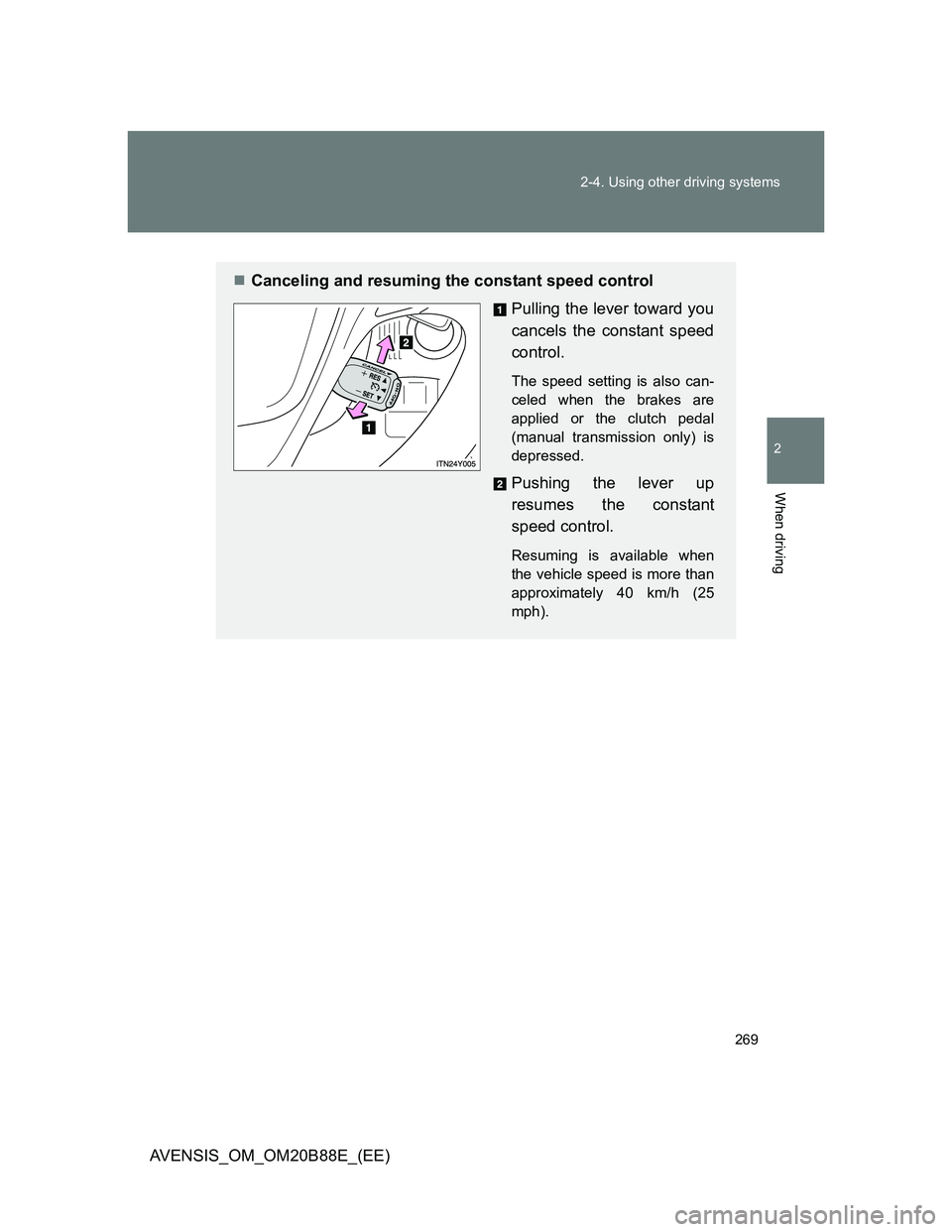
Canceling and resuming the constant speed control
Pulling the lever toward you
cancels the constant speed
control.
The speed setting is also can-
celed when the brakes are
applied or the clutch pedal
(manual transmission only) is
depressed.
Pushing the lever up
resumes the constant
speed control.
Resuming is available when
the vehicle speed is more than
approximately 40 km/h (25
mph).
Page 278 of 776
278 2-4. Using other driving systems
AVENSIS_OM_OM20B88E_(EE)
Vehicle-to-vehicle distance settings
Select a distance from the table below. Note that the distances
shown correspond to a vehicle speed of 80 km/h (50 mph). Vehi-
cle-to-vehicle distance increases/decreases in accordance with
vehicle speed.
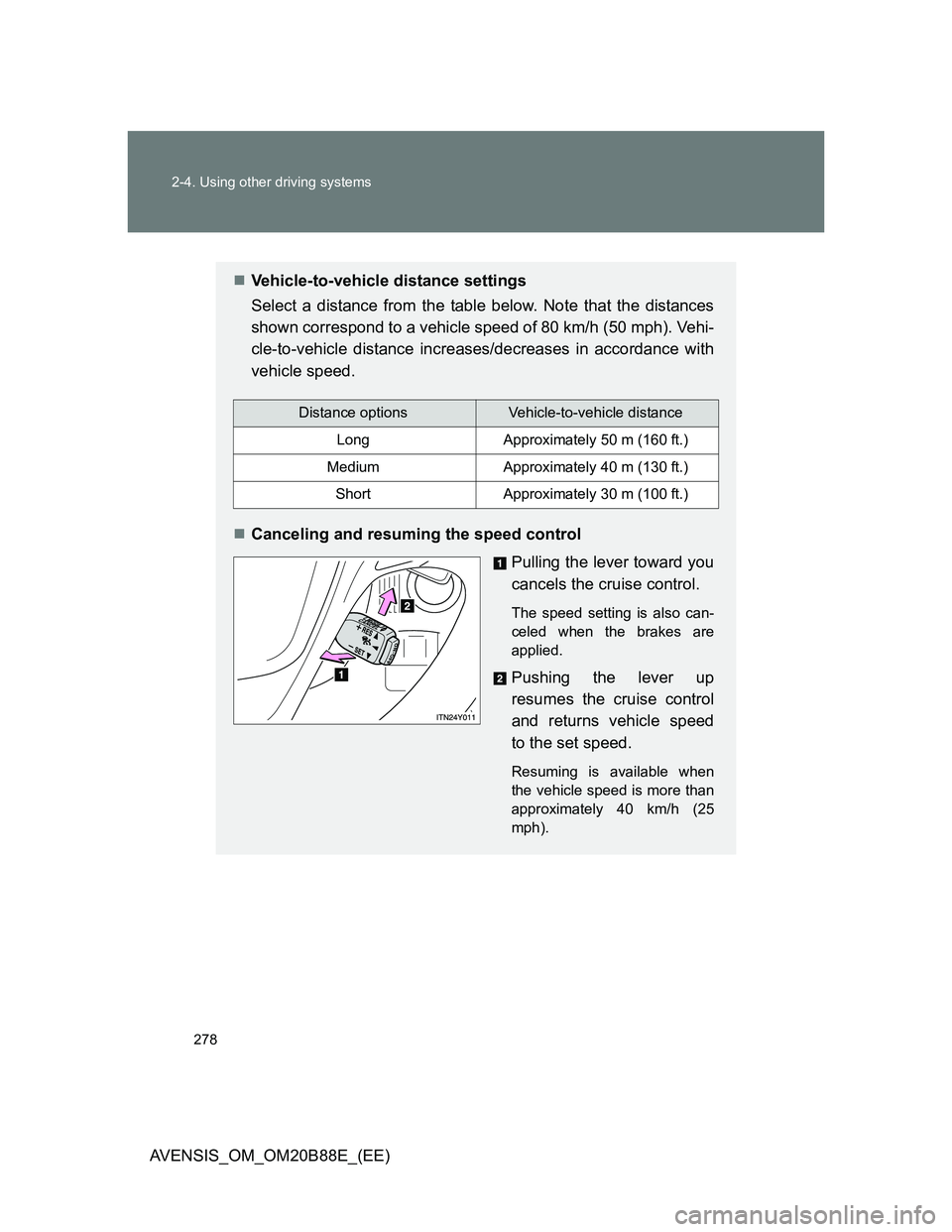
Canceling and resuming the speed control
Pulling the lever toward you
cancels the cruise control.
The speed setting is also can-
celed when the brakes are
applied.
Pushing the lever up
resumes the cruise control
and returns vehicle speed
to the set speed.
Resuming is available when
the vehicle speed is more than
approximately 40 km/h (25
mph).
Distance optionsVehicle-to-vehicle distance
LongApproximately 50 m (160 ft.)
MediumApproximately 40 m (130 ft.)
ShortApproximately 30 m (100 ft.)
Page 280 of 776
280 2-4. Using other driving systems
AVENSIS_OM_OM20B88E_(EE)Example of constant speed cruising
When there are no vehicles ahead
The vehicle travels at the speed set by the driver. The desired vehicle-to-
vehicle distance can also be set by operating the vehicle-to-vehicle dis-
tance control.
Example of deceleration cruising
When the vehicle ahead is driving slower than the set speed
When a vehicle is detected running ahead of you, the system automati-
cally decelerates your vehicle. When a greater reduction in vehicle speed
is necessary, the system applies the brakes. A warning tone warns you
when the system cannot decelerate sufficiently to prevent your vehicle
from closing in on the vehicle ahead.
Example of follow-up cruising
When following a vehicle driving slower than the set speed
The system continues follow-up cruising while adjusting for changes in the
speed of the vehicle ahead in order to maintain the vehicle-to-vehicle dis-
tance set by the driver.
Example of acceleration
When there are no longer any vehicles ahead driving slower than
the set speed
The system accelerates until the set speed is reached. The system then
returns to constant speed cruising.
Page 281 of 776
281 2-4. Using other driving systems
2
When driving
AVENSIS_OM_OM20B88E_(EE)
Approach warning
When your vehicle is too close to a vehicle ahead, and sufficient
automatic deceleration via the cruise control is not possible, the dis-
play will flash and the buzzer will sound to alert the driver. An exam-
ple of this would be if another driver cuts in front of you while you are
following a vehicle. Apply the brakes to ensure an appropriate vehi-
cle-to-vehicle distance.
Warning may not occur when
In the following instances, there is a possibility that the warnings
will not occur:
When the speed of the vehicle ahead matches or exceeds your
vehicle speed
When the vehicle ahead is traveling at an extremely slow speed
Immediately after the cruise control speed was set
At the instant the accelerator is applied
Page 288 of 776
288 2-4. Using other driving systems
AVENSIS_OM_OM20B88E_(EE)
CAUTION
Before using dynamic radar cruise control
Do not overly rely on vehicle-to-vehicle distance control.
Be aware of the set speed. If automatic deceleration/acceleration is not
appropriate, adjust the vehicle speed, as well as the distance between your
vehicle and vehicles ahead by applying the brakes etc.
Cautions regarding the driving assist systems
Observe the following precautions.
Failure to do so may cause an accident resulting in death or serious injury.
Assisting the driver to measure following distance
The dynamic radar cruise control is only intended to help the driver in
determining the following distance between the driver’s own vehicle and a
designated vehicle travelling ahead. It is not a mechanism that allows
careless or inattentive driving, and it is not a system that can assist the
driver in low-visibility conditions. It is still necessary for driver to pay close
attention to the vehicle’s surroundings.
Assisting the driver to judge proper following distance
The dynamic radar cruise control determines whether the following dis-
tance between the driver’s own vehicle and a designated vehicle traveling
ahead is appropriate or not. It is not capable of making any other type of
judgement. Therefore, it is absolutely necessary for the driver to remain
vigilant and to determine whether or not there is a possibility of danger in
any given situation.
Assisting the driver to operate the vehicle
The dynamic radar cruise control has no capability to prevent or avoid a
collision with a vehicle traveling ahead. Therefore, if there is ever any dan-
ger, the driver must take immediate and direct control of the vehicle and
act appropriately in order to ensure the safety of all involved.