Page 258 of 530
2564-5. Using the driving support systems
4RUNNER (U)_(OM35A83U)
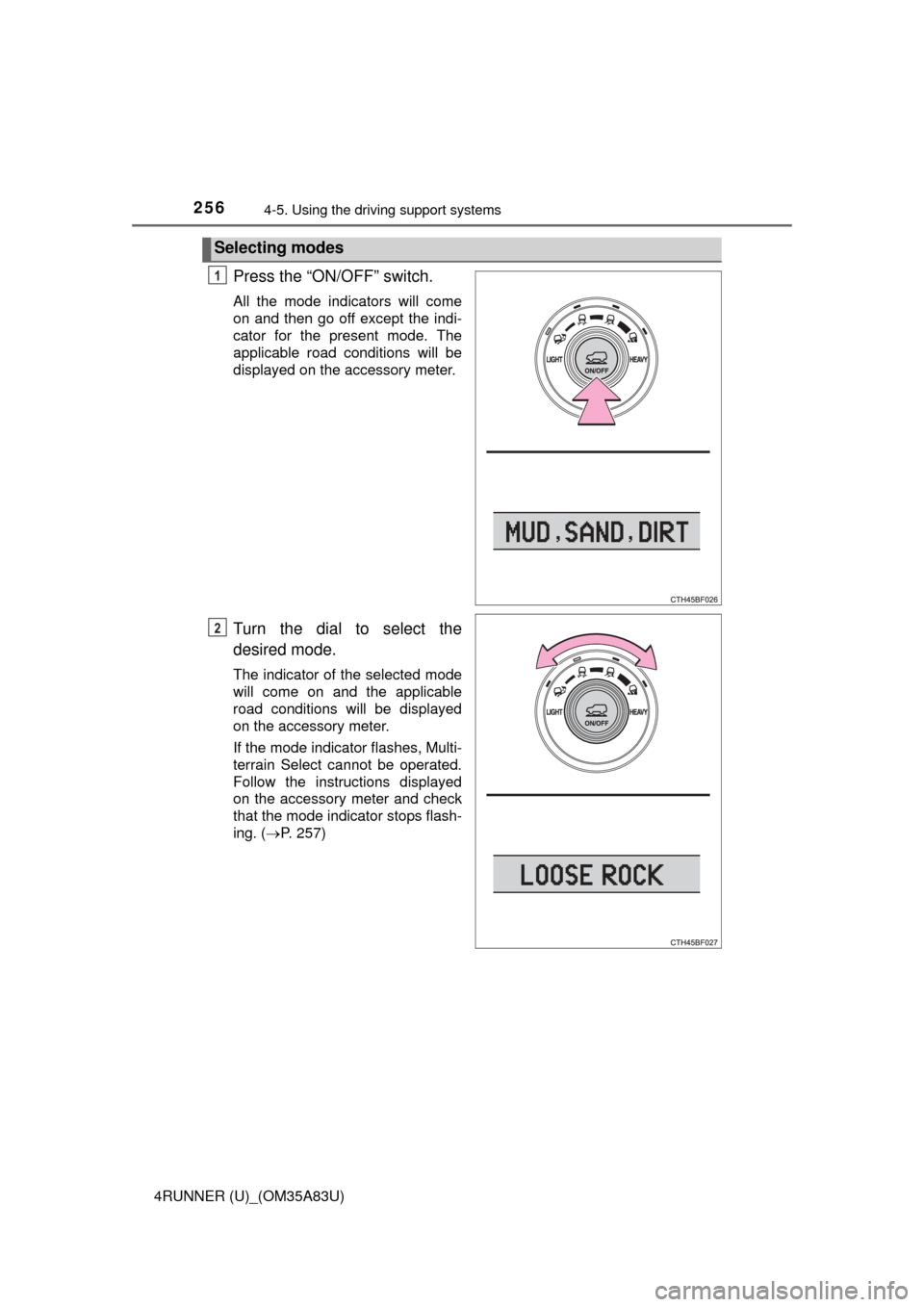
Press the “ON/OFF” switch.
All the mode indicators will come
on and then go off except the indi-
cator for the present mode. The
applicable road conditions will be
displayed on the accessory meter.
Turn the dial to select the
desired mode.
The indicator of the selected mode
will come on and the applicable
road conditions will be displayed
on the accessory meter.
If the mode indicator flashes, Multi-
terrain Select cannot be operated.
Follow the instructions displayed
on the accessory meter and check
that the mode indicator stops flash-
ing. (P. 257)
Selecting modes
1
2
Page 259 of 530
2574-5. Using the driving support systems
4
Driving
4RUNNER (U)_(OM35A83U)
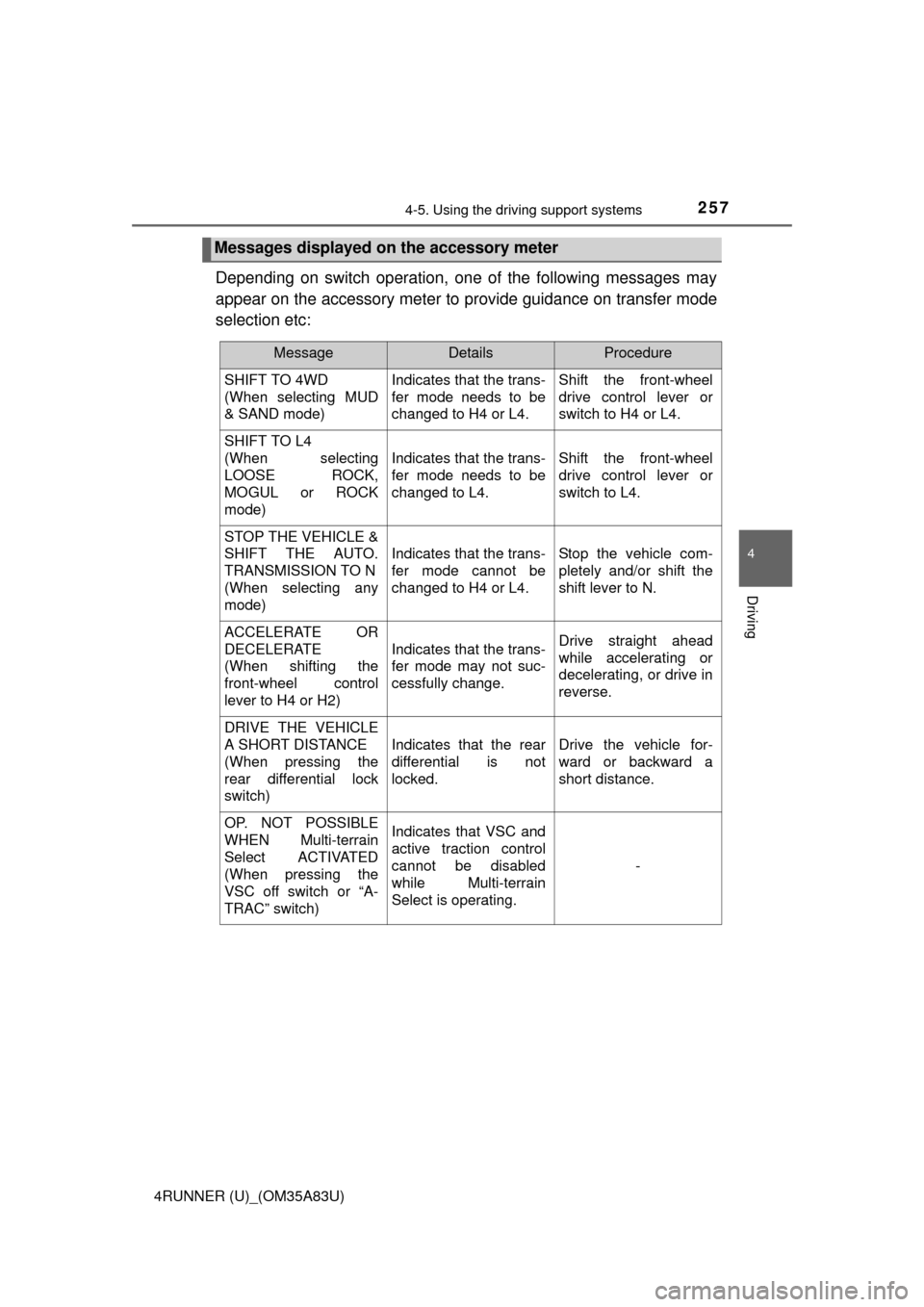
Depending on switch operation, one of the following messages may
appear on the accessory meter to provide guidance on transfer mode
selection etc:
Messages displayed on the accessory meter
MessageDetailsProcedure
SHIFT TO 4WD
(When selecting MUD
& SAND mode) Indicates that the trans-
fer mode needs to be
changed to H4 or L4.Shift the front-wheel
drive control lever or
switch to H4 or L4.
SHIFT TO L4
(When selecting
LOOSE ROCK,
MOGUL or ROCK
mode)
Indicates that the trans-
fer mode needs to be
changed to L4.Shift the front-wheel
drive control lever or
switch to L4.
STOP THE VEHICLE &
SHIFT THE AUTO.
TRANSMISSION TO N
(When selecting any
mode)
Indicates that the trans-
fer mode cannot be
changed to H4 or L4.Stop the vehicle com-
pletely and/or shift the
shift lever to N.
ACCELERATE OR
DECELERATE
(When shifting the
front-wheel control
lever to H4 or H2)
Indicates that the trans-
fer mode may not suc-
cessfully change.Drive straight ahead
while accelerating or
decelerating, or drive in
reverse.
DRIVE THE VEHICLE
A SHORT DISTANCE
(When pressing the
rear differential lock
switch)
Indicates that the rear
differential is not
locked.Drive the vehicle for-
ward or backward a
short distance.
OP. NOT POSSIBLE
WHEN Multi-terrain
Select ACTIVATED
(When pressing the
VSC off switch or “A-
TRAC” switch)Indicates that VSC and
active traction control
cannot be disabled
while Multi-terrain
Select is operating.
-
Page 281 of 530

279
Interior features5
4RUNNER (U)_(OM35A83U)5-1. Using the air conditioning
system and defogger
Manual air conditioning system............................. 280
Automatic air conditioning system............................. 286
Seat heaters/ seat ventilators ................ 293
5-2. Using the interior lights Interior lights list ................ 295
• Interior lights ................. 296
• Personal lights .............. 296 5-3. Using the storage
features
List of storage features ..... 298
• Glove box...................... 299
• Console box .................. 299
• Cup holders .................. 300
• Auxiliary box ................. 302
• Coin holder/tissue pocket/pen holder ......... 303
• Bottle holders ................ 304
Luggage compartment features ........................... 305
5-4. Other interior features Other interior features ....... 310
• Sun visors ..................... 310
• Vanity mirrors................ 310
• Clock ............................. 311
• Outside temperature display........................... 312
• Power outlets (120 V AC) .................... 314
• Power outlets ................ 319
• Armrest ......................... 321
• Assist grips ................... 322
Garage door opener.......... 323
Safety Connect ................. 330
Compass ........................... 335
Page 313 of 530
3115-4. Other interior features
5
Interior features
4RUNNER (U)_(OM35A83U)
The clock can be adjusted by pressing the buttons.Adjusts the hours
Adjusts the minutes
■For quicker adjustment of the clo ck (Vehicles with Multi-terrain Select
only)
To advance the minutes and hours quickly, press and hold the “M” or “H” but-
ton.
The time can be adjusted back or forth by following the procedure below:
■ The clock is displayed when
Vehicles without a smart key system
The engine switch is in the “ACC” or “ON” position.
Vehicles with a smart key system
The engine switch is in ACCESSORY or IGNITION ON mode.
■ When disconnecting and reco nnecting battery terminals
The clock data will be reset.
Clock
1
2
The hour or minute can be moved forward
or backward by pressing the “MODE/ ”
or “SET/ ” button while pressing and
holding the “H” or “M” button. If the
“MODE/ ” or “SET/ ” button is also
pressed and held in the above operation,
the hour or minute will move faster.
Page 314 of 530
3125-4. Other interior features
4RUNNER (U)_(OM35A83U)
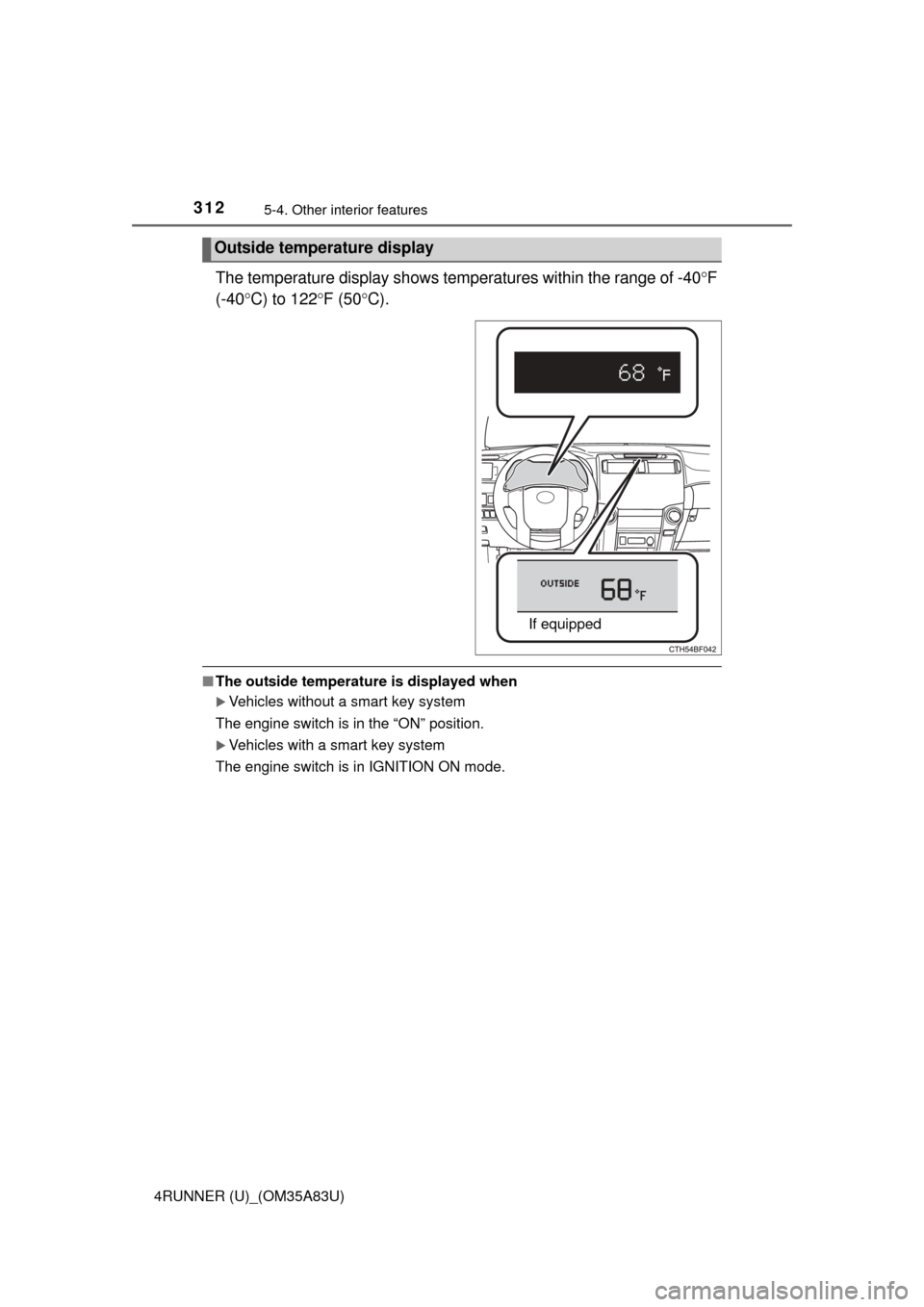
The temperature display shows temperatures within the range of -40F
(-40 C) to 122 F (50 C).
■The outside temperature is displayed when
Vehicles without a smart key system
The engine switch is in the “ON” position.
Vehicles with a smart key system
The engine switch is in IGNITION ON mode.
Outside temperature display
If equipped
Page 315 of 530
3135-4. Other interior features
5
Interior features
4RUNNER (U)_(OM35A83U)■
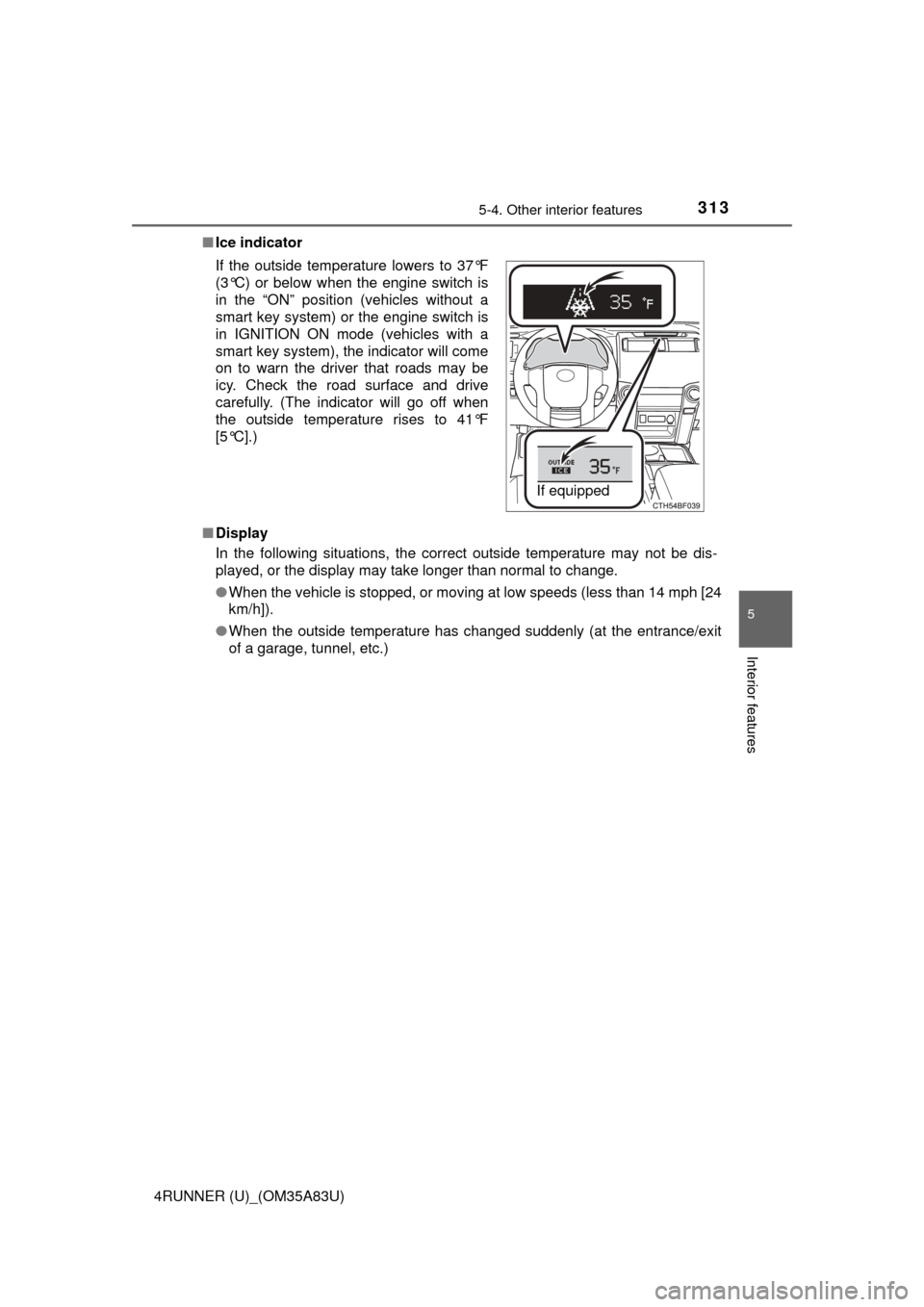
Ice indicator
■ Display
In the following situations, the correct outside temperature may not be dis-
played, or the display may take longer than normal to change.
●When the vehicle is stopped, or moving at low speeds (less than 14 mph [24
km/h]).
● When the outside temperature has changed suddenly (at the entrance/exit
of a garage, tunnel, etc.)
If the outside temperature lowers to 37°F
(3°C) or below when the engine switch is
in the “ON” position (vehicles without a
smart key system) or the engine switch is
in IGNITION ON mode (vehicles with a
smart key system), the indicator will come
on to warn the driver that roads may be
icy. Check the road surface and drive
carefully. (The indicator will go off when
the outside temperature rises to 41°F
[5°C].)
If equipped
Page 329 of 530
3275-4. Other interior features
5
Interior features
4RUNNER (U)_(OM35A83U)
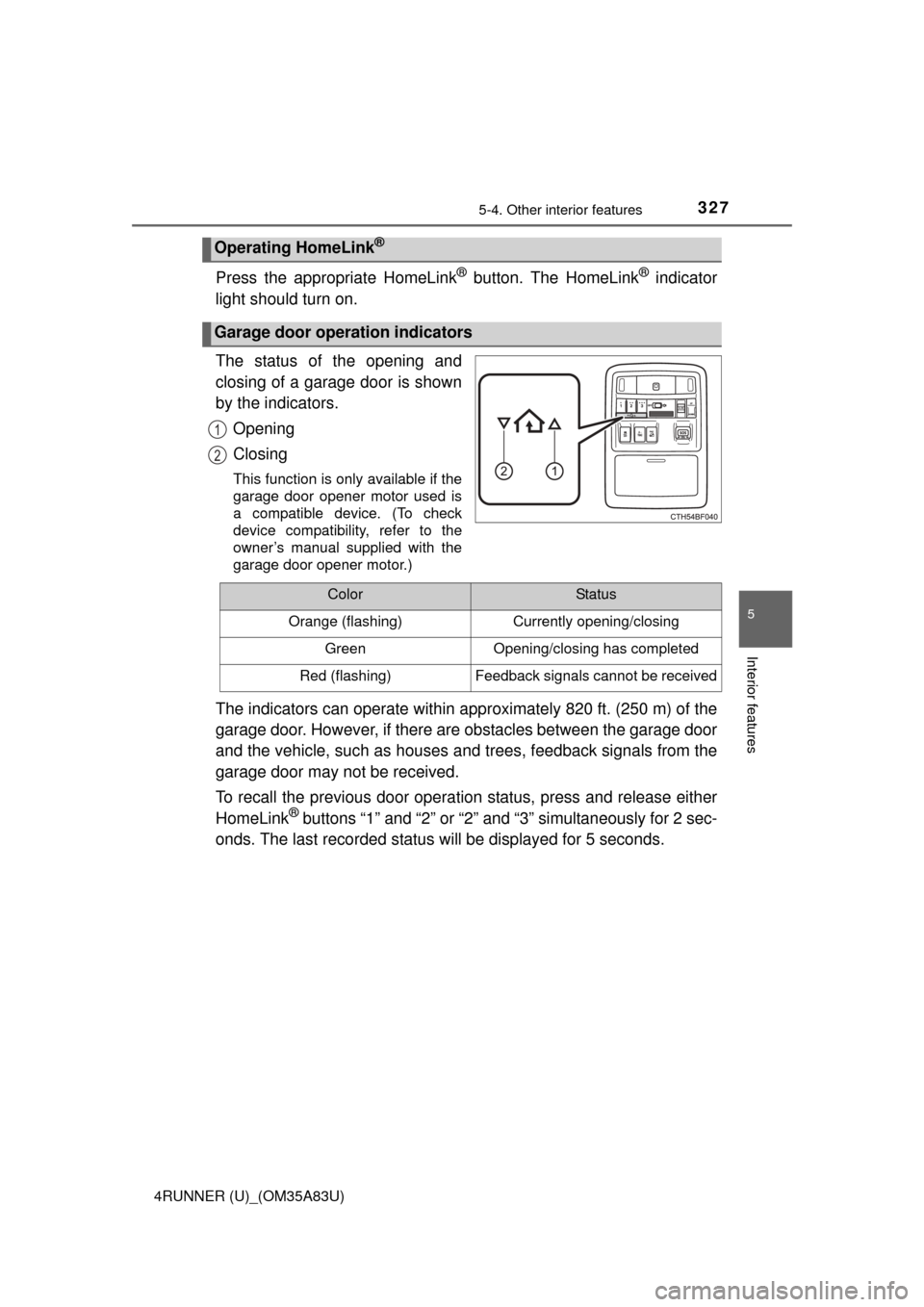
Press the appropriate HomeLink® button. The HomeLink® indicator
light should turn on.
The status of the opening and
closing of a garage door is shown
by the indicators.
Opening
Closing
This function is only available if the
garage door opener motor used is
a compatible device. (To check
device compatibility, refer to the
owner’s manual supplied with the
garage door opener motor.)
The indicators can operate within approximately 820 ft. (250 m) of the
garage door. However, if there are obstacles between the garage door
and the vehicle, such as houses a nd trees, feedback signals from the
garage door may not be received.
To recall the previous door operat ion status, press and release either
HomeLink
® buttons “1” and “2” or “2” and “3” simultaneously for 2 sec-
onds. The last recorded status will be displayed for 5 seconds.
Operating HomeLink®
Garage door operation indicators
1
2
ColorStatus
Orange (flashing)Currently opening/closing
GreenOpening/closing has completed
Red (flashing)Feedback signals cannot be received
Page 337 of 530
3355-4. Other interior features
5
Interior features
4RUNNER (U)_(OM35A83U)
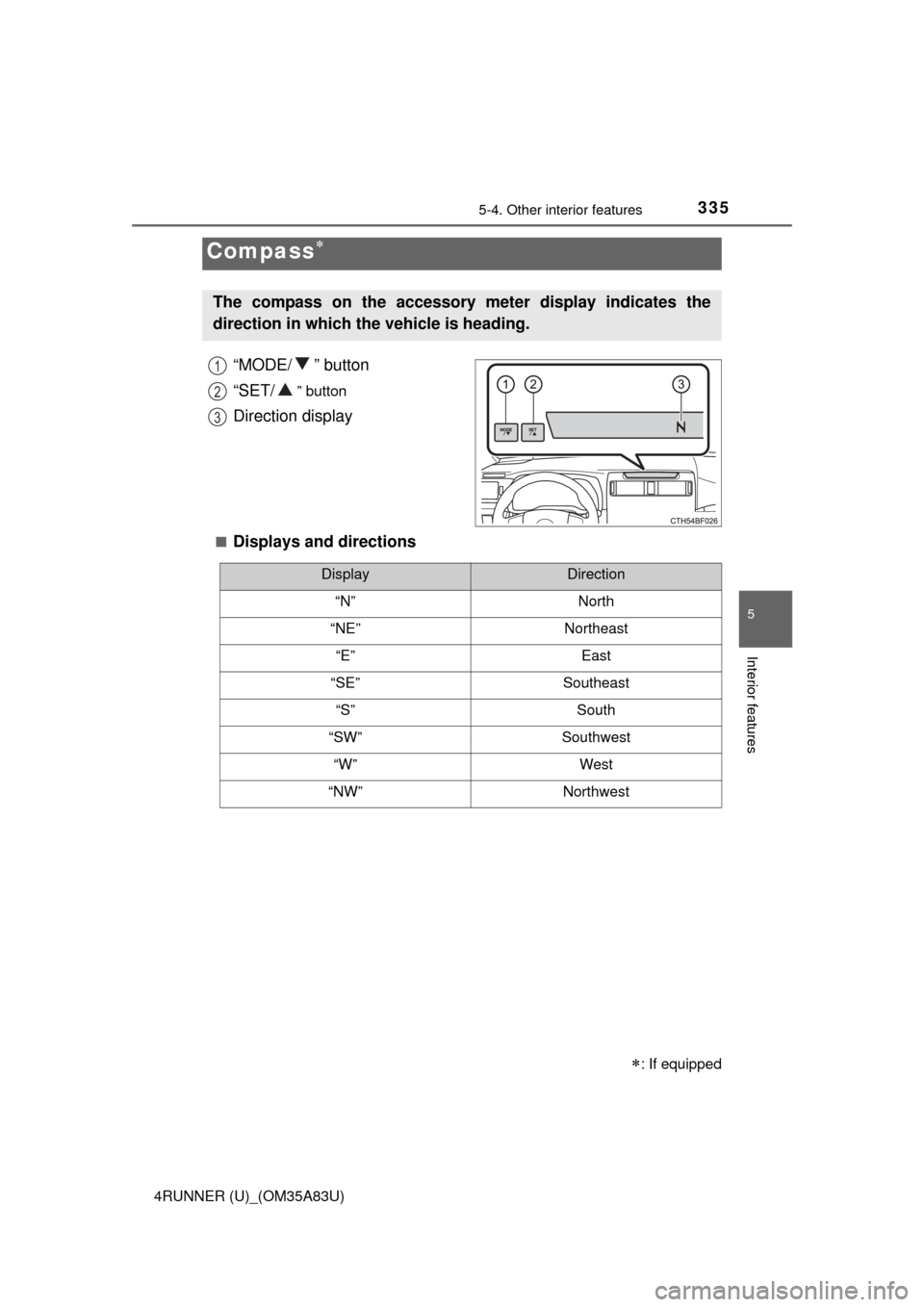
“MODE/ ” button
“SET/
” button
Direction display
■Displays and directions
Compass
: If equipped
The compass on the accessory meter display indicates the
direction in which the vehicle is heading.
1
2
3
DisplayDirection
“N”North
“NE”Northeast
“E”East
“SE”Southeast
“S”South
“SW”Southwest
“W”West
“NW”Northwest