2014 TOYOTA 4RUNNER fuel
[x] Cancel search: fuelPage 203 of 530
2014-2. Driving procedures
4
Driving
4RUNNER (U)_(OM35A83U)
*1: To improve fuel efficiency and reduce noises, set the shift lever in the Dposition for normal driving.
*2: Selecting shift ranges using S mode restricts the upper limit of the possiblegear ranges, controls engine braking forces, and prevents unnecessary
upshifting
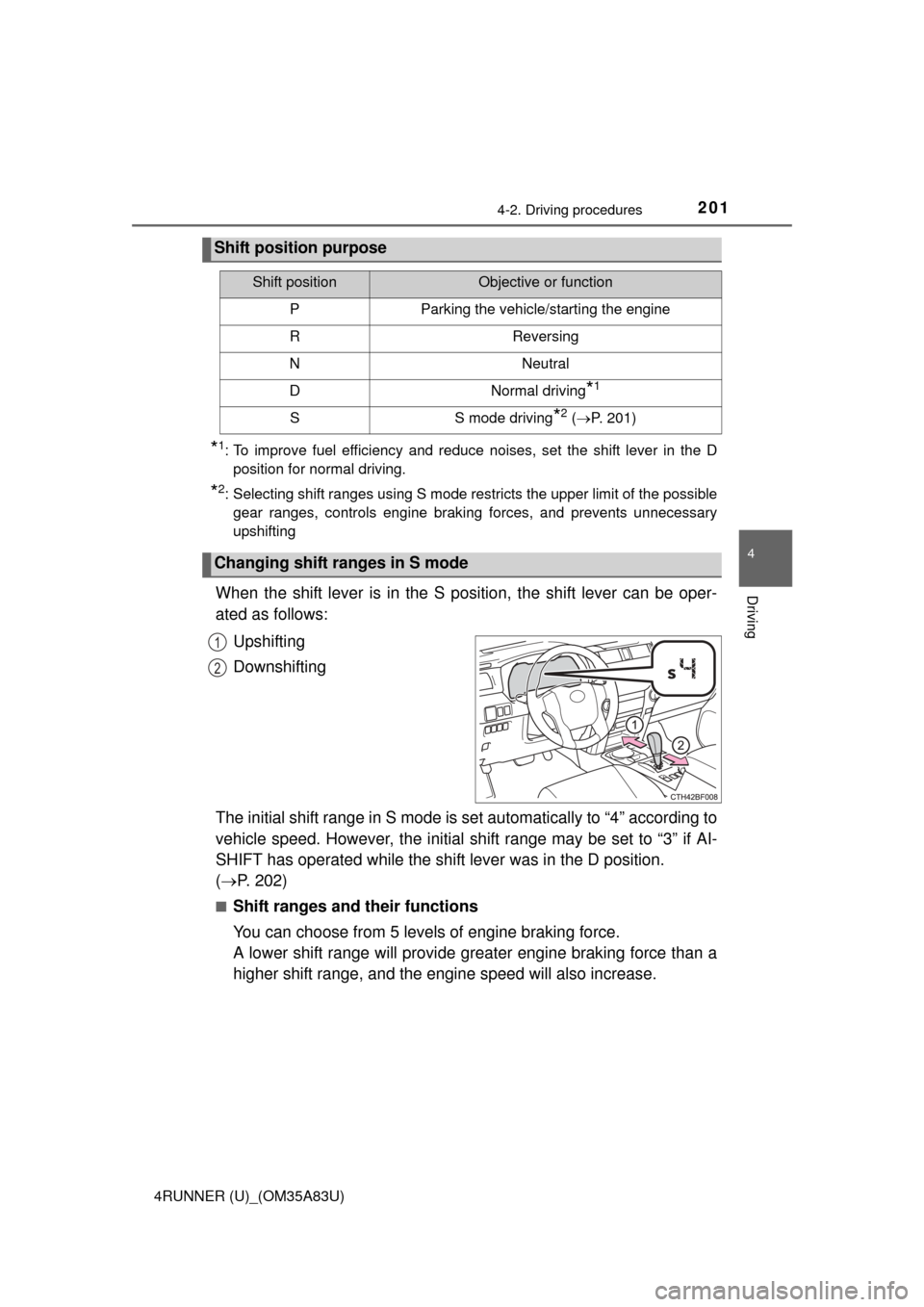
When the shift lever is in the S position, the shift lever can be oper-
ated as follows:
Upshifting
Downshifting
The initial shift range in S mode is set automatically to “4” according to
vehicle speed. However, the initial sh ift range may be set to “3” if AI-
SHIFT has operated while the shift lever was in the D position.
( P. 202)
■Shift ranges and their functions
You can choose from 5 levels of engine braking force.
A lower shift range will provide greater engine braking force than a
higher shift range, and the engine speed will also increase.
Shift position purpose
Shift positionObjective or function
PParking the vehicle/starting the engine
RReversing
NNeutral
DNormal driving*1
SS mode driving*2 ( P. 201)
Changing shift ranges in S mode
1
2
Page 211 of 530

2094-3. Operating the lights and wipers
4
Driving
4RUNNER (U)_(OM35A83U)
■Daytime running light system
●To make your vehicle more visible to other drivers, the headlight high beam
turn on automatically (at a decreased intensity) whenever the engine is
started and the parking brake is released. Daytime running lights are not
designed for use at night.
Type A and B: Daytime running lights can be turned off by operating the
switch.
● Compared to turning on the headlights, the daytime running light system
offers greater durability and consumes less electricity, so it can help improve
fuel economy.
■ Headlight control sensor (if equipped)
■ Automatic light off system
Vehicles without a smart key system
● When the headlights come on: The headlights and tail lights turn off 30 sec-
onds after a door is opened and closed if the engine switch is turned to the
“ACC” or “LOCK” position. (The lights turn off immediately if on the
key is pressed after all the doors are locked.)
● When only the tail lights come on: The tail lights turn off automatically if the
engine switch is turned to the “ACC” or “LOCK” position and the driver’s
door is opened.
To turn the lights on again, turn the engine switch to the “ON” position, or turn
the lights off and then back to or .
Vehicles with a smart key system
● When the headlights come on: The headlights and tail lights turn off 30
seconds after a door is opened and closed if the engine switch is turned to
ACCESSORY mode or turned off. (The lights turn off immediately if
on the key is pressed after all the doors are locked.)
● When only the tail lights come on: The tail lights turn off automatically if the
engine switch is turned off and the driver’s door is opened.
To turn the lights on again, turn the engine switch to IGNITION ON mode, or
turn the light switch off and then back to or .
■ Customization
Settings (e.g. light sensor sensitivity) can be changed.
(Customizable features: P. 485)
The sensor may not function properly if an
object is placed on the sensor, or anything
that blocks the sensor is affixed to the
windshield.
Doing so interferes with the sensor
detecting the level of ambient light and
may cause the automatic headlight sys-
tem to malfunction.
Page 221 of 530
219
4
Driving
4RUNNER (U)_(OM35A83U)
4-4. Refueling
●Close all the doors and windows, and turn the engine switch off.
● Confirm the type of fuel.
■Fuel types
Use unleaded gasoline (Octane rating 87 [Research Octane Number 91] or
higher)
Opening the fuel tank cap
Perform the following steps to open the fuel tank cap:
Before refueling the vehicle
Page 222 of 530
2204-4. Refueling
4RUNNER (U)_(OM35A83U)
CAUTION
■When refueling the vehicle
Observe the following precautions while refueling the vehicle. Failure to do
so may result in death or serious injury.
● After exiting the vehicle and before opening the fuel door, touch an
unpainted metal surface to discharge any static electricity. It is important to
discharge static electricity before refueling because sparks resulting from
static electricity can cause fuel vapors to ignite while refueling.
● Always hold the grips on the fuel tank cap and turn it slowly to remove it.
A whooshing sound may be heard when the fuel tank cap is loosened.
Wait until the sound cannot be heard before fully removing the cap. In hot
weather, pressurized fuel may spray out the filler neck and cause injury.
● Do not allow anyone that has not discharged static electricity from their
body to come close to an open fuel tank.
● Do not inhale vaporized fuel.
Fuel contains substances that are harmful if inhaled.
● Do not smoke while refueling the vehicle.
Doing so may cause the fuel to ignite and cause a fire.
● Do not return to the vehicle or touch any person or object that is statically
charged.
This may cause static electricity to build up, resulting in a possible ignition
hazard.
■ When refueling
Observe the following precautions to prevent fuel overflowing from the fuel
tank:
● Securely insert the fuel nozzle into the fuel filler neck.
● Stop filling the tank after the fuel nozzle automatically clicks off.
● Do not top off the fuel tank.
NOTICE
■Refueling
Do not spill fuel during refueling.
Doing so may damage the vehicle, such as causing the emission control
system to operate abnormally or damaging fuel system components or the
vehicle’s painted surface.
Page 223 of 530
2214-4. Refueling
4
Driving
4RUNNER (U)_(OM35A83U)
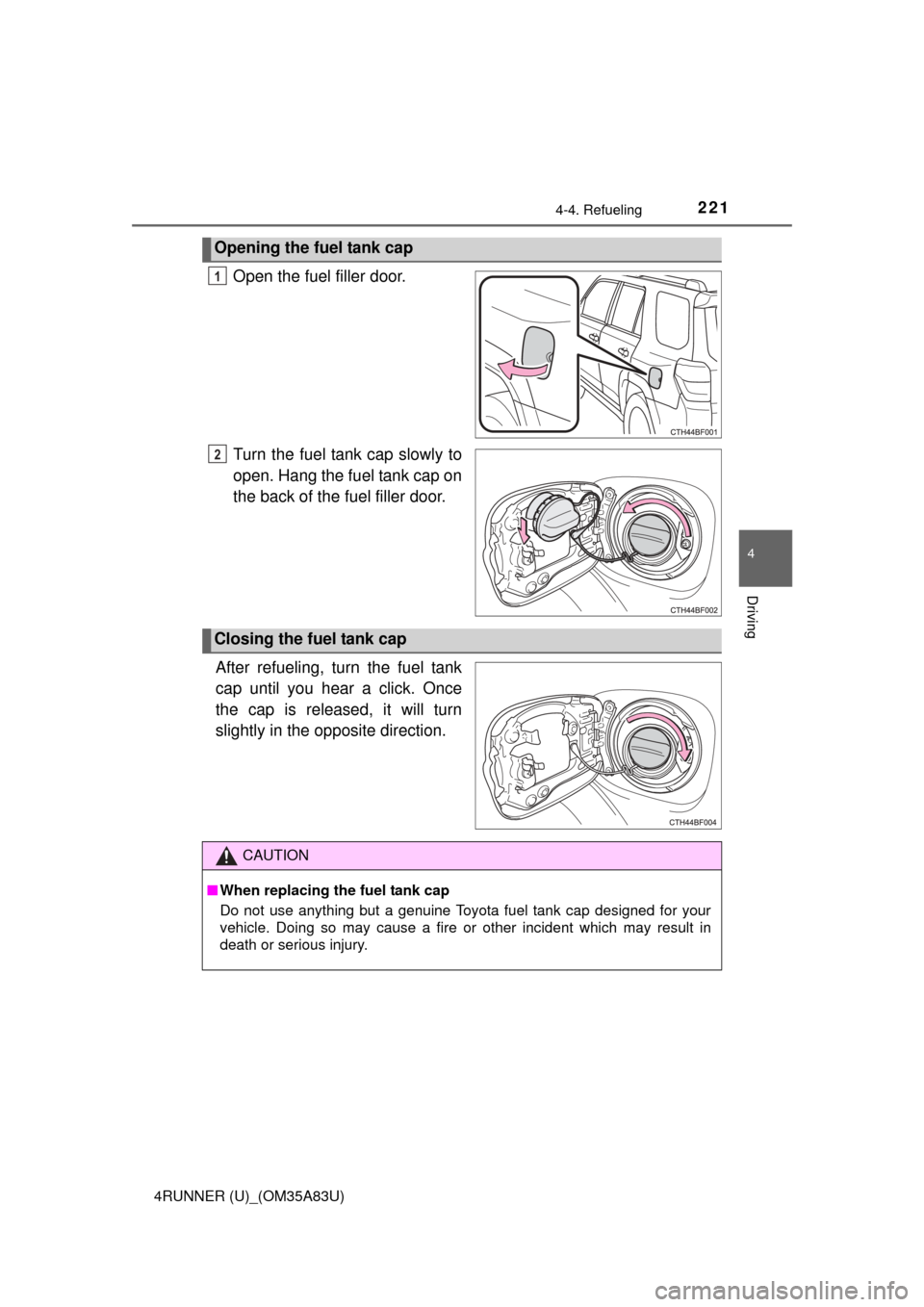
Open the fuel filler door.
Turn the fuel tank cap slowly to
open. Hang the fuel tank cap on
the back of the fuel filler door.
After refueling, turn the fuel tank
cap until you hear a click. Once
the cap is released, it will turn
slightly in the opposite direction.
Opening the fuel tank cap
1
2
Closing the fuel tank cap
CAUTION
■ When replacing the fuel tank cap
Do not use anything but a genuine Toyota fuel tank cap designed for your
vehicle. Doing so may cause a fire or other incident which may result in
death or serious injury.
Page 286 of 530
2845-1. Using the air conditioning system and defogger
4RUNNER (U)_(OM35A83U)
■Fogging up of the windows
●The windows will easily fog up when the humidity in the vehicle is high.
Turning on will dehumidify the air from the outlets and defog the wind-
shield effectively.
● If you turn off, the windows may fog up more easily.
● The windows may fog up if the recirculated air mode is used.
■ Outside/recirculated air mode
When driving on dusty roads such as tunnels or in heavy traffic, set the out-
side/recirculated air mode to the recirculated air mode. This is effective in
preventing outside air from entering the vehicle interior. During cooling opera-
tion, setting the recirculated air mode will also cool the vehicle inter\
ior effec-
tively.
■ When the outside temperature exceeds 75°F (24°C) and the air condition-
ing system is on
●In order to reduce the air conditioning power consumption, the air condition-
ing system may switch to recirculated air mode automatically. This may also
reduce fuel consumption.
● Recirculated air mode is selected as a default mode when the engine switch
is turned to the “ON” position (vehicles without a smart key system) or the
engine switch is turned to IGNITION ON mode (vehicles with a smart key
system).
● It is possible to switch to outside air mode at any time by pressing
.
■When the indicator light on flashes
Press
to turn off the cooling and dehumidification function and turn it on
again. There may be a problem in the air conditioning system if the indicator
light continues to flash. Turn the air conditioning system off and have it
inspected by your Toyota dealer.
Page 293 of 530
2915-1. Using the air conditioning system and defogger
5
Interior features
4RUNNER (U)_(OM35A83U)■
When the outside temperature exceeds 75°F (24°C) and the air condition-
ing system is on
●In order to reduce the air conditioning power consumption, the air condition-
ing system may switch to recirculated air mode automatically. This may also
reduce fuel consumption.
● Recirculated air mode is selected as a default mode when the engine switch
is turned to the “ON” position (vehicles without a smart key system) or the
engine switch is turned to IGNITION ON mode (vehicles with a smart key
system).
● It is possible to switch to outside air mode at any time by pressing
.
■When the outside temperature falls to nearly 32 F (0C)
The dehumidification function may not operate even when is pressed.
■ When driving on dusty roads
Close all windows. If dust thrown up by the vehicle is still drawn into the vehi-
cle after closing the windows, it is recommended that the air intake mode be
set to outside air mode and the fan speed to any setting except off.
■ When the indicator light on flashes
Press
to turn off the cooling and dehumidification function and turn it on
again. There may be a problem in the air conditioning system if the indicator
light continues to flash. Turn the air conditioning system off and have it
inspected by your Toyota dealer.
■ Air conditioning odors
●During use, various odors from inside and outside the vehicle may enter into
and accumulate in the air conditioning system. This may then cause odor to
be emitted from the vents.
● To reduce potential odors from occurring:
• It is recommended that the air conditioning system be set to outside air
mode prior to turning the vehicle off.
• The start timing of the blower may be delayed for a short period of time immediately after the air conditioning system is started in automatic
mode.
■ Air conditioning filter
P. 383
Page 335 of 530

3335-4. Other interior features
5
Interior features
4RUNNER (U)_(OM35A83U)■
Stolen Vehicle Location
If your vehicle is stolen, Safety
Connect can work with local author-
ities to assist them in locating a nd recovering the vehicle. After filing
a police report, call the Safety Connect response center at 1-800-
331-4331 and follow the prompts for Safety Connect to initiate this
service.
In addition to assisting law enforcement with recovery of a stolen
vehicle, Safety-Connect-equippe d vehicle location data may, under
certain circumstances, be shared with third parties to locate your
vehicle. Further information is available at Toyota.com.
■Emergency Assistance Button (“SOS”)
In the event of an emergency on the road, push the “SOS” button to
reach the Safety Connect respon se center. The answering agent
will determine your vehicle’s location, assess the emergency, and
dispatch the necessary assistance required.
If you accidentally press the “SOS” button, tell the response-center
agent that you are not experiencing an emergency.
■
Enhanced Roadside Assistance
Enhanced Roadside Assi stance adds GPS data to the already
included warranty-based Toyota roadside service.
Subscribers can press the “SOS” bu tton to reach a Safety Connect
response-center agent, who can help with a wide range of needs,
such as: towing, flat tire, fuel deli very, etc. For a description of the
Enhanced Roadside Assistance se rvices and their limitations,
please see the Safety Connect Terms and Conditions, which are
available at Toyota.com.