Page 44 of 298
44
2. Bluetooth® SETTINGS
Bluetooth is a registered trademark of Bluetooth SIG, Inc.
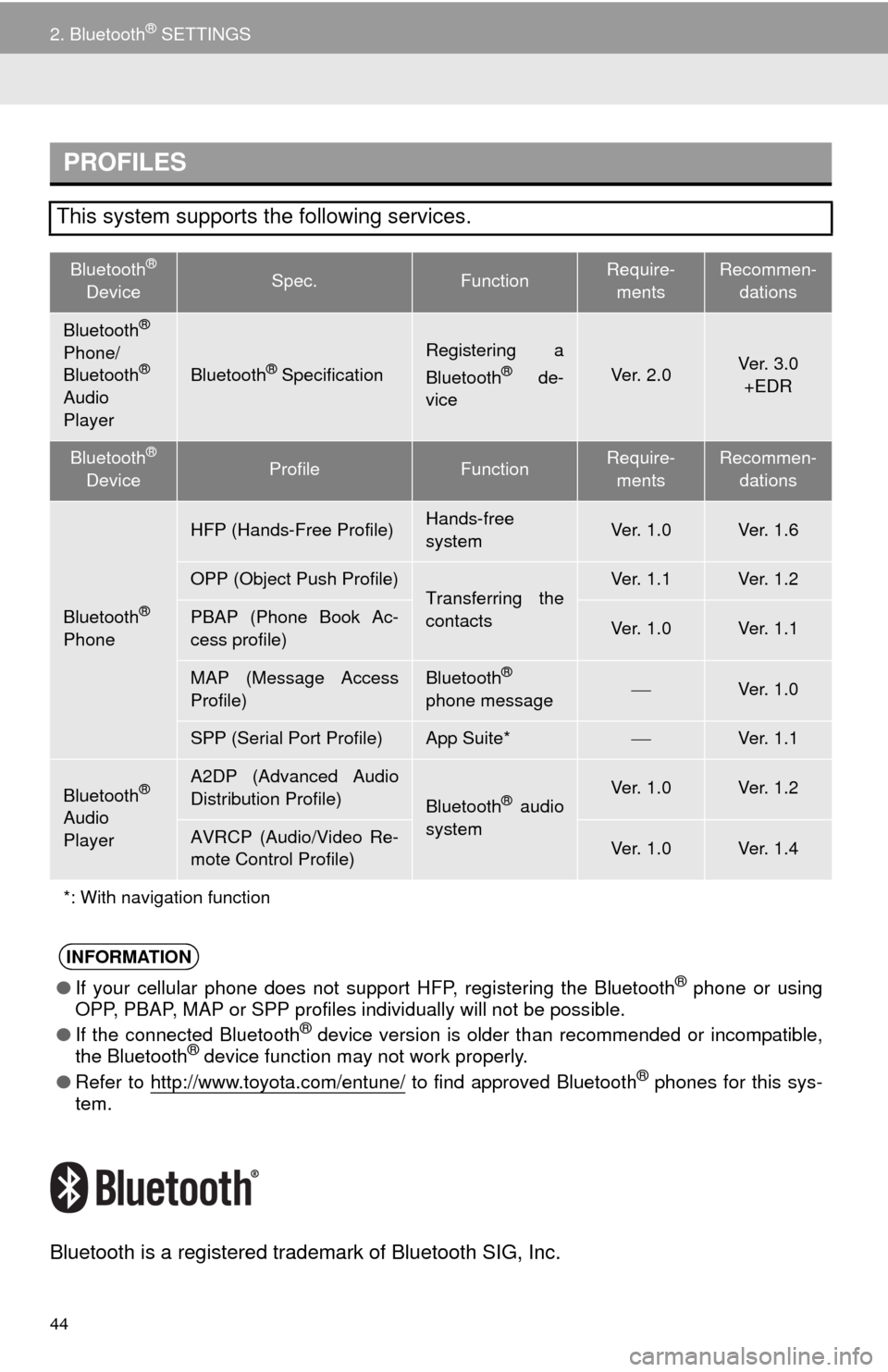
PROFILES
This system supports the following services.
Bluetooth®
DeviceSpec.FunctionRequire-
mentsRecommen-
dations
Bluetooth®
Phone/
Bluetooth®
Audio
PlayerBluetooth® Specification
Registering a
Bluetooth® de-
viceVe r. 2 . 0Ve r. 3 . 0
+EDR
Bluetooth®
DeviceProfileFunctionRequire-
mentsRecommen-
dations
Bluetooth®
Phone
HFP (Hands-Free Profile)Hands-free
systemVe r. 1 . 0Ve r. 1 . 6
OPP (Object Push Profile)Transferring the
contactsVe r. 1 . 1Ve r. 1 . 2
PBAP (Phone Book Ac-
cess profile)Ve r. 1 . 0Ve r. 1 . 1
MAP (Message Access
Profile)Bluetooth®
phone messageVe r. 1 . 0
SPP (Serial Port Profile)App Suite*Ve r. 1 . 1
Bluetooth®
Audio
Player
A2DP (Advanced Audio
Distribution Profile)
Bluetooth® audio
systemVe r. 1 . 0Ve r. 1 . 2
AVRCP (Audio/Video Re-
mote Control Profile)Ve r. 1 . 0Ve r. 1 . 4
*: With navigation function
INFORMATION
●If your cellular phone does not support HFP, registering the Bluetooth® phone or using
OPP, PBAP, MAP or SPP profiles individually will not be possible.
●If the connected Bluetooth
® device version is older than recommended or incompatible,
the Bluetooth® device function may not work properly.
●Refer to http://www.toyota.com/entune/
to find approved Bluetooth® phones for this sys-
tem.
Page 95 of 298
95
2. RADIO OPERATION
3
AUDIO/VISUAL SYSTEM
3. INTERNET RADIO*
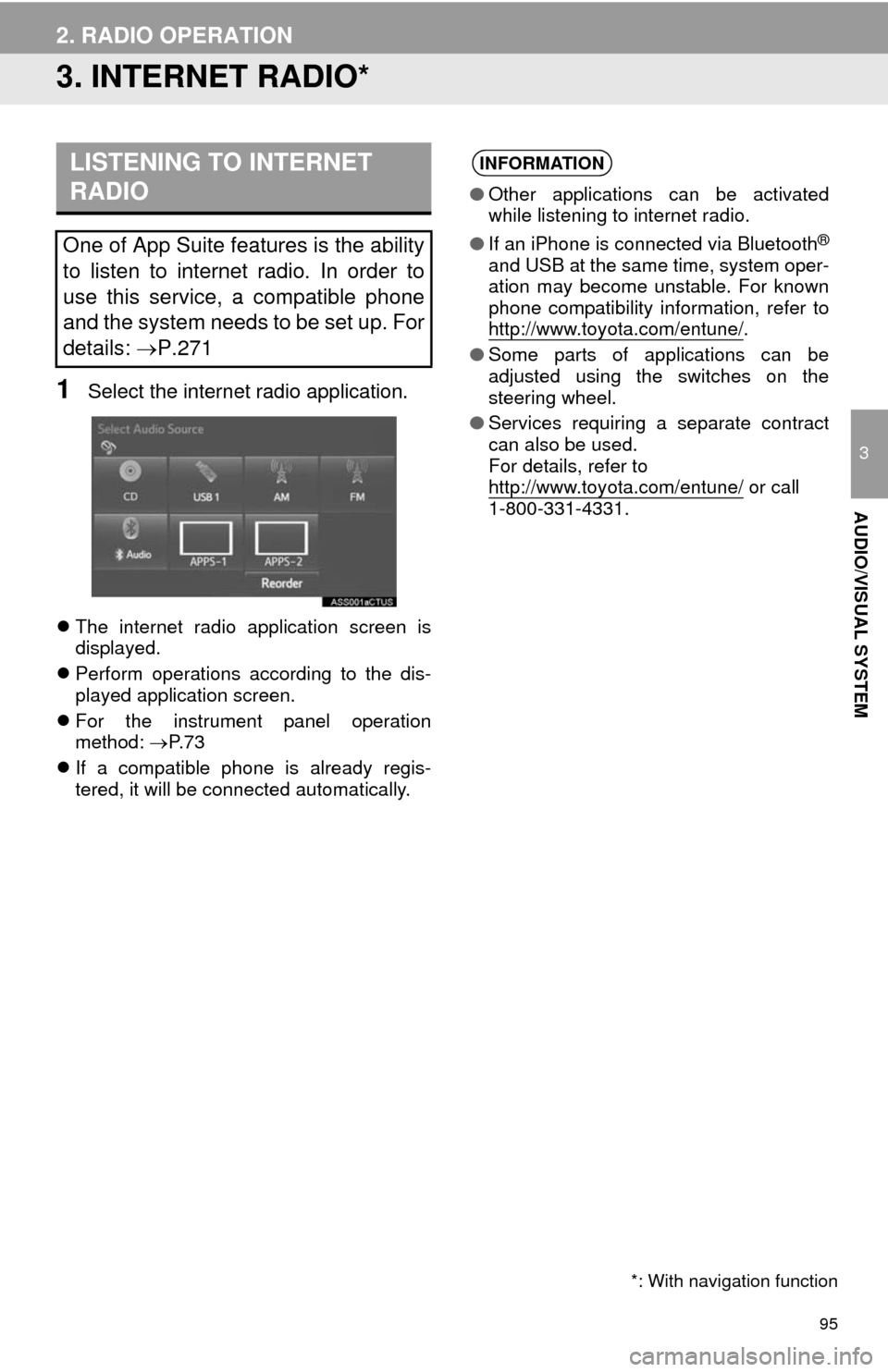
1Select the internet radio application.
The internet radio application screen is
displayed.
Perform operations according to the dis-
played application screen.
For the instrument panel operation
method: P. 7 3
If a compatible phone is already regis-
tered, it will be connected automatically.
LISTENING TO INTERNET
RADIO
One of App Suite features is the ability
to listen to internet radio. In order to
use this service, a compatible phone
and the system needs to be set up. For
details: P.271
*: With navigation function
INFORMATION
●Other applications can be activated
while listening to internet radio.
●If an iPhone is connected via Bluetooth
®
and USB at the same time, system oper-
ation may become unstable. For known
phone compatibility information, refer to
http://www.toyota.com/entune/
.
●Some parts of applications can be
adjusted using the switches on the
steering wheel.
●Services requiring a separate contract
can also be used.
For details, refer to
http://www.toyota.com/entune/
or call
1-800-331-4331.
Page 188 of 298
188
3. WHAT TO DO IF...
1. TROUBLESHOOTING
When using the hands-free system with a Bluetooth® device
If there is a problem with the hands-free system or a Bluetooth® device, first check
the table below.
SymptomLikely causeSolution
Page
Cellular
phoneThis
system
The hands-free sys-
tem or Bluetooth® de-
vice does not work.
The connected de-
vice may not be a
compatible
Bluetooth
® cellular
phone.
For a list of specific
devices which
operation has been
confirmed on this
system, check with
your Toyota dealer or
the following website:
http://www.toyota.com/
entune/
The Bluetooth® ver-
sion of the connect-
ed cellular phone
may be older than
the specified ver-
sion.Use a cellular phone
with Bluetooth® ver-
sion 2.0 or higher (rec-
ommended: Ver. 3.0
+EDR or higher).44
Page 191 of 298

191
3. WHAT TO DO IF...
7
PHONE
When using the phonebook
SymptomLikely causeSolution
Page
Cellular
phoneThis
system
Phonebook data can-
not be transferred
manually/automati-
cally.
The profile version
of the connected
cellular phone may
not be compatible
with transferring
phonebook data.
For a list of specific
devices which
operation has been
confirmed on this
system, check with
your Toyota dealer or
the following website:
http://www.toyota.com/
entune/
Automatic contact
transfer function on
this system is set to
off.Set automatic contact
transfer function on this
system to on.
178
Passcode has not
been entered on the
cellular phone.Enter the passcode on
the cellular phone if re-
quested (default pass-
code: 1234).
Transfer operation
on the cellular
phone has not com-
pleted.Complete transfer op-
eration on the cellular
phone (approve trans-
fer operation on the
phone).
Phonebook data can-
not be edited.
Automatic contact
transfer function on
this system is set to
on.Set automatic contact
transfer function on this
system to off.
178
Page 267 of 298
267
1. App Suite OVERVIEW
9
App Suite
No.NameFunction
Content providerProvides content to the system via a cellular phone.
Application serverProvides downloadable application to the system via a cellular
phone.
Cellular phone*
Using the App Suite application, communication is relayed be-
tween the system, the application server and the contents pro-
vider.
ApplicationsDownloaded App Suite applications provide access to audio/vi-
sual content from a content provider when connected via a
compatible phone with a data connection.
App Suite
Contents received, via a cellular phone, from the contents pro-
vider servers are displayed on the screen. The system is
equipped with an application player to run applications.
*: For known compatible phones, refer to http://www.toyota.com/entune/
.
INFORMATION
●The actual service availability is dependent on the network condition.
Page 268 of 298

268
1. App Suite OVERVIEW
App Suite will be available on a 3 year trial
period included upon purchase of a new
vehicle. User registration is required to
start using the service. (P.270)
When 3 years has elapsed after purchas-
ing a new vehicle, a fee will be charged to
renew the contract.*
Services requiring a separate contract can
also be used.*
*: For details, refer to http://
www.toyota.com/entune/ or call 1-800-
331-4331.
App Suite is available in the 48 states,
D.C. and Alaska of the United States.The following personal data can be
deleted from the system and returned to
their default settings:
• Downloaded applications
• Downloaded application content
BEFORE USING THE
FUNCTION
SUBSCRIPTION
AVAILABILITY OF SERVICE
INFORMATION
●When using App Suite, depending on
the details of your cellular phone con-
tract, data usage fees may apply. Con-
firm data usage fees before using this
service.
●In this section, the required actions to
activate applications, connect a cellular
phone to the system and registration
steps for App Suite are explained. For
details regarding App Suite operations
and each of the applications, refer to
http://www.toyota.com/entune/
.
●The actual service availability is depen-
dent on the network condition.
INITIALIZING PERSONAL
DATA
The personal data used in applications
can be removed from the system.
(P.61)
INFORMATION
●Once initialized, data will be erased from
the system. Pay close attention when
initializing the data.
Page 269 of 298
269
1. App Suite OVERVIEW
9
App Suite
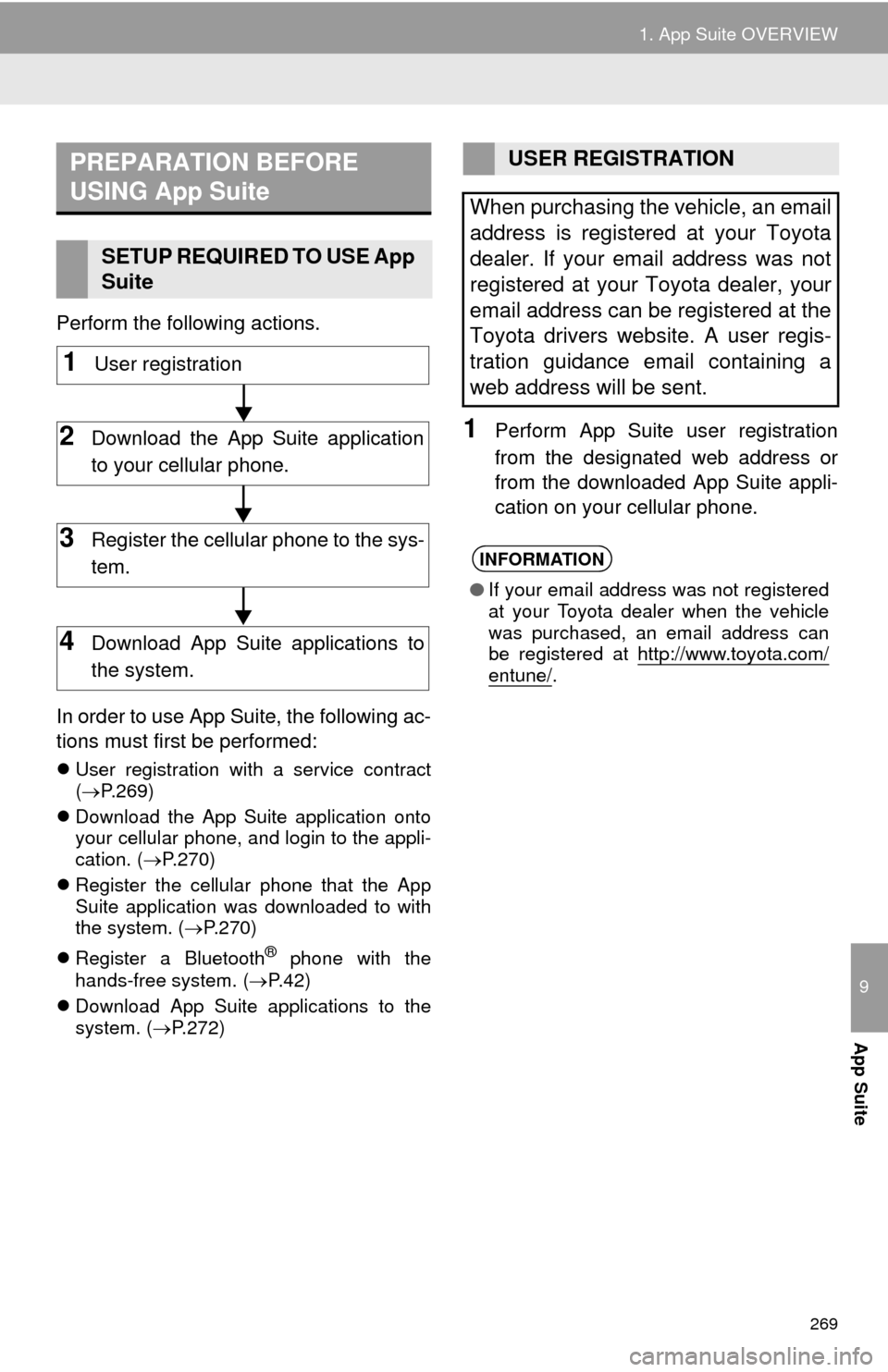
Perform the following actions.
In order to use App Suite, the following ac-
tions must first be performed:
User registration with a service contract
(P.269)
Download the App Suite application onto
your cellular phone, and login to the appli-
cation. (P.270)
Register the cellular phone that the App
Suite application was downloaded to with
the system. (P.270)
Register a Bluetooth
® phone with the
hands-free system. (P.42)
Download App Suite applications to the
system. (P.272)
1Perform App Suite user registration
from the designated web address or
from the downloaded App Suite appli-
cation on your cellular phone.
PREPARATION BEFORE
USING App Suite
SETUP REQUIRED TO USE App
Suite
1User registration
2Download the App Suite application
to your cellular phone.
3Register the cellular phone to the sys-
tem.
4Download App Suite applications to
the system.
USER REGISTRATION
When purchasing the vehicle, an email
address is registered at your Toyota
dealer. If your email address was not
registered at your Toyota dealer, your
email address can be registered at the
Toyota drivers website. A user regis-
tration guidance email containing a
web address will be sent.
INFORMATION
●If your email address was not registered
at your Toyota dealer when the vehicle
was purchased, an email address can
be registered at http://www.toyota.com/
entune/.
Page 270 of 298
270
1. App Suite OVERVIEW
1Download the App Suite application
using to cellular phone.
2Run the App Suite application on your
cellular phone.
3Enter the information required into the
App Suite application. Login to the ap-
plication.
1The actions on P.269 need to be per-
formed before App Suite applications
can be downloaded.
2Once your phone is running the App
Suite application with a valid account
logged in and is connected to the sys-
tem, an on-screen pop-up will be dis-
played offering to begin downloading
App Suite applications to the system.
After download has started, see P.273
for more information.
REGISTERING THE App Suite
APPLICATION
INFORMATION
●Applications can only be used when the
App Suite application has been down-
loaded to your cellular phone and the
application is running.
●App Suite operational procedures can
also be confirmed by visiting
http://www.toyota.com/entune/
.
●In order to use applications, it is neces-
sary to run the App Suite application on
your cellular phone.
●If an iPhone is connected via Bluetooth
®
and USB at the same time, system oper-
ation may become unstable. For known
phone compatibility information, refer to
http://www.toyota.com/entune/
.
●If an App Suite application is used while
iPod audio is being played back, system
operation may become unstable.
DOWNLOADING App Suite
APPLICATIONS

