2014 SUBARU IMPREZA WRX keyless entry
[x] Cancel search: keyless entryPage 97 of 414
2-12Keys and doors/Remote keyless entry system
ity reasons. It is recommended that you
have your dealer program all of your
transmitters into your system. !Programming the transmitters
The remote keyless entry system is
equipped with a special code learning
feature that allows you to program new
transmitter codes into the system or to
delete old ones. The system can learn up
to four unique transmitter codes. The four
transmitter codes may be the same ordifferent.
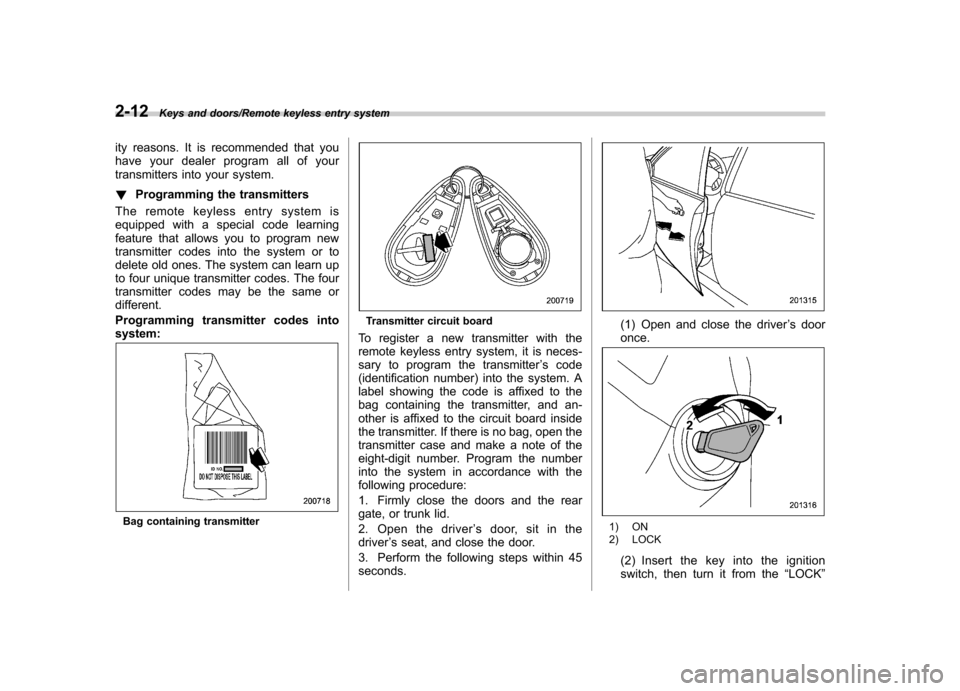
Programming transmitter codes into system:
Bag containing transmitter
Transmitter circuit board
To register a new transmitter with the
remote keyless entry system, it is neces-
sary to program the transmitter ’s code
(identification number) into the system. A
label showing the code is affixed to the
bag containing the transmitter, and an-
other is affixed to the circuit board inside
the transmitter. If there is no bag, open the
transmitter case and make a note of the
eight-digit number. Program the number
into the system in accordance with the
following procedure:
1. Firmly close the doors and the rear
gate, or trunk lid.
2. Open the driver ’s door, sit in the
driver ’s seat, and close the door.
3. Perform the following steps within 45 seconds.(1) Open and close the driver ’s door
once.
1) ON
2) LOCK
(2) Insert the key into the ignition
switch, then turn it from the “LOCK ”
Page 98 of 414

position to the“ON ”position 10 times
within 15 seconds.
NOTE . When you complete step (2), an
electronic tone will sound once. . If you do not perform steps (1) and
(2) within 45 seconds, an error will
occur. Neither an electronic tone nor
the buzzer will sound, and the interior
lamp will not flash. In this event, per-
form the whole procedure again begin-
ning with part 1.
4. Open and close the door once within
15 seconds. NOTE . When part 4 of the procedure is
completed, an electronic tone will
sound for 30 seconds.. If you do not perform the operations
in part 4 within 15 seconds, an error
will occur and the electronic tone will
not sound. In this event, perform the
registration steps again beginning with
part 3 of the procedure.
5. Before the electronic tone stops
sounding, push the lock side of the power
door lock switch the same number of
times as the leftmost digit of the transmit-
ter code. For example, push the lock
switch eight times if the leftmost digit of
the code is 8. NOTE . The electronic tone will stop sound-
ing when you start entering the num-
ber.. If you do not start entering the
number using the lock switch before
the electronic tone stops sounding, an
error will occur. In this event, perform
the registration steps again beginning
with part 3 of the procedure.. If the interval between one push of the switch and the next exceeds 5
seconds, an error will occur. In this
event, perform the procedure again
beginning with part 4. If an error occurs
six times, perform the procedure again
starting with part 3.
6. When you have finished entering the
number, push the unlock side of the lock
switch within 5 seconds. NOTE .
An electronic tone will sound.
. If you push the unlock side of the
lock switch when more than 5 seconds
have passed, an error will occur. In this
event, perform the procedure again
beginning with part 4. If an error occurs
six times, perform the procedure again
starting with part 3.
Keys and doors/Remote keyless entry system2-13
– CONTINUED –
Page 99 of 414

2-14Keys and doors/Remote keyless entry system
7. Perform parts 5 and 6 of the procedure
for each of the remaining digits of the
transmitter code beginning with the sec-
ond digit (counting from the left) and
finishing with the eighth digit. NOTE .When you finish entering the eighth
digit, an electronic tone will sound for
30 seconds.. If the interval between one push of
the switch and the next exceeds 5
seconds, an error will occur. In this
event, perform the procedure again
beginning with part 4. If an error occurs
six times, perform the procedure again
starting with part 3.
8. Before the electronic tone stops
sounding, use the power door lock switch
to reenter the transmitter code beginning
with the leftmost digit. NOTE
If you do not start entering the number
using the lock switch before the elec-
tronic tone stops sounding, an error
will occur. In this event, perform the
procedure again beginning with part 3.
9. When you have finished entering the
code a second time, an electronic tone will
sound for 1 second and automatic door
locking and unlocking operation will take place once to indicate completion of
registration, provided the code entered
the second time is identical to that entered
the first time.
NOTE
If the code entered the second time is
not identical to the code entered the
first time, an error will occur. In this
event, perform the procedure again
beginning with part 5. If an error occurs
five times, perform the procedure again
starting with part 3.
10. If you wish to program another trans-
mitter code into the system (up to four
transmitter codes can be programmed into
the system), perform the procedure begin-
ning with part 4. When you have finished
programming all of the necessary trans-
mitter codes into the system, remove the
key from the ignition switch.
11. Test every registered transmitter to
confirm correct operation. ! Deleting old transmitter codes
The control unit of the remote keyless
entry system has four memory locations to
store transmitter codes, giving it the ability
to operate with up to four transmitters.
When you lose a transmitter, the losttransmitter ’s code remains in the memory.
For security reasons, lost transmitter codes should be deleted from the mem-
ory.
To delete old transmitter codes, program
four transmitter codes into the system. If
you have only one current transmitter,
program it four times. If you have two
current transmitters, program each one
twice. If you have three current transmit-
ters, program two of them once and the
third one twice. This process will leave
only current transmitter codes in thesystem
’s memory.
NOTE
Make sure no one else is operating
their keyless entry system within range
of your vehicle when programming
transmitters. If someone else were to
operate their remote transmitter while
you are programming your transmit-
ters, it is possible that their transmitter
code will be programmed into your
system, allowing them unauthorized
access to your vehicle.
Page 108 of 414
!Initialization of power window
If the vehicle ’s battery is disconnected due
to situations such as battery or fuse
replacement, the following functions aredeactivated. . One-touch auto up/down function
. Anti-entrapment function
Initialize the power window using the
following procedure to reactivate thesefunctions.
1. Close the driver ’s door.
2. Turn the ignition switch to the “ON ”
position.
3. Open the driver ’s side window halfway
by pushing down the power window switch.
4. Pull up the power window switch and
close the window completely. Continue
pulling up the switch for approximately 1
second after the window is closed com-
pletely. Trunk lid (4-door)
WARNING
. To prevent dangerous exhaust
gas from entering the vehicle,
always keep the trunk lid closed
while driving.
. Help prevent children, adults or
animals from locking themselves
in the trunk. On hot or sunny
days, the temperature in the
trunk could quickly become high
enough to cause death or serious
heat-related injuries including
brain damage to anyone locked
inside, particularly for small chil-dren.
. When leaving the vehicle, either
close all windows and lock all
doors. Also make certain that the
trunk is closed. &
To open and close the trunk
lid from outside
The trunk lid can be opened using the
remote keyless entry system. Refer to“ Remote keyless entry system ”F 2-7.
To close the trunk lid, lightly press the
trunk lid down until the latch engages.
NOTE
Do not leave your valuables in the
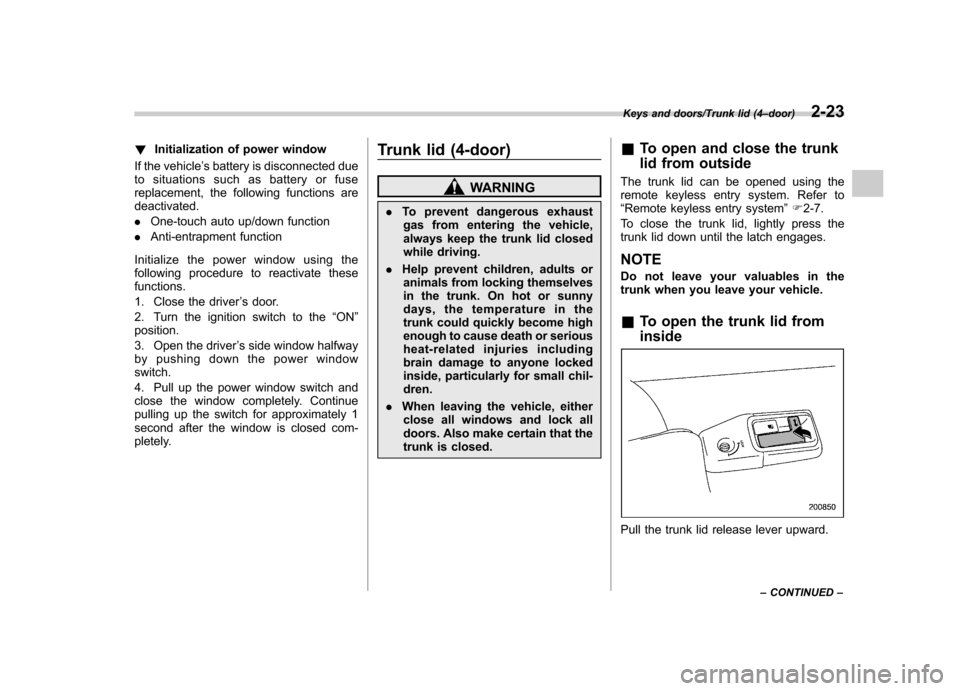
trunk when you leave your vehicle. & To open the trunk lid from inside
Pull the trunk lid release lever upward.
Keys and doors/Trunk lid (4 –door)2-23
– CONTINUED –
Page 111 of 414
2-26Keys and doors/Rear gate (5–door)
Rear gate (5-door)
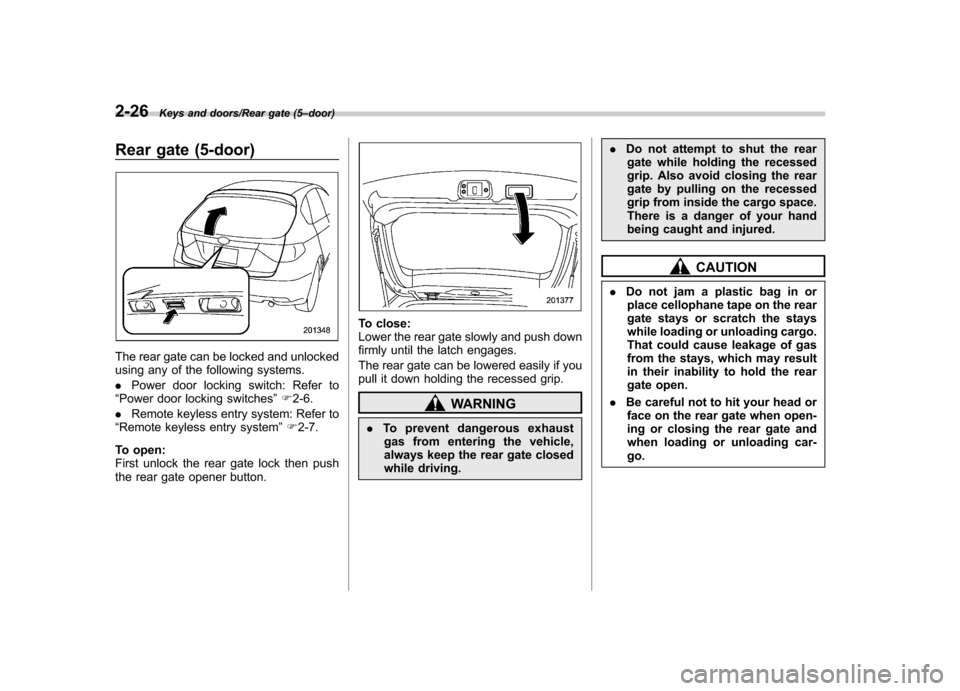
The rear gate can be locked and unlocked
using any of the following systems. . Power door locking switch: Refer to
“ Power door locking switches ”F 2-6.
. Remote keyless entry system: Refer to
“ Remote keyless entry system ”F 2-7.
To open:
First unlock the rear gate lock then push
the rear gate opener button.
To close:
Lower the rear gate slowly and push down
firmly until the latch engages.
The rear gate can be lowered easily if you
pull it down holding the recessed grip.
WARNING
. To prevent dangerous exhaust
gas from entering the vehicle,
always keep the rear gate closed
while driving. .
Do not attempt to shut the rear
gate while holding the recessed
grip. Also avoid closing the rear
gate by pulling on the recessed
grip from inside the cargo space.
There is a danger of your hand
being caught and injured.
CAUTION
. Do not jam a plastic bag in or
place cellophane tape on the rear
gate stays or scratch the stays
while loading or unloading cargo.
That could cause leakage of gas
from the stays, which may result
in their inability to hold the rear
gate open.
. Be careful not to hit your head or
face on the rear gate when open-
ing or closing the rear gate and
when loading or unloading car-go.
Page 119 of 414
3-4Instruments and controls/Ignition switch
&Acc
In this position the electrical accessories
(audio, accessory power outlet, etc.) can
be used. & ON
This is the normal operating position after
the engine is started. & START
The engine is started in this position. The
starter cranks the engine to start it. When
the key is released (after the engine has
started), the key automatically returns tothe “ON ”position.
CAUTION
Do not turn the ignition switch to the “ START ”position while the engine
is running.
If your registered key fails to start the
engine, pull out the key once (the security
indicator light will blink), and then insert
the key in the ignition switch and turn it tothe “START ”position and again try to start
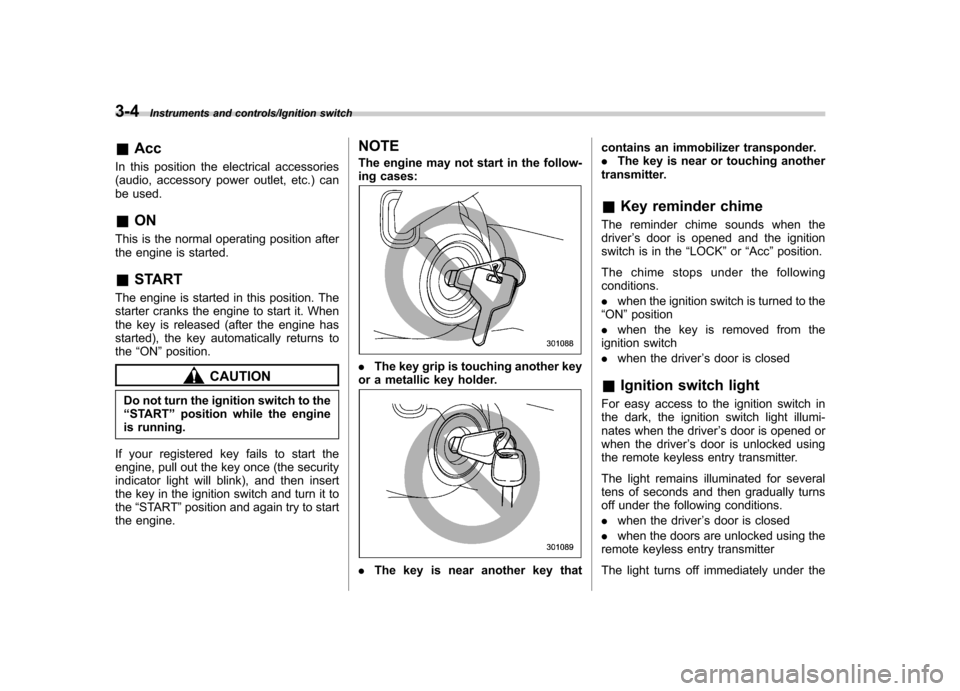
the engine. NOTE
The engine may not start in the follow-
ing cases:.
The key grip is touching another key
or a metallic key holder.
. The key is near another key that contains an immobilizer transponder. .
The key is near or touching another
transmitter. & Key reminder chime
The reminder chime sounds when the driver ’s door is opened and the ignition
switch is in the “LOCK ”or “Acc ”position.
The chime stops under the followingconditions. . when the ignition switch is turned to the
“ ON ”position
. when the key is removed from the
ignition switch. when the driver ’s door is closed
& Ignition switch light
For easy access to the ignition switch in
the dark, the ignition switch light illumi-
nates when the driver ’s door is opened or
when the driver ’s door is unlocked using
the remote keyless entry transmitter.
The light remains illuminated for several
tens of seconds and then gradually turns
off under the following conditions. . when the driver ’s door is closed
. when the doors are unlocked using the
remote keyless entry transmitter
The light turns off immediately under the
Page 120 of 414

following conditions. .when the ignition switch is turned to the
“ ON ”position
. when all doors and the rear gate (5-
door) are locked using the remote keyless
entry transmitter Hazard warning flasher
The hazard warning flasher is used to
warn other drivers when you have to park
your vehicle under emergency conditions.
The hazard warning flasher works regard-
less of the position of the ignition switch.
To turn on the hazard warning flasher,
push the hazard warning button on the
instrument panel. To turn off the flasher,
push the button again. NOTE
When the hazard warning flasher is on,
the turn signals do not work.Meters and gauges NOTE
Liquid-crystal displays are used in
some of the meters and gauges on
the combination meter. You will find
their indications hard to see if you wear
polarized glasses. &
Combination meter illumina- tion
When the ignition switch is turned to the “ ON ”position, the various parts of the
combination meter are illuminated in the
following sequence:
1. Warning lights, indicator lights, meter
needles and gauge needles illuminate.
2. Meter needles and gauge needles
each show MAX position.
3. Meter needles and gauge needles
each show MIN position.
4. Meter and gauge dials, odometer and
trip meter back light illuminate.
5. Regular illumination (for driving) be- gins.
Instruments and controls/Hazard warning flasher3-5
– CONTINUED –
Page 122 of 414
NOTE .Even during the illumination after
the driver ’s door is opened, if the
ignition switch is turned to the “ON ”
position, the combination meter will
illuminate as usual.. If the doors are locked by the remote
keyless entry system during the illumi-
nation after the driver ’s door is opened,
the illumination will be turned off.. Even while the illumination gradu-
ally turns off after the ignition switch is
turned to the “LOCK ”position, if the
ignition switch is turned to the “ON ”
position, the combination meter illumi-
nate as usual.
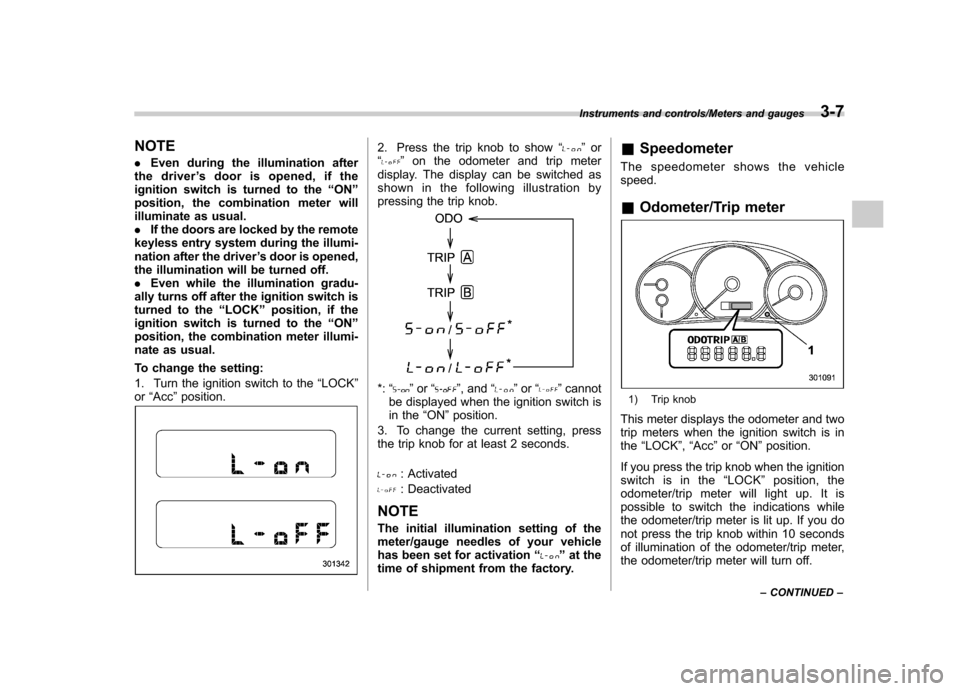
To change the setting:
1. Turn the ignition switch to the “LOCK ”
or “Acc ”position.2. Press the trip knob to show “”or
“” on the odometer and trip meter
display. The display can be switched as
shown in the following illustration by
pressing the trip knob.
*: “”or “”, and “”or “”cannot
be displayed when the ignition switch is
in the “ON ”position.
3. To change the current setting, press
the trip knob for at least 2 seconds.
: Activated
: Deactivated
NOTE
The initial illumination setting of the
meter/gauge needles of your vehicle
has been set for activation “
”at the
time of shipment from the factory. &
Speedometer
The speedometer shows the vehicle speed. & Odometer/Trip meter
1) Trip knob
This meter displays the odometer and two
trip meters when the ignition switch is inthe “LOCK ”, “Acc ”or “ON ”position.
If you press the trip knob when the ignition
switch is in the “LOCK ”position, the
odometer/trip meter will light up. It is
possible to switch the indications while
the odometer/trip meter is lit up. If you do
not press the trip knob within 10 seconds
of illumination of the odometer/trip meter,
the odometer/trip meter will turn off.
Instruments and controls/Meters and gauges3-7
– CONTINUED –