2014 SMART FORTWO COUPE ECU
[x] Cancel search: ECUPage 116 of 222

ture range from
00F84‡(00F820 ¥) to 104 ‡
(40 ¥) .
When the vehicle is exposed to tempera-
tures below 00F813‡(00F825 ¥) for longer than
seven days, irreversible damage by frost
can occur.
Terms of use Observe the following notes:
R
exclusions of the high-voltage battery
terms of use in the battery rental con-
tract
R exclusions and limitations in the war-
ranty and guarantee documents, as well as
in the Service Booklet
R maintenance notes for the high-voltage
battery in the Service Booklet
Overvoltage protection !
Overvoltage in the on-board powersup-
ply system can damage the vehicle.
The vehicle is therefore equipped with a
protective device against overvoltage in
the power supply system. This protective
device can be activated in severe thun-
derstorms, for example, and lead to
security systems being triggered. This
function is used to protect the vehicle.
Once the security system has been reac-
tivated, the charging process continues
automatically.
Reactivate the security system after it has
been triggered. Otherwise the charging
process will not continue. The high-volt-
age battery is not being charged, which may
result in the vehicle not being ready to
start.
If you have secured other devices using the
same security system, they will also be
deactivated after this is triggered. Make
sure that these devices do function after
reactivating the security system. Charging cable and ‑connecter warming Observe the safety notes on (Y
page 112).
Charging cable and ‑connecter can become
warmed during charging process when con-
nected to a power source.
This warming is caused by
R high charge currents
R charging time
R transfer resistances at the plug contacts
R resistances of the charging cable
If the infrastructure of the power supply
system and charging cable are in good
order, the charging cable and ‑connecter
will only warm up within admissible
threshold.
Damaged charging cable plug or its con-
tacts may lead to warming above admissi-
ble threshold. In case of this, have the
cable, respectively power socket,
exchanged or disposed by a qualified elec-
trician. Charging at an AC power socket or a
private wallbox
Charging at an AC power socket G
WARNING
If you apply improperly installed power
sockets or adapters, extension cables or
similar to connect the charging cable to
power sockets, this may cause fire or lead
to electric shock. Risk of life!
In order to avoid the risk, please observe
the following:
R Connect the charging cable only to power
sockets which are
-properly installed
- approved by a qualified electrician
R For safety reasons only use charging
cables which have been supplied and
approved for the vehicle.
R Do not use a damaged charging cable. 114
High-voltage battery>> Operation.
Page 120 of 222

Observe the provider's instructions at the
charging station.
Charging station with charging commu-
nication („Plug&Charge“) You do not have to activate charging sta-
tions with charging communication before
the charging process. This is done by the
vehicle. This function is called "Plug &
Charge". Information is exchanged
between the vehicle and the charging sta-
tion via the charging cable for activation.
This is for:
R mutual authorization of the vehicle and
the charging station
R verification of contract data
R automatic billing of the energy costs
Electronic certificates are used here for
secure exchange of data.
If the verification of contract data is suc-
cessful, the charging process is initiated.
i A preliminary version of the
ISO/IEC 15118 standard is used for com-
munication between the vehicle and the
charging station. If it is necessary to
update your vehicle, consult an author-
ized electric drive smart center.
In order to use "Plug & Charge", you have to
configure the functions of your vehicle on
the "Vehicle Homepage" (Y page 120). For
this you require a "Plug & Charge" certif-
icate which you receive from your power
company after concluding a suitable con-
tract. Consult an authorized electric drive
smart center if you have problems with the
configuration or have no access to the
Internet.
The charging station offers information on
the availability of electricity and costs.
This information is processed by the vehi-
cle and is used for an optimum charging of
the high‑voltage battery (Y page 123). The
energy costs are automatically calculated
after the charging process is complete. With your existing electricity contract,
you and others who have access to your vehi-
cle can charge the costs to your electricity
bill. For this reason, cancel your existing
electricity contract for this vehicle
before you sell it. Delete your "Plug &
Charge" certificate by all means.
i
You can delete the certificate from the
vehicle's data on the "Vehicle Home-
page". Please consult an authorized
electric drive smart center if you do not
have access to the Internet.
If the charging station allows the con-
nected vehicle access to the Internet, you
can call up and change information per-
taining to the vehicle on the "Vehicle
Homepage" (Y page 120).
Connecting the charging cable X
Engage the parking brake.
X Move the gear selector lever to park
position P.
X Switch off the ignition.
X Open the charge socket flap.
X Remove the cover from the charge socket.
X Insert plug of the charging cable into the
charge socket to the stop.
The high‑voltage battery is being
charged.
i The vehicle must not be moved during
charging.
The 00E5 indicator lamp in the multi-
function display comes on when the igni-
tion is switched on and the charging
cable is connected.
i The drive system and battery cooling
systems may switch on audibly during the
charging process, depending on the tem-
perature. 118
High-voltage battery>> Operation.
Page 123 of 222

free of charge service life you can con-
tinue to use the "Vehicle Homepage" with
costs. Further information can be obtained
at any authorized electric drive smart
center.
The "Vehicle Homepage" is available in the
following languages:
R German
R English
R French
R Italian
R Spanish
R Portuguese
R Dutch
i Further information concerning sup-
ported end devices and available lan-
guages can be found under the following
address: http://vh.smart.com/info.
In order to call up the "Vehicle Homepage",
the vehicle must be connected to the Inter-
net.
This is enabled:
R via a mobile service module (if your
vehicle is equipped with it)
(Y page 122)
R via powerline (Y page 122)
Further information can be found here
(Y page 114).
Personal area setup You must first set up your personal access
under http://vh.smart.com in order to
access the "Vehicle Homepage". For this,
you need a valid Email address.
Following registration, you then have
access to your personal area on the "Vehi-
cle Homepage". The vehicle must be regis-
tered in the personal area for you to access
the settings of your vehicle. Call up the
corresponding input field within the
"Vehicle Homepage". Enter the vehicle
identification number (VIN) and the vehi-
cle verification code (VVC). This informa- tion can be obtained at your authorized
electric drive smart center when you
receive the vehicle.
Notes on data protection Please note that the "Vehicle Homepage"
allows access to your personal data. For
this reason, keep your vehicle verification
code (VVC) and your user data in a secure
place and safe from unauthorized persons.
Each person who has access to the above
information can use the functions on the
"Vehicle Homepage". For this reason, make
sure than no unauthorized persons have
access to your personal area.
After selling the vehicle, you are required
to delete the vehicle from your personal
area on the "Vehicle Homepage". You must
also destroy the vehicle verification code
(VVC) documents.
If you have bought a pre-owned vehicle, it
may be possible that the previous owner
still has access to the "Vehicle Homepage".
For this reason, have a new vehicle veri-
fication code (VVC) reissued to you at an
authorized electric drive smart center
after purchase. With this new code you can
set up the access to your vehicle as descri-
bed in the "Personal area setup" section.
Here you can also deactivate the previous
owner's access, should it still be active.
Calling up the functions of the "Vehicle
Homepage"
If the vehicle is registered in your per-
sonal area of the "Vehicle Homepage", you
can, for example, access the following
functions:
R
call up the current charge level
R program the departure time
R activate the "Air conditioning before
start" function
When the vehicle is being charged, you can
call up the estimated charging time and the
attainable range. Both results are esti- High-voltage battery
121>> Operation. Z
Page 150 of 222

systems. In this case, it is important to
keep in mind that a considerably higher
degree of effort is necessary to brake and
steer the vehicle. Adapt your driving
accordingly. Brakes
G
WARNING
Make sure not to endanger any other road
users when carrying out braking maneu-
vers.
Refer to the description of the hydraulic
brake assistant (Y page 48).
! Because the ESP ®
operates automati-
cally, the ignition must be switched off
when the parking brake is being tested
on a brake test dynamometer. Active
braking action through the ESP ®
may oth-
erwise seriously damage the brake sys-
tem which is not covered by the smart
Limited Warranty.
Brake pad wear or a leak in the brake system
may be the reason for low brake fluid level
in the brake fluid reservoir.
The brake fluid level in the brake fluid
reservoir may be too low if the brake warn-
ing lamp in the instrument cluster comes
on (Y page 23) although the parking brake
is released.
Have the brake system inspected immedi-
ately. Contact an authorized electric drive
smart center.
All checks and service work on the brake
system should be carried out by qualified
technicians only. Contact an authorized
electric drive smart center.
Only install brake pads and use brake fluid
recommended by smart. Inclines G
WARNING
Resting your foot on the brake pedal will
cause excessive and premature wear of the
brake pads.
It can also result in the brakes overheat-
ing, thereby significantly reducing their
effectiveness and your ability to stop the
vehicle in sufficient time to avoid an acci-
dent.
Please observe the following guidelines to
avoid that the permitted maximum speed is
exceeded when driving on downhill grades:
R Do not move the gear selector lever to N.
R Recuperation is limited, if:
-the high-voltage battery is fully
charged or too cold
- the power electronics or the electric
motor is overheated.
When driving down long and steep grades,
do not depress the brake pedal perma-
nently. Depress it in intervals instead to
reduce the vehicle speed.
High and low stresses After hard braking, it is advisable to drive
on for some time, rather than immediately
park, so that the air stream will cool down
the brakes faster.
If your brake system is normally only sub-
jected to moderate loads, you should occa-
sionally test the effectiveness of the
brakes by applying above-normal braking
pressure at higher speeds. This will also
enhance the grip of the brake pads.
G
WARNING
Make sure not to endanger any other road
users when carrying out these braking
maneuvers. 148
Driving instructions>> Operation.
Page 154 of 222

Standing water
Do not drive through flooded areas or water
of unknown depth. Before driving through
water, determine its depth. Never acceler-
ate before driving into water.
If you must drive through standing water,
drive slowly to prevent water from entering
R the front compartment
R the engine compartment
R the passenger compartment
! Water in these areas could cause dam-
age to
R electrical components
R electrical wiring
R the drive system
R the high-voltage battery
Any such damage is not covered by the
smart Limited Warranty. Passenger compartment
G
WARNING
Always fasten items being carried as
securely as possible.
In an accident, during hard braking or sud-
den maneuvers, loose items thrown around
inside the vehicle may injure vehicle
occupants.
The cargo compartment is the preferred
place to carry objects. Control and operation of radio trans-
mitters
Radio and telephone G
WARNING
Please do not forget that your primary
responsibility is to drive the vehicle
safely. Only operate the radio or tele- phone
8
if road, weather and traffic condi-
tions permit.
Bear in mind that at a speed of just 30 mph
(approximately 50 km/h), your vehicle is
covering a distance of 44 feet (approx-
imately 14 m) every second.
Telephones and two-way radios G
WARNING
Never operate radio transmitters equipped
with a built-in or attached antenna (i.e.
without being connected to an external
antenna) from inside the vehicle while the
drive system is switched on. Doing so could
lead to a malfunction of the vehicle’s elec-
tronic system, possibly resulting in an
accident and/or serious personal injury.
Radio transmitters, such as a mobile phone
or a citizens band unit should only be used
inside the vehicle if they are connected to
an antenna that is installed on the outside
of the vehicle.
Refer to the radio transmitter operation
instructions regarding use of an external
antenna. Coolant temperature
During severe operating conditions and
stop-and-go city traffic, the coolant tem-
perature may rise.
! Excessive coolant temperature causes
the red coolant temperature warning
lamp 00AC in the instrument cluster to
come on.
The drive system should not be operated
with the red coolant temperature warn-
ing lamp 00ACilluminated. Doing so may
cause serious damage to the drive system
and the high-voltage battery, which is
not covered by the smart Limited War-
ranty.
8 Observe all legal requirements. 152
Driving instructions>> Operation.
Page 188 of 222

tensioning spring could crack the wind-
shield.
Do not allow the wiper arms to contact the
windshield glass without a wiper blade
inserted.
We recommend that you have this work
carried out at an authorized electric
drive smart center.
To ensure proper visibility
R it is vital that you have wiper blades that
are in perfect shape
R clean the wiper blades regularly with a
cleaning agent
R remove any tough dirt stains with a
sponge or brush Windshield wiper blades
! Do not pull on the wiper blade inserts.
They could tear.
Removing X
Remove the key from the starter switch. X
Fold wiper arm 0085away from the wind-
shield until it snaps into place.
X Press on retaining springs 0044on both
sides of wiper blade 0043.
X Fold wiper blade 0043away from wiper
arm 0085in direction of arrow 0087.
X Detach wiper blade 0043in direction of
arrow 0083. Installing
X
With guide tab 0083sliding into opening
0084, attach new wiper blade 0043onto the
wiper arm.
X Fold wiper blade 0043towards the wiper
arm in direction of arrow 0087.
Retaining springs 0044must audibly
engage in attachment 0085.
X Check whether wiper blade 0043is securely
fastened.
X Fold the wiper arm backward to rest on
the windshield.
Make sure to hold on to the wiper when
folding it back.
! Make sure the wiper blades are properly
installed. Improperly installed wiper
blades may cause windshield damage. Rear window wiper blade186
Replacing wiper blades>> Practical hints.
Page 193 of 222

X
Place the tire repair kit securely in the
vehicle.
X Drive off immediately.
The tire sealant will distribute itself
evenly inside the tire. G
WARNING
Do not exceed vehicle speed of 50 mph
(80 km/h). A tire sealant repair is not
designed to operate at higher speeds.
The sticker must be attached on the instru-
ment cluster where it will be easily seen by
the driver.
Vehicle handling characteristics of a tire
sealant repaired tire may change. Adapt
your driving accordingly.
X After driving for about 1.8 miles (3 km)
or ten minutes, stop and exit the vehicle
taking all of the appropriate safety pre-
cautions.
X Take the tire repair kit from the vehicle.
X Screw the end of filler hose 0085onto tire
valve 006F.
X Check the tire inflation pressure using
pressure gauge 0044. G
WARNING
If tire inflation pressure has fallen below
130 kPa (1.3 bar, 19 psi) do not continue to
drive the vehicle.
Park your vehicle safely away from the
roadway and contact the nearest authorized
electric drive smart center or call Road-
side Assistance.
Have the damaged tire replaced.
X If the tire inflation pressure is at least
130 kPa (1.3 bar, 19 psi), inflate or deflate
the tire to correct tire inflation pres-
sure (see Tire and Loading Information
placard located on the driver’s door
B‑pillar). R
To increase the tire inflation pres-
sure: Switch on the electric air pump.
R To decrease the tire inflation pres-
sure: Open vent screw 0087. Recheck the
tire inflation pressure with the elec-
tric air pump’s pressure gauge.
X After checking the tire inflation pres-
sure, unscrew the end of filler hose 0085
from tire valve 006F.
X Screw the valve cap onto the tire valve.
X Plug filler hose with the stopper.
X Place the tire repair kit securely in the
vehicle.
! The manufacturer is unable to guaran-
tee that all tire punctures can be
repaired with the tire repair kit, in par-
ticular cuts or perforations larger than
approximately 0.16 in (4 mm) or away from
the tire’s tread. The manufacturer is not
liable for damage sustained through
improper use of the tire repair kit. G
WARNING
Follow recommended tire inflation pres-
sures.
Do not underinflate tires. Underinflated
tires wear excessively and/or unevenly,
adversely affect handling and energy con-
sumption of the vehicle, and are more
likely to fail from being overheated.
Do not overinflate tires. Overinflated
tires can adversely affect handling and
ride comfort, wear unevenly, increase
stopping distance, and result in sudden
deflation (blowout) because they are more
likely to become punctured or damaged by
road debris, potholes etc.
Do not overload the tires by exceeding the
specified load limit as indicated on the
Tire and Loading Information placard on
the driver’s door B‑pillar. Overloading the
tires can overheat them, possibly causing
a blowout. Overloading the tires can also
result in handling or steering problems, or
brake failure. Flat tire
191>> Practical hints. Z
Page 195 of 222
You may operate the electrical air pump
again after it has cooled off.
X If a tire inflation pressure of at least
200 kpa (2.0 bar, 29 psi) is not attained,
turn off the electric air pump by press-
ing OFF on electric air pump switch 0085.
X Unscrew the end of filler hose 0085from
tire valve 006B.
X After clearing the area around the vehi-
cle of people and obstacles, drive vehi-
cle back or forth very slowly approx-
imately 30 ft (10 m).
This serves to better distribute the tire
sealant material inside the tire.
X Screw the end of filler hose 0085onto tire
valve 006B.
X Inflate the tire again. G
WARNING
If a tire inflation pressure of
200 kPa (2.0 bar, 29 psi) is not attained, the
tire is too severely damaged for the tire
sealant to provide a reliable tire repair.
In this case, the tire sealant cannot prop-
erly seal the tire.
Do not drive the vehicle.
Contact the nearest authorized electric
drive smart center for assistance or call
Roadside Assistance.
X After attaining a tire inflation pressure
of at least 200 kPa (2.0 bar, 29 psi), press
OFF on electric air pump switch 0085.
The electric air pump is switched off.
X Turn the key in the starter switch to
position 0.
X Unscrew the end of filler hose 0085from
tire valve 006B.
X Place the tire repair kit securely in the
vehicle.
X Drive off immediately.
The tire sealant will distribute itself
evenly inside the tire. G
WARNING
Do not exceed vehicle speed of 50 mph
(80 km/h). A tire sealant repair is not
designed to operate at higher speeds.
The sticker must be attached on the instru-
ment cluster where it will be easily seen by
the driver.
Vehicle handling characteristics of a tire
sealant repaired tire may change. Adapt
your driving accordingly.
X After driving for about 1.8 miles (3 km)
or ten minutes, stop and exit the vehicle
taking all of the appropriate safety pre-
cautions.
X Take the tire repair kit from the vehicle.
X Screw the end of filler hose 0085onto tire
valve 006B. X
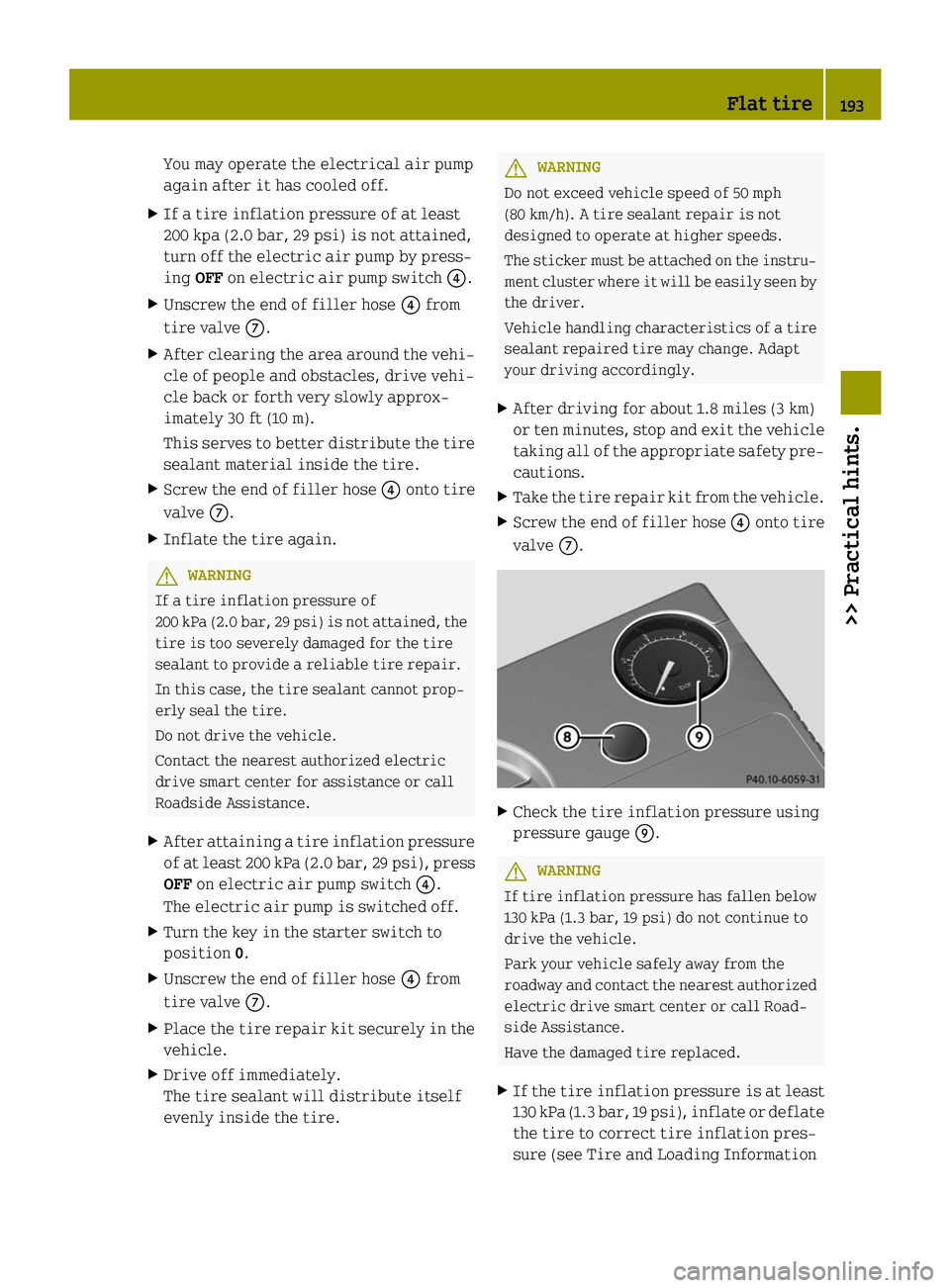
Check the tire inflation pressure using
pressure gauge 006D. G
WARNING
If tire inflation pressure has fallen below
130 kPa (1.3 bar, 19 psi) do not continue to
drive the vehicle.
Park your vehicle safely away from the
roadway and contact the nearest authorized
electric drive smart center or call Road-
side Assistance.
Have the damaged tire replaced.
X If the tire inflation pressure is at least
130 kPa (1.3 bar, 19 psi), inflate or deflate
the tire to correct tire inflation pres-
sure (see Tire and Loading Information Flat tire
193>> Practical hints. Z