Radio
Operation
Introduction
This chapter contains information on the following subjects:
Main menu
22
Radio DAB text and images presentation
23
Select the frequency range
23
List of available stations
23
Search and select available stations
24
Save radio station
24
Station logos
25
TP Traffic programme
25
First and foremost, pay attention to the safety instructions » page 7 , Impor-
tant notes .
The device allows analogue radio reception of FM and AM frequency ranges as
well as DAB digital radio reception.
CAUTION
■ For vehicles with window antennas do not stick foil or metal coated stickers
to the window as this can lead to interference.■
Car parks, tunnels, tall buildings or mountains can interfere with the radio
signal even causing it to fail completely.
Note
In countries where the RDS function is not supported, we recommend turning
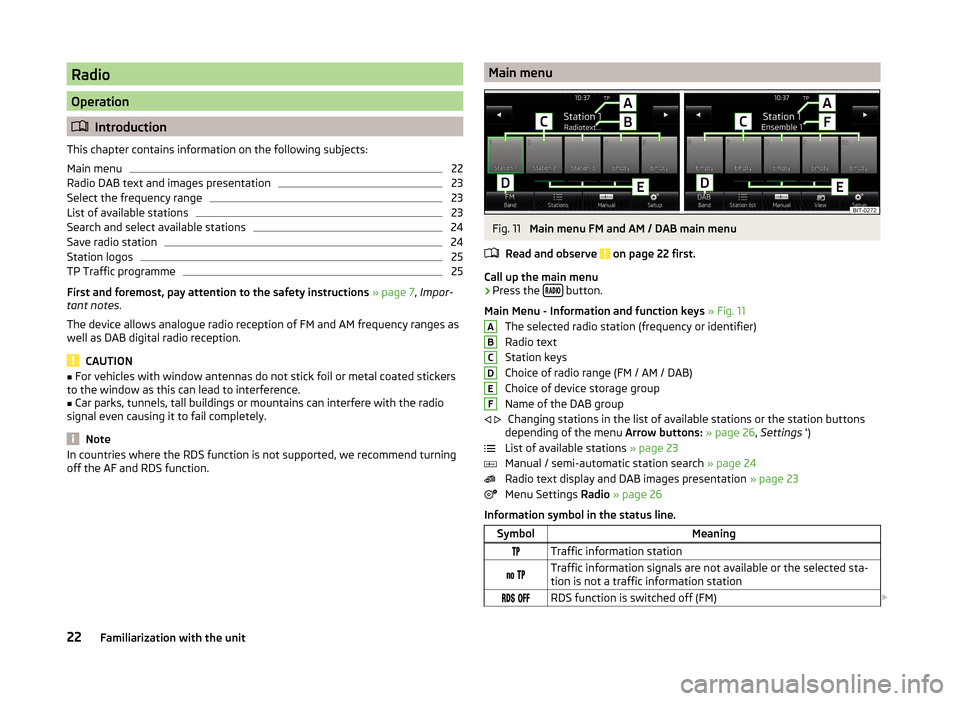
off the AF and RDS function.Main menuFig. 11
Main menu FM and AM / DAB main menu
Read and observe
on page 22 first.
Call up the main menu
›
Press the button.
Main Menu - Information and function keys » Fig. 11
The selected radio station (frequency or identifier)
Radio text
Station keys
Choice of radio range (FM / AM / DAB)
Choice of device storage group
Name of the DAB group Changing stations in the list of available stations or the station buttons
depending of the menu Arrow buttons: » page 26 , Settings ')
List of available stations » page 23
Manual / semi-automatic station search » page 24
Radio text display and DAB images presentation » page 23
Menu Settings Radio » page 26
Information symbol in the status line.
SymbolMeaningTraffic information station Traffic information signals are not available or the selected sta-
tion is not a traffic information station RDS function is switched off (FM) ABCDEF
22Familiarization with the unit