2014 SKODA ROOMSTER door lock
[x] Cancel search: door lockPage 61 of 204

Mechanical windows
Introduction
This chapter contains information on the following subjects:
Open / close window
58
The window can be operated mechanically by means of the handle attached to
the respective door panel.
WARNINGThe windows should nevertheless be closed carefully – risk of injury!
CAUTION
■ In the event that the windows are frozen, first of all eliminate the
ice » page 138 , Windows and exterior mirrors and only then operate the elec-
trical power windows. Otherwise, the window sealing and the electrical power
window mechanism could be damaged.■
Always make sure that the windows are closed when you leave the locked
vehicle.
For the sake of the environment
At high speeds, you should keep the windows closed to prevent unnecessarily high fuel consumption.
Note
When driving always use the existing heating, air conditioning and ventilation
system for ventilating the interior of the vehicle. If the windows are opened,
dust as well as other dirt can get into the vehicle and in addition the wind
noise is more at certain speeds.Open / close windowFig. 39
Window operation: left / right
Read and observe
and on page 58 first.
Only one window can be operated mechanically at any time.
Opening
Lift the crank in the direction of arrow
A
» Fig. 39 .
Closing
Turn the crank in the direction of the arrow
B
» Fig. 39 .
58Operation
Page 66 of 204
NoteWhen the “tourist light” mode is active, the warning light flashes for 10 sec-
onds each time the ignition is switched on.
Hazard warning light system
Fig. 44
Dash panel: Button for hazard
warning light system
Read and observe on page 59 first.
›
Press the
» Fig. 44 button.
All the turn signal lights on the vehicle flash at the same time when the hazard
warning light system is switched on. The warning light for the turn signals and
the warning light in the button also flash at the same time. The hazard warn-
ing light system can also be operated if the ignition is switched off.
The hazard warning light system will switch on automatically if one of the air-
bags is deployed.
CAUTION
Switch on the hazard warning light system if, for example, the following oc-
curs.■
You encounter a traffic jam.
■
The vehicle has broken down.
Parking lights
Read and observe
on page 59 first.
Switching on the parking light
›
Switch off the ignition.
›
Pull the turn signal stalk
» Fig. 42 on page 61 upwards or downwards - the
side light on the right or left side of the vehicle is switched on.
Switching on the side lights on both sides ›Turn the light switch » Fig. 40 on page 59 to the position and lock the ve-
hicle.
Note
■ The parking light can only be activated if the ignition is switched off.■If the right or left turn signal light has been switched on and the ignition is
switched off, the parking light is not automatically switched on.
Interior lights
Introduction
This chapter contains information on the following subjects:
Interior lighting - version 1
63
Interior lighting - version 2
64
Illuminated storage compartment on the passenger side
64
Luggage compartment light
64
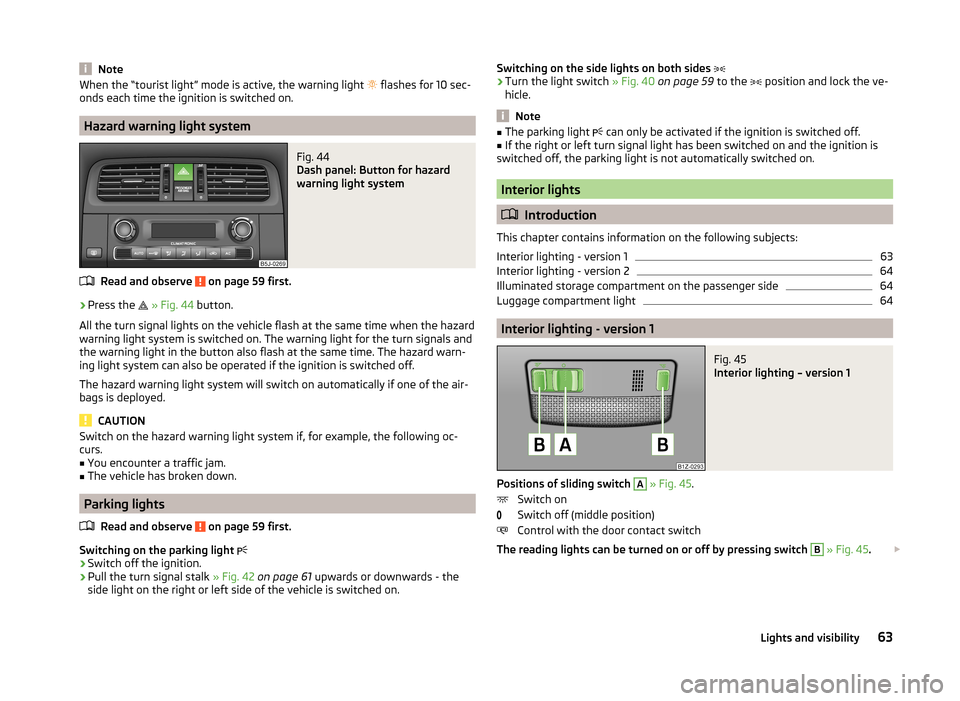
Interior lighting - version 1
Fig. 45
Interior lighting – version 1
Positions of sliding switch
A
» Fig. 45 .
Switch on
Switch off (middle position)
Control with the door contact switch
The reading lights can be turned on or off by pressing switch
B
» Fig. 45 .
63Lights and visibility
Page 67 of 204

If control of the lights by the door contact switch is enabled (switchA » Fig. 45 is in the position), the light will come on when one of the fol-
lowing occurs.
› The vehicle is unlocked.
› One of the doors is opened.
› The ignition key is removed.
If control of the lights by the door contact switch is enabled (switch A
» Fig. 45
in the
position), the light will go off when one of the following occurs.
› The vehicle is locked.
› The ignition is switched on.
› About 30 seconds after all the doors have been closed.
If a door remains open, or if switch
A
» Fig. 45 is in the
position, the interior
light goes out after 10 minutes to prevent the vehicle battery from discharging.
Interior lighting - version 2
Fig. 46
Interior lighting – version 2
Slide switch positions » Fig. 46 .
Switch on
Switch off
Control by the door contact switch (middle position)
The same principles apply for interior lighting version 2 as for » page 63, Interi-
or lighting - version 1 .
Illuminated storage compartment on the passenger side
›
When opening the flap of the storage compartment on the front passenger
side the lighting in the storage compartment comes on.
›
The light switches on automatically when the parking light is switched on
and goes out when the flap is closed.
Luggage compartment light
The light comes on automatically when the boot lid is opened. If the tailgate remains open for more than 10 minutes, the luggage compartment light
switches off automatically.
Visibility
Introduction
This chapter contains information on the following subjects:
Rear window heater
64
Sun visors
65
sunshade
65
Rear window heater
Fig. 47
Button for rear window heater
›
The rear window heater is switched on or off by pressing the but-
ton » Fig. 47 , the warning light in the switch comes on or goes out.
The rear window heater can only be switched on when the engine is running.
The rear window heater switches off automatically after approximately 7 mi-
nutes.
For the sake of the environment
The heating should be switched off as soon as the window is de-iced or free
from mist. The reduced current consumption will have a favourable effect on
fuel economy » page 116, Saving electrical energy . 64Operation
Page 89 of 204

Front armrest with storage compartmentFig. 88
Armrest: Storage compartment/open storage compartment
Read and observe
on page 83 first.
Fold the armrest forwards
›
Press the lower button on the end of the armrest » Fig. 88 -
.
›
Fold the arm rest forward and release the button again.
Opening the storage compartment
›
Press the upper button and open the cover of the stowage compartment up-
wards » Fig. 88 -
.
Note
The moving space of the arms can be restricted if the armrest is folded for-
wards. In city traffic the armrest should not be folded forwards.
folding table in the middle back seat
Fig. 89
Rear seats: Armrest
Read and observe on page 83 first.
The centre seat back can be used as an armrest forward or table with cup
holders » Fig. 89 by folding it forwards » page 71, Fold downseat backrest and
seat fold down completely .
Two beverage containers can be placed into the recesses.
WARNING■ Never put hot beverage containers in the cup holder. They may spill if the
vehicle moves – there is a risk of scalding.■
Do not use any cups or beakers made of fragile material (e.g. glass, porce-
lain). This could lead to injuries in the event of an accident.
CAUTION
■ Do not leave open beverage containers in the cup holder during the journey.
There is a risk of spilling e.g. when braking which may cause damage to the
electrical components or seat upholstery.■
If the middle rear seat backrest should be folded forward for lengthy periods,
then make sure that the belt locks are not located below it - this can warp the
upholstery or fabric.
slots in the doors
Fig. 90
Storage compartment: in the front door/in the rear door
Read and observe
on page 83 first.
There is a bottle holder at
B
» Fig. 90 of the pocket in the front doors.
86Operation
Page 90 of 204

WARNINGUse the section A » Fig. 90 of the door pocket only for storing objects
which do not project so that the effectiveness of the side airbag is not im-
paired.
stowage compartments in the luggage
Fig. 91
Storage compartments in the
side trim panel
Read and observe on page 83 first.
Storage compartments are located on both sides of the luggage compart-
ment » Fig. 91 .
CAUTION
The storage compartments are designed for storing small objects of up to 1.5
kg. in weight in total.
Flexible storage compartment
Fig. 92
Flexible storage compartment
Read and observe on page 83 first.
The flexible storage compartment » Fig. 92 can be fitted to the right-hand side
of the luggage compartment.
Fitting›Insert both ends of the flexible storage compartment into the openings of
the right side trim panel of the boot and push it downwards until it locks.
Removing›
Grasp the flexible storage compartment on the two upper corners.
›
Press the upper corners inwards and release the storage compartment by
pulling upwards.
›
Remove by pulling towards you.
CAUTION
The storage compartment is designed for storing small objects with a maxi-
mum total weight of 8 kg.
Note
If the variable loading floor » page 76 is installed in the luggage compartment,
no flexible storage compartment can be installed.
Praktik
Introduction
This chapter contains information on the following subjects:
Lashings
88
Adjustable safety partition behind the front seats
88
Attachment of the loading floor
88
Adjustment of the safety partition
88
Emergency release of the loading area door
89
Interior lighting
89WARNINGThe load to be transported must always be secured safely so that it does
not come loose when making an emergency braking or in a vehicle collision
which could cause injuries to occupants.87Seats and stowing
Page 92 of 204

›Undo and remove a bolt
» Fig. 96 - on either side in the upper body and
one bolt » Fig. 96 - in the lower area.›
Move the safety partition into the required position. Ensure it is always move
the same distance- the same number of holes on both sides both upwards
and downwards.
›
On each side in the upper area of the body, undo and remove a bolt and undo
and remove a bolt in the lower area.
›
Have the tightening torque of the bolts checked with a torque wrench as
soon as possible. The tightening torque must be 20 Nm.
›
Change the position of the cover of the luggage compartment floor behind
the safety partition so that it lines up with the new position of the safety
partition.
›
Fold back the loading floor part.
Emergency release of the loading area door
Fig. 97
Emergency unlocking of the
loading area door
Read and observe on page 87 first.
If there is a fault in the central locking, you can unlock the loading area door as
follows:
›
Pull the control cable towards you and pull on it.
›
Press on the loading area door to open it.
›
Press the control cable back again.
Interior lightingFig. 98
Interior lighting
Read and observe on page 87 first.
Switching on
›
Move the cover glass to the position
» Fig. 98.
Switching off
›
Move the cover glass to the O » Fig. 98 position.
Door contact setting
›
Move the cover glass to the middle position
» Fig. 98 .
Note
We recommend you have the bulb replacement performed by a specialist ga-
rage.89Seats and stowing
Page 105 of 204

Bluetooth
The following menu items can be selected from the Bluetooth menu item.
■ User - Overview of the stored users
■ New user - Search for new mobile phones in reception range
■ Visibility - Switches on the visibility of the phone for other devices
■ Media Player
■ Active device
■ Paired devices
■ Find
■ Phone name - option to change the name of the phone (default SKODA_BT)
Settings
The following menu items can be selected from the Settings menu item.
■ Phone book
■ Update 1)
■ List
■ Surname
■ Name
■ Ring tone
Back
Return in the Start menu of the telephone.
Voice control
Introduction
This chapter contains information on the following subjects:
Dialogue
102
Voice commands
103
Dialogue
The period of time during which the system is ready to receive voice com-
mands and to carry them out is called a dialogue. The system gives audible
feedback and guides you if necessary through the relevant functions.
Optimum understanding of the voice commands depends on several factors.
› Speak with a normal tone of voice without intonation and excessive pauses.
› Avoid a bad pronunciation.
› Close the doors, windows and sliding roof, to reduce or stop disturbing exte-
rior noise.
› It is recommended to speak louder at higher speeds, so that the tone of your
voice is louder than the increased surrounding noise.
› During the dialogue, limit additional noise in the vehicle, e.g. passengers talk-
ing at the same time.
› Do not speak, if the system makes an announcement.
The microphone for voice control is inserted in the moulded headliner and di-
rected to the driver and front passenger. Therefore the driver and the front
passenger can operate the equipment.
Entering a phone number
The telephone number can be entered as a continuous series of individually
spoken digits (the whole number at once) or in the form of digital blocks (sepa-
rated by short pauses). After each order of digits (separation through brief
voice pause) all of the digits detected up to now are repeated by the system.
The digits 0 - 9, symbols +,
, #
are permitted. The system detects no continu-
ous digit combinations such as twenty-three, but only individually spoken dig-
its (two, three).
Switching on voice control
› Press the
button on the adapter
» Fig. 105 on page 100 briefly.
› Press the
1
button on the multifunction steering wheel briefly
» page 99,
Operating the phone on the multifunction steering wheel .
Switching off voice control
If the system is currently playing a message, the message that is currently be-
ing played will have to be stopped as follows:
› Press the
button on the adapter briefly.
› Press the
1
button on the multifunction steering wheel briefly.
If the system is expecting a voice command, you can end the dialogue yourself
as follows.
› With the
CANCEL voice command.
› Press the
button on the adapter.
› Press the
1
button on the multifunction steering wheel briefly.
1)
On vehicles fitted with the Amundsen+ navigation system, this function can be accessed via the naviga-
tion system menu; refer to the » Operating instructions for the Amundsen+ navigation system .
102Operation
Page 123 of 204

The brake pressure drops gradually the more you operate the accelerator ped-
al. If the vehicle does not start off within 2 seconds, it starts to roll back.
HHC is active on slopes of >5 % when the driver door is closed. HHC is always only active on slopes when in forward or reverse start off. When driving down-
hill, it is inactive.
Antilock Braking System (ABS)
Read and observe
and on page 119 first.
ABS prevents the wheels locking when braking. Thus helping the driver to
maintain control of the vehicle.
The intervention of the ABS is noticeable from the pulsating movements of
the brake pedal which is accompanied by noises.
When the ABS system is active, do not brake periodically or reduce the pres- sure on the brake pedal.
Traction Control System (ASR)
Fig. 117
TCS button
Read and observe and on page 119 first.
If the wheels are slipping, the ASR system adapts the engine speed to the con-
ditions of the road surface. The TCS makes it much easier to start off, acceler-
ate and climb steep hills even if the conditions of the road surface are unfav-
ourable.
The TCS function is automatically activated each time the ignition is switched
on.
During an intervention of the system, the TCS warning light flashes in the
instrument cluster.
The TCS should normally always be enabled. Only in certain exceptional cir-
cumstances can it be sensible to switch the system off, for instance:
› when driving with snow chains;
› when driving in deep snow or on a very loose surface;
› when it is necessary to “rock a vehicle free” when it has got stuck.
Ensure the TCS is activated again afterwards.
You can switch TCS off and on again as needed by pressing the
but-
ton » Fig. 117 . The
warning light comes on in the instrument cluster when the
TCS is deactivated.
The TCS warning light
» page 45 lights up in the instrument cluster when
there is a fault on the TCS.
Electronic Differential Lock (EDL)
Read and observe
and on page 119 first.
If one of the wheels starts to spin, the EDL system brakes the spinning wheel
and transfers the driving force to the other wheels. This ensures the stability
of the vehicle and a quick journey.
EDL switches off automatically to avoid excessive heat generation on the
brake of the wheel being braked. The vehicle can continue to be driven and
has the same characteristics as a vehicle not fitted with EDL. The EDL switches
on again automatically as soon as the brake has cooled down.
Parking aid
Introduction
This chapter contains information on the following subjects:
Function
121
Activation/deactivation
121
120Driving