2014 SKODA ROOMSTER lock
[x] Cancel search: lockPage 29 of 204
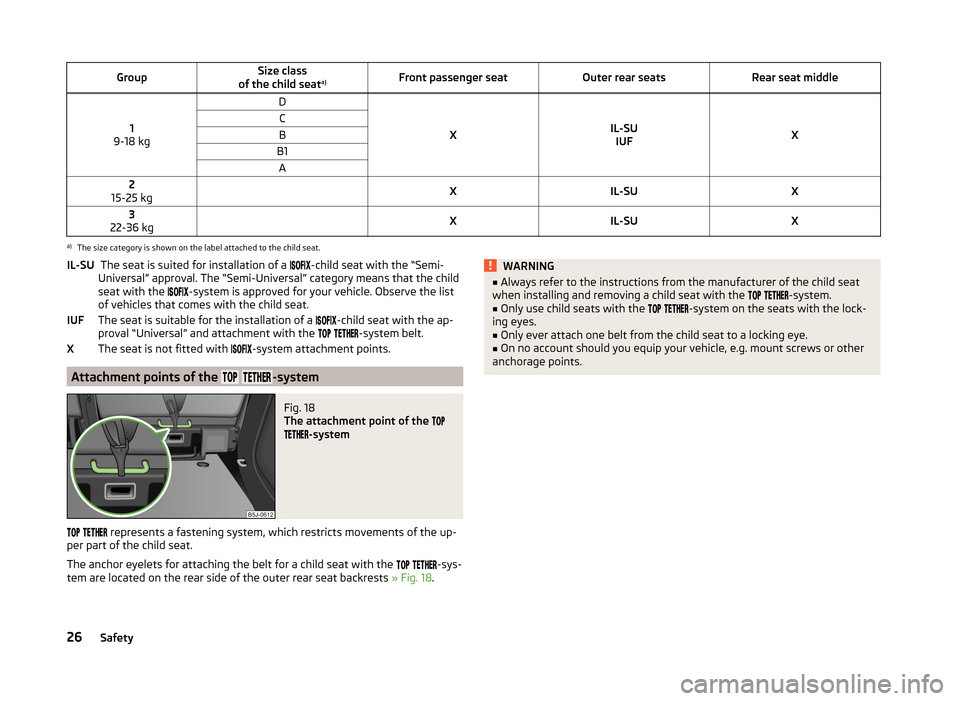
GroupSize class
of the child seat a)Front passenger seatOuter rear seatsRear seat middle
1
9-18 kg
D
XIL-SU IUFX
CBB1A2
15-25 kg XIL-SUX3
22-36 kg XIL-SUXa)
The size category is shown on the label attached to the child seat.
The seat is suited for installation of a -child seat with the “Semi-
Universal” approval. The “Semi-Universal” category means that the child
seat with the
-system is approved for your vehicle. Observe the list
of vehicles that comes with the child seat.
The seat is suitable for the installation of a
-child seat with the ap-
proval “Universal” and attachment with the
-system belt.
The seat is not fitted with
-system attachment points.
Attachment points of the -system
Fig. 18
The attachment point of the
-system
represents a fastening system, which restricts movements of the up-
per part of the child seat.
The anchor eyelets for attaching the belt for a child seat with the
-sys-
tem are located on the rear side of the outer rear seat backrests » Fig. 18.
IL-SU
IUFXWARNING■
Always refer to the instructions from the manufacturer of the child seat
when installing and removing a child seat with the -system.■
Only use child seats with the
-system on the seats with the lock-
ing eyes.
■
Only ever attach one belt from the child seat to a locking eye.
■
On no account should you equip your vehicle, e.g. mount screws or other
anchorage points.
26Safety
Page 32 of 204

Operation
Cockpit
OverviewDoor opening lever
48
Electrical power windows
55
Electric exterior mirror adjustment
68
Air outlet vents
90
Parking ticket holder
83
Operating lever:
› Turn signal light, headlight and parking light, headlight
flasher
61
› Speed regulating system
121
Steering wheel:
› With horn
› With driver’s front airbag
18
›With pushbuttons for radio, navigation system and mobile
phone
97
Instrument cluster: Instruments and warning lights
30
Operating lever:
› Windscreen wiper and wash system
66
›Multifunction display
33
›MAXI DOT display
37
Button for rear window heater
64
TCS button
120
Air outlets in the central part of the dash panel
90
Button for hazard warning light system
63
Warning light for the deactivated front seat passenger airbag
21
Depending on equipment fitted:
› Operating controls for the heating
91
›Operating controls for the air conditioning system
93
›Operating controls for Climatronic
95
Storage compartments on the front passenger side
84
Front passenger airbag
18
Air outlet vents
90
Key-operated switch for the front seat passenger airbag
2112345678910111213141516171819Door opening lever48
Switch depending on equipment fitted:
› Boot lid remote release
55
›Interior monitor
54
Light switch and headlamp beam adjustment
59, 60
Fuse box in the dashboard
176
Bonnet release lever
146
Lever for adjusting the steering wheel
10
Ignition lock
107
Pedals
109
Depending on equipment fitted:
› Gearshift lever (manual gearbox)
109
›Selector lever (automatic gearbox)
110
Rocker switch for front left seat heating
69
Central locking system
51
Handbrake
109
Rocker switch for front right seat heating
69
Depending on equipment fitted:
› Ashtrays
81
›Storage compartment
85
Depending on equipment fitted:
› Radio
› Navigation system
MDI
104
Note
The arrangement of the controls right-hand drive models may differ from the
layout shown in » Fig. 19. The symbols on the controls and switches are the
same as for left-hand drive models.2021222324252627282930313233343529Cockpit
Page 33 of 204

Instruments and Indicator Lights
Instrument cluster
Introduction
This chapter contains information on the following subjects:
Overview
30
Engine revolutions counter
31
Speedometer
31
Coolant temperature gauge display
31
Fuel gauge
31
Counter for distance driven
32
Digital clock
32
Display of the second speed
32
Recommended gear
32
Fault display
The Error message will appear in the display if there is a fault in the instru-
ment cluster. Ensure that the fault is rectified as soon as possible by a special-
ist workshop.
WARNING■ Concentrate fully at all times on your driving! As the driver you are fully
responsible for road safety.■
Never operate the controls in the instrument cluster while driving, only
when the vehicle is stationary!
OverviewFig. 20
Instrument cluster
Read and observe
on page 30 first.
Revolutions counter with warning lights » page 31
Display:
› With counter for distance driven
» page 32
› With service interval display
» page 36
› With digital clock
» page 32
› With multifunction display (MFA)
» page 33
› With the MAXI DOT display
» page 37
Speedometer with warning lights » page 31
Coolant temperature gauge 1)
» page 31
Button for display mode:
› Setting the hours/minutes
» page 32
› Enable/disable the display of the second speed 2)
» page 32
› Service interval 2)
- Display of the number of days, kilometres or miles re-
maining until the next Service 3)
» page 36
123451)
Applies for vehicles using the MAXI DOT display.
2)
Applies for vehicles with a segment display.
3)
Applies for models in which where the values are indicated in British measuring units.
30Operation
Page 35 of 204

CAUTIONNever drive until the fuel tank is completely empty! The irregular supply of fuel
can cause misfiring. This can result in considerable damage to parts of the en-
gine and the exhaust system.
Counter for distance driven
Read and observe
on page 30 first.
The distance which you have driven with your vehicle is shown in km. In somecountries the measuring unit “mile” is used.
Daily trip counter (trip)
The trip counter indicates the distance you have driven since it was last reset -
in steps of 100 metres or 1/10 of a mile.
Reset trip meter
The meter can be reset by pressing and holding button
6
» Fig. 20 on
page 30 .
Odometer
The odometer indicates the total distance in kilometres or miles which the ve-
hicle has been driven.
Note
If the second speed display is enabled on vehicles with a segment display, this
speed will be shown instead of the odometer.
Digital clock
Read and observe
on page 30 first.
The clock is set with buttons
5
and
6
» Fig. 20 on page 30 .
Select the display that you wish to change with the button
5
and carry out
the change with the button
6
.
In vehicles equipped with the MAXI DOT display, it is also possible to set the
clock in the Time menu » page 38.
Display of the second speed
Read and observe
on page 30 first.
The display can show the current speed in mph 1)
.
This feature is provided for driving in countries with different units for speed.
MAXI DOT display
The display of the second speed can be set in the Settings menu
item » page 38 , Settings .
Segment display
›
Press the
5
» Fig. 20 on page 30 key repeatedly, until the odometer display
flashes » page 32 .
›
Press the
6
key while the display is flashing.
The second speed is displayed instead of the odometer.
Display of the second speed can be disabled in the same way.
Recommended gear
Fig. 21
Recommended gear
Read and observe on page 30 first.
The gear currently engaged is shown in the instrument cluster display
A
» Fig. 21 .
In order to minimise the fuel consumption, a recommendation for shifting into
another gear is indicated in the display.
1)
On models on which the speedometer indicates mph, the second speed is displayed in km/h.
32Operation
Page 42 of 204

The following message is shown in the MAXI DOT display.Gearbox overheated. Stop. Owner's manual!
Stop the vehicle, switch off the engine, and wait until the
icon goes out –
there is a risk of gearbox damage. You can continue your journey as soon as
the icon disappears.WARNINGIf you have to stop for technical reasons, park the vehicle at a safe distance
from the traffic, switch off the engine and switch on the hazard warning
lights system » page 63.
Note
■
Warning messages shown in the MAXI DOT display must be confirmed with
button B » Fig. 25 on page 37 to call up the main menu.■
As long as the operational faults are not rectified, the symbols are always in-
dicated again. After they are displayed for the first time, the symbols continue
to be indicated without any extra messages for the driver.
Warning lights
Introduction
This chapter contains information on the following subjects:
Handbrake
39
Brake system
40
Seat belt warning light
40
Generator
40
Open door
40
Engine oil
40
Coolant
41
Power steering
42
Electronic Stability Control (ESC)
42
Traction Control System (ASR)
42
Anti-lock brake system (ABS)
42
The rear fog light
43
Bulb failure
43
Exhaust inspection system
43
Glow plug system (diesel engine)
43 EPC fault light (petrol engine)43 Diesel particulate filter (diesel engine)43
Fuel reserve
44
Airbag system
44
Tyre pressure
45
Windscreen washer fluid level
45
Traction control (TCS) switched off
45
Turning signal system
46
Low beam
46
Fog lights
46
Cruise control system
46
Selector lever lock
46
Main beam
46
The warning lights show certain functions/faults and may be accompanied by
audible signals.
WARNING■ If illuminated warning lights and the corresponding descriptions and
warning notes are not observed, this may result in severe injuries or major
vehicle damage.■
The engine compartment of your car is a hazardous area. There is a risk of
injuries, scalding, accidents and fire when working in the engine compart-
ment, e.g. inspecting and replenishing oil and other fluids. It is essential to
observe safety notes » page 145, Engine compartment .
Handbrake
Read and observe
on page 39 first.
The warning light comes on if the handbrake is applied. An audible warning
is also given if you drive the vehicle for at least 3 seconds at a speed of more
than 6 km/h.
The following message is shown in the MAXI DOT display. Release parking brake!
39Instruments and Indicator Lights
Page 43 of 204

Brake systemRead and observe
on page 39 first.
The
indicator light comes on if the brake fluid level in the braking system is
too low or there is a fault in the ABS.
The following message is shown in the MAXI DOT display.
Brake fluid: Owner's manual!
Stop the vehicle, switch off the engine, and check the level of the brake flu-
id » page 152 .
Further information » page 108, Brakes .
WARNING■
If you have to stop for technical reasons, then park the vehicle at a safe
distance from the traffic, switch off the engine and activate the hazard
warning light system » page 63.■
The following guidelines should be observed when opening the bonnet
and checking the brake fluid level » page 145, Engine compartment .
■
If the warning light
is displayed simultaneously with warning light
» page 42 ,
Anti-lock brake system (ABS) ,
do not continue your
journey! Seek help from a specialist garage.
■
A fault to the ABS system or the braking system can increase the vehi-
cle's braking distance – there is a risk of accident.
Seat belt warning light
Read and observe
on page 39 first.
The indicator light comes on after the ignition is switched on as a reminder
for the driver and front passenger to fasten their seat belt. The indicator light
only goes out once the driver and front passenger have fastened their seat
belt.
A steady warning signal sounds at vehicle speeds greater than 20 km/h and
the flashes if the driver and front passenger have not fastened their seat
belts.
The warning signal is switched of and the indicator light is permanently lit if
the driver and front passenger have not fastened their seat belts within the
next 90 seconds.
Further information » page 12.
Generator
Read and observe
on page 39 first.
If the warning light lights up
when the engine is running, the vehicle battery
is not being charged.
Seek help from a specialist garage. The electrical system requires checking.
WARNINGIf you have to stop for technical reasons, park the vehicle at a safe distance
from the traffic, switch off the engine and switch on the hazard warning
lights system » page 63.
CAUTION
Do not continue driving if the warning light (coolant system fault) lights
up in addition to the warning light while you are driving. Stop the engine -
there is a risk of engine damage.
Open door
Read and observe
on page 39 first.
The warning light
comes on if one or several doors are opened or if the boot
lid is opened.
The warning light comes on even when the ignition is switched off. The warn-
ing light lights up for a maximum of 5 minutes.
WARNINGIf you have to stop for technical reasons, park the vehicle at a safe distance
from the traffic, switch off the engine and switch on the hazard warning
lights system » page 63.
Engine oil
Read and observe
on page 39 first.
The warning light lights up red (low oil pressure)
The following message is shown in the MAXI DOT display.
Oil pressure: Engine off. Owner's manual!
40Operation
Page 45 of 204

Power steeringRead and observe
on page 39 first.
The warning light
comes on for a few seconds when the ignition is switched
on.
If the warning light after switching on the ignition or when driving lights up
continuously, a fault exists in the electrohydraulic power steering. The power
steering operates with reduced steering assist or does not function at all.
Seek help from a specialist garage.
Note
■ If the yellow warning light goes out after starting the engine again and
driving a short distance, it is not necessary to visit a specialist garage.■
If the vehicle battery has been disconnected and reconnected, the yellow
warning light
comes on after switching on the ignition. The warning light
should go out after driving a short distance.
■
There is no power-assisted steering support when the vehicle is being towed
without the engine running or when the power-assisted steering is defect.
The vehicle is fully steerable however. There is however increased force re-
quired to turn the steering wheel.
Electronic Stability Control (ESC)
Read and observe
on page 39 first.
The warning light flashes to show that the ESC is currently operating.
If the warning light comes on immediately after you start the engine, the
ESC might be switched off due to technical reasons. Switch the ignition off and
on again. The ESC is fully functional again if the warning light does not light
up after you switch the engine back on.
There is a fault in the ESC system if the warning light lights up.
The following message is shown in the MAXI DOT display. Error: Electronic Stability Control (ESC)
Seek help from a specialist garage.
The ESC system cannot be turned off, the
» page 120 button only switches
the TCS off, the warning light in the instrument cluster lights up.
As the ESC operates in conjunction with the ABS, the ESP indicator light will
also come on if the ABS system fails.
Further information » page 119, Electronic Stability Control (ESC) .
Note
The warning light comes on after the ignition is switched on if the vehicle's
battery has been disconnected and reconnected. The warning light should go
out after the vehicle has driven a short distance.
Traction Control System (ASR)
Read and observe
on page 39 first.
The warning light flashes to show that the ASR is currently operating.
If the warning light comes on immediately after starting the engine, the ASR
can be switched off for technical reasons. Switch the ignition off and on again.
The TCS is fully functional again if the warning light does not light up after
you switch the engine back on.
If the warning light lights up, there is a fault in the ASR.
The following message is shown in the MAXI DOT display. Error: Traction control (ASR)
Seek help from a specialist garage.
The fact that the TCS system operates together with the ABS means that the TCS warning light will also come on if the ABS system is not operating proper-
ly.
Further information » page 120, Traction Control System (ASR) .
Note
The warning light comes on after the ignition is switched on if the vehicle's
battery has been disconnected and reconnected. The warning light should go
out after the vehicle has driven a short distance.
Anti-lock brake system (ABS)
Read and observe
on page 39 first.
If the warning light
lights up, there is a fault in the ABS.
42Operation
Page 49 of 204

Turning signal system
Read and observe
on page 39 first.
Either the left
or right
warning light flashes depending on the position of
the turn signal lever.
If a turn signal light fails, the warning light flashes at twice its normal rate.
Switching off the hazard warning light system is switched on will cause all of
the turn signal lights as well as both warning lights to flash.
Further information » page 61, Turn signal and main beam lights .
Low beam
Read and observe
on page 39 first.
The warning light comes on when low beam is selected
» page 59.
Fog lights
Read and observe
on page 39 first.
The warning light comes on when the fog lights are operating
» page 61.
Cruise control system
Read and observe
on page 39 first.
The warning light comes on when the cruise control is operat-
ing » page 121 .
Selector lever lock
Read and observe
on page 39 first.
If the warning light lights up, operate the brake pedal. This is necessary to
be able to move the selector lever from position P or N » page 111 .
Main beam
Read and observe
on page 39 first.
The warning light
comes on when the main beam or headlight flasher are
selected » page 61 .
46Operation