2014 SKODA RAPID phone
[x] Cancel search: phonePage 99 of 200

Voice commandActionSETTINGSSelection for setting Bluetooth®
, dialogue etc.CANCELThe dialogue is ended.a)
On vehicles fitted with the Amundsen+ navigation system, this function can be accessed via the naviga-
tion system menu; refer to the » operating instructions for the Amundsen+ navigation system .
If a voice command is not detected, the system answers with “ Pardon?”, and a
new entry can be made. After the 2nd error the system repeats the aid. After
the 3rd attempt the answer “ Cancelled.” is given and the dialogue is ended.
Store voice recording of a contact
If automatic name recognition does not work reliably for some contacts, you
can choose to save your own voice tag for the contact in the Phone book -
Voice tag - Record menu item.
Your own voice entry can also be saved using the voice control in the menu
FURTHER OPTIONS .
Multimedia
Introduction
This chapter contains information on the following subjects:
Music playback via Bluetooth ®
96
Operating the radio and navigation system on the multifunction steering
wheel
96
AUX and MDI inputs (AUX and USB)
97Music playback via Bluetooth ®
The universal telephone preinstallation GSM II makes it possible to play back
music via Bluetooth ®
from the devices such as MP3 player, mobile phone or
notebook.
To ensure that music can be played via Bluetooth ®
, you must first pair the de-
vice with the hands-free system in the Phone - Bluetooth - Media player
menu.
The music playback process is performed on the connected device.
The universal telephone preinstallation GSM II ensures that the music played
back via the hands-free system can be controlled with the remote con-
trol » page 95 , Voice commands .
Note
The device being connected must support the Bluetooth ®
A2DP profile; refer
to the operating instructions for the relevant device being connected.
Operating the radio and navigation system on the multifunction steering wheel
Fig. 89
Multifunction steering wheel: Navigation control buttons
The multifunction steering wheel features buttons for operating the basic
functions for the factory-fitted radio and navigation system » Fig. 89.
The radio and the navigation system can of course still be operated via the de-
vices. A description is included in the relevant operating instructions.
If the side lights are switched on, the buttons on the multifunction steering wheel are illuminated.
The buttons apply for the respective operating mode of the current radio, au-
dio, video or navigation system.
The following functions can be completed by pressing or turning the buttons. 96Using the system
Page 101 of 200

AUX input
For vehicles with an AUX input this depends on the equipment and is located
at one of the following locations.
› Between the front seats in the centre console
» Fig. 90 -
.
› Above the storage box of the front centre console
» Fig. 90 –
.
› On the front of the Amundsen+ navigation system.
The AUX input is indicated with the lettering
.
Audio devices can be connected via the standard 3.5 mm jack plug to the input.
USB input
If vehicles are equipped with the USB input, this will be located above the stor-
age compartment in the front centre console » Fig. 90 -
.
The USB input is indicated with the symbol .
USB devices can be connected at the input (such as storage sources).
SmartGate
Introduction
This chapter contains information on the following subjects:
Connection with SmartGate
98
Smart Gate website
99
Password Management
99
SmartGate is a system which transmits vehicle data via Wi-Fi.
The ŠKODA applications installed in a connected communications device (e.g.
phone, tablet, notebook) 1)
offer the possibility to further process the received
data.
Available applications and further information can be found on the ŠKODA
website..
WARNING■ The national legal regulations for using mobile communication devices in
a vehicle must be observed.■
Do not fit the equipment or mounts to be connected onto airbag covers
or within the immediate deployment range of the airbags.
■
Never leave a connected device in the deployment area of an airbag, on a
seat, on the dash panel or any another area, from which it can be thrown
during a sudden braking manoeuvre, an accident or a collision - there is a
risk of injury.
Note
The Wi-Fi range is limited to the interior of the vehicle.
Connection with SmartGate
Read and observe
on page 98 first.
For a successful connection the following conditions must be met. Wi-Fi is turned on in the device to be connected.
The ignition is switched on.
Connect
›
Can enable the connected device to search for available Wi-Fi networks (see
operating instructions for the connected device).
›
In the found networks menu, select the connection to the
“SmartGate_ ... ”network 2)
.
›
Enter the password (the password is preset at the factory to the complete
Vehicle Identification Number - enter capital letters).
Disconnecting the connection
The connection to SmartGate can be ended in the following ways.
›
By disconnecting the connected device from SmartGate.
›
By turning off the Wi-Fi in the connected device.
›
By switching off the ignition and removing the key for more than 5 s (for ve-
hicles with starter button - by turning off the engine and opening the driver's
door).
1)
The applications support communication devices with the Android operating system version 4.0.x and
later and iOS 7.xx and higher.
2)
The last six symbols of the VIN vehicle identification number of your vehicle are displayed at position ....
98Using the system
Page 138 of 200
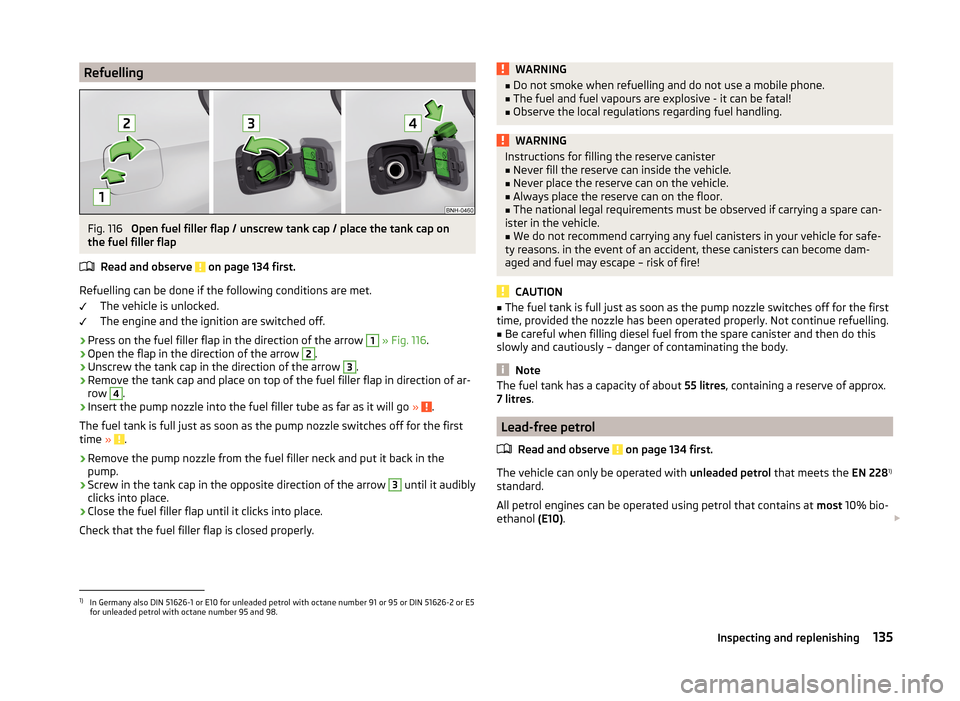
RefuellingFig. 116
Open fuel filler flap / unscrew tank cap / place the tank cap on
the fuel filler flap
Read and observe
on page 134 first.
Refuelling can be done if the following conditions are met. The vehicle is unlocked.
The engine and the ignition are switched off.
›
Press on the fuel filler flap in the direction of the arrow
1
» Fig. 116 .
›
Open the flap in the direction of the arrow
2
.
›
Unscrew the tank cap in the direction of the arrow
3
.
›
Remove the tank cap and place on top of the fuel filler flap in direction of ar-
row
4
.
›
Insert the pump nozzle into the fuel filler tube as far as it will go » .
The fuel tank is full just as soon as the pump nozzle switches off for the first
time »
.
›
Remove the pump nozzle from the fuel filler neck and put it back in the
pump.
›
Screw in the tank cap in the opposite direction of the arrow
3
until it audibly
clicks into place.
›
Close the fuel filler flap until it clicks into place.
Check that the fuel filler flap is closed properly.
WARNING■ Do not smoke when refuelling and do not use a mobile phone.■The fuel and fuel vapours are explosive - it can be fatal!■
Observe the local regulations regarding fuel handling.
WARNINGInstructions for filling the reserve canister■Never fill the reserve can inside the vehicle.■
Never place the reserve can on the vehicle.
■
Always place the reserve can on the floor.
■
The national legal requirements must be observed if carrying a spare can-
ister in the vehicle.
■
We do not recommend carrying any fuel canisters in your vehicle for safe-
ty reasons. in the event of an accident, these canisters can become dam-
aged and fuel may escape – risk of fire!
CAUTION
■ The fuel tank is full just as soon as the pump nozzle switches off for the first
time, provided the nozzle has been operated properly. Not continue refuelling.■
Be careful when filling diesel fuel from the spare canister and then do this
slowly and cautiously – danger of contaminating the body.
Note
The fuel tank has a capacity of about 55 litres, containing a reserve of approx.
7 litres .
Lead-free petrol
Read and observe
on page 134 first.
The vehicle can only be operated with unleaded petrol that meets the EN 2281)
standard.
All petrol engines can be operated using petrol that contains at most 10% bio-
ethanol (E10).
1)
In Germany also DIN 51626-1 or E10 for unleaded petrol with octane number 91 or 95 or DIN 51626-2 or E5
for unleaded petrol with octane number 95 and 98.
135Inspecting and replenishing
Page 173 of 200

Assignment of the fuses in the dash panelFig. 150
Schematic representation of the fuse box for vehicles with left-
hand steering/right-hand steering
Read and observe
and on page 169 first.
No.Power consumer1S-contact2START - STOP3Instrument cluster, headlight range adjustment, telephone, oil level
sensor, diagnostic port, dimmable interior rear-view mirror4Control unit for ABS/ESC, steering angle sensor strip with switches5Petrol engine: Speed regulating system6Reversing light (manual gearbox)7Ignition, engine control unit, automatic gearbox8Brake pedal switch, clutch switch, engine cooling fan9Operating controls for the heating, electronic control unit for air con-
ditioning system, park distance control, window lift, engine cooling
fan, heated washer nozzles10DC-DC converter11Mirror adjustment12Control unit for trailer detection13Electronic control unit for automatic gearbox, selector lever of the
automatic gearbox14Headlight range control15Not assignedNo.Power consumer16Power steering, speed sensor, engine control unit, control unit for
fuel pump17Daytime running lights/radio for vehicles with START-STOP18Mirror heater19Ignition lock input20Engine control unit, electronic control unit for fuel pump, fuel pump21Reversing lamp (automatic gearbox), fog lights with the function
CORNER
22
Operating controls for the heating, electronic control unit for air con-
ditioning system, telephone, instrument cluster, steering angle
sender, multi-function steering wheel, ignition key removal lock, di-
agnostic port, rain sensor23Interior lighting, storage compartment and luggage compartment,
side lights24Central control unit25Light switch26Rear window wiper27Operating lever underneath the steering wheel28Petrol engine: Purge valve, PTC heater29Injection, coolant pump30Fuel pump, ignition system, cruise control31Lambda probe32High-pressure fuel pump, control valve for fuel pressure33Engine control unit34Engine control unit, vacuum pump35Switch illumination, number plate light, parking light36High beam, light switch37Rear fog light, DC-DC converter38Fog lights39Air blower for heating40Not assigned41Heated front seats42Rear window heater 170Do-it-yourself
Page 193 of 200

Manual air conditioningAir distribution control87
Operating elements88
Manual gear changing see gear changing
104
MAXI DOT See MAXI DOT display
46
MAXI DOT display46
Main menu46
Operation42
Settings47
Maximum permissible weights
177
Maximum speed181
MDI97
Mechanical windows57
open and close57
Media see radio / navigation system
4
MFD See multifunction display
43
Mirror Exterior mirror
68
Make-up65
Mobile phone90
Connecting to the hands-free system93
Modifications124
Modifications and technical alterations Airbags
126
Service125
Spoiler126
Multifunction display Functions
43
Information45
Memory44
Operation42
Multimedia96
Multimedia holder77
N
N1
84
Nameplate177
Navigation system4
Nets81
Notes for driving with tyre repaired162
Notes on using wheels148
O
oil information messages
36
Oil See Engine oil
141
oil pressure information messages
36
On-board computer See multifunction display
43
Operating weight178
Operation in winter Diesel fuel
136
Vehicle battery146
Original accessories125
Outside temperature45
Overview Engine compartment
139
Indicator lights34
P
Parking
103
Parking aid110
Parking aid110
Function111
Parking light58
Parking space103
Parking vehicle Parking
103
Part replacement124
Passive safety Before setting off8
Driving safety8
Safety equipment8
Passive Safety8
Payload178
Pedals104
Footmats104
Petrol see fuel
135
Plastic parts129
Pockets on the front seat rests80
Polishing vehicle paint work see vehicle care
129
Power outlet 12 V
76
Power steering Warning light
37
Power windows55
Practical equipment 12-Volt power outlet
76
Net pockets on the front seat rests80
Reflective Vest154
Practical features Storage pockets on the front seats
79
Waste container77
Puncture set160
R
Radiator fan
139
Radio4
Raise vehicle159
Rear interior light
64
Rear fog light61
Warning light38
Rear mirror66
Exterior mirror68
Interior mirror67
190Index
Page 195 of 200

Storage compartmentGlasses compartment78
in the boot83
in the centre console74
in the front arm rest78
on the front passenger side78
Storage compartments73
Storage pockets on the front seats79
Stowage compartments in the doors
74
Sun visors65
Switching off the engine101
Switch light on/off58
Switch off ignition101
Switch on ignition101
T
Taking care of your vehicle Automatic car wash system
128
High-pressure cleaner128
Washing by hand127
Wash system128
TCS Operation
109
Technical data177
Telephone90
Tiptronic106
Tools155
TOP TETHER26
Towing164
Towing a trailer122
Towing device Description
116
Operation and maintenance131
Towing eye Front
165
Rear165
Towing protection54
Traction Control System (TCS)109
Trailer121
13-pin socket121
connection and disconnection121
Loading122
Safety eye121
Towing a trailer122
Trailer operation116
Transport Luggage compartment
80
Roof rack84
Transporting73
Transporting children safely22
Triangle154
Turn signal60
Turn signal system Warning light
40
two-way radio systems90
Tyre Damage
150
Explanation of the labelling151
see wheels151
Tyre inflation pressure Warning light
40
Tyre load-bearing capacity See Wheels
151
Tyre pressure149
Tyre pressure monitoring115
Save tyre pressure values115
Tyre repair General notes
161
Preparations161
Pressure test162
Sealing and inflating the tyre162
Tyres148
new107
Tyre pressure149
Wear and tear149
Wear indicators150
Tyre size151
see wheels151
U
Under-body Vehicle care
131
Under-body protection131
Unlock Key
50
Unlocking Individual settings
52
Remote control50
Unlocking and locking49
USB97
Used vehicles Acceptance and recycling
127
Useful equipment Ashtray
76
Car park ticket holder74
Cigarette lighter75
Clothes hook79
Cup holders74
Glasses compartment78
Multimedia holder77
Storage compartment73
Using the information system42
Using the selector lever105
V
Vehicle battery Automatic load deactivation
147
charging146
Checking the battery electrolyte level146
Cover145
Operation in winter146
Replacing147
Safety instructions144
vehicle care chrome parts
129
Vehicle care Alcantara
133
Artificial leather133
192Index