2014 SKODA CITIGO warning
[x] Cancel search: warningPage 30 of 164

Using the system
Cockpit
OverviewDoor opening lever
41
Electric windows
44
Central locking system
43
Electric exterior mirror adjustment
54
Air outlet vent
71
Operating lever:
› Turn signal lights and main beam, headlight flasher
49
›Speed regulating system
87
Parking ticket holder
60
Steering wheel:
› With horn
› With driver’s front airbag
16
Instrument cluster: Instruments and warning lights
28
Operating lever:
› Multifunction display
30
›Windscreen wiper and wash system
52
Button for rear window heater
52
START-STOP button
88
Depending on equipment fitted:
› Operating controls for the heating
71
›Operating controls for the air conditioning system
71
Socket for the cradle for the Move & Funmultifunction device
73
Warning light for the deactivated front seat passenger airbag
18
Interior rear-view mirror
54
Button for hazard warning light system
50
Front passenger airbag
16
Bag holder
64
Storage compartment on the front passenger side
64
Air outlet vent
71
Power window in the front passenger door
44
Door opening lever
411234567891011121314151617181920212223Light switch48
Bonnet release lever
107
Regulator for headlamp beam adjustment for the headlights
48
Lever for adjusting the steering wheel
10
Ignition lock
77
Pedals
80
Regulator for left seat heating
57
Radio
Button for City Safe Drive system
90
Handbrake lever
79
Depending on equipment fitted:
› Gearshift lever (manual gearbox)
79
›Selector lever (automated gearbox)
81
Storage compartment
61
Regulator for right seat heating
57
Note
■
Cars with factory-fitted radio are supplied with separate instructions for op-
erating such equipment.■
The arrangement of the controls right-hand drive models may differ from the
layout shown in » Fig. 17. The symbols on the controls and switches are the
same as for left-hand drive models.
2425262728293031323334353627Cockpit
Page 31 of 164

Instruments and control lights
Instrument cluster
Introduction
This chapter contains information on the following subjects:
Overview
28
Speedometer
28
Fuel reserve display
29
Tachometer
29
Counter for distance driven
30
Service interval display
30
Gear recommendation
30
The instrument cluster gives the driver basic information such as the current
speed, engine speed, the state of some vehicle systems and the like.
WARNINGConcentrate fully at all times on your driving! As the driver you are fully re-
sponsible for road safety.
Overview
Fig. 18
Instrument cluster - Version 1
Fig. 19
Instrument cluster - Version 2
Read and observe
on page 28 first.
Speedometer » page 28
Display:
› with fuel gauge (only in the instrument cluster - version 2)
» page 29
› With counter for distance driven
» page 30
› With service interval display
» page 30
› With multifunction display
» page 30
› with outside temperature display
» page 32
The counter for the distance travelled button (trip) » page 30
Fuel gauge » page 29
Engine revolutions counter » page 29
Adjust button for the time » page 33
Speedometer
Read and observe
on page 28 first.
The speedometer displays the current speed.
12345628Using the system
Page 32 of 164
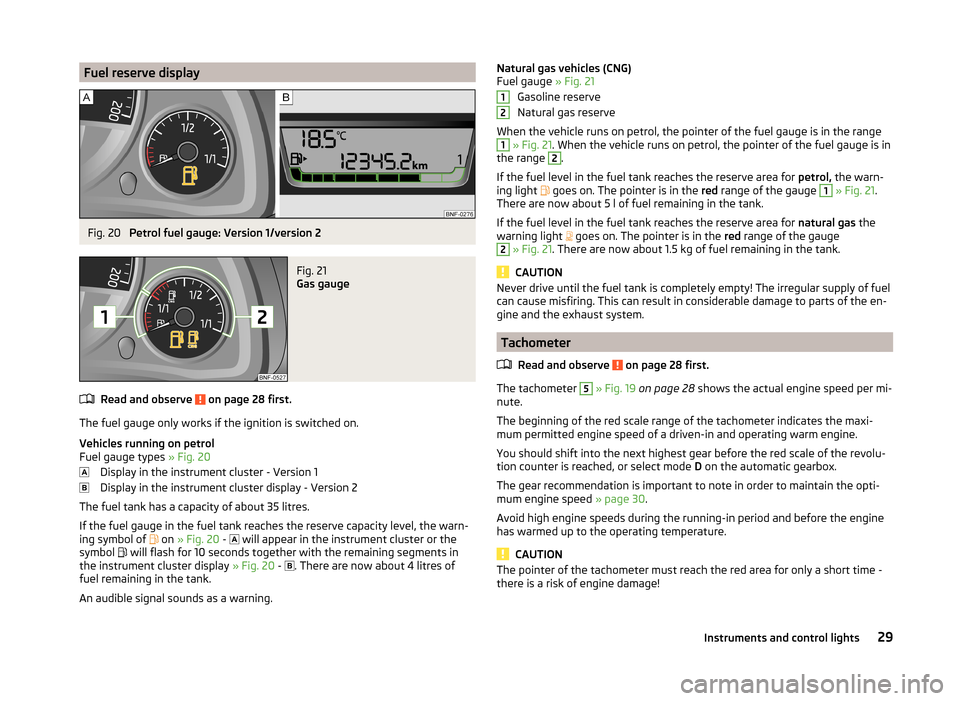
Fuel reserve displayFig. 20
Petrol fuel gauge: Version 1/version 2
Fig. 21
Gas gauge
Read and observe on page 28 first.
The fuel gauge only works if the ignition is switched on.
Vehicles running on petrol
Fuel gauge types » Fig. 20
Display in the instrument cluster - Version 1
Display in the instrument cluster display - Version 2
The fuel tank has a capacity of about 35 litres.
If the fuel gauge in the fuel tank reaches the reserve capacity level, the warn-
ing symbol of on
» Fig. 20 -
will appear in the instrument cluster or the
symbol will flash for 10 seconds together with the remaining segments in
the instrument cluster display » Fig. 20 -
. There are now about 4 litres of
fuel remaining in the tank.
An audible signal sounds as a warning.
Natural gas vehicles (CNG)
Fuel gauge » Fig. 21
Gasoline reserve
Natural gas reserve
When the vehicle runs on petrol, the pointer of the fuel gauge is in the range1
» Fig. 21 . When the vehicle runs on petrol, the pointer of the fuel gauge is in
the range
2
.
If the fuel level in the fuel tank reaches the reserve area for petrol, the warn-
ing light
goes on. The pointer is in the red range of the gauge
1
» Fig. 21 .
There are now about 5 l of fuel remaining in the tank.
If the fuel level in the fuel tank reaches the reserve area for natural gas the
warning light goes on. The pointer is in the
red range of the gauge
2
» Fig. 21 . There are now about 1.5 kg of fuel remaining in the tank.
CAUTION
Never drive until the fuel tank is completely empty! The irregular supply of fuel
can cause misfiring. This can result in considerable damage to parts of the en-
gine and the exhaust system.
Tachometer
Read and observe
on page 28 first.
The tachometer
5
» Fig. 19 on page 28 shows the actual engine speed per mi-
nute.
The beginning of the red scale range of the tachometer indicates the maxi-
mum permitted engine speed of a driven-in and operating warm engine.
You should shift into the next highest gear before the red scale of the revolu-
tion counter is reached, or select mode D on the automatic gearbox.
The gear recommendation is important to note in order to maintain the opti-
mum engine speed » page 30.
Avoid high engine speeds during the running-in period and before the engine
has warmed up to the operating temperature.
CAUTION
The pointer of the tachometer must reach the red area for only a short time -
there is a risk of engine damage!1229Instruments and control lights
Page 33 of 164

Counter for distance drivenRead and observe
on page 28 first.
To toggle between the odometer and the counter for the distance travelled(trip), briefly press the button
3
» Fig. 18 on page 28 or » Fig. 19 on page 28 .
Counter for distance travelled (trip)
The daily trip counter shows the distance driven since the time the counter
was last reset - in steps of 0.1 km.
Reset counter for distance travelled (trip)
›
Press and hold the
3
» Fig. 18 on page 28 or » Fig. 19 on page 28 button.
Odometer
The odometer indicates the total distance which the vehicle has been driven.
Service interval display
Read and observe
on page 28 first.
The service interval display shows the mileage to the next service event.
Before the next service interval has been reached, the message
appears in
the instrument cluster display for some seconds and the remaining kilometres
are shown after switching on the ignition.
If the time of the service has been reached, an acoustic signal will sound and the message
appears for a few seconds after switching on the ignition.
The information regarding the service intervals can be found in the service
schedule.
Note
Information is retained in the Service Interval Display even after the vehicle
battery is disconnected.
Gear recommendation
Read and observe
on page 28 first.
An information for the engaged gear is shown in the display of the instrument
cluster.
The function of the gear recommendation is to help reduce fuel consumption.
ShowImportanceOptimal gear engaged.Recommendation that you shift to a higher gear.Recommendation that you shift to a lower gear.
Recommended gear
The gear recommendation is intended only for vehicles with a manual trans-
mission or for vehicles with an automatic transmission in manual shift mode
(Tiptronic).
On vehicles with a manual transmission in the display, the recommended gear
and the respective arrow symbol is displayed.
For vehicles with automated manual transmission mode for manual shifting
(Tiptronic), the currently engaged gear and the respective arrow symbol is
shown in the display.
WARNINGThe driver is always responsible for selecting the correct gear in different
driving situations, such as overtaking.
For the sake of the environment
A suitably selected gear has the following advantages.■It helps to reduce fuel consumption.■
It reduces the operating noise.
■
It protects the environment.
■
It benefits the durability and reliability of the engine.
Multi-function display (MFD)
Introduction
This chapter contains information on the following subjects:
Operation
31
Memory
31
Multifunction display details
32
Warning at excessive speeds
33
33
30Using the system
Page 34 of 164

The driving data is displayed on the multifunction display.
The multifunction display only operates if the ignition is switched on. After the ignition is switched on, the function that was last selected before switching
off the ignition is displayed.WARNING■ Concentrate fully at all times on your driving! As the driver you are fully
responsible for the operation of your vehicle.■
Even at temperatures of around +4 °C, black ice may still be on the road
surface! You should therefore not only rely on the outside temperature dis-
play for accurate information as to whether there is ice on the road.
Note
In certain national versions the displays appear in the Imperial system of
measures.
Operation
Fig. 22
Buttons on the control lever
Read and observe on page 31 first.
Some features of the multi-function display can be operated with the buttons
on the control lever » Fig. 22.
Operation description
ButtonActionOperationABriefly push up or downSelect data / set data valuesBPress brieflyView information / confirm specificationMemoryFig. 23
Multi-function display - Display
example of the memory
Read and observe on page 31 first.
The multifunction display is equipped with two automatic memories, 1 and 2.
The display of the selected memory is displayed at the position indicated by
the arrow » Fig. 23.
Single-trip memory
Total trip memory
Select memory
›
Select the corresponding element of the multifunction display » page 32,
Multifunction display details .
›
Confirm details again to select the desired memory.
Reset memory
›
Select the corresponding element of the multifunction display » page 32,
Multifunction display details .
›
Select the desired memory.
›
Press and hold to confirm the selected memory.
The following values of the selected memory are set to zero. › Average fuel consumption.
› Distance driven.
› Average speed.
› Driving time.
Single-trip memory (memory 1)
The single-trip memory collates the driving information from the moment the
ignition is switched on until it is switched off.
New data will also flow into the calculation of the current driving information if
the trip is continued within 2 hours after switching off the ignition.
31Instruments and control lights
Page 35 of 164

If the trip is interrupted for more than 2 hours, the memory is automatically
erased.
Total-trip memory (memory 2)
The total distance driven memory gathers data from any number of individual
journeys up to a total of 19 hours and 59 minutes driving or 1,999 kilometres
driven.
The memory is deleted when either of these limits is reached and the calcula-
tion starts all over again.
Unlike the single-trip memory, the total-trip memory is not deleted after a pe-
riod of interruption of driving of 2 hours.
Note
Disconnecting the vehicle battery will delete all memory data.
Multifunction display details
Read and observe
on page 31 first.
Outside temperature
The current outside temperature is displayed.
If the outside temperature drops below +4 °C, the temperature indicator ap-
pears and a snow flake symbol (display for low temperature) flashes for a
few seconds, then remains displayed together with the outside temperature.
Driving time
The time travelled since the memory was last erased is displayed.
If you want to measure the time travelled from a particular moment in time on,
at this moment, reset the memory by setting the button to zero » page 31,
Memory .
The maximum distance indicated in both memories is 19 hours and 59 minutes.
The indicator is set back to zero if this period is exceeded.
Current fuel consumption
The current fuel consumption level is displayed in litres/100 km 1)
. You can use
this information to adapt your driving style to the desired fuel consumption.
The display appears in litres/hour if the vehicle is stationary or driving at a low
speed 2)
.
Average fuel consumption
The average fuel consumption since the memory was last erased is displayed
in litres/100 km 1)
.
If you wish to determine the average fuel consumption over a certain period of
time, you must set the memory at the start of the new measurement to
zero » page 31 . After erasing the memory, no value is displayed until you have
driven approx. 300 m.
The display is updated regularly while you are driving.
Range
The range indicates the distance you can still drive with your vehicle based on
the level of fuel in the tank and the same style of driving as before.
The display is shown in steps of 10 km. After the warning light for the fuel re-
serve » page 29 , Fuel reserve display illuminates, the display is shown in steps
of 5 km.
The fuel consumption over the last 50 km is used to calculate the information.
The range will increase if you drive in a more economical manner.
Distance travelled
The distance travelled since the memory was last erased is displayed.
If you want to measure the distance travelled from a particular moment in time
on, at this moment, reset the memory by setting the button to zero » page 31,
Memory .
The maximum distance indicated in both memories is 1 999 km. The indicator is
set back to zero if this period is exceeded.
Average speed
The average speed since the memory was last erased is displayed in km/hour .
To determine the average speed over a certain period of time, set the memory
to zero at the start of the measurement » page 31, Memory .
After erasing this data, no value appears in the display until you have driven
approx. 300 m. 1)
On some models in certain countries, the display appears in kilometres/litre.
2)
On some models in certain countries, the display appears in --,- kilometres/litres if the vehicle is station-
ary.
32Using the system
Page 36 of 164

The display is updated regularly while you are driving.
Current driving speed
The current speed, which is identical to the display of the speedometer1
» Fig. 19 on page 28 is displayed.
Coolant temperature
The current coolant temperature is displayed.
Warning against excessive speeds
Set the speed limit, for example, for the maximum permissible speed in
town » page 33 , Warning at excessive speeds .
Warning at excessive speeds
Read and observe
on page 31 first.
Adjust the speed limit while the vehicle is stationary
›
Select the menu item (warning when limit is exceeded).
›
Activate the speed limit option by confirming this menu item (the value flash-
es).
›
Set the desired speed limit, e.g. 50 km/h.
›
Store the speed limit by confirming the set value, or wait several seconds;
your settings will be saved automatically.
This allows you to set the speed in 5 km/h intervals.
Adjusting the speed limit while the vehicle is moving
›
Select the menu item (warning when limit is exceeded).
›
Drive at the desired speed, e.g. 50 km/h.
›
Confirm the current speed as the speed limit.
If you wish to adjust the set speed limit, you can do so in 5 km/h intervals (e.g.
the accepted speed of 47 km/h increases to 50 km/h or decreases to 45 km/h).
›
Store the speed limit, or wait several seconds; your settings will be saved au-
tomatically.
Change or disable speed limit
›
Select the menu item (warning when limit is exceeded).
›
By confirming the stored value, the speed limit is disabled.
›
By reconfirming, the option to change the speed limit is activated.
If the set speed limit is exceeded, an audible signal will sound as a warning. At
the same time the message (warning against excessive speed) appears on
the display with the set limit value.
The set driving mode remains stored even after switching the ignition on and
off.
Read and observe on page 31 first.
The time is set as follows.
›
Select the time display on the instrument cluster » page 31, Operation .
›
Press the button
6
» Fig. 19 on page 28 and keep it pressed down until the
time display appears.
›
Press button
3
to change the value. For quick value change, hold down the
button.
›
Press button
6
to select the minutes display until it flashes.
›
Press button
3
to change the value. For quick value change, hold down the
button.
›
Confirm the set value by pressing the button
6
again, or wait for around 5
seconds. The setting is saved automatically (the value stops flashing).
Warning lights
Introduction
This chapter contains information on the following subjects:
Handbrake
34
Braking system
34
Seat belt warning light
34
Alternator
34
Engine oil
35
Coolant
35
Automated transmission
35
Power steering
36
Electronic Stability Control (ESC)
36
Traction Control System (TCS)
36
Antilock brake system (ABS)
37
Tyre pressure
37
Rear fog light
37
Exhaust inspection system
37
Engine performance check
38
Airbag system
38
33Instruments and control lights
Page 37 of 164

Handbrake - automatic transmission38 Brake pedal (automatic transmission)38
Turn signal system
38
Cruise control system
38
Main beam
38
/ Safety belt (belt status display) - rear seat
38
City Safe Drive
39
/
START-STOP
39
The warning lights indicate certain functions or faults.
The lighting up of some warning lights may be accompanied by acoustic sig-
nals.
After switching on the ignition, some warning lights light up briefly as a func-
tion test.
If the tested systems are OK, the corresponding warning lights extinguishes
for a few seconds after switching on the ignition or after starting the engine.
WARNING■ Ignoring light-up indicator lamps in the instrument cluster and the control
symbols in the display may cause serious injury or damage to the vehicle.■
If you have to stop for technical reasons, then park the vehicle at a safe
distance from the traffic, switch off the engine and activate the hazard
warning light system » page 50. The warning triangle is set up at the pre-
scribed distance - observe the national legal provisions when doing so.
■
The engine compartment of your car is a hazardous area. The following
warning instructions must be followed at all times when working in the en-
gine compartment » page 107, Engine compartment .
Handbrake
Read and observe
on page 34 first.
The warning light
illuminates if the handbrake is applied. An audible warn-
ing is also given if you drive the vehicle for at least 3 seconds at a speed of
more than 6 km/h.
Braking system
Read and observe
on page 34 first.
The indicator light
illuminates if the brake fluid level in the braking system
is too low or there is a fault in the ABS.
›
Stop the vehicle, switch off the engine, and check the level of the brake flu-
id » page 113 » .
WARNING■
If the warning light illuminates together with the warning light
» page 37 , Antilock brake system (ABS) , stop driving! Seek help
from a specialist garage.■
A fault to the ABS system or the braking system can increase the vehi-
cle's braking distance – risk of accident!
Seat belt warning light
Read and observe
on page 34 first.
The warning light
illuminates as a reminder for the driver and front passen-
ger to fasten seat belts.
The indicator light
goes off after the respective seat belt has been fastened.
If the driver or front passenger has not fastened their seat belt and the vehicle
speed is more than 20 km/h, the warning light
flashes and you will hear an
acoustic signal.
The warning signal is switched off and the indicator light is
permanently il-
luminated if the driver and front passenger have not fastened their seat belts
within the next 90 seconds.
Further information » page 11, Seat belts .
Alternator
Read and observe
on page 34 first.
The warning light
illuminates when the engine is running but the vehicle
battery is not charging.
Seek assistance from a specialist garage immediately.
34Using the system