2014 Seat Mii ECU
[x] Cancel search: ECUPage 80 of 219
Operation
●
Avoid brusque manoeuvres and sudden
braking.
● Adjust your speed and driving style to visi-
bility, road, traffic and weather conditions. CAUTION
● Always remove the roof carrier system from
the roof before entering a car wash.
● The height of your vehicle is changed by
the installation of the roof carrier and the
load secured on it. Compare the vehicle
height with the passage height, for example
in underground car parks or for garage doors.
● The roof antenna and the range of the rear
lid should not be affected by the roof carrier
system or the load being transported.
● Take extra care not to let the hatch strike
the roof load when opening. For the sake of the environment
The vehicle uses more fuel when the roof car-
rier system is fitted. Securing the base supports and roof
carrier system
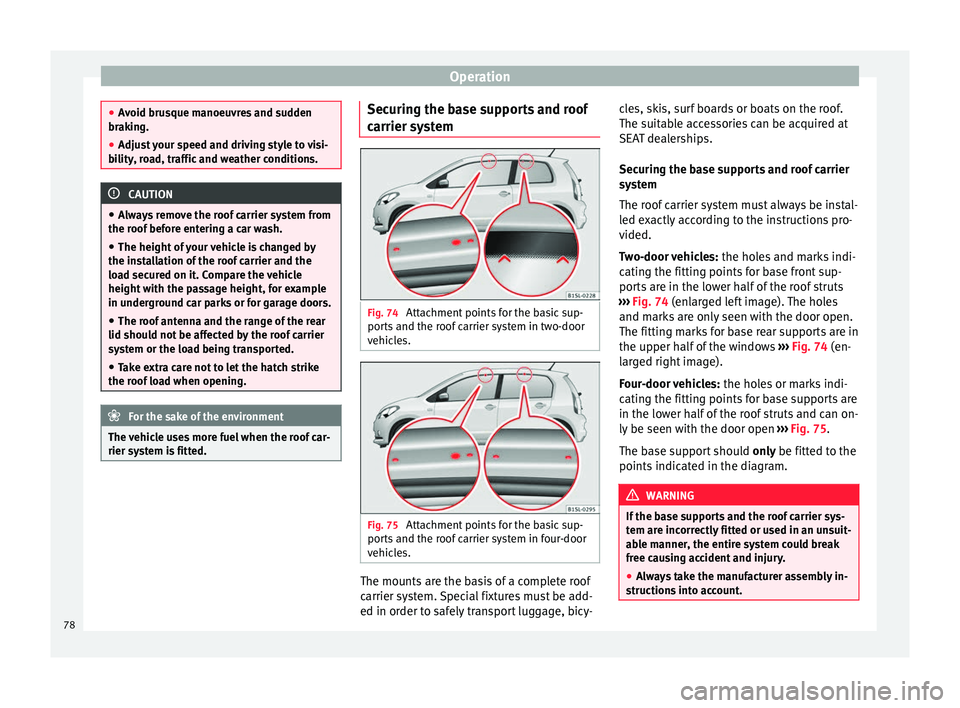
Fig. 74
Attachment points for the basic sup-
ports and the roof carrier system in two-door
vehicles. Fig. 75
Attachment points for the basic sup-
ports and the roof carrier system in four-door
vehicles. The mounts are the basis of a complete roof
carrier system. Special fixtures must be add-
ed in order to safely transport luggage, bicy-cles, skis, surf boards or boats on the roof.
The suitable accessories can be acquired at
SEAT dealerships.
Securing the base supports and roof carrier
system
The roof carrier system must always be instal-
led exactly according to the instructions pro-
vided.
Two-door vehicles:
the holes and marks indi-
cating the fitting points for base front sup-
ports are in the lower half of the roof struts
››› Fig. 74
(enlarged left image). The holes
and m ark
s are only seen with the door open.
The fitting marks for base rear supports are in
the upper half of the windows ››› Fig. 74
(en-
larged right image).
Four-door vehicles: the holes or marks indi-
cating the fitting points for base supports are
in the lower half of the roof struts and can on-
ly be seen with the door open ››› Fig. 75.
The ba
se support should only
be fitted to the
points indicated in the diagram. WARNING
If the base supports and the roof carrier sys-
tem are incorrectly fitted or used in an unsuit-
able manner, the entire system could break
free causing accident and injury.
● Always take the manufacturer assembly in-
structions into account. 78
Page 81 of 219

Transport and practical equipment
●
Only use base supports and roof carrier
systems that are not damaged and are cor-
rectly fitted.
● The base support should only be fitted to
the points indicated in the diagram ››› Fig. 74.
● Sec ur
e the base supports and roof carrier
system correctly.
● Check the screws and attachments before
driving and after a short distance. During
each long journey, check the attachments
during every break.
● Always fit the roof carrier system correctly
for wheels, skis and surfboards, etc.
● Never modify or repair the basic supports
or roof carrier system. Note
Read and take into account the instructions
included with the roof carrier system fitted
and keep them in the vehicle. Loading the roof carrier system
Loads can only be correctly secured when the
roof carrier system is correctly fitted
››› .
Maximum authorised roof load
The maximum authorised roof load is 50 kg.
The r oof
load includes the weight of the base
support, the roof carrier system and the load
being transported ››› .Always check the weight of the base support,
the roof carrier system and the weight of the
load to be transported and, if necessary,
weigh them. Never exceed the maximum au-
thorised roof load.
If you are using a roof carrier with a lower
weight rating, you cannot transport the maxi-
mum roof load. Do not exceed the maximum
weight limit for the roof carrier given in the
fitting instructions.
Distributing a load
Uniformly distribute loads and secure them
correctly
››› .
Check attachments
After fitting the base supports and the roof
carrier system, always check the attachments
after a short trip and at regular intervals. WARNING
Exceeding the maximum authorised roof load
can result in accidents and/or vehicle dam-
age.
● Never surpass the maximum authorised
weight for the roof, the maximum authorised
weight on the axles and the total maximum
authorised weight of the vehicle.
● Never exceed the capacity of the roof carri-
er system even if this is less than the maxi-
mum authorised roof load. ●
Secure heavy items as far forward as possi-
ble and distribute the vehicle load uniformly. WARNING
Loose and incorrectly secured loads can fall
from the roof carrier system causing acci-
dents and injury.
● Always use suitable ropes and straps in
good condition.
● Always secure loads correctly. 79
Technical specifications
Advice
Operation
Safety
Page 107 of 219

Driver assistance systems
and serious injury to the driver and passen-
gers.
●
Adjust your speed and driving style to visi-
bility, road, traffic and weather conditions.
Even though the brake assist systems, ABS,
BAS, EDL, ASR and ESC* provide more securi-
ty, do not take unnecessary risks while driv-
ing.
● Brake assist systems can not overcome the
laws of physics. Even with ESC* and other
systems, slippery and wet roads will always
be dangerous.
● Driving to quickly on wet ground can result
in the wheels losing contact with the ground
in an effect known as “aquaplaning”. Without
adherence, it is impossible to brake, steer or
control the vehicle.
● Brake assist systems cannot avoid acci-
dents if, for example, the driver does not re-
spect safety distances or drives to quickly in
difficult conditions.
● Even though brake assist systems are ex-
tremely effective and help control the vehicle
in difficult situations, remember that the ve-
hicle stability depends on tyre grip.
● When accelerating on a slippery surface,
for example on ice or snow, press the acceler-
ator carefully. The wheels can still slip even
with brake assist systems resulting in loss of
vehicle control. WARNING
The effectiveness of the ESC* can be consid-
erably reduced if other components and sys-
tems affecting driving dynamics are not main-
tained or are not functioning correctly. This
includes, among others, brakes, tyres and
other systems already mentioned.
● Remember that changing and fitting other
components to the vehicle can affect opera-
tion of the ABS, BAS, ASR TC, EDL and ESC*.
● Changes to the vehicle suspension or using
unapproved wheel/tyre combinations can af-
fect operation of the ABS, BAS, ASR, TC, EDL
and ESC* and their effectiveness.
● Likewise, the effectiveness of ESC* de-
pends on the use of suitable tyres
››› page 158. Note
● To ensure that the ESC*, ASR and TC work
properly, all four wheels must be fitted with
identical tyres. Any differences in the rolling
radius of the tyres can cause the system to
reduce engine power when this is not de-
sired.
● If a malfunction should occur in the ABS,
the ESC*, ASR, TC and EDL will also be affec-
ted.
● Noises may be heard while any of the
above systems are operating. Parking sensor system*
Introduction The parking sensor system assists the driver
when parking. If the rear of the vehicle is ap-
proaching an obstacle, an intermittent audi-
ble warning is emitted. The shorter the dis-
tance, the shorter the intervals between
tones. If the vehicle is too close to the obsta-
cle, the audible warning becomes constant.
If you continue to approach an obstacle when
the sound is continuous, this means the sys-
tem can no longer measure the distance.
Sensors situated on the rear bumper transmit
and receive ultrasound. Using the ultrasound
signal (transmission, reflection from the ob-
stacles and reception), this system continu-
ously calculates the distance between the
bumper and the obstacle.
WARNING
The parking distance warning system cannot
replace the driver's assessment of the situa-
tion.
● The sensors have blind spots in which ob-
stacles and people are not registered.
● Always observe the area around the vehi-
cle, as the sensors do not always detect
small children, animals or objects. » 105Technical specifications
Advice
Operation
Safety
Page 123 of 219

Care and maintenance
Check first with a specialised workshop that
understands the technical possibilities of in-
stallation if you wish to use a two-way radio
with a transmitting power of over 10 watts.
SEAT recommends taking your car in for tech-
nical service.
All legal requirements, together with the in-
structions for the use of two-way radios must
be observed. WARNING
If the two-way radio is not securely fastened
in position, it could be sent flying around the
vehicle in the event of sharp braking, sudden
manoeuvres or accident, causing injury.
● While driving, two-way radios must be se-
curely fastened in position, outside the air-
bags deployment zones, or safely stowed
away. WARNING
When using a two-way radio without a con-
nection to an exterior aerial, the maximum
permitted levels of electromagnetic radiation
may be exceeded. This is also the case if the
aerial has not been correctly installed.
● You should only use a two-way radio inside
the vehicle if it has first been correctly con-
nected to an exterior aerial. Information stored by the control
units
Your vehicle is fitted at the factory with a ser-
ies of electronic control units responsible for
the engine and gearbox management. In ad-
dition, the control units supervise the per-
formance of the exhaust gas system and the
airbag systems.
Therefore, while the vehicle is being driven,
these electronic control units are continuous-
ly analysing the vehicle data. In the event of
faults or deviations from the theoretical val-
ues, only this data is stored. Normally, the
warning lamps on the instrument panel light
up in the event of faults.
This data can only be read and analysed us-
ing special equipment.
The storing of the data allows specialised
workshops to detect and repair faults. Stored
data may include:
● Data relating to the engine or the gearbox
● Speed
● Direction of travel
● Braking force
● Detection of seat belt
The vehicle control units never record conver-
sations held by passengers in the vehicle.
In vehicles equipped with an emergency call
function via the mobile phone or other appli- ances connected in the vehicle, it is possible
to send the vehicle position. If the control
unit records an accident with airbag activa-
tion, the system may automatically send a
signal. This will depend on the network oper-
ator. Normally, transmission is only possible
in areas with good coverage.
Event Data Recorder
The vehicle is
not
fitted with an event data re-
c or
der.
An event data recorder temporarily stores the
vehicle information. Therefore, in the event of
an accident, it is possible to obtain detailed
information about how the accident occur-
red. Vehicles with airbag systems can store
data relating to impact speed, seat belt sta-
tus, seat positions and airbag activation
times may be stored, etc. The volume of data
depends on the manufacturer.
Event data recorders can only be mounted
with authorisation from the vehicle owner
and, in some countries, they are governed by
local legislation.
Reprogramming control units
On the whole, all the data required for the
component management is stored in the con-
trol units. The programming of certain con-
venience functions, such as the turn signals,
individual door opening and instructions on
the display can be modified using special »
121
Technical specifications
Advice
Operation
Safety
Page 124 of 219

Advice
equipment at the workshop. If the comfort
functions are reprogrammed, the information
and Instruction Manual descriptions will not
coincide with the modified functions. There-
fore, SEAT recommends that any modifica-
tions be recorded in the section “Other work-
shop notes” in the Maintenance Programme.
The SEAT Official Service must have a record
of any modification to the programming.
Reading the vehicle fault memory
There is a diagnostics connector in the vehi-
cle interior for reading the vehicle fault mem-
ory. The fault memory documents errors and
deviations from the theoretical values of the
electronic control units.
The diagnostics connector is in the driver
side footwell area, next to the lever for open-
ing the bonnet, below a cover.
The fault memory should only be read and re-
set by a specialised workshop.
Using a mobile telephone in a vehicle
without connection to an exterior
aerial Mobile telephones transmit and receive radio
waves also called high-frequency energy,
both when in use and when on stand-by. Sci-
entific studies state that radio waves exceed-
ing certain values may be harmful to the hu- man body. International committees and au-
thorities have established limits and direc-
tives in order to ensure electromagnetic radi-
ation from mobile phones remains within cer-
tain limits that do not endanger health. Nev-
ertheless, there is no conclusive scientific
evidence that wireless telephones are totally
safe.
That is why some experts recommend moder-
ate use of the mobile telephone, and the ap-
pliance of measures to reduce radiation on
the human body.
When a mobile phone not connected to an
exterior aerial is used inside the vehicle, the
electromagnetic radiation may be greater
than if the mobile phone were connected to a
built-in aerial or to another exterior aerial.
If the vehicle is fitted with a suitable hands-
free device that allows the employment of
numerous additional mobile telephone func-
tions with compatible Bluetooth technolo-
gy
®
, it will comply with the legislation in
many countries which only permits the use of
mobile phones inside vehicles using a
hands-free device.
The hands-free system of the Portable Navi-
gation System (supplied by SEAT) has been
designed for use with conventional mobile
phones and phones with Bluetooth technolo-
gy ®
››› page 123 . Mobile telephones must be
p l
aced in a suitable telephone support or
stored safely in the vehicle. If a support is used for the telephone, it must be securely
fastened to the base plate. The mobile will be
secure on the instrument panel and always
within reach of the driver only by following
these procedures. Mobile telephone connec-
tion with an external aerial is carried out sub-
ject to the hands-free device, via the tele-
phone support or by the Bluetooth
®
connec-
tions present in the mobile telephone and
the vehicle.
If the mobile phone is connected to an aerial
incorporated into the vehicle or an exterior
aerial connected to the vehicle, it will help re-
duce the electromagnetic radiation transmit-
ted and the risk to human health. It will also
improve the quality of the connection.
If the phone is used inside the vehicle with-
out the hands-free system, it will not be se-
curely fastened and will not be connected to
the exterior aerial of the vehicle telephone.
Nor will the telephone charge if it is not on
the support. In addition, some calls may
break off and the quality of the connection
will be affected.
Mobile telephones should only be used in-
side the vehicle if they are connected to a
hands-free system. SEAT recommends using
an external aerial should you wish to use a
mobile telephone inside the vehicle.
Bluetooth ®
is a registered trademark of Blue-
tooth ®
SIG, Inc.
122
Page 125 of 219

Care and maintenance
WARNING
If the mobile phone is not securely fastened
in position, it could be sent flying around the
vehicle in the event of sharp braking, sudden
manoeuvres or accident, causing injury.
● While driving, the mobile telephone, other
equipment including telephone accessories
such as telephone supports, notepads and
navigators must be correctly secured, away
from the airbags deployment zones, or stored
in a safe place. WARNING
When using a mobile telephone or two-way
radio without connecting an external aerial,
the maximum permitted levels of electromag-
netic radiation in the vehicle may be excee-
ded, thus putting the driver and the rest of
the vehicle occupants in danger. This is also
the case if the aerial has not been correctly
installed.
● A minimum of 20 centimetres should be
kept between mobile phone aerials and artifi-
cial pacemakers, as mobile telephones may
affect the working of pacemakers.
● Do not keep mobile phones in breast pock-
ets directly above pacemakers.
● Immediately switch off the mobile tele-
phone if you suspect any interference with
pacemakers or other types of medical equip-
ment. SEAT Portable System*
Fig. 94
In the centre console: Remove the
navigator. Fig. 95
Remove the navigator holder The SEAT Portable System (supplied by SEAT)
allows for the use of other vehicle functions
such as additional applications
››› .The gradient and the angle of vision can be
set by moving the navigator to the required
position
››› Fig. 94
›
›› .
The Portable Navigation System Instruction
Manual can be observed directly on the
equipment.
Functions 1)
● Multifunction display (MFI) shown with ad-
ditional instruments ››› page 36.
● Operation of a factory-fitted radio and a
››› Booklet Radio system connected multime-
di a p
layer.
● Image display.
● Navigation.
● Hands-free system for mobile telephones
via Bluetooth.
● Door open.
● Optical parking system (OPS).
● Recommended gear and driving advice.
Observe the Instruction Manual in the
equipment
● Connect the Portable Navigation System.
● Press the button more on the screen.
● Press the Manual button.
»1)
subject to the vehicle
123
Technical specifications
Advice
Operation
Safety
Page 126 of 219

Advice
● Select the required chapter and press the
corresponding button.
Removing and fitting the navigator
● Securely support the navigator.
● Press the release button 1 until the device
is released from its holder.
● Take the navigator out and store it safely.
To fit the navigator, place it in the upper sup-
port and push the lower part inside the hold-
er until it engages with a click ››› .
Removing and fitting the navigator holder
● Press the holder release button ››› Fig. 95
(arrow).
● Remove the holder from the dash panel in
an upwards direction.
● If necessary, close the opening with the
corresponding cover.
In order to fit the holder, place it on the open-
ing from above and press in a downwards di-
rection until it engages with a click. ››› .
WARNING
Any distraction may lead to an accident, with
the risk of injury. Operating the navigator
could distract you from the traffic.
● Always stay alert and drive responsibly. ●
Select volume settings that allow you to
easily hear signals from outside the vehicle
at all times (e.g. emergency service sirens).
● Setting the volume too high may cause
damage to your hearing. This also applies if
the device is set to high volumes for a short
period. WARNING
Journey instructions and traffic signals
shown on the navigation system may differ to
the current traffic situation.
● Traffic signals and driving regulations take
precedence over journey instructions and in-
dications from the navigation system.
● Adjust your speed and driving style to visi-
bility, road, traffic and weather conditions. WARNING
If the navigator is not securely fastened in
position, it could be sent flying around the
vehicle in the event of sharp braking, sudden
manoeuvres or accident, causing injury.
● Fit the navigator housing safely on the cor-
responding opening on the dash panel.
● Always place the navigator securely in its
holder or store it in the vehicle. CAUTION
An unsuitable gradient and angle of vision
setting can damage the navigator. ●
When adjusting the navigation device,
move it with care and not beyond its limits. CAUTION
Excessively high or low outside temperatures
can affect the Portable Navigation System op-
eration or damage the device.
● Always take the Portable Navigation Sys-
tem with you when you leave the vehicle to
protect it from excessively high or low tem-
peratures and intense sunlight. CAUTION
Humidity can damage the Portable Naviga-
tion System connections on the dash panel.
● Do not clean the holder for the navigation
device with moist products. Use a dry cloth. Note
SEAT recommends taking the Portable Navi-
gation System with you when you leave the
vehicle to prevent it from being stolen. 124
Page 148 of 219

Advice
Fig. 106
C: Bonnet securing rod in the bon-
net. D: Bonnet supported by the bonnet se-
curing rod Opening the bonnet
● Before opening the bonnet, make sure that
the windscreen wiper arms are in place
against the windscreen ››› .
● Pull the release lever 1 in the direction of
the arrow ›››
Fig. 105
A. The bonnet is re- leased from the lock carrier by a spring mech-
anism
››› .
● Lift the bonnet up slightly while pressing
the release lever 2
B
in the direction of the
arr
ow to completely open the bonnet.
● Take out the bonnet support rod from its
clip in the direction of the arrow 3
C
and
p
lace it in the corresponding open position
4
D
(arrow).
C
losing the bonnet
● Slightly lift the bonnet ››› .
● Take out the bonnet support rod from the
opening catch 4
D
and insert it into its clip
3
C
in the opening catch.
● L
et the bonnet fall from a height of 30 cm
into its clip; Do not
apply pressure!
If the bonnet is not correctly closed, open it
once again and close it correctly.
The bonnet is correctly closed when it is flush
with the corresponding parts on the body-
work. WARNING
If the bonnet is not correctly closed, it could
suddenly open while driving leaving the driv-
er without visibility. This could result in a se-
rious accident.
● After closing the bonnet, always check that
it is properly secured by the locking mecha-
nism in the lock carrier piece. The bonnet must be flush with the surrounding body pan-
els.
●
While driving, if you notice that the bonnet
is not correctly closed then stop immediately
and close it correctly.
● Only open and close the bonnet when there
is nobody within its range. CAUTION
● To avoid damage to the bonnet and to the
windscreen wiper arms, only open it when
the windscreen wipers are in place against
the windscreen.
● Before driving, always lower the wiper
arms. Engine oil
Introduction WARNING
Incorrectly handling engine oil can cause in-
jury and serious burns.
● Always protect your eyes when handling
engine oil.
● Oil is toxic and must be kept out of the
reach of children.
● Engine oil should only be kept in its origi-
nal packaging; the same goes for used oil un-
til it is disposed of. 146