2014 Seat Mii lock
[x] Cancel search: lockPage 34 of 219

Safety
be used. Using auxiliary introduction ele-
ments facilitates installation and protects up-
holstery. Auxiliary introduction elements
form part of the supply volume of the child
seat or can be acquired at a SEAT dealership.
If necessary, auxiliary introduction elements
are inserted in both anchor points of the ve-
hicle ››› .
● Observe the manufacturer's instructions
when installing and removing the child seat
››› .
● Press the child seat onto the retaining rings
››› Fig. 21 in the direction of the arrow. The
c hi
ld seat must be safely engaged and click
audibly into place.
● Pull on both sides of the child seat to en-
sure that it is secure.
Child seat with adjustable retaining straps
● Observe the manufacturer's instructions
when installing and removing the child seat
››› .
● Place the child seat on the seat cushion
and attach the retaining strap hooks to the
retaining rings ››› Fig. 21 .
● Tight en the s
traps evenly using the corre-
sponding adjustment device. The child seat
must sit flush against the vehicle seat.
● Pull on both sides of the child seat to en-
sure that it is secure. WARNING
The lower anchor points for child seats do not
include rings. Only secure booster seats to
lower anchor points. CAUTION
● To avoid making permanent marks in the
padding, remove the auxiliary introduction
elements from the anchor points when the
child seat is not installed in the vehicle an-
chor points.
● To prevent damage being done to the up-
holstery, the padding or the auxiliary intro-
duction elements, always remove the auxili-
ary introduction elements from the anchor
points before folding the rear seat bench. Securing a child seat using a Top
Tether retaining strap
Fig. 22
Example of an upper retaining strap
connected. ●
Observe the manufacturer's instructions
when installing and removing the child seat
››› .
● Unlock the seat backrest and fold it gently
forward ››› page 64 .
● Remo
ve the head restraints situated be-
hind the child seat and store them safely in
the vehicle ››› page 6.
● Guide the upper r
etaining strap from of the
child seat back to the luggage compartment,
feeding it through the seat backrest and the
rear shelf.
● Fold back the seat backrest and push it
firmly into the lock.
● Secure the child seat to the lower anchor
points ››› page 31
32
Page 37 of 219
Cockpit
Operation
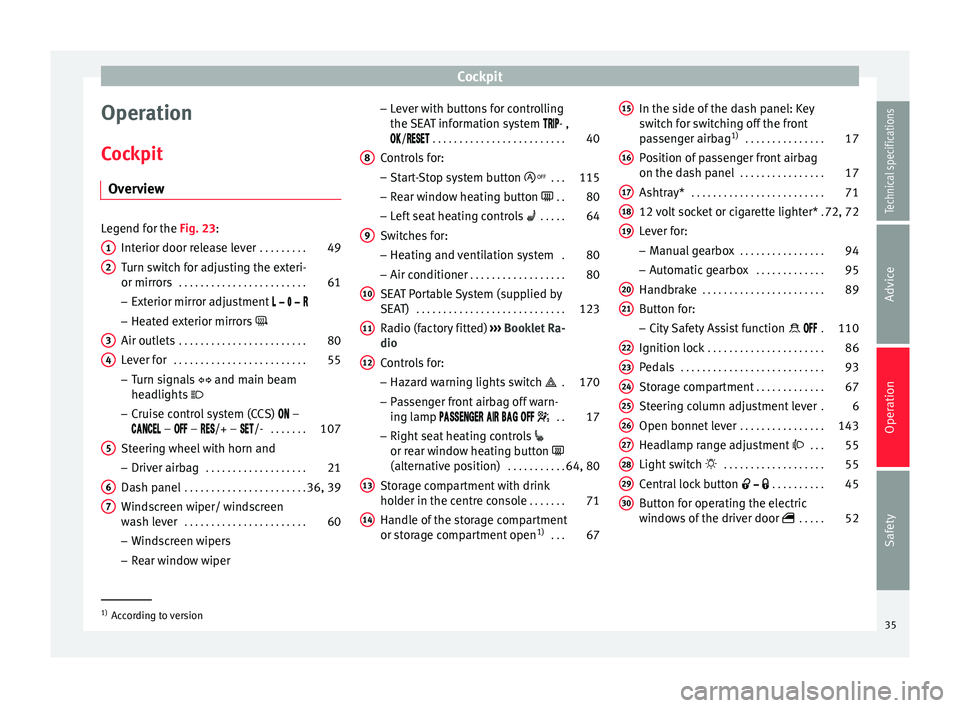
Cockpit Overview Legend for the Fig. 23
:
Int
erior door release lever . . . . . . . . .49
Turn switch for adjusting the exteri-
or mirrors . . . . . . . . . . . . . . . . . . . . . . . . 61
– Exterior mirror adjustment
– Heated exterior mirrors
Air outlets . . . . . . . . . . . . . . . . . . . . . . . . 80
Lever for . . . . . . . . . . . . . . . . . . . . . . . . . 55
– Turn signals and main beam
headlights
– Cruise control system (CCS) –
– – /+ – /- . . . . . . .107
Steering wheel with horn and
– Driver airbag . . . . . . . . . . . . . . . . . . . 21
Dash panel . . . . . . . . . . . . . . . . . . . . . . . 36, 39
Windscreen wiper/ windscreen
wash lever . . . . . . . . . . . . . . . . . . . . . . . 60
– Windscreen wipers
– Rear window wiper
1 2
3
4
5
6
7 –
Lever with buttons for controlling
the SEAT information system - ,
/
. . . . . . . . . . . . . . . . . . . . . . . . . 40
C ontr
ols for:
– Start-Stop system button . . .115
– Rear window heating button . .80
– Left seat heating controls . . . . . 64
Switches for: – Heating and ventilation system .80
– Air conditioner . . . . . . . . . . . . . . . . . . 80
SEAT Portable System (supplied by
SEAT) . . . . . . . . . . . . . . . . . . . . . . . . . . . . 123
Radio (factory fitted) ››› Booklet Ra-
dio
Controls for:
– Hazard warning lights switch . 170
– Passenger front airbag off warn-
ing lamp . .17
– Right seat heating controls
or rear window heating button
(alternative position) . . . . . . . . . . .64, 80
Storage compartment with drink
holder in the centre console . . . . . . .71
Handle of the storage compartment
or storage compartment open 1)
. . . 67
8 9
10
11
12
13
14 In the side of the dash panel: Key
switch for switching off the front
passenger airbag
1)
. . . . . . . . . . . . . . . 17
Position of passenger front airbag
on the dash panel . . . . . . . . . . . . . . . . 17
Ashtray* . . . . . . . . . . . . . . . . . . . . . . . . . 71
12 volt socket or cigarette lighter* .72, 72
Lever for:
– Manual gearbox . . . . . . . . . . . . . . . . 94
– Automatic gearbox . . . . . . . . . . . . .95
Handbrake . . . . . . . . . . . . . . . . . . . . . . . 89
Button for:
– City Safety Assist function . 110
Ignition lock . . . . . . . . . . . . . . . . . . . . . . 86
Pedals . . . . . . . . . . . . . . . . . . . . . . . . . . . 93
Storage compartment . . . . . . . . . . . . .67
Steering column adjustment lever .6
Open bonnet lever . . . . . . . . . . . . . . . . 143
Headlamp range adjustment . . . 55
Light switch . . . . . . . . . . . . . . . . . . . 55
Central lock button . . . . . . . . . .45
Button for operating the electric
windows of the driver door . . . . .52
15 16
17
18
19
20
21
22
23
24
25
26
27
28
29
30
1)
According to version
35
Technical specifications
Advice
Operation
Safety
Page 38 of 219

Operation
Instruments Detail of instrument panel Fig. 24
Instrument panel, on dash panel: var-
iant 1. Fig. 25
Instrument panel, on dash panel: var-
iant 2. Details of the instruments
››› Fig. 24 or
› ›
› Fig. 25: Speedomet er. Depending on the
vehicle in km/h or in mph.
Displays on the screen . . . . . . . . . . . . 37
Reset knob for trip recorder (trip).
– Pre
ss the button 0.0/SET
briefly
to
sw
itch the trip odometer and od-
ometer.
– Press the 0.0/SET
for 5 seconds
t
o
r
eset the odometer to zero and,
where necessary, other indicators
on the multifunction display. . . . .40
Fuel reserve display . . . . . . . . . . . . . . . 139
Rev counter (with the engine run-
ning, in thousands of revolutions
per minute).
The beginning of the red zone of
the rev counter indicates the maxi-
mum speed in any gear after run-
ning-in and with the engine hot.
However, it is advisable to change
up a gear or move the selector lever
to D (or lift your foot off the acceler-
at
or) before the needle reaches the
red zone ››› .
Clock set button .
– If necessary, change the time dis-
play by pressing the top and bot-
tom buttons of the rocker switch
››› Fig. 26 B .
– Press the button to change
the hour, so that it is flashing.
1 2
3
4
5
6 –
To continue setting the time,
press button 0.0/SET . Hold button
down to scroll through the num-
bers quickly.
– Press the button again to
change the minutes, so that it
flashes.
– To continue setting the time,
press button 0.0/SET . Hold button
down to scroll through the num-
bers quickly.
– Press button again to end the
clock setting. CAUTION
● When the engine is cold, avoid high revs
and heavy acceleration and do not make the
engine work hard.
● To prevent damage to the engine, the rev
counter needle should only remain in the red
zone for a short period of time. For the sake of the environment
Changing up a gear in time reduces fuel con-
sumption and noise. Note
On the screen of the SEAT Portable System
(supplied by SEAT) ››› page 123 other instru-
ment s
can be viewed, such as an outside tem-
perature gauge. 36
Page 45 of 219

Opening and closing
Opening and closing Vehicle key set Remote control vehicle key* Fig. 27
Remote control key Remote control key
With the vehicle key the vehicle may be
locked or unlocked remotely
››› page 45.
The vehicle key includes an emitter and bat-
tery. The receiver is in the interior of the vehi-
cle. The range of the vehicle key with remote
control and new battery is several metres
around the vehicle.
If it is not possible to open or close the vehi-
cle using the remote control key, this should
be re-synchronised ››› page 45 or the bat-
tery changed ››› page 44. Different keys belonging to the vehicle may
be used.
Folding the key shaft in and out
When the button is pressed
››› Fig. 27 A , the
key shaft is released and unfolds.
To fold it
press the button and fold the key
sh
aft in until it locks in place.
Replacing a key
To obtain a spare key and other vehicle keys,
the vehicle chassis number is required.
Each new key must contain a microchip and
be coded with the data from the vehicle elec-
tronic immobiliser. A vehicle key will not work
if it does not contain a microchip or the mi-
crochip has not been encoded. This is also
true for keys cut for the vehicle.
The vehicle keys or new spare keys can be
obtained from a SEAT dealership, a Special-
ised workshop or approved key service quali-
fied to create this kind of key.
New keys or spare keys must be synchron-
ised before use ››› page 45. WARNING
Careless or incorrect use of vehicle keys may
result in severe injury and accident.
● Always take all the keys with you whenever
you leave the vehicle. Children and unauthor-
ised individuals could lock the doors or the boot hatch, start the engine or turn on the ig-
nition, activating electrical systems, the elec-
tric windows, for example.
●
Never leave children or disabled people
alone in the car. They could be trapped in the
car in an emergency and will not be able to
get themselves to safety. For example, de-
pending on the time of the year, tempera-
tures inside a locked and closed vehicle can
be extremely high or extremely low resulting
in serious injuries and illness or even death,
particularly for young children.
● Never remove the key from the ignition if
the vehicle is in motion. The steering may
lock and it will not be possible to turn the
steering wheel. CAUTION
The remote control key contains electronic
components. Protect them from damage, im-
pacts and humidity. Note
● Only use the key button when you require
the corresponding function. Pushing the but-
ton unnecessarily could accidentally unlock
the vehicle or trigger the alarm. It is also pos-
sible even when you are outside the radius of
action.
● Remote control key operation can be great-
ly influenced by overlapping radio signals
around the vehicle working in the same range » 43Technical specifications
Advice
Operation
Safety
Page 46 of 219

Operation
of frequencies (for example, radio
transmitters, mobile telephones).
● Obstacles between the remote control and
the vehicle, bad weather conditions and
draining batteries can considerably reduce
the range of the remote control.
● If the buttons of the vehicle key are press-
ed ››› Fig. 27 or one of the central locking but-
t on
s ››› page 45 is pressed repeatedly in
quick
succession, the central locking briefly
disconnects as protection against overload-
ing. The vehicle is then unlocked. Lock it if necessary. Vehicle mechanical key
Fig. 28
Vehicle mechanical key The vehicle key set may include a mechanical
key
››› Fig. 28 . D
up
licate keys
To obtain a spare key and other vehicle keys,
the vehicle chassis number is required.
Each new key must contain a microchip and
be coded with the data from the vehicle elec-
tronic immobiliser. A vehicle key will not work
if it does not contain a microchip or the mi-
crochip has not been encoded. This is also
true for keys cut for the vehicle.
The vehicle keys or new spare keys can be
obtained from a SEAT dealership, a special-
ised workshop or an approved locksmith
qualified to create them.
Control lamp on the vehicle key Fig. 29
Control lamp on the vehicle key When a button on the vehicle key is pressed,
the control lamp flashes
››› Fig. 29 (arrow)
onc e briefly
. If the button is pressed and
held, the indicator blinks several times, for example: for the convenience opening func-
tion.
When the control lamp does not light upon
pushing a button, the vehicle key batteries
must be changed
››› page 44.
Changing the battery Fig. 30
Vehicle key: battery compartment cov-
er Fig. 31
Vehicle key: removing the battery44
Page 47 of 219

Opening and closing
SEAT recommend having the batteries
changed in a specialised workshop.
The battery is located to the rear of the vehi-
cle key, under a cover.
Changing the battery
● Unfold the vehicle key shaft ››› page 43.
● Remove the cover from the back of the ve-
hicle key ››› Fig. 30 in the direction of the ar-
r o
w ››› .
● Extract the battery from the compartment
using a suitable thin object ››› Fig. 31 .
● Plac
e the new battery in the compartment,
pressing in the direction of the arrow as
shown ››› Fig. 31 ››› .
● Fit the battery compartment cover, pressing
in the direction of the arrow as shown
››› Fig. 30 until it clicks into place. CAUTION
● If the battery is not changed correctly, the
vehicle key may be damaged.
● Use of unsuitable batteries may damage
the vehicle key. For this reason, always re-
place the dead battery with another of the
same voltage, size and specifications.
● When fitting the battery, check that the po-
larity is correct. For the sake of the environment
Please dispose of your used batteries correct-
ly and with respect for the environment. Synchronising the vehicle key
If the button
is pressed frequently outside
of the vehicle range, it is possible that the ve-
hicle can no longer be locked or unlocked us-
ing the key. In this case, the vehicle key must
be synchronised once more as follows:
● Unfold the vehicle key shaft ›››
page 43.
● Press the button on the vehicle key. For
this, it must remain with the vehicle.
● Open the vehicle within one minute using
the key shaft.
● Turn on the ignition using the vehicle key.
The key has been synchronised.
● If necessary, fit the cap.
Central locking* and locking
system Introduction Central locking functions correctly when all
the doors and the rear lid are correctly shut.If the driver door is open, the vehicle
cannot
be locked with the key.
The battery of an unlocked vehicle parked for
a long period (e.g. in a private garage) may
run down and fail to start the motor. WARNING
The incorrect use of the central locking sys-
tem may cause serious injuries.
● The central locking system will lock all
doors. A vehicle locked from the inside can
prevent any non-authorised individual from
opening the doors and accessing the vehicle.
Nevertheless, in case of emergency or acci-
dent, locked doors will complicate access to
the vehicle interior to help the passengers.
● Never leave children or disabled people
alone in the vehicle. The central locking but-
ton can be used to lock all the doors from
within. Therefore, passengers will be locked
inside the vehicle. Individuals locked in the
vehicle can be exposed to very high or very
low temperatures.
● Depending on the time of the year, temper-
atures inside a locked and closed vehicle can
be extremely high or extremely low resulting
in serious injuries and illness or even death,
particularly for young children.
● Never leave individuals locked in a closed
and locked vehicle. In case of emergency,
they may not be able to exit the vehicle by
themselves or get help. 45
Technical specifications
Advice
Operation
Safety
Page 48 of 219

Operation
Description of the central locking
system The central locking system allows all doors
and the rear lid to be locked and unlocked
centrally.
● From outside, using the vehicle key.
● From inside, by pushing the central locking
button ››› page 48.
The c entr
al locking system can be activated
or deactivated at a specialised workshop.
In case of a vehicle key fault or central lock-
ing system fault, all doors can be locked or
unlocked manually.
Locking the vehicle after the airbags have
been deployed
If the airbags are deployed due to an acci-
dent, the vehicle will be automatically and
completely unlocked. Depending on the
amount of damage, it can be locked follow-
ing an accident in the following ways:
FunctionNecessary operations
Lock the vehicle,
by pushing the
central locking
button:– Turn off the ignition and turn it on
again.
– Push the central locking button
.
FunctionNecessary operations
Use the key to lock the vehicle:– Turn off the ignition and turn it on
again.
OR: Remove the key from the igni-
tion.
– Open any door just once.
– Lock the vehicle with the key. Note
If the buttons of the vehicle key are pressed
››› page 43 or one of the central locking but-
t on
s ››› Fig. 34 is pressed repeatedly in short
suc
cession, the central locking briefly discon-
nects as protection against overloading. In
this case, the vehicle remains unlocked for
about 30 seconds. If neither the door or the
boot is opened during this time, the vehicle
will then automatically lock. Locking and unlocking the vehicle
from the exterior
Fig. 32
Buttons on the vehicle key Fig. 33
Vehicle mechanical key46
Page 49 of 219

Opening and closing
Central lockingFunctionHandling
the buttons
on the vehi-
cle ››› Fig. 32Handling the vehicle
key ››› Fig. 32 in the
lock cylinder or with
the vehicle mechani-
cal key ››› Fig. 33.
Unlocking
the vehi-
cle.Press button.Insert the vehicle key in-
to the lock cylinder of
the driver door and turn
the key in an anticlock-
wise direction.
Lock the
vehicle.Press button.Insert the vehicle key in-
to the lock cylinder of
the driver door and turn
the key in a clockwise
direction.
Unlocking
the rear lid.Press button.Insert the vehicle key in-
to the lock cylinder of
the driver door and turn
the key in an anticlock-
wise direction.
Locking
the rear lid.Press button.Insert the vehicle key in-
to the lock cylinder of
the driver door and turn
the key in a clockwise
direction. Please note:
depending on the operation of
the c entr
al locking feature set by a special-
ised workshop, in order to unlock all the
doors and the rear lid, press the button twice. The vehicle key only locks and unlocks the
vehicle if it is within range of the vehicle and
if the battery has enough power.
● Upon locking the vehicle, all turn signals
will flash once in confirmation.
● Upon u
nlocking the vehicle, all turn signals
will flash twice
in confirmation.
If the turn signals do not
flash in confirma-
tion, at least one of the doors or the rear lid
has been left unlocked.
If the driver door is open, the vehicle cannot
be locked with the key. If you unlock the vehi-
cle without opening any doors or the rear lid,
it will lock again automatically after a few
seconds. This function prevents the vehicle
from remaining unlocked if the unlocking
button is pressed by mistake.
Mechanical locking
FunctionUsing the vehicle's mechani-
cal key ››› Fig. 33 in the lock
cylinder
Locking the driv-
er door manually.
To unlock, insert the vehicle key in-
to the lock cylinder of the driver
door and turn the key in an anti-
clockwise direction.
To lock, insert the vehicle key into
the lock cylinder of the driver door
and turn the key in a clockwise di-
rection.
FunctionUsing the vehicle's mechani-
cal key ››› Fig. 33 in the lock
cylinder
Locking and un-
locking the rear
lid.
To unlock, insert the vehicle key in-
to the lock cylinder of the driver
door and turn the key in an anti-
clockwise direction.
To lock, insert the vehicle key into
the lock cylinder of the driver door
and turn the key in a clockwise di-
rection. If the driver's door is open, it cannot be
locked with the vehicle key.
47
Technical specifications
Advice
Operation
Safety