2014 Seat Ibiza ST engine
[x] Cancel search: enginePage 63 of 240

Dash panel
off after approximately 2 seconds. This is the
time taken for the function check.
This programme includes the ABS, EDL and
ASR. It also includes emergency braking as-
sistance (BAS).
The warning lamp
has the following
f
unctions:
● It flashes whilst driving when the ASR/ESC
is activated.
● It will light up if there is a fault in the ESC.
● As the ESC operates in conjunction with the
ABS, the ESC light will also come on if a fault
should occur in the ABS.
If the ESC control lamp lights up and stays
on after the engine is started, this may mean
that the control system has temporarily
switched off the ESC. In this case the ESC can
be reactivated by switching the ignition off
and then on again. If the control lamp goes
out, this means the system is fully functional.
The lamp provides information about the
disconnection status of the system:
● It stays lit when the ASR is disconnected
when pressing the switch. Brake system* Situations in which the warning lamp lights
up
● the br ak
e fluid level is too low
››› page 173.
● there i
s a fault in the brake system.
This warning lamp can light up together with
the ABS system warning lamp. WARNING
● If the brake warning lamp does not go out
or if it lights up when driving, the brake fluid
level in the reservoir is too low so there is a
risk of an accident ››› page 173, Brake fluid.
Stop the vehicle and do not drive on. Obtain
technical assistance.
● If the brake warning lamp lights up to-
gether with the ABS lamp this could be
due to an ABS fault. This could cause the rear
wheels to lock quickly when you brake. This
could cause the rear to break away. Risk of
skidding. Stop the vehicle and seek technical
assistance. Cruise speed (cruise control)*
The warning lamp comes on when the
cruise control system is switched on. For fur-
ther information on the cruise control system
please see
›››
page 150 . T
y
re pressure
Fig. 71
Centre console: tyre monitoring sys-
tem button. The tyre monitoring lamp* compares wheel
revolutions and with it, using the ESC, the
wheel diameter of each wheel. If the diame-
ter of a wheel changes, the tyre control lamp
lights up. The wheel diameter changes
when:
● Tyre pressure is insufficient.
● The tyre structure is damaged.
● The vehicle is unbalanced because of a
load.
● The wheels of one axle are under more
pressure (for example, driving with a trailer or
on steep slopes).
● The vehicle is fitted with snow chains.
● The temporary spare wheel is fitted.
● The wheel on one axle is changed. »
61
Technical specifications
Advice
Operation
Safety
The essentials
Page 64 of 240

Operation
Tyre pressure adjustment
On adjusting tyre pressure or changing one
or more wheels, the ››› Fig. 71 button must be
k ept
pressed down, with the ignition on, until
an acoustic signal is heard.
If the wheels are under excessive load (for ex-
ample, driving with a trailer or heavy load),
the tyre pressure must be increased to the
recommended value for a full load (see the
sticker on the inside of the fuel flap). If the
tyre monitor system button is pressed down,
the new tyre pressures are confirmed.
The tyre pressure control lamp lights up
If the tyre pressure of a wheel is much lower
than the value set by the driver, then the tyre
pressure control lamp ››› will light up.
WARNING
● When the tyre pressure control lamp lights
up, reduce speed immediately and avoid any
sudden turning or braking manoeuvre. Stop
when possible, and check the tyre pressure
and status.
● The driver is responsible for maintaining
correct tyre pressures. For this reason, tyre
pressure must be regularly checked.
● Under certain circumstances (e.g. when
driving in a sporty manner, in winter condi-
tions or on a dirt track) the tyre control lamp
may light up belatedly or may function incor-
rectly. Note
If the battery is disconnected, the yellow
warning lamp lights up after turning the
ignition on.
This should turn off after a brief
journey. Speed selector lever lock*
The brake pedal must be depressed when
this warning lamp lights up. This is necessary
when the automatic gearbox* selector lever
is moved out of the positions
P
or N
.
Fuel level/reserve It lights up when only 7 litres of fuel remain
in the tank, and an
acoustic signal*
al
so
sou
nds. It reminds you to fuel up the fuel
tank as soon as possible ›››
page 163.
Door open display* This warning lamp lights up if one of the
doors is open.
The warning light
should go off when all
the doors are closed correctly. Rear lid open* The warning lamp
should switch off when
the r
ear lid is fully closed.
Main beam headlights The warning lamp lights up when the main
beams are on or when the headlight flasher
is operated.
For further information see
››› page 93.
Electro-hydraulic steering* The level of steering assistance depends on
the vehicle speed and on the steering wheel
turning speed.
The warning lamp should light up for a few
seconds when the ignition is switched on. It
should go out once the engine is started.
There is a fault in the electro-hydraulic steer-
ing system if the lamp does not go out or
lights up whilst the vehicle is in motion. Take
the vehicle to technical services as soon as
possible.
62
Page 65 of 240

Dash panel
Note
When towing the vehicle with the engine
stopped or due to a fault in the power steer-
ing, this will not operate. The vehicle can still
be steered, but it will require greater force to
turn the steering wheel. Emission control system*
Control lamp
flashes:
When ther e i
s misfiring that can damage the
catalytic converter. Reduce speed and drive
carefully to the nearest specialised workshop
to have the engine checked.
The control lamp lights up:
If a fault has developed during driving which
has reduced the quality of the exhaust gas
(e.g. lambda probe fault). Reduce speed and
drive carefully to the nearest specialised
workshop to have the engine checked.
Level*/Temperature of the coolant There is a fault if:
● The warning symbol does not go out again
after a few seconds.
● The warning lamp lights up or flashes while
the vehicle is moving, and three acoustic
warning signals ›
›
› are emitted.This means that either the coolant level is too
low or the coolant temperature is too high.
Coolant temperature too high
If the warning lamp comes on,
stop the vehi-
cle, turn off the engine and wait for it to cool
down. Check the coolant level.
If the c
oolant level is correct, the overheating
may be caused by a malfunction of the radia-
tor fan. Check the radiator fan fuse and have
it replaced if necessary ››› page 195.
If the control lamp lights up again after driv-
ing on for a short distance, stop the vehicle
and switch the engine off
. Contact a Techni-
cal Service or a specialised workshop.
Coolant level too low
If the warning lamp comes on , stop the vehi-
cle, turn off the engine and wait for it to cool
down
. First check the coolant level. If the lev-
el of the coolant is below the “MIN” mark,
top up with coolant liquid ››› .
WARNING
● If your vehicle is immobilised for technical
reasons, move it to a safe distance from traf-
fic. Turn the engine off, turn the hazard lights
on and place the warning triangle.
● Never open the bonnet if you can see or
hear steam or coolant escaping from the en-
gine compartment. Risk of scalding. Wait un- til you can no longer see or hear escaping
steam or coolant.
●
The engine compartment is a dangerous
area. Before carrying out any work in the en-
gine compartment, switch off the engine and
allow it to cool down. Always note the corre-
sponding warnings ››› page 166. Alternator
This warning lamp signals a fault in the alter-
nator.
The warning lamp lights up when the igni-
tion is switched on. It should go out when the
engine has started running.
If the warning lamp
lights up while driv-
ing, the alternator is no longer charging the
battery. You should immediately drive to the
nearest specialised workshop.
You should avoid using electrical equipment
that is not absolutely necessary because this
will drain the battery.
Turn signals Depending on which turn signal is operating,
either the left
or right turn signal lamp
flashes. Both control lamps will flash at the
same time when the hazard warning lights
are switched on. »
63
Technical specifications
Advice
Operation
Safety
The essentials
Page 66 of 240

Operation
If any of both turn signals fails, the warning
lamp will start flashing twice faster than nor-
mal.
For further information on the turn signals,
please see ››› page 93.
“SAFE” Electronic immobiliser* This warning lamp flashes if an unauthorised
key is used.
Inside the key there is a chip that deactivates
the electronic immobiliser automatically
when the key is inserted into the ignition.
The electronic immobiliser will be activated
again automatically as soon as you pull the
key out of the ignition lock.
If the following message* is shown on the in-
strument panel display:
SAFE
, the vehicle
c annot
be started.
The engine can, however, be started if the
appropriate coded SEAT genuine key is used. Note
The vehicle cannot operate properly if you do
not have a genuine SEAT key. Digital instrument panel
display
Fuel gauge and reserve indicator Fig. 72
Instrument panel: fuel gauge The fuel tank has a capacity of approx. 45 li-
tres.
When the gauge reaches the reserve area,
››› Fig. 72 the warning lamp will light up and
an ac ou
stic signal will sound at the same
time, reminding the driver to refuel. At this
point there are still 7 litres of fuel in the tank.
Digital clock* –
To set the hour, press button 4
››› Fig. 70.
The “hour” option flashes on the digital
display and is set using button 5 “set”
››› Fig. 70 . –
To set
the minutes, press button
4 again
and select the minute option. Set from but-
ton 5 “set”.
Once the operation has been carried out, the
system memorises the time.
Recommended gear display* Fig. 73
Gear display. Use the gear display to save fuel. If you are
not in the correct gear, a triangle will appear
next to the gear display indicating whether
you should change up or down
››› Fig. 73 . For
f ur
ther information on the gear change dis-
play, please see the ››› page 134. Note
The gear change indication should not be tak-
en into account when quick acceleration is re-
quired (for example when overtaking). 64
Page 68 of 240
Operation
Km (miles) - Fuel range The fuel range is calculated using the figures
for tank content and current fuel consump-
tion. This shows how far the vehicle can trav-
el using the same conditions as a reference.
Ø l/100 km - Average fuel consumptionAfter turning on the ignition, average fuel
consumption will be shown after travelling
approximately 100 metres. Until then dashes
will appear in the display. The display will be
updated every 5 seconds while the vehicle is
in motion. The amount of fuel used will not
be shown.
l/100 km o l/h - Current fuel consumption
The display will show the current fuel con-
sumption in ltr/km whilst the vehicle is in
motion or in ltr/hour when the vehicle is at a
standstill with the engine running.
Using this display you can see how your driv-
ing style affects fuel consumption
››› page 134 .
Indic at
ed speed warning
When the required speed has been reached,
enter the “Speed warning” mode in the menu and press button
››› Fig. 74 A
RESET . The set
speed is memorised. If the indicated speed is
exceeded at any time, a warning message is
displayed on the screen and an audible warn-
ing sounds. 1)
This may be deactivated by pressing the RESET button. The speed may be altered us-
ing the rocker switch ››› Fig. 74 B in intervals
of 5 km/h within 5 seconds of the initial
memory value being stored.
Outside temperature display
The measurement margin ranges from -45 °C
(-49 °F) to +58 °C (+136 °F). At temperatures
lower than +4°C (+39 °F), an “ice crystal sym-
bol” is displayed and a “warning” is sounded
if the vehicle is moving at more than 10 km/h
(6 mph) (ice warning). This symbol will flash
for about 10 seconds and remains lit until
the outside temperature rises above +4°C
(+39°F), or if you are driving, the temperature
does not rise above +6°C (+43°F) if it was al-
ready lit.
The lighting of the ice crystal symbol is in-
tended to warn the driver of the risk of ice,
so that he/she proceeds with due care. WARNING
There could be black ice on the road surface
even if the “snowflake symbol” is not shown.
For this reason you should not rely exclusive-
ly on this display - Risk of accident! Note
When the vehicle is at a standstill or when
travelling at very low speeds, the tempera-
ture displayed may be higher than the true
outside temperature as a result of the heat
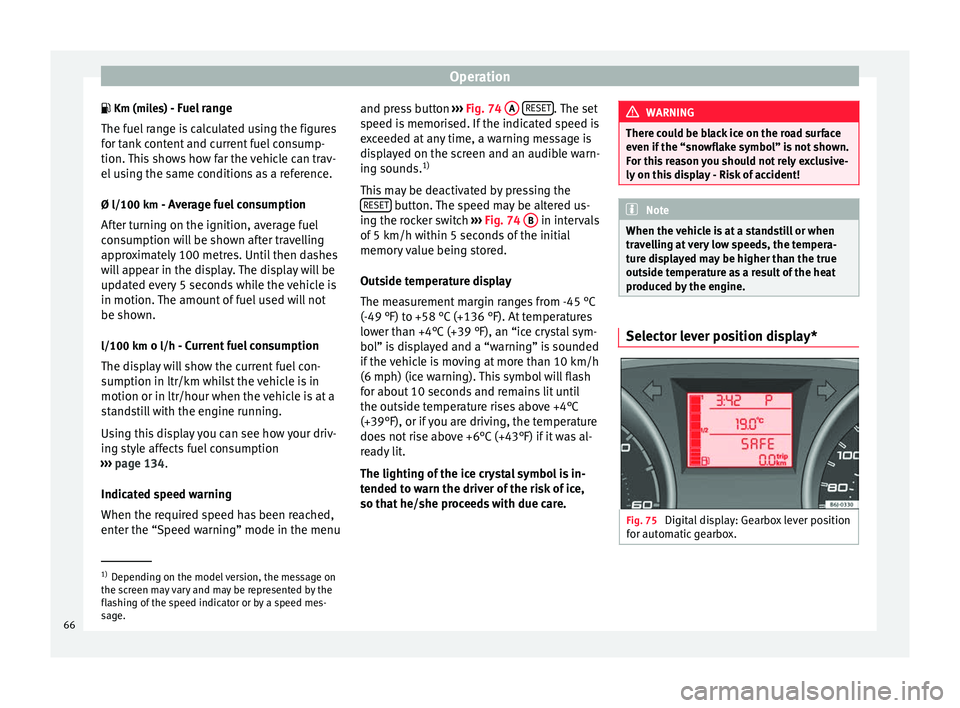
produced by the engine. Selector lever position display*
Fig. 75
Digital display: Gearbox lever position
for automatic gearbox. 1)
Depending on the model version, the message on
the screen may vary and may be represented by the
flashing of the speed indicator or by a speed mes-
sage.
66
Page 69 of 240

Dash panel
The position of the automatic selector lever
will be shown on the display ››› page 129.
Odometer The upper counter in the display registers the
total mileage covered by the vehicle.
The lower counter registers the short jour-
neys. The last digit indicates 100-metre sec-
tions. The trip recorder counter may be reset
by pressing the reset button
››› Fig. 70 5 .
Service interval display Fig. 76
Service interval display The service indication is shown on the instru-
ment panel display
››› Fig. 76 .
S EA
T distinguishes between services with
en-
gine oil change (e.g. Interval Service) and
services without
engine oil change (e.g. In- spection Service). The service interval display
only indicates the dates of services that in-
clude engine oil change. The dates of all oth-
er services, such as Inspection Service or
brake fluid change, appear in the sticker on
the door pillar or in the Maintenance Pro-
gramme.
Vehicles with
service intervals dependent on
time/distance travelled already have certain
service intervals set.
The intervals are calculated separately in ve-
hicles with LongLife service. Technical pro-
gre
ss has made it possible to considerably
reduce servicing requirements. With the
LongLife System, SEAT ensures that your ve-
hicle only has an interval service when it is
necessary. To calculate this (max. two years),
the conditions under which the vehicle is
used and the individual driving style are also
taken into account. The service pre-warning
will appear at 20 days or less prior to the cor-
responding service. The distance travelled is
rounded off to the nearest 100 km and the
time to full days. The current service message
can only be consulted 500 km or more after
the last service. Until that time, only dashes
are displayed.
Service warning
A service warning will appear when the igni-
tion i
s switched on if a service is due soon. The instrument panel display will show the
“spanner symbol”
and the “km (miles)”
indication, along with a clock symbol with
the days remaining until the date of the next
service. The figure indicated is the maximum
number of kilometres (miles) remaining be-
fore the date of the next service. The indica-
tion changes after a few seconds. A “clock
symbol” appears and the number of days un-
til the service appointment should be carried
out.
Service
If a service is due, an audible warning will
sound and the flashing “spanner” symbol
will be shown along with the fixed text SERV-
ICE.
If no service is carried out following the indi-
cation on the instrument panel, the excess
distance travelled and the excess time follow-
ing the SERVICE warning will be displayed.
Reading the service message
The current service message can be c
onsul-
ted with the ignition on, the engine switched
off and the vehicle at a standstill:
● Press the button on the instrument pan-
el as often as necessary until the “spanner”
symbol is displayed.
»
67
Technical specifications
Advice
Operation
Safety
The essentials
Page 85 of 240

Opening and closing
WARNING
● An incorrect use of the keys can cause seri-
ous injuries.
● Never leave children or disabled persons in
the vehicle. In case of emergency, they may
not be able to leave the vehicle or manage on
their own.
● An uncontrolled use of the key could start
the engine or activate any electric equipment
(e.g. electric windows), causing risk of acci-
dent. The doors can be locked using the re-
mote control key. This could become an ob-
stacle for assistance in an emergency situa-
tion.
● Never forget the keys inside the vehicle. An
unauthorised use of your vehicle could result
in injury, damage or theft. Always take the
key with you when you leave the vehicle.
● Never remove the key from the ignition if
the vehicle is in motion. Otherwise, the steer-
ing could suddenly block and it would be im-
possible to steer the vehicle. CAUTION
There are electronic components in the re-
mote control key. Avoid wetting and hitting
the keys. Radio frequency remote
control*
Locking and unlocking the vehicle Fig. 84
Assignment of buttons on the remote
control key. Fig. 85
Range of the radio frequency remote
control. The radio frequency remote control key is
used to lock and unlock the vehicle from a
distance.
By using button
4
››› Fig. 84 on the control,
the k ey
shaft is released.
Unlocking the vehicle
››› Fig. 84 1 .
Locking the vehicle
››› Fig. 84 2 .
Unlocking the rear lid. Press button ›››
Fig. 84 3 until all the turn signals on the
vehicle flash briefly. When the unlocking but-
ton
3 is pressed, you have 2 minutes to
open the door. Once this time has passed, it
will lock again.
Moreover, the battery indicator on the key
››› Fig. 84 (arrow), will flash.
The r emot
e control transmitter and the bat-
teries are integrated in the key. The receiver
is inside the vehicle. The maximum range de-
pends on different factors. The range is re-
duced as the batteries start to lose power. WARNING
Read and observe the relevant warnings ››› in Set of keys on page 83.
Note
● The radio frequency remote control key
functions only when you are within range
››› Fig. 85.
» 83
Technical specifications
Advice
Operation
Safety
The essentials
Page 89 of 240

Opening and closing
A warning appears on the instrument panel
display if the rear lid is open or not properly
closed.* An audible warning is also given if
the boot lid is opened while the vehicle is
moving faster than 6 km/h (4 mph)*. WARNING
● Always close the rear lid properly. Risk of
accident or injury.
● The rear lid must not be opened when the
reverse or rear fog lights are lit. This may
damage the tail lights.
● Do not close the rear lid by pushing it down
with your hand on the rear window. The glass
could smash. Risk of injury!
● Ensure the rear lid is locked after closing it.
If not, it may open unexpectedly while driv-
ing.
● Never allow children to play in or around
the vehicle. A locked vehicle can be subjected
to extremely high and low temperatures, de-
pending on the time of year, thus causing se-
rious injuries/illness. It could even have fatal
consequences. Close and lock both the rear
lid and all the other doors when you are not
using the vehicle.
● Closing the rear lid without observing and
ensuring it is clear could cause serious injury
to you and to third parties. Make sure that no
one is in the path of the rear lid.
● Never drive with the rear lid open or half-
closed, exhaust gases may enter into the in-
terior of the vehicle. Danger of poisoning! ●
If you only open the rear lid, do not leave
the key inside. The vehicle cannot be opened
if the key is left inside. Electric windows
Opening or closing the windows
electrically* Fig. 87
Detail of the driver door: controls for
the front and rear windows (5-door vehicles
with front and rear electric windows). Read the additional information carefully
››› page 10
The front and rear electric windows can be
operated by using the controls on the driver
door. The other doors each have a switch for
their own window.
Always close the windows fully if you park
the vehicle or leave it unattended ››› .You can use the electric windows for approx.
10 minutes after switching off the ignition if
neither the driver door nor the front passen-
ger door has been opened and the key has
not been removed from the ignition.
Safety switch not pressed: buttons on rear
doors are activated.
Safety switch pressed: buttons on rear doors
are deactivated.
WARNING
Observe the safety warnings ››› in Set of
keys on page 83.
● Inc orr
ect use of the electric windows can
result in injury.
● Never close the rear lid without observing
and ensuring it is clear, to do otherwise could
cause serious injury to you and third parties.
Make sure that no one is in the path of a win-
dow.
● The engine may accidentally be started and
be out of control.
● If the ignition is switched on, the electric
equipment could be activated with risk of in-
jury, for example, in the electric windows.
● The doors can be locked using the remote
control key. This could become an obstacle
for assistance in an emergency situation.
● Always take the key with you when you
leave the vehicle. » 87
Technical specifications
Advice
Operation
Safety
The essentials