Page 242 of 380

240
508_en_Chap09_verifications_ed02-2014
Checks
12 V battery
the battery does not require any
maintenance.
However, check that the terminals
are clean and correctly tightened,
particularly in summer and winter.Refer to the warranty and maintenance
record for details of the replacement
intervals for these components.
Air filter and passenger compartment filter
Replace the oil filter each time the
engine oil is changed.
Refer to the warranty and
maintenance record for details of
the replacement interval for this
component.
Oil filterthe presence of this label, in particular with
the Stop & Start system, indicates the use of
a specific 12 V lead-acid battery with special
technology and specification. t
h
e involvement
of a P
e
uge
Ot
dealer or a qualified workshop
is essential when replacing or disconnecting
the battery.
Particle filter (Diesel)
the start of saturation of the
particle filter is indicated by
the temporary illumination of
this warning lamp accompanied by a message
in the multifunction screen.
As soon as the traffic conditions permit,
regenerate the filter by driving at a
speed of at least 40 mph (60 km/h) until
the warning lamp goes off.
If the warning lamp stays on, this
indicates a low additive level.
On a new vehicle, the first particle
filter regeneration operations may be
accompanied by a "burning" smell,
which is per fectly normal.
Following prolonged operation of the
vehicle at very low speed or at idle,
you may, in exceptional circumstances,
notice the emission of water vapour at
the exhaust on acceleration.
t
h
is does
not affect the behaviour of the vehicle
or the environment.
un
less other wise indicated, check these components in accordance with the warranty and maintenance record and according to your engine.
Other wise, have them checked by a P
e
uge
Ot
dealer or a qualified workshop.
When carrying out work on the battery, refer
to the "12 V battery" section for details of the
precautions to be taken before disconnecting
the battery and following its reconnection. Depending on the environment (e.g. dusty
atmosphere) and the use of the vehicle (e.g.
city driving), replace them twice as often if
necessary
.
A clogged passenger compartment filter may
have an adverse effect on the per formance
of the air conditioning system and generate
undesirable odours.
Checks
Page 287 of 380

285
04
508_en_Chap11c_SMegplus-i_ed02-2014
RADIO
If "DAB / FM auto tracking" is activated, there is a difference of a
few seconds when the system switches to "FM" analogue radio with
sometimes a variation in volume.
When the digital signal is restored, the system automatically
changes back to "DAB".
Select change of source. Press on
Media to display the primary page.
Select "DAB Radio".
Select "List" in the primary page.
or
Select "Radio list" in the secondary page.
Select the radio station from the list offered. Digital radio provides higher quality reception and also the
graphical display of current information on the radio station being
listened to. Select "List" in the primary page.
t
he range of multiplexes available is displayed in alphabetical
order.
Press Media to display the primary page then
press on the secondary page.
Select "Settings".
Select "RADIO".
Select "Digital/FM auto tracking" then
"Confirm". "DAB" does not cover 100% of the territory.
When the digital radio signal is weak, "DAB / FM auto tracking"
allows you to continue listening to the same station, by
automatically switching to the corresponding "FM" analogue
station (if there is one).
If the "DAB" station being listened to is not available on "FM" (" DAB/
FM" option greyed out), or "DAB
/ FM auto tracking" is not activated,
the sound will cut out while the digital signal is too weak.
Digital radio - DAB / FM auto tracking
DAB (Digital Audio Broadcasting)
Digital radio
Page 288 of 380

286
04
508_en_Chap11c_SMegplus-i_ed02-2014
CD, MP3 CD, USB player, auxiliary input
Insert the CD in the player, insert the uSB
memory stick in the u SB player or connect the
u
SB peripheral to the u SB port using a suitable
cable (not supplied).
t
he system builds playlists (in temporary
memory), an operation which can take from
a few seconds to several minutes at the first
connection.
Reduce the number of non-music files and the
number of folders to reduce the waiting time.
t
he playlists are updated every time the ignition
is switched off or connection of a
u SB memory
stick. However, the system memorises these
lists and if they are not modified, the loading
time will be shorter. Selection of source
t
he steering mounted SRC (source) button can be used to go to the
next media source, available if the source is active.
Press OK to confirm the selection.
"CD / CD MP3"
"USB, iPod"
"Bluetooth (streaming)"
"Auxiliary"
"Radio" Select change of source then choose the
source. Press on Media to display the primary page.
MUSIC
Page 306 of 380
304
05
508_en_Chap11c_SMegplus-i_ed02-2014
Adding a waypointOrganising waypoints
Select "Enter destination".
Select "Itinerary".
Select "Add waypoint" then "Address".
t
he address of the waypoint is entered in
the same way as a destination, so enter
the "City:" or post code, the "Road:" and
the "N°:". Confirm each time.
t
hen select "Add waypoint ". Select the waypoint that you want to move in
the order.
to organise waypoints, carry out the previous operations 1 to 3
again (Adding a waypoint).
Select "
Up".
Select "Down".
Select "Delete".
Select "Road map" to view the changes made
to the route.
Select "Navigate to".
Select the criteria then "Confirm" to start
guidance and give the general direction of the
navigation route. Press on Navigation to display the primary
page then go to the secondary page.
NAVIGATION - GUIDANCE
Page 323 of 380
321
06
508_en_Chap11c_SMegplus-i_ed02-2014
Select:
- "Time/Date" to change the time zone,
synchronisation with
g PS, time and its
format and then the date.
-
"Languages" to change the language.
-
"Calculator" to display a calculator
-
"Calendar" to display a calculator.
Press on Configuration
to display the primary
page then go to the secondary page.
CONFIGURATION
Page 347 of 380
345
04AUDIO
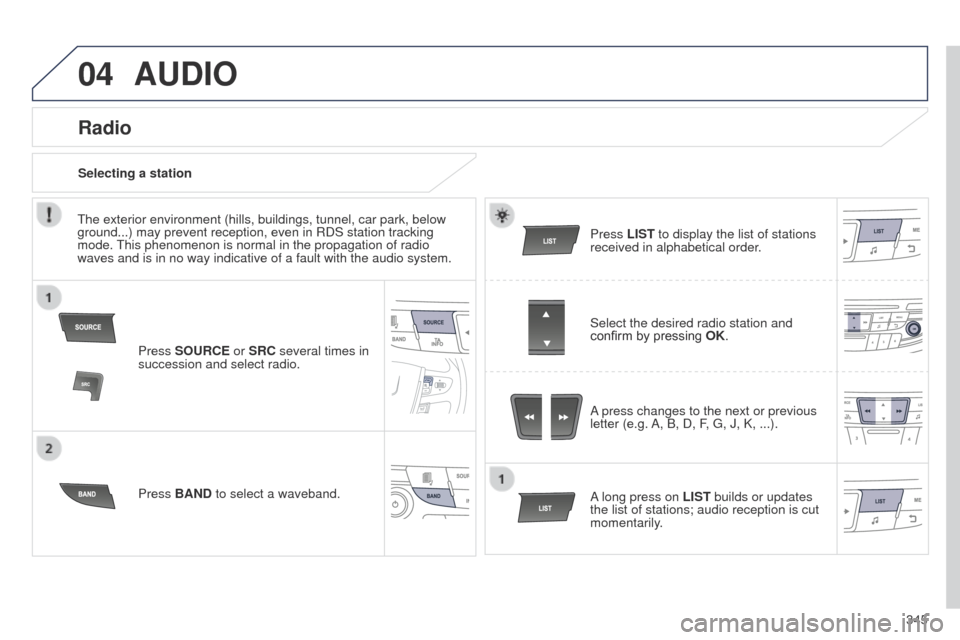
Press SOURCE or SRC several times in
succession and select radio.
Press BAND to select a waveband. Press LIST
to display the list of stations
received in alphabetical order.
A press changes to the next or previous
letter (e.g. A, B, D, F,
g , J, K, ...).
Radio
Select the desired radio station and
confirm by pressing OK.
Selecting a station
A long press on LIST builds or updates
the list of stations; audio reception is cut
momentarily.
t
he exterior environment (hills, buildings, tunnel, car park, below
ground...) may prevent reception, even in RDS station tracking
mode.
t
his phenomenon is normal in the propagation of radio
waves and is in no way indicative of a fault with the audio system.