Page 330 of 400
05
328
308_EN_CHAP10C_SMEGPLUS_ED02-2013
Adding a waypoint Organising waypoints
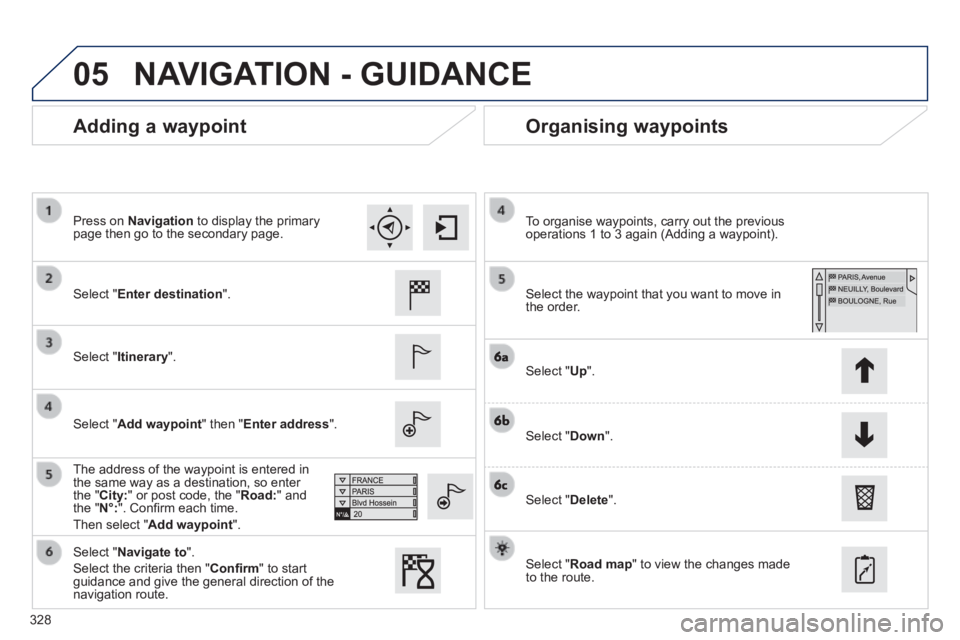
Select " Enter destination ".
Select " Itinerary ".
Select " Add waypoint " then " Enter address ".
The address of the waypoint is entered in the same way as a destination, so enter the " City: " or post code, the " Road: " and the " N°: ". Confi rm each time.
Then select " Add waypoint ".
Select the waypoint that you want to move in the order.
To organise waypoints, carry out the previous operations 1 to 3 again (Adding a waypoint).
Select " Up ".
Select " Down ".
Select " Delete ".
Select " Road map " to view the changes made to the route.
Select " Navigate to ".
Select the criteria then " Confi rm " to start guidance and give the general direction of the navigation route.
Press on Navigation to display the primary page then go to the secondary page.
NAVIGATION - GUIDANCE
Page 331 of 400
05
329
308_EN_CHAP10C_SMEGPLUS_ED02-2013
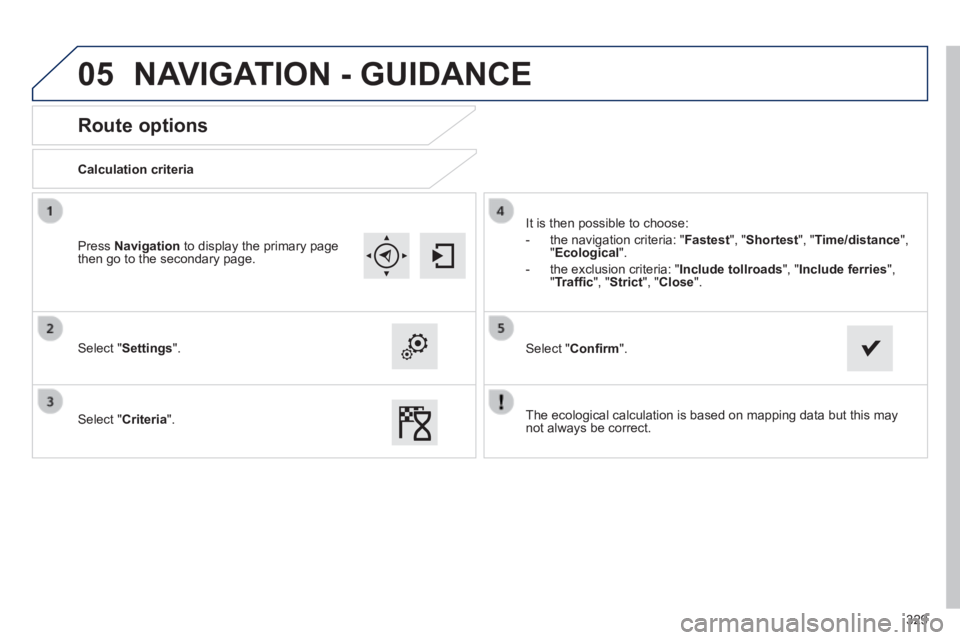
Route options
Calculation criteria
Select " Settings ".
Select " Criteria ".
It is then possible to choose:
- the navigation criteria: " Fastest ", " Shortest ", " Time/distance ", " Ecological ".
- the exclusion criteria: " Include tollroads" , " Include ferries ", " Traffi c ", " Strict ", " Close ".
Select " Confi rm ".
Press Navigation to display the primary page then go to the secondary page.
NAVIGATION - GUIDANCE
The ecological calculation is based on mapping data but this may not always be correct.
Page 332 of 400
05
330
308_EN_CHAP10C_SMEGPLUS_ED02-2013
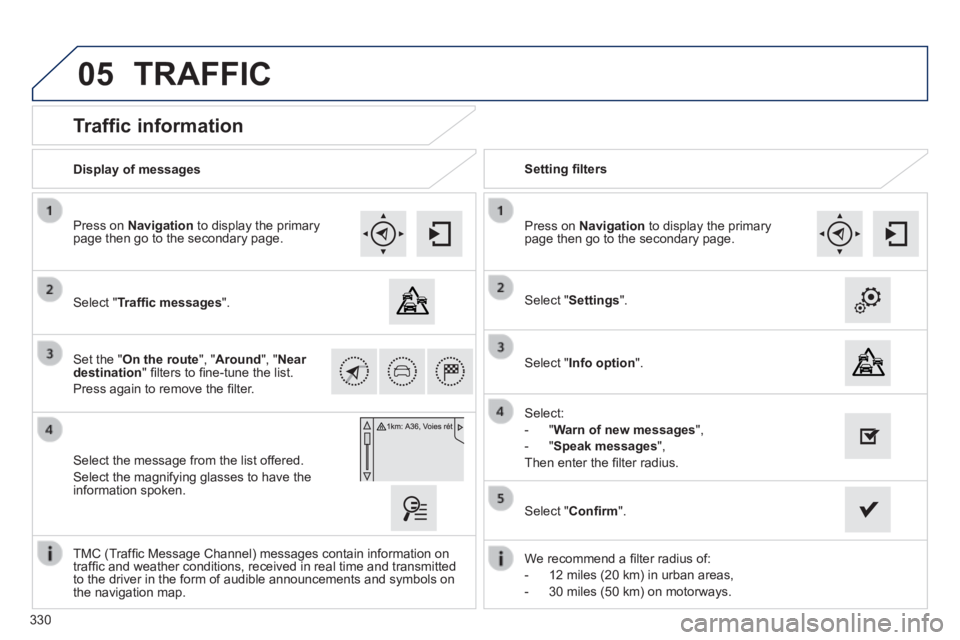
Traffic information
Select " Traffi c messages ".
Press on Navigation to display the primary page then go to the secondary page.
Select the message from the list offered.
Select the magnifying glasses to have the information spoken.
Set the " On the route ", " Around ", " Near destination " fi lters to fi ne-tune the list.
Press again to remove the fi lter.
Select " Settings ".
Select:
- " Warn of new messages ",
- " Speak messages ",
Then enter the fi lter radius.
Press on Navigation to display the primary page then go to the secondary page.
Display of messages Setting fi lters
We recommend a fi lter radius of:
- 12 miles (20 km) in urban areas,
- 30 miles (50 km) on motorways.
TMC (Traffi c Message Channel) messages contain information on traffi c and weather conditions, received in real time and transmitted to the driver in the form of audible announcements and symbols on the navigation map.
Select " Confi rm ".
TRAFFIC
Select " Info option ".
Page 333 of 400
05
331
308_EN_CHAP10C_SMEGPLUS_ED02-2013
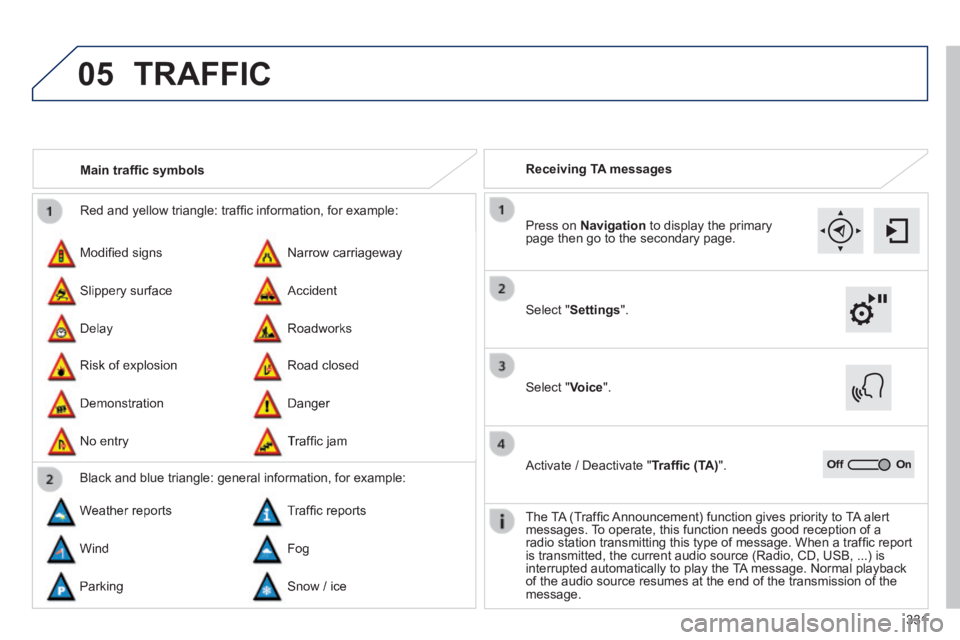
Red and yellow triangle: traffi c information, for example:
Modifi ed signs
Risk of explosion
Narrow carriageway
Road closed
Slippery surface
Demonstration
Accident
Danger
Delay
No entry
Roadworks
Traffi c jam
Main traffi c symbols
Black and blue triangle: general information, for example:
Weather reports Traffi c reports
Wind Fog
Parking Snow / ice
Receiving TA messages
TRAFFIC
Select " Settings ".
Press on Navigation to display the primary page then go to the secondary page.
Select " Voice ".
Activate / Deactivate " Traffi c (TA) ".
The TA (Traffi c Announcement) function gives priority to TA alert messages. To operate, this function needs good reception of a radio station transmitting this type of message. When a traffi c report is transmitted, the current audio source (Radio, CD, USB, ...) is interrupted automatically to play the TA message. Normal playback of the audio source resumes at the end of the transmission of the message.
Page 334 of 400
05
308_EN_CHAP10C_SMEGPLUS_ED02-2013
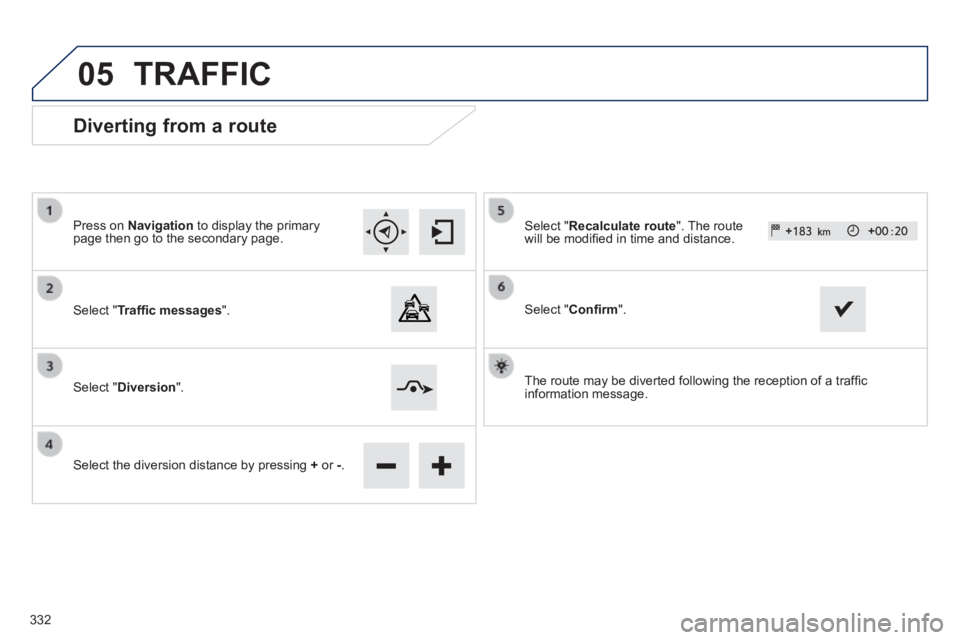
Diverting from a route
Press on Navigation to display the primary page then go to the secondary page.
Select " Traffi c messages ".
Select " Diversion ".
Select the diversion distance by pressing + or -.
Select " Recalculate route ". The route will be modifi ed in time and distance.
Select " Confi rm ".
The route may be diverted following the reception of a traffi c information message.
TRAFFIC
332
Page 335 of 400
05
333
308_EN_CHAP10C_SMEGPLUS_ED02-2013
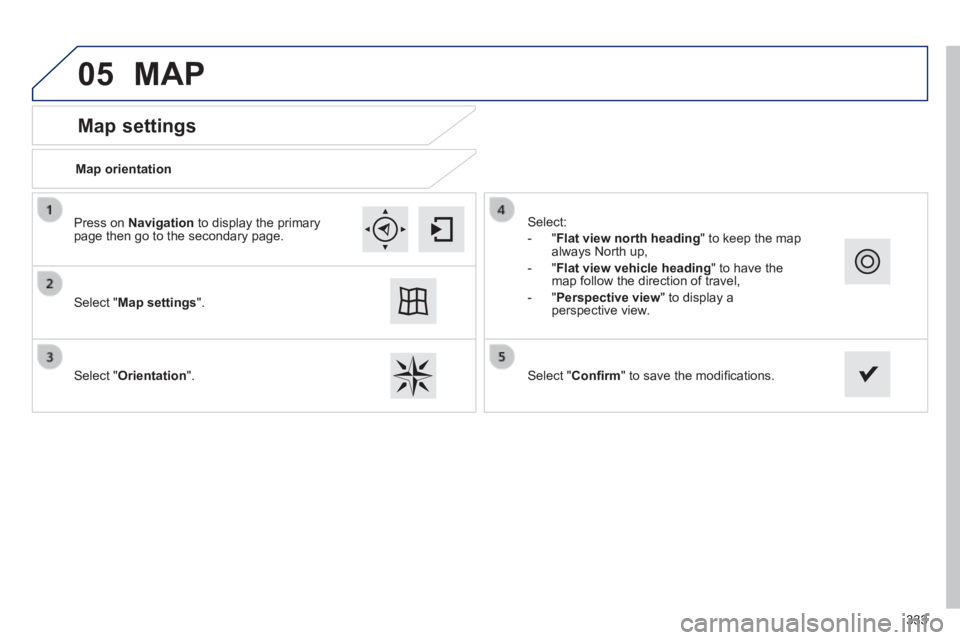
Map settings
MAP
Map orientation
Select " Map settings ".
Select " Orientation ".
Select:
- " Flat view north heading " to keep the map always North up,
- " Flat view vehicle heading " to have the map follow the direction of travel,
- " Perspective view " to display a perspective view.
Press on Navigation to display the primary page then go to the secondary page.
Select " Confi rm " to save the modifi cations.
Page 336 of 400
05
308_EN_CHAP10C_SMEGPLUS_ED02-2013
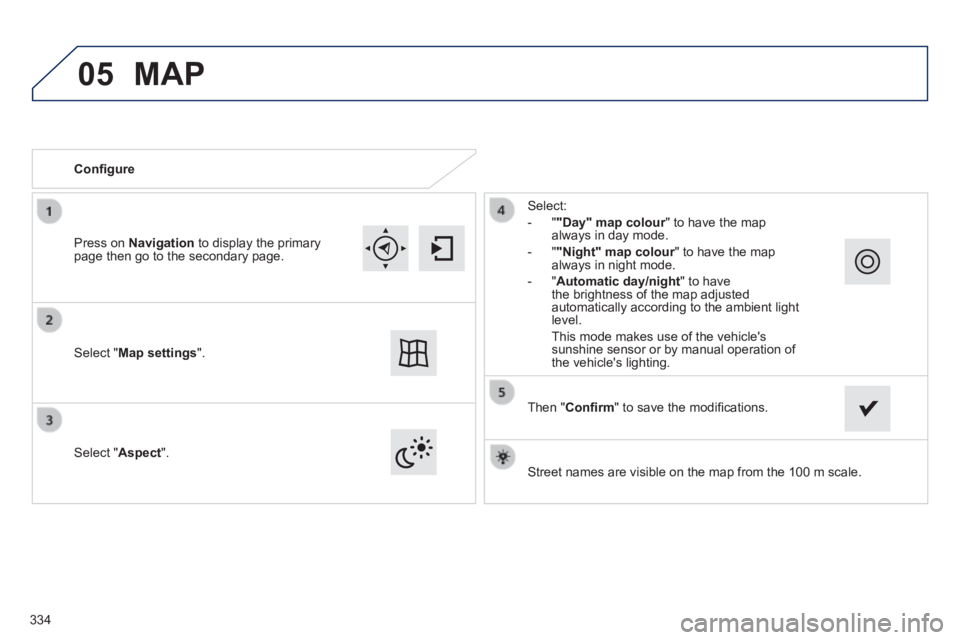
Street names are visible on the map from the 100 m scale.
Confi gure
Select " Aspect ".
Select:
- " "Day" map colour " to have the map always in day mode.
- " "Night" map colour " to have the map "Night" map colour " to have the map "Night" map colouralways in night mode.
- " Automatic day/night " to have the brightness of the map adjusted automatically according to the ambient light level.
This mode makes use of the vehicle's sunshine sensor or by manual operation of the vehicle's lighting. Select " Map settings ".
Press on Navigation to display the primary page then go to the secondary page.
MAP
Then " Confi rm " to save the modifi cations.
334
Page 337 of 400
05
335
308_EN_CHAP10C_SMEGPLUS_ED02-2013
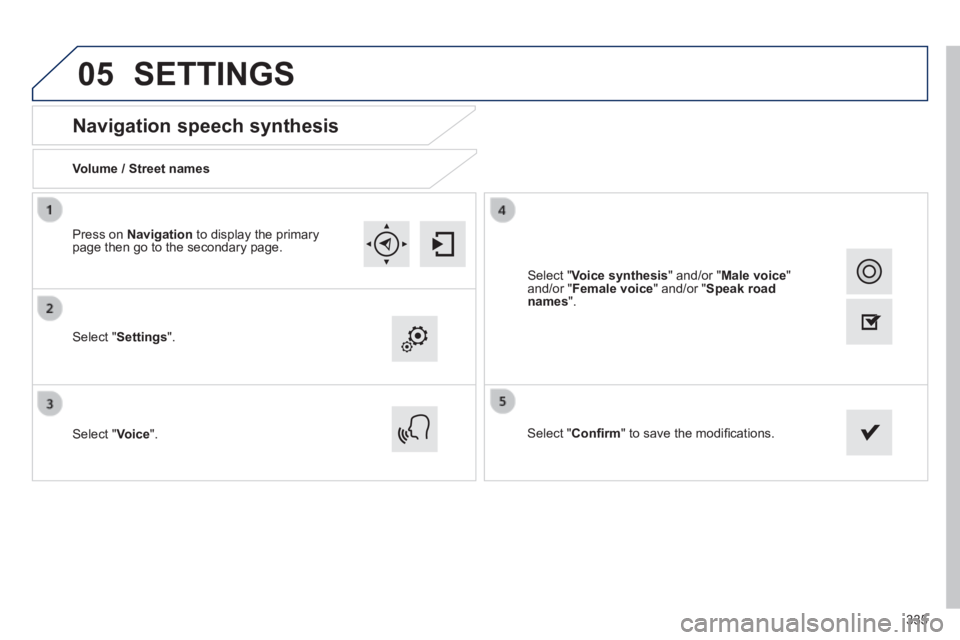
Navigation speech synthesis
Volume / Street names
Select " Settings ".
Select " Voice ". Select " Confi rm " to save the modifi cations.
Press on Navigation to display the primary page then go to the secondary page.
SETTINGS
Select " Voice synthesis " and/or " Male voice " and/or " Female voice " and/or " Speak road names ".