2014 PEUGEOT 3008 reset
[x] Cancel search: resetPage 256 of 389
254
01 FIRST STEPS
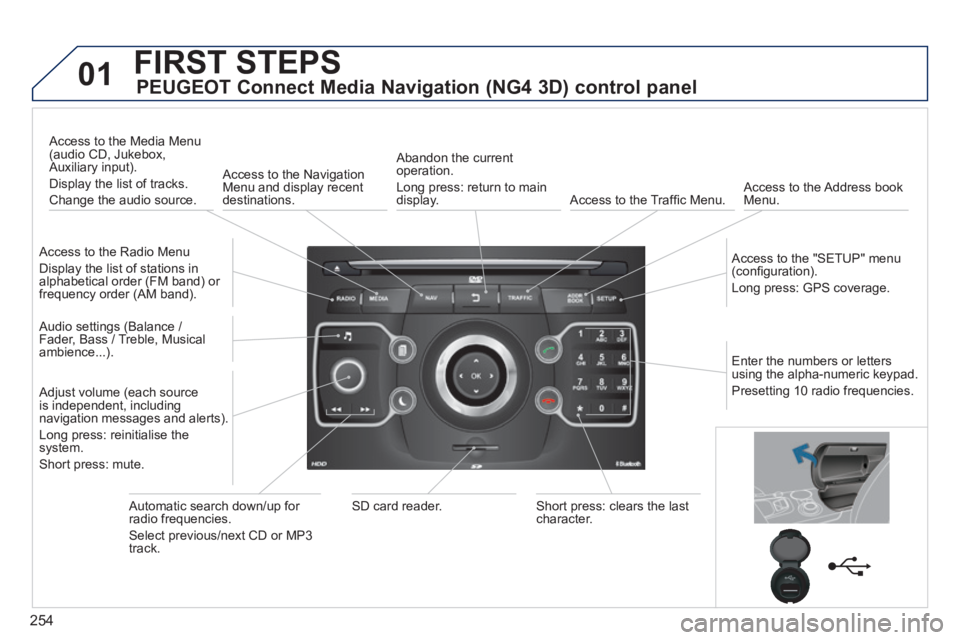
PEUGEOT Connect Media Navigation (NG4 3D) control panel
Access to the Radio Menu
Display the list of stations in alphabetical order (FM band) or frequency order (AM band).
Access to the Media Menu (audio CD, Jukebox, Auxiliary input).
Display the list of tracks.
Change the audio source.
Access to the Navigation Menu and display recent destinations.
Abandon the current operation.
Long press: return to main display. Access to the Traffi c Menu. Access to the Address book Menu.
Access to the "SETUP" menu (confi guration).
Long press: GPS coverage.
Audio settings (Balance / Fader, Bass / Treble, Musical ambience...).
Adjust volume (each source is independent, including navigation messages and alerts).
Long press: reinitialise the system.
Short press: mute.
Automatic search down/up for radio frequencies.
Select previous/next CD or MP3 track.
SD card reader. Short press: clears the last character.
Enter the numbers or letters using the alpha-numeric keypad.
Presetting 10 radio frequencies.
Page 289 of 389
287
NAV
RADI O
AUX standard3
Reset video settings3
Off / Audio / Audio and Video (AV)
Ext. Device (Aux) management 2
3
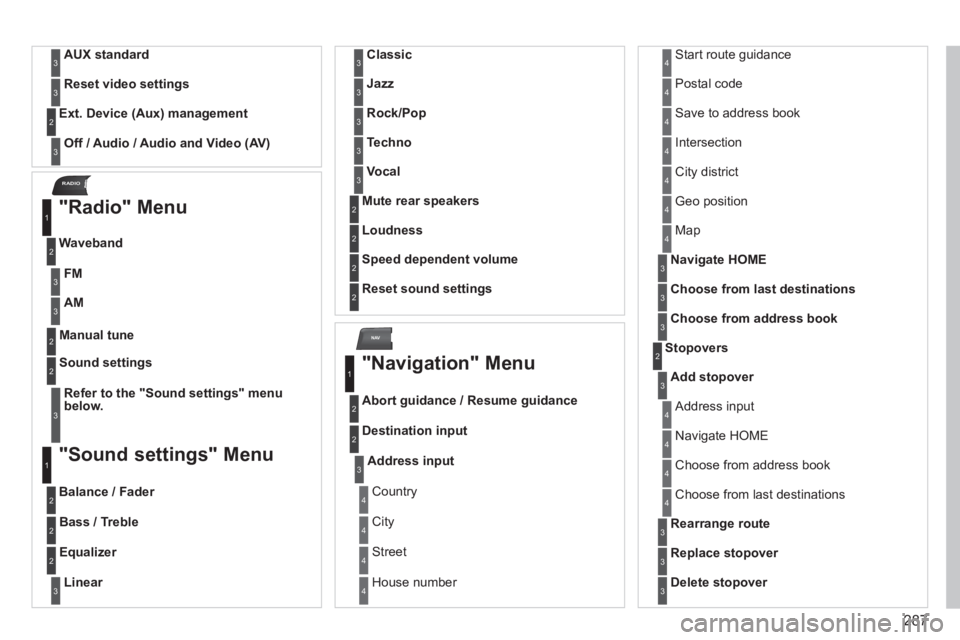
"Radio" Menu
Waveband
1
2
Manual tune 2
Refer to the "Sound settings" menu below.
Sound settings 2
3
"Sound settings" Menu
Balance / Fader
1
2
Bass / Treble 2
Equalizer 2
Linear3
Classic3
Jazz3
Rock/Pop3
Techno3
Vocal3
Mute rear speakers 2
Loudness 2
Speed dependent volume 2
Reset sound settings 2
"Navigation" Menu
Abort guidance / Resume guidance
1
2
Destination input 2
Address input3
Country 4
City 4
Street 4
House number 4
Start route guidance 4
Postal code 4
Save to address book 4
Intersection 4
City district 4
Geo position 4
Map 4
Navigate HOME3
Choose from last destinations3
Choose from address book3
Stopovers 2
Add stopover3
Address input 4
Navigate HOME 4
Choose from address book 4
Choose from last destinations 4
Rearrange route3
Replace stopover3
Delete stopover3
FM3
AM3
Page 292 of 389

290
Display 2
Brightness3
Colour3
Steel 4
blue light (only in day mode) 4
Orange Ray 4
Blue Flame 4
Map colour3
Day mode for map 4
Night mode for map 4
Auto. Day/Night for map 4
Units 2
Temperature3
Celsius 4
Fahrenheit 4
Metric / Imperial3
km 4
Miles 4
System 2
Factory reset3
Software version3
Automatic scrolling3
Page 302 of 389
02
300
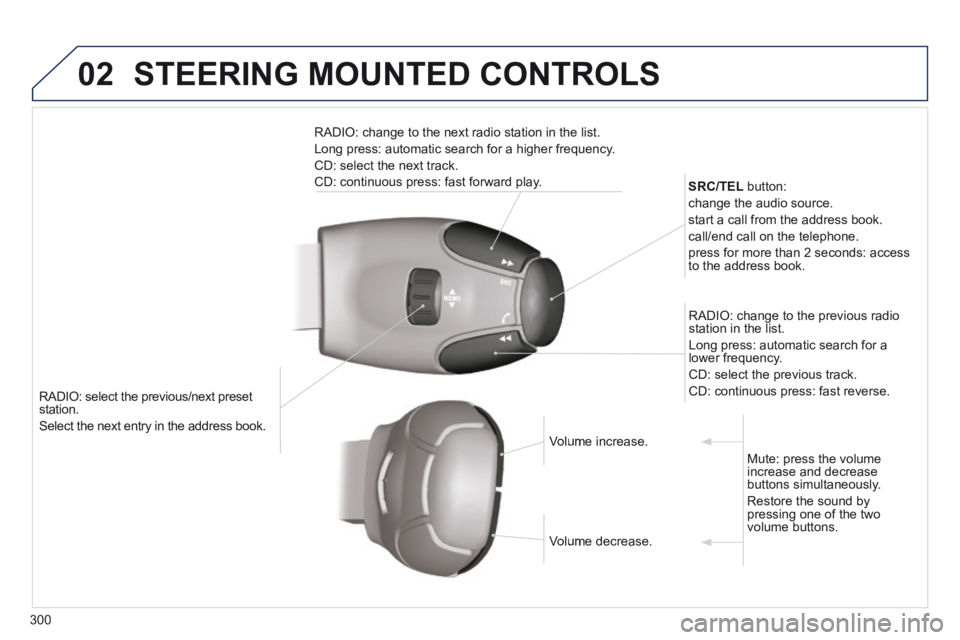
RADIO: select the previous/next preset station.
Select the next entry in the address book.
SRC/TEL button:
change the audio source.
start a call from the address book.
call/end call on the telephone.
press for more than 2 seconds: access to the address book.
RADIO: change to the previous radio station in the list.
Long press: automatic search for a lower frequency.
CD: select the previous track.
CD: continuous press: fast reverse.
RADIO: change to the next radio station in the list.
Long press: automatic search for a higher frequency.
CD: select the next track.
CD: continuous press: fast forward play.
Volume increase. Volume increase.
Volume decrease. Volume decrease.
Mute: press the volume increase and decrease buttons simultaneously.
Restore the sound by pressing one of the two volume buttons.
STEERING MOUNTED CONTROLS
Page 333 of 389
07
331
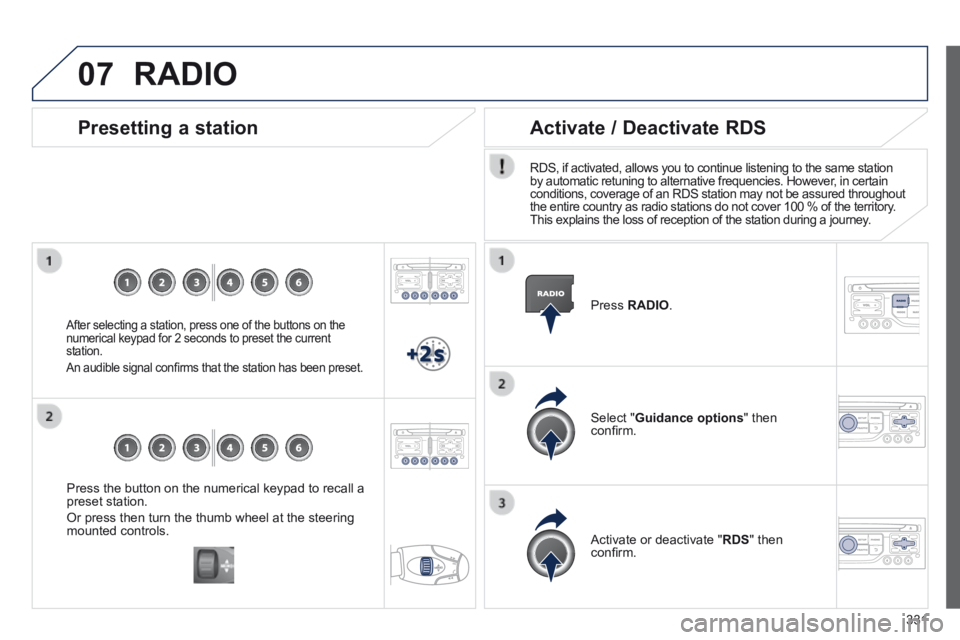
Press the button on the numerical keypad to recall a preset station.
Or press then turn the thumb wheel at the steering mounted controls.
Presetting a station
After selecting a station, press one of the buttons on the numerical keypad for 2 seconds to preset the current station.
An audible signal confi rms that the station has been preset.
Press RADIO .
Activate / Deactivate RDS
RDS, if activated, allows you to continue listening to the same station by automatic retuning to alternative frequencies. However, in certain conditions, coverage of an RDS station may not be assured throughout the entire country as radio stations do not cover 100 % of the territory\
. This explains the loss of reception of the station during a journey.
Select " Guidance options " then confi rm.
Activate or deactivate " RDS " then confi rm.
RADIO
Page 377 of 389
.
Alphabetical index375
Screenwash fluid level ..........................105, 198Screenwash, front .........................................105Screen-wash reservoir .................................Screen-wash reservoir .................................Screen-wash reservoir198Seat adjustment ........................................65, 66Seat belts ...............................................147-149Seats, electric .................................................66Seats, rear .......................................................Seats, rear .......................................................Seats, rear70Serial number, vehicle ..................................247Service indicator .............................................Service indicator .............................................Service indicator39Service warning light ......................................34Servicing .........................................................25Setting the clock .................................43, 45, 47Short-cut menus ..................................260, 302Sidelamps ...............................94, 216, 217, 219Side repeater ................................................Side repeater ................................................Side repeater218SIM card ................................................112, 284Ski flap ..........................................................117Snow chains ..................................................215Spare wheel ..................................207, 210, 211Speed limiter .................................................Speed limiter .................................................Speed limiter166Speedometer ..................................................Speedometer ..................................................Speedometer27Spotlamps, side ............................................109Start ...............................................................230Starting the vehicle .........................78, 174, 179Steering mounted controls, audio ..................................................258, 353Stopping the vehicle .......................78, 174, 179Stop & Start ...Stop & Start ...Stop & Start56, 60, 63, 91, 183, 192, 199, 229Storage ....................................111, 113, 117, 119Storage box ...................................................112Storage wells ................................................11 9Stowing rings ................................................11 9Sun visor ...............................................Sun visor ...............................................Sun visor112, 124Synchronising the remote control ...................79Synthesiser, voice .........................................314System, navigation...............................264, 304
Radio ....................................275, 329, 330, 355RCA sockets .................................................280Reading lamps, rear ......................................Reading lamps, rear ......................................Reading lamps, rear108Rear foglamp.........................................219, 220Rear screen (demisting) ......................60, 61, 72Recharging the battery .................................231Reduction of electrical load ..........................232Regeneration of the particle emissions filter ...Regeneration of the particle emissions filter ...Regeneration of the particle emissions filter19 9
Safety for children ...........................8 3, 13 3, 13 8Screen, colour 16/9 ...............................259, 286Screen, colour and mapping.................3 01, 3 4 0Screen menu map ................286, 340, 364, 366Screen, monochrome ..................354, 364, 366Screen, monochrome C ..................................54Screen, multifunction (with audio equipment) ...............45, 47, 50, 52Screen, multifunction (without audio equipment) .....43
RS
Parking sensors, front ...................................18 6Parking sensors, rear....................................18 6Parking space sensor ..................................189Particle emission filter ..................Particle emission filter ..................Particle emission filter192, 198, 199Passenger compartment filter ......................Passenger compartment filter ......................Passenger compartment filter19 9PEUGEOT call button ...................................2 51PEUGEOT Connect Assistance ...........250, 251PEUGEOT Connect Media Navigation (NG 4 3D) ............................253, 256, 259, 286PEUGEOT Connect Navigation (RT6) ...50, 297PEUGEOT Connect SOS .....................250, 251PEUGEOT CONNECT SOS .........................2 51PEUGEOT Connect Sound (RD5) ....................................47, 351, 364, 366PEUGEOT services ......................................2 51PIN code .......................................................284Player, CD MP3 .............................................357POIs (updating) .............................................271Port, USB ..............................113, 337, 358, 360Priming the fuel system ................................193Protecting children .......................125, 126, 13 0,13 3, 13 5 -137, 15 0Puncture ........................................................201
Reinitialising the electric windows ..................83Reinitialising the remote control .....................79Remote control ....................................75, 76, 80Removable screen (snow shield)..................238Removing a wheel ........................................2 11Removing the mat .........................................114Repair kit, puncture .......................................201Replacing bulbs ............................216, 219 -221Replacing fuses ............................................222Replacing the air filter ...................................Replacing the air filter ...................................Replacing the air filter19 9Replacing the oil filter ...................................Replacing the oil filter ...................................Replacing the oil filter19 9Replacing the passenger compartment filter ....Replacing the passenger compartment filter ....Replacing the passenger compartment filter19 9Replacing wiper blades.........................1 0 7, 2 3 3Resetting the service indicator .......................Resetting the service indicator .......................Resetting the service indicator40Resetting the trip recorder ..............................Resetting the trip recorder ..............................Resetting the trip recorder42Rev counter .....................................................Rev counter .....................................................Rev counter27Reversing camera .........................................188Reversing lamp .............................................219Risk areas (update) ...............................271, 308Roof bars .......................................................237Routine checks .....................................199, 200Running out of fuel (Diesel) ..........................193