2014 NISSAN QUEST ignition
[x] Cancel search: ignitionPage 76 of 482
becomes involved in certain types of collisions,
helping to restrain front seat occupants.
The pretensioner is encased with the seat belt
retractor and buckle anchor. These seat belts
are used the same way as conventional seat
belts.
When a pretensioner activates, smoke is re-
leased and a loud noise may be heard. The
smoke is not harmful, and it does not indicate a
fire. Care should be taken not to inhale it as it
may cause irritation and choking. Those with a
history of a breathing condition should get fresh
air promptly.
After pretensioner activation, load limiters allow
the seat belt to release webbing (if necessary) to
reduce forces against the chest.
The supplemental air bag warning light
is
used to indicate malfunctions in the pretensioner
system. (See “Supplemental air bag warning
light” (P.1-59) for more details.) If the operation
of the supplemental air bag warning light
indicates there is a malfunction, have the system
checked by a NISSAN dealer.
When selling your vehicle, we request that you
inform the buyer about the pretensioner system
and guide the buyer to the appropriate sections
in this Owner’s Manual.
SSS1016
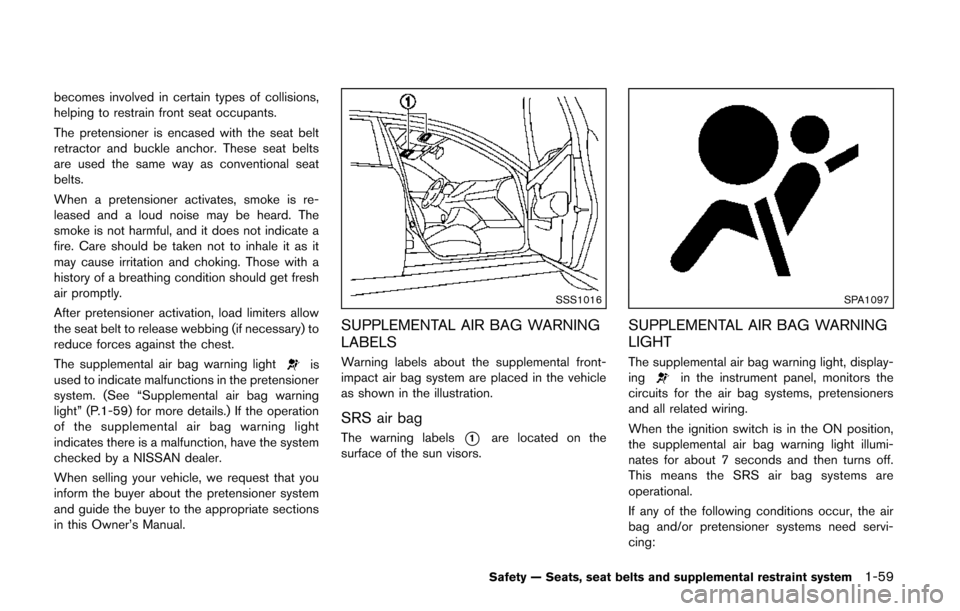
SUPPLEMENTAL AIR BAG WARNING
LABELS
Warning labels about the supplemental front-
impact air bag system are placed in the vehicle
as shown in the illustration.
SRS air bag
The warning labels*1are located on the
surface of the sun visors.
SPA1097
SUPPLEMENTAL AIR BAG WARNING
LIGHT
The supplemental air bag warning light, display-
ingin the instrument panel, monitors the
circuits for the air bag systems, pretensioners
and all related wiring.
When the ignition switch is in the ON position,
the supplemental air bag warning light illumi-
nates for about 7 seconds and then turns off.
This means the SRS air bag systems are
operational.
If any of the following conditions occur, the air
bag and/or pretensioner systems need servi-
cing:
Safety — Seats, seat belts and supplemental restraint system1-59
Page 77 of 482
1-60Safety — Seats, seat belts and supplemental restraint system
.The supplemental air bag warning light
remains on approximately 7 seconds after
the ignition switch is pushed to the ON
position.
. The supplemental air bag warning light
flashes intermittently.
. The supplemental air bag warning light does
not come on at all.
Under these conditions, the air bag and/or
pretensioner systems may not operate properly.
They must be checked and repaired. Take your
vehicle to the nearest NISSAN dealer.
WARNING
If the supplemental air bag warning
light is on, it could mean that the front
air bag, side air bag and curtain air bag
and/or pretensioner systems will not
operate in an accident. To help avoid
injury to yourself or others, have your
vehicle checked by a NISSAN dealer as
soon as possible.
REPAIR AND REPLACEMENT PRO-
CEDURE
The front air bags, side air bags and curtain air
bags and pretensioners are designed to activate
on a one-time-only basis. As a reminder, unless
it is damaged, the supplemental air bag warning
light will remain illuminated after inflation has
occurred. Repair and replacement of these
systems should be done only by a NISSAN
dealer.
When maintenance work is required on the
vehicle, the front air bags, side air bags and
curtain air bags, pretensioners and related parts
should be pointed out to the person conducting
the maintenance. The ignition switch should
always be in the LOCK position when working
under the hood or inside the vehicle.
WARNING
. Once a front air bag, side air bag or
curtain air bag has inflated, the air
bag module will not function again
and must be replaced. Additionally,
the activated pretensioner must
also be replaced. The air bag mod-
ule and pretensioner should be
replaced by a NISSAN dealer. The
air bag module and pretensioner system cannot be repaired.
. The front air bag, side air bag,
curtain air bag and the pretensioner
should be inspected by a NISSAN
dealer if there is any damage to the
front end or side portion of the
vehicle.
. If you need to dispose of a supple-
mental air bag or pretensioner or
scrap the vehicle, contact a NISSAN
dealer. Correct supplemental air
bag and pretensioner system dis-
posal procedures are set forth in the
appropriate NISSAN Service Man-
ual. Incorrect disposal procedures
could cause personal injury.
Page 83 of 482
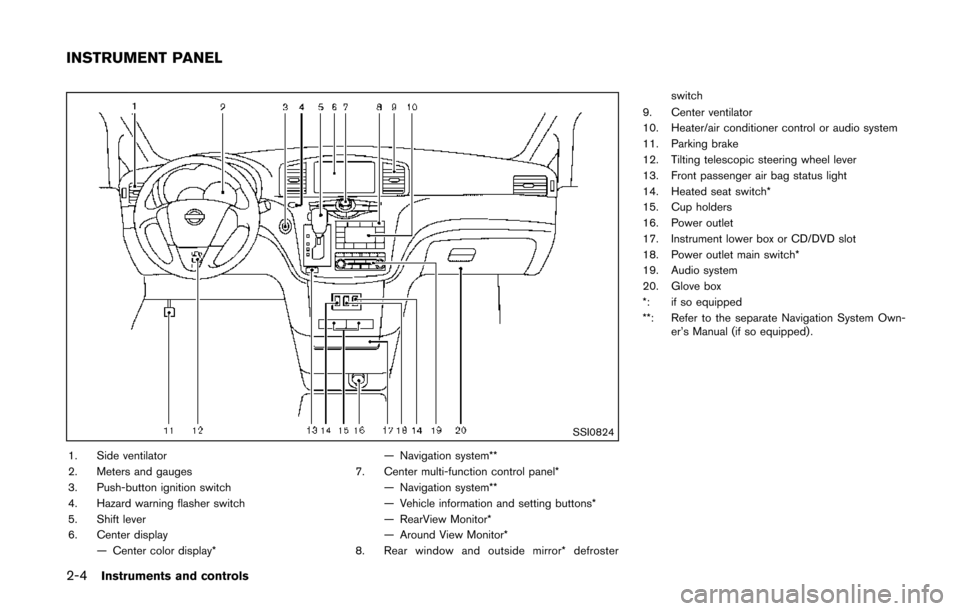
2-4Instruments and controls
SSI0824
1. Side ventilator
2. Meters and gauges
3. Push-button ignition switch
4. Hazard warning flasher switch
5. Shift lever
6. Center display— Center color display* — Navigation system**
7. Center multi-function control panel* — Navigation system**
— Vehicle information and setting buttons*
— RearView Monitor*
— Around View Monitor*
8. Rear window and outside mirror* defroster switch
9. Center ventilator
10. Heater/air conditioner control or audio system
11. Parking brake
12. Tilting telescopic steering wheel lever
13. Front passenger air bag status light
14. Heated seat switch*
15. Cup holders
16. Power outlet
17. Instrument lower box or CD/DVD slot
18. Power outlet main switch*
19. Audio system
20. Glove box
*: if so equipped
**: Refer to the separate Navigation System Own- er’s Manual (if so equipped) .
INSTRUMENT PANEL
Page 84 of 482
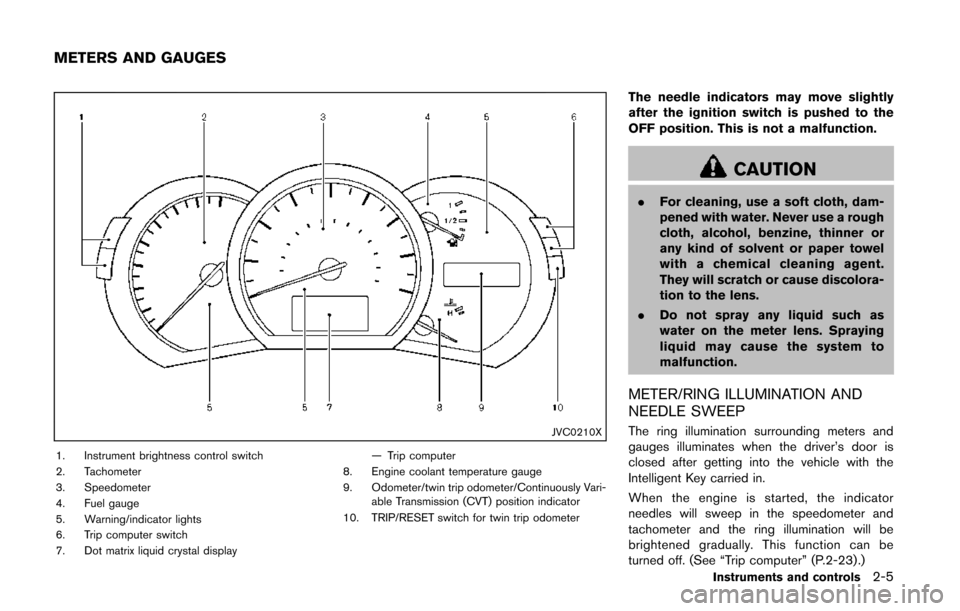
JVC0210X
1. Instrument brightness control switch
2. Tachometer
3. Speedometer
4. Fuel gauge
5. Warning/indicator lights
6. Trip computer switch
7. Dot matrix liquid crystal display— Trip computer
8. Engine coolant temperature gauge
9. Odometer/twin trip odometer/Continuously Vari- able Transmission (CVT) position indicator
10. TRIP/RESET switch for twin trip odometer
The needle indicators may move slightly
after the ignition switch is pushed to the
OFF position. This is not a malfunction.
CAUTION
. For cleaning, use a soft cloth, dam-
pened with water. Never use a rough
cloth, alcohol, benzine, thinner or
any kind of solvent or paper towel
with a chemical cleaning agent.
They will scratch or cause discolora-
tion to the lens.
. Do not spray any liquid such as
water on the meter lens. Spraying
liquid may cause the system to
malfunction.
METER/RING ILLUMINATION AND
NEEDLE SWEEP
The ring illumination surrounding meters and
gauges illuminates when the driver’s door is
closed after getting into the vehicle with the
Intelligent Key carried in.
When the engine is started, the indicator
needles will sweep in the speedometer and
tachometer and the ring illumination will be
brightened gradually. This function can be
turned off. (See “Trip computer” (P.2-23) .)
Instruments and controls2-5
METERS AND GAUGES
Page 85 of 482
2-6Instruments and controls
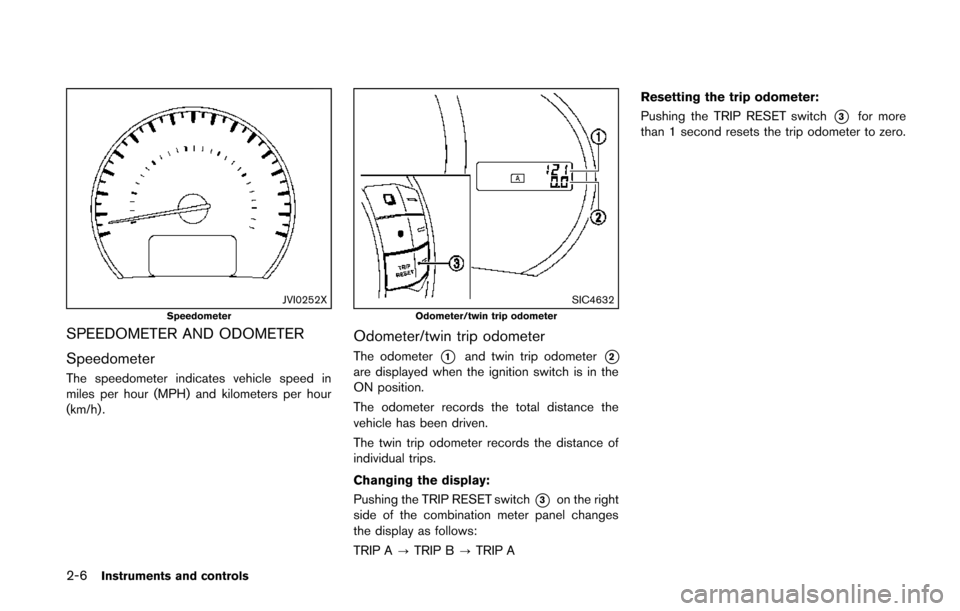
JVI0252XSpeedometer
SPEEDOMETER AND ODOMETER
Speedometer
The speedometer indicates vehicle speed in
miles per hour (MPH) and kilometers per hour
(km/h) .
SIC4632Odometer/twin trip odometer
Odometer/twin trip odometer
The odometer*1and twin trip odometer*2are displayed when the ignition switch is in the
ON position.
The odometer records the total distance the
vehicle has been driven.
The twin trip odometer records the distance of
individual trips.
Changing the display:
Pushing the TRIP RESET switch
*3on the right
side of the combination meter panel changes
the display as follows:
TRIP A ?TRIP B ?TRIP A Resetting the trip odometer:
Pushing the TRIP RESET switch
*3for more
than 1 second resets the trip odometer to zero.
Page 87 of 482
2-8Instruments and controls
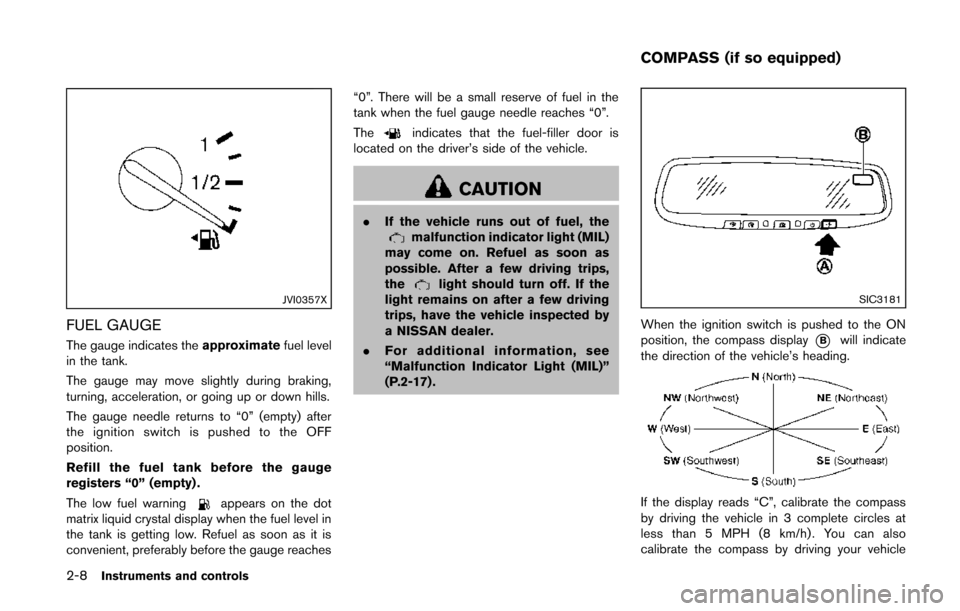
JVI0357X
FUEL GAUGE
The gauge indicates theapproximatefuel level
in the tank.
The gauge may move slightly during braking,
turning, acceleration, or going up or down hills.
The gauge needle returns to “0” (empty) after
the ignition switch is pushed to the OFF
position.
Refill the fuel tank before the gauge
registers “0” (empty) .
The low fuel warning
appears on the dot
matrix liquid crystal display when the fuel level in
the tank is getting low. Refuel as soon as it is
convenient, preferably before the gauge reaches “0”. There will be a small reserve of fuel in the
tank when the fuel gauge needle reaches “0”.
The
indicates that the fuel-filler door is
located on the driver’s side of the vehicle.
CAUTION
. If the vehicle runs out of fuel, themalfunction indicator light (MIL)
may come on. Refuel as soon as
possible. After a few driving trips,
the
light should turn off. If the
light remains on after a few driving
trips, have the vehicle inspected by
a NISSAN dealer.
. For additional information, see
“Malfunction Indicator Light (MIL)”
(P.2-17) .SIC3181
When the ignition switch is pushed to the ON
position, the compass display
*Bwill indicate
the direction of the vehicle’s heading.
If the display reads “C”, calibrate the compass
by driving the vehicle in 3 complete circles at
less than 5 MPH (8 km/h). You can also
calibrate the compass by driving your vehicle
COMPASS (if so equipped)
Page 88 of 482
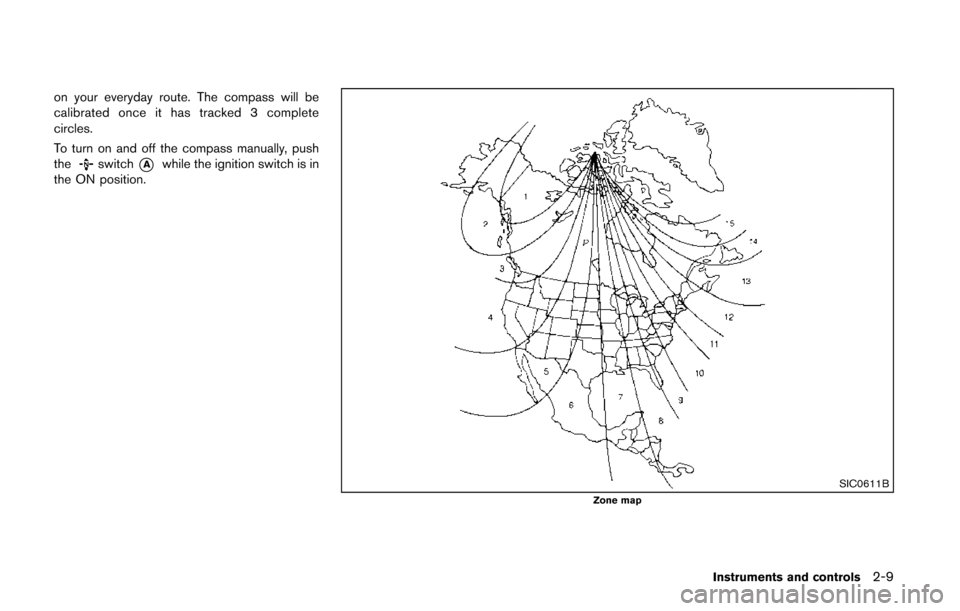
on your everyday route. The compass will be
calibrated once it has tracked 3 complete
circles.
To turn on and off the compass manually, push
the
switch*Awhile the ignition switch is in
the ON position.
SIC0611BZone map
Instruments and controls2-9
Page 91 of 482
2-12Instruments and controls
CHECKING BULBS
With all doors closed, apply the parking brake
and push the ignition switch to the ON position
without starting the engine. The following lights
will come on (if so equipped):
,or,,,,
The following lights come on briefly and then go
off (if so equipped):
,or,,,,,,
If any light does not come on, it may indicate a
burned-out bulb or an open circuit in the
electrical system. Have the system checked by
a NISSAN dealer.
Some indicators and warnings are also dis-
played on the dot matrix crystal display on the
speedometer. (See “Dot matrix liquid crystal
display” (P.2-18) .)
WARNING LIGHTS
orAnti-lock Braking System
(ABS) warning light
When the ignition switch is in the ON position,
the Anti-lock Braking System (ABS) warning
light illuminates and then turns off. This indicates
the ABS is operational.
If the ABS warning light illuminates while the
engine is running, or while driving, it may
indicate the ABS is not functioning properly.
Have the system checked by a NISSAN dealer.
If an ABS malfunction occurs, the anti-lock
function is turned off. The brake system then
operates normally, but without anti-lock assis-
tance. (See “Brake system” (P.5-29).)
Blind Spot Warning (BSW) system
warning light (if so equipped)
If the light comes on and remains on, it may
indicate that the BSW system is not functioning
properly. Although the vehicle is still driveable,
have the system checked by a NISSAN dealer.
See “Blind Spot Warning (BSW) system” (P.5-
17).
orBrake warning light
This light functions for both the parking brake
and the foot brake systems.
Parking brake indicator:
When the ignition switch is in the ON position,
the light comes on when the parking brake is
applied.
Low brake fluid warning light:
When the ignition switch is in the ON position,
the light warns of a low brake fluid level. If the
light comes on while the engine is running with
the parking brake not applied, stop the vehicle
and perform the following:
1. Check the brake fluid level. Add brake fluid
as necessary. (See “Brake fluid” (P.8-12) .)
2. If the brake fluid level is correct, have the warning system checked by a NISSAN
dealer.
Anti-lock Braking System (ABS) warning
indicator:
When the parking brake is released and the
brake fluid level is sufficient, if both the brake
warning light and the Anti-lock Braking System
(ABS) warning light illuminate, it may indicate
the ABS is not functioning properly. Have the
brake system checked, and if necessary re-
paired, by a NISSAN dealer promptly. (See