Page 321 of 492
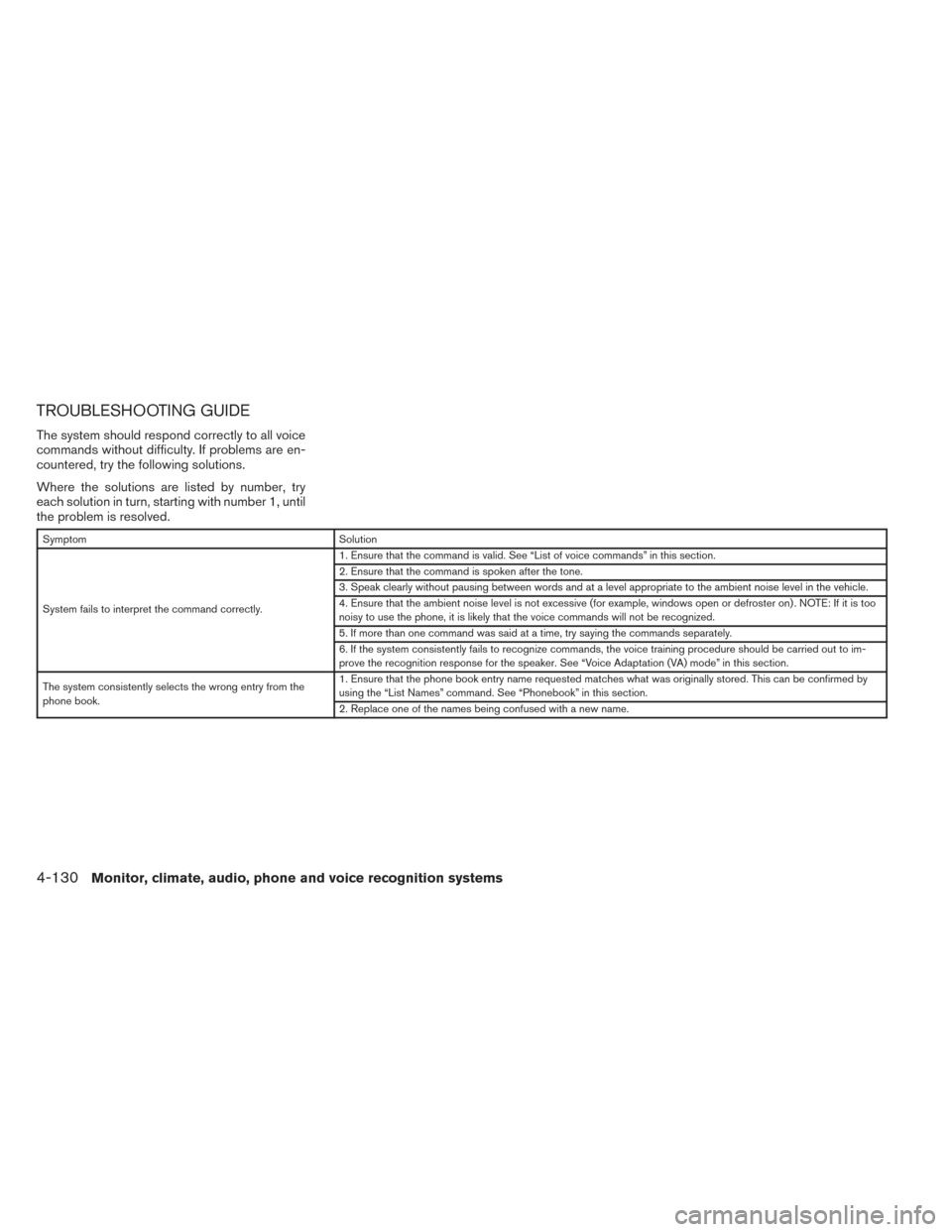
TROUBLESHOOTING GUIDE
The system should respond correctly to all voice
commands without difficulty. If problems are en-
countered, try the following solutions.
Where the solutions are listed by number, try
each solution in turn, starting with number 1, until
the problem is resolved.
SymptomSolution
System fails to interpret the command correctly. 1. Ensure that the command is valid. See “List of voice commands” in this section.
2. Ensure that the command is spoken after the tone.
3. Speak clearly without pausing between words and at a level appropriate to the ambient noise level in the vehicle.
4. Ensure that the ambient noise level is not excessive (for example, windows open or defroster on) . NOTE: If it is too
noisy to use the phone, it is likely that the voice commands will not be recognized.
5. If more than one command was said at a time, try saying the commands separately.
6. If the system consistently fails to recognize commands, the voice training procedure should be carried out to im-
prove the recognition response for the speaker. See “Voice Adaptation (VA) mode” in this section.
The system consistently selects the wrong entry from the
phone book. 1. Ensure that the phone book entry name requested matches what was originally stored. This can be confirmed by
using the “List Names” command. See “Phonebook” in this section.
2. Replace one of the names being confused with a new name.
4-130Monitor, climate, audio, phone and voice recognition systems
Page 351 of 492
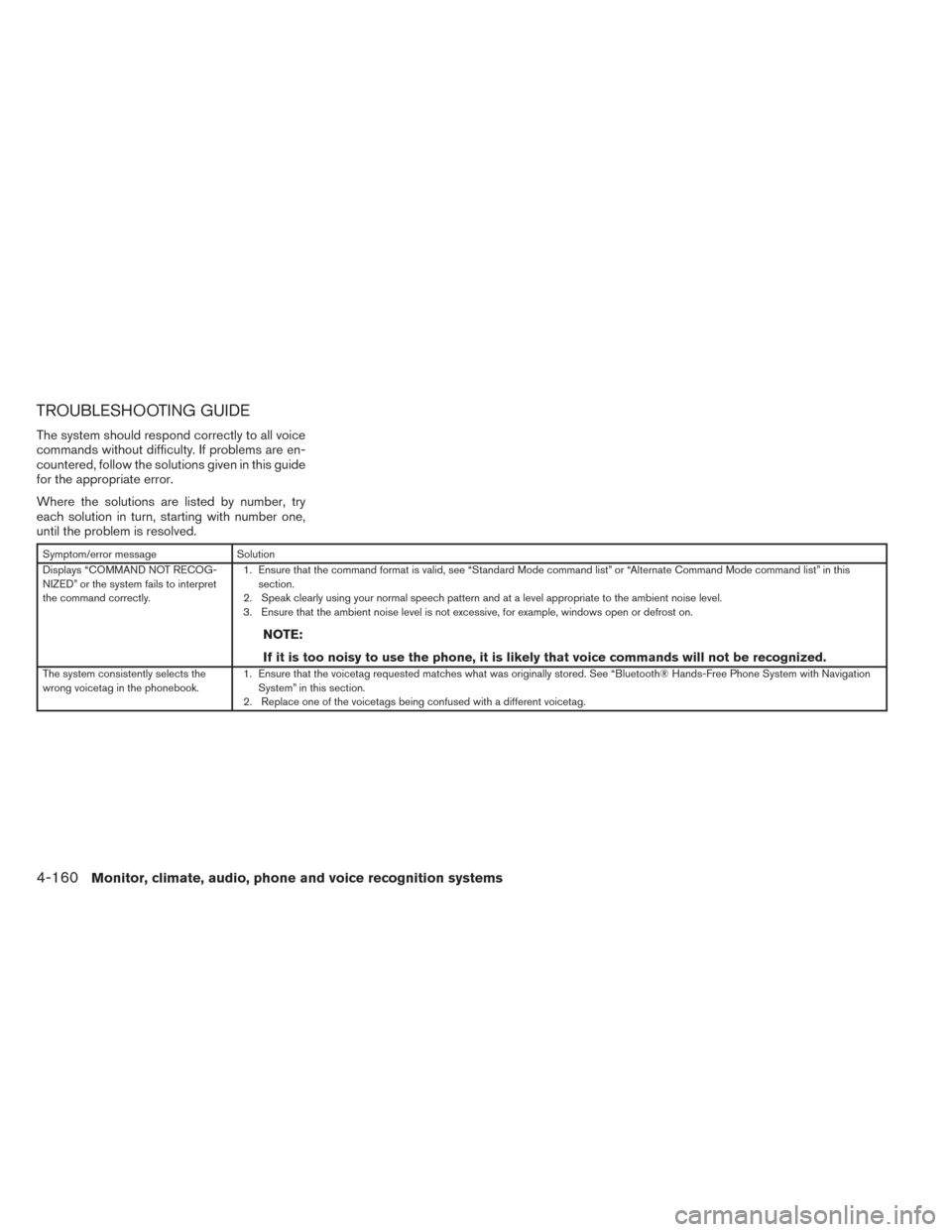
TROUBLESHOOTING GUIDE
The system should respond correctly to all voice
commands without difficulty. If problems are en-
countered, follow the solutions given in this guide
for the appropriate error.
Where the solutions are listed by number, try
each solution in turn, starting with number one,
until the problem is resolved.
Symptom/error messageSolution
Displays “COMMAND NOT RECOG-
NIZED” or the system fails to interpret
the command correctly. 1. Ensure that the command format is valid, see “Standard Mode command list” or “Alternate Command Mode command list” in this
section.
2. Speak clearly using your normal speech pattern and at a level appropriate to the ambient noise level.
3. Ensure that the ambient noise level is not excessive, for example, windows open or defrost on.
NOTE:
If it is too noisy to use the phone, it is likely that voice commands will not be recognized.
The system consistently selects the
wrong voicetag in the phonebook. 1. Ensure that the voicetag requested matches what was originally stored. See “Bluetooth® Hands-Free Phone System with Navigation
System” in this section.
2. Replace one of the voicetags being confused with a different voicetag.
4-160Monitor, climate, audio, phone and voice recognition systems
Page 412 of 492
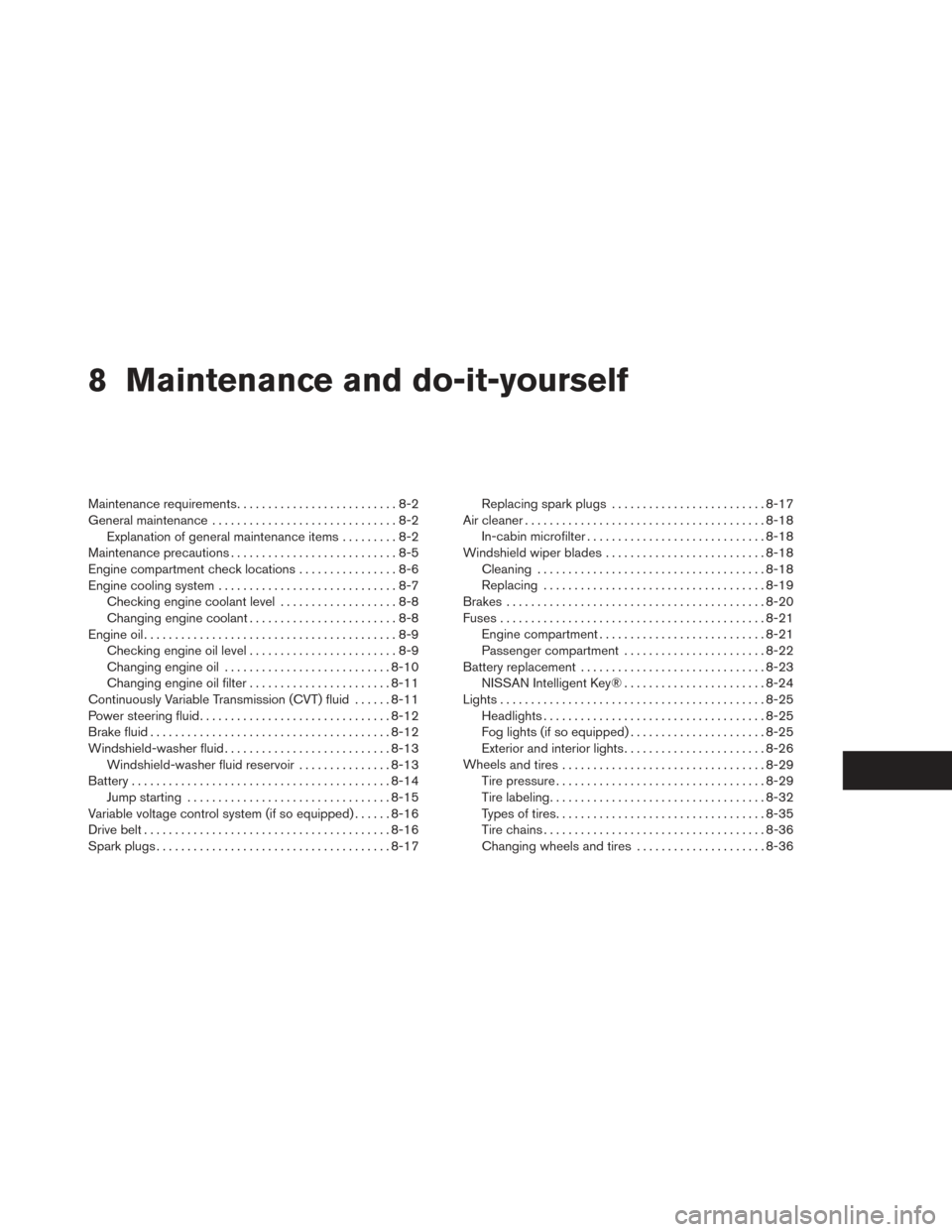
8 Maintenance and do-it-yourself
Maintenance requirements..........................8-2
General maintenance ..............................8-2
Explanation of general maintenance items .........8-2
Maintenance precautions ...........................8-5
Engine compartment check locations ................8-6
Engine cooling system .............................8-7
Checking engine coolant level ...................8-8
Changing engine coolant ........................8-8
Engine oil .........................................8-9
Checking engine oil level ........................8-9
Changing engine oil ........................... 8-10
Changing engine oil filter .......................8-11
Continuously Variable Transmission (CVT) fluid ......8-11
Power steering fluid ............................... 8-12
Brake fluid ....................................... 8-12
Windshield-washer fluid ........................... 8-13
Windshield-washer fluid reservoir ...............8-13
Battery .......................................... 8-14
Jump starting ................................. 8-15
Variable voltage control system (if so equipped) . . ....8-16
Drive belt ........................................ 8-16
Spark plugs ...................................... 8-17Replacing spark plugs
......................... 8-17
Air cleaner ....................................... 8-18
In-cabin microfilter ............................. 8-18
Windshield wiper blades .......................... 8-18
Cleaning ..................................... 8-18
Replacing .................................... 8-19
Brakes .......................................... 8-20
Fuses ........................................... 8-21
Engine compartment ........................... 8-21
Passenger compartment .......................8-22
Battery replacement .............................. 8-23
NISSAN Intelligent Key® .......................8-24
Lights ........................................... 8-25
Headlights .................................... 8-25
Fog lights (if so equipped) ......................8-25
Exterior and interior lights .......................8-26
Wheels
and tires ................................. 8-29
Tire pressure . . . ............................... 8-29
Tire labeling ................................... 8-32
Types of tires .................................. 8-35
Tire chains .................................... 8-36
Changing wheels and tires .....................8-36
Page 417 of 492
VQ35DE engine
1. Power steering fluid reservoir
2. Engine coolant reservoir
3. Drive belt location
4. Fuse box
5. Engine oil filler cap6. Brake fluid reservoir
7. Air cleaner
8. Fuse box
9. Fuse box/Fusible links
10 Fuse box
11. Battery12. Engine oil dipstick
13. Radiator cap
14. Windshield-washer fluid reservoir
NOTE:
Engine cover removed for clarity.
LDI2266
ENGINE COMPARTMENT CHECK
LOCATIONS
8-6Maintenance and do-it-yourself
Page 432 of 492
ENGINE COMPARTMENT
CAUTION
Never use a fuse of a higher or lower
amperage rating than specified on the
fuse box cover. This could damage the
electrical system or cause a fire.
If any electrical equipment does not come on,
check for an open fuse. 1. Be sure the ignition switch and the headlight switch are OFF.
2. Open the engine hood. 3. Remove the fuse box cover by pushing the
tab and lifting the cover up.
4. Remove the fuse with the fuse puller. The fuse puller is located in the fuse block in the
passenger compartment. 5. If the fuse is open
�A, replace it with a new
fuse
�B.
6. If a new fuse also opens, have the electrical system checked and repaired by a NISSAN
dealer.
Fusible links
If the electrical equipment does not operate and
fuses are in good condition, check the fusible
links. If any of these fusible links are melted,
replace with only Genuine NISSAN parts.
LDI2267LDI0456
FUSES
Maintenance and do-it-yourself8-21
Page 433 of 492
PASSENGER COMPARTMENT
CAUTION
Never use a fuse of a higher or lower
amperage rating than specified on the
fuse box cover. This could damage the
electrical system or cause a fire.If any electrical equipment does not operate,
check for an open fuse.
1. Be sure the ignition switch and the headlight switch are OFF.
2. Open the glove box to access the fuse box cover.
3. Pull the fuse box cover to remove.
4. Remove the fuse with the fuse puller.
5. If the fuse is open
�A, replace it with an
equivalent good fuse
�B.
6. Push the fuse box cover to install.
7. If a new fuse also opens, have the electrical system checked and repaired by a NISSAN
dealer.
LDI2092LDI0456
8-22Maintenance and do-it-yourself
Page 434 of 492
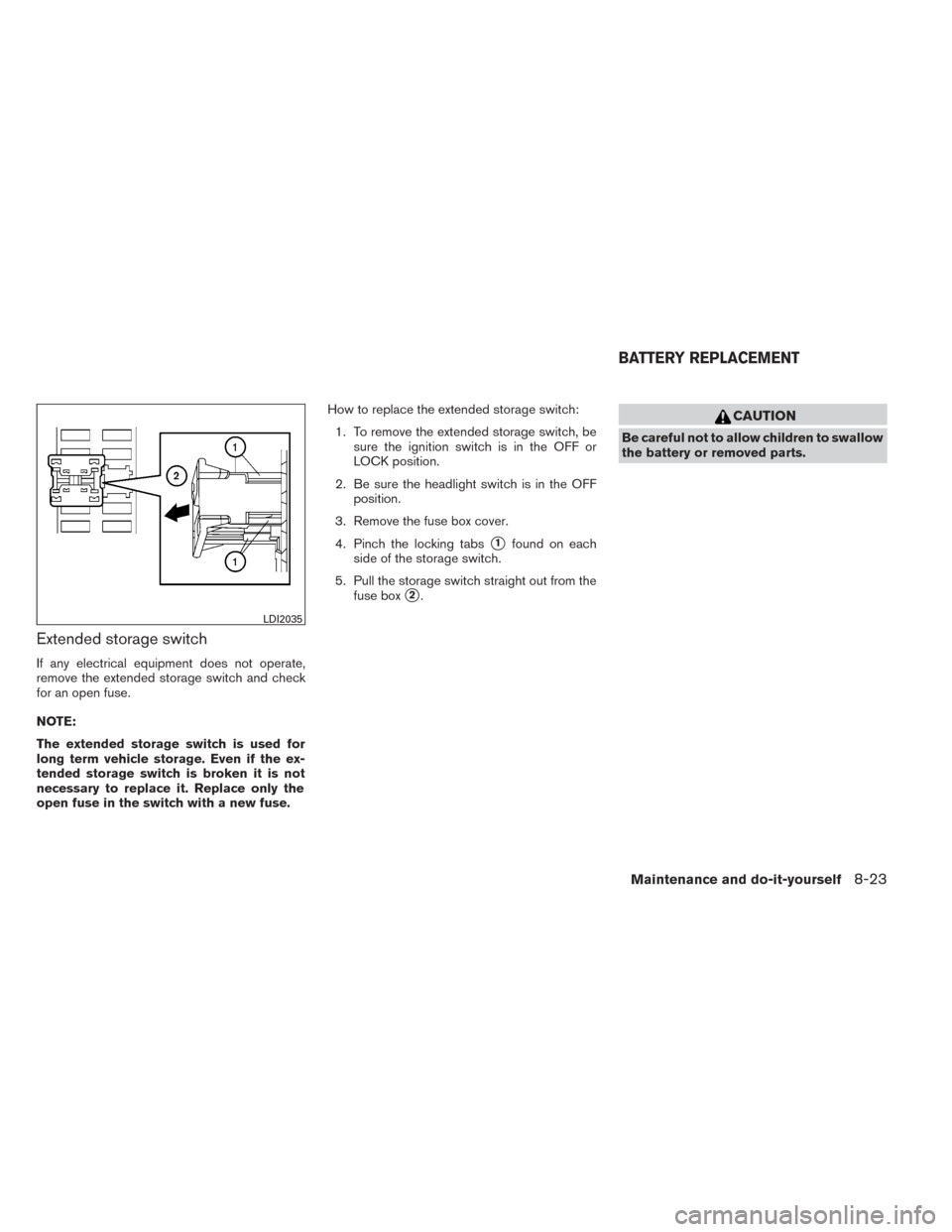
Extended storage switch
If any electrical equipment does not operate,
remove the extended storage switch and check
for an open fuse.
NOTE:
The extended storage switch is used for
long term vehicle storage. Even if the ex-
tended storage switch is broken it is not
necessary to replace it. Replace only the
open fuse in the switch with a new fuse.How to replace the extended storage switch:
1. To remove the extended storage switch, be sure the ignition switch is in the OFF or
LOCK position.
2. Be sure the headlight switch is in the OFF position.
3. Remove the fuse box cover.
4. Pinch the locking tabs
�1found on each
side of the storage switch.
5. Pull the storage switch straight out from the fuse box
�2.
CAUTION
Be careful not to allow children to swallow
the battery or removed parts.
LDI2035
BATTERY REPLACEMENT
Maintenance and do-it-yourself8-23
Page 475 of 492
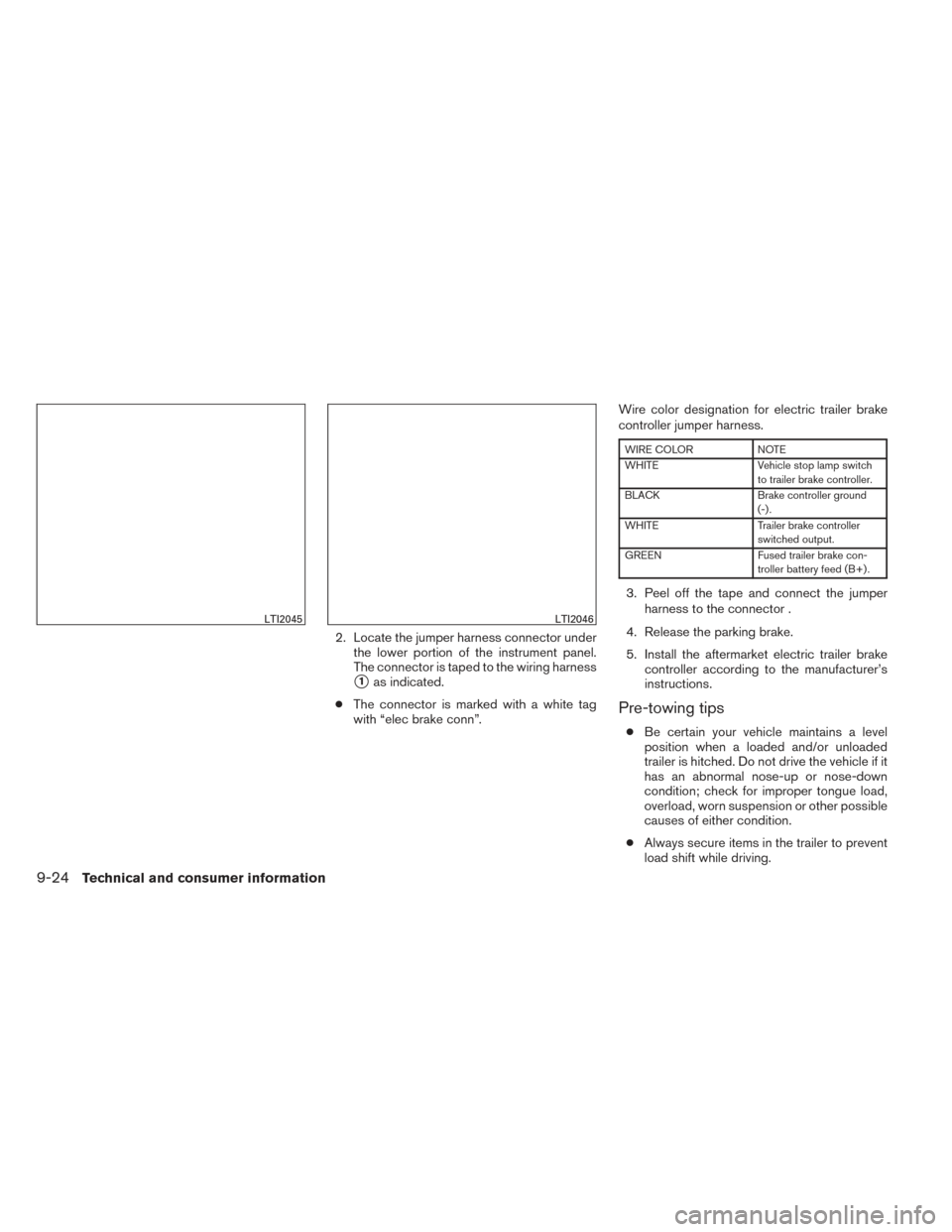
2. Locate the jumper harness connector underthe lower portion of the instrument panel.
The connector is taped to the wiring harness
�1as indicated.
● The connector is marked with a white tag
with “elec brake conn”. Wire color designation for electric trailer brake
controller jumper harness.
WIRE COLOR
NOTE
WHITE Vehicle stop lamp switch
to trailer brake controller.
BLACK Brake controller ground
(-) .
WHITE Trailer brake controller
switched output.
GREEN Fused trailer brake con-
troller battery feed (B+) .
3. Peel off the tape and connect the jumper harness to the connector .
4. Release the parking brake.
5. Install the aftermarket electric trailer brake controller according to the manufacturer’s
instructions.
Pre-towing tips
●Be certain your vehicle maintains a level
position when a loaded and/or unloaded
trailer is hitched. Do not drive the vehicle if it
has an abnormal nose-up or nose-down
condition; check for improper tongue load,
overload, worn suspension or other possible
causes of either condition.
● Always secure items in the trailer to prevent
load shift while driving.
LTI2045LTI2046
9-24Technical and consumer information