2014 NISSAN MAXIMA maintenance
[x] Cancel search: maintenancePage 96 of 432
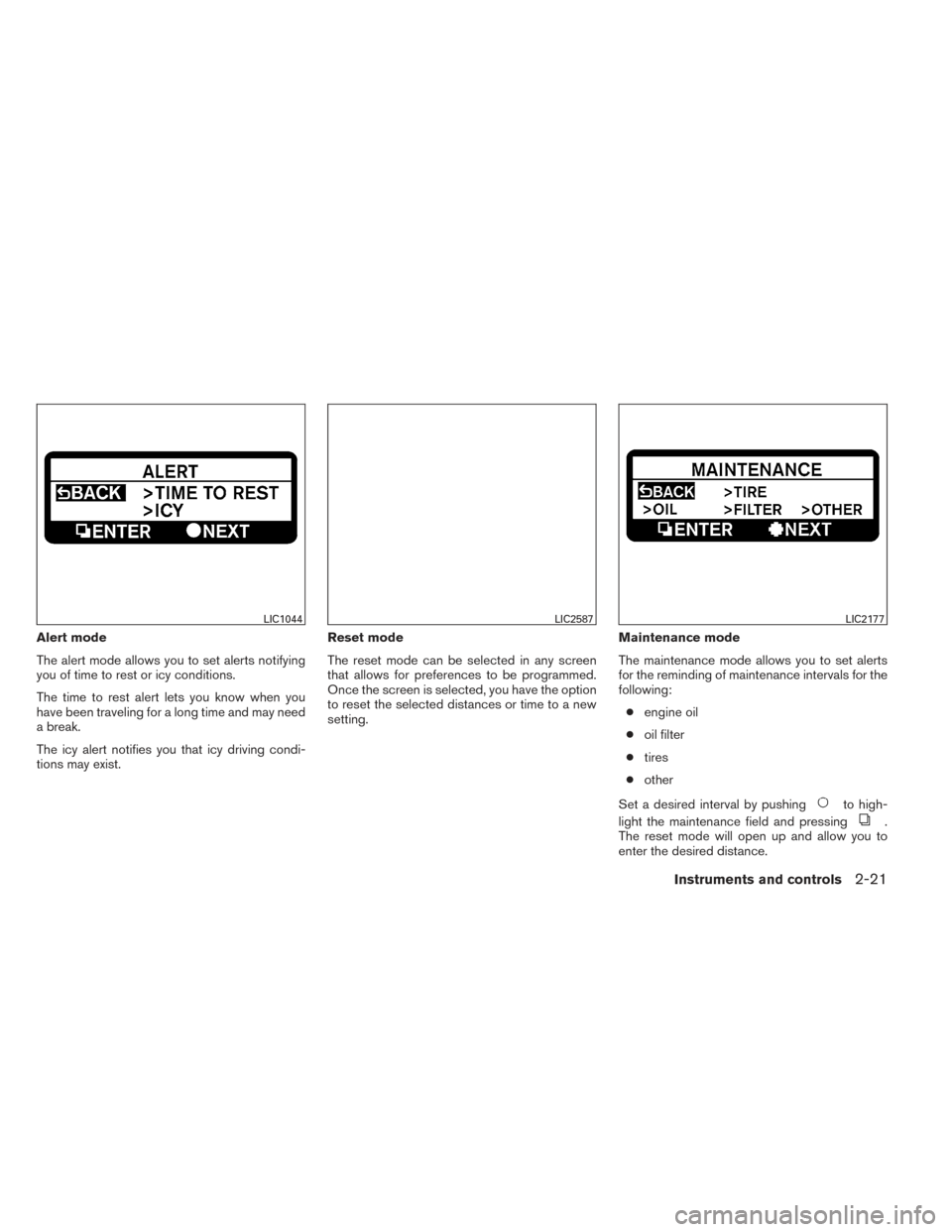
Alert mode
The alert mode allows you to set alerts notifying
you of time to rest or icy conditions.
The time to rest alert lets you know when you
have been traveling for a long time and may need
a break.
The icy alert notifies you that icy driving condi-
tions may exist.Reset mode
The reset mode can be selected in any screen
that allows for preferences to be programmed.
Once the screen is selected, you have the option
to reset the selected distances or time to a new
setting.
Maintenance mode
The maintenance mode allows you to set alerts
for the reminding of maintenance intervals for the
following:
● engine oil
● oil filter
● tires
● other
Set a desired interval by pushing
to high-
light the maintenance field and pressing
.
The reset mode will open up and allow you to
enter the desired distance.
LIC1044LIC2587LIC2177
Instruments and controls2-21
Page 99 of 432
12. Loose fuel cap warning
13. Check tire pressure warning
14. Tire pressure warning
15. I-Key System Error: See Owner’s Manual
Door and trunk open warning
This warning illuminates when a door or the trunk
has been opened when the engine is running.
Push warning
After the Shift P warning illuminates, the Push
warning will illuminate if the ignition switch is
placed in the ACC position when the shift lever is
moved to the P (Park) position.
See “Shift P warning” in this section for additional
information.
To turn off the Push warning, place the ignition
switch in the ON position and then to the LOCK
position.
Low fuel warning
This warning illuminates when the fuel level in the
fuel tank is getting low. Refuel as soon as it is
convenient, preferably before the fuel gauge
reaches E (Empty) .There will be a small re-
serve of fuel in the tank when the fuel
gauge needle reaches E (Empty) . Low windshield-washer fluid warning
This warning illuminates when the windshield-
washer fluid is at a low level. Add windshield-
washer fluid as necessary. See “Windshield-
washer fluid” in the “Maintenance and do-it-
yourself” section of this manual.
No key warning
This warning illuminates following two condi-
tions:
1. When the ignition switch is pushed and the Intelligent Key cannot be recognized by the
system. If this warning illuminates, you can-
not start the engine.
Check for the following causes and perform
the assigned remedies:
– The battery of the Intelligent Key carried with you is discharged completely. Re-
place the battery with a new one.
– The Intelligent Key carried with you is not registered to the system. Use the regis-
tered Intelligent Key.
– You do not have an Intelligent Key with you. Carry an Intelligent Key with you.
2. When the door is closed with the Intelligent Key left outside the vehicle and the ignition switch is placed in the ACC or ON position.
A chime will also sound.
Parking brake warning
This warning illuminates when the parking brake
is set and the vehicle is driven.
SHIFT P warning
This warning illuminates when the ignition switch
is pushed to stop the engine with the shift lever in
any position except in the P (Park) position.
If this warning illuminates, the ignition switch is in
the OFF position. Move the shift lever to the P
(Park) position or push the ignition switch to the
ON position.
An inside warning chime will also sound.
If the shift lever is moved to the P (Park) position,
the Push warning will appear. Refer to “Push
warning” in this section.
For additional information about Intelligent Key,
see “NISSAN Intelligent Key®” in the “Pre-
driving checks and adjustments” section.
Engine start operation indicator
This indicator illuminates when the ignition switch
is in the LOCK, OFF, ACC or ON position with
the shift lever in the P (Park) position.
2-24Instruments and controls
Page 100 of 432
This indicator means that the engine will start by
pushing the push-button ignition switch with the
brake pedal depressed.
NISSAN Intelligent Key® insertion indica-
tor
This indicator illuminates when the Intelligent Key
needs to be inserted into the Intelligent Key port.
(For example, the Intelligent Key battery is dis-
charged.)
If this indicator illuminates, insert the Intelligent
Key into the Intelligent Key port in the correct
direction. See “Push-button ignition switch” in
the “Starting and driving” section.
NISSAN Intelligent Key® removal indica-
tor
This indicator illuminates when the driver’s door
is opened with the ignition switch placed in the
OFF position and the Intelligent Key placed in the
Intelligent Key port. A key reminder chime also
sounds.
If this indicator illuminates, remove the Intelligent
Key from the Intelligent Key port and take it with
you when leaving the vehicle.
NISSAN Intelligent Key® battery dis-
charge indicator
This indicator illuminates when the Intelligent Key
battery is running out of power.If this indicator illuminates, replace the battery
with a new one. See “Battery replacement” in the
“Maintenance and do-it-yourself” section.
Loose fuel cap warning
This warning appears when the fuel-filler cap is
not tightened correctly after the vehicle has been
refueled. See “Fuel-filler cap” in the “Pre-driving
checks and adjustments” section.
Check tire pressure warning
This warning appears when the low tire pressure
warning light in the meter illuminates and low tire
pressure is detected. If this warning appears,
stop the vehicle and adjust the tire pressure to
the recommended COLD tire pressure shown on
the Tire and Loading Information label. See “Low
tire pressure warning light” earlier in this section
and “Tire Pressure Monitoring System (TPMS)”
in the “Starting and driving” section.
Tire pressure warning
This screen will show the actual pressure of each
tire. Any low tire pressure will be highlighted. The
screen does not indicate which pressure corre-
sponds with which tire.
The numbers do not automatically update after
tire pressure is adjusted. After the tire is inflated
to the recommended pressure, the vehicle must
be driven at speeds above 16 MPH (25 km/h) toupdate the numbers. Refer to “Tire Pressure
Monitoring System” in the “Starting and driving”
section.
Intelligent Key error
After the ignition switch is pushed to the ON
position, this light comes on for about 2 seconds
and then turns off.
The I-Key System Error message warns of a
malfunction with the Intelligent Key system. If the
light comes on while the engine is stopped, it may
be impossible to start the engine.
If the light comes on while the engine is running,
you can drive the vehicle. However in these
cases, contact a NISSAN dealer for repair as
soon as possible.
Instruments and controls2-25
Page 128 of 432
To turn the map lights on, press the switches. To
turn them off, press the switches again.
CAUTION
Do not use for extended periods of time
with the engine stopped. This could result
in a discharged battery.The light illuminates when the trunk lid is opened.
When the trunk lid is closed, the light goes off.
The light will go off after a period of time if the
trunk lid is left open, unless the ignition switch is
in the ON position.
For bulb replacement procedures, refer to “Exte-
rior and interior lights” in the “Maintenance and
do-it-yourself” section of this manual. The HomeLink® Universal Transceiver provides
a convenient way to consolidate the functions of
up to three individual hand-held transmitters into
one built-in device.
HomeLink® Universal Transceiver:
● Will operate most Radio Frequency (RF)
devices such as garage doors, gates, home
and office lighting, entry door locks and se-
curity systems.
● Is powered by your vehicle’s battery. No
separate batteries are required. If the vehi-
cle’s battery is discharged or is discon-
nected, HomeLink® will retain all program-
ming.
When the HomeLink® Universal Trans-
ceiver is programmed, retain the original
transmitter for future programming proce-
dures (Example: new vehicle purchases) .
Upon sale of the vehicle, the programmed
HomeLink® Universal Transceiver buttons
should be erased for security purposes. For
additional information, refer to “Program-
ming HomeLink®” later in this section.
MAP LIGHTS TRUNK LIGHTHOMELINK® UNIVERSAL
TRANSCEIVER (if so equipped)
Instruments and controls2-53
Page 169 of 432
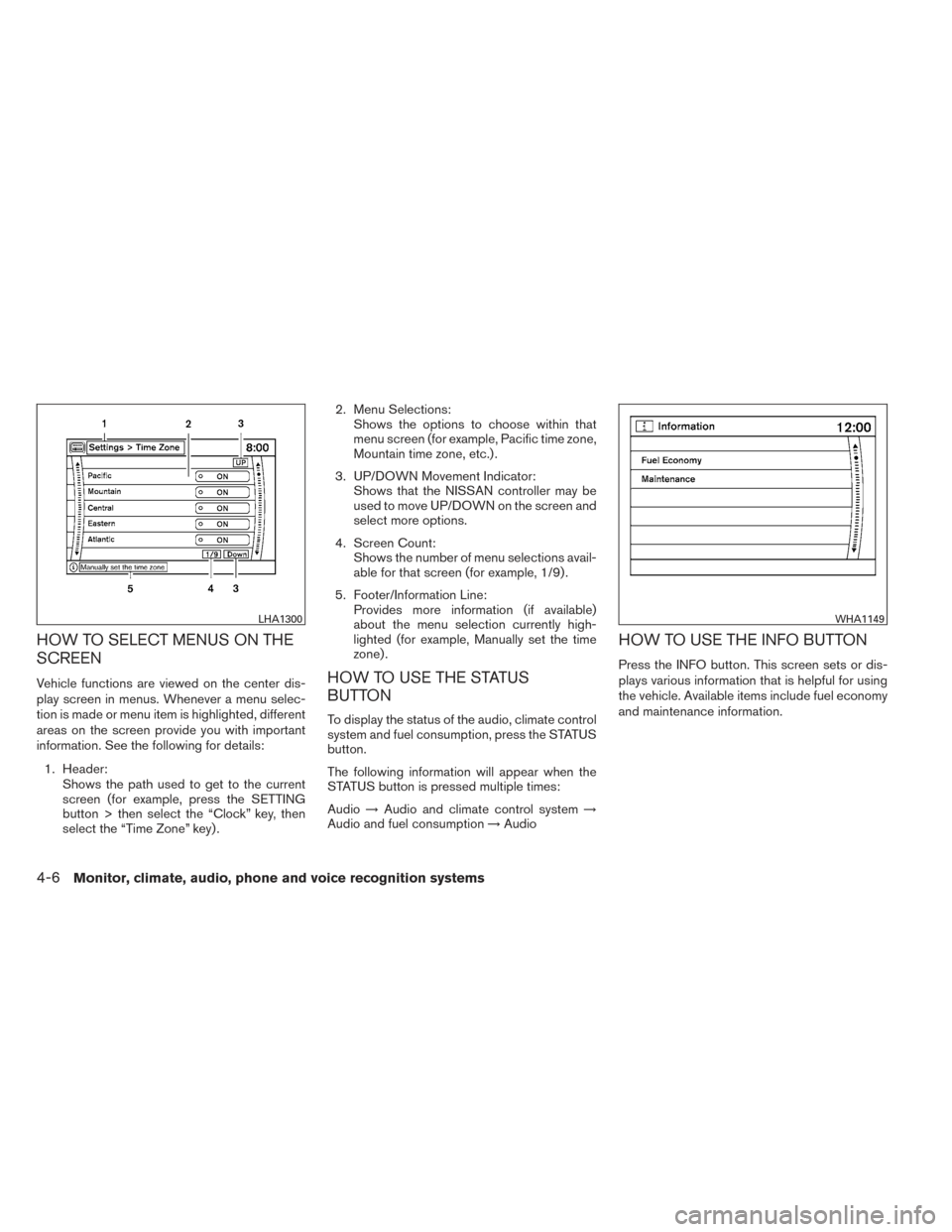
HOW TO SELECT MENUS ON THE
SCREEN
Vehicle functions are viewed on the center dis-
play screen in menus. Whenever a menu selec-
tion is made or menu item is highlighted, different
areas on the screen provide you with important
information. See the following for details:1. Header: Shows the path used to get to the current
screen (for example, press the SETTING
button > then select the “Clock” key, then
select the “Time Zone” key) . 2. Menu Selections:
Shows the options to choose within that
menu screen (for example, Pacific time zone,
Mountain time zone, etc.) .
3. UP/DOWN Movement Indicator: Shows that the NISSAN controller may be
used to move UP/DOWN on the screen and
select more options.
4. Screen Count: Shows the number of menu selections avail-
able for that screen (for example, 1/9) .
5. Footer/Information Line: Provides more information (if available)
about the menu selection currently high-
lighted (for example, Manually set the time
zone) .HOW TO USE THE STATUS
BUTTON
To display the status of the audio, climate control
system and fuel consumption, press the STATUS
button.
The following information will appear when the
STATUS button is pressed multiple times:
Audio →Audio and climate control system →
Audio and fuel consumption →Audio
HOW TO USE THE INFO BUTTON
Press the INFO button. This screen sets or dis-
plays various information that is helpful for using
the vehicle. Available items include fuel economy
and maintenance information.
LHA1300WHA1149
4-6Monitor, climate, audio, phone and voice recognition systems
Page 170 of 432
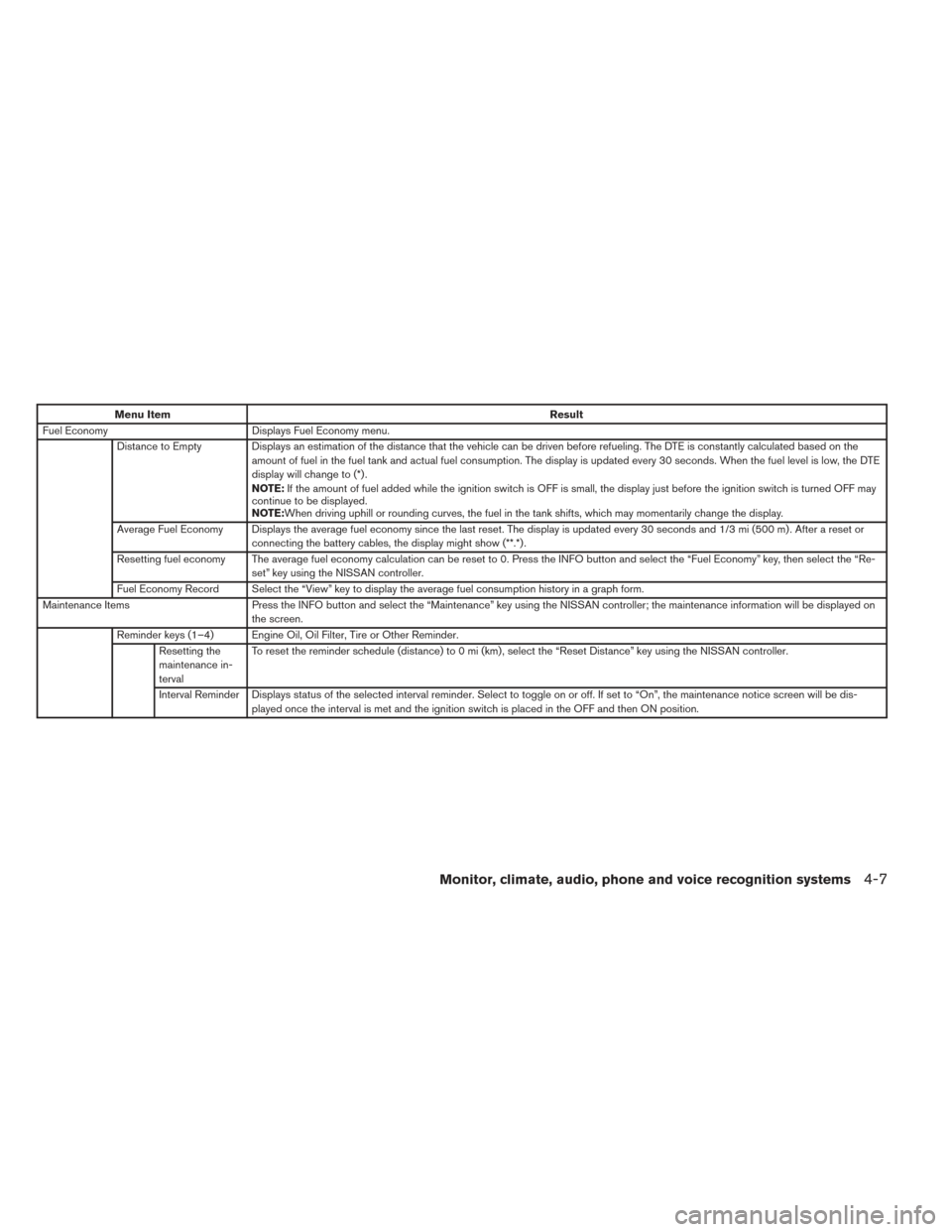
Menu ItemResult
Fuel Economy Displays Fuel Economy menu.
Distance to Empty Displays an estimation of the distance that the vehicle can be driven before refueling. The DTE is constantly calculated based on the amount of fuel in the fuel tank and actual fuel consumption. The display is updated every 30 seconds. When the fuel level is low, the DTE
display will change to (*) .
NOTE:If the amount of fuel added while the ignition switch is OFF is small, the display just before the ignition switch is turned OFF may
continue to be displayed.
NOTE:When driving uphill or rounding curves, the fuel in the tank shifts, which may momentarily change the display.
Average Fuel Economy Displays the average fuel economy since the last reset. The display is updated every 30 seconds and 1/3 mi (500 m) . After a reset or connecting the battery cables, the display might show (**.*) .
Resetting fuel economy The average fuel economy calculation can be reset to 0. Press the INFO button and select the “Fuel Economy” key, then select the “Re- set” key using the NISSAN controller.
Fuel Economy Record Select the “View” key to display the average fuel consumption history in a graph form.
Maintenance Items Press the INFO button and select the “Maintenance” key using the NISSAN controller; the maintenance information will be displayed on
the screen.
Reminder keys (1–4) Engine Oil, Oil Filter, Tire or Other Reminder. Resetting the
maintenance in-
terval To reset the reminder schedule (distance) to 0 mi (km) , select the “Reset Distance” key using the NISSAN controller.
Interval Reminder Displays status of the selected interval reminder. Select to toggle on or off. If set to “On”, the maintenance notice screen will be dis- played once the interval is met and the ignition switch is placed in the OFF and then ON position.
Monitor, climate, audio, phone and voice recognition systems4-7
Page 177 of 432
Touch screen maintenance
If you clean the display screen, use a dry, soft
cloth. If additional cleaning is necessary, use a
small amount of neutral detergent with a soft
cloth. Never spray the screen with water or de-
tergent. Dampen the cloth first, and then wipe the
screen.
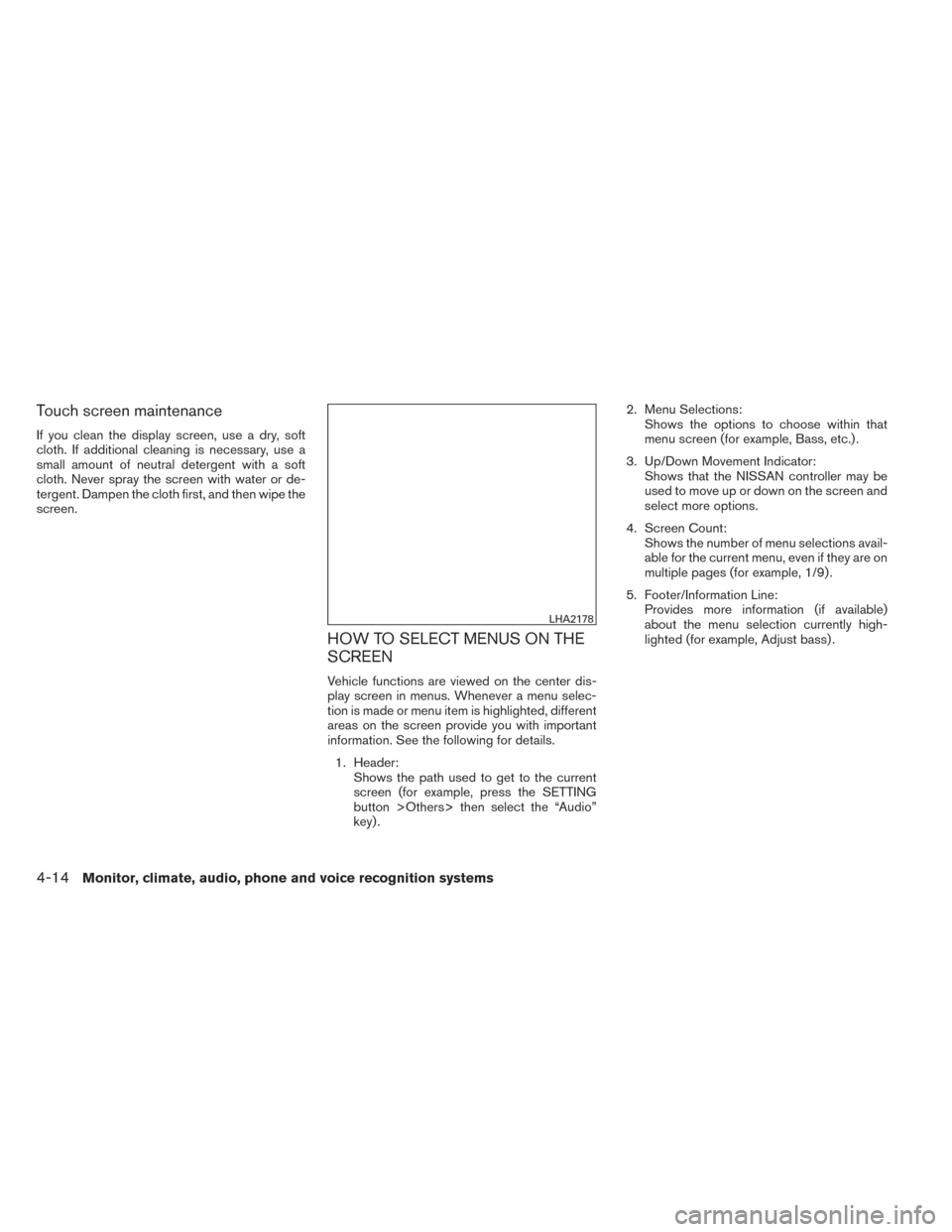
HOW TO SELECT MENUS ON THE
SCREEN
Vehicle functions are viewed on the center dis-
play screen in menus. Whenever a menu selec-
tion is made or menu item is highlighted, different
areas on the screen provide you with important
information. See the following for details.1. Header: Shows the path used to get to the current
screen (for example, press the SETTING
button >Others> then select the “Audio”
key) . 2. Menu Selections:
Shows the options to choose within that
menu screen (for example, Bass, etc.) .
3. Up/Down Movement Indicator: Shows that the NISSAN controller may be
used to move up or down on the screen and
select more options.
4. Screen Count: Shows the number of menu selections avail-
able for the current menu, even if they are on
multiple pages (for example, 1/9) .
5. Footer/Information Line: Provides more information (if available)
about the menu selection currently high-
lighted (for example, Adjust bass) .
LHA2178
4-14Monitor, climate, audio, phone and voice recognition systems
Page 178 of 432
HOW TO USE THE STATUS
BUTTON
The STATUS button is used to display system
information. Three different split screens of infor-
mation are available. Press the STATUS button
multiple times to cycle through these screens as
follows:
Audio with Fuel Economy Information→Audio
with Climate Control Information →Audio with
Turn Information for Navigation
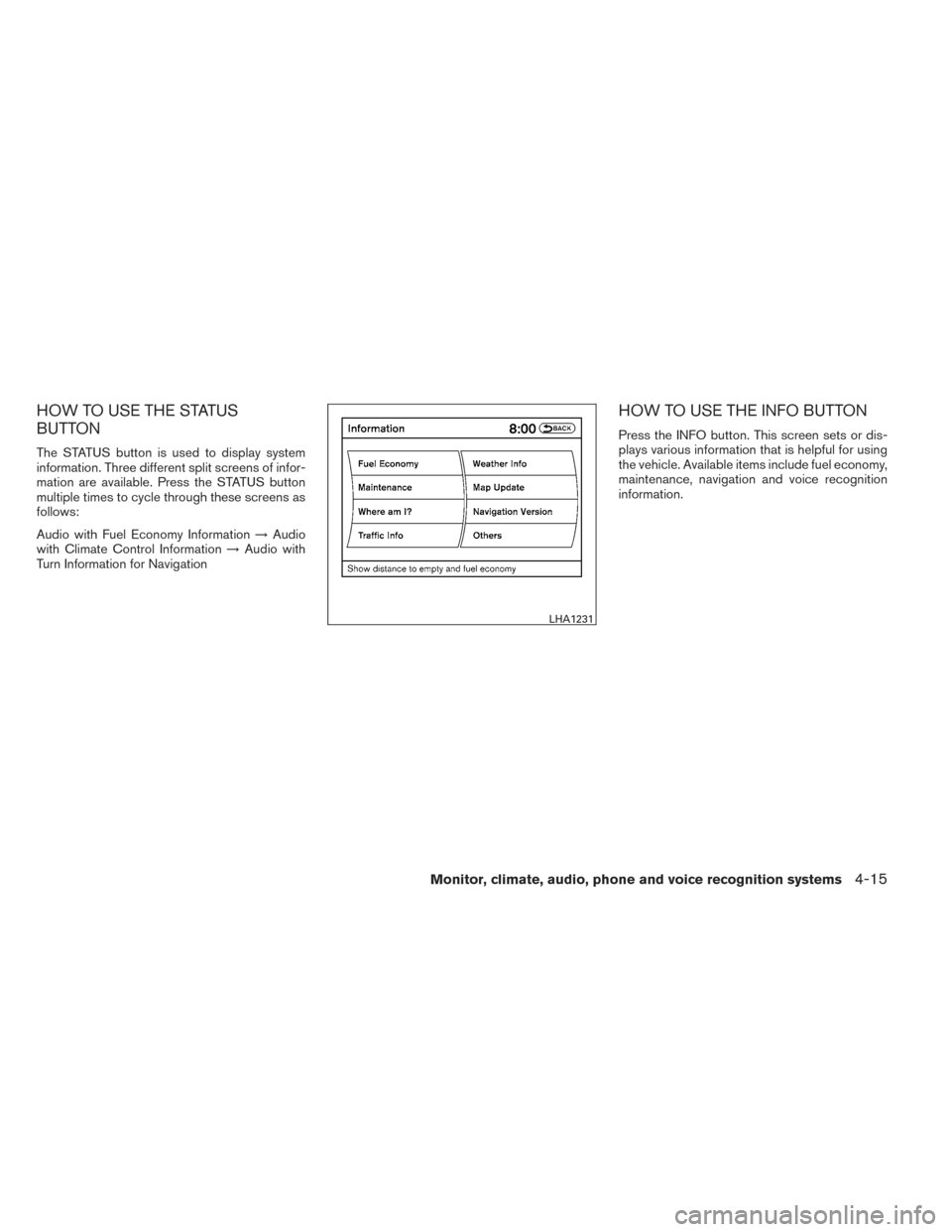
HOW TO USE THE INFO BUTTON
Press the INFO button. This screen sets or dis-
plays various information that is helpful for using
the vehicle. Available items include fuel economy,
maintenance, navigation and voice recognition
information.
LHA1231
Monitor, climate, audio, phone and voice recognition systems4-15