2014 NISSAN LEAF audio
[x] Cancel search: audioPage 262 of 397
RANDOM (RDM):
When the RDM button is pressed while a USB
memory device is being playing, the play pattern
can be changed as follows:
To change the play mode, press the RDM button
repeatedly and the mode will change as follows:
Normal→All Random→1 Folder Random→Nor-
mal
BACK button:
When the BACK button is pressed, it returns to
the previous display.
IPOD® PLAYER OPERATION
Connecting iPod®:
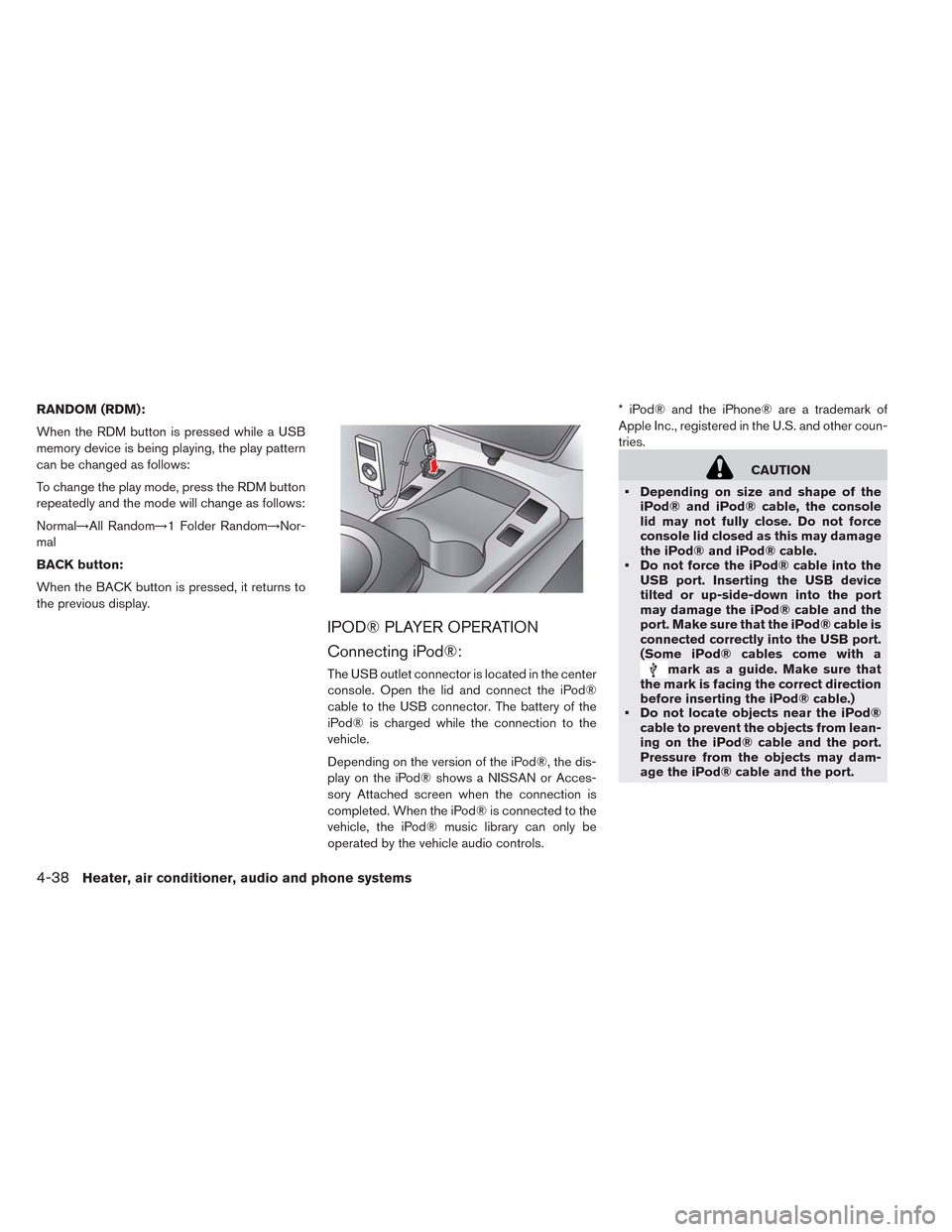
The USB outlet connector is located in the center
console. Open the lid and connect the iPod®
cable to the USB connector. The battery of the
iPod® is charged while the connection to the
vehicle.
Depending on the version of the iPod®, the dis-
play on the iPod® shows a NISSAN or Acces-
sory Attached screen when the connection is
completed. When the iPod® is connected to the
vehicle, the iPod® music library can only be
operated by the vehicle audio controls.* iPod® and the iPhone® are a trademark of
Apple Inc., registered in the U.S. and other coun-
tries.
CAUTION
• Depending on size and shape of the
iPod® and iPod® cable, the console
lid may not fully close. Do not force
console lid closed as this may damage
the iPod® and iPod® cable.
• Do not force the iPod® cable into the
USB port. Inserting the USB device
tilted or up-side-down into the port
may damage the iPod® cable and the
port. Make sure that the iPod® cable is
connected correctly into the USB port.
(Some iPod® cables come with a
mark as a guide. Make sure that
the mark is facing the correct direction
before inserting the iPod® cable.)
• Do not locate objects near the iPod®
cable to prevent the objects from lean-
ing on the iPod® cable and the port.
Pressure from the objects may dam-
age the iPod® cable and the port.
4-38Heater, air conditioner, audio and phone systems
Page 263 of 397
Compatibility
The following models are available:
• Third generation iPhone® (Firmware version
IOS4/4.0)
• Fourth generation iPhone® (Firmware version
IOS4/4.0)
• Fifth generation iPod® (Firmware version 1.3)
• First generation iPod Classic® (Firmware ver-
sion 1.1.1 or 1.1.2PC)
• Second generation iPod Classic® (Firmware
version 2.0.1)
• First generation iPod touch® (Firmware version
1.1.5 or 2.2.1)
• Second and third generation iPod touch®
(Firmware version 2.2.1 or IOS4/4.0.0)
• First generation iPod nano® (Firmware version
1.1.3)
• Second generation iPod nano® (Firmware ver-
sion 1.1.3)
• Third generation iPod nano® (Firmware version
1.1.2PC or 1.1.3PC)
• Fourth generation iPod nano® (Firmware ver-
sion 1.0.2 or 1.0.4)
• Fifth generation iPod nano® (Firmware version
1.0.1 or 1.0.2)The iPod touch® may not respond quickly with
the system in some cases.
Make sure that the iPod® firmware is updated.
Audio main operation
Place the power switch in the ACC or ON posi-
tion. Then, press the CD·AUX button repeatedly
to switch to the iPod® mode.
If the system has been turned off while the iPod®
was playing, pressing the PWR button will start
the iPod®.
iPod® MENU button:
Place the power switch in the ACC or ON posi-
tion. Then, press the iPod® button to switch to
the iPod® mode.
If another audio source is playing and the iPod®
is connected, pressing the iPod® button
changes to the iPod® mode.
If the system has been turned off while the iPod®
was playing, pressing the PWR button will start
the iPod®.
When the iPod® MENU button is pressed while
the iPod® is connected, the interface for iPod®
operation is shown on the audio display. The
items on the menu list can be scrolled by turning
the TUNE/SCROLL dial while the iPod® is op-erational. To select an item, press ENTER. Items
in the iPod® menu appear on the display in the
following order:
• Now Playing
• Playlists
• Artists
• Albums
• Songs
• Podcasts
• Genres
• Composers
• Audiobooks
• Shuffle Songs
For more information about each item, see the
iPod® Owner’s Manual.
Next/Previous Track and Fast
Forward/Rewind
When the
orbutton is pressed for
more than 1.5 seconds while the iPod® is play-
ing, the iPod® will play while fast forwarding or
rewinding. When the button is released , the
iPod® will return to the normal play speed.
When the
orbutton is pressed for
less than 1.5 seconds while the iPod® is playing,
Heater, air conditioner, audio and phone systems4-39
Page 264 of 397
the next track or the beginning of the current track
on the iPod® will be played.
REPEAT (RPT):
When the RPT play button is pressed while a
track is being played, the play pattern can be
changed as follows:
Repeat Off→1 Track Repeat→All Repeat→Re-
peat Off
RANDOM (RDM):
When the RDM play button is pressed while a
track is being played, the play pattern can be
changed as follows:
Shuffle Off→Track Shuffle→Album Shuffle-
→Shuffle Off
BACK button:
When the BACK button is pressed, it returns to
the previous display.
CD CARE AND CLEANING
• Handle a CD by its edges. Do not bend the disc.
Never touch the surface of the disc.
• Always place the discs in the storage case
when they are not being used.
• To clean a disc, wipe the surface from the center
to the outer edge using a clean, soft cloth. Do
not wipe the disc using a circular motion.
• Do not use a conventional record cleaner or
alcohol intended for industrial use.
• A new disc may be rough on the inner and outer
edges. Remove the rough edges by rubbing the
inner and outer edges with the side of a pen or
pencil as illustrated.
STEERING WHEEL SWITCH FOR
AUDIO CONTROL
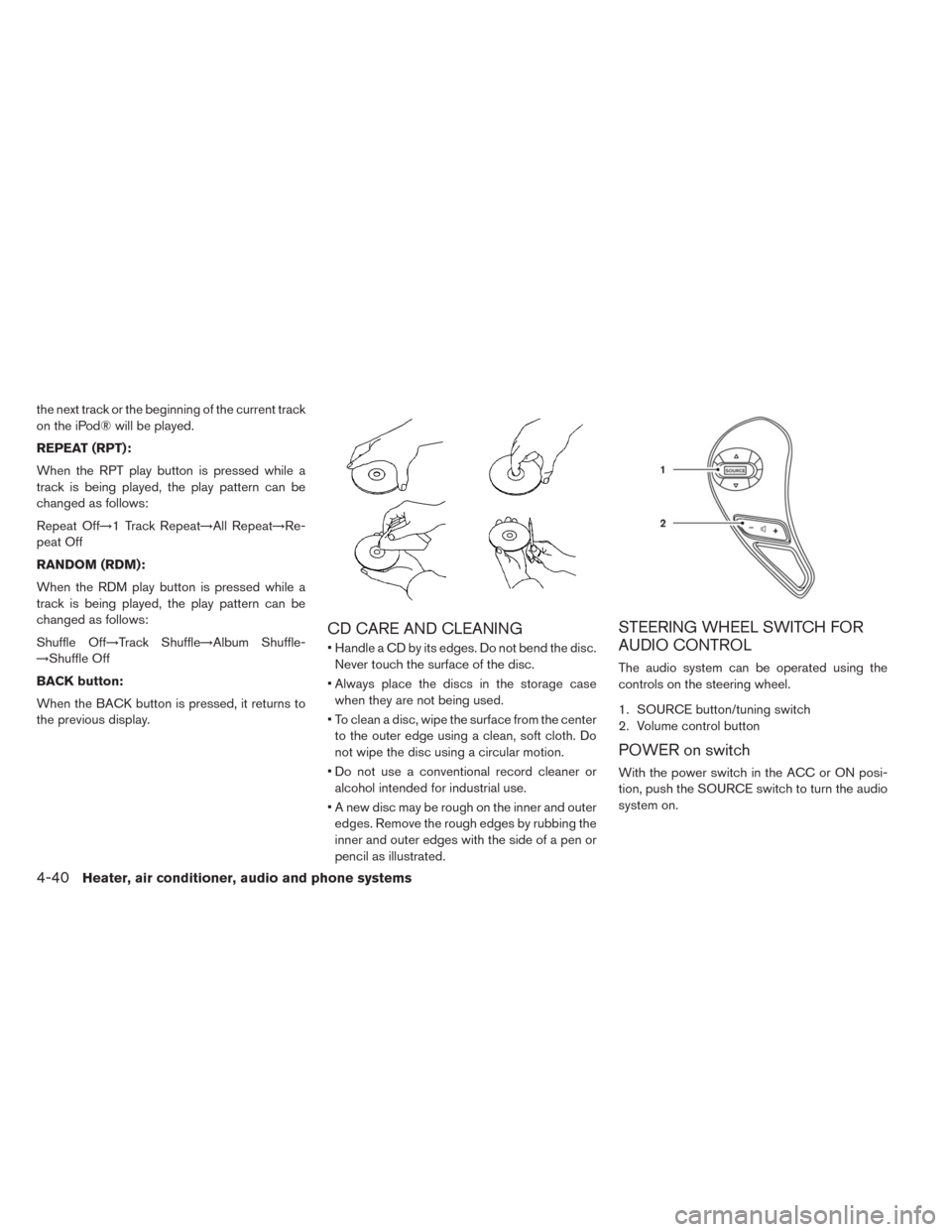
The audio system can be operated using the
controls on the steering wheel.
1. SOURCE button/tuning switch
2. Volume control button
POWER on switch
With the power switch in the ACC or ON posi-
tion, push the SOURCE switch to turn the audio
system on.
4-40Heater, air conditioner, audio and phone systems
Page 265 of 397
SOURCE select switch
Push the source select switch to change the
mode in the following sequence:
AM→FM1→FM2→XM1→XM2→XM3→CD*→
USB/iPod®*→AUX*→AM.
* These modes are only available when compat-
ible media storage is inserted into the device or
connected to the system.
Volume control switch
Push the volume control switch to increase or
decrease the volume.
Tuning switch
While the display is showing a map or audio
screen, tilt the Menu Control switch upward or
downward to select a station, track, CD or folder.
For most audio sources, tilting the switch up/
down for more than 1.5 seconds provides a
different function than a tilting up/down for less
than 1.5 seconds.AM and FM:
• Tilt up/down for less than 1.5 seconds to in-
crease or decrease the preset station.
• Tilt up/down for more than 1.5 seconds to seek
up or down to the next station.
XM:
• Tilt up/down for less than 1.5 seconds to in-
crease or decrease the preset station.
• Tilt up/down for more than 1.5 seconds to go to
the next or previous category.
• Press the ENTER button to show the XM Menu.
iPod®:
• Tilt up/down for less than 1.5 seconds to in-
crease or decrease the track number.
• Press the iPod MENU button to show the iPod
Menu.
CD:
• Tilt up/down for less than 1.5 seconds to in-
crease or decrease the track number.
• Tilt up/down for more than 1.5 seconds to in-
crease or decrease the folder number (if playing
compressed audio files) .
• Press the ENTER button to show the CD Menu.USB:
• Tilt up/down for less than 1.5 seconds to in-
crease or decrease the track number.
• Tilt up/down for more than 1.5 seconds to in-
crease or decrease the folder number.
• Press the ENTER button to show the USB
Menu.
Heater, air conditioner, audio and phone systems4-41
Page 266 of 397
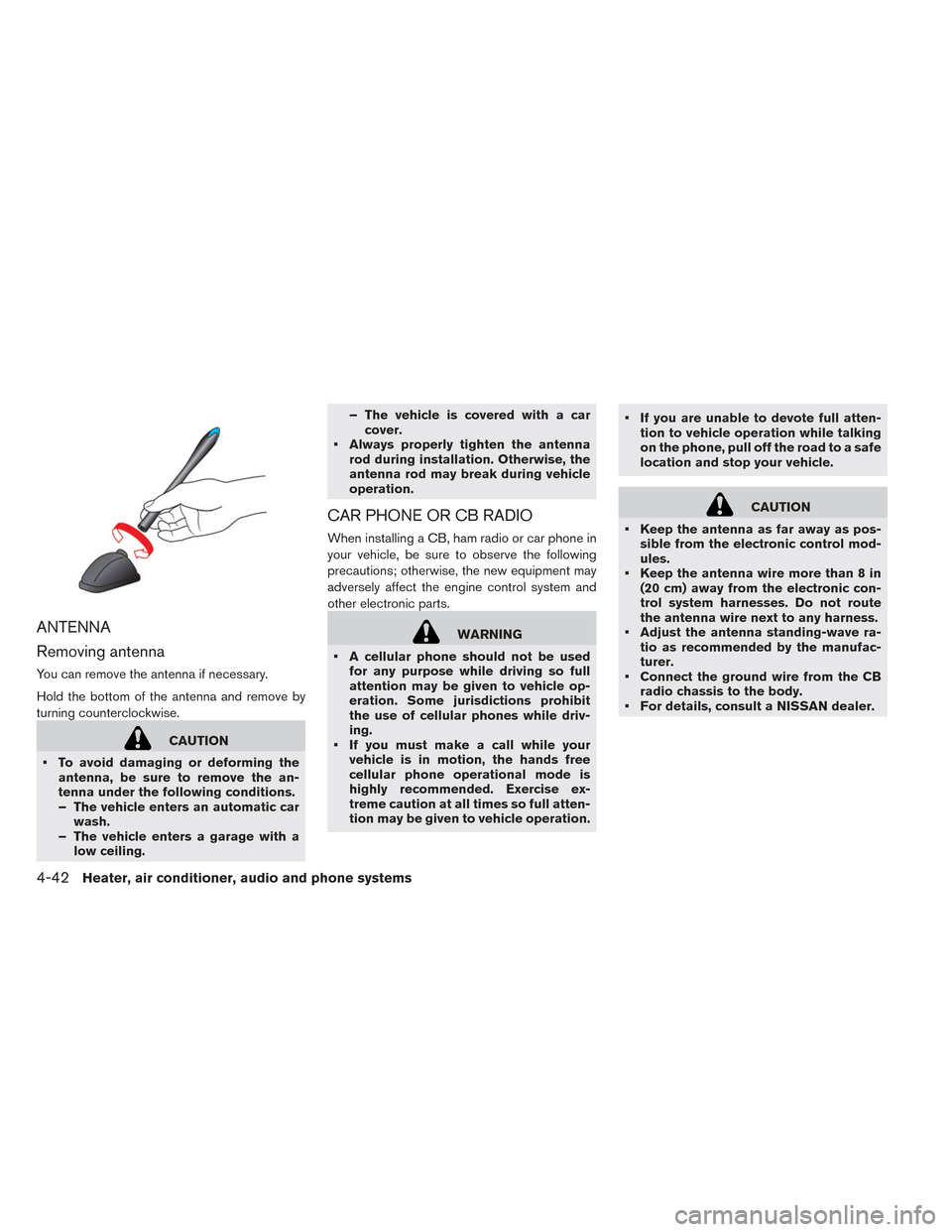
ANTENNA
Removing antenna
You can remove the antenna if necessary.
Hold the bottom of the antenna and remove by
turning counterclockwise.
CAUTION
• To avoid damaging or deforming the
antenna, be sure to remove the an-
tenna under the following conditions.
– The vehicle enters an automatic car
wash.
– The vehicle enters a garage with a
low ceiling.– The vehicle is covered with a car
cover.
• Always properly tighten the antenna
rod during installation. Otherwise, the
antenna rod may break during vehicle
operation.
CAR PHONE OR CB RADIO
When installing a CB, ham radio or car phone in
your vehicle, be sure to observe the following
precautions; otherwise, the new equipment may
adversely affect the engine control system and
other electronic parts.
WARNING
• A cellular phone should not be used
for any purpose while driving so full
attention may be given to vehicle op-
eration. Some jurisdictions prohibit
the use of cellular phones while driv-
ing.
• If you must make a call while your
vehicle is in motion, the hands free
cellular phone operational mode is
highly recommended. Exercise ex-
treme caution at all times so full atten-
tion may be given to vehicle operation.• If you are unable to devote full atten-
tion to vehicle operation while talking
on the phone, pull off the road to a safe
location and stop your vehicle.
CAUTION
• Keep the antenna as far away as pos-
sible from the electronic control mod-
ules.
• Keep the antenna wire more than 8 in
(20 cm) away from the electronic con-
trol system harnesses. Do not route
the antenna wire next to any harness.
• Adjust the antenna standing-wave ra-
tio as recommended by the manufac-
turer.
• Connect the ground wire from the CB
radio chassis to the body.
• For details, consult a NISSAN dealer.
4-42Heater, air conditioner, audio and phone systems
Page 267 of 397
WARNING
• Use a phone after stopping your ve-
hicle in a safe location. If you have to
use a phone while driving, exercise ex-
treme caution at all times so full atten-
tion may be given to vehicle operation.
• If you are unable to devote full atten-
tion to vehicle operation while talking
on the phone, pull off the road to a safe
location and stop your vehicle.
CAUTION
To avoid draining the vehicle battery, use
a phone after the READY to drive indica-
tor light is on.
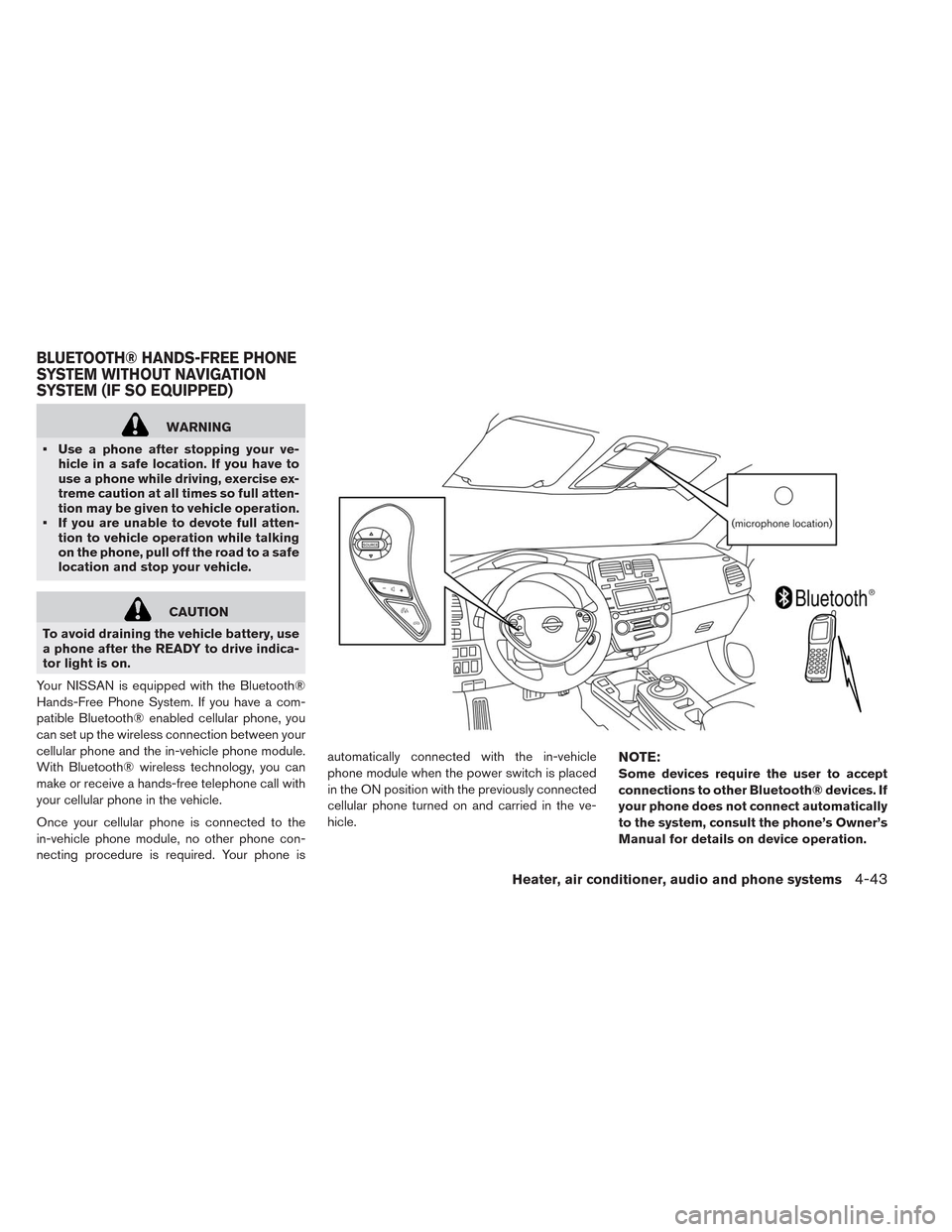
Your NISSAN is equipped with the Bluetooth®
Hands-Free Phone System. If you have a com-
patible Bluetooth® enabled cellular phone, you
can set up the wireless connection between your
cellular phone and the in-vehicle phone module.
With Bluetooth® wireless technology, you can
make or receive a hands-free telephone call with
your cellular phone in the vehicle.
Once your cellular phone is connected to the
in-vehicle phone module, no other phone con-
necting procedure is required. Your phone isautomatically connected with the in-vehicle
phone module when the power switch is placed
in the ON position with the previously connected
cellular phone turned on and carried in the ve-
hicle.
NOTE:
Some devices require the user to accept
connections to other Bluetooth® devices. If
your phone does not connect automatically
to the system, consult the phone’s Owner’s
Manual for details on device operation.
BLUETOOTH® HANDS-FREE PHONE
SYSTEM WITHOUT NAVIGATION
SYSTEM (IF SO EQUIPPED)
Heater, air conditioner, audio and phone systems4-43
Page 268 of 397
You can connect up to 5 different Bluetooth®
cellular phones to the in-vehicle phone module.
However, you can talk on only one cellular phone
at a time.
Before using the Bluetooth® Hands-Free Phone
System, refer to the following notes.
• Set up the wireless connection between a com-
patible cellular phone and the in-vehicle phone
module before using the hands-free phone sys-
tem.
• Some Bluetooth® enabled cellular phones may
not be recognized or work properly. Please visit
www.nissanusa.com/bluetooth for a recom-
mended phone list and connecting instructions.
• You will not be able to use a hands-free phone
under the following conditions:
– Your vehicle is outside of the cellular service
area.
– Your vehicle is in an area where it is difficult
to receive a cellular signal; such as in a
tunnel, in an underground parking garage,
near a tall building or in a mountainous area.
– Your cellular phone is locked to prevent it
from being dialed.
–• When the radio wave condition is not ideal or
ambient sound is too loud, it may be difficult to
hear the other person’s voice during a call.
• Do not place the cellular phone in an area
surrounded by metal or far away from the in-
vehicle phone module to prevent tone quality
degradation and wireless connection disrup-
tion.
• While a cellular phone is connected through the
Bluetooth® wireless connection, the battery
power of the cellular phone may discharge
quicker than usual. The Bluetooth® Hands-
Free Phone System cannot charge cellular
phones.
• If the hands-free phone system seems to be
malfunctioning, see “Troubleshooting guide” in
this section. You can also visit
www.nissanusa.com/bluetooth for trouble-
shooting help.
• Some cellular phones or other devices may
cause interference or a buzzing noise to come
from the audio system speakers. Storing the
device in a different location may reduce or
eliminate the noise.
• Refer to the cellular phone Owner’s Manual
regarding the telephone charges, cellular phone
antenna and body, etc.REGULATORY INFORMATION
FCC Regulatory information
CAUTION: To maintain compliance with FCC’s
RF exposure guidelines, use only the supplied
antenna. Unauthorized antenna, modification, or
attachments could damage the transmitter and
may violate FCC regulations.
Operation is subject to the following two condi-
tions:
1. This device may not cause interference and
2. this device must accept any interference, in-
cluding interference that may cause unde-
sired operation of the device.
IC Regulatory information
• Operation is subject to the following two condi-
tions: (1) this device may not cause interfer-
ence, and (2) this device must accept any inter-
ference, including interference that may cause
undesired operation of the device.
• This Class B digital apparatus meets all require-
ments of the Canadian Interference-Causing
Equipment Regulations.
BLUETOOTH® is a trademark
owned by Bluetooth SIG, Inc. and licensed to
Visteon.
4-44Heater, air conditioner, audio and phone systems
Page 269 of 397
USING THE SYSTEM
The NISSAN Voice Recognition system allows
hands-free operation of the Bluetooth® Phone
System.
If the vehicle is in motion, some commands may
not be available so full attention may be given to
vehicle operation.
Initialization
When the power switch is placed in the ON
position, NISSAN Voice Recognition is initialized,
which takes a few seconds. If the
button is
pressed before the initialization completes, the
system will announce “Hands-free phone system
not ready” and will not react to voice commands.
Operating tips
To get the best performance out of the NISSAN
Voice Recognition system, observe the following:
• Keep the interior of the vehicle as quiet as
possible. Close the windows to eliminate sur-
rounding noises (traffic noises, vibration
sounds, etc.) , which may prevent the system
from recognizing voice commands correctly.
• Wait until the tone sounds before speaking a
command. Otherwise, the command will not be
received properly.• Start speaking a command within 5 seconds
after the tone sounds.
• Speak in a natural voice without pausing be-
tween words.
Giving voice commands
To operate NISSAN Voice Recognition, press
and release the
button located on the
steering wheel. After the tone sounds, speak a
command.
The command given is picked up by the micro-
phone, and voice feedback is given when the
command is accepted.
• If you need to hear the available commands for
the current menu again, say “Help” and the
system will repeat them.
• If a command is not recognized, the system
announces, “Command not recognized. Please
try again.”Make sure the command is said ex-
actly as prompted by the system and repeat the
command in a clear voice.
• If you want to go back to the previous command,
you can say “Go back” or “Correction” any time
the system is waiting for a response.
• You can cancel a command when the system is
waiting for a response by saying, “Cancel” or“Quit.” The system announces “Cancel” and
ends the VR session. You can also press and
hold the
button on the steering wheel for
5 seconds at any time to end the VR session.
Whenever the VR session is cancelled, a
double beep is played to indicate you have
exited the system.
• If you want to adjust the volume of the voice
feedback, press the volume control switches (+
or -) on the steering wheel while being provided
with feedback. You can also use the radio vol-
ume control knob.
• In most cases you can interrupt the voice feed-
back to speak the next command by pressing
the
button on the steering wheel.
• To use the system faster, you may speak the
second level commands with the main menu
command on the main menu. For example,
press the
button and after the tone say,
“Call Redial.”
How to say numbers
NISSAN Voice Recognition requires a certain
way to speak numbers in voice commands. Refer
to the following rules and examples.
• Either “zero” or “oh” can be used for “0”.
Example: 1-800-662-6200
Heater, air conditioner, audio and phone systems4-45