2014 NISSAN LEAF steering wheel
[x] Cancel search: steering wheelPage 302 of 397
ANTI-LOCK BRAKING SYSTEM
(ABS)
WARNING
• The Anti-lock Braking System (ABS) is
a sophisticated device, but it cannot
prevent accidents resulting from care-
less or dangerous driving techniques.
It can help maintain vehicle control
during braking on slippery surfaces.
Remember that stopping distances on
slippery surfaces will be longer than
on normal surfaces even with ABS.
Stopping distances may also be longer
on rough, gravel or snow covered
roads, or if you are using tire chains.
Always maintain a safe distance from
the vehicle in front of you. Ultimately,
the driver is responsible for safety.
• Tire type and condition may also affect
braking effectiveness.
– When replacing tires, install the
specified size of tires on all four
wheels.
– For detailed information, see
“Wheels and tires” in the “Mainte-
nance and do-it-yourself” section of
this manual.The Anti-lock Braking System (ABS) controls the
brakes so the wheels do not lock during hard
braking or when braking on slippery surfaces.
The system detects the rotation speed at each
wheel and varies the brake fluid pressure to pre-
vent each wheel from locking and sliding. By
preventing each wheel from locking, the system
helps the driver maintain steering control and
helps to minimize swerving and spinning on slip-
pery surfaces.
Using the system
Depress the brake pedal and hold it down. De-
press the brake pedal with firm steady pressure,
but do not pump the brakes. The ABS will oper-
ate to prevent the wheels from locking up. Steer
the vehicle to avoid obstacles.
WARNING
Do not pump the brake pedal. Doing so
may result in increased stopping dis-
tances.
Self-test feature
The ABS includes electronic sensors, electric
pumps, hydraulic solenoids and a computer. The
computer has a built-in diagnostic feature that
tests the system each time you push the power
switch in the READY to drive position and move
the vehicle at a low speed in forward or reverse.
When the self-test occurs, you may hear a
“clunk” noise and/or feel a pulsation in the brake
pedal. This is normal and does not indicate a
malfunction. If the computer senses a malfunc-
tion, it switches the ABS off and illuminates the
ABS warning light on the instrument panel. The
brake system then operates normally, but without
anti-lock assistance.
If the ABS warning light illuminates during the
self-test or while driving, have the vehicle
checked by a NISSAN certified LEAF dealer.
5-22Starting and driving
Page 303 of 397
Normal operation
The ABS operates at speeds above 3 to 6 MPH
(5 to 10 km/h) . The speed varies according to
road conditions.
When the ABS senses that one or more wheels
are close to locking up, the actuator rapidly ap-
plies and releases hydraulic pressure. This action
is similar to pumping the brakes very quickly. You
may feel a pulsation in the brake pedal and hear a
noise from under the hood or feel a vibration from
the actuator when it is operating. This is normal
and indicates that the ABS is operating properly.
However, the pulsation may indicate that road
conditions are hazardous and extra care is re-
quired while driving.The Vehicle Dynamic Control (VDC) system uses
various sensors to monitor driver inputs and ve-
hicle motion. Under certain driving conditions,
the VDC system helps to perform the following
functions.
• Controls brake pressure to reduce wheel slip on
one slipping drive wheel so power is transferred
to a drive wheel on the same axle that is not
slipping.
• Controls brake pressure and traction motor out-
put to reduce drive wheel slip based on vehicle
speed (traction control function) .
• Controls brake pressure at individual wheels
and traction motor output to help the driver
maintain control of the vehicle in the following
conditions.
– understeer (vehicle tends to not follow the
steered path despite increased steering in-
put)
– oversteer (vehicle tends to spin due to cer-
tain road or driving conditions) .
The VDC system can help the driver to maintain
control of the vehicle, but it cannot prevent loss of
vehicle control in all driving situations.
When the VDC system operates, the
warning in the instrument panel flashes. When
the warning flashes, note the following items.• The road may be slippery or the system may
determine some action is required to help keep
the vehicle on the steered path.
• You may feel a pulsation in the brake pedal and
hear a noise or vibration from under the hood.
This is normal and indicates that the VDC sys-
tem is working properly.
• Adjust your speed and driving according to the
road conditions.
See “VDC warning light” in the “Instruments and
controls” section and “VDC OFF indicator light”
in the “Instruments and controls” section.
If a malfunction occurs in the system, the
warning illuminates in the lower display. The VDC
system automatically turns off when this warning
light is lit.
The VDC OFF switch is used to turn off the VDC
system. The VDC off indicator
illuminates
to indicate that the VDC system is off. When the
VDC switch is used to turn off the system, the
VDC system still operates to prevent one drive
wheel from slipping by transferring power to a
drive wheel that is not slipping. The
warn-
ing flashes if this occurs. All other VDC functions
are off and the
warning will not flash. The
VDC System is automatically reset to ON when
VEHICLE DYNAMIC CONTROL (VDC)
SYSTEM
Starting and driving5-23
Page 304 of 397
the power switch is placed in the OFF position
then back to the ON position.
The computer has a built-in diagnostic feature
that tests the system each time you start the EV
(Electric Vehicle) and move the vehicle forward or
in reverse at a slow speed. When the self-test
occurs, you may hear a “clunk” noise and/or feel a
pulsation in the brake pedal. This is normal and is
not an indication of a malfunction.
WARNING
• The VDC system is designed to help
the driver maintain stability but does
not prevent accidents due to abrupt
steering operation at high speeds or
by careless or dangerous driving tech-
niques. Reduce vehicle speed and be
especially careful when driving and
cornering on slippery surfaces and al-
ways drive carefully.• Do not modify the vehicle’s suspen-
sion. If suspension parts such as shock
absorbers, struts, springs, stabilizer
bars, bushings and wheels are not
NISSAN recommended for your ve-
hicle or are extremely deteriorated the
VDC system may not operate properly.
This could adversely affect vehicle
handling performance, and the
warning may flash ormay il-
luminate.
• If brake related parts such as brake
pads, rotors and calipers are not
NISSAN recommended or are ex-
tremely deteriorated, the VDC system
may not operate properly and
may
illuminate.
• If traction motor control related parts
are not NISSAN recommended or are
extremely deteriorated, the
may
illuminate.
• When driving on extremely inclined
surfaces such as higher banked cor-
ners, the VDC system may not operate
properly and the
warning may illu-
minate. Do not drive on these types of
roads.• When driving on an unstable surface
such as a turntable, ferry, elevator or
ramp, the
warning may illuminate.
This is not a malfunction. Restart the
EV (Electric Vehicle) system after driv-
ing onto a stable surface.
• If wheels or tires other than the
NISSAN recommended ones are used,
the VDC system may not operate prop-
erly and the
warning may illumi-
nate.
• The VDC system is not a substitute for
winter tires or tire chains on a snow
covered road.
5-24Starting and driving
Page 307 of 397
Tire chains may be used. For details, see “Tire
chains” in the “Maintenance and do-it-yourself”
section.
SPECIAL WINTER EQUIPMENT
It is recommended that the following items be
carried in the vehicle during winter:
• A scraper and stiff-bristled brush to remove ice
and snow from the windows and wiper blades.
• A shovel to dig the vehicle out of snow-drifts.
• Extra window washer fluid to refill the reservoir
tank.
DRIVING ON SNOW OR ICE
WARNING
• Wet ice (32°F, 0°C and freezing rain) ,
very cold snow or ice can be slick and
very hard to drive on. The vehicle will
have much less traction or “grip” under
these conditions. Try to avoid driving
on wet ice until the road is salted or
sanded.• Whatever the conditions, drive with
caution. Accelerate and slow down
with care. If accelerating too fast, the
drive wheels will lose even more trac-
tion.
• Allow more stopping distance under
these conditions. Braking should be
started sooner than on dry pavement.
• Allow greater following distances on
slippery roads.
• Watch for slippery spots (glare ice) .
These may appear on an otherwise
clear road in shaded areas. If a patch of
ice is seen ahead, brake before reach-
ing it. Try not to brake while on the ice,
and avoid any sudden steering maneu-
vers.
• Do not use cruise control on slippery
roads.
FREEING A FROZEN CHARGE
PORT LID
When the charge port is frozen, melt the ice using
a hair dryer.
Starting and driving5-27
Page 311 of 397
The flasher can be actuated with the power
switch in any position.
Some state laws may prohibit the use of
the hazard warning flasher switch while
driving.TIRE PRESSURE MONITORING
SYSTEM (TPMS)
This vehicle is equipped with the Tire Pressure
Monitoring System (TPMS) . It monitors tire pres-
sure of all tires. When the low tire pressure warn-
ing light is lit, and the CHECK TIRE PRESSURE
warning appears on the vehicle information dis-
play, one or more of your tires is significantly
under-inflated. If the vehicle is being driven with
low tire pressure, the TPMS will activate and
warn you of it by the low tire pressure warning
light. This system will activate only when the
vehicle is driven at speeds above 16 MPH
(25 km/h) . For more details, see “Warning/
indicator lights and audible reminders” in the
“Instruments and controls” section and “Tire
Pressure Monitoring System (TPMS)” in the
“Starting and driving” section.
WARNING
• Radio waves could adversely affect
electric medical equipment. Those
who use a pacemaker should contact
the electric medical equipment manu-
facturer for the possible influences be-
fore use.• If the low tire pressure warning light
illuminates while driving, avoid sud-
den steering maneuvers or abrupt
braking, reduce vehicle speed, pull off
the road to a safe location and stop the
vehicle as soon as possible. Driving
with underinflated tires may perma-
nently damage the tires and increase
the likelihood of tire failure. Serious
vehicle damage could occur and may
lead to an accident and could result in
serious personal injury. Check the tire
pressure for all four tires. Adjust the
tire pressure to the recommended
COLD tire pressure shown on the Tire
and Loading Information label to turn
the low tire pressure warning light
OFF. If the light still illuminates while
driving after adjusting the tire pres-
sure, a tire may be flat. If you have a
flat tire, repair it as soon as possible.
• When a wheel is replaced, the TPMS
will not function and the low tire pres-
sure warning light will flash for ap-
proximately 1 minute. The light will re-
main on after 1 minute. Contact a
NISSAN certified LEAF dealer as soon
as possible for tire replacement
and/or system resetting.
FLAT TIRE
In case of emergency6-3
Page 314 of 397
Before using emergency tire puncture
repair kit
• If any foreign object (for example, a screw or
nail) is embedded in the tire, do not remove it.
• Check the expiration date of the sealant (shown
on the label attached to the bottle) . Never use a
sealant whose expiration date has passed.
Repairing tire:
WARNING
Observe the following precautions when
using the tire repair compound.
•
Swallowing the compound is danger-
ous. Immediately drink as much water
as possible and seek prompt medical
assistance.
•
Rinse well with lots of water if the
compound comes into contact with
skin or eyes. If irritation persists, seek
prompt medical attention.
•
Keep the repair compound out of the
reach of children.•
The emergency repair compound may
cause a malfunction of the tire pres-
sure sensors and cause the low tire
pressure warning light to illuminate.
Have the tire pressure sensor replaced
as soon as possible.
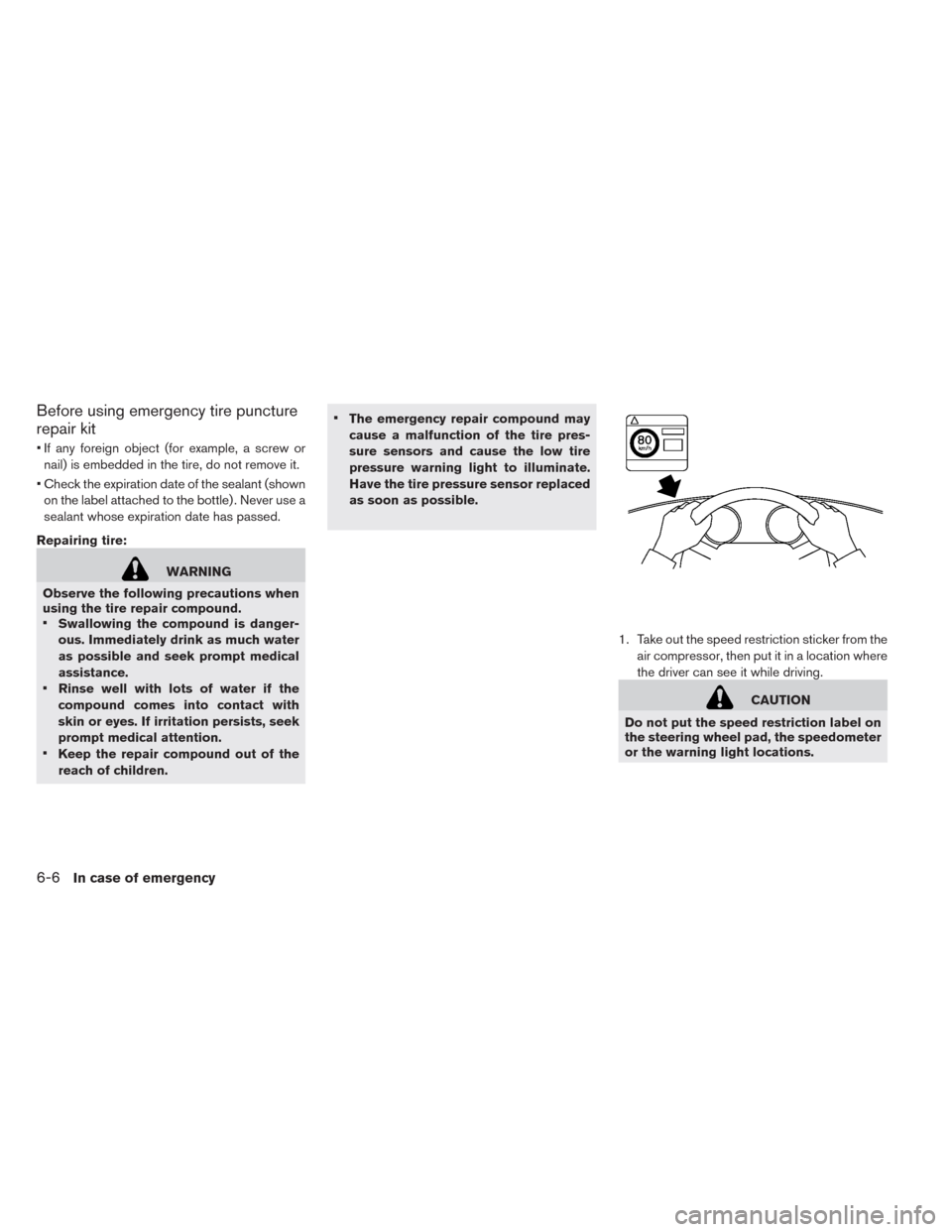
1. Take out the speed restriction sticker from the
air compressor, then put it in a location where
the driver can see it while driving.
CAUTION
Do not put the speed restriction label on
the steering wheel pad, the speedometer
or the warning light locations.
6-6In case of emergency
Page 321 of 397
When towing your vehicle, all State (Provincial in
Canada) and local regulations for towing must be
followed. Incorrect towing equipment could dam-
age your vehicle. Towing instructions are avail-
able from a NISSAN certified LEAF dealer. Local
service operators are familiar with the applicable
laws and procedures for towing. To assure
proper towing and to prevent accidental damage
to your vehicle, NISSAN recommends that you
have a service operator tow your vehicle. It is
advisable to have the service operator carefully
read the following precautions.
WARNING
• Never ride in a vehicle that is being
towed.
• Never get under your vehicle after it
has been lifted by a tow truck.
CAUTION
• When towing, make sure that the ax-
les, steering system and power train
are in working condition. If any unit is
damaged, dollies must be used.
• Always attach safety chains before
towing.For information about towing your vehicle behind
a recreational vehicle (RV) , see “Flat towing” in
the “Technical and consumer information” sec-
tion.
TOWING RECOMMENDED BY
NISSAN
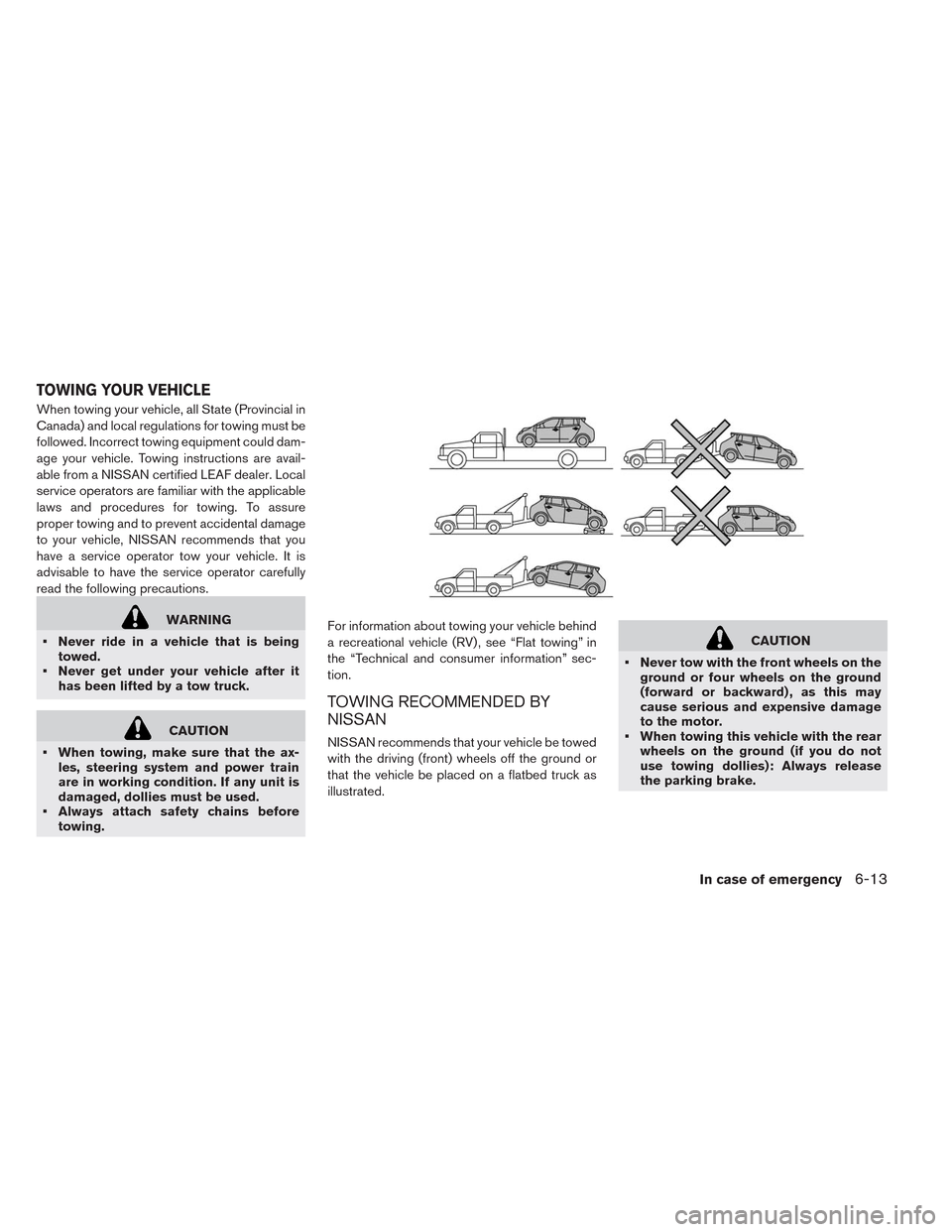
NISSAN recommends that your vehicle be towed
with the driving (front) wheels off the ground or
that the vehicle be placed on a flatbed truck as
illustrated.
CAUTION
• Never tow with the front wheels on the
ground or four wheels on the ground
(forward or backward) , as this may
cause serious and expensive damage
to the motor.
• When towing this vehicle with the rear
wheels on the ground (if you do not
use towing dollies): Always release
the parking brake.
TOWING YOUR VEHICLE
In case of emergency6-13
Page 323 of 397
Pulling a stuck vehicle
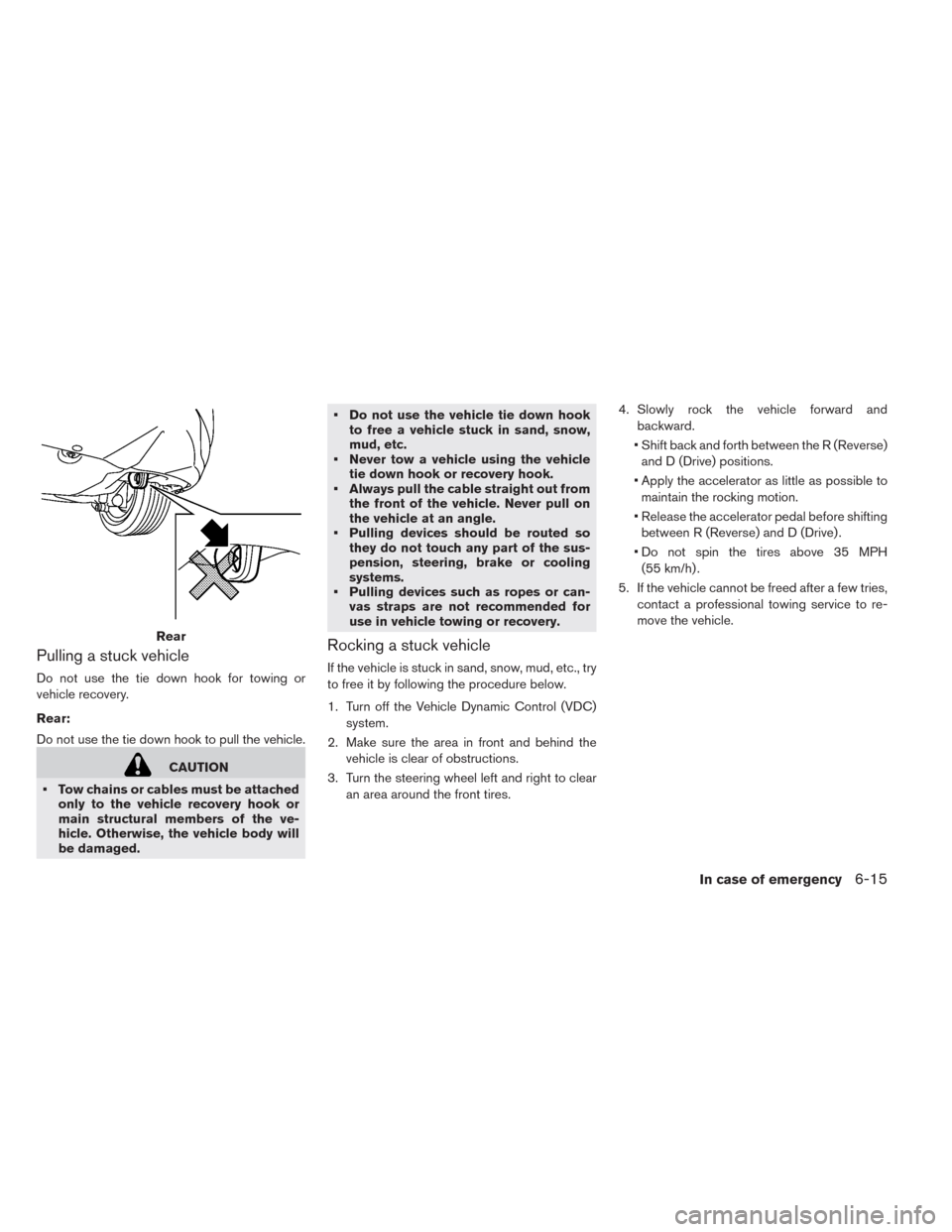
Do not use the tie down hook for towing or
vehicle recovery.
Rear:
Do not use the tie down hook to pull the vehicle.
CAUTION
• Tow chains or cables must be attached
only to the vehicle recovery hook or
main structural members of the ve-
hicle. Otherwise, the vehicle body will
be damaged.• Do not use the vehicle tie down hook
to free a vehicle stuck in sand, snow,
mud, etc.
• Never tow a vehicle using the vehicle
tie down hook or recovery hook.
• Always pull the cable straight out from
the front of the vehicle. Never pull on
the vehicle at an angle.
• Pulling devices should be routed so
they do not touch any part of the sus-
pension, steering, brake or cooling
systems.
• Pulling devices such as ropes or can-
vas straps are not recommended for
use in vehicle towing or recovery.
Rocking a stuck vehicle
If the vehicle is stuck in sand, snow, mud, etc., try
to free it by following the procedure below.
1. Turn off the Vehicle Dynamic Control (VDC)
system.
2. Make sure the area in front and behind the
vehicle is clear of obstructions.
3. Turn the steering wheel left and right to clear
an area around the front tires.4. Slowly rock the vehicle forward and
backward.
• Shift back and forth between the R (Reverse)
and D (Drive) positions.
• Apply the accelerator as little as possible to
maintain the rocking motion.
• Release the accelerator pedal before shifting
between R (Reverse) and D (Drive) .
• Do not spin the tires above 35 MPH
(55 km/h) .
5. If the vehicle cannot be freed after a few tries,
contact a professional towing service to re-
move the vehicle.
Rear
In case of emergency6-15