Page 62 of 397
– The charger contains no user ser-
viceable parts. Do not attempt to
repair the charger, doing so will void
your warranty.
•
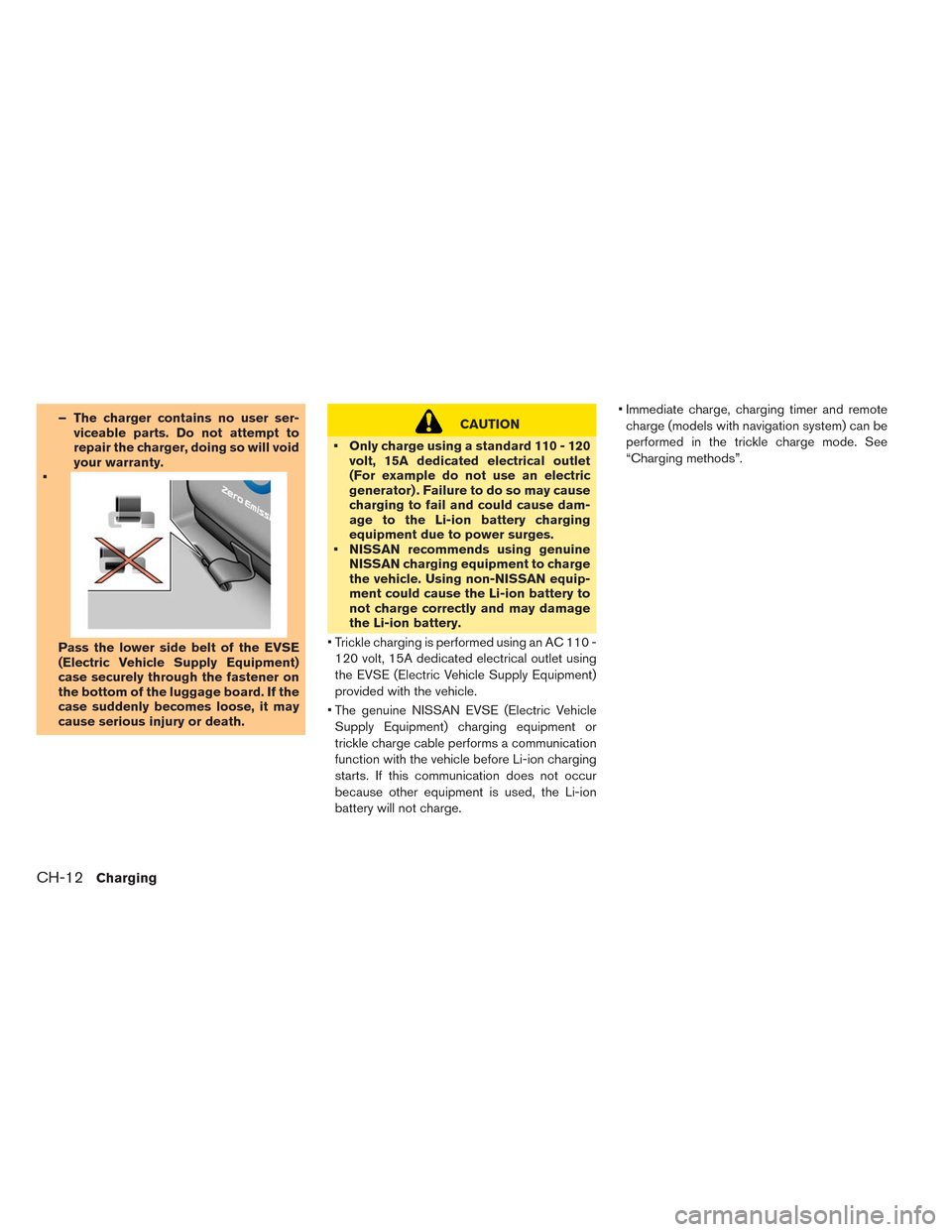
Pass the lower side belt of the EVSE
(Electric Vehicle Supply Equipment)
case securely through the fastener on
the bottom of the luggage board. If the
case suddenly becomes loose, it may
cause serious injury or death.
CAUTION
• Only charge using a standard 110 - 120
volt, 15A dedicated electrical outlet
(For example do not use an electric
generator) . Failure to do so may cause
charging to fail and could cause dam-
age to the Li-ion battery charging
equipment due to power surges.
• NISSAN recommends using genuine
NISSAN charging equipment to charge
the vehicle. Using non-NISSAN equip-
ment could cause the Li-ion battery to
not charge correctly and may damage
the Li-ion battery.
• Trickle charging is performed using an AC 110 -
120 volt, 15A dedicated electrical outlet using
the EVSE (Electric Vehicle Supply Equipment)
provided with the vehicle.
• The genuine NISSAN EVSE (Electric Vehicle
Supply Equipment) charging equipment or
trickle charge cable performs a communication
function with the vehicle before Li-ion charging
starts. If this communication does not occur
because other equipment is used, the Li-ion
battery will not charge.• Immediate charge, charging timer and remote
charge (models with navigation system) can be
performed in the trickle charge mode. See
“Charging methods”.
CH-12Charging
Page 71 of 397
CHARGING TIMER
Use charging timer to schedule when the Li-ion
battery charges. The vehicle automatically begins
charging at the scheduled times when the charge
connector is connected to the vehicle. The timers
do not need to be reset each time the Li-ion
battery needs charging.
With navigation system
The charging timer can save two timer settings
that include the charging start time and end time.
The charging timer can be applied to one of the
timer settings for each day of the week.
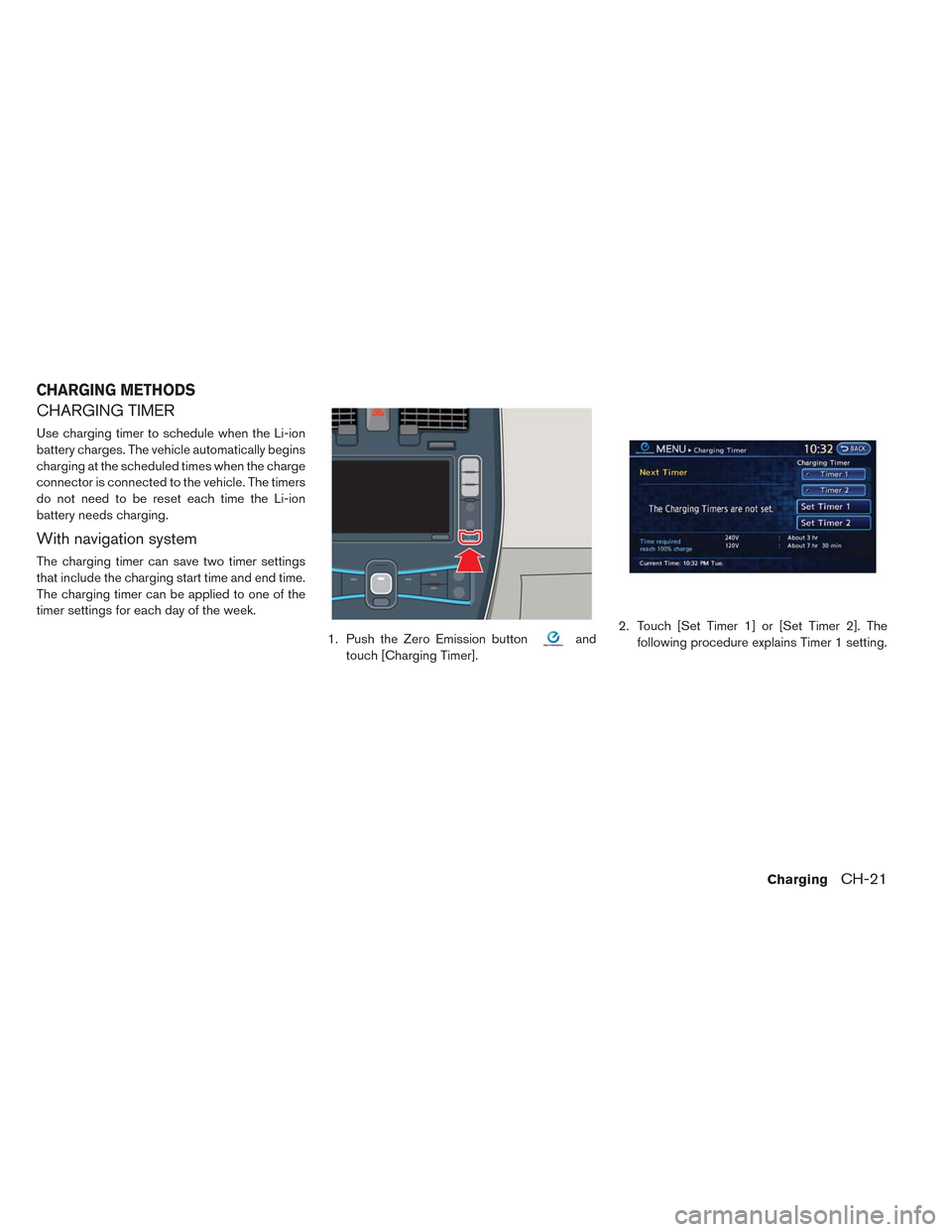
1. Push the Zero Emission button
and
touch [Charging Timer].2. Touch [Set Timer 1] or [Set Timer 2]. The
following procedure explains Timer 1 setting.
CHARGING METHODS
ChargingCH-21
Page 73 of 397
![NISSAN LEAF 2014 1.G Owners Manual 7. The [Timer 1] indicator illuminates after the
charging timer is set. Use the same procedure
to set the Timer 2 setting.
8. Place the power switch in the OFF position,
and then connect the charge co](/manual-img/5/375/w960_375-72.png "NISSAN LEAF 2014 1.G Owners Manual 7. The [Timer 1] indicator illuminates after the
charging timer is set. Use the same procedure
to set the Timer 2 setting.
8. Place the power switch in the OFF position,
and then connect the charge co")
7. The [Timer 1] indicator illuminates after the
charging timer is set. Use the same procedure
to set the Timer 2 setting.
8. Place the power switch in the OFF position,
and then connect the charge connector to the
vehicle.
NOTE:
•Always place the power switch in the OFF
position after setting the charging timers.
When the power switch is in the ON posi-
tion, the Li-ion battery will not start charg-
ing.
•The Li-ion battery may not be charged to
the expected level if the charging timerstart time and end time are set so there is
not enough time to charge the Li-ion bat-
tery.
•When either the charge start time or
charge end time is set, the charging timer
function is activated.
•When only the charging timer end time is
set, the system automatically determines
when to begin charging. The Li-ion battery
may not be charged to the expected level
in the following conditions:
– The Li-ion battery is charged in cold
weather.
– The charge connector is connected to
the vehicle too close to the scheduled
charging end time.
•When only the charging timer end time is
set, the system automatically stops charg-
ing when the Li-ion battery charges to a
full charge. Charging may stop before the
scheduled end time.
•Touch [Timer 1] or [Timer 2] to turn off the
charging timer function. Touch [Yes] if the
settings shown on the screen are correct.
After this operation has been performed,
the indicator disappears and the charging
timer function is turned off. The start andstop time settings are not deleted, even if
the charging timer function is turned off.
•If charging timer and the Climate Ctrl.
Timer are operating at the same time due
to an overlap of the timer settings, you can
prioritize which function receives electri-
cal power first. See LEAF Navigation Sys-
tem Owner’s Manual.
•When charging is set as the first priority,
the Climate Ctrl. Timer does not start until
10 segments of the Li-ion battery avail-
able charge gauge are illuminated.
•When the climate control is set as the first
priority, the climate control system will be
turned on as scheduled by the Climate
Ctrl. Timer regardless of the remaining
battery energy.
•Even when the climate control is set as the
first priority, the climate control system
will be turned off when the electric de-
mands of the climate control system is
more than can be provided to the Li-ion
battery for charging.
•Some charging stations used to perform
normal charge are equipped with timer
functions. If the charger timer function
and the vehicle timer are both set, and the
ChargingCH-23
Page 74 of 397
two timers are not set to operate at the
same time, it is possible that the charger
will not start or the battery will not be
charged to the level expected.
•If the Li-ion battery warmer is operating
while the Climate Ctrl. Timer or Remote
Climate Control is being used, perfor-
mance of the Climate Control will be re-
duced.
•The Li-ion battery may not charge to the
expected level using the Charging Timer
when a Start time and End time are set
while the Li-ion battery warmer operates.
•Set only the Charging Timer End time
when charging in cold weather. The ve-
hicle automatically determines when to
start charging to fully charge the Li-ion
battery, even if the Li-ion battery warmer
operates. Charging ends before the set
End time if the Li-ion battery is fully
charged.
•The 12-volt battery can become dis-
charged if the charging timer is operated
repeatedly between the Li-ion battery
charges while the vehicle is not used for
an extended period of time.
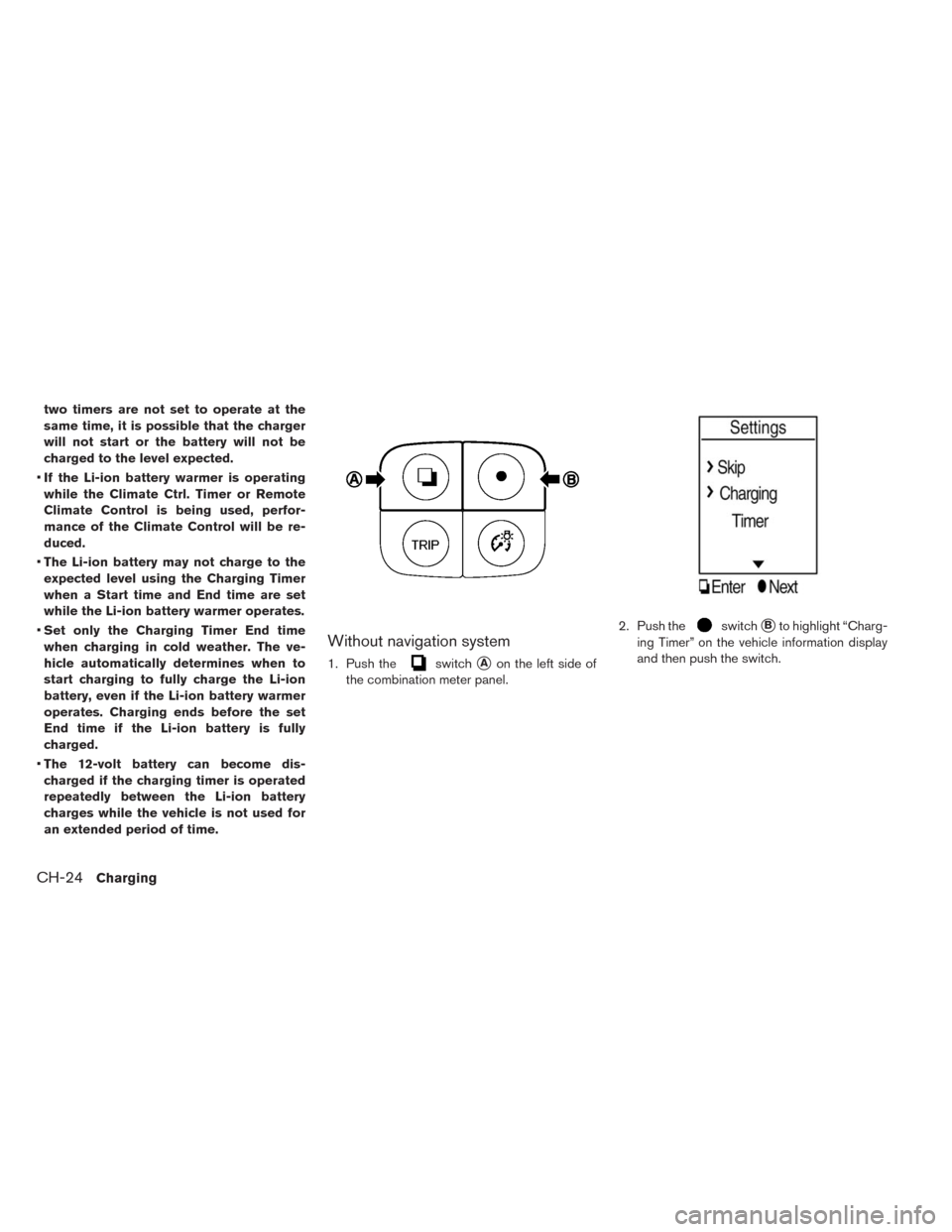
Without navigation system
1. Push theswitch�Aon the left side of
the combination meter panel.2. Push the
switch�Bto highlight “Charg-
ing Timer” on the vehicle information display
and then push the switch.
CH-24Charging
Page 76 of 397
IMMEDIATE CHARGE
When a charging timer is not turned on, charging
automatically starts when a normal or trickle
charge connector is connected to the vehicle.
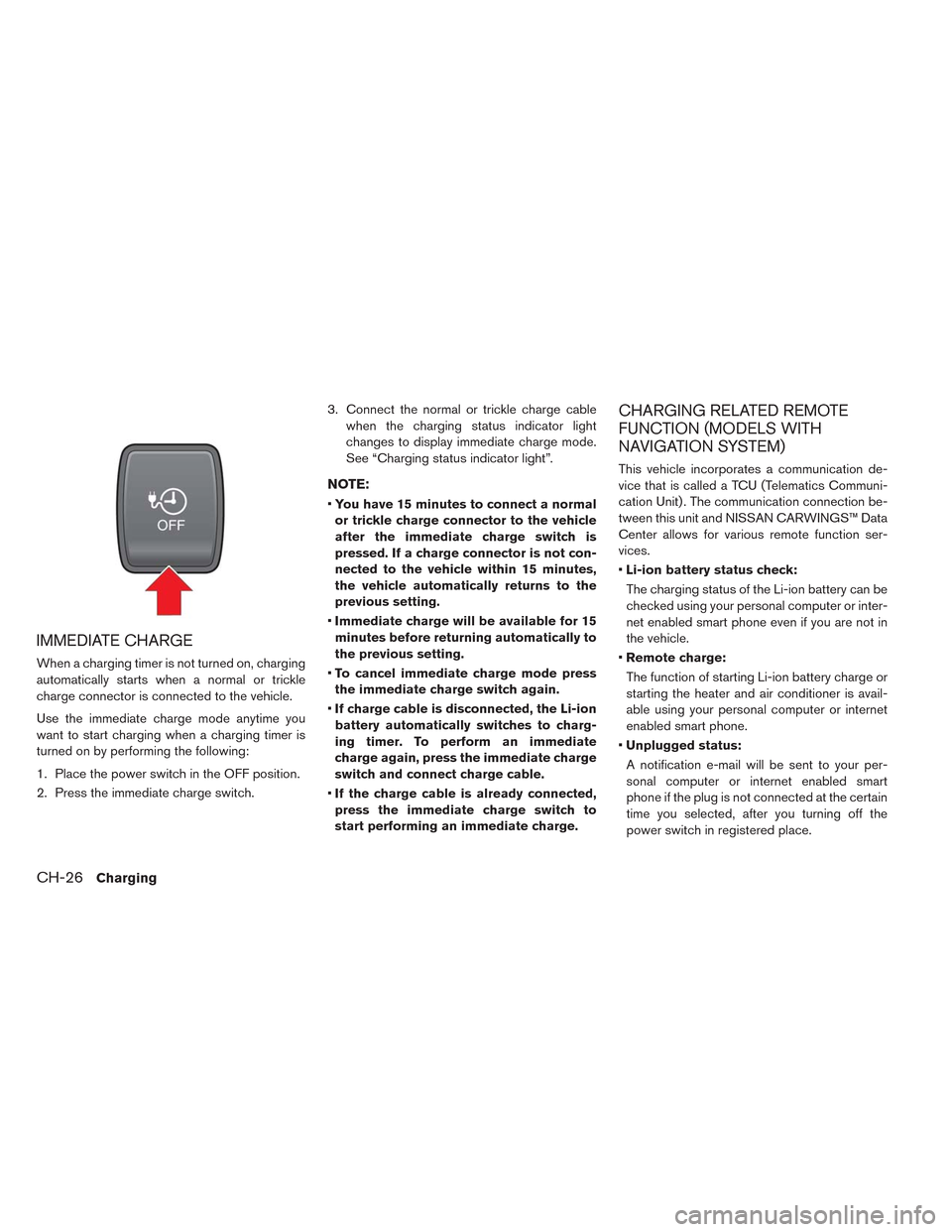
Use the immediate charge mode anytime you
want to start charging when a charging timer is
turned on by performing the following:
1. Place the power switch in the OFF position.
2. Press the immediate charge switch.3. Connect the normal or trickle charge cable
when the charging status indicator light
changes to display immediate charge mode.
See “Charging status indicator light”.
NOTE:
•You have 15 minutes to connect a normal
or trickle charge connector to the vehicle
after the immediate charge switch is
pressed. If a charge connector is not con-
nected to the vehicle within 15 minutes,
the vehicle automatically returns to the
previous setting.
•Immediate charge will be available for 15
minutes before returning automatically to
the previous setting.
•To cancel immediate charge mode press
the immediate charge switch again.
•If charge cable is disconnected, the Li-ion
battery automatically switches to charg-
ing timer. To perform an immediate
charge again, press the immediate charge
switch and connect charge cable.
•If the charge cable is already connected,
press the immediate charge switch to
start performing an immediate charge.
CHARGING RELATED REMOTE
FUNCTION (MODELS WITH
NAVIGATION SYSTEM)
This vehicle incorporates a communication de-
vice that is called a TCU (Telematics Communi-
cation Unit) . The communication connection be-
tween this unit and NISSAN CARWINGS™ Data
Center allows for various remote function ser-
vices.
•Li-ion battery status check:
The charging status of the Li-ion battery can be
checked using your personal computer or inter-
net enabled smart phone even if you are not in
the vehicle.
•Remote charge:
The function of starting Li-ion battery charge or
starting the heater and air conditioner is avail-
able using your personal computer or internet
enabled smart phone.
•Unplugged status:
A notification e-mail will be sent to your per-
sonal computer or internet enabled smart
phone if the plug is not connected at the certain
time you selected, after you turning off the
power switch in registered place.
CH-26Charging
Page 77 of 397
NOTE:
•Establishing the CARWINGS™ service is
necessary before using this service. See
LEAF Navigation System Owner’s Manual.
•To check the Li-ion battery charging status
using an internet enabled smart phone or
personal computer, the following condi-
tions must be met:
– The vehicle must be located in a cellu-
lar phone coverage area.
– The cellular phone must be located in
an area with cellular phone coverage.
– If using a computer, the computer must
be connected to the internet.
– Some cellular phones are not compat-
ible and cannot be used to check the
Li-ion battery charging status. Please
confirm beforehand.
•Certain remote functions required a com-
patible smart phone, which is not included
with vehicle.
•CARWINGS™ information system features
are included through a subscription ser-
vice which requires owner consent to ac-
tivate. The subscription must be active to
use these features.•CARWINGS™ communications may be re-
ceived at a verified e-mail address or by
SMS/text messaging-enabled mobile
phone.
•Standard text rates and/or data usage
may apply depending on your carrier.
ChargingCH-27
Page 139 of 397
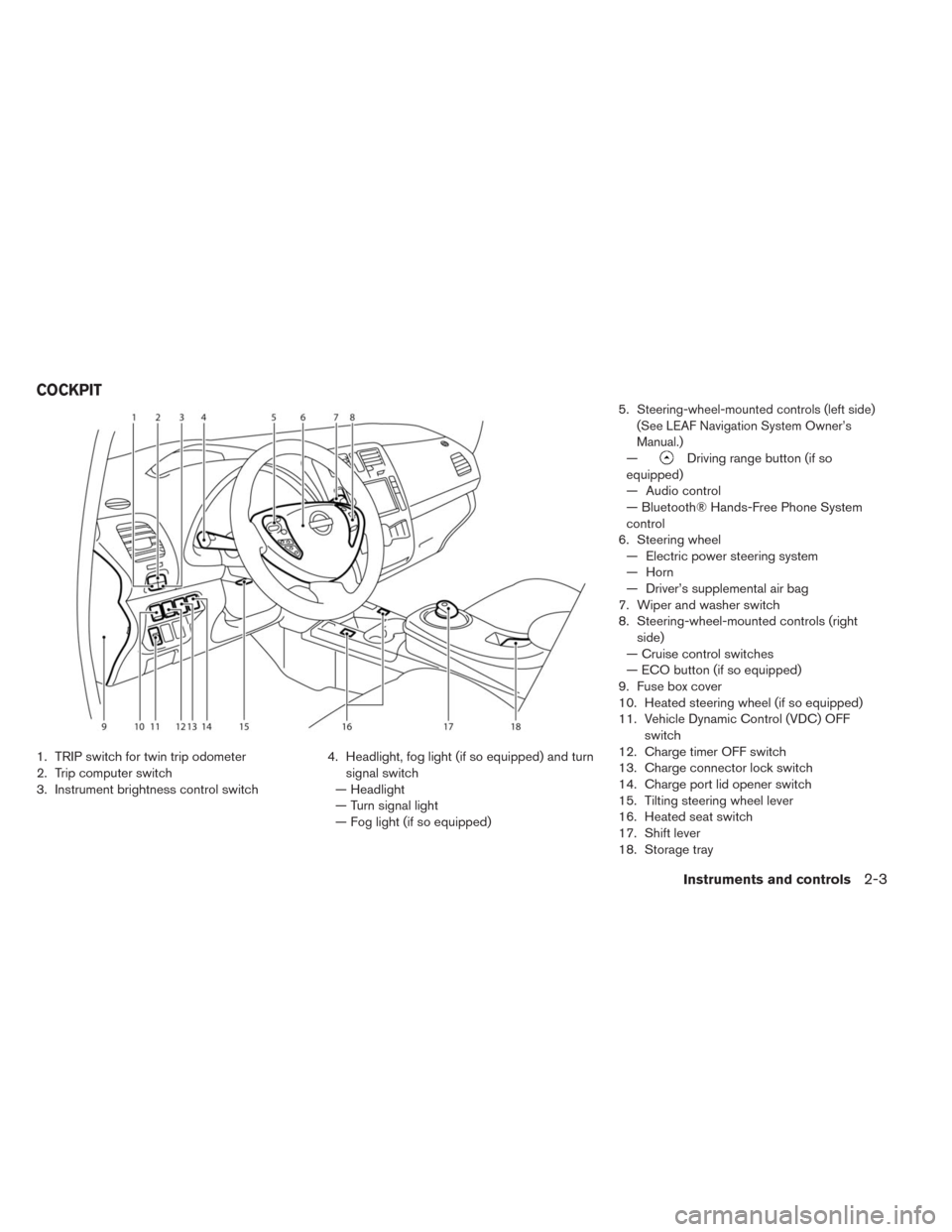
1. TRIP switch for twin trip odometer
2. Trip computer switch
3. Instrument brightness control switch4. Headlight, fog light (if so equipped) and turn
signal switch
— Headlight
— Turn signal light
— Fog light (if so equipped)5.
Steering-wheel-mounted controls (left side)
(See LEAF Navigation System Owner’s
Manual.)
—Driving range button (if so
equipped)
— Audio control
— Bluetooth® Hands-Free Phone System
control
6. Steering wheel
— Electric power steering system
— Horn
— Driver’s supplemental air bag
7. Wiper and washer switch
8. Steering-wheel-mounted controls (right
side)
— Cruise control switches
— ECO button (if so equipped)
9. Fuse box cover
10. Heated steering wheel (if so equipped)
11. Vehicle Dynamic Control (VDC) OFF
switch
12. Charge timer OFF switch
13. Charge connector lock switch
14. Charge port lid opener switch
15. Tilting steering wheel lever
16. Heated seat switch
17. Shift lever
18. Storage tray
COCKPIT
Instruments and controls2-3
Page 140 of 397
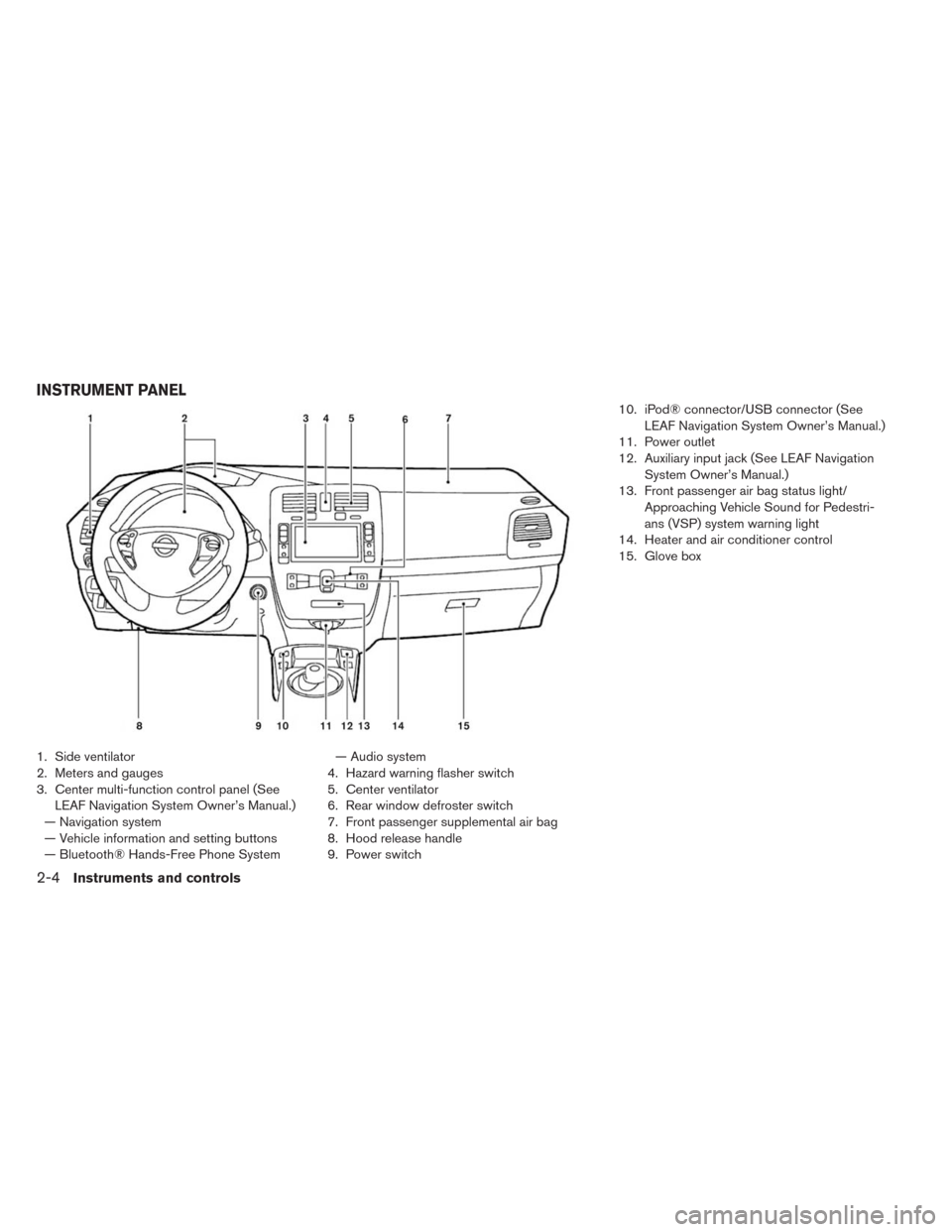
1. Side ventilator
2. Meters and gauges
3. Center multi-function control panel (See
LEAF Navigation System Owner’s Manual.)
— Navigation system
— Vehicle information and setting buttons
— Bluetooth® Hands-Free Phone System— Audio system
4. Hazard warning flasher switch
5. Center ventilator
6. Rear window defroster switch
7. Front passenger supplemental air bag
8. Hood release handle
9. Power switch10. iPod® connector/USB connector (See
LEAF Navigation System Owner’s Manual.)
11. Power outlet
12. Auxiliary input jack (See LEAF Navigation
System Owner’s Manual.)
13. Front passenger air bag status light/
Approaching Vehicle Sound for Pedestri-
ans (VSP) system warning light
14. Heater and air conditioner control
15. Glove box
INSTRUMENT PANEL
2-4Instruments and controls