2014 NISSAN JUKE USB
[x] Cancel search: USBPage 218 of 402
JVH0743X
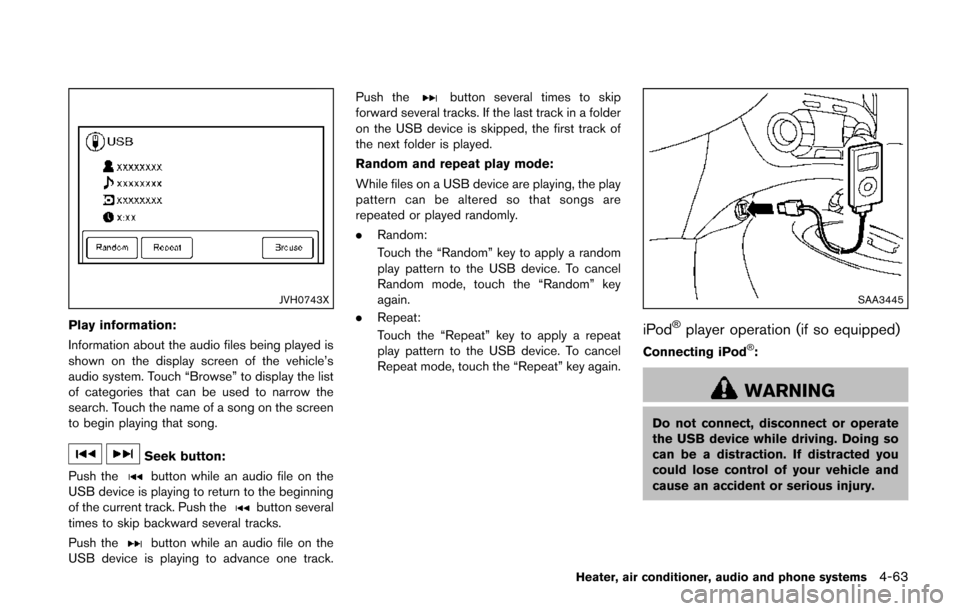
Play information:
Information about the audio files being played is
shown on the display screen of the vehicle’s
audio system. Touch “Browse” to display the list
of categories that can be used to narrow the
search. Touch the name of a song on the screen
to begin playing that song.
Seek button:
Push the
button while an audio file on the
USB device is playing to return to the beginning
of the current track. Push the
button several
times to skip backward several tracks.
Push the
button while an audio file on the
USB device is playing to advance one track. Push the
button several times to skip
forward several tracks. If the last track in a folder
on the USB device is skipped, the first track of
the next folder is played.
Random and repeat play mode:
While files on a USB device are playing, the play
pattern can be altered so that songs are
repeated or played randomly.
. Random:
Touch the “Random” key to apply a random
play pattern to the USB device. To cancel
Random mode, touch the “Random” key
again.
. Repeat:
Touch the “Repeat” key to apply a repeat
play pattern to the USB device. To cancel
Repeat mode, touch the “Repeat” key again.
SAA3445
iPod®player operation (if so equipped)
Connecting iPod®:
WARNING
Do not connect, disconnect or operate
the USB device while driving. Doing so
can be a distraction. If distracted you
could lose control of your vehicle and
cause an accident or serious injury.
Heater, air conditioner, audio and phone systems4-63
Page 219 of 402
4-64Heater, air conditioner, audio and phone systems
CAUTION
.Do not force the USB device into the
USB port. Inserting the USB device
tilted or up-side-down into the port
may damage the port. Make sure
that the USB device is connected
correctly into the USB port.
. Do not grab the USB port cover (if
so equipped) when pulling the USB
device out of the port. This could
damage the port and the cover.
. Do not leave the USB cable in a
place where it can be pulled unin-
tentionally. Pulling the cable may
damage the port.
Refer to your device manufacturer’s owner
information regarding the proper use and care
of the device.
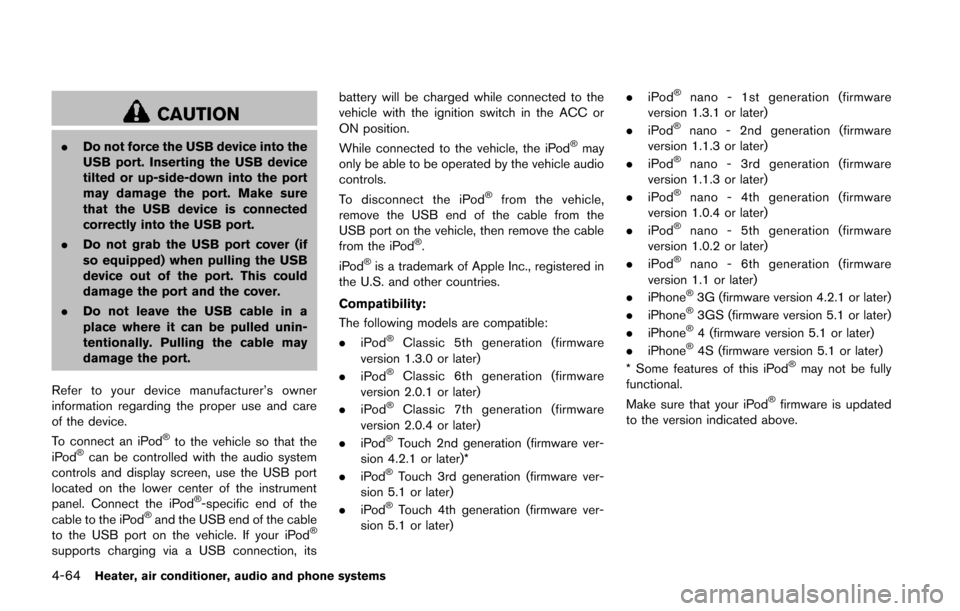
To connect an iPod
®to the vehicle so that the
iPod®can be controlled with the audio system
controls and display screen, use the USB port
located on the lower center of the instrument
panel. Connect the iPod
®-specific end of the
cable to the iPod®and the USB end of the cable
to the USB port on the vehicle. If your iPod®
supports charging via a USB connection, its battery will be charged while connected to the
vehicle with the ignition switch in the ACC or
ON position.
While connected to the vehicle, the iPod
®may
only be able to be operated by the vehicle audio
controls.
To disconnect the iPod
®from the vehicle,
remove the USB end of the cable from the
USB port on the vehicle, then remove the cable
from the iPod
®.
iPod®is a trademark of Apple Inc., registered in
the U.S. and other countries.
Compatibility:
The following models are compatible:
. iPod
®Classic 5th generation (firmware
version 1.3.0 or later)
. iPod
®Classic 6th generation (firmware
version 2.0.1 or later)
. iPod
®Classic 7th generation (firmware
version 2.0.4 or later)
. iPod
®Touch 2nd generation (firmware ver-
sion 4.2.1 or later)*
. iPod
®Touch 3rd generation (firmware ver-
sion 5.1 or later)
. iPod
®Touch 4th generation (firmware ver-
sion 5.1 or later) .
iPod
®nano - 1st generation (firmware
version 1.3.1 or later)
. iPod
®nano - 2nd generation (firmware
version 1.1.3 or later)
. iPod
®nano - 3rd generation (firmware
version 1.1.3 or later)
. iPod
®nano - 4th generation (firmware
version 1.0.4 or later)
. iPod
®nano - 5th generation (firmware
version 1.0.2 or later)
. iPod
®nano - 6th generation (firmware
version 1.1 or later)
. iPhone
®3G (firmware version 4.2.1 or later)
. iPhone®3GS (firmware version 5.1 or later)
. iPhone®4 (firmware version 5.1 or later)
. iPhone®4S (firmware version 5.1 or later)
* Some features of this iPod®may not be fully
functional.
Make sure that your iPod
®firmware is updated
to the version indicated above.
Page 221 of 402
4-66Heater, air conditioner, audio and phone systems
Push and hold the seek buttonorfor
1.5 seconds while a track is playing to reverse or
fast forward the track being played. The track
plays at an increased speed while reversing or
fast forwarding. When the button is released,
the track returns to normal play speed.
JVH0748X
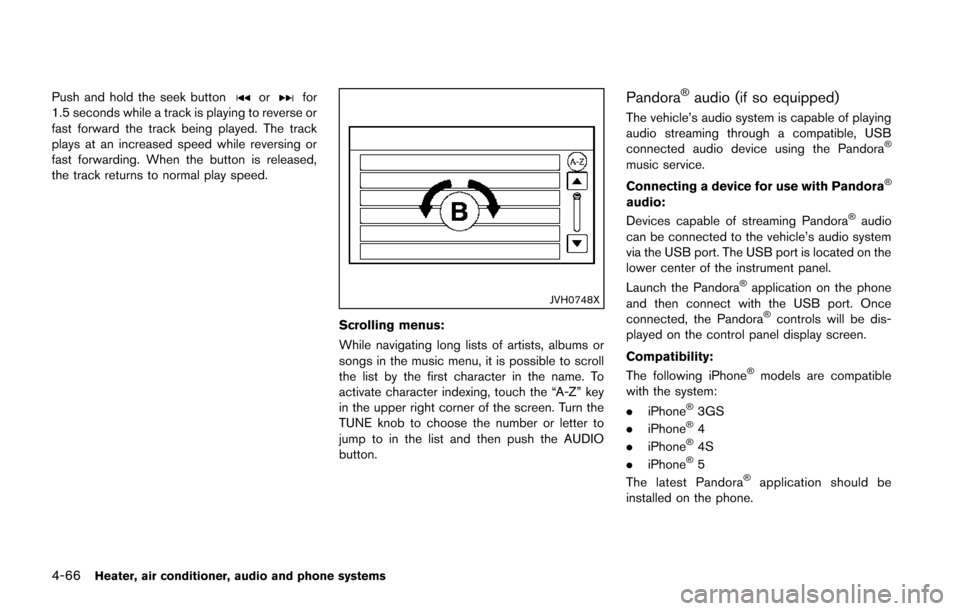
Scrolling menus:
While navigating long lists of artists, albums or
songs in the music menu, it is possible to scroll
the list by the first character in the name. To
activate character indexing, touch the “A-Z” key
in the upper right corner of the screen. Turn the
TUNE knob to choose the number or letter to
jump to in the list and then push the AUDIO
button.
Pandora®audio (if so equipped)
The vehicle’s audio system is capable of playing
audio streaming through a compatible, USB
connected audio device using the Pandora
®
music service.
Connecting a device for use with Pandora
®
audio:
Devices capable of streaming Pandora®audio
can be connected to the vehicle’s audio system
via the USB port. The USB port is located on the
lower center of the instrument panel.
Launch the Pandora
®application on the phone
and then connect with the USB port. Once
connected, the Pandora
®controls will be dis-
played on the control panel display screen.
Compatibility:
The following iPhone
®models are compatible
with the system:
. iPhone
®3GS
. iPhone®4
. iPhone®4S
. iPhone®5
The latest Pandora®application should be
installed on the phone.
Page 223 of 402
4-68Heater, air conditioner, audio and phone systems
JVH0750X
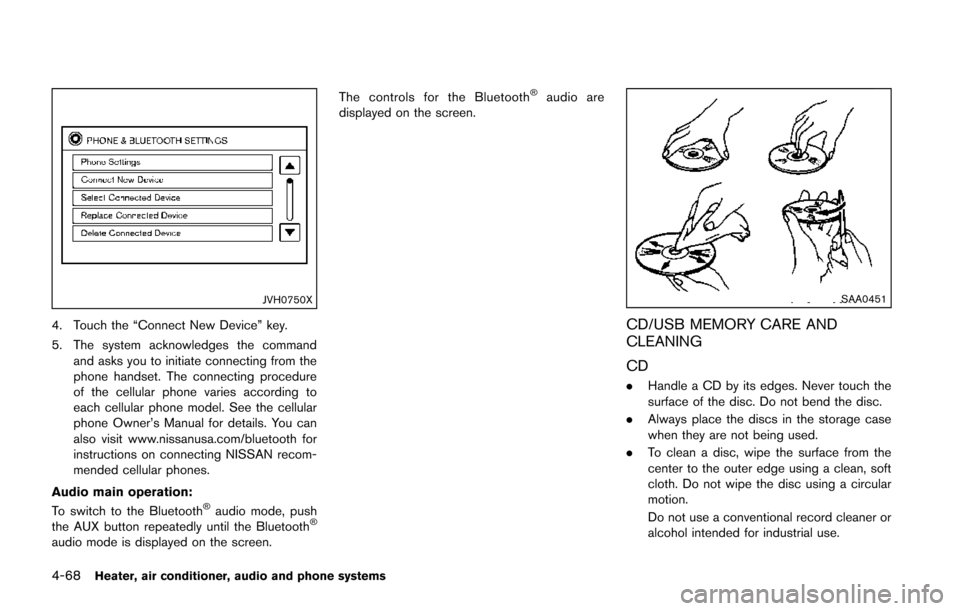
4. Touch the “Connect New Device” key.
5. The system acknowledges the commandand asks you to initiate connecting from the
phone handset. The connecting procedure
of the cellular phone varies according to
each cellular phone model. See the cellular
phone Owner’s Manual for details. You can
also visit www.nissanusa.com/bluetooth for
instructions on connecting NISSAN recom-
mended cellular phones.
Audio main operation:
To switch to the Bluetooth
®audio mode, push
the AUX button repeatedly until the Bluetooth®
audio mode is displayed on the screen. The controls for the Bluetooth
®audio are
displayed on the screen.
SAA0451
CD/USB MEMORY CARE AND
CLEANING
CD
. Handle a CD by its edges. Never touch the
surface of the disc. Do not bend the disc.
. Always place the discs in the storage case
when they are not being used.
. To clean a disc, wipe the surface from the
center to the outer edge using a clean, soft
cloth. Do not wipe the disc using a circular
motion.
Do not use a conventional record cleaner or
alcohol intended for industrial use.
Page 224 of 402
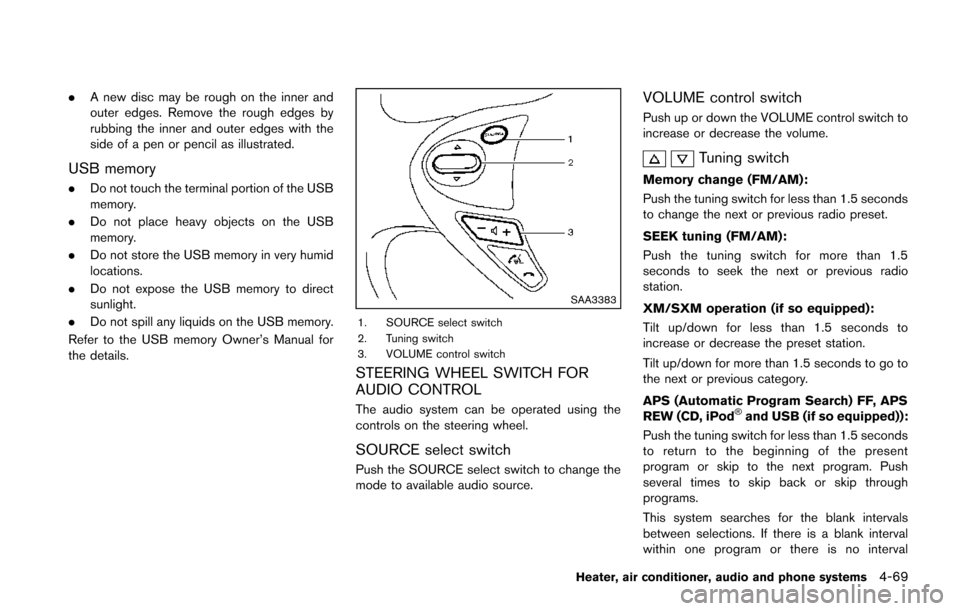
.A new disc may be rough on the inner and
outer edges. Remove the rough edges by
rubbing the inner and outer edges with the
side of a pen or pencil as illustrated.
USB memory
.Do not touch the terminal portion of the USB
memory.
. Do not place heavy objects on the USB
memory.
. Do not store the USB memory in very humid
locations.
. Do not expose the USB memory to direct
sunlight.
. Do not spill any liquids on the USB memory.
Refer to the USB memory Owner’s Manual for
the details.
SAA3383
1. SOURCE select switch
2. Tuning switch
3. VOLUME control switch
STEERING WHEEL SWITCH FOR
AUDIO CONTROL
The audio system can be operated using the
controls on the steering wheel.
SOURCE select switch
Push the SOURCE select switch to change the
mode to available audio source.
VOLUME control switch
Push up or down the VOLUME control switch to
increase or decrease the volume.
Tuning switch
Memory change (FM/AM):
Push the tuning switch for less than 1.5 seconds
to change the next or previous radio preset.
SEEK tuning (FM/AM):
Push the tuning switch for more than 1.5
seconds to seek the next or previous radio
station.
XM/SXM operation (if so equipped):
Tilt up/down for less than 1.5 seconds to
increase or decrease the preset station.
Tilt up/down for more than 1.5 seconds to go to
the next or previous category.
APS (Automatic Program Search) FF, APS
REW (CD, iPod
®and USB (if so equipped)):
Push the tuning switch for less than 1.5 seconds
to return to the beginning of the present
program or skip to the next program. Push
several times to skip back or skip through
programs.
This system searches for the blank intervals
between selections. If there is a blank interval
within one program or there is no interval
Heater, air conditioner, audio and phone systems4-69
Page 226 of 402
This vehicle is equipped with Smartphone
Integration technology. This allows many com-
patible Smartphone applications to be displayed
and easily controlled through the vehicle’s
touchscreen.
NOTE:
A compatible smartphone and registration
is required to use mobile applications or to
access connected features of certain vehi-
cle applications.
REGISTERING WITH NISSANCON-
NECTTMAPP
To use the Smartphone Integration feature, it is
necessary for the user to register. In order to
register, visit the NissanConnect
TMwebsite,
www.nissanusa.com/connect/ and sign up or
create an account through the prompts on the
NissanConnect
TMApp. Once registered, down-
load the NissanConnectTMApp from your
compatible phone’s application download
source and then log into the application. If you
already have an account created through the
App, please log in.
CONNECT PHONE
To use this feature, a compatible smartphone
must be connected via Bluetooth®or USB to the
vehicle. For more information on connecting your
phone, see “Bluetooth
®Hands-Free Phone
System (Type B)” (P.4-85) .
NOTE:
. For Apple iPhones, NissanConnect
TM
Apps REQUIRES the phone to be
plugged in via USB.
. For Android phones, NissanConnect
TM
Apps REQUIRES the phone to be
paired via Bluetooth.
APPLICATION DOWNLOAD
Once connected, the NissanConnectTMApp will
search your phone to determine which compa-
tible applications are currently installed. The
user will then choose which apps they want to
bring into their vehicle from the list of apps
within the “Manage My Apps” section of the
NissanConnect
TMApp on their smartphone.
The vehicle will then download the in-vehicle
interface for each of these compatible applica-
tions. Once downloaded, the user can access
their selected smartphone applications through
the vehicle touchscreen. For more information
on application availability see www.nissanusa.
com/connect/ When installing a car phone or a CB radio in
your vehicle, be sure to observe the following
precautions, otherwise the new equipment may
adversely affect the electronic control modules
and electronic control system harness.
WARNING
.
A cellular phone should not be used
for any purpose while driving so full
attention may be given to vehicle
operation. Some jurisdictions prohi-
bit the use of cellular phones while
driving.
. If you must make a call while your
vehicle is in motion, the hands-free
cellular phone operational mode (if
so equipped) is highly recom-
mended. Exercise extreme caution
at all times so full attention may be
given to vehicle operation.
. If a conversation in a moving vehicle
requires you to take notes, pull off
the road to a safe location and stop
your vehicle before doing so.
Heater, air conditioner, audio and phone systems4-71
NISSANCONNECTTMAPP
SMARTPHONE INTEGRATION (if so
equipped) CAR PHONE OR CB RADIO
Page 388 of 402
10 Index
A
ABS (Anti-lock Braking System) ............................ 5-40
Adjusting the screen .................................................. 4-19
Advanced air bag system ......................................... 1-44
Air bag systemAdvanced air bag system .................................. 1-44
Front passenger air bag and status light....... 1-46
Front-seat mounted side-impact
supplemental air bag system ............................ 1-49
Roof-mounted curtain side-impact
supplemental air bag system ............................ 1-49
Air bag warning labels............................................... 1-52
Air bag warning light...................................... 1-52, 2-17
Air cleaner housing filter ........................................... 8-16
Air conditioner Air conditioner operation.................................... 4-20
Air conditioner service ........................................ 4-27
Air conditioner specification label.................... 9-12
Air conditioning system refrigerant and
lubricant recommendations....................... 4-27, 9-7
In-cabin microfilter ............................................... 4-27
Air conditioner operation........................................... 4-23
Alarm, How to stop alarm (see vehicle
security system)........................................................... 2-30
Alcohol, drugs and driving.......................................... 5-8
All-wheel drive (AWD)............................................... 5-33
Antenna.......................................................................... 4-70
Anti-lock Braking System (ABS) ............................ 5-40
Anti-lock braking system (ABS) warning light..... 2-13
Appearance care Exterior appearance care ...................................... 7-2
Interior appearance care ....................................... 7-5
Application download................................................. 4-71
Audible reminders....................................................... 2-19
Audio operation precautions.................................... 4-28 Audio setup .................................................................... 4-6
Audio system................................................................ 4-28
Steering wheel audio controls.......................... 4-69
Audio system voice commands............................... 4-96
Autolight system.......................................................... 2-36
Automatic Air conditioner....................................................... 4-24
Door locks................................................................. 3-6
AUX (Auxiliary) input....................................... 4-47, 4-52
Average fuel consumption ........................................ 2-11
Avoiding collision and rollover ................................... 5-7
B
Back door (See lift gate) .......................................... 3-20
Battery............................................................................ 8-13 Battery replacement, Intelligent Key................ 8-24
Battery replacement, Keyfob............................. 8-23
Battery saver system........................................... 2-37
Variable voltage control system........................ 8-14
Before starting the engine........................................ 5-15
Bluetooth
®Hands-Free Phone System
(Type B)......................................................................... 4-85
Bluetooth
®Hands-Free Phone System
(Type A) ......................................................................... 4-72
Bluetooth
®hands-free phone system
voice commands ......................................................... 4-94
Bluetooth
®settings..................................................... 4-90
Bluetooth®streaming audio ..................................... 4-67
Booster seats............................................................... 1-34
Brake Anti-lock Braking System (ABS) ..................... 5-40
Brake and clutch fluid......................................... 8-11
Brake system......................................................... 5-39
Parking brake operation ..................................... 5-29
Warning light......................................................... 2-13 Break-in schedule ....................................................... 5-31
Brightness control
Display ON/OFF button ........................................ 4-6
Instrument panel................................................... 2-38
Bulb check/instrument panel ................................... 2-13
Bulb replacement........................................................ 8-26
C
Cabin air filter............................................................... 4-27
Capacities and recommended fuel/lubricants ....... 9-2
Car phone or CB radio ............................................. 4-71
Cargo cover.................................................................. 2-44
Cargo floor box............................................................ 2-43
Catalytic converter, Three way catalyst................... 5-4
CD/USB memory care and cleaning ..................... 4-68
Check tire pressure warning...................................... 2-7
Child restraints............................................................. 1-18 Booster seats........................................................ 1-34
LATCH system...................................................... 1-20
Precautions on child restraints......................... 1-18
Child safety................................................................... 1-16
Child safety rear door lock ......................................... 3-6
Chimes, Audible reminders ...................................... 2-19
Circuit breaker, Fusible link...................................... 8-20
Cleaning exterior and interior............................ 7-2, 7-5
Clock.............................................................................. 2-41
Clock (models with navigation system)................... 4-8
Clutch fluid.................................................................... 8-11
Coat hook ..................................................................... 2-44
Cockpit ............................................................................ 2-3
Cold weather driving.................................................. 5-43
Compact Disc (CD) player (See
audio system)....................................... 4-44, 4-50, 4-60
Connect phone............................................................ 4-71
Connecting procedure............................................... 4-87
Page 393 of 402
10-6
Three-way catalyst........................................................ 5-4
Tilt steering column .................................................... 3-23
Tire pressure, Low tire pressure warning light.... 2-15
Tires Flat tire....................................................................... 6-3
Low tire pressure warning system...................... 5-4
Tire and Loading information label ....... 8-31, 9-11
Tire chains.............................................................. 8-38
Tire dressing............................................................. 7-4
Tire pressure ......................................................... 8-30
Tire pressure monitoring
system (TPMS) ............................................... 5-4, 6-3
Tire rotation............................................................ 8-39
Types of tires......................................................... 8-37
Uniform tire quality grading ............................... 9-18
Wheel/tire size......................................................... 9-8
Wheels and tires.................................................. 8-30
Tonneau cover (see cargo cover)........................... 2-44
Touch screen....................................................... 4-4, 4-10
Towing Flat towing ............................................................. 9-17
Tow truck towing.................................................. 6-12
Towing a trailer ..................................................... 9-17
TPMS, Tire pressure monitoring system................. 5-4
TPMS, Tire pressure warning system...................... 6-3
Traffic info setup............................................................ 4-9
Trailer towing................................................................ 9-17
Transmission Continuously Variable Transmission
(CVT) fluid.............................................................. 8-11
Driving with CVT (Continuously
Variable Transmission) ............................. 5-11, 5-17
Driving with manual transmission.......... 5-11, 5-23
Transmission shift lever lock release............... 5-22
Transmitter (See remote keyless entry system) .... 3-7
Transmitter, With Intelligent Key system
(See Intelligent Key system)..................................... 3-16 Traveling or registering your vehicle in
another country.............................................................. 9-9
Trip computer............................................................... 2-10
Troubleshooting guide ............................................... 4-97
Turn signal switch ....................................................... 2-38
U
Underbody cleaning ..................................................... 7-3
Uniform tire quality grading ...................................... 9-18
USB interface............................................................... 4-62
USB memory operation............................................. 4-52
Using the system......................................................... 4-93
V
Vanity mirror.................................................................. 3-27
Variable voltage control system............................... 8-14
Vehicle Dimensions and weights....................................... 9-9
Identification number (VIN)................................ 9-10
Information display.................................................. 2-9
Loading information ............................................. 9-14
Recovery (freeing a stuck vehicle) .................. 6-14
Security system .................................................... 2-29
Vehicle dynamic control (VDC) off switch..... 2-39
Vehicle dynamic control (VDC) system.......... 5-41
Vehicle phonebook ..................................................... 4-87
Ventilators...................................................................... 4-19
Voice command........................................................... 4-86
Voice command (Bluetooth
®Hands-Free
Phone System) ............................................................ 4-78
Voice Prompt Interrupt............................................... 4-86
W
Warning Hazard warning flasher switch............................. 6-2
Lights....................................................................... 2-13
Tire pressure monitoring
system (TPMS) ............................................... 5-4, 6-3
Warning/indicator lights and
audible reminders................................................. 2-12
Warning labels, Air bag warning labels................. 1-52
Warning light Air bag warning light................................ 1-52, 2-17
Anti-lock braking system (ABS)
warning light.......................................................... 2-13
AWD warning light .............................................. 5-35
Brake warning light.............................................. 2-13
Door open warning light..................................... 2-14
Electric power steering warning light ............. 2-14
Intelligent Key system warning light................ 2-14
Low fuel warning light......................................... 2-15
Low tire pressure warning light........................ 2-15
Seat belt warning light........................................ 2-16
Warranty, Emission control system warranty ....... 9-19
Washer switch Rear window wiper and washer switch ......... 2-34
Windshield wiper and washer switch............. 2-32
Washing........................................................................... 7-2
Waxing............................................................................. 7-3
Weights (See dimensions and weights)................. 9-9
Wheel/tire size............................................................... 9-8
Wheels and tires......................................................... 8-30 Care of wheels ........................................................ 7-4
Cleaning aluminum alloy wheels ......................... 7-4
Window washer fluid ................................................. 8-12
Window(s)
Cleaning .................................................................... 7-3
Power windows .................................................... 2-45