2014 NISSAN JUKE steering wheel
[x] Cancel search: steering wheelPage 87 of 402
2-12Instruments and controls
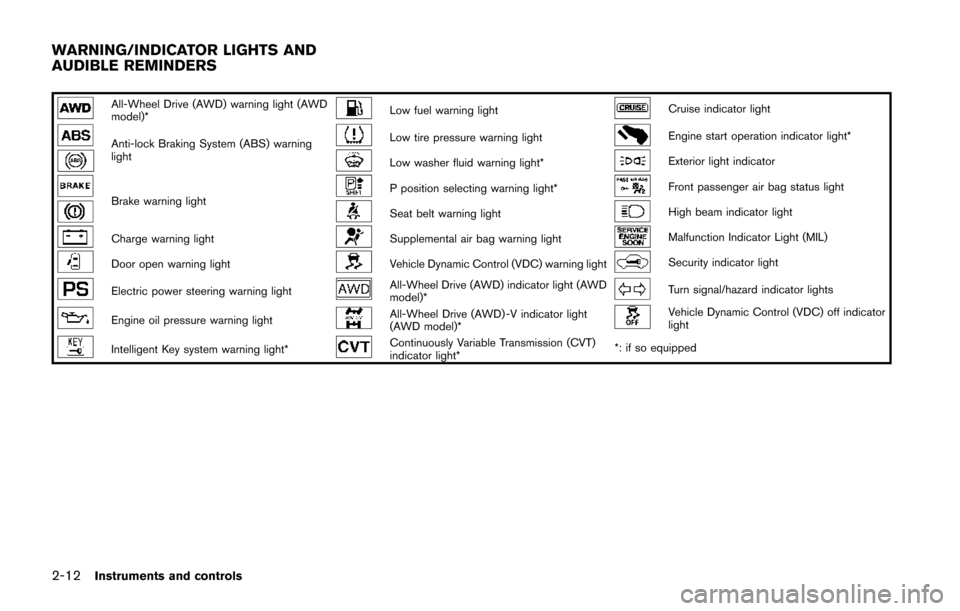
All-Wheel Drive (AWD) warning light (AWD
model)*Low fuel warning lightCruise indicator light
Anti-lock Braking System (ABS) warning
lightLow tire pressure warning lightEngine start operation indicator light*
Low washer fluid warning light*Exterior light indicator
Brake warning lightP position selecting warning light*Front passenger air bag status light
Seat belt warning lightHigh beam indicator light
Charge warning lightSupplemental air bag warning lightMalfunction Indicator Light (MIL)
Door open warning lightVehicle Dynamic Control (VDC) warning lightSecurity indicator light
Electric power steering warning lightAll-Wheel Drive (AWD) indicator light (AWD
model)*Turn signal/hazard indicator lights
Engine oil pressure warning lightAll-Wheel Drive (AWD) -V indicator light
(AWD model)*Vehicle Dynamic Control (VDC) off indicator
light
Intelligent Key system warning light*Continuously Variable Transmission (CVT)
indicator light**: if so equipped
WARNING/INDICATOR LIGHTS AND
AUDIBLE REMINDERS
Page 89 of 402
2-14Instruments and controls
.Pressing the brake pedal with the
engine stopped and/or low brake
fluid level may increase your stop-
ping distance and braking will re-
quire greater pedal effort as well as
pedal travel.
. If the brake fluid level is below the
minimum or MIN mark on the brake
fluid reservoir, do not drive until the
brake system has been checked at a
NISSAN dealer.
Charge warning light
If the light illuminates while the engine is running,
it may indicate the charging system is not
functioning properly. Turn the engine off and
check the alternator belt. If the belt is loose,
broken, missing or if the light remains on, see a
NISSAN dealer immediately.
CAUTION
Do not continue driving if the alternator
belt is loose, broken or missing.
Door open warning light
This light illuminates when any of the doors and/
or lift gate are not closed securely while the
ignition switch is in the ON position.
Electric power steering warning
light
When the ignition switch is in the ON position,
the electric power steering warning light illumi-
nates. After starting the engine, the electric
power steering warning light turns off. This
indicates the electric power steering system is
operational.
If the electric power steering warning light
illuminates while the engine is running, it may
indicate the electric power steering system is
not functioning properly and may need servicing.
Have the electric power steering system
checked by a NISSAN dealer.
When the electric power steering warning light
illuminates with the engine running, the power
assist to the steering will cease operation but
you will still have control of the vehicle. At this
time, greater steering efforts are required to
operate the steering wheel, especially in sharp
turns and at low speeds.
See “Electric power steering system” (P.5-38) .
Engine oil pressure warning light
This light warns of low engine oil pressure. If the
light flickers or illuminates during normal driving,
pull off the road in a safe area, stop the engine
immediately and call a NISSAN dealer or other
authorized repair shop.
The engine oil pressure warning light is
not designed to indicate a low oil level.
Use the dipstick to check the oil level. (See
“Engine oil” (P.8-8).)
CAUTION
Running the engine with the engine oil
pressure warning light on could cause
serious damage to the engine almost
immediately. Such damage is not cov-
ered by warranty. Turn off the engine as
soon as it is safe to do so.
Intelligent Key system warning light
(if so equipped)
After the ignition switch is placed in the ON
position, this light comes on for about 2 seconds
and then turns off.
This light illuminates or blinks as follows:
Page 91 of 402
2-16Instruments and controls
WARNING
.If the light does not illuminate with
the ignition switch placed in the ON
position, have the vehicle checked
by a NISSAN dealer as soon as
possible.
. If the light illuminates while driving,
avoid sudden steering maneuvers or
abrupt braking, reduce vehicle
speed, pull off the road to a safe
location and stop the vehicle as
soon as possible. Driving with un-
der-inflated tires may permanently
damage the tires and increase the
likelihood of tire failure. Serious
vehicle damage could occur and
may lead to an accident and could
result in serious personal injury.
Check the tire pressure for all four
tires. Adjust the tire pressure to the
recommended COLD tire pressure
shown on the Tire and Loading
Information label to turn the low
tire pressure warning light OFF. If
the light still illuminates while driv-
ing after adjusting the tire pressure,
a tire may be flat. If you have a flat
tire, replace it with a spare tire as soon as possible.
. When a spare tire is mounted or a
wheel is replaced, the TPMS will not
function and the low tire pressure
warning light will flash for approxi-
mately 1 minute. The light will
remain on after 1 minute. Contact
your NISSAN dealer as soon as
possible for tire replacement and/
or system resetting.
. Replacing tires with those not ori-
ginally specified by NISSAN could
affect the proper operation of the
TPMS.
CAUTION
.The TPMS is not a substitute for the
regular tire pressure check. Be sure
to check the tire pressure regularly.
. If the vehicle is being driven at
speeds of less than 16 MPH (25
km/h) , the TPMS may not operate
correctly.
. Be sure to install the specified size
of tires to the four wheels correctly.
Low washer fluid warning light
(Canada only)
This light illuminates when the washer fluid is at
a low level. Add washer fluid as necessary. (See
“Window washer fluid” (P.8-12) .)
P position selecting warning light
(if so equipped)
The warning light blinks in red when the ignition
switch is pushed to stop the engine with the
shift lever in any position except the P (Park)
position.
If this warning appears, move the shift lever to
the P (Park) position or push the ignition switch
to the ON position.
An inside warning chime will also sound.
See “Intelligent Key system” (P.3-10) .
Seat belt warning light
The light and chime remind you to fasten seat
belts. The light illuminates whenever the ignition
switch is placed in the ON position, and will
remain illuminated until the driver’s seat belt is
fastened. At the same time, the chime will sound
for about 6 seconds unless the driver’s seat belt
is securely fastened.
The seat belt warning light for the front
passenger will illuminate if the seat belt is not
fastened when the front passenger’s seat is
Page 114 of 402
SIC3672
FOG LIGHT SWITCH (if so equipped)
To turn the fog lights on, turn the headlight
switch to theposition, then turn the switch
to theposition. To turn them off, turn the
switch to the OFF position.
The headlights must be on for the fog lights to
operate.
When the headlight switch is in the AUTO
position, turning the fog light switch to the
position will turn on the headlights, fog lights
and the other lights while the ignition switch is in
the ON position or the engine is running.
SIC4521
To sound the horn, push the center pad area of
the steering wheel.
WARNING
Do not disassemble the horn. Doing so
could affect proper operation of the
supplemental front air bag system.
Tampering with the supplemental front
air bag system may result in serious
personal injury.
SIC4544
The vehicle should be driven with the Vehicle
Dynamic Control (VDC) system on for most
driving conditions.
If the vehicle is stuck in mud or snow, the VDC
system reduces the engine output to reduce
wheel spin. The engine speed will be reduced
even if the accelerator is depressed to the floor.
If maximum engine power is needed to free a
stuck vehicle, turn the VDC system off.
To turn off the VDC system, push the VDC OFF
switch. The
indicator light will illuminate.
Push the VDC OFF switch again or restart the
engine to turn on the system. (See “Vehicle
Dynamic Control (VDC) system” (P.5-41) .)
Instruments and controls2-39
HORN VEHICLE DYNAMIC CONTROL (VDC)
OFF SWITCH
Page 150 of 402
SPA2809
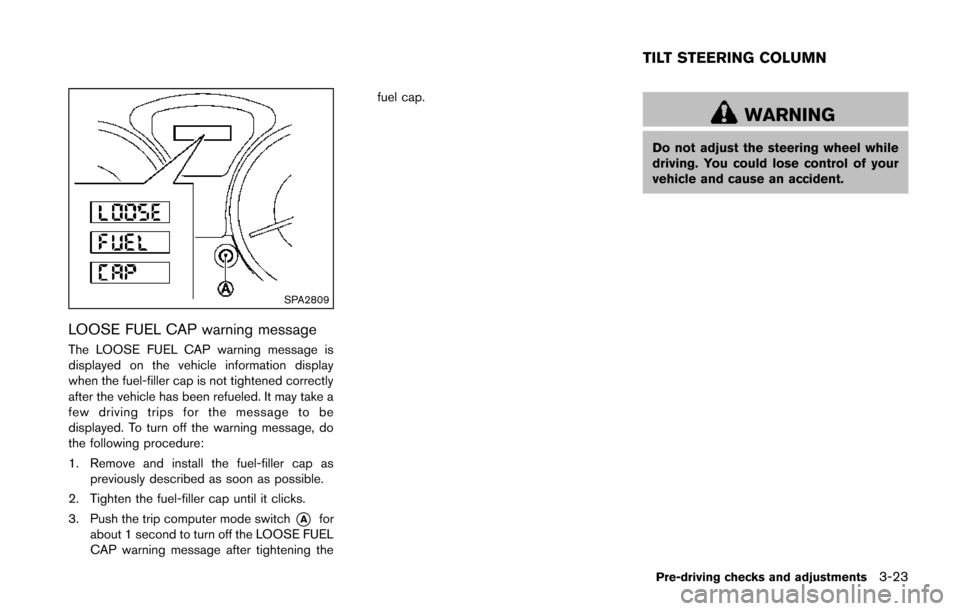
LOOSE FUEL CAP warning message
The LOOSE FUEL CAP warning message is
displayed on the vehicle information display
when the fuel-filler cap is not tightened correctly
after the vehicle has been refueled. It may take a
few driving trips for the message to be
displayed. To turn off the warning message, do
the following procedure:
1. Remove and install the fuel-filler cap aspreviously described as soon as possible.
2. Tighten the fuel-filler cap until it clicks.
3. Push the trip computer mode switch
*Afor
about 1 second to turn off the LOOSE FUEL
CAP warning message after tightening the fuel cap.
WARNING
Do not adjust the steering wheel while
driving. You could lose control of your
vehicle and cause an accident.
Pre-driving checks and adjustments3-23
TILT STEERING COLUMN
Page 151 of 402
3-24Pre-driving checks and adjustments
SPA2808
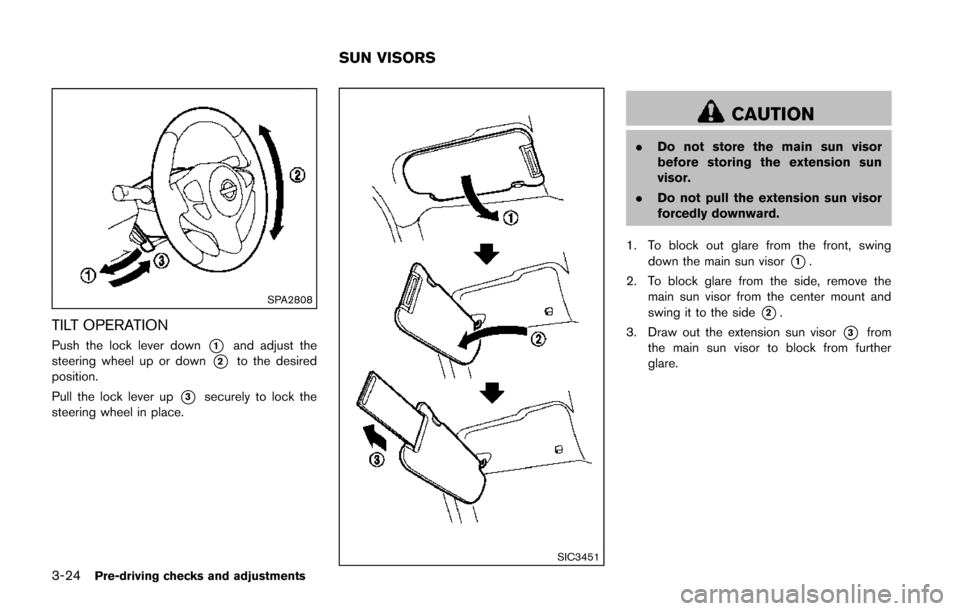
TILT OPERATION
Push the lock lever down*1and adjust the
steering wheel up or down
*2to the desired
position.
Pull the lock lever up
*3securely to lock the
steering wheel in place.
SIC3451
CAUTION
. Do not store the main sun visor
before storing the extension sun
visor.
. Do not pull the extension sun visor
forcedly downward.
1. To block out glare from the front, swing down the main sun visor
*1.
2. To block glare from the side, remove the main sun visor from the center mount and
swing it to the side
*2.
3. Draw out the extension sun visor
*3from
the main sun visor to block from further
glare.
SUN VISORS
Page 156 of 402
")
4 Heater, air conditioner, audio and phone sys-tems
Safety note ........................................................................\
.......... 4-3
Control panel buttons — color screen (Type A) ............... 4-3
How to use touch screen ................................................. 4-4
How to use the BACK button ......................................... 4-6
How to use brightness control and display
ON/OFF button ................................................................... 4-6
How to use the SETUP button ....................................... 4-6
Control panel buttons — color screen (Type B) ........... 4-10 How to use touch screen .............................................. 4-10
How to use the BACK button ...................................... 4-11
How to use the APPS·i button ..................................... 4-12
How to use brightness control button ........................ 4-15
How to use the ON·OFF button/Volume
control knob ....................................................................... 4-15
How to use the CAMERA button ................................ 4-15
RearView monitor (if so equipped) ................................... 4-15
How to read the displayed lines .................................. 4-16
Difference between predictive and
actual distances ................................................................ 4-17
Adjusting the screen (if so equipped) ........................ 4-19
Operating tips ................................................................... 4-19
Ventilators ........................................................................\
......... 4-19 Center ventilators ............................................................. 4-19
Side ventilators ................................................................. 4-20 Heater and air conditioner .................................................. 4-20
Manual air conditioner (if so equipped) ................... 4-21
Automatic air conditioner (with Integrated
Control System) ............................................................. 4-24
Operating tips (for automatic air conditioner) ........ 4-27
In-cabin microfilter ......................................................... 4-27
Servicing air conditioner .............................................. 4-27
Audio system ........................................................................\
.. 4-28 Audio operation precautions ....................................... 4-28
FM-AM-SAT radio with Compact Disc (CD) player
(Type A) ........................................................................\
.... 4-41
FM-AM-SAT radio with Compact Disc (CD) player
(Type B) ........................................................................\
.... 4-48
FM-AM-SAT radio with Compact Disc (CD) player
(Type C) ........................................................................\
... 4-57
CD/USB memory care and cleaning ........................ 4-68
Steering wheel switch for audio control .................. 4-69
Antenna ........................................................................\
.... 4-70
NissanConnect
TMApp smartphone integration (if
so equipped) ........................................................................\
.. 4-71
Registering with NissanConnect
TMApp .................. 4-71
Connect phone ............................................................... 4-71
Application download ................................................... 4-71
Car phone or CB radio ........................................................ 4-71
Page 224 of 402
.A new disc may be rough on the inner and
outer edges. Remove the rough edges by
rubbing the inner and outer edges with the
side of a pen or pencil as illustrated.
USB memory
.Do not touch the terminal portion of the USB
memory.
. Do not place heavy objects on the USB
memory.
. Do not store the USB memory in very humid
locations.
. Do not expose the USB memory to direct
sunlight.
. Do not spill any liquids on the USB memory.
Refer to the USB memory Owner’s Manual for
the details.
SAA3383
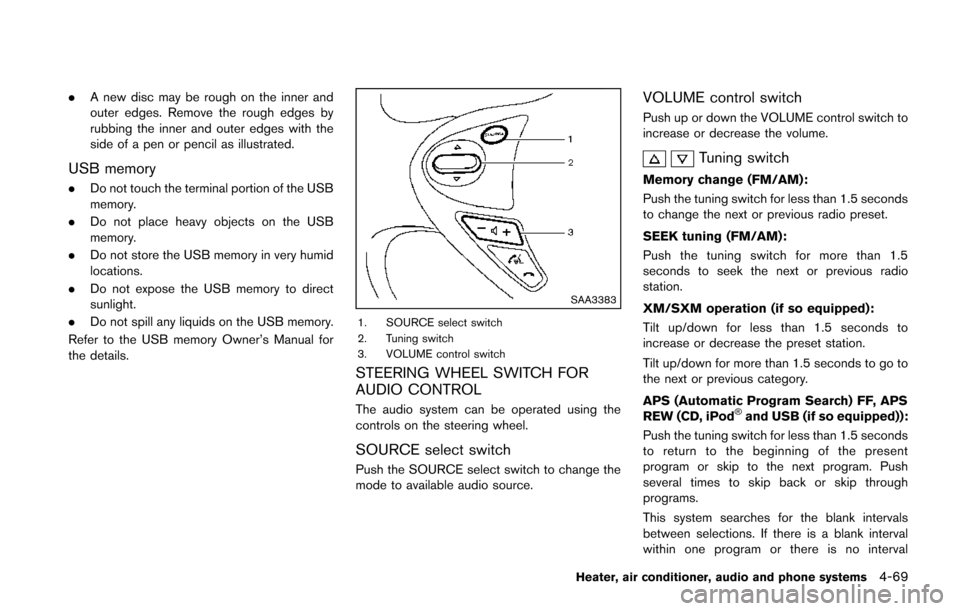
1. SOURCE select switch
2. Tuning switch
3. VOLUME control switch
STEERING WHEEL SWITCH FOR
AUDIO CONTROL
The audio system can be operated using the
controls on the steering wheel.
SOURCE select switch
Push the SOURCE select switch to change the
mode to available audio source.
VOLUME control switch
Push up or down the VOLUME control switch to
increase or decrease the volume.
Tuning switch
Memory change (FM/AM):
Push the tuning switch for less than 1.5 seconds
to change the next or previous radio preset.
SEEK tuning (FM/AM):
Push the tuning switch for more than 1.5
seconds to seek the next or previous radio
station.
XM/SXM operation (if so equipped):
Tilt up/down for less than 1.5 seconds to
increase or decrease the preset station.
Tilt up/down for more than 1.5 seconds to go to
the next or previous category.
APS (Automatic Program Search) FF, APS
REW (CD, iPod
®and USB (if so equipped)):
Push the tuning switch for less than 1.5 seconds
to return to the beginning of the present
program or skip to the next program. Push
several times to skip back or skip through
programs.
This system searches for the blank intervals
between selections. If there is a blank interval
within one program or there is no interval
Heater, air conditioner, audio and phone systems4-69