2014 NISSAN JUKE service
[x] Cancel search: servicePage 212 of 402
JVH0738X
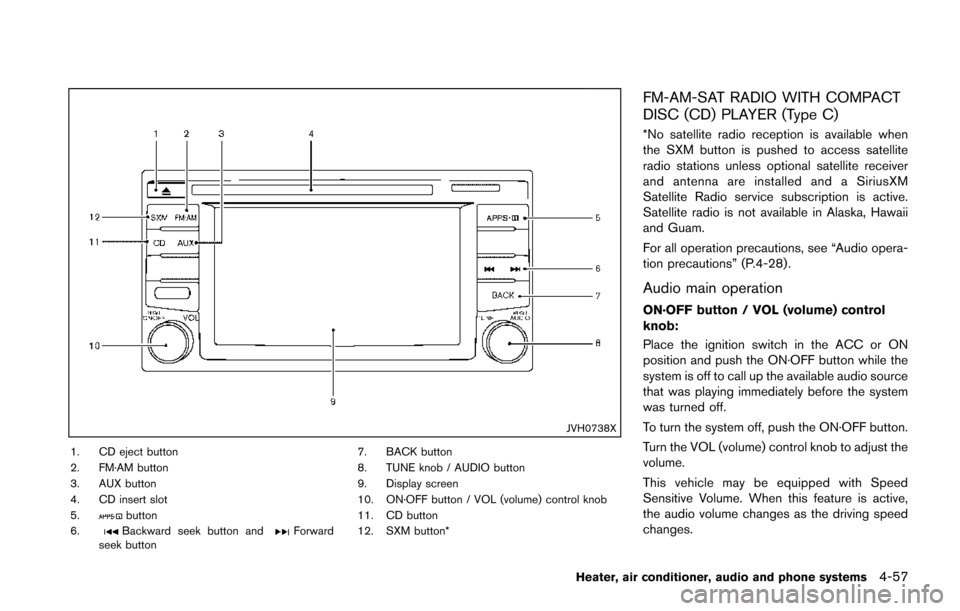
1. CD eject button
2. FM·AM button
3. AUX button
4. CD insert slot
5.
button
6.Backward seek button andForward
seek button 7. BACK button
8. TUNE knob / AUDIO button
9. Display screen
10. ON·OFF button / VOL (volume) control knob
11. CD button
12. SXM button*
FM-AM-SAT RADIO WITH COMPACT
DISC (CD) PLAYER (Type C)
*No satellite radio reception is available when
the SXM button is pushed to access satellite
radio stations unless optional satellite receiver
and antenna are installed and a SiriusXM
Satellite Radio service subscription is active.
Satellite radio is not available in Alaska, Hawaii
and Guam.
For all operation precautions, see “Audio opera-
tion precautions” (P.4-28) .
Audio main operation
ON·OFF button / VOL (volume) control
knob:
Place the ignition switch in the ACC or ON
position and push the ON·OFF button while the
system is off to call up the available audio source
that was playing immediately before the system
was turned off.
To turn the system off, push the ON·OFF button.
Turn the VOL (volume) control knob to adjust the
volume.
This vehicle may be equipped with Speed
Sensitive Volume. When this feature is active,
the audio volume changes as the driving speed
changes.
Heater, air conditioner, audio and phone systems4-57
Page 214 of 402
SiriusXM Satellite Radio service subscription is
active. Satellite radio is not available in Alaska,
Hawaii and Guam.
If a compact disc is playing when the SXM
button is pushed, the compact disc will auto-
matically be turned off and the last radio station
played will come on.
While the radio is in SXM mode, the operation
can be controlled through the touch-screen.
Touch the “Channels” key to display a list of
channels. Touch a channel displayed on the list
to change to that channel. Touch the “Cate-
gories” key to display a list of categories. Touch
a category displayed on the list to display
options within that category.
Tuning with the touch-screen:
When in AM or FM mode, the radio can be
tuned using the touch-screen. To bring up the
visual tuner, touch the “Tune” key on the lower
right corner of the screen. A screen appears
with a bar running from low frequencies on the
left to high frequencies on the right. Touch the
screen at the location of the frequency you wish
to tune and the station will change to that
frequency. To return to the regular radio display
screen, touch the “OK” key.
Tuning with the TUNE knob:
The radio can also be manually tuned using theTUNE knob. When in FM or AM mode, turn the
TUNE knob to the left for lower frequencies or to
the right for higher frequencies. When in SXM
mode, turn the TUNE knob to change the
channel.
SEEK tuning:
When in FM or AM mode, push the seek buttons
orto tune from low to high or high to
low frequencies and to stop at the next broad-
casting station.
When in SXM mode, push the seek buttons
orto change the category.JVH0741X
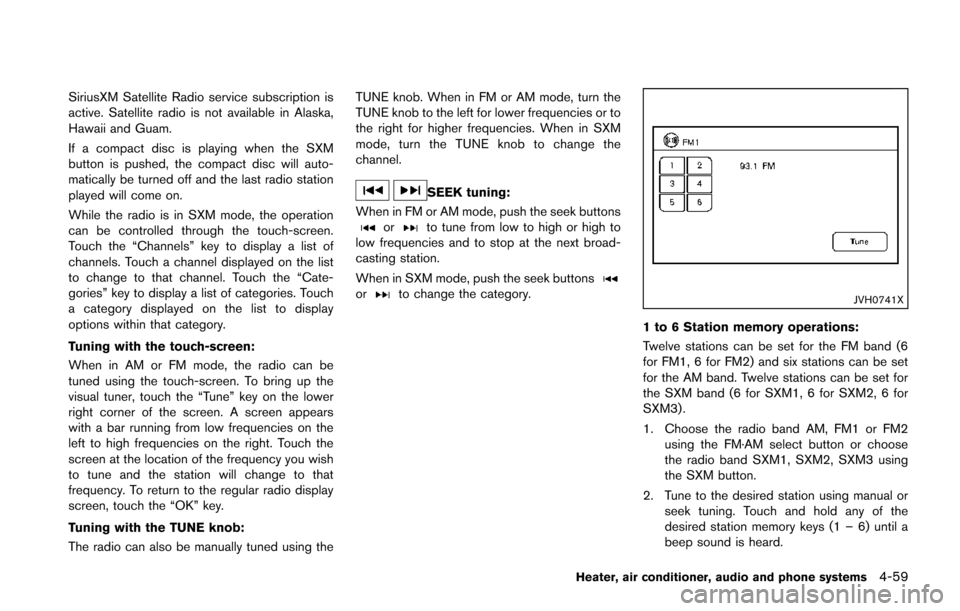
1 to 6 Station memory operations:
Twelve stations can be set for the FM band (6
for FM1, 6 for FM2) and six stations can be set
for the AM band. Twelve stations can be set for
the SXM band (6 for SXM1, 6 for SXM2, 6 for
SXM3) .
1. Choose the radio band AM, FM1 or FM2 using the FM·AM select button or choose
the radio band SXM1, SXM2, SXM3 using
the SXM button.
2. Tune to the desired station using manual or seek tuning. Touch and hold any of the
desired station memory keys (1 – 6) until a
beep sound is heard.
Heater, air conditioner, audio and phone systems4-59
Page 221 of 402
4-66Heater, air conditioner, audio and phone systems
Push and hold the seek buttonorfor
1.5 seconds while a track is playing to reverse or
fast forward the track being played. The track
plays at an increased speed while reversing or
fast forwarding. When the button is released,
the track returns to normal play speed.
JVH0748X
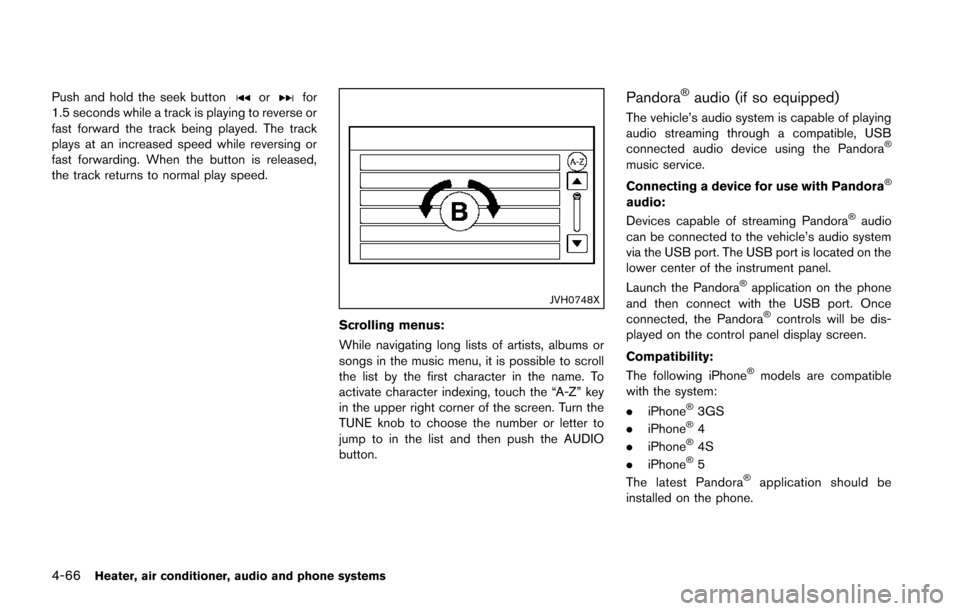
Scrolling menus:
While navigating long lists of artists, albums or
songs in the music menu, it is possible to scroll
the list by the first character in the name. To
activate character indexing, touch the “A-Z” key
in the upper right corner of the screen. Turn the
TUNE knob to choose the number or letter to
jump to in the list and then push the AUDIO
button.
Pandora®audio (if so equipped)
The vehicle’s audio system is capable of playing
audio streaming through a compatible, USB
connected audio device using the Pandora
®
music service.
Connecting a device for use with Pandora
®
audio:
Devices capable of streaming Pandora®audio
can be connected to the vehicle’s audio system
via the USB port. The USB port is located on the
lower center of the instrument panel.
Launch the Pandora
®application on the phone
and then connect with the USB port. Once
connected, the Pandora
®controls will be dis-
played on the control panel display screen.
Compatibility:
The following iPhone
®models are compatible
with the system:
. iPhone
®3GS
. iPhone®4
. iPhone®4S
. iPhone®5
The latest Pandora®application should be
installed on the phone.
Page 228 of 402
automatically connected with the in-vehicle
phone module when the ignition switch is
placed in the ON position with the connected
cellular phone turned on and carried in the
vehicle.
You can connect up to 5 different Bluetooth
®
cellular phones in the in-vehicle phone module.
However, you can talk on only one cellular phone
at a time.
Before using the Bluetooth
®Hands-Free Phone
System, refer to the following notes.
. Wireless LAN (Wi-Fi) and the Bluetooth
®
functions share the same frequency band
(2.4 GHz) . Using the Bluetooth®and the
wireless LAN functions at the same time may
slow down or disconnect the communica-
tion and cause undesired noise. It is
recommended that you turn off the wireless
LAN (Wi-Fi) when using the Bluetooth
®
functions.
. Set up the wireless connection between a
compatible cellular phone and the in-vehicle
phone module before using the Bluetooth
®
Hands-Free Phone System.
. Some Bluetooth®enabled cellular phones
may not be recognized by the in-vehicle
phone module. Please visit www.nissanusa.
com/bluetooth for a recommended phone
list and instructions for connecting your phone.
. You will not be able to use a hands-free
phone under the following conditions:
— Your vehicle is outside of the telephone
service area.
— Your vehicle is in an area where it is difficult to receive radio waves; such as in
a tunnel, in an underground parking
garage, near a tall building or in a
mountainous area.
— Your cellular phone is locked to prevent it from being dialed.
. When the radio wave condition is not ideal
or ambient sound is too loud, it may be
difficult to hear the other person’s voice
during a call.
. Immediately after the ignition switch is
placed in the ON position, it may be
impossible to receive a call for a short
period of time.
. Do not place the cellular phone in an area
surrounded by metal or far away from the in-
vehicle phone module to prevent tone quality
degradation and wireless connection dis-
ruption.
. While a cellular phone is connected through
the Bluetooth
®wireless connection, the
battery power of the cellular phone may
discharge quicker than usual. The Blue- tooth
®Hands-Free Phone System cannot
charge cellular phones.
. If the Bluetooth
®Hands-Free Phone System
seems to be malfunctioning, see “Trouble-
shooting guide” (P.4-84). You can also visit
www.nissanusa.com/bluetooth for trouble-
shooting help.
. Some cellular phones or other devices may
cause interference or a buzzing noise to
come from the audio system speakers.
Storing the device in a different location
may reduce or eliminate the noise.
. Refer to the cellular phone Owner’s Manual
regarding battery charging, cellular phone
antenna, etc.
This wireless hands-free car kit is based on
Bluetooth technology.
. Frequency: 2402 MHz - 2480 MHz
. Output power: 4.14 dBm E.I.R.P
. Modulation: FHSS GFSK 8DPSK, p/
4DQPSK
. Number of channels: 79
. This wireless equipment cannot be used for
any services related to life safety because
there is the possibility of radio interference.
Heater, air conditioner, audio and phone systems4-73
Page 241 of 402
4-86Heater, air conditioner, audio and phone systems
.You will not be able to use a hands-free
phone under the following conditions:
— Your vehicle is outside of the cellular
service area.
— Your vehicle is in an area where it is difficult to receive cellular signal; such as
in a tunnel, in an underground parking
garage, near a tall building or in a
mountainous area.
— Your cellular phone is locked to prevent it from being dialed.
. When the radio wave condition is not ideal
or ambient sound is too loud, it may be
difficult to hear the other person’s voice
during a call.
. Immediately after the ignition switch is
placed in the ON position, it may be
impossible to receive a call for a short
period of time.
. Do not place the cellular phone in an area
surrounded by metal or far away from the in-
vehicle phone module to prevent tone quality
degradation and wireless connection dis-
ruption.
. While a cellular phone is connected through
the Bluetooth
®wireless connection, the
battery power of the cellular phone may
discharge quicker than usual. The Blue-
tooth
®Hands-Free Phone System cannot charge cellular phones.
. If the hands-free phone system seems to be
malfunctioning, visit www.nissanusa.com/
bluetooth for troubleshooting help or con-
tact your NISSAN dealer.
. Some cellular phones or other devices may
cause interference or a buzzing noise to
come from the audio system speakers.
Storing the device in a different location
may reduce or eliminate the noise.
. Refer to the cellular phone owner’s manual
regarding the telephone charges, cellular
phone antenna and body, etc.
. The signal strength display on the monitor
will not coincide with the signal strength
display of some cellular phones.
REGULATORY INFORMATION
FCC Regulatory information
– CAUTION: To maintain compliance with
FCC’s RF exposure guidelines, use only the
supplied antenna. Unauthorized antenna, mod-
ification, or attachments could damage the
transmitter and may violate FCC regulations.
– Operation is subject to the following two
conditions:
1. This device may not cause interference and
2. This device may not cause interference and
IC Regulatory information
– Operation is subject to the following two
conditions: (1) this device may not cause
interference, and (2) this device must accept
any interference, including interference that may
cause undesired operation of the device.
– This Class B digital apparatus meets all
requirements of the Canadian Interference-
Causing Equipment Regulations.
Bluetooth®is a trademark
owned by Bluetooth SIG, Inc.
and licensed to Bosch.
VOICE COMMAND
You can use voice commands to operate various
Bluetooth®Hands-Free Phone System features
using the NISSAN Voice Recognition system.
For more details, see “NISSAN voice recogni-
tion system” (P.4-92) .
Voice Prompt Interrupt
While using the voice recognition system, the
system voice can be interrupted to allow the
user to speak commands. While the system is
speaking, push the
button on the steering
wheel. The system voice will stop and a tone will
be heard. After the tone, speak desired com-
mand (displayed on the touch-screen) .
Page 256 of 402
WARNING
.Do not leave children or adults who
would normally require the support
of others alone in your vehicle. Pets
should not be left alone either. They
could accidentally injure themselves
or others through inadvertent op-
eration of the vehicle. Also, on hot,
sunny days, temperatures in a
closed vehicle could quickly become
high enough to cause severe or
possibly fatal injuries to people or
animals.
. Properly secure all cargo with ropes
or straps to help prevent it from
sliding or shifting. Do not place
cargo higher than the seatbacks. In
a sudden stop or collision, unse-
cured cargo could cause personal
injury.
EXHAUST GAS (carbon monoxide)
WARNING
.Do not breathe exhaust gases; they
contain colorless and odorless car-
bon monoxide. Carbon monoxide is
dangerous. It can cause uncon-
sciousness or death.
. If you suspect that exhaust fumes
are entering the vehicle, drive with
all windows fully open, and have the
vehicle inspected immediately.
. Do not run the engine in closed
spaces such as a garage.
. Do not park the vehicle with the
engine running for any extended
length of time.
. Keep the lift gate closed while
driving, otherwise exhaust gases
could be drawn into the passenger
compartment. If you must drive with
the lift gate open, follow these
precautions:
1. Open all the windows.
2. Set the
air recirculation to off
and the fan control to high to circulate the air.
. If electrical wiring or other cable
connections must pass to a trailer
through the seal on the lift gate or
the body, follow the manufacturer’s
recommendation to prevent carbon
monoxide entry into the vehicle.
. If a special body, camper or other
equipment is added for recreational
or other usage, follow the manufac-
turer’s recommendation to prevent
carbon monoxide entry into the
vehicle. (Some recreational vehicle
appliances such as stoves, refrig-
erators, heaters, etc. may also gen-
erate carbon monoxide.)
. The exhaust system and body
should be inspected by a qualified
mechanic whenever:
— The vehicle is raised for service.
— You suspect that exhaust fumes
are entering into the passenger
compartment.
— You notice a change in the sound of the exhaust system.
— You have had an accident invol- ving damage to the exhaust
Starting and driving5-3
PRECAUTIONS WHEN STARTING
AND DRIVING
Page 261 of 402
5-8Starting and driving
WARNING
The following actions can increase the
chance of losing control of the vehicle if
there is a sudden loss of tire air
pressure. Losing control of the vehicle
may cause a collision and result in
personal injury.
.The vehicle generally moves or pulls
in the direction of the flat tire.
. Do not rapidly apply the brakes.
. Do not rapidly release the accelera-
tor pedal.
. Do not rapidly turn the steering
wheel.
1. Remain calm and do not overreact.
2. Maintain a firm grip on the steering wheel with both hands and try to hold a straight
course.
3. When appropriate, slowly release the accel- erator pedal to gradually slow the vehicle.
4. Gradually steer the vehicle to a safe location off the road and away from traffic if possible.
5. Lightly apply the brake pedal to gradually stop the vehicle. 6. Turn on the hazard warning flashers and
either contact a roadside emergency service
to change the tire or see “Changing a flat
tire” (P.6-3) of this Owner’s Manual.
DRINKING ALCOHOL/DRUGS AND
DRIVING
WARNING
Never drive under the influence of
alcohol or drugs. Alcohol in the blood-
stream reduces coordination, delays
reaction time and impairs judgement.
Driving after drinking alcohol increases
the likelihood of being involved in an
accident injuring yourself and others.
Additionally, if you are injured in an
accident, alcohol can increase the se-
verity of the injury.
NISSAN is committed to safe driving. However,
you must choose not to drive under the influence
of alcohol. Every year thousands of people are
injured or killed in alcohol-related accidents.
Although the local laws vary on what is
considered to be legally intoxicated, the fact is
that alcohol affects all people differently and
most people underestimate the effects of
alcohol. Remember, drinking and driving don’t mix! And
that is true for drugs, too (over-the-counter,
prescription, and illegal drugs) . Don’t drive if
your ability to operate your vehicle is impaired by
alcohol, drugs, or some other physical condition.
DRIVING SAFETY PRECAUTIONS
Your NISSAN is designed for both normal and
off-road use. However, avoid driving in deep
water or mud as your NISSAN is mainly
designed for leisure use, unlike a conventional
off-road vehicle.
Remember that Two-Wheel Drive (2WD) mod-
els are less capable than All-Wheel Drive
(AWD) models for rough road driving and
extrication when stuck in deep snow, mud, or
the like.
Please observe the following precautions:
WARNING
.
Drive carefully when off the road
and avoid dangerous areas. Every
person who drives or rides in this
vehicle should be seated with their
seat belt fastened. This will keep
you and your passengers in position
when driving over rough terrain.
Page 263 of 402
5-10Starting and driving
ment even if the other two wheels
are raised off the ground. Make sure
you inform test facility personnel
that your vehicle is equipped with
AWD before it is placed on a
dynamometer. Using the wrong test
equipment may result in drivetrain
damage or unexpected vehicle
movement which could result in
serious vehicle damage or personal
injury.
. When a wheel is off the ground due
to an unlevel surface, do not spin
the wheel excessively (AWD model) .
. Accelerating quickly, sharp steering
maneuvers or sudden braking may
cause loss of control.
. If at all possible, avoid sharp turning
maneuvers, particularly at high
speeds. Your vehicle has a higher
center of gravity than a conventional
passenger car. The vehicle is not
designed for cornering at the same
speeds as conventional passenger
cars. Failure to operate this vehicle
correctly could result in loss of
control and/or a rollover accident.
. Always use tires of the same type,
size, brand, construction (bias, bias- belted or radial) , and tread pattern
on all four wheels. Install traction
devices on the front wheels when
driving on slippery roads and drive
carefully.
. Be sure to check the brakes imme-
diately after driving in mud or water.
See “Brake system” (P.5-39) for wet
brakes.
. Avoid parking your vehicle on steep
hills. If you get out of the vehicle
and it rolls forward, backward or
sideways, you could be injured.
. Whenever you drive off-road
through sand, mud or water as deep
as the wheel hub, more frequent
maintenance may be required. See
the maintenance information in the
“NISSAN Service and Maintenance
Guide”.
. Spinning the front wheels on slip-
pery surfaces may cause the AWD
warning light to flash and the AWD
system to automatically switch from
the AWD mode to the 2WD mode.
This could reduce traction. Be espe-
cially careful when towing a trailer
(AWD model) .WARNING
Never remove or turn the key to the
LOCK position while driving. This may
cause the driver to lose control of the
vehicle and could result in serious
vehicle damage or personal injury.
IGNITION SWITCH (models without
Intelligent Key system)