Page 280 of 332
flame if the engine backfires. If it is
not there, and the engine backfires,
you could be burned. Do not drive
with the air cleaner removed, and be
careful when working on the engine
with the air cleaner removed.
. Never pour fuel into the throttle
body or attempt to start the engine
with the air cleaner removed. Doing
so could result in serious injury.CLEANING
If your windshield is not clear after using the
windshield washer or if a wiper blade chatters
when running, wax or other material may be on
the blade or windshield.
Clean the outside of the windshield with a
washer solution or a mild detergent. Your
windshield is clean if beads do not form when
rinsing with clear water.
Clean each blade by wiping it with a cloth
soaked in a washer solution or a mild detergent.
Then rinse the blade with clear water. If your
windshield is still not clear after cleaning the
blades and using the wiper, replace the blades.
CAUTION
Worn windshield wiper blades can
damage the windshield and impair
driver vision.
Maintenance and do-it-yourself8-17
WINDSHIELD WIPER BLADES
Page 281 of 332
8-18Maintenance and do-it-yourself
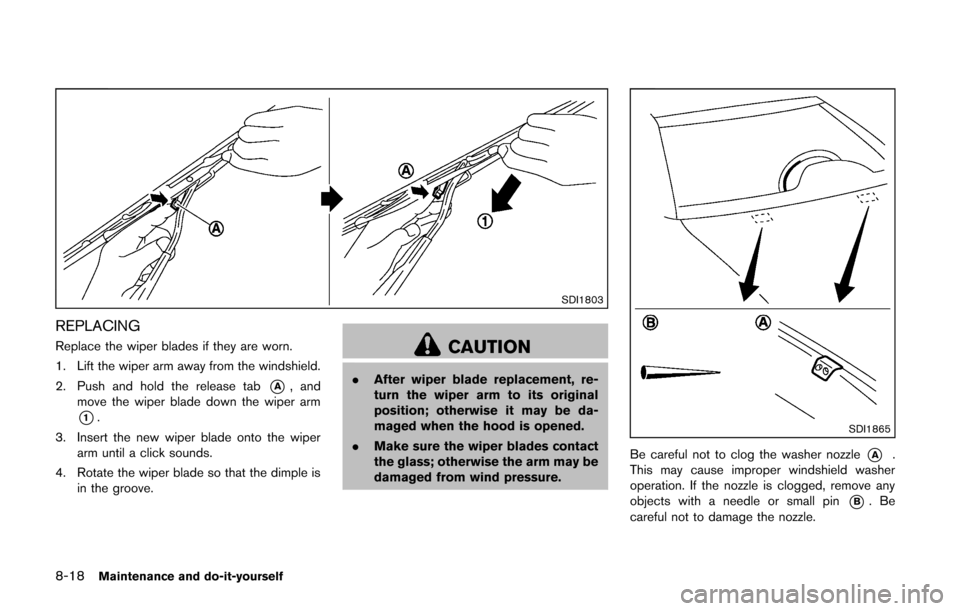
SDI1803
REPLACING
Replace the wiper blades if they are worn.
1. Lift the wiper arm away from the windshield.
2. Push and hold the release tab
*A, and
move the wiper blade down the wiper arm
*1.
3. Insert the new wiper blade onto the wiper arm until a click sounds.
4. Rotate the wiper blade so that the dimple is in the groove.
CAUTION
.After wiper blade replacement, re-
turn the wiper arm to its original
position; otherwise it may be da-
maged when the hood is opened.
. Make sure the wiper blades contact
the glass; otherwise the arm may be
damaged from wind pressure.
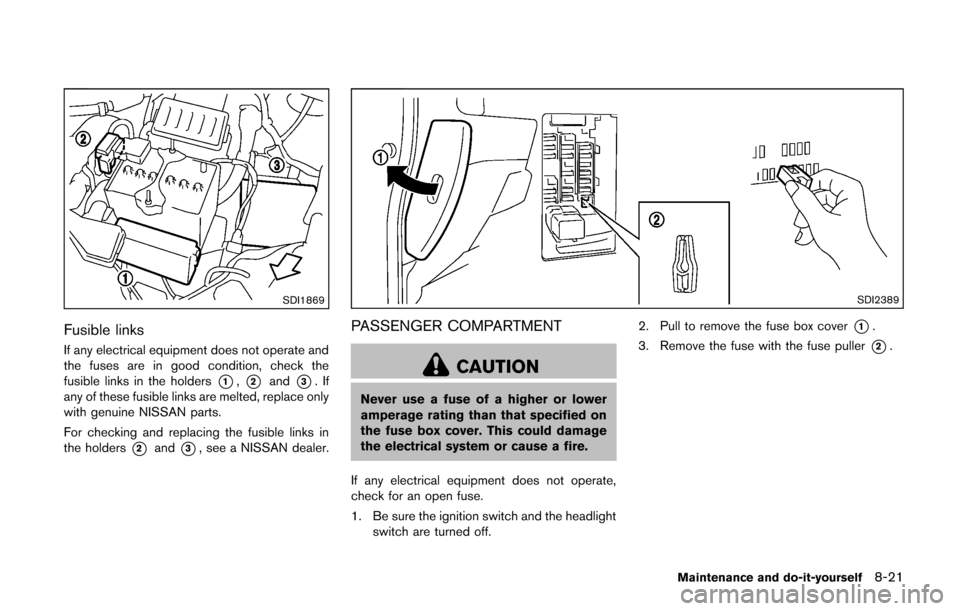
SDI1865
Be careful not to clog the washer nozzle*A.
This may cause improper windshield washer
operation. If the nozzle is clogged, remove any
objects with a needle or small pin
*B.Be
careful not to damage the nozzle.
Page 282 of 332
Contact a NISSAN dealer if checking or
replacement is required.If the brakes do not operate properly, have the
brakes checked by a NISSAN dealer.
SELF-ADJUSTING BRAKES
Your vehicle is equipped with self-adjusting
brakes.
The disc-type brakes self-adjust every time the
brake pedal is applied.
WARNING
See a NISSAN dealer for a brake
system check if the brake pedal height
does not return to normal.
BRAKE PAD WEAR WARNING
The disc brake pads have audible wear warn-
ings. When a brake pad requires replacement, it
will make a high pitched scraping sound when
the vehicle is in motion. This scraping sound will
first occur only when the brake pedal is
depressed. After more wear of the brake pad,
the sound will always be heard even if the brake
pedal is not depressed. Have the brakes
checked as soon as possible if the wear warning
sound is heard.
Under some driving or climate conditions,
occasional brake squeak, squeal or other noise
may be heard. Occasional brake noise duringlight to moderate stops is normal and does not
affect the function or performance of the brake
system.
Proper brake inspection intervals should
be followed.
For additional information, see the
maintenance log section of your “NISSAN
Service and Maintenance Guide”.
Maintenance and do-it-yourself8-19
REAR WINDOW WIPER BLADE BRAKES
Page 283 of 332
8-20Maintenance and do-it-yourself
SDI1959
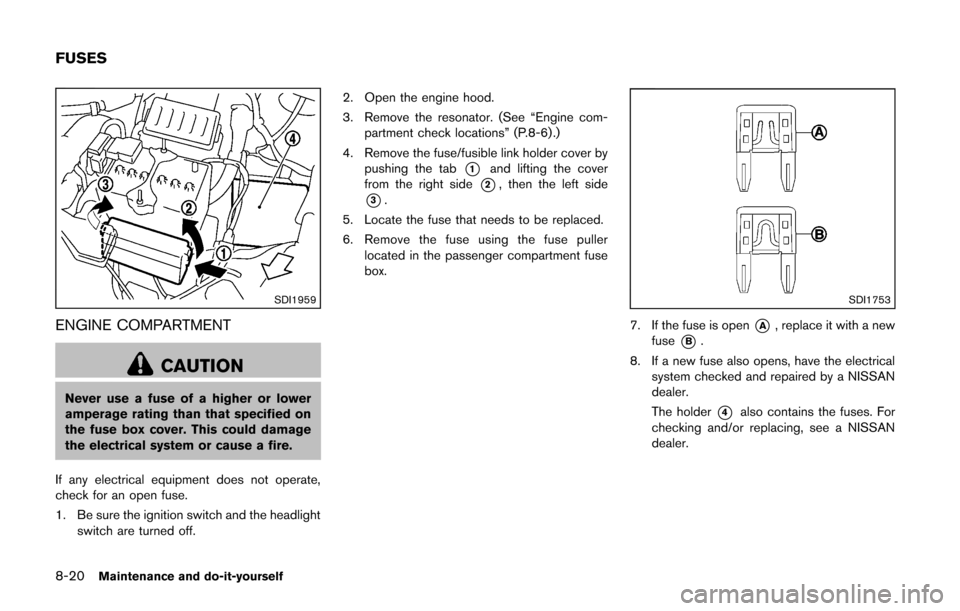
ENGINE COMPARTMENT
CAUTION
Never use a fuse of a higher or lower
amperage rating than that specified on
the fuse box cover. This could damage
the electrical system or cause a fire.
If any electrical equipment does not operate,
check for an open fuse.
1. Be sure the ignition switch and the headlight switch are turned off. 2. Open the engine hood.
3. Remove the resonator. (See “Engine com-
partment check locations” (P.8-6) .)
4. Remove the fuse/fusible link holder cover by pushing the tab
*1and lifting the cover
from the right side
*2, then the left side
*3.
5. Locate the fuse that needs to be replaced.
6. Remove the fuse using the fuse puller located in the passenger compartment fuse
box.
SDI1753
7. If the fuse is open*A, replace it with a new
fuse
*B.
8. If a new fuse also opens, have the electrical system checked and repaired by a NISSAN
dealer.
The holder
*4also contains the fuses. For
checking and/or replacing, see a NISSAN
dealer.
FUSES
Page 284 of 332
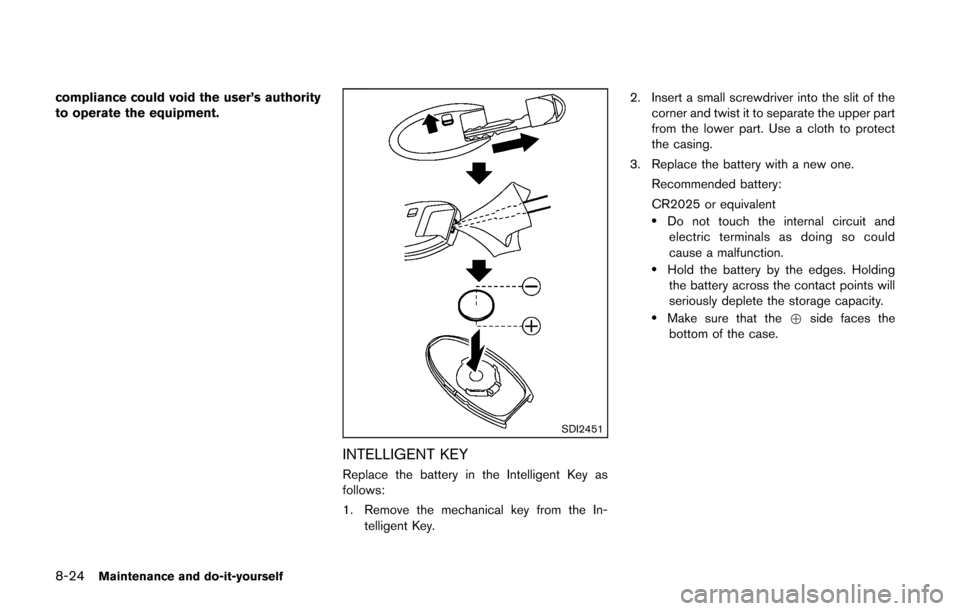
SDI1869
Fusible links
If any electrical equipment does not operate and
the fuses are in good condition, check the
fusible links in the holders
*1,*2and*3.If
any of these fusible links are melted, replace only
with genuine NISSAN parts.
For checking and replacing the fusible links in
the holders
*2and*3, see a NISSAN dealer.
SDI2389
PASSENGER COMPARTMENT
CAUTION
Never use a fuse of a higher or lower
amperage rating than that specified on
the fuse box cover. This could damage
the electrical system or cause a fire.
If any electrical equipment does not operate,
check for an open fuse.
1. Be sure the ignition switch and the headlight switch are turned off. 2. Pull to remove the fuse box cover
*1.
3. Remove the fuse with the fuse puller
*2.
Maintenance and do-it-yourself8-21
Page 285 of 332
8-22Maintenance and do-it-yourself
SDI1753
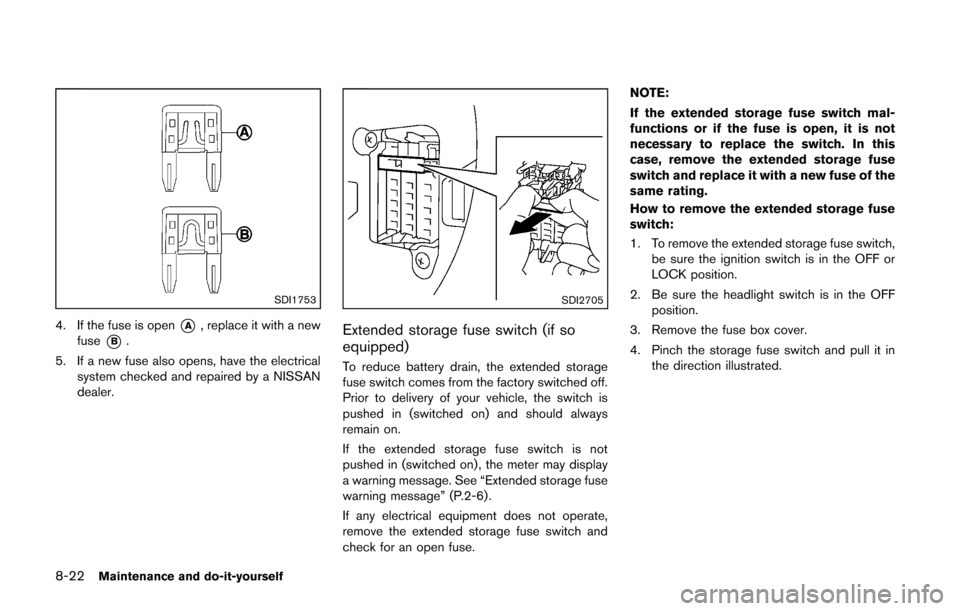
4. If the fuse is open*A, replace it with a new
fuse
*B.
5. If a new fuse also opens, have the electrical system checked and repaired by a NISSAN
dealer.
SDI2705
Extended storage fuse switch (if so
equipped)
To reduce battery drain, the extended storage
fuse switch comes from the factory switched off.
Prior to delivery of your vehicle, the switch is
pushed in (switched on) and should always
remain on.
If the extended storage fuse switch is not
pushed in (switched on) , the meter may display
a warning message. See “Extended storage fuse
warning message” (P.2-6).
If any electrical equipment does not operate,
remove the extended storage fuse switch and
check for an open fuse. NOTE:
If the extended storage fuse switch mal-
functions or if the fuse is open, it is not
necessary to replace the switch. In this
case, remove the extended storage fuse
switch and replace it with a new fuse of the
same rating.
How to remove the extended storage fuse
switch:
1. To remove the extended storage fuse switch,
be sure the ignition switch is in the OFF or
LOCK position.
2. Be sure the headlight switch is in the OFF position.
3. Remove the fuse box cover.
4. Pinch the storage fuse switch and pull it in the direction illustrated.
Page 286 of 332
CAUTION
Be careful not to allow children to
swallow the battery and removed parts.
SDI2134
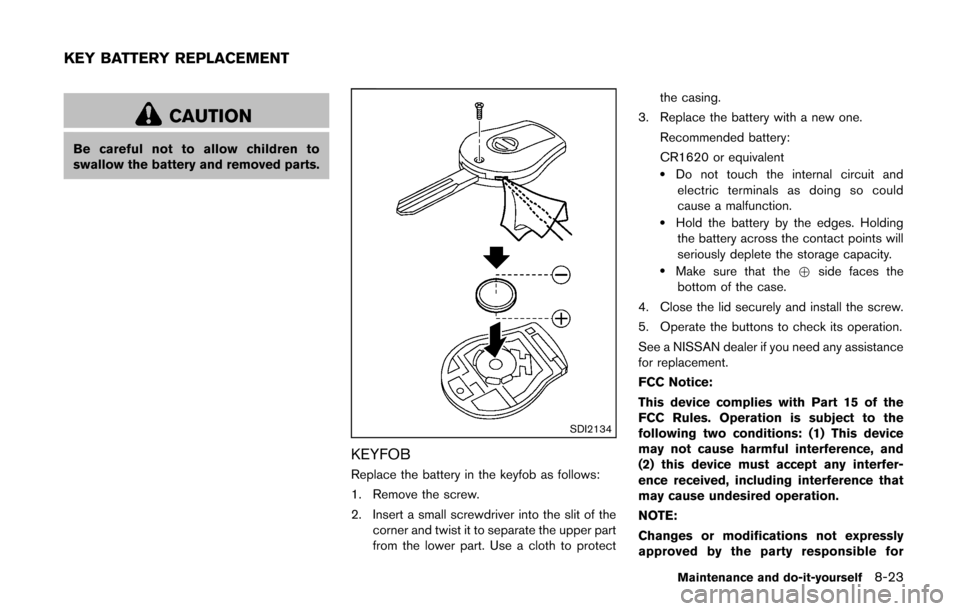
KEYFOB
Replace the battery in the keyfob as follows:
1. Remove the screw.
2. Insert a small screwdriver into the slit of thecorner and twist it to separate the upper part
from the lower part. Use a cloth to protect the casing.
3. Replace the battery with a new one.
Recommended battery:
CR1620 or equivalent
.Do not touch the internal circuit andelectric terminals as doing so could
cause a malfunction.
.Hold the battery by the edges. Holdingthe battery across the contact points will
seriously deplete the storage capacity.
.Make sure that the +side faces the
bottom of the case.
4. Close the lid securely and install the screw.
5. Operate the buttons to check its operation.
See a NISSAN dealer if you need any assistance
for replacement.
FCC Notice:
This device complies with Part 15 of the
FCC Rules. Operation is subject to the
following two conditions: (1) This device
may not cause harmful interference, and
(2) this device must accept any interfer-
ence received, including interference that
may cause undesired operation.
NOTE:
Changes or modifications not expressly
approved by the party responsible for
Maintenance and do-it-yourself8-23
KEY BATTERY REPLACEMENT
Page 287 of 332
8-24Maintenance and do-it-yourself
compliance could void the user’s authority
to operate the equipment.
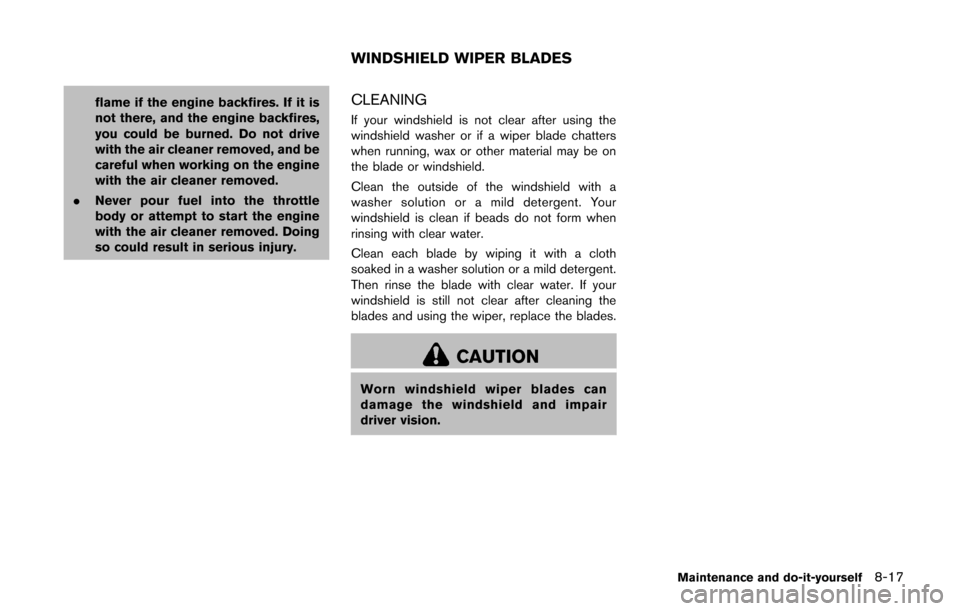
SDI2451
INTELLIGENT KEY
Replace the battery in the Intelligent Key as
follows:
1. Remove the mechanical key from the In-telligent Key. 2. Insert a small screwdriver into the slit of the
corner and twist it to separate the upper part
from the lower part. Use a cloth to protect
the casing.
3. Replace the battery with a new one. Recommended battery:
CR2025 or equivalent
.Do not touch the internal circuit andelectric terminals as doing so could
cause a malfunction.
.Hold the battery by the edges. Holdingthe battery across the contact points will
seriously deplete the storage capacity.
.Make sure that the +side faces the
bottom of the case.