Page 248 of 489
Playback order:
Music playback order of a CD, DVD or USB
device with compressed audio files is as illus-
trated.● The folder names of folders not containing
compressed audio files are not shown in the
display.
● If there is a file in the top level of the
disc/USB, “Root Folder” is displayed.
● The playback order is the order in which the
files were written by the writing software, so
the files might not play in the desired order.
Playback order chart
WHA1374
Monitor, climate, audio, phone and voice recognition systems4-55
Page 249 of 489
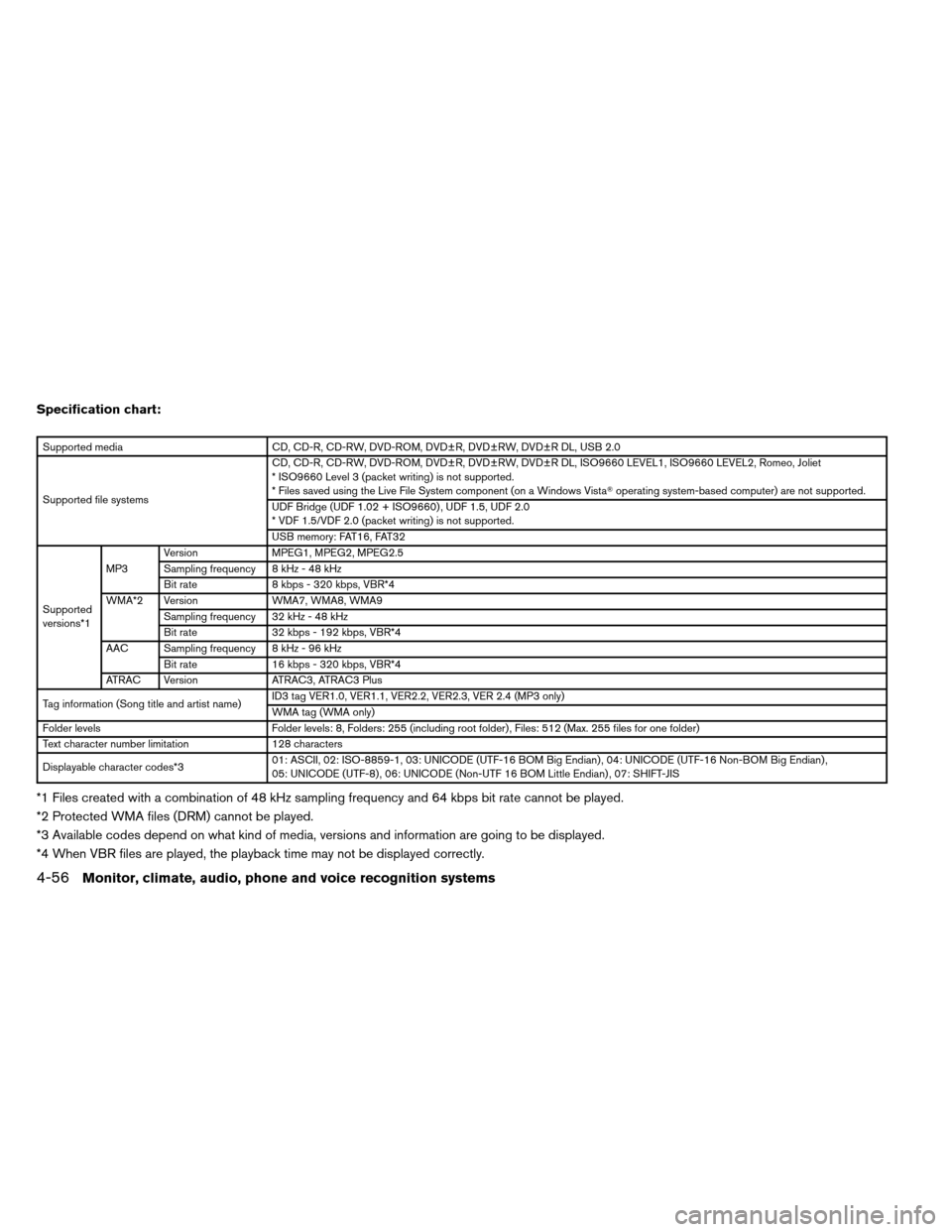
Specification chart:
Supported mediaCD, CD-R, CD-RW, DVD-ROM, DVD±R, DVD±RW, DVD±R DL, USB 2.0
Supported file systems CD, CD-R, CD-RW, DVD-ROM, DVD±R, DVD±RW, DVD±R DL, ISO9660 LEVEL1, ISO9660 LEVEL2, Romeo, Joliet
* ISO9660 Level 3 (packet writing) is not supported.
* Files saved using the Live File System component (on a Windows Vista�
operating system-based computer) are not supported.
UDF Bridge (UDF 1.02 + ISO9660) , UDF 1.5, UDF 2.0
* VDF 1.5/VDF 2.0 (packet writing) is not supported.
USB memory: FAT16, FAT32
Supported
versions*1 MP3
Version
MPEG1, MPEG2, MPEG2.5
Sampling frequency 8 kHz - 48 kHz
Bit rate 8 kbps - 320 kbps, VBR*4
WMA*2 Version WMA7, WMA8, WMA9
Sampling frequency 32 kHz - 48 kHz
Bit rate 32 kbps - 192 kbps, VBR*4
AAC Sampling frequency 8 kHz - 96 kHz Bit rate 16 kbps - 320 kbps, VBR*4
ATRAC Version ATRAC3, ATRAC3 Plus
Tag information (Song title and artist name) ID3 tag VER1.0, VER1.1, VER2.2, VER2.3, VER 2.4 (MP3 only)
WMA tag (WMA only)
Folder levels Folder levels: 8, Folders: 255 (including root folder) , Files: 512 (Max. 255 files for one folder)
Text character number limitation 128 characters
Displayable character codes*3 01: ASCII, 02: ISO-8859-1, 03: UNICODE (UTF-16 BOM Big Endian) , 04: UNICODE (UTF-16 Non-BOM Big Endian) ,
05: UNICODE (UTF-8) , 06: UNICODE (Non-UTF 16 BOM Little Endian) , 07: SHIFT-JIS
*1 Files created with a combination of 48 kHz sampling frequency and 64 kbps bit rate cannot be played.
*2 Protected WMA files (DRM) cannot be played.
*3 Available codes depend on what kind of media, versions and information are going to be displayed.
*4 When VBR files are played, the playback time may not be displayed correctly.
4-56Monitor, climate, audio, phone and voice recognition systems
Page 250 of 489

Troubleshooting guide:
SymptomCause and Countermeasure
Cannot play Check if the CD/DVD/USB device was inserted correctly.
Check if the CD/DVD is scratched or dirty.
Check if there is condensation inside the player. If there is, wait until the condensation is gone (about 1 hour) before using the player.
If there is a temperature increase error, the player will play correctly after it returns to the normal temperature.
If there is a mixture of music CD files (CD-DA data) and compressed audio files on a CD, only the music CD files (CD-DA data) will be played.
Files with extensions other than “.MP3”, “.WMA”, “.AAC”, “.M4A” or “.AA3” cannot be played. In addition, the character codes and number of charac-
ters for folder names and file names should be in compliance with the specifications.
Check if the disc or file is generated in an irregular format. This may occur depending on the variation or the setting of the compressed audio file writ-
ing application or other text editing applications.
Check if the finalization process, such as session close and disc close, is done for the disc.
Check if the CD/DVD/USB device is protected by copyright.
Poor sound quality Check if the CD/DVD is scratched or dirty.
It takes a relatively long time
before the music starts
playing. If there are many folders or file levels on the CD/DVD/USB device, or if it is a multisession disc, some time may be required before the music starts
playing.
Music cuts off or skips The writing software and hardware combination might not match, or the writing speed, writing depth, writing width, etc., might not match the
specifications. Try using the slowest writing speed.
Skipping with high bit rate
files Skipping may occur with large quantities of data, such as for high bit rate data.
Moves immediately to the
next song when playing If an unsupported compressed audio file has been given a supported extension like “.MP3”, or when play is prohibited by copyright protection, the
player will skip to the next song.
Songs do not play back in
the desired order The playback order is the order in which the files were written by the writing software. Therefore, the files might not play in the desired order.
Random/Shuffle may be active on the audio system or on the USB device.
Monitor, climate, audio, phone and voice recognition systems4-57
Page 252 of 489
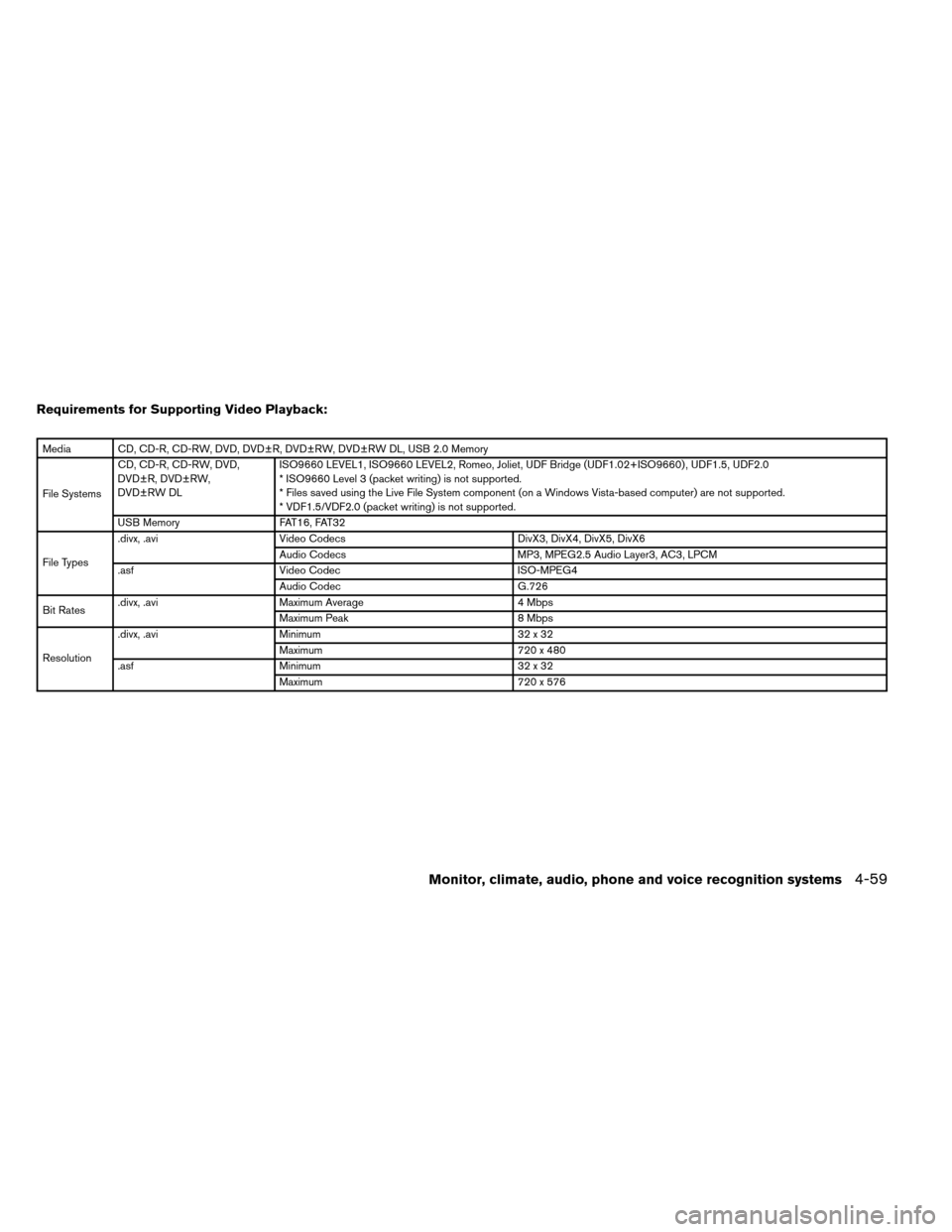
Requirements for Supporting Video Playback:
Media CD, CD-R, CD-RW, DVD, DVD±R, DVD±RW, DVD±RW DL, USB 2.0 Memory
File SystemsCD, CD-R, CD-RW, DVD,
DVD±R, DVD±RW,
DVD±RW DL
ISO9660 LEVEL1, ISO9660 LEVEL2, Romeo, Joliet, UDF Bridge (UDF1.02+ISO9660) , UDF1.5, UDF2.0
* ISO9660 Level 3 (packet writing) is not supported.
* Files saved using the Live File System component (on a Windows Vista-based computer) are not supported.
* VDF1.5/VDF2.0 (packet writing) is not supported.
USB Memory FAT16, FAT32
File Types .divx, .avi
Video Codecs DivX3, DivX4, DivX5, DivX6
Audio Codecs MP3, MPEG2.5 Audio Layer3, AC3, LPCM
.asf Video Codec ISO-MPEG4
Audio Codec G.726
Bit Rates .divx, .avi
Maximum Average 4 Mbps
Maximum Peak 8 Mbps
Resolution .divx, .avi
Minimum 32 x 32
Maximum 720 x 480
.asf Minimum 32 x 32
Maximum 720 x 576
Monitor, climate, audio, phone and voice recognition systems4-59
Page 259 of 489
Before connecting a device to the auxiliary input
jacks, turn off the power of the portable device.
With a compatible device connected to the aux-
iliary input jacks, press the AUX button until the
AUX mode appears in the display. The output
from the device will be played through the display
(when the vehicle is in the (P) Park position and
the parking brake engaged) and audio system.AUX settings
Select the “Settings” key using the NISSAN con-
troller and press the ENTER button.
Choose one of the display modes by selecting
the “
” key or the “” key:
● Normal
● Wide
● Cinema
Additional features
For more information about the iPod� player
available with this system, see “iPod� player op-
eration without Navigation System” in this sec-
tion.
For more information about the USB interface
available with this system, see “USB interface
(models without Navigation System)” in this sec-
tion.
LHA1367
4-66Monitor, climate, audio, phone and voice recognition systems
Page 262 of 489
For information on how to use the NISSAN con-
troller, see “How to use the NISSAN controller” in
this section.Display album cover art:
When an audio source encoded with album
cover art is played, the album cover art can be
displayed on the screen. To toggle this feature on
or off, touch the “Display Album Cover Art” key.
When the feature is activated, the amber indica-
tor next to the word ON will illuminate.CD, DVD or USB with compressed audio
files
While listening to a CD or compressed audio
files, certain text might be able to be displayed
(when CD encoded with text is being used) .
Depending on how the CD or compressed audio
files are encoded, the following text might be
displayed:
● Folder displays the name of the current
folder being accessed.
● File displays the name of the file currently
playing.
LHA1256LHA1257LHA1258
Monitor, climate, audio, phone and voice recognition systems4-69
Page 268 of 489

Before connecting a device to the auxiliary input
jacks, turn off the power of the portable device.
With a compatible device connected to the aux-
iliary input jacks, press the DISC/AUX button
repeatedly until the AUX mode appears in the
display. The output from the device will be played
through the display (when the vehicle is in the (P)
Park position and the parking brake engaged)
and audio system.AUX settings
Select the “Settings” key using the NISSAN con-
troller.
The display mode can be set to Normal, Wide or
Cinema. The volume setting can be set to Low,
Medium or High.
Additional features
For more information about the iPod�player
available with this system, see “iPod� player op-
eration with Navigation System” in this section.
For more information about the USB interface
available with this system, see “USB interface
(models with Navigation System)” in this section. For more information about the Bluetooth�
streaming audio feature available with this sys-
tem, see “Bluetooth�
streaming audio” in this
section.
WHA1393LHA1394
Monitor, climate, audio, phone and voice recognition systems4-75
Page 272 of 489
USB INTERFACE (models without
Navigation System) (if so equipped)
Connecting a device to the USB input
jack
CAUTION
●Depending on size and shape of USB
device, the console lid may not fully
close. Do not force console lid closed
as this may damage USB device. ●
Do not force the USB device into the
USB port. Inserting the USB device
tilted or up-side-down into the port may
damage the USB device and the port.
Make sure that the USB device is con-
nected correctly into the USB port.
(Some USB devices come with a
mark as a guide. Make sure that the
mark is facing the correct direction be-
fore inserting the device.)
● Do not locate objects near the USB de-
vice to prevent the objects from leaning
on the USB device and the port. Pres-
sure from the objects may damage the
USB device and the port.
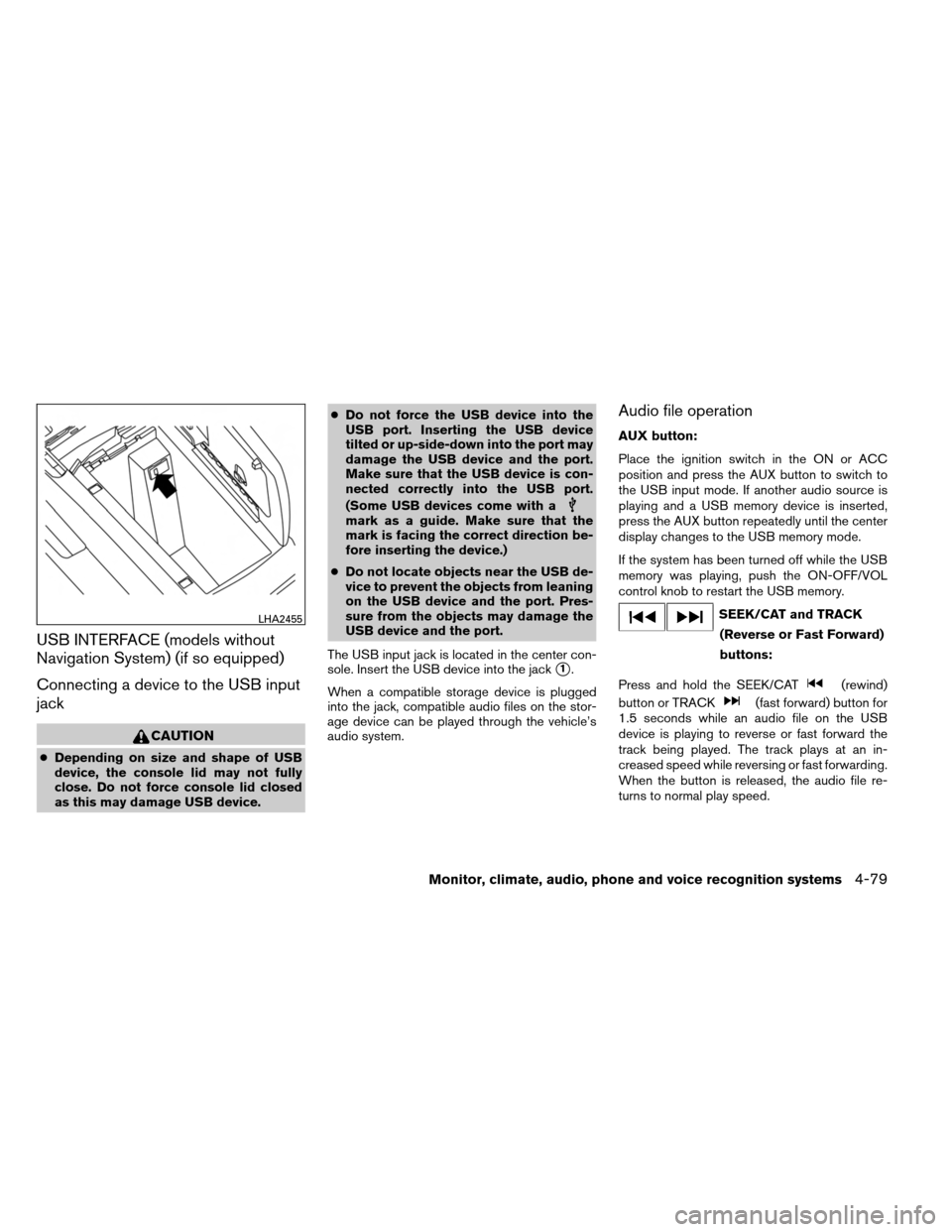
The USB input jack is located in the center con-
sole. Insert the USB device into the jack
�1.
When a compatible storage device is plugged
into the jack, compatible audio files on the stor-
age device can be played through the vehicle’s
audio system.
Audio file operation
AUX button:
Place the ignition switch in the ON or ACC
position and press the AUX button to switch to
the USB input mode. If another audio source is
playing and a USB memory device is inserted,
press the AUX button repeatedly until the center
display changes to the USB memory mode.
If the system has been turned off while the USB
memory was playing, push the ON-OFF/VOL
control knob to restart the USB memory.
SEEK/CAT and TRACK (Reverse or Fast Forward)
buttons:
Press and hold the SEEK/CAT
(rewind)
button or TRACK
(fast forward) button for
1.5 seconds while an audio file on the USB
device is playing to reverse or fast forward the
track being played. The track plays at an in-
creased speed while reversing or fast forwarding.
When the button is released, the audio file re-
turns to normal play speed.
LHA2455
Monitor, climate, audio, phone and voice recognition systems4-79