2014 MITSUBISHI OUTLANDER fuel
[x] Cancel search: fuelPage 221 of 451
Multi Information display - Type 2
Features and controls 5-143
5
N00575301030
This displays the average fuel consumption from the last reset to the present. The reset mode conditions for the average fuel consumption display can be switchedbetween “Auto reset”
and “Manual reset”.
For information on how to change the aver- age fuel consumption di
splay setting, refer to
“Changing the function settings” on page 5-146.
N00556501121
Shows the temperature outside the vehicle.
N00579000025
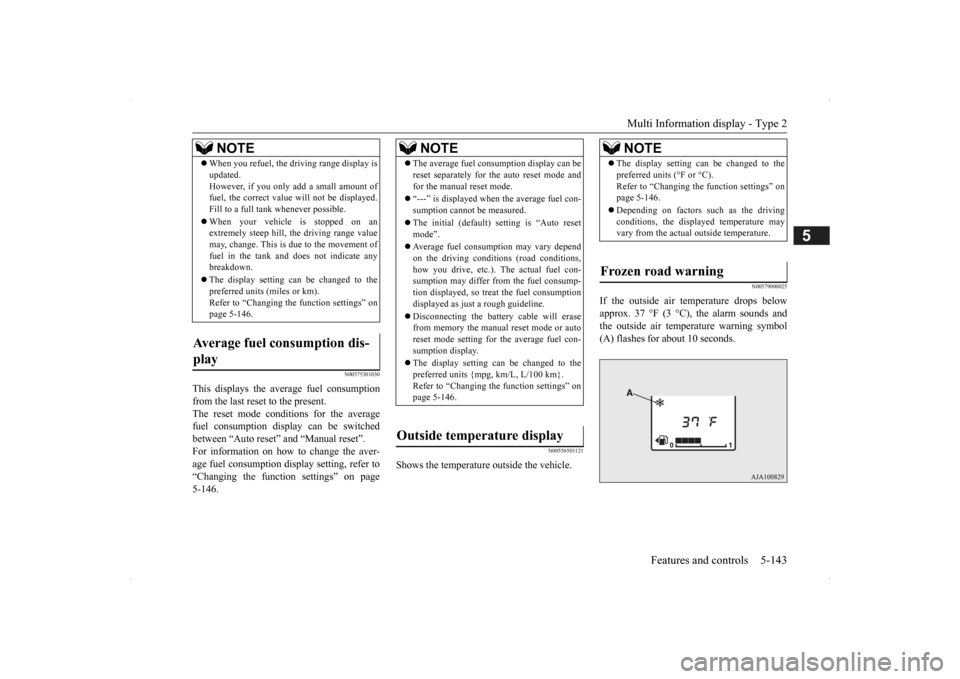
If the outside air temperature drops below approx. 37 °F (3 °C), the alarm sounds andthe outside air temperature warning symbol (A) flashes for about 10 seconds.
When you refuel, the driving range display is updated.However, if you only add a small amount offuel, the correct value
will not be displayed.
Fill to a full tank whenever possible. When your vehicle is stopped on an extremely steep hill, the driving range value may, change. This is due to the movement offuel in the tank and does not indicate any breakdown. The display setting ca
n be changed to the
preferred units (miles or km). Refer to “Changing the
function settings” on
page 5-146.
Average fuel consumption dis- play
NOTE
NOTE
The average fuel cons
umption display can be
reset separately for the auto reset mode andfor the manual reset mode. “---” is displayed when the average fuel con- sumption cannot be measured. The initial (default) setting is “Auto reset mode”. Average fuel consumption may vary depend on the driving conditi
ons (road conditions,
how you drive, etc.). The actual fuel con- sumption may differ from the fuel consump- tion displayed, so trea
t the fuel consumption
displayed as just a rough guideline. Disconnecting the batt
ery cable will erase
from memory the manual reset mode or auto reset mode setting for the average fuel con- sumption display. The display setting ca
n be changed to the
preferred units {mpg, km/L, L/100 km}.Refer to “Changing th
e function settings” on
page 5-146.
Outside temperature display
NOTE
The display setting ca
n be changed to the
preferred units (°F or °C).Refer to “Changing the function settings” onpage 5-146. Depending on factors such as the driving conditions, the displa
yed temperature may
vary from the actual outside temperature.
Frozen road warning
BK0200500US.book 143 ページ 2013年2月12日 火曜日 午前9時46分
Page 222 of 451
Multi Information display - Type 2 5-144 Features and controls
5
N00556601193
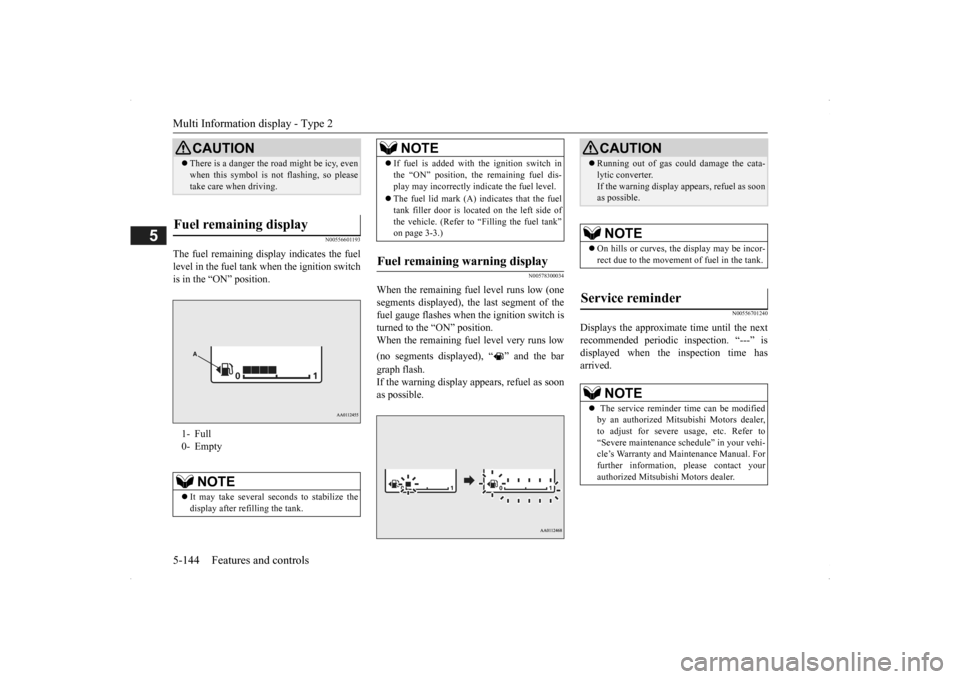
The fuel remaining disp
lay indicates the fuel
level in the fuel tank
when the ignition switch
is in the “ON” position.
N00578300034
When the remaining fuel level runs low (one segments displayed), the last segment of the fuel gauge flashes when
the ignition switch is
turned to the “ON” position. When the remaining fuel level very runs low (no segments displayed), “ ” and the bar graph flash. If the warning display appears, refuel as soon as possible.
N00556701240
Displays the approximate time until the next recommended periodic
inspection. “---” is
displayed when the inspection time has arrived.
CAUTION There is a danger the ro
ad might be icy, even
when this symbol is not flashing, so pleasetake care when driving.
Fuel remaining display 1- Full 0- Empty
NOTE
It may take several se
conds to stabilize the
display after refilling the tank.
If fuel is added with the ignition switch in the “ON” position, th
e remaining fuel dis-
play may incorrectly i
ndicate the fuel level.
The fuel lid mark (A) indicates that the fuel tank filler door is located on the left side ofthe vehicle. (Refer to “Filling the fuel tank” on page 3-3.)
Fuel remaining warning display
NOTE
CAUTION Running out of gas coul
d damage the cata-
lytic converter.If the warning display appears, refuel as soonas possible.NOTE
On hills or curves, the display may be incor- rect due to the movement
of fuel in the tank.
Service reminder
NOTE
The service reminder time can be modified by an authorized Mitsubishi Motors dealer, to adjust for severe usage, etc. Refer to“Severe maintenance sc
hedule” in your vehi-
cle’s Warranty and Ma
intenance Manual. For
further information,
please contact your
authorized Mitsubishi Motors dealer.
BK0200500US.book 144 ページ 2013年2月12日 火曜日 午前9時46分
Page 224 of 451
Multi Information display - Type 2 5-146 Features and controls
5
N00556801209
The “Average fuel c
onsumption reset mode”,
“Fuel consumption uni
t” and “Temperature
unit” setting can be m
odified as desired,
when the ignition switch is in the “ON” posi- tion.
N00575501029
You can change the mode condition for theaverage fuel consumpt
ion display to “Auto
reset” or “Manual reset”.
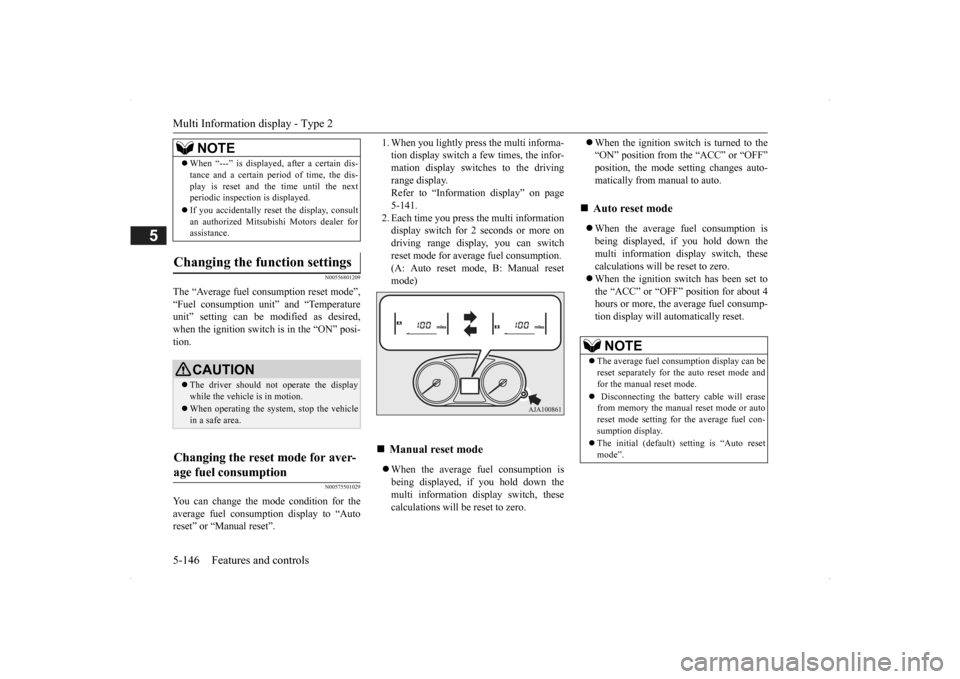
1. When you lightly press the multi informa- tion display switch a few times, the infor-mation display switches to the driving range display. Refer to “Information display” on page5-141. 2. Each time you press the multi information display switch for 2 seconds or more ondriving range display, you can switch reset mode for average fuel consumption. (A: Auto reset mode, B: Manual reset mode) When the average fuel consumption is being displayed, if you hold down the multi information display switch, thesecalculations will be reset to zero.
When the ignition switch is turned to the “ON” position from the “ACC” or “OFF”position, the mode setting changes auto- matically from manual to auto. When the average fuel consumption is being displayed, if you hold down themulti information display switch, these calculations will
be reset to zero.
When the ignition sw
itch has been set to
the “ACC” or “OFF” position for about 4 hours or more, the average fuel consump-tion display will automatically reset.
When “---” is displayed, after a certain dis- tance and a certain pe
riod of time, the dis-
play is reset and th
e time until the next
periodic inspection is displayed. If you accidentally reset
the display, consult
an authorized Mitsubishi Motors dealer for assistance.
Changing the function settings
CAUTION The driver should not operate the display while the vehicle is in motion. When operating the system, stop the vehicle in a safe area.
Changing the reset mode for aver- age fuel consumption
NOTE
Manual reset mode
Auto reset mode NOTE
The average fuel cons
umption display can be
reset separately for the auto reset mode and for the manual reset mode. Disconnecting the batt
ery cable will erase
from memory the manual reset mode or auto reset mode setting for the average fuel con-sumption display. The initial (default) setting is “Auto reset mode”.
BK0200500US.book 146 ページ 2013年2月12日 火曜日 午前9時46分
Page 225 of 451
Multi Information display - Type 2
Features and controls 5-147
5
N00557101179
The fuel consumpti
on display unit can be
changed. The distance
and amount units are
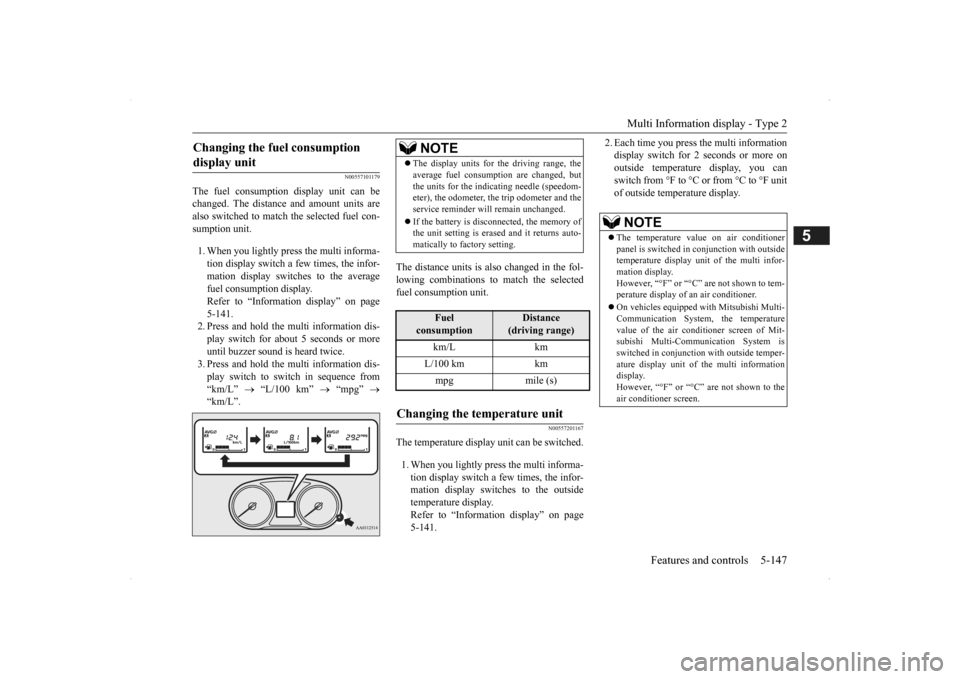
also switched to match the selected fuel con- sumption unit. 1. When you lightly press the multi informa- tion display switch a few times, the infor- mation display switches to the average fuel consumption display. Refer to “Information display” on page 5-141.2. Press and hold the mu
lti information dis-
play switch for about 5 seconds or more until buzzer sound is heard twice.3. Press and hold the mu
lti information dis-
play switch to switch in sequence from “km/L”
“L/100 km”
“mpg”
“km/L”.
The distance units is al
so changed in the fol-
lowing combinations to match the selected fuel consumption unit.
N00557201167
The temperature display unit can be switched. 1. When you lightly press the multi informa- tion display switch a few times, the infor- mation display switches to the outsidetemperature display. Refer to “Information display” on page 5-141.
2. Each time you press the multi information display switch for 2 seconds or more onoutside temperature display, you can switch from °F to °C or from °C to °F unit of outside temperature display.
Changing the fuel consumption display unit
NOTE
The display units for the driving range, the average fuel consumption are changed, butthe units for the indicating needle (speedom-eter), the odometer, the trip odometer and the service reminder will
remain unchanged.
If the battery is disconnected, the memory of the unit setting is erased and it returns auto- matically to factory setting.
Fuel
consumption
Distance
(driving range)
km/L km L/100 km km mpg mile (s)
Changing the temperature unit
NOTE
The temperature value on air conditioner panel is switched in
conjunction with outside
temperature display unit of the multi infor- mation display.However, “°F” or “°C” are not shown to tem- perature display of an air conditioner. On vehicles equipped
with Mitsubishi Multi-
Communication System, the temperature value of the air conditioner screen of Mit-subishi Multi-Communication System is switched in conjunction
with outside temper-
ature display unit of the multi informationdisplay. However, “°F” or “°C”
are not shown to the
air conditioner screen.
BK0200500US.book 147 ページ 2013年2月12日 火曜日 午前9時46分
Page 233 of 451
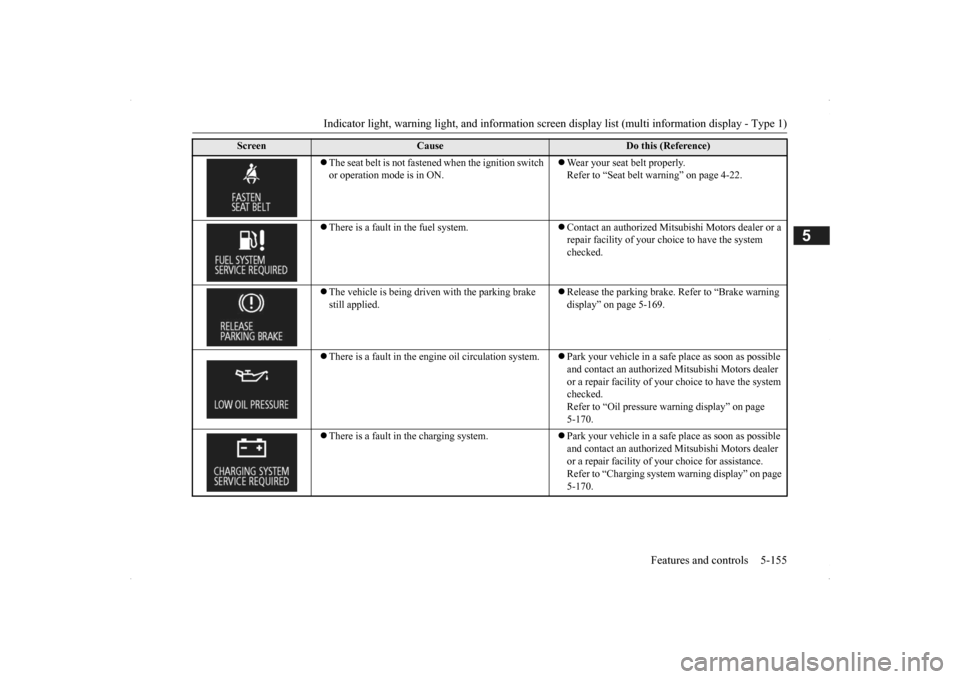
Indicator light, warning light, and information screen display list (multi information display - Type 1)
Features and controls 5-155
5
The seat belt is not fastened when the ignition switch or operation mode is in ON.
Wear your seat belt properly. Refer to “Seat belt warning” on page 4-22.
There is a fault in the fuel system.
Contact an authorized Mitsubishi Motors dealer or a repair facility of your choi
ce to have the system
checked.
The vehicle is being driven with the parking brake still applied.
Release the parking brake.
Refer to “Brake warning
display” on page 5-169.
There is a fault in the engi
ne oil circul
ation system.
Park your vehicle in a safe
place as soon as possible
and contact an authorized
Mitsubishi Motors dealer
or a repair facility of your
choice to have the system
checked.Refer to “Oil pressure
warning display” on page
5-170.
There is a fault in the charging system.
Park your vehicle in a safe
place as soon as possible
and contact an authorized
Mitsubishi Motors dealer
or a repair facility of your
choice for assistance.
Refer to “Charging system
warning display” on page
5-170.
Screen
Cause
Do this (Reference)
BK0200500US.book 155 ページ 2013年2月12日 火曜日 午前9時46分
Page 235 of 451
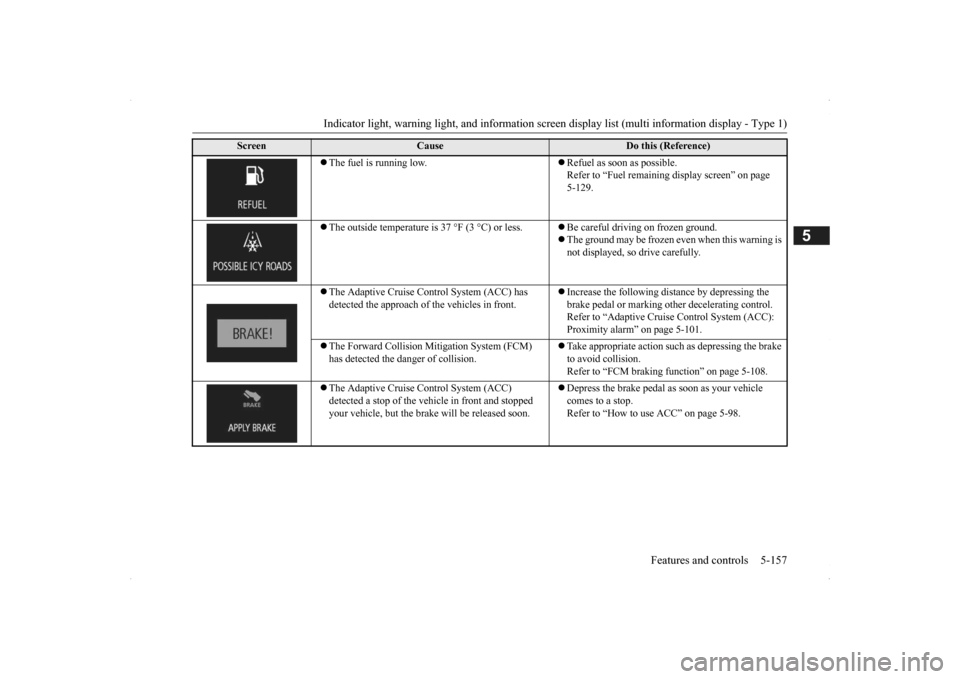
Indicator light, warning light, and information screen display list (multi information display - Type 1)
Features and controls 5-157
5
The fuel is running low.
Refuel as soon as possible. Refer to “Fuel remaining
display screen” on page
5-129.
The outside temperature is 37 °F (3 °C) or less.
Be careful driving on frozen ground. The ground may be frozen even when this warning is not displayed, so
drive carefully.
The Adaptive Cruise Control System (ACC) has detected the approach of
the vehicles in front.
Increase the following distance by depressing the brake pedal or marking ot
her decelerating control.
Refer to “Adaptive Cruise Control System (ACC): Proximity alarm” on page 5-101.
The Forward Collision Mi
tigation System (FCM)
has detected the danger of collision.
Take appropriate action such as depressing the brake to avoid collision. Refer to “FCM braking function” on page 5-108.
The Adaptive Cruise Control System (ACC) detected a stop of the ve
hicle in front and stopped
your vehicle, but the brak
e will be re
leased soon.
Depress the brake pedal
as soon as your vehicle
comes to a stop. Refer to “How to use ACC” on page 5-98.
Screen
Cause
Do this (Reference)
BK0200500US.book 157 ページ 2013年2月12日 火曜日 午前9時46分
Page 244 of 451

Indicators 5-166 Features and controls
5
N00519900127 N00520000216
The arrows will flash in time with the corre- sponding exterior turn signals when the turnsignal lever is used. Both arrows will flash
when the hazard warn-
ing flasher swit
ch is pressed.
N00520100086
A blue light comes on when the headlights are on high beam.
N00520200175
This indicator comes on while the front foglights are on.
N00551300026
This indicator light illuminates while the position lights are on.
N00575601020
This indicator comes on in blue while thecoolant temperature is low.
N00579200027
This function displays
how fuel-efficiently
you are driving under different driving condi- tions. The ECO drive assist di
splay will change as
follows if you do fuel-efficient driving using the accelerator in a way well matched with the vehicle speed.
Indicators Turn signal indicators/Hazard warning lights
NOTE
If the indicator flashes faster than usual or if the indicator stays on wi
thout flashing, check
for a malfunctioning turn signal light bulb orturn signal connection.
High beam indicator
Front fog light indicator
(if so
equipped)Position indicator Low coolant temperature indi- cator - blue (Vehicle equipped with the multi information dis- play - Type 2)
NOTE
When the indicator goes out, this should be used as a rough indication of when the heat-ing starts working.
ECO Drive Assist (Vehicle equipped with the multi infor-mation display - Type 2)
ECO drive level Low High
BK0200500US.book 166 ページ 2013年2月12日 火曜日 午前9時46分
Page 245 of 451

Warning lights
Features and controls 5-167
5
N00520300147 N00520401536
This light comes on when the ignition switch is turned to the “ON” position (engine off) or the operation mode is put in ON.When the engine is started, the light should go off a few seconds later. A warning is also displayed in the multi information display. The warning light also illuminates after start- ing the engine under the following condi-tions. When the parking brake is still applied. When the brake fluid level is low. When the brake system circuit is not working properly.
When the vehicle is moving at more than 5 mph (8 km/h) and parking brake applied, a buzzer will sound to inform the driver that theparking brake is not properly release. Before driving, be sure
that the parking brake
is fully released and
brake warning light is
off.
N00520501814
This indicator is a part
of the onboard diag-
nostic (OBD) system which monitors the emissions, engine control system or auto- matic transaxle cont
rol system/continuously
variable transmission
(CVT) control system.
If a problem is detected in one of these sys- tems, this indicator illuminates or flashes. When the ignition switch is turned to the “ON” position or the operation mode is put inON, this indicator
normally comes on and
goes off after the engine has started. This indicator will come on if the fuel tank filler cap is not properly tightened. If thisindicator comes on and stays on after refuel- ing, stop the engine and check that the cap is properly tightened. (Turn the cap clockwiseuntil you hear clicking sounds.) If this indicator does not go off after several seconds or lights up while driving, have thesystem checked as soon as possible at an authorized Mitsubishi Motors dealer or a repair facility
of your choice.
Warning lights Brake warning light and buzzer
CAUTIONIf the brake warning light and the Anti-lock braking system warning
light are illuminated
at the same time, the braking force distribu-tion function will not ope
rate, so the vehicle
may be destabilized during sudden braking under the following conditions.• When the brake warning light does not goout even when the parking brake isreleased.• When the brake warning light stays onwhile driving.• If the above occurs, avoid sudden brakingand high-speed driving. Park the vehicle in a safe place, and contact an authorized Mit- subishi Motors dealer or a repair facility ofyour choice as soon as possible.
The vehicle should be brought to a halt in the following manner when brake performance is deteriorated.• Confirm that the vehicle slows down whenyou press down on the brake pedal harder than usual. In some cases, the brake pedalmay go all the way to the floor.• Should the brakes fail, use engine brakingto reduce your speed and slowly apply the parking brake. Depress the brake peda
l to illuminate the
stop lights to alert
the vehicles
behind you.
Engine malfunction indicator (“SERVICE ENGINE SOON” or “Check engine light”)
BK0200500US.book 167 ページ 2013年2月12日 火曜日 午前9時46分