2014 MITSUBISHI OUTLANDER stop start
[x] Cancel search: stop startPage 178 of 451
Adaptive Cruise Control System (ACC) (if so equipped) 5-100 Features and controls
5
N00581300025
The speed of your vehicle will be maintained at the speed you have set. The speed can be set between approximately 25 mph (40 km/h) and 110 mph (180 km/h).
N00581400026
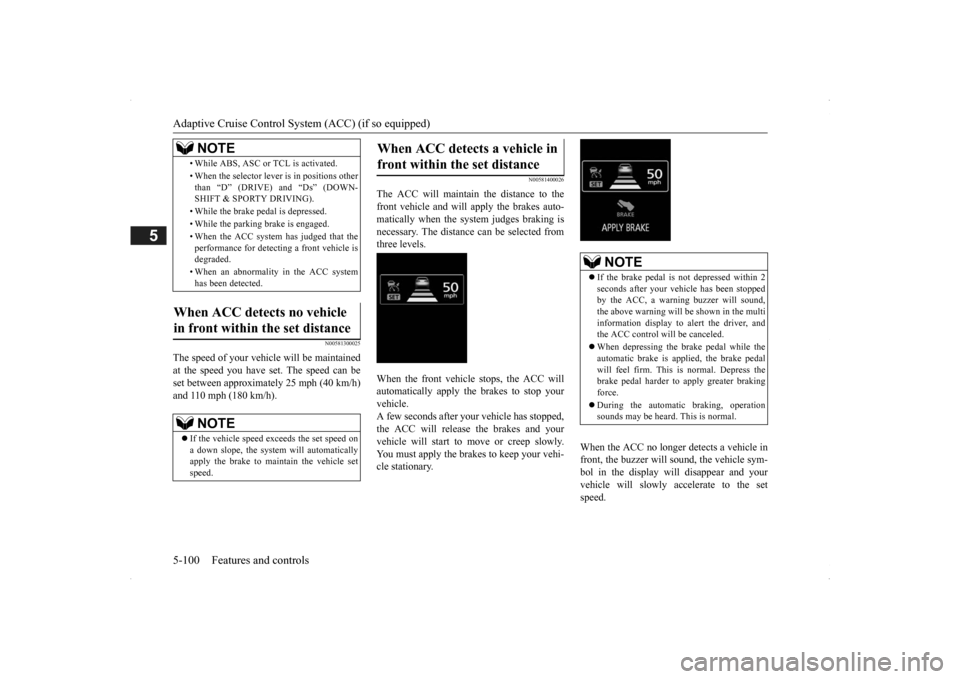
The ACC will maintain the distance to thefront vehicle and will apply the brakes auto-matically when the system judges braking is necessary. The distance
can be selected from
three levels. When the front vehicle stops, the ACC will automatically apply the brakes to stop yourvehicle. A few seconds after your vehicle has stopped, the ACC will release the brakes and yourvehicle will start to move or creep slowly. You must apply the brakes to keep your vehi- cle stationary.
When the ACC no longer detects a vehicle in front, the buzzer will sound, the vehicle sym-bol in the display will disappear and your vehicle will slowly accelerate to the set speed.
• While ABS, ASC or TCL is activated. • When the selector leve
r is in positions other
than “D” (DRIVE) and “Ds” (DOWN- SHIFT & SPORTY DRIVING). • While the brake pedal is depressed. • While the parking brake is engaged.• When the ACC system has judged that the performance for detect
ing a front vehicle is
degraded. • When an abnormality
in the ACC system
has been detected.
When ACC detects no vehicle in front within the set distance
NOTE
If the vehicle speed exceeds the set speed on a down slope, the system will automatically apply the brake to main
tain the vehicle set
speed.NOTE
When ACC detects a vehicle in front within the set distance
NOTE
If the brake pedal is not depressed within 2 seconds after your vehi
cle has been stopped
by the ACC, a warni
ng buzzer will sound,
the above warning will be shown in the multi information display to alert the driver, and the ACC control will be canceled. When depressing the brake pedal while the automatic brake is applied, the brake pedalwill feel firm. This is normal. Depress the brake pedal harder to apply greater braking force. During the automatic
braking, operation
sounds may be heard. This is normal.
BK0200500US.book 100 ページ 2013年2月12日 火曜日 午前9時46分
Page 194 of 451

Tire pressure monitoring system 5-116 Features and controls
5
Each tire, including the spare (if provided), should be checked monthly when cold andinflated to the inflation pressure recom- mended by the vehicle manufacturer on the vehicle placard or tire
inflation pressure label.
(If your vehicle has tires of a different size than the size indicated on the vehicle placard or tire inflation pressure label, you shoulddetermine the proper ti
re inflation pressure
for those tires.) As an added safety feature, your vehicle hasbeen equipped with a tire pressure monitoring system (TPMS) that illuminates a low tire pressure telltale when
one or more of your
tires is significant
ly under-inflated.
Accordingly, when the low tire pressure tell-tale illuminates, you should stop and check your tires as soon as possible, and inflate them to the proper pressure. Driving on a sig-nificantly under-inflated
tire causes the tire to
overheat and can lead
to tire failure.
Under-inflation also reduces fuel efficiency and tire tread life, and may affect the vehi-cle’s handling and stoppi
ng ability. Please
note that the TPMS is
not a substitute for
proper tire maintenance,
and it is the driver’s
responsibility to
maintain corre
ct tire pres-
sure, even if under-inflation has not reached the level to trigger illumination of the TPMSlow tire pressure telltale. Your vehicle has also
been equipped with a
TPMS malfunction indica
tor to indicate when
the system is not operating properly. The TPMS malfunction indicator is combined with the low tire pressure telltale.When the system detects a malfunction, the telltale will flash for approximately one min- ute and then remain c
ontinuously illuminated.
This sequence will c
ontinue upon subsequent
vehicle start-ups as long as the malfunction exists.When the malfunction indicator is illumi- nated, the system may not
be able to detect or
signal low tire pr
essure as intended.
TPMS malfunctions may
occur for a variety
of reasons, including the installation of replacement or alternate tires or wheels on thevehicle that prevent the TPMS from function- ing properly. Always
check the TPMS mal-
function telltale after replacing one or moretires or wheels on your vehicle to ensure that the replacement or alternate tires and wheels
allow the TPMS to continue to function prop- erly.
N00532801511
1. If the tire pressure monitoring systemwarning light illuminates, avoiding hard braking, sharp steering maneuvers and high speeds. You should stop and adjust the tires to the proper inflation pressure as soon as possible. Adjust the spare tire atthe same time. Refer to “Tires” on page 9-14.
NOTE
In addition, the warni
ng display is displayed
on the information screen in the multi-infor-mation display.
If the warning light / display illuminates while driving
NOTE
In addition, the warni
ng display is displayed
on the information screen in the multi-infor- mation display. When inspecting or adjusting the tire pres- sure, do not apply excessive force to the valve stem to
avoid breakage.
After inspecting or adjusting the tire pres- sure, always reinstall the valve cap on thevalve stem. Without the valve cap, di
rt or moisture could
get into the valve, resulting in damage to thetire inflation pressure sensor. Do not use metal valve caps, which may cause a metal reaction,
resulting in corrosion
and damage of the tire
inflation pressure sen-
sors.
BK0200500US.book 116 ページ 2013年2月12日 火曜日 午前9時46分
Page 239 of 451
Indicator light, warning light, and information screen display list (multi information display - Type 1)
Features and controls 5-161
5
N00558201252
The operation status of each syst
em is displayed on the informat
ion screen. For furthe
r details, refer to
the appropriate page
for each system.
Other interrupt displays
Screen
System operation status
Reference
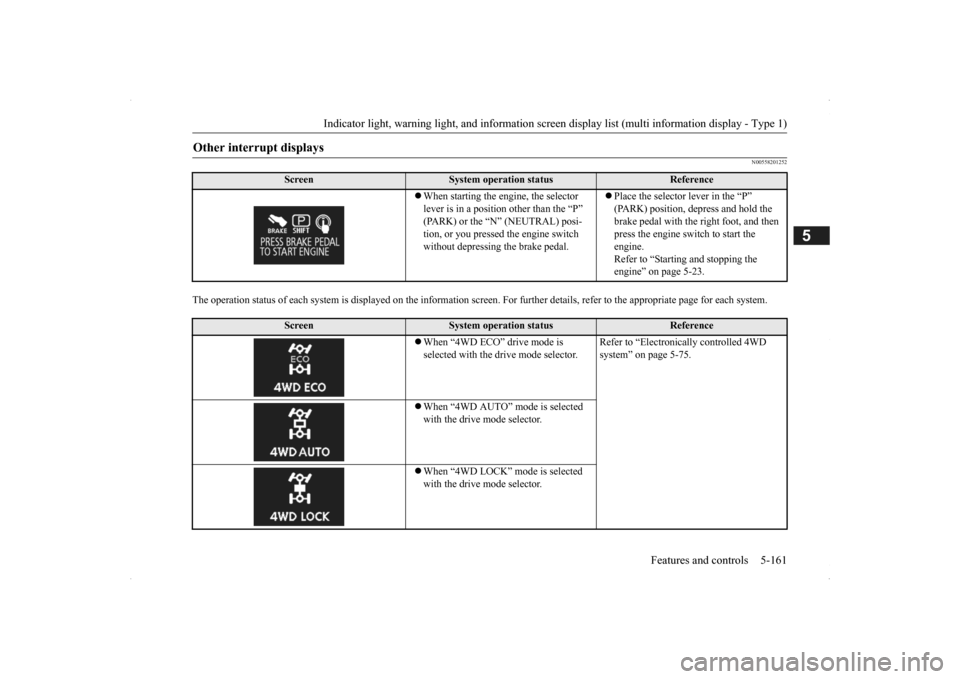
When starting the engine, the selector lever is in a positi
on other than the “P”
(PARK) or the “N” (NEUTRAL) posi-tion, or you pressed the engine switch without depressing the brake pedal.
Place the selector lever in the “P” (PARK) position, depress and hold the brake pedal with the right foot, and then press the engine switch to start the engine. Refer to “Starting and stopping the engine” on page 5-23.
Screen
System operation status
Reference
When “4WD ECO” drive mode is selected with the drive mode selector.
Refer to “Electronica
lly controlled 4WD
system” on page 5-75.
When “4WD AUTO” mode is selected with the drive mode selector. When “4WD LOCK” mode is selected with the drive mode selector.
BK0200500US.book 161 ページ 2013年2月12日 火曜日 午前9時46分
Page 245 of 451

Warning lights
Features and controls 5-167
5
N00520300147 N00520401536
This light comes on when the ignition switch is turned to the “ON” position (engine off) or the operation mode is put in ON.When the engine is started, the light should go off a few seconds later. A warning is also displayed in the multi information display. The warning light also illuminates after start- ing the engine under the following condi-tions. When the parking brake is still applied. When the brake fluid level is low. When the brake system circuit is not working properly.
When the vehicle is moving at more than 5 mph (8 km/h) and parking brake applied, a buzzer will sound to inform the driver that theparking brake is not properly release. Before driving, be sure
that the parking brake
is fully released and
brake warning light is
off.
N00520501814
This indicator is a part
of the onboard diag-
nostic (OBD) system which monitors the emissions, engine control system or auto- matic transaxle cont
rol system/continuously
variable transmission
(CVT) control system.
If a problem is detected in one of these sys- tems, this indicator illuminates or flashes. When the ignition switch is turned to the “ON” position or the operation mode is put inON, this indicator
normally comes on and
goes off after the engine has started. This indicator will come on if the fuel tank filler cap is not properly tightened. If thisindicator comes on and stays on after refuel- ing, stop the engine and check that the cap is properly tightened. (Turn the cap clockwiseuntil you hear clicking sounds.) If this indicator does not go off after several seconds or lights up while driving, have thesystem checked as soon as possible at an authorized Mitsubishi Motors dealer or a repair facility
of your choice.
Warning lights Brake warning light and buzzer
CAUTIONIf the brake warning light and the Anti-lock braking system warning
light are illuminated
at the same time, the braking force distribu-tion function will not ope
rate, so the vehicle
may be destabilized during sudden braking under the following conditions.• When the brake warning light does not goout even when the parking brake isreleased.• When the brake warning light stays onwhile driving.• If the above occurs, avoid sudden brakingand high-speed driving. Park the vehicle in a safe place, and contact an authorized Mit- subishi Motors dealer or a repair facility ofyour choice as soon as possible.
The vehicle should be brought to a halt in the following manner when brake performance is deteriorated.• Confirm that the vehicle slows down whenyou press down on the brake pedal harder than usual. In some cases, the brake pedalmay go all the way to the floor.• Should the brakes fail, use engine brakingto reduce your speed and slowly apply the parking brake. Depress the brake peda
l to illuminate the
stop lights to alert
the vehicles
behind you.
Engine malfunction indicator (“SERVICE ENGINE SOON” or “Check engine light”)
BK0200500US.book 167 ページ 2013年2月12日 火曜日 午前9時46分
Page 246 of 451

Warning lights 5-168 Features and controls
5
N00520601323
This light comes on in the event of a malfunc- tion in the charging system or when the igni-tion switch is turned to the “ON” position (engine off) or the operation mode is put in ON. On vehicle equipped with the multiinformation display - Type 1, a warning is also displayed in the multi information dis- play. When the engine is started, the lightshould go out. Check to make sure that the light has gone out before driving.
N00520701278
This light comes on when the engine oil pres- sure is below normal. If the light stays onwhile driving, stop the
engine as soon as pos-
sible. Do not run the engine until the cause of the low oil pressure is corrected.
CAUTION Driving for a long time with the engine mal- function indicator on
may cause more dam-
age to the emission control system. Thiscould also affect fuel economy and drivabil- ity. If this indicator does not come on when the ignition switch is turned to the “ON” posi- tion or the operation mode
is put in ON, have
the system checked at an authorized Mitsubi- shi Motors dealer or a repair facility of your choice. If the engine malfuncti
on indicator comes on
while the engine is running, avoid driving athigh speeds. During vehicle operation
with the indicator
on, the vehicle may not
accelerate when you
depress the accelerator pedal. When the vehicle is stat
ionary with the indi-
cator on, you must depress the brake pedalmore firmly than usual since the engine idling speed is higher than usual and a vehi- cle with an automatic transaxle or CVT has astronger tendency to creep forward.
NOTE
Do not disconnect the ba
ttery cable when the
engine malfunction i
ndicator (“SERVICE
ENGINE SOON” or “Che
ck engine light”) is
on. The engine electronic control module stores critical OBD information (especially exhaustemission data), which ma
y be lost if the bat-
tery cable is disconne
cted while the engine
malfunction indicator is
on. This will make it
difficult to diagnose the cause of future prob- lems.
Charging system warning light
CAUTION If the warning light stays on while the engine is running, park your ve
hicle in a safe place
as soon as possible and
contact an authorized
Mitsubishi Motors dealer
or a repair facility
of your choice to have the system checked.
Oil pressure warning light (Vehicle equipped with the multi information display - Type 2)
CAUTION If this light comes on when the engine oil level is not low, have
your vehicle checked at
an authorized Mitsubish
i Motors dealer or a
repair facility
of your choice.
This warning light does not show the amount of oil in the crankcase. This can only bedetermined by checking th
e oil level with the
dipstick with the engine turned off.
BK0200500US.book 168 ページ 2013年2月12日 火曜日 午前9時46分
Page 252 of 451
Combination headlights and dimmer switch 5-174 Features and controls
5
If the following operation is performed with the combination headlights and dim- mer switch in the “ ” or “ ” position, the lights automatically turn off afterabout 3 minutes. [Except for vehicles
equipped with the
F. A . S . T. - k e y ] The ignition switch is turned to the “OFF”or “ACC” position or the key is removed from the ignition switch and the driver’s door is not opened. [For vehicles equipped
with the F.A.S.T.-
key] The operation mode is changed to OFF or ACC and the driver’s door is not opened.
If the combination
headlights and dimmer
switch is turned to the “ ” or “ ” posi- tion again after the engine is turned off, theabout 3-minute auto
-cutout function
described above will not
work. The lights (the
parking lights, tail lig
hts and license plate
lights) will stay on and will not turn off auto- matically.
N00549801236
[When using a key to start the engine]If the driver’s door is opened with the key in the “OFF” or “LOCK” or “ACC” position orremoved from the ignition switch while the lights are on, the tone will sound to remind you to turn off the lights. [When using the F.A.S.T.-key to start the engine] If the driver’s door is opened with the opera- tion mode is put in OFF or ACC, or if theoperation mode is changed to OFF while the lights are on, the tone will sound to remind you to turn off the lights. In either case, the lights will turn off automat- ically and so will the tone. Or you can turn
the light switch to the “OFF” position to stop the tone.
N00549901178
To change the headlights from high beam tolow beam and vice vers
a, pull the turn signal
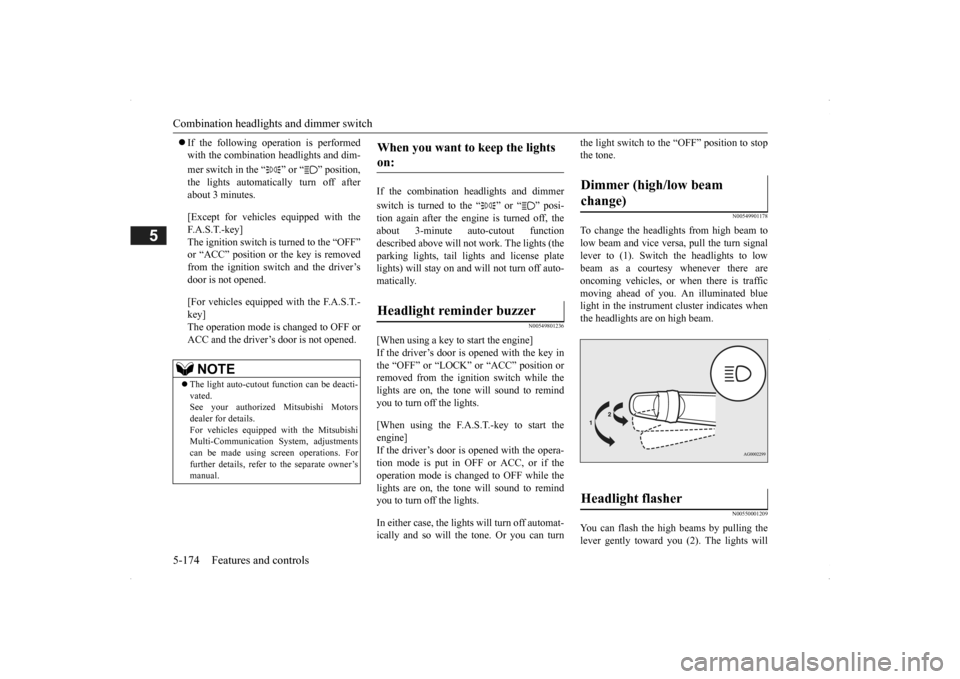
lever to (1). Switch the headlights to low beam as a courtesy whenever there are oncoming vehicles, or when there is traffic moving ahead of you. An illuminated bluelight in the instrument
cluster indicates when
the headlights are on high beam.
N00550001209
You can flash the high beams by pulling the lever gently toward you (2). The lights will
NOTE
The light auto-cutout
function can be deacti-
vated. See your authorized Mitsubishi Motorsdealer for details. For vehicles equipped
with the Mitsubishi
Multi-Communication System, adjustmentscan be made using sc
reen operations. For
further details, refer to the separate owner’s manual.
When you want to keep the lights on: Headlight reminder buzzer
Dimmer (high/low beam change) Headlight flasher
BK0200500US.book 174 ページ 2013年2月12日 火曜日 午前9時46分
Page 268 of 451

Bluetooth® 2.0 interface (if so equipped) 5-190 Features and controls
5
If a passcode has been set and the security function is enabled, the voice guide will say “Hands-free system is lo
cked. State the pass-
code to continue” when the SPEECH button (except for vehicles with Mitsubishi Multi- Communication System) or PICK-UP button(for vehicles with Mi
tsubishi Multi-Commu-
nication System) is pre
ssed to enter voice rec-
ognition mode. Say th
e 4-digit passcode
number to enter the passcode. If the entered passcode
is wrong, the voice
guide will say “<4-digi
t passcode>, Incorrect
passcode. Please try again.” Enter the correctpasscode.
Use the following procedure to turn off the security function by di
sabling the passcode.
1. Press the SPEECH button (except for vehicles with Mitsubishi Multi-Commu-nication System) or PICK-UP button (for vehicles with Mitsubishi Multi-Commu- nication System).2. Say “Setup.” 3. Say “Passcode.” 4. The voice guide w
ill say “Passcode is
enabled. Would you like to disable it?” Answer “Yes.” Answer “No” to cancel the disabling ofthe passcode and return to the main menu.
5. When the disabling of the passcode is completed, the voice
guide will say “Pass-
code is disabled” and the system will return to the main menu.
N00564700011
The Bluetooth
® 2.0 interface can use the
speaker enrollment func
tion to create a voice
model for one person per language. This makes it easier for the Bluetooth
® 2.0
interface to recognise
voice commands said
by you. You can turn a voice model registered with the speaker enrollment function on and offwhenever you want.
N00564801110
It takes about 2 to 3 minutes to complete thespeaker enrollment process. To ensure the best results, run through the process while in the driver’s seat, in an envi-ronment that is as qu
iet as possible (when
there is no rain or strong winds and the vehi- cle windows are closed). Please turn off yourphone while in speaker enrollment to prevent interruption of the process. Use the following procedure for speakerenrollment.
NOTE
Passcode will be require
d to access the sys-
tem after the next
ignition cycle.
It is required for a little time after engine stop that the entered passcode is actually recorded in the system.If the ignition switch
or the operation mode
is made to ACC or ON or the engine is started immediately afte
r engine stop, there
is a case when the entered passcode is not recorded in the system. At this time, please try to enter the passcode again.
Entering the passcode
NOTE
You can reenter the pa
sscode as many times
as you want. If you have forgot
ten your passcode, say
“Cancel” to quit the voice input mode and then check with an authorized MitsubishiMotors dealer.
Disabling the passcode
NOTE
System must be unlocke
d to disable the pass-
code.
Speaker enrollment function
Speaker enrollment
BK0200500US.book 190 ページ 2013年2月12日 火曜日 午前9時46分
Page 269 of 451

Bluetooth® 2.0 interface (if so equipped)
Features and controls 5-191
5
1. Stop your vehicle in a safe area, put the selector lever in the “P” (PARK) positionand pull the parking brake lever. 2. Press the SPEECH button (except for vehicles with Mitsubishi Multi-Commu-nication System) or PICK-UP button (for vehicles with Mitsubishi Multi-Commu- nication System).3. Say “Voice training.”
4. The voice guide will
say “This operation
must be performed in a quiet environmentwhile the vehicle is stopped. See the owner’s manual for th
e list of required
training phrases. Pr
ess and release the
SPEECH button when you are ready to begin. Press the HANG-UP button to can- cel at any time.”Press the SPEECH button to start the speaker enrollment process.
5. The voice guide will prompt for phrase 1. Repeat the correspondi
ng phrase listed in
table “Enrollment commands” on page 5-206. The system will register your voice andthen move on to the registration of the next command. Continue the process until all phrases have been registered. 6. When all enrollment commands have been read out, the voice guide will say “Speaker enrollment is complete.” The system will then end the speaker enroll-ment process and return to the main menu.
NOTE
Speaker enrollment is
not possible unless the
vehicle is parked. Ma
ke sure you park the
vehicle in a safe ar
ea before attempting
speaker enrollment.
NOTE
If you do not start the speaker enrollment process within 3 minut
es after pressing the
SPEECH button, the speaker enrollment function will time out. The voice guide will
say “Speaker enroll-
ment has timed out.” The system will then beep and the voice recognition mode will be deactivated.
NOTE
To repeat the most recent voice training com- mand, press and release the SPEECH button. If you press the HANG-UP button anytime during the process, the system will beep and stop the speaker enrollment process.NOTE
Completing the speaker enrollment process will turn on the voice
model automatically.
The commands “Help” a
nd “Cancel” will not
work in this mode.
BK0200500US.book 191 ページ 2013年2月12日 火曜日 午前9時46分