2014 MITSUBISHI OUTLANDER door lock
[x] Cancel search: door lockPage 98 of 451
Free-hand Advanced
Security Transmitter (F.A.S
.T.-key) (if so equipped)
5-20 Features and controls
5
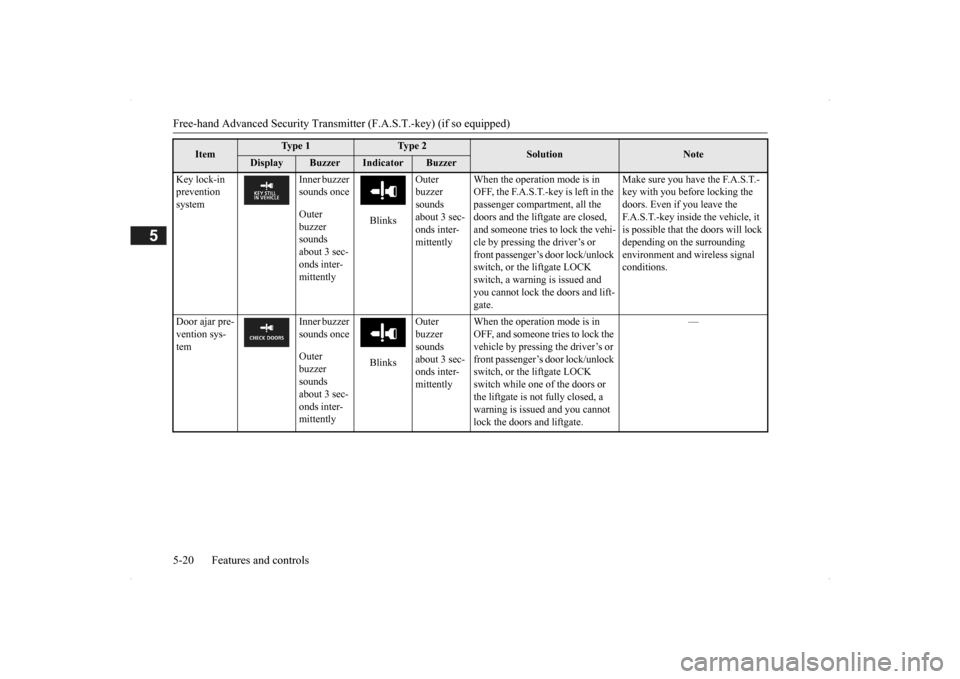
Key lock-in prevention system
Inner buzzer sounds once Outer buzzer sounds about 3 sec- onds inter- mittently
Blinks
Outer buzzer sounds about 3 sec-onds inter- mittently
When the operation mode is in OFF, the F.A.S.T.-key is left in the passenger compartment, all the doors and the liftgate are closed, and someone tries to lock the vehi- cle by pressing the driver’s or front passenger’s door lock/unlock switch, or the liftgate LOCK switch, a warning is issued and you cannot lock the doors and lift-gate.
Make sure you have the F.A.S.T.- key with you before locking the doors. Even if you leave the F.A.S.T.-key inside the vehicle, it is possible that the doors will lock depending on the surrounding environment and
wireless signal
conditions.
Door ajar pre- vention sys- tem
Inner buzzer sounds once Outer buzzer sounds about 3 sec- onds inter- mittently
Blinks
Outer buzzer sounds about 3 sec-onds inter- mittently
When the operation mode is in OFF, and someone tries to lock the vehicle by pressing the driver’s or front passenger’s door lock/unlock switch, or the liftgate LOCK switch while one of the doors or the liftgate is not fully closed, a warning is issued and you cannot lock the doors and liftgate.
—
Item
Ty p e 1
Ty p e 2
Solution
Note
Display
Buzzer
Indicator
Buzzer
BK0200500US.book 20 ページ 2013年2月12日 火曜日 午前9時46分
Page 99 of 451
Free-hand Advanced Securi
ty Transmitter (F.A.S.T.-key) (if so equipped)
Features and controls 5-21
5
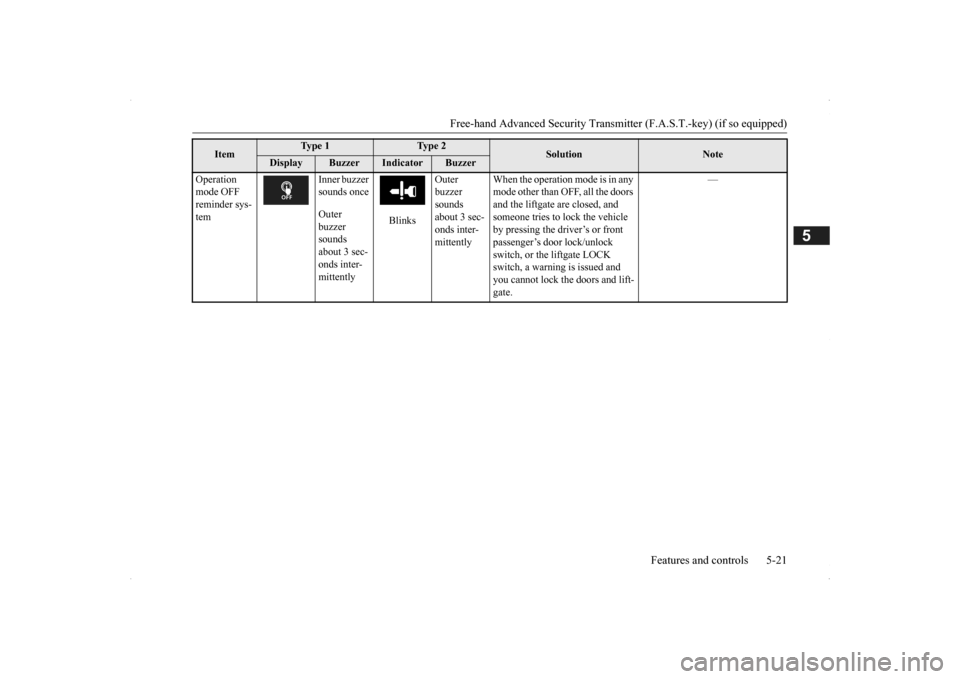
Operation mode OFF reminder sys- tem
Inner buzzer sounds once Outer buzzer sounds about 3 sec- onds inter- mittently
Blinks
Outer buzzer sounds about 3 sec-onds inter- mittently
When the operation mode is in any mode other than OFF, all the doors and the liftgate
are closed, and
someone tries to lock the vehicle by pressing the driver’s or front passenger’s door lock/unlock switch, or the liftgate LOCK switch, a warning is issued and you cannot lock the doors and lift- gate.
—
Item
Ty p e 1
Ty p e 2
Solution
Note
Display
Buzzer
Indicator
Buzzer
BK0200500US.book 21 ページ 2013年2月12日 火曜日 午前9時46分
Page 100 of 451

Free-hand Advanced
Security Transmitter (F.A.S
.T.-key) (if so equipped)
5-22 Features and controls
5
N00514301080
After pressing the e
ngine switch and opera-
tion mode in OFF, when driver’s door isopened, the steering wheel is locked. Warning display
The following methods ca
n be used to unlock
the steering wheel. Put the operation mode in ACC. Start the engine.
Steering wheel lock
(if so equipped)
To l o c k
NOTE
When the following ope
ration is performed
with the operation mode
in OFF, the steering
wheel is locked. • Open or close one of the doors. (except the liftgate) • Lock all door and the liftgate by using the F.A.S.T.-key operation or the remote con- trol transmitter of the F.A.S.T.-key.
When the driver’s door is opened while the steering wheel does not
unlock, warning dis-
play will appear and the buzzer sounds toalert the steering wheel is unlocked.
To u n l o c k
WA R N I N G If the engine is stopped while driving, do not open a door or press the LOCK switch on the remote control switch until the vehicle stops in a safe
place. This could
cause the steering wheel to lock, making it impossible to operate the vehicle.CAUTION Carry the F.A.S.T.-key with you when leav- ing the vehicle.If your vehicle needs to
be towed, put the
operation mode in ACC to unlock the steer- ing wheel.
NOTE
When the steering wheel does not unlock, the warning display wi
ll appear. Press the
engine switch again wh
ile moving the steer-
ing wheel slightly right and left. Warning display When the steering wheel lock is abnormal, the warning display will
appear and the inner
buzzer will sounds. Put the operation mode in OFF and then press the lock switch of theF.A.S.T.-key. If the warning will appear again, contact an authorized Mitsubishi Motors dealer. warning display
BK0200500US.book 22 ページ 2013年2月12日 火曜日 午前9時46分
Page 104 of 451
Free-hand Advanced
Security Transmitter (F.A.S
.T.-key) (if so equipped)
5-26 Features and controls
5
N00514800017 N00515201158
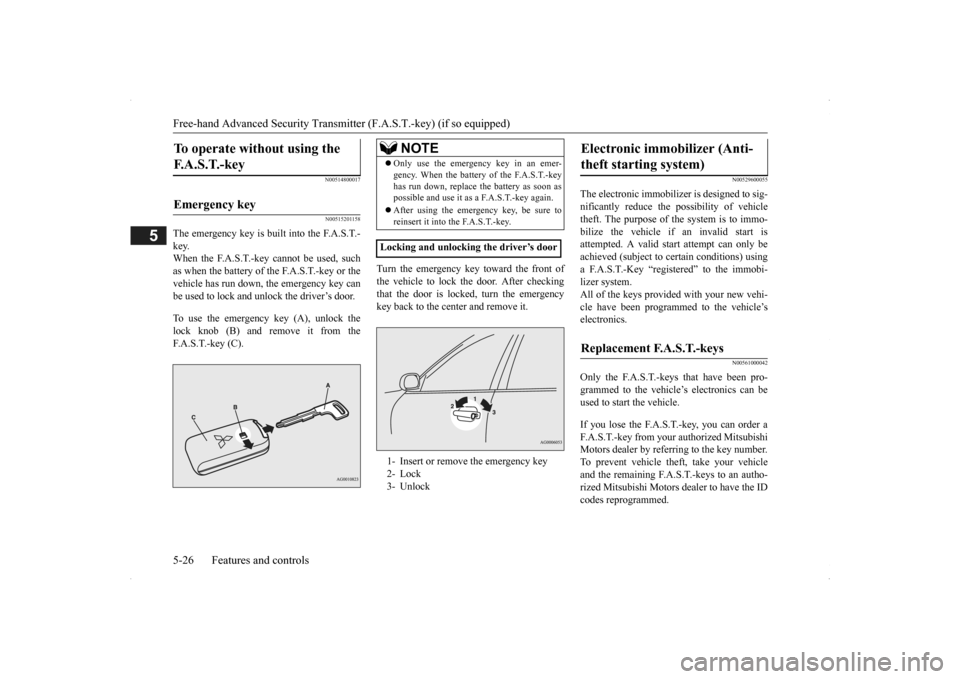
The emergency key is built into the F.A.S.T.- key.When the F.A.S.T.-key cannot be used, such as when the battery of the F.A.S.T.-key or the vehicle has run down, the emergency key can be used to lock and unlock the driver’s door. To use the emergency key (A), unlock the lock knob (B) and remove it from theF.A.S.T.-key (C).
Turn the emergency key toward the front of the vehicle to lock the door. After checking that the door is locked, turn the emergency key back to the center and remove it.
N00529600055
The electronic immobilize
r is designed to sig-
nificantly reduce the
possibility of vehicle
theft. The purpose of the system is to immo- bilize the vehicle if
an invalid start is
attempted. A valid st
art attempt can only be
achieved (subject to ce
rtain conditions) using
a F.A.S.T.-Key “registered” to the immobi- lizer system. All of the keys provided with your new vehi- cle have been program
med to the vehicle’s
electronics.
N00561000042
Only the F.A.S.T.-keys that have been pro-grammed to the vehicl
e’s electronics can be
used to start the vehicle. If you lose the F.A.S.T.-key, you can order a F.A.S.T.-key from your authorized MitsubishiMotors dealer by refe
rring to the key number.
To prevent vehicle theft, take your vehicle and the remaining F.A.S.T.-keys to an autho-rized Mitsubishi Motors
dealer to have the ID
codes reprogrammed.
To operate without using the F. A . S . T. - k e y
Emergency key
NOTE
Only use the emergency key in an emer- gency. When the battery of the F.A.S.T.-keyhas run down, replace
the battery as soon as
possible and use it as a F.A.S.T.-key again. After using the emergency key, be sure to reinsert it into the F.A.S.T.-key.
Locking and unlocking the driver’s door 1- Insert or remove
the emergency key
2- Lock 3- Unlock
Electronic immobilizer (Anti- theft starting system)
Replacement F.A.S.T.-keys
BK0200500US.book 26 ページ 2013年2月12日 火曜日 午前9時46分
Page 105 of 451

Free-hand Advanced Securi
ty Transmitter (F.A.S.T.-key) (if so equipped)
Features and controls 5-27
5
N00561100014
To add a F.A.S.T.-key, you must already have 2 registered F.A.S.T.-keys. You need to regis- ter the ID code to the vehicle.Registering the ID code can be done by your authorized Mitsubishi Motors dealer. Or it can be done by yourself (except for vehiclessold in Canada). For you to register the ID code yourself, fol- low the “Customer F.A.S.T.-key program- ming” procedure below. If you choose to have your authorizedMitsubishi Motors dealer register the ID code, take your vehicle and all remaining F.A.S.T.-keys to your authorized MitsubishiMotors dealer.
N00561201171
You can program new F.A.S.T.-keys to thesystem if you have tw
o valid (already regis-
tered) F.A.S.T.-keys an
d a blank (not regis-
tered) F.A.S.T.-key. For F.A.S.T.-key programming, follow the procedures below. 1. Open the driver’s door. 2. While carrying the first valid F.A.S.T.- key, put the operatio
n mode in ON. (Per-
form the following procedure within 30 seconds.)
3. Insert the new F.A.S.T.-key into the key slot. 4. With the first valid F.A.S.T.-key, press the UNLOCK button for 4 to 10 seconds and press the LOCK button during this time.5. Release in sequence the LOCK and UNLOCK buttons within 10 seconds of pressing the LOCK butt
on in step 4. (Per-
form the following procedure within 30 seconds.) 6. With the second valid F.A.S.T.-key, pressthe UNLOCK button for 4 to 10 seconds and press the LOCK button during this time.
Additional F.A.S.T.-keys
NOTE
You are provided with 2 F.A.S.T.-keys, but you may register up to 4 F.A.S.T.-keys. You can obtain blank F.A.S.T.-keys specially cut for your vehicle from your MitsubishiMotors dealer.
Customer F.A.S.T.-key program- ming (Except for vehicles sold in Canada)
NOTE
Keep the driver’s door open until F.A.S.T.- key programming is finished. Do not open or close other doors.
BK0200500US.book 27 ページ 2013年2月12日 火曜日 午前9時46分
Page 106 of 451

Free-hand Advanced
Security Transmitter (F.A.S
.T.-key) (if so equipped)
5-28 Features and controls
5
7. Release in sequence the LOCK and UNLOCK buttons within 10 seconds ofpressing the LOCK button in step 6. The immobilizer display on the information screen in the multi-information displaywill blink. When registration of ID
code is complete,
the buzzer will sound 3 times and the immobilizer display will come on for 30seconds. If an error occurs, F.A.S.T.-key program- ming will be terminated and the buzzerwill sound for 3 seconds. 8. If you wish to register another F.A.S.T.- key, repeat the process from step 1 after the operation mode is put in OFF.
N00515501210
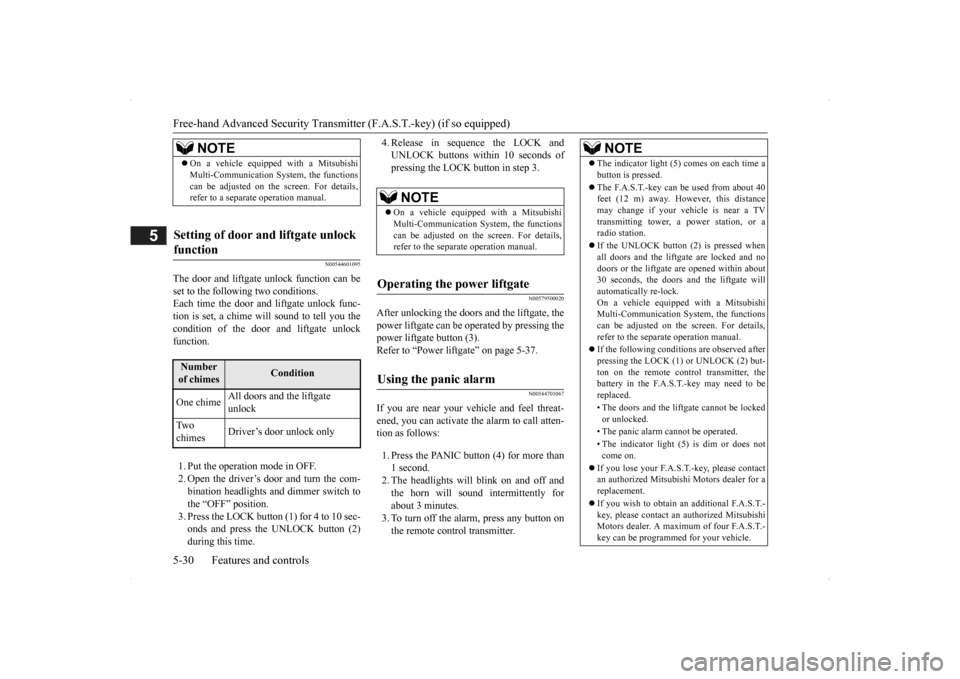
Press the remote control transmitter buttons to lock or unlock the doors and the liftgate. It can also help you
signal for attention by
setting off the panic alarm.
Press the LOCK button (1) to lock all the doors and the liftgate. The turn signal lights will also blink once. Press the UNLOCK button (2) to unlock the driver’s door only. Within about 2 seconds, press the UNLOCK button one more time to unlock all the doors and liftgate. The dome light will turn on for 30 seconds.The turn signal lights will also blink twice. The front side-marker and parking lights will also turn on for about 30 seconds. Refer to“Welcome light” on page 5-175.
NOTE
F.A.S.T.-key programming will be termi- nated if the operation
mode is put in OFF
before the immobilizer
display starts blink-
ing.NOTE
The immobilizer displa
y will go off immedi-
ately if the operation
mode is put in OFF.
Perform the operation when the interrupt dis- play screen is not show
ing. The interrupt dis-
play screen may prevent you from seeing theimmobilizer display. It is not possible to re
gister a F.A.S.T.-key if
the immobilizer displa
y goes off during the
procedure.
Keyless entry system
1-
LOCK ( ) button
2-
UNLOCK ( ) button
3- Power liftgate button (if so equipped) 4- PANIC button
NOTE
5- Operation indicator lightTo l o c k
NOTE
If you press the LOCK button (1) twice, the horn will sound once.
To unlock
BK0200500US.book 28 ページ 2013年2月12日 火曜日 午前9時46分
Page 107 of 451

Free-hand Advanced Securi
ty Transmitter (F.A.S.T.-key) (if so equipped)
Features and controls 5-29
5
The horn and turn signal lights of the keyless entry system answerback function can be changed as required. This is done with the key removed from the ignition switch. The answerback function can be set in the following three ways. 1. Put the operation mode in OFF.
2. Open the driver’s door and turn the com- bination headlights a
nd dimmer switch to
the “OFF” position. 3. Press the LOCK button (1) for 4 to 10 sec- onds and press the UNLOCK button (2)during this time. 4. Release in sequence the UNLOCK and LOCK buttons within 10 seconds ofpressing the UNLOCK button in step 3.
The answerback function from the turn signal lights can be turned ON or OFF separately. 1. Put the operation mode in OFF. 2. Open the driver’s door and turn the com-bination headlights a
nd dimmer switch to
the “OFF” position. 3. Press the UNLOCK button (2) for 4 to 10seconds and press the LOCK button (1) during this time.
4. Release in sequence the UNLOCK and LOCK buttons within 10 seconds ofpressing the LOCK button in step 3.
The buzzer answerback function can be turned ON or OFF as required.
NOTE
On a vehicle equippe
d with a Mitsubishi
Multi-Communication System, the functionscan be adjusted on the screen. For details,refer to the separa
te operation manual.
The door and liftgate unlock function can be set so that all doors and liftgate unlock when the UNLOCK button (2) is pressed once. Refer to “Setting of door
and liftgate unlock
function” on page 5-30.
Answerback function
Horn deactivation/reactivation One chime: The horn will not sound. Two chimes: The horn will sound. Four chimes: The horn will sound if the
LOCK button is pressed twicewithin 1 second.
NOTE
On a vehicle equippe
d with a Mitsubishi
Multi-Communication System, the functions can be adjusted on the screen. For details, refer to the separate operation manual.
Turn signal light
deactivation/reactiva-
tion
Number of chimes
To l o c k
To u n l o c k
One chime One flash Two flashes Two chimes One flash No flash Three chimes No flash Two flashes Four chimes Two flashes One flash Five chimes No flash One flash Six chimes Two flashes No flash Seven chimes No flash No flash
NOTE
On a vehicle equipped with a Mitsubishi Multi-Communication System, the functions can be adjusted on the screen. For details, refer to the separa
te operation manual.
Buzzer deactivation/reactivation
BK0200500US.book 29 ページ 2013年2月12日 火曜日 午前9時46分
Page 108 of 451
Free-hand Advanced
Security Transmitter (F.A.S
.T.-key) (if so equipped)
5-30 Features and controls
5
N00544601095
The door and liftgate
unlock function can be
set to the following two conditions.Each time the door and
liftgate unlock func-
tion is set, a chime wi
ll sound to tell you the
condition of the door and liftgate unlockfunction. 1. Put the operation mode in OFF. 2. Open the driver’s door and turn the com-bination headlights and dimmer switch to the “OFF” position. 3. Press the LOCK button (1) for 4 to 10 sec-onds and press the UNLOCK button (2) during this time.
4. Release in sequence the LOCK and UNLOCK buttons within 10 seconds ofpressing the LOCK button in step 3.
N00579500020
After unlocking the doors and the liftgate, thepower liftgate
can be operated
by pressing the
power liftgate button (3). Refer to “Power li
ftgate” on page 5-37.
N00544701067
If you are near your vehicle and feel threat- ened, you can activate the alarm to call atten- tion as follows: 1. Press the PANIC button (4) for more than 1 second. 2. The headlights will blink on and off and the horn will sound intermittently forabout 3 minutes. 3. To turn off the alarm, press any button on the remote control transmitter.
NOTE
On a vehicle equippe
d with a Mitsubishi
Multi-Communication System, the functionscan be adjusted on the screen. For details,refer to a separa
te operation manual.
Setting of door and liftgate unlock function
Number of chimes
Condition
One chime
All doors and the liftgate unlock
Tw o chimes
Driver’s door unlock only
NOTE
On a vehicle equippe
d with a Mitsubishi
Multi-Communication System, the functionscan be adjusted on the screen. For details, refer to the separa
te operation manual.
Operating the power liftgate
Using the panic alarm
NOTE
The indicator light (5) comes on each time a button is pressed. The F.A.S.T.-key can be used from about 40 feet (12 m) away. However, this distance may change if your vehicle is near a TVtransmitting tower, a power station, or a radio station. If the UNLOCK button (2) is pressed when all doors and the liftgate are locked and no doors or the liftgate
are opened within about
30 seconds, the doors a
nd the liftgate will
automatically re-lock. On a vehicle equippe
d with a Mitsubishi
Multi-Communication System, the functions can be adjusted on the screen. For details, refer to the separate operation manual. If the following conditi
ons are observed after
pressing the LOCK (1) or UNLOCK (2) but-ton on the remote control transmitter, the battery in the F.A.S.T.-key may need to be replaced. • The doors and the lift
gate cannot be locked
or unlocked. • The panic alarm
cannot be operated.
• The indicator light
(5) is dim or does not
come on.
If you lose your F.A.S.T.
-key, please contact
an authorized Mitsubish
i Motors dealer for a
replacement. If you wish to obtain an
additional F.A.S.T.-
key, please contact an
authorized Mitsubishi
Motors dealer. A maximu
m of four F.A.S.T.-
key can be programmed for your vehicle.
BK0200500US.book 30 ページ 2013年2月12日 火曜日 午前9時46分