2014 MITSUBISHI OUTLANDER display
[x] Cancel search: displayPage 336 of 451

Audio Files (MP3/WMA/AAC) 7-20 Comfort controls
7
Discs that have not
been finalized cannot
be played back. Even if recorded using the correct format on a recorder or computer, application software settings and environments; discpeculiarities, damage,
or marking; or dirt
or condensation on the lens inside the product may render the disc unplayable. Depending on the disc
, some functions
may not be used, or the disc may not play back. Do not use discs with cracks or warps. If the disc has sticke
rs affixed, remains
from removed stickers, or affixed adhe- sive, then do not use the disc. Discs that have decora
tive labels or stick-
ers may not be used.
This product will play
back audio CDs, how-
ever please be aware of the following points regarding CD standards. Ensure that you use discs with on the label surface. Playback of other than standard CDs is not guaranteed. Even
if the audio can be
played back, the audio quality cannot beguaranteed. When playing back other than standard CDs, the following may occur.
• There may be noise during playback. • There may be jumping in the audio.• The disc may not be recognized. • The first track may not be played back. • It may take longer than usual until startof playback of tracks. • Playback may start from within the track.• Some parts may not be played back. • Tracks may freeze during playback. • Tracks may be displayed erroneously.
N00715600027
This product can play back MP3/WMA/AACformat audio files recorded on CD-ROM, CD-R/RW, and USB devices. There are limitations on the files and media that can be used, therefore read the followingprior to recording MP3/WMA/AAC format audio files on discs or USB devices. Additionally, ensure y
ou read the user manu-
als for your CD-R/RW drive and the writing software, and ensure these are used correctly. If the MP3/WMA/AAC
format audio files
includes title informati
on or other data, then
this can be displayed.
Nonstandard CDs
Audio Files (MP3/WMA/AAC)
CAUTION CD-ROM and CD-R/RW media can only play back MP3 fo
rmat audio files.
Actions such as copying audio CDs or files and either distributing these to others for free or for charge, or uploading files via the Inter-net or other means to servers is an infringe- ment of the law. Do not append the file
extensions “.mp3”,
“.wma”, or “.m4a”, to other than MP3/WMA/AAC format
files. Playing back
discs with these types of files recorded upon them may cause the files to be incorrectly identified for playback, which may lead toloud noise, resulting in speaker damage or accident.NOTE
Depending on the condition of the disc recorder or recording software used, correctplayback may not be po
ssible. In these cases,
refer to the user manual for your product or software. Depending on your computer’s operating system, version, softwa
re, or settings, files
may not have a file
extension appended. In
these cases, append
the file extensions
“.mp3”, “.wma”, or “.m4a” when copying the files. Files larger than 2GB in size cannot be played back.
BK0200500US.book 20 ページ 2013年2月12日 火曜日 午前9時46分
Page 338 of 451
Audio Files (MP3/WMA/AAC) 7-22 Comfort controls
7
N00715900020
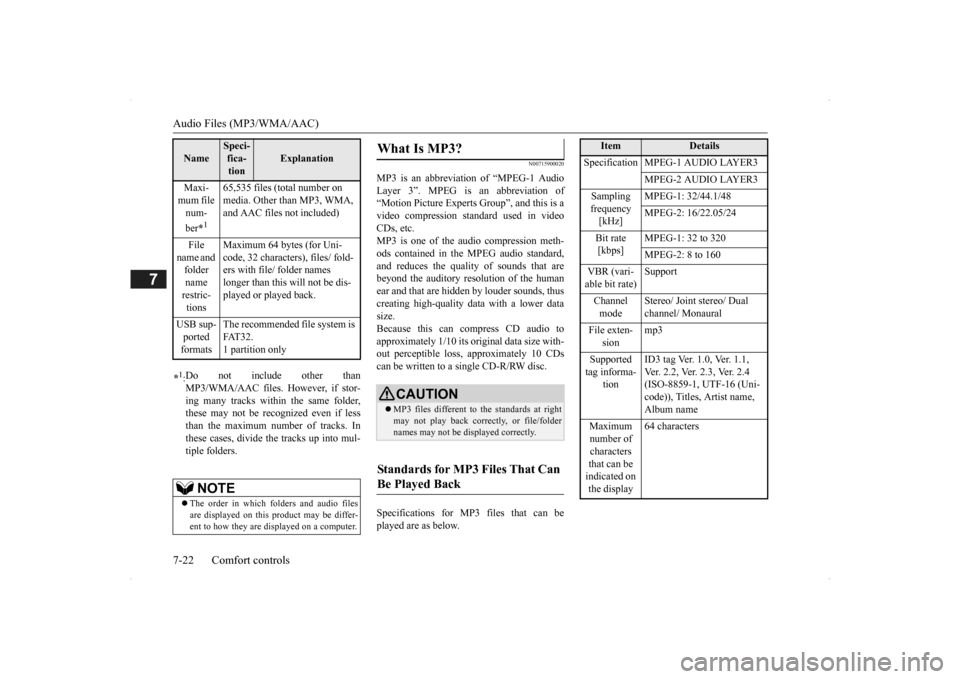
MP3 is an abbreviation of “MPEG-1 Audio Layer 3”. MPEG is an abbreviation of “Motion Picture Experts Group”, and this is avideo compression standard used in video CDs, etc. MP3 is one of the audio compression meth-ods contained in the MPEG audio standard, and reduces the quality
of sounds that are
beyond the auditory resolution of the human ear and that are hidden by louder sounds, thus creating high-qua
lity data with a lower data
size. Because this can co
mpress CD audio to
approximately 1/10 its orig
inal data size with-
out perceptible loss, approximately 10 CDs can be written to a single CD-R/RW disc. Specifications for MP3 files that can be played are as below.
Maxi- mum file num- ber
*1
65,535 files (total number on media. Other than MP3, WMA, and AAC files not included)
File
name and folder name restric-tions
Maximum 64 bytes (for Uni- code, 32 characters), files/ fold-ers with file/ folder names longer than this will not be dis- played or played back.
USB sup- ported formats
The recommended file system is FAT32. 1 partition only
*1: Do not include other than MP3/WMA/AAC files. However, if stor- ing many tracks within the same folder,these may not be recognized even if less than the maximum number of tracks. In these cases, divide the tracks up into mul-tiple folders.
NOTE
The order in which folders and audio files are displayed on this product may be differ- ent to how they are displayed on a computer.Name
Speci- fica- tion
Explanation
What Is MP3?
CAUTION MP3 files different to the standards at right may not play back corr
ectly, or file/folder
names may not be di
splayed correctly.
Standards for MP3 Files That Can Be Played Back
Item
Details
Specification MPEG-1 AUDIO LAYER3
MPEG-2 AUDIO LAYER3
Sampling frequency [kHz]
MPEG-1: 32/44.1/48 MPEG-2: 16/22.05/24
Bit rate [kbps]
MPEG-1: 32 to 320 MPEG-2: 8 to 160
VBR (vari- able bit rate)
Support
Channel mode
Stereo/ Joint stereo/ Dual channel/ Monaural
File exten-
sion
mp3
Supported tag informa-
tion
ID3 tag Ver. 1.0, Ver. 1.1, Ver. 2.2, Ver. 2.3, Ver. 2.4 (ISO-8859-1, UTF-16 (Uni-code)), Titles, Artist name, Album name
Maximum number of characters that can be indicated on the display
64 characters
BK0200500US.book 22 ページ 2013年2月12日 火曜日 午前9時46分
Page 339 of 451

Audio Files (MP3/WMA/AAC)
Comfort controls 7-23
7
N00716000028
WMA is an abbreviation of Windows Media Audio, and this is an
audio compression for-
mat from Microsoft. This is a compressionformat that has a higher compression ratio than MP3. Specifications for WMA files that can be played are as below.
N00716100029
AAC is an abbreviation of Advanced Audio Coding, and this is
an audio compression
standard used in “MPEG-2” and “MPEG-4”. This features 1.4x th
e compression of MP3,
with comparable audio quality.
Specifications for AAC files that can be played are as below.
What Is WMA?
NOTE
Microsoft, Windows Media, and Windows are registered trademarks of Microsoft Cor- poration (USA) and in
other countries.
CAUTIONWMA supports digita
l rights management
(DRM). This product cannot play back WMA files protected
using this system.
WMA files different to the standards at right may not play back correctly, or file/folder names may not be displayed correctly. “Pro”, “Lossless”, and “Voice” are not sup- ported.
Standards for WMA Files That Can Be Played Back
Item
Details
Specification Windows Media Audio
Version7.0/8.0/9.0
Sampling fre- quency [kHz]
32/44.1/48
Bit rate [kbps] 48 to 320
VBR
(variable bit rate)
Support
Channel mode Stereo/Monaural File extension wma Supported tag information
WMA tags Title name, Artist name, Album name
Maximum num- ber of characters that can be indi- cated on the dis-
play
64 characters
What Is AAC?
CAUTION AAC supports digita
l rights management
(DRM). This product cannot play back AACfiles protected using this system. AAC files different to
the standards at right
may not play back correctly, or file/foldernames may not be displayed correctly.
Standards for AAC Files That Can Be Played Back
Item
Details
Specification Advanced Audio
CodingMPEG4/AAC-LC MPEG2/AAC-LC
Sampling
fre- quency [kHz]
MPEG4 8/11.025/12/16/22.05/
24/32/44.1/48
MPEG2 8/11.025/12/16/22.05/
24/32/44.1/48
Bit rate [kbps]
MPEG4 8 to 320 MPEG2 8 to 320
VBR
(variable bit rate)
Support
Channel mode Stereo/Monaural
BK0200500US.book 23 ページ 2013年2月12日 火曜日 午前9時46分
Page 340 of 451
Important Points on Safety for the Customer 7-24 Comfort controls
7
N00716200020
This product features a number of pictorial indications as well as
points concerning han-
dling so that you can use the product cor- rectly and in a safe manner, as well as preventinjury or damage to yourself, other users, or property.
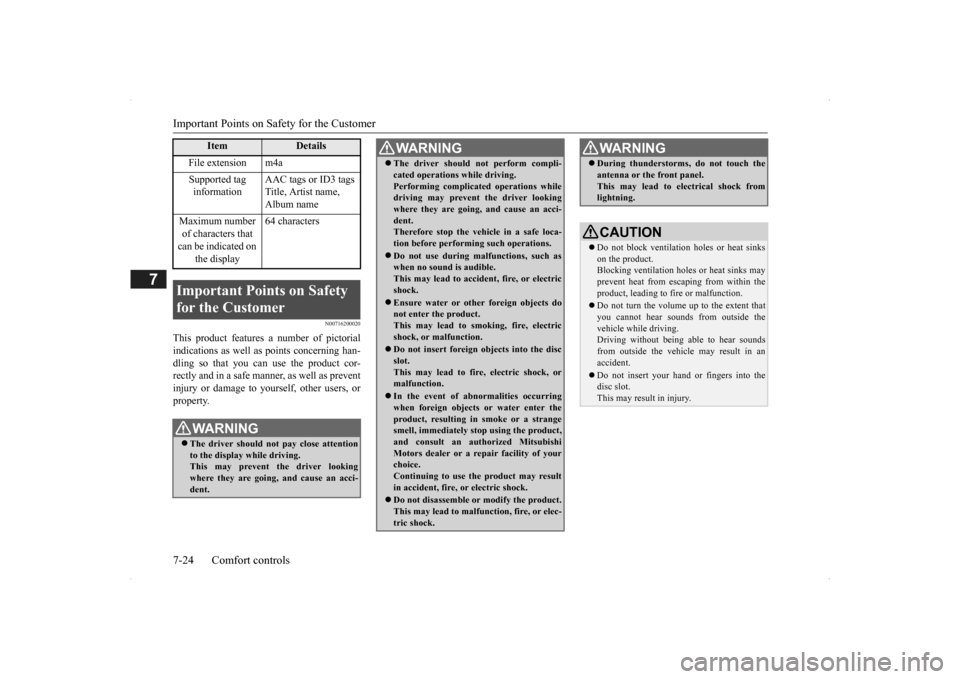
File extension m4a Supported tag information
AAC tags or ID3 tags Title, Artist name, Album name
Maximum number of characters that can be indicated on
the display
64 characters
Important Points on Safety for the Customer
WA R N I N G The driver should not pay close attention to the display while driving.This may prevent the driver looking where they are going, and cause an acci- dent.
Item
Details
The driver should not perform compli- cated operations while driving.Performing complicated operations whiledriving may prevent the driver looking where they are going, and cause an acci- dent.Therefore stop the vehicle in a safe loca- tion before performi
ng such operations.
Do not use during malfunctions, such as when no sound is audible. This may lead to accident, fire, or electricshock. Ensure water or othe
r foreign objects do
not enter the product. This may lead to smoking, fire, electric shock, or malfunction. Do not insert foreign objects into the disc slot.This may lead to fire
, electric shock, or
malfunction. In the event of abnormalities occurring when foreign objects or water enter the product, resulting in smoke or a strangesmell, immediately st
op using the product,
and consult an auth
orized Mitsubishi
Motors dealer or a repair facility of yourchoice. Continuing to use the product may result in accident, fire, or electric shock. Do not disassemble or modify the product. This may lead to malfun
ction, fire, or elec-
tric shock.WA R N I N G
During thunderstorms, do not touch the antenna or the front panel.This may lead to electrical shock fromlightning.CAUTION Do not block ventilati
on holes or heat sinks
on the product. Blocking ventilation hol
es or heat sinks may
prevent heat from escaping from within theproduct, leading to fire or malfunction. Do not turn the volume up to the extent that you cannot hear sounds from outside the vehicle while driving. Driving without being able to hear soundsfrom outside the vehicle may result in an accident. Do not insert your hand or fingers into the disc slot. This may result in injury.WA R N I N G
BK0200500US.book 24 ページ 2013年2月12日 火曜日 午前9時46分
Page 342 of 451
Operation Keys 7-26 Comfort controls
7
N00716700038
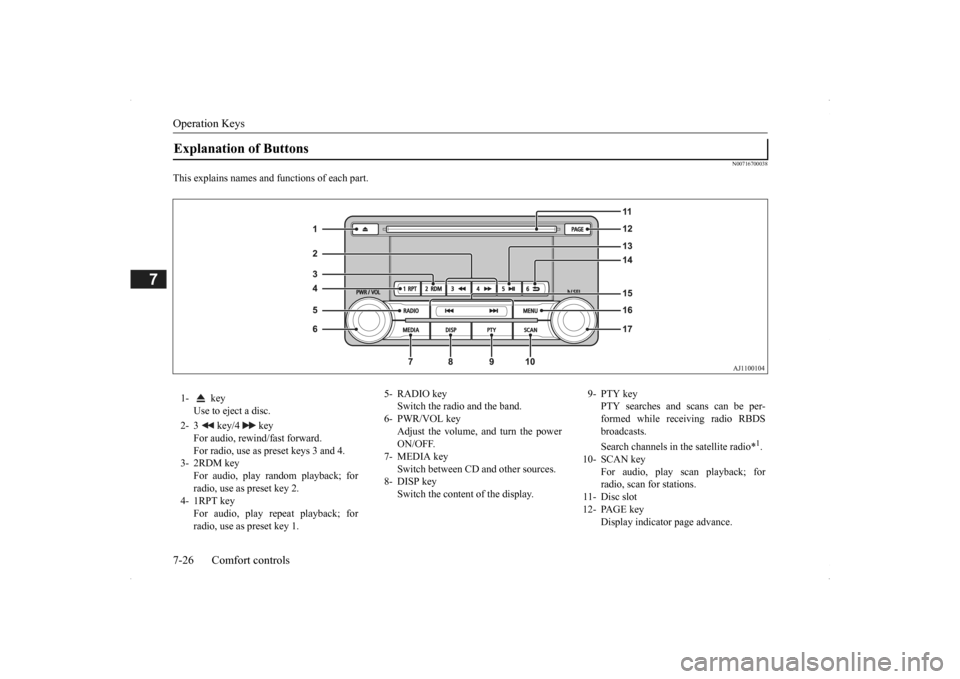
This explains names and functions of each part.Explanation of Buttons 1- key
Use to eject a disc.
2- 3 key/4 key
For audio, rewind/fast forward. For radio, use as preset keys 3 and 4.
3- 2RDM key
For audio, play random playback; for radio, use as preset key 2.
4- 1RPT key
For audio, play repeat playback; for radio, use as preset key 1.
5- RADIO key
Switch the radio and the band.
6- PWR/VOL key
Adjust the volume, and turn the powerON/OFF.
7- MEDIA key
Switch between CD
and other sources.
8- DISP key
Switch the content of the display.
9- PTY key
PTY searches and scans can be per- formed while receiving radio RBDS broadcasts. Search channels in the satellite radio*
1.
10- SCAN key
For audio, play scan playback; forradio, scan for stations.
11- Disc slot 12- PAGE key
Display indicator page advance.
BK0200500US.book 26 ページ 2013年2月12日 火曜日 午前9時46分
Page 344 of 451

Listen to Radio 7-28 Comfort controls
7
N00716900027
This explains how to listen to AM and FM radio broadcasts. Press the RADIO key to switch the band. Switch between AM and FM bands. The selected band is indicated on the display. *: When a satellite
tuner is connected
Turn the /SEL key to the frequency to lis- ten to.
Collective search for stations that can be received. Press the SCAN key.When a station is received, this is played for 5 seconds, then the product searches for the next station. Register the broadcast st
ation in advance, and
select this at a later time. 1. Tune in to the frequency to register.
2. Hold down any of the keys from the 1RPT key to the 6 key. A “Beep” sounds, and the preset key is registered.
During RBDS broadcast
reception,
select
PTY (program conten
t), and automatically
scan for stations. 1. During FM reception,
press the PTY key.
This switches to the PTY selection mode. 2. Press the PTY key to select PTY. 3. Press the key or key. The PTY (program cont
ent) indicator will
flash, and station selection will automati- cally start.When a station is received, the frequency is displayed.
Listen to Radio To Listen to the Radio
NOTE
Bands switch in the order AM, FM1, FM2, SIR1*, SIR2*, SIR3*, and SIR4*. If no signal is receiv
ed, bands will not be
switched to SIR2, SIR3, or SIR4.
Manual/Seek Station Selection
/SEL key (counter- clockwise)
Reduces the frequency being received.
/SEL key (clockwise)
Increases the frequency being received.
key
(hold down)
Release the button to start seek station selection, and when a station is received, scanning stops.
key
(hold down)Scan Station Selection
NOTE
Press this button again while receiving the station to return
to normal reception.
Preset Memory
NOTE
The preset memory can register a maximum of 6 stations for each band. If a preset key that al
ready has a station reg-
istered is selected, then this is overwritten with the new preset. Pressing the preset ke
y will select the previ-
ously registered frequency.
PTY Search
BK0200500US.book 28 ページ 2013年2月12日 火曜日 午前9時46分
Page 345 of 451
Listen to Satellite Radio (if so equipped)
Comfort controls 7-29
7
During RBDS broadcast
reception, select
PTY (program content) to perform a collec-tive search for stations. 1. During FM reception, press the PTY key. This switches to the PTY selection mode. 2. Press the PTY key to select PTY.3. Press the SCAN key. When a broadcast station is received, this is played for 5 seconds, then the productsearches for the next station.
N00717000025
This section explains how
to listen to satellite
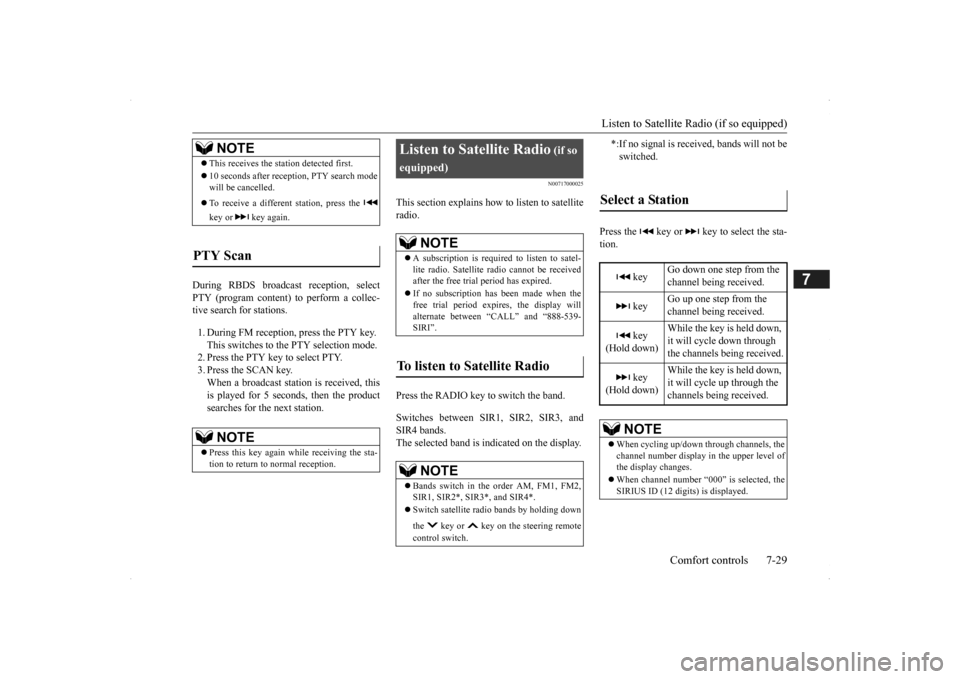
radio. Press the RADIO key to switch the band. Switches between SIR1, SIR2, SIR3, and SIR4 bands. The selected band is indicated on the display.
Press the key or ke
y to select the sta-
tion.
NOTE
This receives the station detected first. 10 seconds after reception, PTY search mode will be cancelled. To receive a different station, press the key or key again.
PTY Scan
NOTE
Press this key again while receiving the sta- tion to return to normal reception.
Listen to Satellite Radio
(if so
equipped)
NOTE
A subscription is require
d to listen to satel-
lite radio. Satellite
radio cannot be received
after the free tria
l period has expired.
If no subscription has been made when the free trial period expire
s, the display will
alternate between “CALL” and “888-539-SIRI”.
To listen to Satellite Radio
NOTE
Bands switch in the order AM, FM1, FM2, SIR1, SIR2*, SIR3*, and SIR4*. Switch satellite radi
o bands by holding down
the key or key on the steering remote control switch.
*:If no signal is received, bands will not be switched.
Select a Station
key
Go down one step from the channel being received.
key
Go up one step from the channel being received.
key
(Hold down)
While the key is held down, it will cycle down through the channels being received.
key
(Hold down)
While the key is held down, it will cycle up through the channels being received.
NOTE
When cycling up/down through channels, the channel number display
in the upper level of
the display changes. When channel number “
000” is selected, the
SIRIUS ID (12 digi
ts) is displayed.
BK0200500US.book 29 ページ 2013年2月12日 火曜日 午前9時46分
Page 346 of 451

Listen to Satellite Radio (if so equipped) 7-30 Comfort controls
7
Channels are received in order and take 10 seconds each. Press the SCAN key. All of the channels are scanned. 1. Press the PTY key. Switches to the category search mode, and the category name is indicated on thedisplay. 2. Turn the /SEL key to select the cate- gory.3. Press the SCAN key. The channels in the selected category are scanned.
Register the channel in
advance, and select
this at a later time. 1. Tune in to the channel to register. 2. Hold down any of the keys from the 1RPT key to the 6 key. A “Beep” sounds, and the preset key is registered.
Other channels can be
selected while listen-
ing to a channel. 1. Press the PTY key. Switches to the category search mode,and the category name is indicated on the display. 2. Turn the /SEL key to select the cate- gory. 3. Press the /SEL key. Switches to channe
l search mode.
4. Turn the /SEL key to select the chan- nel. 5. Press the /SEL key. A “Beep” sounds, and the selected chan- nel is received. (Channel preliminary set-ting mode) The channel name shown on the display flashes. Press the /SEL key again to cancel the search mode and retu
rn to normal recep-
tion. 6. To continue the search, turn the /SEL key to select the channel. The selected channel is received. 7. Press the /SEL key. Cancels the search mode and returns tonormal reception.
Scan Station Selection
Scan All Channels
NOTE
Press this key again while receiving the channel to return to normal reception. Selecting a channel will cancel this.
Scan Category Channels
NOTE
Press the SCAN key or PTY key again while receiving the channel to return to normalreception. Turning the /SET key will cancel.
Preset Memory
NOTE
The preset memory can register a maximum of 6 stations per band. If a preset key that already has a channel reg- istered is selected, then this is overwritten with the new preset. Pressing the preset key will select the previ- ously registered channel.The preset channels on the display are shown as “P1” though “P6”.
Channel Search
BK0200500US.book 30 ページ 2013年2月12日 火曜日 午前9時46分