2014 MITSUBISHI OUTLANDER engine
[x] Cancel search: enginePage 264 of 451

Bluetooth® 2.0 interface (if so equipped) 5-186 Features and controls
5
Steering control switch and microphone
P.5-186Voice recognition function
P.5-188
Useful voice commands
P.5-189
Speaker enrollment function
P.5-190
Connecting the Bluetooth
® 2.0 interface and
the Bluetooth
® device
P.5-192
Operating a music player connected via Blue- tooth
® P.5-196
How to make or receive hands-free calls
P.5-196Phonebook function
P.5-199
N00564001109
Press this button to increase the volume.
NOTE
If the ignition switch
or the operation mode
is left in ACC, the accessory power willautomatically turn off after a certain periodof time and you will no longer be able to use the Bluetooth
® 2.0 interface. The accessory
power comes on again if
the ignition switch
or the engine switch is operated. Refer to“ACC power auto-cut
out function” on page
5-18 and 5-57. The Bluetooth
® 2.0 interface cannot be used
if the Bluetooth
® device has a dead battery
or the device power is turned off. Hands-free calls
will not be possible if your
phone does not have
service available.
If you place the Bluetooth
® device in the
vehicle’s third seat or
luggage compartment,
you may not be able to
use the Bluetooth
®
2.0 interface. Some Bluetooth
® devices are not compatible
with the Bluetooth
® 2.0 interface.
You can confirm the Link System software version by pressing the HANG-UP button 3times (press and hold 2 times and then press briefly) within 10 seconds.
For detail of the Bluetooth
® 2.0 interface,
refer to the following web site: [For vehicles sold in U.S.A.] You can access the MITSUBISHI MOTORSNORTH AMERICA web site. [For vehicles sold in Canada and Mexico] You can access the MITSUBISHI MOTORSweb site. Please read and agree to the “Warning about Links to the Web Sites of Other Companies”,the websites mentioned above may connect you to websites other
than the MITSUBISHI
MOTORS web site.http://www.mitsubishi-motors.com/en/prod- ucts/index.html Software updates by ce
llular phone/digital
audio device manufacturers may change/alter devi
ce connectivity.
NOTE
Steering control switch and microphone
1- Volume up button 2- Volume down button 3- SPEECH button4- PICK-UP button 5- HANG-UP button 6- MicrophoneVolume up button
BK0200500US.book 186 ページ 2013年2月12日 火曜日 午前9時46分
Page 268 of 451

Bluetooth® 2.0 interface (if so equipped) 5-190 Features and controls
5
If a passcode has been set and the security function is enabled, the voice guide will say “Hands-free system is lo
cked. State the pass-
code to continue” when the SPEECH button (except for vehicles with Mitsubishi Multi- Communication System) or PICK-UP button(for vehicles with Mi
tsubishi Multi-Commu-
nication System) is pre
ssed to enter voice rec-
ognition mode. Say th
e 4-digit passcode
number to enter the passcode. If the entered passcode
is wrong, the voice
guide will say “<4-digi
t passcode>, Incorrect
passcode. Please try again.” Enter the correctpasscode.
Use the following procedure to turn off the security function by di
sabling the passcode.
1. Press the SPEECH button (except for vehicles with Mitsubishi Multi-Commu-nication System) or PICK-UP button (for vehicles with Mitsubishi Multi-Commu- nication System).2. Say “Setup.” 3. Say “Passcode.” 4. The voice guide w
ill say “Passcode is
enabled. Would you like to disable it?” Answer “Yes.” Answer “No” to cancel the disabling ofthe passcode and return to the main menu.
5. When the disabling of the passcode is completed, the voice
guide will say “Pass-
code is disabled” and the system will return to the main menu.
N00564700011
The Bluetooth
® 2.0 interface can use the
speaker enrollment func
tion to create a voice
model for one person per language. This makes it easier for the Bluetooth
® 2.0
interface to recognise
voice commands said
by you. You can turn a voice model registered with the speaker enrollment function on and offwhenever you want.
N00564801110
It takes about 2 to 3 minutes to complete thespeaker enrollment process. To ensure the best results, run through the process while in the driver’s seat, in an envi-ronment that is as qu
iet as possible (when
there is no rain or strong winds and the vehi- cle windows are closed). Please turn off yourphone while in speaker enrollment to prevent interruption of the process. Use the following procedure for speakerenrollment.
NOTE
Passcode will be require
d to access the sys-
tem after the next
ignition cycle.
It is required for a little time after engine stop that the entered passcode is actually recorded in the system.If the ignition switch
or the operation mode
is made to ACC or ON or the engine is started immediately afte
r engine stop, there
is a case when the entered passcode is not recorded in the system. At this time, please try to enter the passcode again.
Entering the passcode
NOTE
You can reenter the pa
sscode as many times
as you want. If you have forgot
ten your passcode, say
“Cancel” to quit the voice input mode and then check with an authorized MitsubishiMotors dealer.
Disabling the passcode
NOTE
System must be unlocke
d to disable the pass-
code.
Speaker enrollment function
Speaker enrollment
BK0200500US.book 190 ページ 2013年2月12日 火曜日 午前9時46分
Page 289 of 451
12 V power outlets
Features and controls 5-211
5
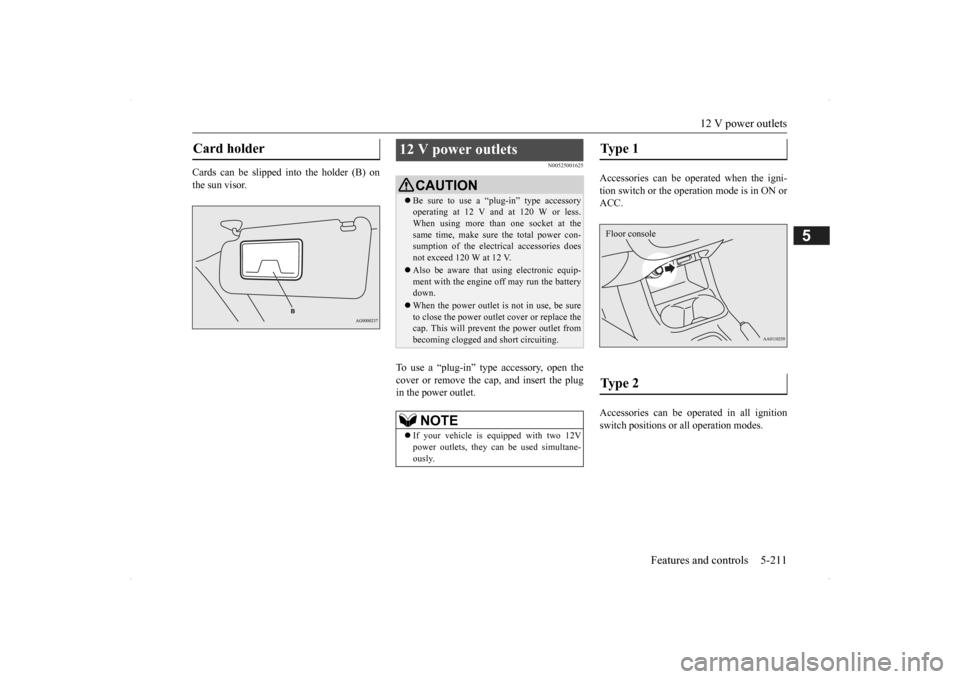
Cards can be slipped into the holder (B) on the sun visor.
N00525001625
To use a “plug-in” type accessory, open thecover or remove the cap, and insert the plugin the power outlet.
Accessories can be operated when the igni- tion switch or the operation mode is in ON or ACC. Accessories can be ope
rated in all ignition
switch positions or
all operation modes.
Card holder
12 V power outlets
CAUTIONBe sure to use a “plug-in” type accessory operating at 12 V and at 120 W or less.When using more than one socket at the same time, make sure
the total power con-
sumption of the electrical accessories doesnot exceed 120 W at 12 V. Also be aware that
using electronic equip-
ment with the engine
off may run the battery
down. When the power outlet is not in use, be sure to close the power outle
t cover or replace the
cap. This will prevent the power outlet frombecoming clogged and short circuiting.NOTE
If your vehicle is e
quipped with two 12V
power outlets, they ca
n be used simultane-
ously.
Type 1 Type 2 Floor console
BK0200500US.book 211 ページ 2013年2月12日 火曜日 午前9時46分
Page 290 of 451

Interior lights 5-212 Features and controls
5
N00525301585
N00525401469
Floor console box
Interior lights
NOTE
Be aware that leaving the light illuminated with the engine off may run the batterydown. Never leave the vehi
cle without checking
that the light is off.1- Cargo room light
P.5-214
2- Dome light (rear)
P.5-213
3- Dome light (front)/Reading lights
P.5-213
4- Downlight
P.5-171
Dome light (front)/Reading lights Dome light (front)
1- (DOOR) When any of the doors or the liftgate isopened, the dome light illuminates; when any of them are closed, the dome light goes off after approx
imately 30 seconds.
However, the light
goes off immediately
if: The doors and the liftgate are closed while the ignition switch is in the “ON” position or the operation mode is in ON. The driver’s door is closed while the its lock knob is in the lock position, after all the other doors are closed.
BK0200500US.book 212 ページ 2013年2月12日 火曜日 午前9時46分
Page 291 of 451
Interior lights
Features and controls 5-213
5
2- (OFF) The dome light stays off regardless of any door or the liftgate being opened or closed.
N00537601165
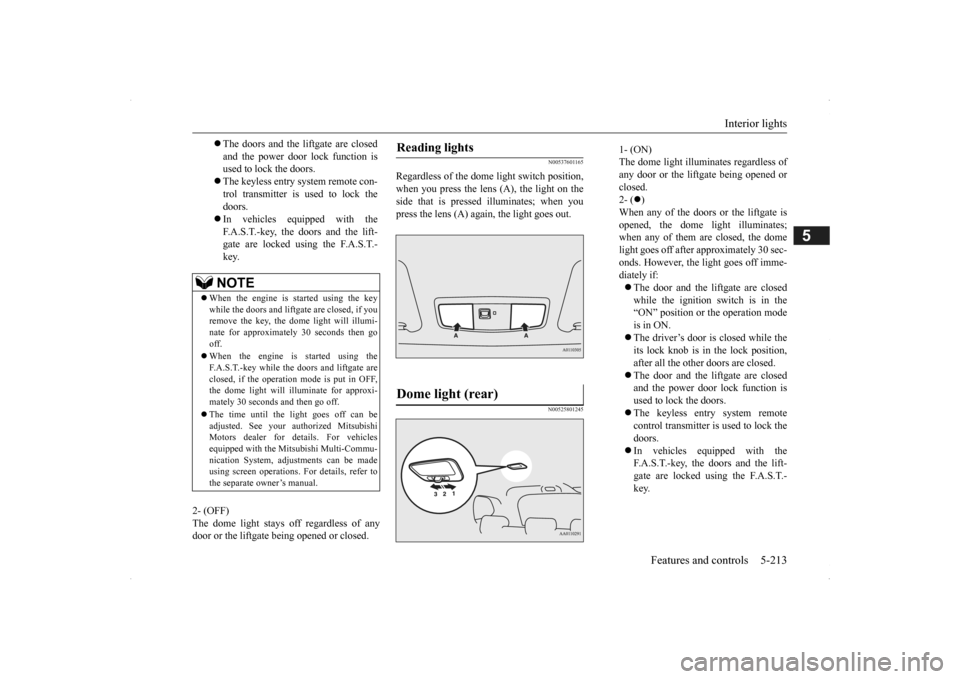
Regardless of the dome light switch position, when you press the lens (A), the light on the side that is pressed illuminates; when youpress the lens (A) agai
n, the light goes out.
N00525801245
The doors and the liftgate are closed and the power door lock function is used to lock the doors. The keyless entry system remote con- trol transmitter is used to lock the doors. In vehicles equipped with the F.A.S.T.-key, the doors and the lift- gate are locked using the F.A.S.T.-key.NOTE
When the engine is
started using the key
while the doors and liftgate are closed, if youremove the key, the dom
e light will illumi-
nate for approximately 30 seconds then go off. When the engine is started using the F.A.S.T.-key while the doors and liftgate areclosed, if the operation
mode is put in OFF,
the dome light will illuminate for approxi- mately 30 seconds and then go off. The time until the light goes off can be adjusted. See your authorized MitsubishiMotors dealer for details. For vehicles equipped with the Mitsubishi Multi-Commu- nication System, adjustments can be madeusing screen operations.
For details, refer to
the separate owner’s manual.
Reading lights Dome light (rear)
1- (ON) The dome light illumin
ates regardless of
any door or the liftgate being opened or closed. 2- (
)
When any of the doors or the liftgate is opened, the dome li
ght illuminates;
when any of them are closed, the domelight goes off after approximately 30 sec- onds. However, the li
ght goes off imme-
diately if: The door and the liftgate are closed while the ignition switch is in the“ON” position or the operation mode is in ON. The driver’s door is closed while the its lock knob is in the lock position, after all the other doors are closed. The door and the liftgate are closed and the power door lock function is used to lock the doors. The keyless entry system remote control transmitter is used to lock the doors. In vehicles equipped with the F.A.S.T.-key, the doors and the lift- gate are locked using the F.A.S.T.- key.
BK0200500US.book 213 ページ 2013年2月12日 火曜日 午前9時46分
Page 292 of 451
Interior lights 5-214 Features and controls
5
3- (OFF) The dome light stays off regardless of anydoor or the liftgate being opened or closed.
N00526101186
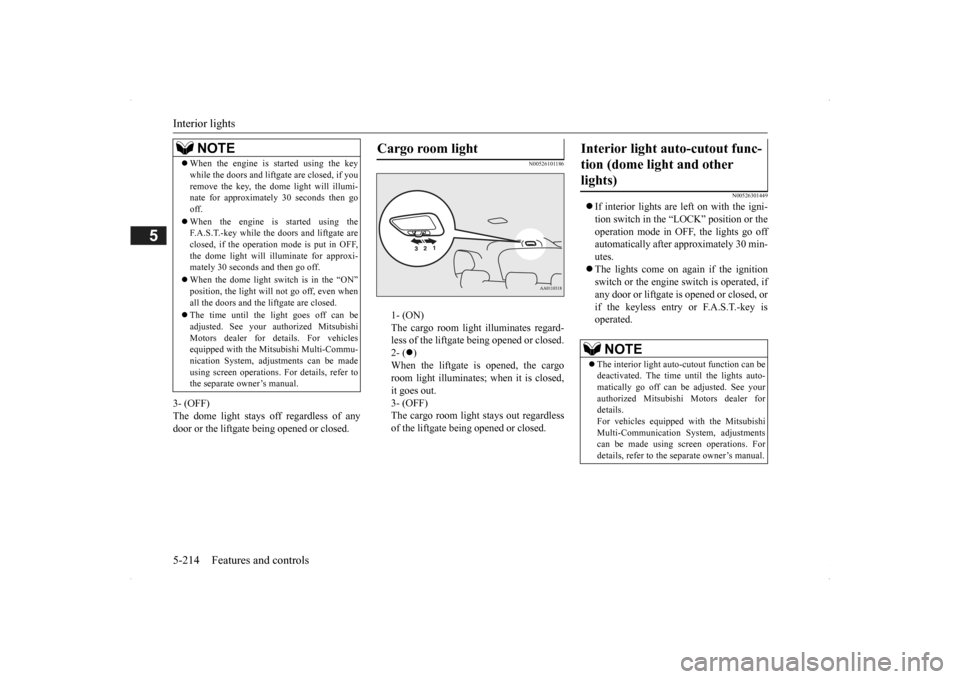
1- (ON) The cargo room light illuminates regard- less of the liftgate being opened or closed.2- (
)
When the liftgate is opened, the cargo room light illuminates;
when it is closed,
it goes out. 3- (OFF) The cargo room light
stays out regardless
of the liftgate bei
ng opened or closed.
N00526301449
If interior lights are left on with the igni- tion switch in the “LOCK” position or the operation mode in OFF, the lights go off automatically after approximately 30 min-utes. The lights come on again if the ignition switch or the engine
switch is operated, if
any door or liftgate is opened or closed, or if the keyless entry or F.A.S.T.-key isoperated.
NOTE
When the engine is started using the key while the doors and liftga
te are closed, if you
remove the key, the do
me light will illumi-
nate for approximately 30 seconds then go off. When the engine is started using the F.A.S.T.-key while the doors and liftgate are closed, if the operation mode is put in OFF,the dome light will il
luminate for approxi-
mately 30 seconds and then go off. When the dome light switch is in the “ON” position, the light will not go off, even when all the doors and the liftgate are closed. The time until the light goes off can be adjusted. See your authorized MitsubishiMotors dealer for details. For vehicles equipped with the Mitsubishi Multi-Commu- nication System, adju
stments can be made
using screen operations. For details, refer to the separate owner’s manual.
Cargo room light
Interior light auto-cutout func- tion (dome light and other lights)
NOTE
The interior light auto
-cutout function can be
deactivated. The time until the lights auto- matically go off can be
adjusted. See your
authorized Mitsubishi Motors dealer fordetails. For vehicles equipped
with the Mitsubishi
Multi-Communication System, adjustmentscan be made using sc
reen operations. For
details, refer to the
separate owner’s manual.
BK0200500US.book 214 ページ 2013年2月12日 火曜日 午前9時46分
Page 302 of 451

Driving precaution 6-2 Driving safety
6
N00629300053
Utility vehicles have
higher ground clearance
and a narrower track, which enables them to perform in a wide variety of off-road situa-tions. Because of the higher ground clear- ance, these vehicles have a higher center of gravity, which makes them handle differentlythan ordinary vehicles when driving on pave- ment. They are not designed to maneuver or corner at the same speed on pavement as con-ventional 2-wheel driv
e passenger cars any
more than low-slung sports cars are designed to perform sati
sfactorily in off-road condi-
tions. Always drive safely and steer the vehicle carefully. Avoid operati
ng the vehicle in a
manner that might require sharp turns or abrupt maneuvers. As w
ith other vehicles of
this type, failure to ope
rate this vehicle cor-
rectly can result in loss of control or vehicle rollover. In a rollover crash, an unbelted person is sig-nificantly more likely to die than a person wearing a seat belt. Be
fore starting the vehi-
cle, always make cert
ain that you and all your
passengers are properly wearing their seatbelts (with children in the rear seat, in appro- priate restraints).
N00628801188
Fuel economy is depe
ndent on many factors.
Your personal driving habits can have a sig- nificant effect on your fuel consumption. Several recommendations
for achieving the
greatest fuel economy are listed below. Whenever accelerating from a stop, always accelerate
slowly and smoothly.
When parked for even a short period, do not idle the engine. Shut it off. Plan your trips to avoid unnecessary stops. Keep your tires inflated to the recom- mended pressures. When driving on highways or dry improved roads, set the drive mode-selec-tor “4WD ECO”, “4WD AUTO” or “AWC ECO”, “NORMAL” position (if so equipped). For freeway driving, maintain a speed of approximately 50 mph (80 km/h) when traffic, roadway and weather conditionssafely permit.
Keep your air filter clean and your vehicle lubricated according
to the recommenda-
tions in this manual. Always keep your ve
hicle well main-
tained. A poorly maintained enginewastes fuel and costs money. Never overload your vehicle.
N00628900049
Drunk driving is one of the most frequent causes of accidents.Your driving ability ca
n be seriously impaired
even with blood alcohol levels far below the legal minimum. If you
have been drinking,
don’t drive. Ride with a designated non- drinking driver, call a cab or a friend, or use public transportation. Drinking coffee or tak-ing a cold shower will not make you sober. Similarly, prescription and nonprescription drugs affect your aler
tness, perception and
reaction time. Consul
t with your doctor or
pharmacist before dr
iving while under the
influence of any of these medications.
Driving precaution
WA R N I N G Utility vehicles have
a significantly higher
rollover rate than othe
r types of vehicles.
Avoid abrupt maneuvers and excessive speed. Always buckle up.
Fuel economy
Driving, alcohol and drugs
WA R N I N G NEVER DRINK AND DRIVE. Your perceptions ar
e less accurate, your
reflexes are slower and your judgment isimpaired.
BK0200500US.book 2 ページ 2013年2月12日 火曜日 午前9時46分
Page 303 of 451

Floor mat
Driving safety 6-3
6
N00628600033
The original equipment floor mat provided with your vehicle was
specifically designed
for your vehicle.Always properly positio
n the floor mat and
assure it does not inte
rfere with operation of
the pedals. Always use the retaining clip onthe driver’s floorboard to secure the floor mat. When used, this clip will help prevent the floor mat from moving forward and possi- bly interfering with the operation of the ped- als. To prevent the floor mat from movingforward and possibly interfering with the operation of the pedals, Mitsubishi genuine floor mats are recommended.
N00628700050
1. Place the floor mat to fit the shape of thefloorboard.2. Align the floor mat with the installation holes over the retaining clips.
3. Secure the floor mat with retaining clips.
Floor mat To install the floor mat
NOTE
The shape of the mat and the number of retaining clips may vary depending on the vehicle model.WA R N I N G If a floor mat is the
wrong size or is not
properly installed, it can interfere with the operation of the pedals. Interference withthe pedals can cause unintended accelera- tion and/or increased stopping distances resulting in a cras
h and injury. Always
make sure the floor mat does not interfere with the accelerator or brake pedal. Always use the reta
ining clip on the
driver’s floorboard to secure the floor mat. Always install the mat with the correct side facing down.
Never install a second mat over or under an existing floor mat. Do not use a floor mat designed for another model vehicle ev
en if it is a Mit-
subishi genuine floor mat. Before driving, be sure to check the fol- lowing:• Periodically check that the floor mat isproperly secured with the retaining clips.If you remove the fl
oor mat while clean-
ing the inside of you
r vehicle or for any
other reason, always
check the condition
of the floor mat afte
r it has been rein-
stalled.• While the vehicle is stopped with theengine off, check that
the floor mat is not
interfering with the pedals by depressingthe pedals fully.WA R N I N G
BK0200500US.book 3 ページ 2013年2月12日 火曜日 午前9時46分