2014 MITSUBISHI LANCER ECU
[x] Cancel search: ECUPage 118 of 434

Steering wheel tilt lock lever Features and controls 5-51
5
N00511500215
To adjust the steering wheel height, release the tilt lock lever while holding the steeringwheel by hand, and raise or lower the steering wheel to the desired height. After adjustment, securely lock the lever bypulling it upward.
N00548601080
Adjust the inside rearview mirror only aftermaking any seat adjustments so as to have aclear view to the rear of the vehicle. Adjust the inside mirror to maximize the view through the rear window.
Steering wheel tilt lock lever 1- Locked2- ReleasedWA R N I N G After adjusting, make sure the lock lever is secured in the locked (1) position. Type 1 Type 2
Do not attempt to adjust the steering wheel while driving. This can be danger- ous. When releasing the tilt lock lever {moving it to the position (2)}, be sure to hold the steering wheel firmly. Otherwise, the steering wheel may slip down too sud-denly. WA R N I N G
Inside day/night rearview mirror
WA R N I N G Do not attempt to adjust the inside rear- view mirror while driving. This can be dangerous.Be sure to adjust the mirror before driv- ing.Type 1 Type 2
Page 132 of 434

Continuously variable transmission (CVT) (if so equipped)
Features and controls 5-65
5
N00563100021
When the selector lever cannot be shifted from the “P” (PARK) position to anotherposition while the brake pedal is pressed andheld down with the ignition switch at the “ON” position, the battery may be flat or the shift-lock mechanism may be malfunction-ing. Immediately have your vehicle checked by an authorized Mitsubishi Motors dealer or arepair facility of your choice. If you need to move the vehicle, shift the selector lever as follows.
1. Make sure the parking brake is fully applied. 2. Stop the engine if it is running. 3. Insert a screwdriver with a cloth over itstip into the notch (A) of the cover. Pry gently as shown to remove the cover. 4. Depress the brake pedal with the right foot.5. Turn the ignition switch to the “ACC”position.
6. Insert a screwdriver in the shift-lock release hole (B). Shift the selector lever to the “N” (NEUTRAL) position while pressing the screwdriver down.
N00513900402
When the ignition switch is turned to the“ON” position, the selector lever position is shown on the multi-information display.
NOTE
To ensure proper transmission operation, stop at each detent position when shifting. After shifting, check the position in the multi-information display. If the brake pedal is not depressed and held, the shift-lock device activates to prevent the selector lever from being moved from the“P” (PARK) position. For a shift indicated by in the illustration, depress the brake pedal before moving the selector lever. If y
ou attempt to move the
selector lever before depressing the brake pedal, the selector lever will be immovable.
When the selector lever cannot be shifted from the “P” (PARK) posi-tion
NOTE
For vehicles with the Free-hand Advanced Security Transmitter (F.A.S.T.-key), turn the ignition switch to the “ACC” position withthe emergency key if the vehicle battery is flat.
Selector lever position display
Page 157 of 434

Limited-slip differential (if so equipped) 5-90 Features and controls
5
N00517400069
A limited-slip differential is applied for rear wheel differential. The features of this lim-ited-slip differential are described below: Just as with a conventional differential, the wheel on one side is a
llowed to turn at a dif-
ferent speed from the wheel on the other sidewhen the vehicle is cornering. The difference between the limited-slip differential and a conventional differential is that if the wheelon one side of the vehicle loses traction, a greater amount of torque is applied to the wheel on the other side to improve traction.
N00517500262
Overuse of the brake can cause poor brakeresponse and premature wear of the brakepads and linings. When driving down a long or steep hill, use engine braking by downshifting.
N00517600377
Your vehicle is equipped with power brakes for more braking force with minimal brake pedal effort.Your brakes are designed to operate at full capacity, even if the power assist is lost. If the power assist is lost, the effort needed topress the brake pedal is greater. If you should loose the power assist for some reason, the brakes will still work. If the power brake unit or either of the two brake hydraulic systems stops working prop-
Jacking up a all-wheel drive vehicles
WA R N I N G Do not start or run the engine while the vehicle is on the jack.The jack could slip out of position and result in an accident.
Limited-slip differential
(if so
equipped)
NOTE
Even if there is a difference in the amount of traction the wheels can get, if both of them are spinning, the limited-slip differential will not be effective.CAUTION Never start the engine while one of the front or rear wheels is jacked up and the other in contact with the ground; doing so may cause the vehicle to jump forward. Continuously attempting to extract the vehi- cle from snow, mud, etc. while using highengine rpm may damage the limited-slip dif- ferential. Using a compact spare wheel will adversely affect the limited-slip differential; replace the compact spare wheel with a standard sizewheel as soon as possible.
Service brake Brake pedal
WA R N I N G Do not leave any objects near the brake pedal or let a floor mat slide under it; doing so could prevent the full pedal stroke that would be necessary in an emergency. Make sure that the pedal canbe operated freely at all times. Make sure the floor mat is securely held in place.CAUTION It is important not to drive the vehicle with your foot resting on the brake pedal when braking is not required. This practice can result in very high brake temperatures, pre-mature pad and lining wear, and possible damage to the brakes.
Power brakes
Page 176 of 434

Rear-view camera (if so equipped)
Features and controls 5-109
5
Reference lines and upper surface of the rear bumper (A) are displayed on the screen. Red line (B) indicates approximately 20 inches (50 cm) behind the rear bumper. Two Green lines (C) indicate approxi- mately 8 inches (20 cm) outside of the vehicle body. Short transverse lines (1 to 3) indicate dis- tance from the rear bumper.CAUTION If the camera lens gets dirty, a clear image cannot be obtained. As necessary, rinse the lens with clean water and gently wipe with a clean, soft cloth. To avoid damaging the camera;• Do not rub the cover excessively or polish it by using an abrasive compound. • Do not disassemble the camera.• Do not splash hot water directly on the lens. • Do not spray the camera and its surround- ings with high-pressure water.• Make sure that the trunk lid is securelyclosed when backing up.
Reference lines on the screen
1: Approximately at the rear edge of the
rear bumper
2: Approximately 39 inches (100 cm) 3: Approximately 79 inches (200 cm) CAUTION The rear-view camera uses a wide-angle lens. As a result, images and distances shownon the screen are not exact. Actual distance may be different from dis- tance indicated by the lines on the screen, depending on the loading condition of the vehicle and road surface condition.The reference lines for distance and vehicle width are based on a level, flat road surface. In the following cases, objects shown on thescreen will appear to be farther off than they actually are.• When the rear of the vehicle is weigheddown with the weight of passengers and luggage in the vehicle. (Case 1)
• When there is an upward slope at the back. (Case 2)CAUTION
Case 1 A- Actual objects B- Objects shown on the screenCase 2 A- Actual objects B- Objects shown on the screen
Page 233 of 434

Bluetooth® 2.0 interface (if so equipped) 5-166 Features and controls
5
With the confirmation function activated, you are given more opportunities than normal to confirm a command when making various settings to the Bluetooth
® 2.0 interface. This
allows you to decrease the possibility that a setting is accidentally changed. The confirmation function can be turned onor off by following the steps below. 1. Press the SPEECH button (except for vehicles with Mitsubishi Multi-Commu- nication System) or PICK-UP button (forvehicles with Mitsubishi Multi-Commu-nication System). 2. Say “Setup.” 3. Say “Confirmation prompts.”4. The voice guide will say “Confirmation prompts are
N00564601118
It is possible to use a passcode as a securityfunction by setting a passcode of your choice for the Bluetooth
® 2.0 interface.
When the security function is turned on, it is necessary to make a voice input of a 4-digit
passcode in order to use all functions of the Bluetooth
® 2.0 interface, except for recep-
tion. Use the following procedure to turn on the security function by setting a passcode. 1. Press the SPEECH button (except for vehicles with Mitsubishi Multi-Commu- nication System) or PICK-UP button (forvehicles with Mitsubishi Multi-Commu-nication System). 2. Say “Setup.” 3. Say “Passcode.”4. The voice guide will say “Passcode is dis- abled. Would you like to enable it?” Answer “Yes.”Answer “No” to cancel the setting of the passcode and return to the main menu. 5. The voice guide will say “Please say a 4-digit passcode. Remember this passcode. It will be required to use this system.” Say a 4-digit number which you want toset as a passcode. 6. For confirmation purposes, the voice guide will say “Passcode <4-digit pass-code>. Is this correct?” Answer “Yes.” Answer “No” to return to the passcode input in Step 5.
7. When the registration of the passcode is completed, the voice guide will say “Pass- code is enabled” and the system will return to the main menu.
If a passcode has been set and the security function is enabled, the voice guide will say “Hands-free system is locked. State the pass- code to continue” when the SPEECH button(except for vehicles with Mitsubishi Multi- Communication System) or PICK-UP button (for vehicles with Mitsubishi Multi-Commu-nication System) is pressed to enter voice rec- ognition mode. Say the 4-digit passcode number to enter the passcode. If the entered passcode is wrong, the voice guide will say “<4-digit passcode>, Incorrect
Security function
Setting the passcode
NOTE
Passcode will be required to access the sys- tem after the next ignition cycle. It is required for a little time after engine stop that the entered passcode is actuallyrecorded in the system. If the ignition switch is made to “ACC” or “ON” or the engine is started immediately after engine stop, thereis a case when the entered passcode is not recorded in the system. At this time, please try to enter the passcode again.
Entering the passcode
Page 234 of 434

Bluetooth® 2.0 interface (if so equipped)
Features and controls 5-167
5
passcode. Please try again.” Enter the correct passcode. Use the following procedure to turn off the security function by disabling the passcode. 1. Press the SPEECH button (except for vehicles with Mitsubishi Multi-Commu-nication System) or PICK-UP button (for vehicles with Mitsubishi Multi-Commu- nication System).2. Say “Setup.” 3. Say “Passcode.” 4. The voice guide will say “Passcode isenabled. Would you like to disable it?” Answer “Yes.” Answer “No” to cancel the disabling ofthe passcode and return to the main menu.
5. When the disabling of the passcode is completed, the voice guide will say “Pass- code is disabled” and the system will return to the main menu.
N00564700011
The Bluetooth
® 2.0 interface can use the
speaker enrollment function to create a voicemodel for one person per language. This makes it easier for the Bluetooth
® 2.0
interface to recognise voice commands said by you. You can turn a voice model registered with the speaker enrollment function on and off whenever you want.
N00564801080
It takes about 2 to 3 minutes to complete thespeaker enrollment process.To ensure the best results, run through the process while in the driver’s seat, in an envi- ronment that is as quiet as possible (whenthere is no rain or strong winds and the vehi- cle windows are closed). Please turn off your phone while in speaker enrollment to preventinterruption of the process. Use the following procedure for speaker enrollment.
1. Stop your vehicle in a safe area, put the shift lever (manual transaxle) in the “N” (Neutral) position, or the selector lever {continuously variable transmission(CVT)} or gearshift lever (Twin Clutch SST) in the “P”(PARK) position, and then pull the parking brake lever. 2. Press the SPEECH button (except for vehicles with Mitsubishi Multi-Commu- nication System) or PICK-UP button (forvehicles with Mitsubishi Multi-Commu- nication System). 3. Say “Voice training.”
NOTE
You can reenter the passcode as many times as you want. If you have forgotten your passcode, say “Cancel” to quit the voice input mode and then check with an authorized MitsubishiMotors dealer.
Disabling the passcode
NOTE
System must be unlocked to disable the pass- code.
Speaker enrollment function
Speaker enrollment
NOTE
Speaker enrollment is not possible unless the vehicle is parked. Make sure you park the vehicle in a safe area before attempting speaker enrollment.
Page 247 of 434

Bluetooth® 2.0 interface (if so equipped) 5-180 Features and controls
5
8. Once the telephone number is registered, the voice guide will say “Number saved” and then the system will return to the main menu.
N00580100026
1. Press the SPEECH button (except forvehicles with Mitsubishi Multi-Commu-nication System) or PICK-UP button (for vehicles with Mitsubishi Multi-Commu- nication System).2. Say “Phonebook.” 3. The voice guide will say “Select one of the following: new entry, edit number,edit name, list names, delete, erase all, or import contact.” Say “Edit name.”
4. The voice guide will say “Please say the name of the entry you would like to edit, or say list names.” Say the name you want to edit. 5. The voice guide will say “Changing
N00580200027
1. Press the SPEECH button (except forvehicles with Mitsubishi Multi-Commu- nication System) or PICK-UP button (for vehicles with Mitsubishi Multi-Commu-nication System).
2. Say “Phonebook.” 3. The voice guide will say “Select one of the following: new entry, edit number, edit name, list names, delete, erase all, orimport contact.” Say “List names.” 4. Bluetooth
® 2.0 interface will read out the
entries in the phonebook in order.5. When the voice guide is done reading the list, it will say “End of list, would you like to start from the beginning?” When youwant to check the list again from thebeginning, answer “Yes.” When you are done, answer “No” to return to the previous or main menu.
NOTE
If the location where a telephone number was already registered has been overwritten with a new number, the voice guide will say “Number changed” and then the system willreturn to the main menu.
Editing a name
NOTE
Say “List names,” and the names registered in the phonebook are read out in order. Refer to “Listening to the list of registered names” on page 5-180.
Listening to the list of registered names
NOTE
You can call, edit or delete a name that is being read out.Press the SPEECH button and say “Call” to call the name, “Edit name” to edit it, or “Delete” to delete it.The system will beep and then execute your command. If you press the SPEECH button and say “Continue” or “Previous” while the list is being read, the system will advance or rewind the list. Say “Continue” to proceed to the next entry or “Previ
ous” to return to the
previous entry.
Page 259 of 434
Cup holder 5-192 Features and controls
5
N00551600188
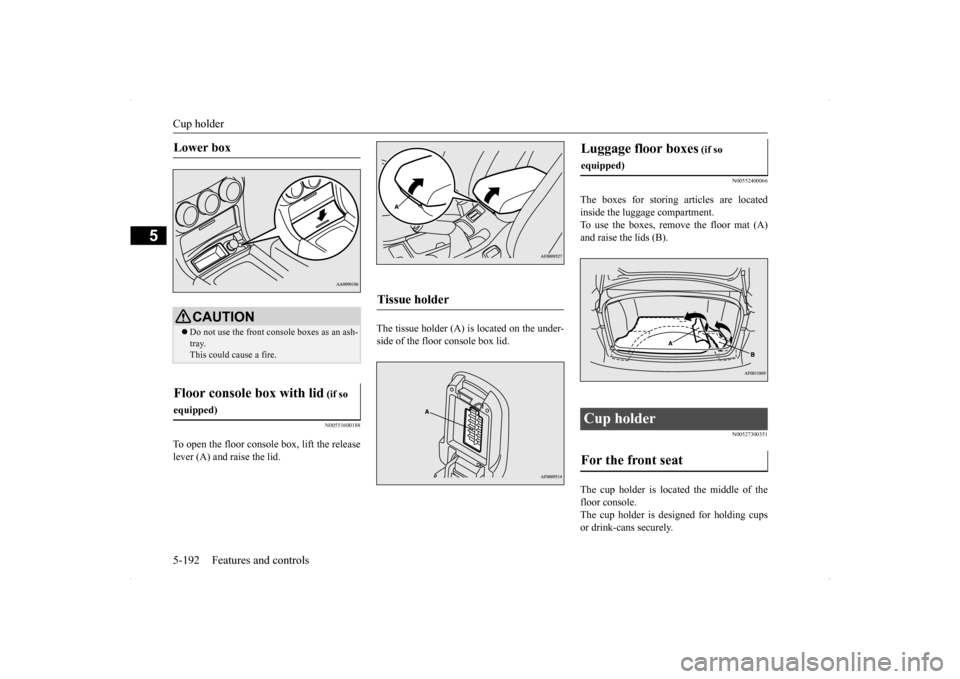
To open the floor console box, lift the release lever (A) and raise the lid.
The tissue holder (A) is located on the under- side of the floor console box lid.
N00552400066
The boxes for storing articles are located inside the luggage compartment. To use the boxes, remove the floor mat (A)and raise the lids (B).
N00527300351
The cup holder is located the middle of thefloor console. The cup holder is designed for holding cups or drink-cans securely.
Lower box
CAUTION Do not use the front console boxes as an ash- tray. This could cause a fire.
Floor console box with lid
(if so
equipped)
Tissue holder
Luggage floor boxes
(if so
equipped)Cup holder For the front seat