2014 MITSUBISHI LANCER ECU
[x] Cancel search: ECUPage 99 of 434

Free-hand Advanced Security Transmitter (F.A.S.T.-key) (if so equipped) 5-32 Features and controls
5
2. Open the driver’s door and turn the com- bination headlights and dimmer switch to the “OFF” position. 3. Press the LOCK button (1) for 4 to 10 sec-onds and press the UNLOCK button (2) during this time. 4. Release in sequence the UNLOCK andLOCK buttons within 10 seconds of pressing the UNLOCK button in step 3.
The turn signal lights answerback function can be set to the following seven conditions. Each time the turn signal lights answerback function is set, a chime will sound to tell you the condition of the answerback function.
1. Turn the ignition switch to the “LOCK” position. If you started the engine with the key, remove the key from the ignition switch.2. Open the driver’s door and turn the com- bination headlights and dimmer switch to the “OFF” position.3. Press the UNLOCK button (2) for 4 to 10 seconds and press the LOCK button (1) during this time.4. Release in sequence the UNLOCK andLOCK buttons within 10 seconds of pressing the LOCK button in step 3.
The buzzer answerback function can be turned ON or OFF as required.
N00544601112
The door unlock function can be set to thefollowing two conditions.Each time the door unlock function is set, a chime will sound to te
ll you the condition of
the door unlock function.
1. Turn the ignition switch to the “LOCK” position. If you started the engine with the key, remove the key from the ignition switch.2. Open the driver’s door and turn the com- bination headlights and dimmer switch to the “OFF” position.3. Press the LOCK button (1) for 4 to 10 sec- onds and press the UNLOCK button (2) during this time.4. Release in sequence the LOCK andUNLOCK buttons within 10 seconds of pressing the LOCK button in step 3.
N00544700015
If you are near your vehicle and feel threat-ened, you can activate the alarm to call atten- tion as follows: 1. Press the PANIC button (4) for more than 1 second. 2. The headlights will blink on and off and the horn will sound intermittently forabout 3 minutes. 3. To turn off the alarm, press any button on the remote control transmitter.
Changing the setting of the turn signal lights answerback functionNumber of chimes
Condition
To l o c k
To u n l o c k
One chime One flash Two flashesTwo chimes One flash No flashThree chimes No flash Two flashesFour chimes Two flashes One flashFive chimes No flash One flashSix chimes Two flashes No flashSeven chimes
No flash No flash
Buzzer deactivation/reactivationSetting of door unlock function
Number of chimes
Condition
One chime All doors unlock Two chimes Driver’s door unlock only
Using the panic alarm
Page 100 of 434

Free-hand Advanced Security Transmit
ter (F.A.S.T.-key) (if so equipped)
Features and controls 5-33
5
N00561300029
Only a F.A.S.T.-key, which has been pro- grammed into the vehicle’s electronics, canlock and unlock all the doors, and start the engine. If you lose the F.A.S.T.-key, you can order aF.A.S.T.-key from your authorized Mitsubishi Motors dealer by referring to the key number. To prevent vehicle theft, the ID codes for allthe F.A.S.T.-keys except the one for the lostF.A.S.T.-key must be programmed again. Take your vehicle and all the remaining F.A.S.T.-keys to your authorized MitsubishiMotors dealer to have your ID codes pro- grammed again.
N00561400020
To add a F.A.S.T.-key, you must already havetwo registered F.A.S.T.-keys. Registering the ID code can be done by yourauthorized Mitsubishi Motors dealer. Or it can be done by yourself (except for vehicles sold in Canada). For you to register the IDcode yourself, follow the “Customer F.A.S.T.-key programming” procedure below. If you choose to have your authorized Mit-subishi Motors dealer
register the ID code,
take your vehicle and all remaining F.A.S.T.-
keys to your authorized Mitsubishi Motors dealer.
N00561501116
You can program new F.A.S.T.-keys to thesystem if you have two valid (already regis-tered) F.A.S.T.-keys, blank (not registered) F.A.S.T.-key and emergency key (specially cut for your vehicle at your MitsubishiMotors dealer). To use the new F.A.S.T.-key, it is necessary to register the key with both the electronicimmobilizer and keyless entry system. Also refer to “Electronic immobilizer: Cus- tomer F.A.S.T.-key programming” on page5-29. For F.A.S.T.-key programming, follow the procedures below. 1. Remove the emergency key from the F.A.S.T.-key. Refer to “Emergency key”on page 5-23.
2. While pushing the lock release buttons (A), remove the cover of the ignition switch. 3. Insert the emergency key into the ignition switch.
Replacement F.A.S.T.-keys
Additional F.A.S.T.-keys
NOTE
You are provided with two F.A.S.T.-keys, but you may register up to four F.A.S.T.-keys.
Customer F.A.S.T.-key program- ming (Except for vehicles sold in Canada)
Page 101 of 434
Free-hand Advanced Security Transmitter (F.A.S.T.-key) (if so equipped) 5-34 Features and controls
5
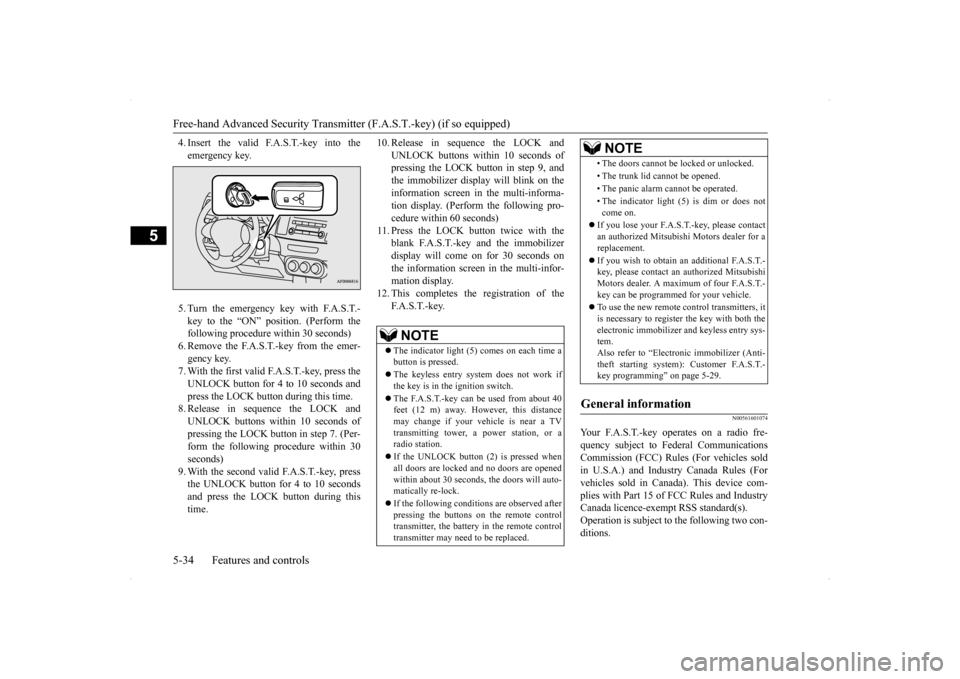
4. Insert the valid F.A.S.T.-key into the emergency key. 5. Turn the emergency key with F.A.S.T.- key to the “ON” position. (Perform the following procedure within 30 seconds)6. Remove the F.A.S.T.-key from the emer- gency key. 7. With the first valid F.A.S.T.-key, press theUNLOCK button for 4 to 10 seconds andpress the LOCK button during this time. 8. Release in sequence the LOCK and UNLOCK buttons within 10 seconds ofpressing the LOCK button in step 7. (Per- form the following procedure within 30 seconds)9. With the second valid F.A.S.T.-key, press the UNLOCK button for 4 to 10 seconds and press the LOCK button during thistime.
10. Release in sequence the LOCK and
UNLOCK buttons within 10 seconds of pressing the LOCK button in step 9, and the immobilizer display will blink on theinformation screen in the multi-informa- tion display. (Perform the following pro- cedure within 60 seconds)
11. Press the LOCK button twice with the
blank F.A.S.T.-key and the immobilizer display will come on for 30 seconds onthe information screen in the multi-infor-mation display.
12. This completes the registration of the
F. A . S . T. - k e y.
N00561601074
Your F.A.S.T.-key operates on a radio fre-quency subject to Federal Communications Commission (FCC) Rules (For vehicles sold in U.S.A.) and Industry Canada Rules (Forvehicles sold in Canada). This device com- plies with Part 15 of FCC Rules and Industry Canada licence-exempt RSS standard(s).Operation is subject to the following two con- ditions.
NOTE
The indicator light (5) comes on each time a button is pressed. The keyless entry system does not work if the key is in the ignition switch. The F.A.S.T.-key can be used from about 40 feet (12 m) away. However, this distance may change if your vehicle is near a TVtransmitting tower, a power station, or a radio station. If the UNLOCK button (2) is pressed when all doors are locked and no doors are openedwithin about 30 seconds, the doors will auto- matically re-lock. If the following conditions are observed after pressing the buttons on the remote control transmitter, the battery in the remote controltransmitter may need to be replaced.
• The doors cannot be locked or unlocked. • The trunk lid cannot be opened.• The panic alarm cannot be operated.• The indicator light (5) is dim or does not come on.
If you lose your F.A.S.T.-key, please contact an authorized Mitsubishi Motors dealer for areplacement. If you wish to obtain an
additional F.A.S.T.-
key, please contact an authorized Mitsubishi Motors dealer. A maximum of four F.A.S.T.- key can be programmed for your vehicle. To use the new remote control transmitters, it is necessary to register the key with both theelectronic immobilizer and keyless entry sys- tem. Also refer to “Electr
onic immobilizer (Anti-
theft starting system): Customer F.A.S.T.- key programming” on page 5-29.
General information
NOTE
Page 102 of 434

Free-hand Advanced Security Transmit
ter (F.A.S.T.-key) (if so equipped)
Features and controls 5-35
5
This device may not cause harmful inter- ference. This device must accept any interference received, including interference that maycause undesired operation.
N00561700081
1. Before replacing the battery, remove static electricity from your body by touching a metal grounded object.
2. With the Mitsubishi mark facing you, insert the cloth-covered tip of a flat blade screwdriver into the notch in the remote control transmitter case and use it to openthe case. 3. Remove the old battery.
4. Install a new battery with the +side (A) up. 5. Close the remote control transmitter case firmly. 6. Check the keyless entry system to see thatit works.
CAUTION Changes or modifications not expressly approved by the manufacturer for compli- ance could void the user’s authority to oper-ate the equipment.
Procedure for replacing the remote control transmitter battery
NOTE
Be sure to perform the procedure with the Mitsubishi mark facing you. If the Mitsubi- shi mark is not facing you when you open theremote control transmitter case, the transmit- ter may come out.
NOTE
You may purchase a replacement battery at an electric appliance store. Your authorized Mitsubishi Motors dealer can replace the battery for you if you prefer.CAUTION When the remote control transmitter case is opened, be careful to keep water, dust, etc. out. Also, do not touch the internal compo- nents.
+ side - side
Coin type bat- tery CR2032
Page 108 of 434

Trunk lid
Features and controls 5-41
5
Press the trunk button (Vehicles with keyless entry system or F.A.S.T.-key) or OPENswitch (Vehicles with F.A.S.T.-key). (See “Keyless entry system” on page 5-7, 5-30 or “Free-hand Advanced Security Transmitter(F.A.S.T.-key)” on page 5-12.) The trunk lid will pop up
to slightly. Lift it to
open the trunk. Pull the trunk lid release lever, located to the left of the driver’s seat, up to open the trunk.
Pull the trunk lid downward as illustrated. Gently slam the trunk lid from the outside so
that it is completely closed. Always ensure the trunk lid is securely closed.
Using the remote control transmitter (Vehicles with keyless entry system or F. A . S . T. - k e y )Operation from inside the vehicle
CAUTION Do not use the trunk lid release lever while the vehicle is moving. If the trunk lid is opened, objects in the trunk could fall onto the road and cause an accident.NOTE
The trunk area light comes on when the trunk lid is opened, and goes out when it is closed. The trunk area light remains illuminated for a certain period and then goes off automati- cally. Refer to “Interior light auto-cutoutfunction (dome light and other lights)” on page 5-189.
To close
CAUTION Be careful to prevent catching anyone’s fin- gers when closing the trunk lid. Before starting the vehicle, be sure to con- firm that the trunk lid is closed. If the trunklid opens while driving the vehicle, objects stored in the trunk could fall out onto the road.NOTE
Gas struts (A) are installed in the locations illustrated to support the trunk lid. Please observe the following in order to preventdamage or faulty operation. • Do not touch, push or pull the gas struts when closing the trunk lid. • Do not attach any plastic material, tape, etc., to the gas struts.
Page 114 of 434

Sunroof (if so equipped)
Features and controls 5-47
5
N00549000127
When this switch is in the lock mode, the main switch for passenger door window and the sub switch cannot be used to open orclose the door window, and the main switch
will open or close only the driver’s door win- dow. To unlock the switch, press it again.
N00551400014
Wind buffeting can be described as the per- ception of pressure on
the ears or a booming
or rumbling sound. Your vehicle may exhibitwind buffeting when driving with one or both
rear door windows down or partially opened. This is a normal occurrence that can be mini- mized. If the buffeting occurs with the rear door windows open, open the front door win-dows as well as the rear door windows to minimize the condition.
N00511000656
The sunroof can be opened and closed with the ignition switch in the “ON” position.
NOTE
The safety mechanism can be activated if the driving conditions or other circumstances cause the door window to be subjected to a physical shock similar to that caused by trapped hand or head. If the safety mechanism is activated 3 or more times consecutively, the safety mecha-nism is deactivated and normal closing of the door window will be aborted. Use the following method to return to normaloperation. 1. If the door window is open, repeatedly pull up the power window switch to fully close the door window. 2. With fully closing the window, releasethe switch and then pull up the switch again for about 1 second.
Lock switch
1- Lock 2- UnlockWA R N I N G Before driving with a child in the vehicle, be sure to lock the window switch to makeit inoperative. Children tampering with the switch could easily trap their hands or heads in the window.
What to do if you hear wind buffeting when driving
Sunroof
(if so equipped)
WA R N I N G Do not stick your head, hands or anything else in the sunroof opening. Before operating the sunroof, make sure that nothing can be trapped (head, hands, fingers, etc.). Never leave a child (or other person who is incapable of safely operating the sunroof switch) alone in the vehicle.
Page 115 of 434

Sunroof (if so equipped) 5-48 Features and controls
5
Press the switch (1), the sunroof automati- cally opens and the sunroof will stop several centimeters this side of
the full open position.
Press the switch (1) again, and the sunroofwill be fully open.To stop the moving sunroo
f, press the switch.
Press the switch (3), the sunroof automati- cally closes.To stop the moving sunroof, press the switch. When the switch (2) is pressed, the rear edge of sunroof raises for ventilation. Press the switch (3). The sunroof can be operated when the igni- tion switch is in the “ON” position. The sun- roof can be opened or closed for a 30 secondsperiod after the ignition switch is turned to the “ACC” or “LOCK”. However, once the driver’s door or the front passenger’s door isopened, the sunroof cannot be operated until the ignition switch is turned on again.
If a hand or head is trapped in the closing sunroof opening, the safety mechanism willcause the sunroof to re-open automatically. The opened sunroof will become operational again after a few seconds.If the safety mechanism is activated 5 or more times consecutively, normal closing of the sunroof will be aborted.As an emergency measure, the sunroof can beclosed in small increments until it is com- pletely closed by repeatedly pressing the switch (2).After performing the emergency measure, consult an authorized Mitsubishi Motors dealer.
To open
NOTE
The sunroof stops just before reaching the fully open position. If the vehicle is driven with the sunroof in this position, wind buf- feting is lower than with the sunroof fullyopen.
To close
To tilt up
To tilt down
Timer function
Safety mechanism
NOTE
The safety mechanism can be activated if the driving conditions or other circumstances cause the sunroof to be subjected to a physi-cal shock similar to that caused by a trapped hand or head.CAUTION The safety mechanism is deactivated just before the sunroof closes. This allows the sunroof to close completely. Therefore beespecially careful that fingers are not trapped in the sunroof opening.
Page 117 of 434
Parking brake 5-50 Features and controls
5
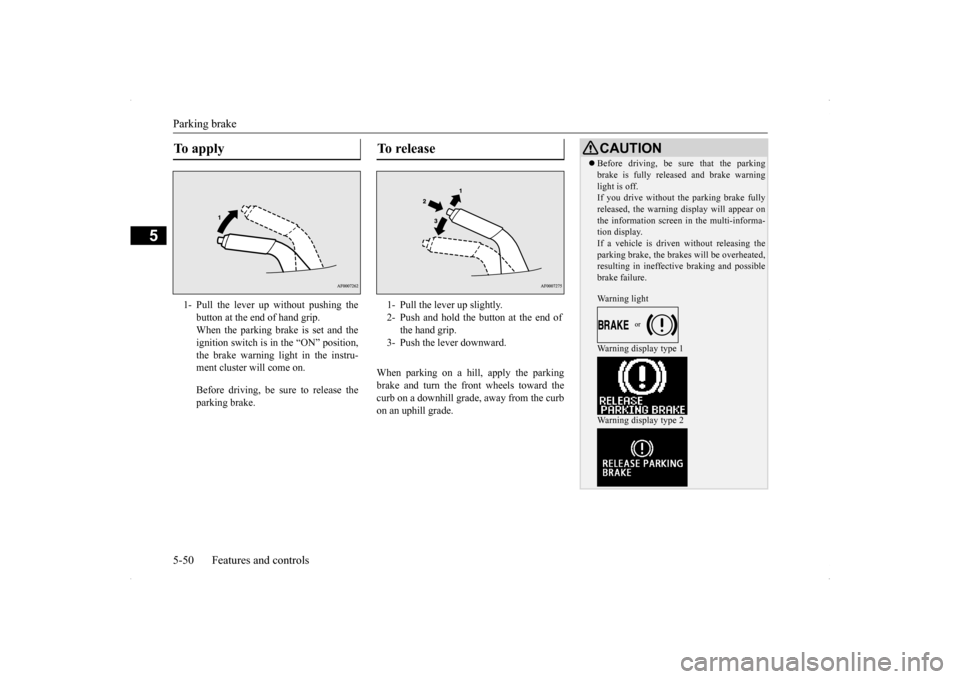
When parking on a hill, apply the parking brake and turn the front wheels toward thecurb on a downhill grade, away from the curb on an uphill grade.
To apply 1- Pull the lever up without pushing the
button at the end of hand grip. When the parking brake is set and theignition switch is in the “ON” position, the brake warning light in the instru- ment cluster will come on. Before driving, be sure to release the parking brake.
To r e l e a s e 1- Pull the lever up slightly. 2- Push and hold the button at the end of
the hand grip.
3- Push the lever downward.
CAUTION Before driving, be sure that the parking brake is fully released and brake warning light is off. If you drive without the parking brake fully released, the warning display will appear onthe information screen in the multi-informa- tion display. If a vehicle is driven without releasing theparking brake, the brakes will be overheated, resulting in ineffective braking and possible brake failure. Warning light Warning display type 1 Warning display type 2