2014 MITSUBISHI LANCER service
[x] Cancel search: servicePage 181 of 434

Multi-information display 5-114 Features and controls
5
the cause of the warning display is elimi- nated, the warning goes out automatically.
N00555300112
Each time you lightly press the multi-infor- mation meter switch, the display screen changes in the following order.
N00555400100
Each time you lightly press the multi-infor-mation meter switch, the display screenchanges as follows: Odometer/Trip odometer
Odome-
ter/Trip odometer
Service reminder
Redisplay of a warning display screen
Odometer/Trip odometer . Shows the total distance traveled. Shows the distance traveled between two points.
NOTE
When the warning is displayed, the warn- ing display screen can be redisplayed on the information screen. Refer to “Information screen (With ignitionswitch in the “OFF” position)” on page 5-114. Refer to “Information screen (With ignitionswitch in the “ON” position)” on page 5-118.
Information screen (With igni- tion switch in the “OFF” posi- tion)
1-
Odometer (Type 1), Trip odometer
2-
Odometer (Type 1), Trip odometer
3- Service reminder4- Redisplay of a warning display screenType 1
When there is no warning display When there is a warning display
Ty p e 2
When there is no warning display When there is a warning display
Odometer/Trip odometer Odometer Trip odometer Usage examples for
trip odometer , trip
odometer :
Page 182 of 434

Multi-information display
Features and controls 5-115
5
N00555500039
Shows the distance and number of months until the next periodic inspection. Refer to “Service reminder” on page 5-123.
N00559600155
When there is information to be announced,such as a key reminder, the buzzer sounds and switches to the warning display screen. Refer to the appropriate page and take the necessarymeasures. When the cause of the warning display is eliminated, the warning display goes outautomatically.
It is possible to measure two currently traveled distances, from home using trip odometer and from a particular pointon the way using trip odometer . To reset the trip odometer: To return the display to 0, hold down the multi-information meter switch for about2 seconds or more. Only the currently dis- played value will be reset. Example: If trip odometer is displayed, only tripodometer will be reset.
NOTE
If there is no warning display, the switching sequence is: Odometer/Trip odometer Odometer/Trip odometer
service
reminder
Odometer/Trip odometer .
Ty p e 1 Ty p e 2
Both trip odometers and can count up to 9999.9 miles/kilometers. When a trip odometer goes past 9999.9 miles/kilometers, it returns to 0.0 miles/kilo-meters. When the battery is disconnected, the memo- ries of trip odometer displays and are cleared, and their displays return to “0.0 miles/kilometers”.
Service reminder Interrupt display screen (With ignition switch in the “OFF” position)
NOTE
Page 184 of 434

Multi-information display
Features and controls 5-117
5
N00555800133
When the ignition switch is turned to the “ON” position, the display screen changes in the following order.
When the ignition switch is turned to the “ON” position, the system check screen isdisplayed for about 4 seconds. If there is no fault, information screen (when the ignition switch is “ON”) is displayed.If there is a fault, the screen changes to warn- ing display. Refer to “Warning display list (when the ignition switch is “ON” position)”on page 5-137.
When the time for periodic inspection arrives, the warning display is displayed for a fewseconds after the screen that is initially dis- played when the ignition switch is turned “ON”. Refer to “Service reminder” on page5-123. Type 1 Type 2
N00555900046
Shows the 4WD drive status. Refer to “Drive mode-s
elector” on page 5-85.
Information screen (With igni- tion switch turned from “OFF” to “ON” position) 1- Screen when the ignition switch is
“OFF”
2- System check screen 3- Screen when the ignition switch is
“ON”
Ty p e 1 Type 2
System check screen
NOTE
The system check screen display varies depending on your equipment.Type 1
Type 2
Service reminder Drive mode indicator display screen
(if so equipped)
Page 185 of 434

Multi-information display 5-118 Features and controls
5
N00545900027
The operation status of the ACD control mode is displayed. Refer to “ACD control mode” on page 5-83.
N00555200140
This is displayed when you press the multi-information meter switch and switch the warning display screen. This mark is also displayed if there is anotherwarning other than the one displayed. When the cause of the warning display is eliminated, the warning goes out automat- ically.
N00556100074
This is displayed when the Active stability control (ASC) is turned “OFF” with the“ASC OFF” switch. Also, if an abnormal condition is occurred in the ASC while driving, the “ASC OFF” dis-play illuminates.Refer to “ASC OFF switch” on page 5-96.
N00556200176
Each time you lightly press the multi-infor-mation meter switch, the display screenchanges in the following order.
ACD control mode display screen
(if so equipped)
Warning display screen (With ignition switch in the “ON” position)
NOTE
When the warning is displayed, the warn- ing display screen can be redisplayed on the information screen. Refer to “Information screen (With ignitionswitch in the “OFF” position)” on page 5-114 or “Information screen (With ignition switch in the “ON” position)” on page 5-118.
“Active stability control (ASC) OFF” display screen
(if so
equipped)Information screen (With igni- tion switch in the “ON” posi- tion)
1-
Odometer (Type 1)/Trip odometer
2-
Odometer (Type 1)/Trip odometer
3- Service reminder4- Engine coolant temperature display
(Type 1)
5- Driving range display (Type 1)6- Average speed display, average fuel
consumption display, momentary fuel consumption display (Type 1)
7- Driving range display, momentary fuel
consumption display (Type 2)
Ty p e 1
When there is no warning display When there is a warning display
Type 2
When there is no warning display
When there is a warning display
Page 186 of 434

Multi-information display
Features and controls 5-119
5
The operation method is the same as when the ignition switch is in the “OFF” position.For further details, refer to “Odometer/Trip odometer” on page 5-114.
Shows the distance and number of months until the next periodic inspection.Refer to “Service reminder” on page 5-123. Shows the engine coolant temperature. If the coolant becomes hot, “ ” will blink. Pay careful attention to the engine coolant temperature display while you are driving. Shows the approximate driving range (how many more miles or kilometers you can drive) with the current fuel level. When thisdriving range falls below 30 miles (50 km), “- --” is displayed. Refuel as soon as possible.
This displays the average speed from the last reset to the present.There are 2 types of mode settings as follows. For details on how to change the average speed display setting, refer to “Changing thefunction settings (With ignition switch in the “ON” position)” on page 5-126.
8- Average fuel consumption display,
momentary fuel consumption display(Type 2)
9- Average speed display, momentary fuel
consumption display (Type 2)
10- Function setting screen 11- Redisplay of a warning display screen
NOTE
While driving, the function setting screen is not displayed even if you operate the multi- information meter switch. Always park the vehicle in a safe place before operating.Refer to “Changing the function settings (With ignition switch in the “ON” position)” on page 5-126. When there is information to be announced, such as a system fault, the tone sounds andthe screen display is changed. Refer to “Interrupt display screen (With igni- tion switch in the “ON” position)” on page5-121.
Odometer/Trip odometer
Service reminder Engine coolant temperature dis- play
CAUTION If the engine is overheating, “ ” will blink. In this case, the bar graph is on the red zone. Immediately park the vehicle in a safe placeand take the required measures. Refer to “Engine overheating” on page 8-4.
Driving range display
NOTE
The driving range is determined based on the fuel consumption data. This may vary depending on the driving conditions and hab- its. Treat the distance displayed as just a rough guideline. When you refuel, the driving range display is automatically updated.However, if you only add a small amount of fuel, the correct value will not be displayed. Fill to a full tank whenever possible. When your vehicle is stopped on an extremely steep hill, the driving range valuemay change. This is due to the movement of fuel in the tank and does not indicate any problem. The display setting can be changed to the preferred units (miles or km).Refer to “Changing the function settings (With ignition switch in the “ON” position)” on page 5-126.
Average speed display
Page 190 of 434

Multi-information display
Features and controls 5-123
5
Refer to “ACD control mode” on page 5-83.
N00568700019
This indicator will be displayed when fuel- efficient driving is achieved.
N00556600125
Shows the amount of fuel remaining.
The arrow (A) indicates that the fuel tank filler door is located on the left side of thevehicle. (Refer to “Filling the fuel tank” on page 3-4.) When the fuel level runs low, the information screen changes to the interrupt display of the fuel remaining warning display and the mark(B) on the fuel remaining display flashes slowly. If this warning display appears, refuel as soon as possible.
N00556700168
Displays the approximate time until the nextrecommended periodic inspection. “---” isdisplayed when the inspection time has arrived.
ECO mode indicator
(if so
equipped)Fuel remaining display screen
CAUTION Running out of gas could damage the cata- lytic converter. If the warning display appears, refuel as soon as possible.
Type 1 Type 2
NOTE
It may take several seconds to stabilize the display after refilling the tank. If fuel is added with the ignition switch in the “ON” position, the remaining fuel dis-play may indicate an incorrect fuel level.
Fuel tank filler door mark Fuel remaining warning display
NOTE
On hills or curves, the display may be incor- rect due to the movement of fuel in the tank.
Service reminder
NOTE
Except for vehicles with Twin Clutch SST, shows the time until the periodic inspection every 6 months (7,500 miles or 12,000 km).Type 1 Type 2
Page 191 of 434
Multi-information display 5-124 Features and controls
5
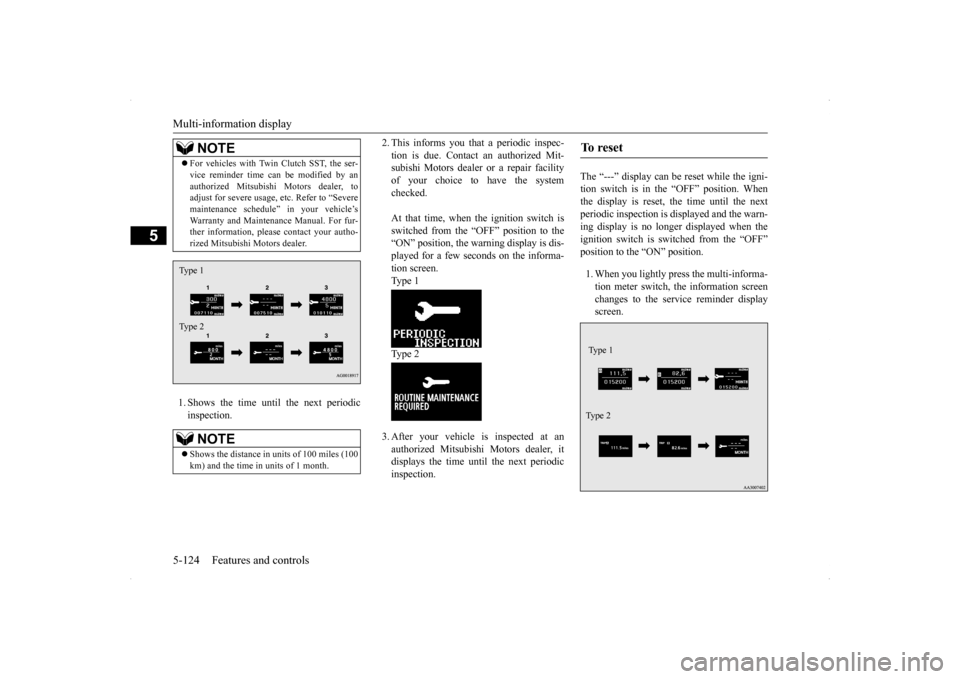
1. Shows the time until the next periodic inspection.
2. This informs you that a periodic inspec- tion is due. Contact an authorized Mit- subishi Motors dealer or a repair facility of your choice to have the systemchecked. At that time, when the ignition switch is switched from the “OFF” position to the “ON” position, the warning display is dis- played for a few seconds on the informa-tion screen.Type 1 Type 2 3. After your vehicle is inspected at an authorized Mitsubishi Motors dealer, itdisplays the time until the next periodicinspection.
The “---” display can be reset while the igni- tion switch is in the “OFF” position. Whenthe display is reset, the time until the next periodic inspection is displayed and the warn- ing display is no longer displayed when theignition switch is switched from the “OFF” position to the “ON” position. 1. When you lightly press the multi-informa- tion meter switch, the information screen changes to the service reminder displayscreen.
For vehicles with Twin Clutch SST, the ser- vice reminder time can be modified by an authorized Mitsubishi Motors dealer, to adjust for severe usage, etc. Refer to “Severe maintenance schedule” in your vehicle’sWarranty and Maintenance Manual. For fur- ther information, please contact your autho- rized Mitsubishi Motors dealer.NOTE
Shows the distance in uni
ts of 100 miles (100
km) and the time in units of 1 month.NOTE
Type 1 Type 2
To r e s e t Type 1 Ty p e 2
Page 211 of 434

Indicator light, warning light, an
d information screen display list
5-144 Features and controls
5
This informs you that a periodic inspection is due.
Screen type 1
Screen type 2
System operation status
Reference
When “2WD” drive mode is selected with the drive mode selector.
Refer to “Electronically controlled 4WD system” on page 5-85.
When “4WD AUTO” mode is selected with the drive mode selector. When “4WD LOCK” mode is selected with the drive mode selector. When the Active Stability Control (ASC) is operating.
Refer to “Active Stability Control (ASC) ”on page 5-95.
Screen type 1
Screen type 2
Do this
Have an inspection made by an authorized M
itsubishi Motors dealer. For further details,
refer to “Service reminder” on page 5-123.