2014 MITSUBISHI LANCER automatic transmission
[x] Cancel search: automatic transmissionPage 145 of 434

Twin Clutch SST (Sportronic Shif
t Transmission) (if so equipped)
5-78 Features and controls
5
Shifting can be performed even while the accelerator pedal is depressed. This allows the driver to enjoy sporty driving, such as quick cornering, by nimbly down-shifting to reduce vehicle speed just before entering a curve.
N00540600032
While the vehicle is stopped or being driven,move the gearshift lever from the “D” (DRIVE) position in the main shift gatetoward the driver’s seat to select manual shifting.
Each time the gearshift lever is pulled rear- ward, the transmission shifts up 1 gear. In addition, each time the gearshift lever is pushed forward, the transmission shifts down1 gear.
CAUTION When manually shifting while the vehicle is being driven, select the correct shift position to control the engine speed so that the tachometer indicator does not enter the redzone. Sudden engine braking and rapid accelera- tion can cause the vehicle to skid. Shift down according to road conditions and vehicle speed. If both the left and right sportronic steering wheel shifters are operated at the same time,the transmission may not change gears.NOTE
Only the forward gears 1 to 6 can be selected. To reverse or park, place the gearshift lever in the “R” (REVERSE) or “P” (PARK) posi-tion. During manual shifting, downshifting will be performed automatically when the vehicle slows down and the transmission will down- shift to 1st gear before the vehicle stops.
If the gearshift lever or sportronic steering wheel shifters are operated repeatedly, the transmission will also shift repeatedly. In order to ensure driving performance, upshifting may not occur depending on the vehicle speed even if the gearshift lever or sportronic steering wheel shifters are oper-ated. In addition, in order to prevent exces- sive engine speed, the buzzer sounds and downshifting may not occur depending onthe vehicle speed even if the gearshift lever or sportronic steering wheel shifters are operated. When driving in an aggressive manner involving high engine rpm, sudden accelera-tion and/or deceleration, the Twin Clutch SST could take longer to shift due to higher fluid temperatures.
Shifting using the gearshift lever
Selecting manual shifting
NOTE
Shifting up and shifting downçç
SHIFT DOWN
SHIFT UP
Page 146 of 434

Twin Clutch SST (Sportronic Shif
t Transmission) (if so equipped) Features and controls 5-79
5
Move the gearshift lever toward the front pas- senger’s seat to return to automated shifting.
N00540700033
While the vehicle is stopped or being drivenwith the gearshift lever in the “D” (DRIVE) position, manual shifting can be selected by pulling one of the sportronic steering wheelshifters toward you. Each time the +(SHIFT UP) sportronic steer- ing wheel shifter is pulled, the transmissionshifts up 1 gear.
Each time the - (SHIFT DOWN) sportronic steering wheel shifter is pulled, the transmis- sion shifts down 1 gear.
NOTE
After manual shifting is selected using the gearshift lever, shifting up and down can also be performed using the sportronic steering wheel shifters.
Returning to “D” range operation
NOTE
When the gearshift lever is moved to the “D” (DRIVE) position from the manual shift gate, it may automatically select a gear dif-ferent from the gear selected during manual shifting depending on vehicle speed or driv- ing conditions.
ç
Shifting using the sportronic steer- ing wheel shifters
Selecting manual shifting Shifting up- (SHIFT DOWN)
+ (SHIFT UP)
Shifting downçç
Page 147 of 434

Twin Clutch SST (Sportronic Shif
t Transmission) (if so equipped)
5-80 Features and controls
5
When the gearshift lever is in the “D” (DRIVE) position, pull the +(SHIFT UP)sportronic steering wheel shifter toward youfor 2 seconds or more to return to “D” range operation.
N00543000040
In manual shift, the currently selected gear isdisplayed on the multi-information display.
N00540800021
NOTE
After manual shifting is selected using the sportronic steering wheel shifters, shifting up and down can also be performed using the gearshift lever.
Returning to “D” range operation
NOTE
If manual shifting is selected using the spor- tronic steering wheel shifters when the gear- shift lever is in the “D” (DRIVE) position,the transmission will automatically return to “D” range operation before the vehicle stops.
ç
When the transmission returns to “D” range operation from manual shifting, it may auto- matically shift up or down from the gear selected using manual shifting depending on the vehicle speed or driving conditions. If manual shifting is selected using the spor- tronic steering wheel shifters, “D” rangeoperation will again be selected by moving the gearshift lever from the “D” (DRIVE) position toward the driver’s seat, then returnit toward the front passenger’s seat.
Manual shift display
NOTE
through
Operation of the Twin Clutch SST
CAUTION Before selecting a position with the engine running and the vehicle stationary, fullydepress the brake pedal to prevent the vehi- cle from creeping. Do not release the brakes until you are readyto drive away. The vehicle will begin to move as soon as the Twin Clutch SST is engaged. Depress the brake pedal with the right foot. Using the left foot could cause driver move-ment delay in case of an emergency. To prevent sudden acceleration, never run the engine at high rpms when shifting from the “P” (PARK) or “N” (NEUTRAL) posi- tion. Operating the accelerator pedal while the other foot is resting on the brake pedal willaffect braking efficiency, may cause prema- ture wear of brake pads and may cause engine damage. Use the gearshift lever in the correct shift position in accordance with driving condi- tions. Never coast downhill backward in the driv-ing shift position { “D” (DRIVE) or manual shifting} or coast forward in the “R” (REVERSE) position.Engine stopping and increased brake pedal and steering effort could lead to an accident.
Page 148 of 434

Twin Clutch SST (Sportronic Shif
t Transmission) (if so equipped) Features and controls 5-81
5
N00540900019
To gain extra acceleration in “D” (DRIVE) position (when passing another vehicle) pushthe accelerator to the floor
if it is safe to do so
in traffic conditions. The Twin Clutch SST will automatically downshift.
N00541600039
The Twin Clutch SST may not upshift to a higher shift position if the computer deter- mines the current speed
cannot be maintained
once a higher shift position is engaged. For smoother vehicle performance, if you release the throttle while climbing a steep grade, the Twin Clutch SST may not upshift.This is normal, as the
computer is temporarily
preventing shifting. After reaching the top of the hill, normal shift function will resume.
When traveling down steep grades, the com- puter may automatically select a lower shift position. This function assists engine brakingefforts, reducing the need for using the ser- vice brakes.
N00541000033
For short waiting periods, such as at trafficlights, the vehicle can be left in gearshift
Do not rev the engine with the brake pedal pressed when the vehicle is stationary. This can cause sudden acceleration and dam- age the Twin Clutch SST. Also, when you depress the accelerator pedalwhile holding down the brake pedal with the gearshift lever in th
e “D” (DRIVE) position,
the engine revolutions may not rise as highas when performing the same operation with the gearshift lever in the “N” (NEUTRAL) position.
Passing acceleration
NOTE
In manual shift, downshifts do not take place when the accelerator is depressed all the way to the floor.CAUTION
Uphill/downhill driving
DRIVING UPHILL
CAUTION Do not use the tendency of the vehicle to creep forward in order to drive at low speedsup hills. The transmission may be damaged and an accident may occur due to the following con-ditions.• The Twin Clutch SST fluid temperaturewill rise and can cause transmission dam- age.
• If the vehicle is continuously driven at lowspeeds using the tendency of the vehicle to creep forward, the vehicle will vibrate or the warning display will appear on the information screen in the multi-information display to alert the driver that the Twin Clutch SST fluid temperature has risen.After that, if the Twin Clutch SST fluid temperature rises even higher, the transmis- sion protection control will operate.If this occurs, the vehicle may suddenly reverse as if the gearshift lever was in the “N” (NEUTRAL) position and cause an accident. If the warning display appears or the transmission protection control operates, refer to “When warning display is showing” on page 5-74.
DRIVING DOWNHILLWaiting
CAUTION
Page 170 of 434

Cruise control (if so equipped) Features and controls 5-103
5
The cruise control will be turned off automat- ically in the following conditions: When you depress the clutch pedal (on vehicles with manual transaxle). Your speed slows to about 10 mph (15 km/h) or more below the set speedbecause of an uphill, etc. Your speed slows to about 25 mph (40 km/h) or less. When the Twin Clutch SST control mode is set to “Sport” mode (on vehicles with Twin Clutch SST).Refer to “Twin Clutch SST control mode” on page 5-76.
When the active stability control (ASC) starts operating (if so equipped). Refer to “Active stability control (ASC)” on page 5-95.
Also, the set speed driving may be deacti- vated as follow: When the engine speed rises and approaches the tachometer’s red zone (the red-colored part of the tachometer dial).
N00518900263
If the cruise control is deactivated by any ofthe conditions described in “To deactivate”on page 5-102, you can return to the previ- ously set speed by pressing the “ACC RES” switch (C) while driving at a speed of approx-imately 25 mph (40 km/h) or greater.
Type 1 Type 2
WA R N I N G On vehicles with continuously variable transmission (CVT) or Twin Clutch SST,although the cruise control will be disen- gaged when shifting to the “N” (NEU- TRAL) position, never move the selectorlever (CVT) or the gearshift lever (Twin Clutch SST) to the “N” (NEUTRAL) posi- tion while driving.You would have no engine braking and this could cause a serious accident.
CAUTION When the set speed driving is deactivated automatically in any situation other than those listed above, there may be a system malfunction. Press the “ON OFF” switch to turn off thecruise control and have your vehicle inspected by an authorized Mitsubishi Motors dealer or a repair facility of yourchoice.
To resume the set speed
Page 178 of 434
Instrument cluster
Features and controls 5-111
5
N00519200276
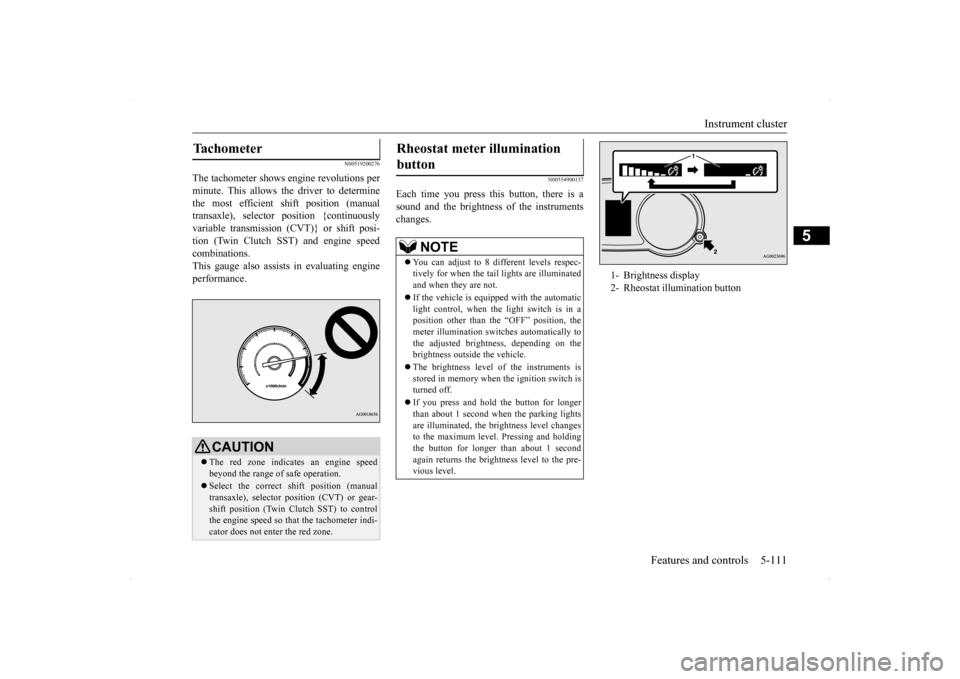
The tachometer shows engine revolutions per minute. This allows the driver to determinethe most efficient shift position (manual transaxle), selector position {continuously variable transmission (CVT)} or shift posi-tion (Twin Clutch SST) and engine speed combinations. This gauge also assists in evaluating engineperformance.
N00554900137
Each time you press this button, there is asound and the brightness of the instruments changes.
Tachometer
CAUTION The red zone indicates an engine speed beyond the range of safe operation. Select the correct shift position (manual transaxle), selector position (CVT) or gear- shift position (Twin Clutch SST) to control the engine speed so that the tachometer indi-cator does not enter the red zone.
Rheostat meter illumination button
NOTE
You can adjust to 8 different levels respec- tively for when the tail
lights are illuminated
and when they are not. If the vehicle is equipped with the automatic light control, when the light switch is in a position other than the “OFF” position, themeter illumination switches automatically to the adjusted brightness, depending on the brightness outside the vehicle. The brightness level of the instruments is stored in memory when the ignition switch isturned off. If you press and hold the button for longer than about 1 second when the parking lights are illuminated, the brightness level changes to the maximum level. Pressing and holdingthe button for longer than about 1 second again returns the brightness level to the pre- vious level.
1- Brightness display 2- Rheostat illumination button
Page 290 of 434

Manual air conditioning withou
t MAX A/C mode (if so equipped)
Comfort controls 7-15
7
N00731000436
Push the switch, and the air conditioning compressor will turn on. The air conditioning indicator light (A) will come on.A sound will be made every time you pushthe switch.
Push the switch again and the air condition- ing compressor will stop and the indicator light (A) goes off.
N00731100219
Set the mode selection dial to the “ ” posi- tion and set the air selection switch (A) to theoutside air position.Turn the temperature control dial clockwise or counterclockwise to the desired tempera- ture. Select the best speed to fit your needs.
NOTE
The factory setting is “Enable automatic air control”. While the mode selection dial is set between “ ” and “ ” position, the air selection will automatically change to the outside air position, even if the sy
stem is set to “Disable
automatic air control”, in order to prevent windows from fogging up.
Air conditioning switch
CAUTION When using the air conditioning, the idling speed may slightly increase as the air condi- tioning compressor is switched on/off auto- matically. Especially for vehicles with acontinuously variable transmission (CVT) or Twin Clutch SST, while the vehicle is sta- tionary, fully depress the brake pedal to pre-vent the vehicle from creeping.NOTE
If a problem is detect
ed in the air condition-
ing compressor, the air conditioning indica-tor light (A) blinks. Press the air conditioning switch once to turn it off, then once more to turn it back on. If the air condi-tioning indicator light (A) does not blink, there is no problem. If it does blink, have it checked at an authorized Mitsubishi Motorsdealer or a repair facility of your choice. Sometimes, for example after using a high- pressure car wash, the condenser can get wet, and the air conditioning indicator light (A)blinks temporarily. Wait for a while, press the air conditioning switch once to turn the system off, then once more to turn it back on.Once the water evaporates, the blinking will stop.
Operating the air conditioning system
Heating
NOTE
For quick heating, set the blower speed selection dial to the position shown in theillustration.
Page 295 of 434

Automatic air conditioning with
Fahrenheit scale (if so equipped)
7-20 Comfort controls
7
Disable automatic air control: Even when the mode selection dial or the blower speed selection dial is set to the “AUTO” position, the air selection switchwill not be automatically controlled. Changing the settings Press the air selection switch for about 10 seconds or longer.When the setting has changed, the system will beep and the indicator light will flash. • When the setting has changed fromenabled to disabled,the system will beep three times and the indicator will flash three times. • When the setting has changed from dis-abled to enabled, the system will beep two times and the indicator light will flash three times.
N00737300297
Push the switch, and the air conditioningcompressor will turn
on. The air conditioning
indicator light (A) will come on. A sound will be made every time you push the switch. Push the switch again and the air condition- ing compressor will stop and the indicator light (A) goes off.
N00759800032
You can change the following functions to match your preference.
NOTE
The factory setting is “Enable automatic air control”. While the mode selection dial is set between “ ” and “ ” position, the air selection will automatically change to the outside air position, even if the sy
stem is set to “Disable
automatic air control”, in order to prevent windows from fogging up.
Air conditioning switch
CAUTION When using the air conditioning, the idling speed may slightly increase as the air condi-tioning compressor is switched on/off auto- matically. Especially for vehicles with a continuously variable transmission (CVT) orTwin Clutch SST, while the vehicle is sta- tionary, fully depress the brake pedal to pre- vent the vehicle from creeping.
NOTE
If a problem is detected in the air condition- ing compressor, the air conditioning indica- tor light (A) blinks. Press the air conditioning switch once to turn it off, then once more to turn it b
ack on. If the air condi-
tioning indicator light does not blink there is no problem. If it does blink, have it checked at an authorized Mitsubishi Motors dealer ora repair facility of your choice. Sometimes, for example after using a high- pressure car wash, the condenser can get wet, and the air conditioning indicator light (A) blinks temporarily. Wait for a while, pressthe air conditioning switch once to turn the system off, then once more to turn it back on. Once the water evaporates, the blinking willstop.
Personalizing the air conditioning switch (Changing the function set- ting)