2014 MITSUBISHI LANCER EVOLUTION USB
[x] Cancel search: USBPage 4 of 338
Instruments and controls (Instrument panel)
Overview 1-2
1
N00100202528
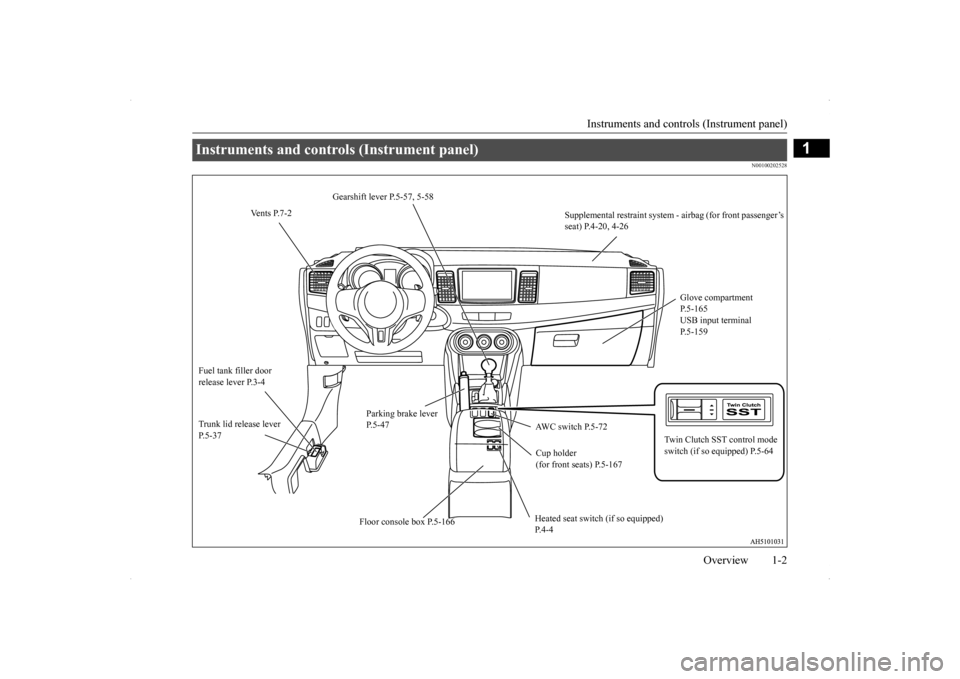
Instruments and controls (Instrument panel)
Gearshift lever P.5-57, 5-58
Vents P.7-2
Supplemental restraint system - airbag (for front passenger’s seat) P.4-20, 4-26
Glove compartment P.5-165USB input terminal P.5-159
Fuel tank filler door release lever P.3-4
Parking brake lever P.5-47
Trunk lid release lever P.5-37
AWC switch P.5-72
Twin Clutch SST control mode switch (if so equipped) P.5-64
Cup holder (for front seats) P.5-167 Heated seat switch (if so equipped) P.4-4
Floor console box P.5-166
BK0200800US.bo
ok 2 ページ 2013年2月14日 木曜日 午後2時28分
Page 62 of 338

5
Features and controlsBreak-in period ................
.................................................................5-3
Keys .....................................................
.............................................5-3
Electronic immobilizer (Anti-theft starting system) .........................5-4 Keyless entry system (if so equipped) ..............................................5-7Free-hand Advanced Security Transmitter (F.A.S.T.-key) (if so equipped)................................
..................................................... 5-11
Door locks........................
...............................................................5-34
Power door locks .............
...............................................................5-36
“Child safety locks” for
rear door...................................................5-37
Trunk lid ....................................
.....................................................5-37
Inside emergency trunk lid
release .................................................5-39
Theft-alarm system ..........
...............................................................5-40
Power windows................
...............................................................5-42
Sunroof (if so equipped
) .........................................
........................5-44
Parking brake ...................
...............................................................5-47
Steering wheel tilt lock lever ..........................................................5-47Inside day/night rearview
mirror ....................................................5-48
Outside rearview mirr
ors ................................................................5-49
Ignition switch .................
...............................................................5-50
Steering wheel lock..........
...............................................................5-52
Starting and stopping the e
ngine ....................................................5-53
Turbocharger operation
...........................................
........................5-55
Clutch pedal operation (if so equipped)..........................................5-56Manual transaxle (if so equipped) ..................................................5-57 Twin Clutch SST (Sportronic Shif
t Transmission) (if so equipped)
...................................................................
..................................5-58
All-wheel drive system
...........................................
........................5-70
Cautions on handling of all-wheel drive vehicles ..........................5-70
S-AWC (Super-All Wheel
Control)................................................ 5-71
Anti-lock braking syst
em ......................................
......................... 5-74
Active stability control
(ASC) .....................
................................... 5-76
Limited-slip differenti
al.........................................
......................... 5-79
Service brake ..................
.................................................
............... 5-79
Brake assist system
................................................
......................... 5-80
Power steering system
...........................................
......................... 5-80
Cruise control .................
.................................................
............... 5-81
Tire pressure monitoring
system .................................................... 5-85
Instrument cluster .
.................................................
......................... 5-89
Multi-information disp
lay .....................................
......................... 5-91
Indicator light, warning light, and information screen display list
.................................................................
................................. 5-111
Indicators ..................................
.................................................... 5-121
Warning lights.................
.................................................
............. 5-122
Information screen disp
lay ...................................
....................... 5-123
Combination headlights and dimmer switch ............................... 5-125 Turn signal lever ...
.................................................
....................... 5-131
Hazard warning flasher
switch ..................................................... 5-131
Front fog light switch
............................................
....................... 5-131
Wiper and washer swit
ch ......................................
....................... 5-132
Electric rear window def
ogger switch .......................................... 5-136
Horn switch ..............................
.................................................... 5-137
Link System ..............................
.................................................... 5-137
Bluetooth
® 2.0 interface ...........
.................................................... 5-137
USB input terminal .........
.................................................
............. 5-158
Sun visors .................................
.................................................... 5-161
12 V power outlet ...........
.................................................
............. 5-162
BK0200800US.bo
ok 1 ページ 2013年2月14日 木曜日 午後2時28分
Page 198 of 338

Horn switch
Features and controls 5-137
5
N00523800130
To honk the horn, press the “ ” mark on the steering wheel.
N00563701053
The Link System takes overall control of thedevices connected via the USB input terminal or the Bluetooth
® 2.0 interface allowing the
connected devices to be operated by using the switches in the vehicle or voice commands.See the following section for details on how to operate. Refer to “Bluetooth
® 2.0 interface” on page
5-137. Refer to “USB input terminal” on page 5-158.Refer to the separate owner’s manual for a DISPLAY AUDIO. Bluetooth
® is a registered trademark of
BLUETOOTH SIG, INC.
N00563800015
You have acquired a device that includes soft-ware licensed by Mitsubishi Motors Corpora- tion from JOHNSON CONTROLS Inc (the automotive experience business unit), andtheir subsequent 3rd party suppliers. For a complete list of these 3rd party products and their end user license agreements, please goto the following website.
http://www.jciblueconnect.com/faq/fulldis- closure.pdf
N00563901185
The Bluetooth
® 2.0 interface allows for mak-
ing/receiving hands-free calls in the vehicle using a Bluetooth
® compatible cellular phone
based on the wireless communication tech- nology commonly known as Bluetooth
®. It
also allows the user to
play music, saved in a
Bluetooth
® music player, from the vehicle’s
speakers.The system is equipped with a voice recogni- tion function, which allows you to make hands-free calls by simple switch operationsand voice command operations using a defined voice tree. The Bluetooth
® 2.0 interface can be used
when the ignition switch is in the “ON” or“ACC” position. Before you can use the Bluetooth
® 2.0 inter-
face, you must pair the Bluetooth
® device
and Bluetooth
® 2.0 interface. Refer to “Con-
necting the Bluetooth
® 2.0 interface and
Bluetooth
® device” on page 5-144.
Do not place stickers, tape, or other items that are attached with adhesive over the grid wires on the rear window. When cleaning the inside rear window, use a soft cloth and wipe lightly over the grid wires.NOTE
If your vehicle is equipped with heated mir- rors, mist can also be removed from the out-side rearview mirrors when the rear window defogger switch is pressed. (Refer to “Heated mirror” on page 5-50.)
Horn switch
CAUTION
Link System Link System End User License Agreement
Bluetooth
® 2.0 interface
BK0200800US.book
137 ページ 2013年2月14日 木曜日 午後2時28分
Page 219 of 338

USB input terminal 5-158 Features and controls
5
5. The voice guide will say “Importing the contact list from the mobile phonebook. This may take several minutes to com- plete. Would you like to continue?”Answer “Yes,” transferring to the mobile phonebook the phonebook stored in the cellular phone will start.Answer “No,” the system will return to the main menu.
6. When the transfer is complete, the voice guide will say “Import complete” and then the system will return to the main menu.
N00566300037
MODEL: MMC FCC ID: CB2MDGMY10IC: 279B-MDGMY10 Your Bluetooth
® 2.0 interface operates on a
radio frequency subject to Federal Communi- cations Commission (FCC) Rules (For vehi- cles sold in U.S.A.) and Industry CanadaRules (For vehicles sold in Canada). This device complies with Part 15 of the FCC Rules and RSS-210 of the Industry CanadaRules. Operation is subject to the following two conditions: This device may not cause harmful inter- ference. This device must accept any interference received, including interference that may cause undesired operation.
The term “IC:” before the radio certification number only signifies that Industry Canada technical specifications were met. The antenna used for this transmitter must notbe co-located or operating in conjunction with any other antenna or transmitter. End- users and installers must be provided withinstallation instructions and transmitter oper- ating conditions for satisfying RF exposure compliance.
N00566401093 N00566701038
You can connect your USB memory device or iPod
* to play music files stored in the USB
memory device or iPod. The following explains how to connect andremove a USB memory device or iPod.
NOTE
The transfer may take some time to complete depending on the number of contacts. If the Bluetooth
® 2.0 interface could not be
connected to the Bluetooth
® compatible cel-
lular phone, the voice guide will say “Unable to transfer contact list from phone” and then the system will return to the main menu. If you press the HANG-UP button or press and hold the SPEECH button during the datatransfer, the transfer will be cancelled and the system will return to the main menu. If an error occurs during the data transfer, all transfer will be cancelled and the voice guide will say “Unable to complete the phonebookimport” and then the system will return to the main menu. If there are no contacts in the phonebook, the voice guide will say “There are no contacts on the connected phone.”
General information
CAUTION Changes or modifications not expressly approved by the manufacturer for compli-ance could void the user’s authority to oper- ate the equipment.
Enrollment commands USB input terminal
BK0200800US.book
158 ページ 2013年2月14日 木曜日 午後2時28分
Page 220 of 338

USB input terminal
Features and controls 5-159
5
Refer to the following sections for details on how to play music files: Refer to the separate owner’s manual for a DISPLAY AUDIO.
N00566800074
1. Park your vehicle in a safe place and turn the ignition switch to the “LOCK” posi- tion.2. Open the USB input terminal cover (A) in the glove compartment.
3. Connect a commercially available USB connector cable (C)
to the USB memory
device (B). 4. Connect the USB connector cable (C) to the USB input terminal (D).
5. To remove the USB connector cable, turn the ignition switch to the “LOCK” posi- tion first and perform the installation steps in reverse.
N00566900046
1. Park your vehicle in a safe place and turnthe ignition switch to the “LOCK” posi- tion.
* : “iPod” is a registered trademark of Apple Inc. in the United States and other coun-tries.
How to connect a USB memory device
WA R N I N G An open glove compartment door can cause a serious injury or death to the front passenger in an accident, even if the pas- senger is wearing his/her seat belt. Always keep the glove compartment door closedwhen driving.NOTE
Do not connect the USB memory device to the USB input terminal directly.The USB memory device may be damaged. When closing the glove compartment, be careful not to trap the USB connector cable.
How to connect an iPod
BK0200800US.book
159 ページ 2013年2月14日 木曜日 午後2時28分
Page 221 of 338
USB input terminal 5-160 Features and controls
5
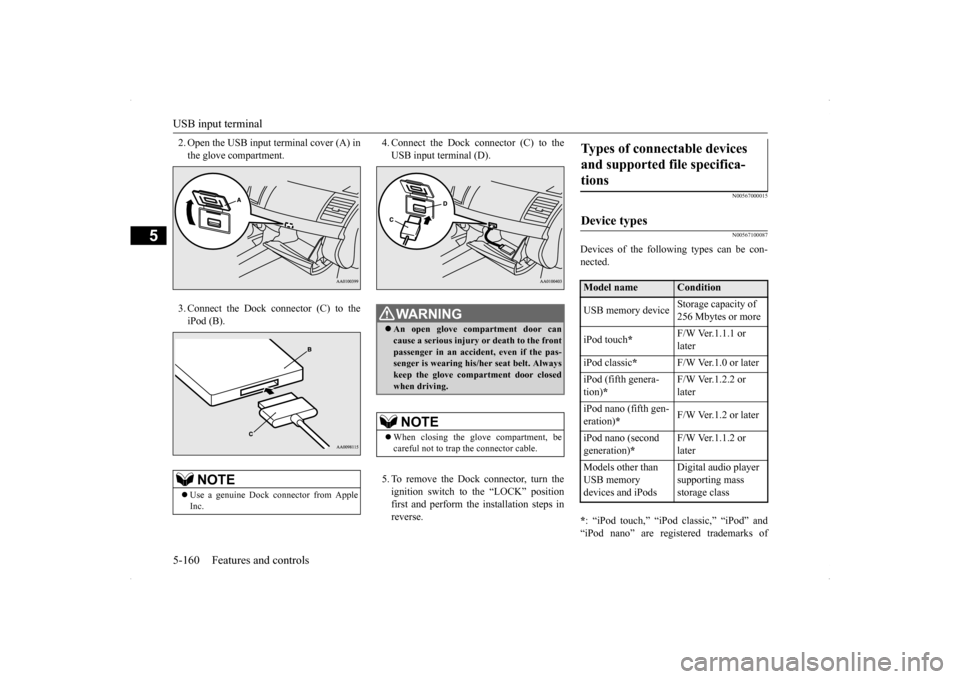
2. Open the USB input terminal cover (A) in the glove compartment. 3. Connect the Dock connector (C) to the iPod (B).
4. Connect the Dock connector (C) to the USB input terminal (D). 5. To remove the Dock connector, turn the ignition switch to the “LOCK” positionfirst and perform the installation steps in reverse.
N00567000015 N00567100087
Devices of the following types can be con- nected. * : “iPod touch,” “iPod classic,” “iPod” and “iPod nano” are registered trademarks of
NOTE
Use a genuine Dock connector from Apple Inc.
WA R N I N G An open glove compartment door can cause a serious injury
or death to the front
passenger in an accident, even if the pas-senger is wearing his/her seat belt. Always keep the glove compartment door closed when driving.NOTE
When closing the glove compartment, be careful not to trap the connector cable.
Types of connectable devices and supported file specifica- tions Device types Model name
Condition
USB memory device
Storage capacity of 256 Mbytes or more
iPod touch
*
F/W Ver.1.1.1 or later
iPod classic
*
F/W Ver.1.0 or later
iPod (fifth genera- tion)
*
F/W Ver.1.2.2 or later
iPod nano (fifth gen- eration)
*
F/W Ver.1.2 or later
iPod nano (second generation)
*
F/W Ver.1.1.2 or later
Models other than USB memory devices and iPods
Digital audio player supporting mass storage class
BK0200800US.book
160 ページ 2013年2月14日 木曜日 午後2時28分
Page 222 of 338

Sun visors
Features and controls 5-161
5
Apple Inc. in the United States and other countries.
N00567200017
You can play music files of the following specifications that are saved in a USB mem- ory device or other device supporting massstorage class.
N00524600281
Fold the sun visor downward (1) to reduce front glare while driving. To reduce side glare, turn the visor to the side (2).
The vanity mirrors are located on the back of the sun visors.
NOTE
Depending on the type of the USB memory device or other device connected, the con- nected device may not function properly orthe available functions may be limited. It is recommended to use an iPod with firm- ware updated to the latest version. You can charge your iPod by connecting it to the USB input terminal when the ignition switch is in the “ACC” or “ON” position. Do not keep your USB memory device or iPod in your vehicle. It is recommended that you back up the files in case of data damage. Do not connect to the USB input terminal any device (hard disk, card reader, memory reader, etc.) other than the connectabledevices specified in the previous section. The device and/or data may be damaged. If any of these devices
was connected by mis-
take, remove it after turning the ignition switch to the “LOCK” position.
File specifications
Item
Condition
File format
MP3, WMA, AAC, WAV
Maximum number of levels(including the root)
Level 8
Number of folders 700 Number of files 65,535Sun visors
Vanity mirror
BK0200800US.book
161 ページ 2013年2月14日 木曜日 午後2時28分
Page 226 of 338
Storage spaces
Features and controls 5-165
5
N00551501285
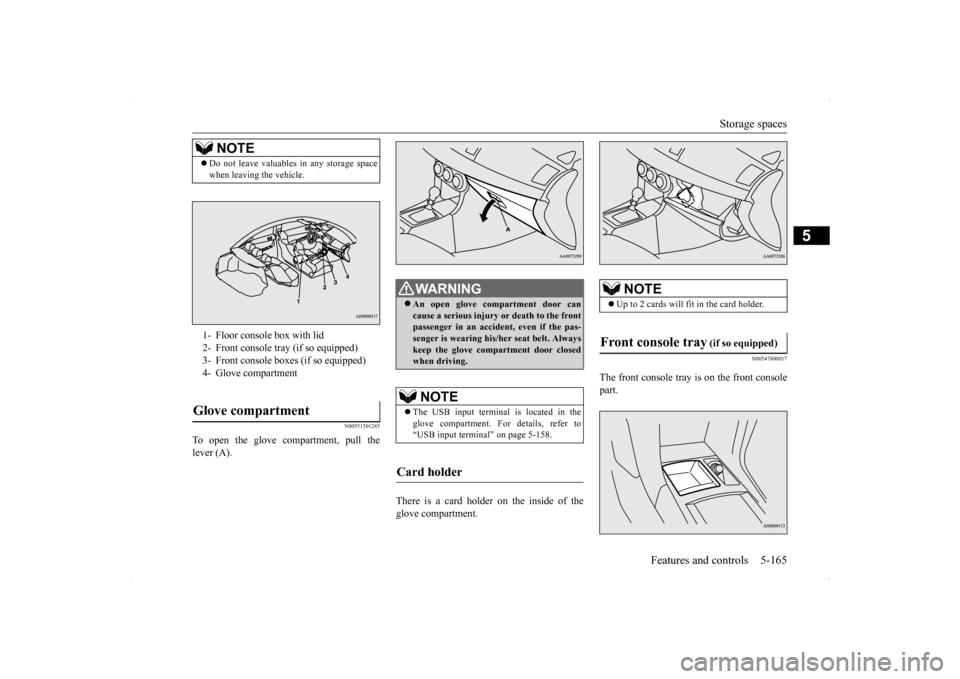
To open the glove compartment, pull the lever (A).
There is a card holder on the inside of the glove compartment.
N00547800017
The front console tray is on the front consolepart.
NOTE
Do not leave valuables in any storage space when leaving the vehicle.1- Floor console box with lid 2- Front console tray (if so equipped)3- Front console boxes (if so equipped)4- Glove compartmentGlove compartment
WA R N I N G An open glove compartment door can cause a serious injury or death to the front passenger in an accident, even if the pas-senger is wearing his/her seat belt. Always keep the glove compartment door closed when driving. NOTE
The USB input terminal is located in the glove compartment. For details, refer to “USB input terminal” on page 5-158.
Card holder
NOTE
Up to 2 cards will f
it in the card holder.
Front console tray
(if so equipped)
BK0200800US.book
165 ページ 2013年2月14日 木曜日 午後2時28分