2014 MITSUBISHI LANCER EVOLUTION ad blue
[x] Cancel search: ad bluePage 216 of 338

Bluetooth® 2.0 interface
Features and controls 5-155
5
8. Once the telephone number is registered, the voice guide will say “Number saved” and then the system will return to the main menu.
N00580100042
1. Press the SPEECH button (except forvehicles with Mitsubishi Multi-Commu-nication System) or PICK-UP button (for vehicles with Mitsubishi Multi-Commu- nication System).2. Say “Phonebook.” 3. The voice guide will say “Select one of the following: new entry, edit number,edit name, list names, delete, erase all, or import contact.” Say “Edit name.”
4. The voice guide will say “Please say the name of the entry you would like to edit, or say list names.” Say the name you want to edit. 5. The voice guide will say “Changing
N00580200030
1. Press the SPEECH button (except forvehicles with Mits
ubishi Multi-Commu-
nication System) or PICK-UP button (for vehicles with Mits
ubishi Multi-Commu-
nication System).
2. Say “Phonebook.” 3. The voice guide will say “Select one of the following: new entry, edit number, edit name, list names, delete, erase all, orimport contact.” Say “List names.” 4. Bluetooth
® 2.0 interface will read out the
entries in the phonebook in order.5. When the voice guide is done reading the list, it will say “End of list, would you like to start from the beginning?” When youwant to check the list again from thebeginning, answer “Yes.” When you are done, answer “No” to return to the previous or main menu.
NOTE
If the location where a telephone number was already registered has been overwritten with a new number, the voice guide will say “Number changed” and then the system willreturn to the main menu.
Editing a name
NOTE
Say “List names,” and the names registered in the phonebook are read out in order. Refer to “Vehicle phonebook: Listening to the list of registered names” on page 5-155.
Listening to the list of registered names
NOTE
You can call, edit or delete a name that is being read out.Press the SPEECH button and say “Call” to call the name, “Edit name” to edit it, or “Delete” to delete it.The system will beep and then execute your command. If you press the SPEECH button and say “Continue” or “Previous” while the list is being read, the system will advance or rewind the list. Say “Continue” to proceed to the next entry or “Previ
ous” to return to the
previous entry.
BK0200800US.book
155 ページ 2013年2月14日 木曜日 午後2時28分
Page 217 of 338

Bluetooth® 2.0 interface 5-156 Features and controls
5
N00580300044
1. Press the SPEECH button (except for vehicles with Mitsubishi Multi-Commu-nication System) or PICK-UP button (for vehicles with Mitsubishi Multi-Commu- nication System).2. Say “Phonebook.” 3. The voice guide will say “Select one of the following: new entry, edit number,edit name, list names, delete, erase all, orimport contact.” Say “Delete.” 4. The voice guide will say “Please say the name of the entry you would like todelete, or say list names.” Say the name of the phonebook entry in which the tele- phone number you want to delete is regis-tered.
5. If only one telephone number is registered in the selected phonebook entry, the voice guide will say “Deleting
7. When the telephone number deletion is complete, the voice guide will say “
N00580400032
You can delete all registered informationfrom the vehicle phonebook. 1. Press the SPEECH button (except for vehicles with Mitsubishi Multi-Commu- nication System) or PICK-UP button (forvehicles with Mitsubishi Multi-Commu- nication System). 2. Say “Phonebook.”3. The voice guide will say “Select one of the following: new entry, edit number, edit name, list names, delete, erase all, orimport contact.” Say “Erase all.”
Deleting a telephone number NOTE
Say “List names,” and the names registered in the phonebook are read out in order. Refer to “Vehicle phonebook: Listening to the listof registered names” on page 5-155.
NOTE
To delete the telephone numbers from all locations, say “All.”
Erasing the phonebook
BK0200800US.book
156 ページ 2013年2月14日 木曜日 午後2時28分
Page 218 of 338

Bluetooth® 2.0 interface
Features and controls 5-157
5
4. For confirmation purposes, the voice guide will ask “Are you sure you want to erase everything from your hands-free system phonebook?” Answer “Yes.”Answer “No” to cancel the deletion of all registered information in the phonebook and return to the main menu. 5. The voice guide will say “You are about to delete everything from your hands-free system phonebook. Do you want to con-tinue?” Answer “Yes” to continue.Answer “No” to cancel the deletion of all registered information in the phonebook and return to the main menu.6. The voice guide will say “Please wait, erasing the hands-free system phone- book” and then the system will delete alldata in the phonebook. When the deletion is complete, the voice guide will say “Hands-free system phone-book erased” and then the system will return to the main menu.
N00566201062
All entries in the phonebook stored in the cel-lular phone can be transferred in a batch and registered in the mobile phonebook.Up to 7 mobile phonebooks, each containing up to 1,000 names, can be registered.
The Bluetooth
® 2.0 interface automatically
converts from text to voice the names regis- tered in the transferred phonebook entries, and creates names. Follow the steps below to transfer to the mobile phonebook the phonebook stored inthe cellular phone.
1. Press the SPEECH button (except for vehicles with Mitsubishi Multi-Commu- nication System) or PICK-UP button (for vehicles with Mitsubishi Multi-Commu-nication System). 2. Say “Phonebook.” 3. The voice guide will say “Select one ofthe following: new entry, edit number,edit name, list names, delete, erase all, or import contact.” Say “Import contact.” 4. The voice guide will say “Would you liketo import a single entry or all contacts?” Say “All contacts.”
Mobile phonebook
NOTE
Only the mobile phonebook transferred from the connected cellular phone can be usedwith that cellular phone. You cannot change the names and telephone numbers in the phonebook entries registered in the mobile phonebook. You cannot select and delete specific phonebook entries, either.To change or delete any of the above, change the applicable information in the source phonebook of the cellular phone and thentransfer the phonebook again.
To import a devices phonebook
NOTE
Transfer should be completed while the vehi- cle is parked. Before transferring, make sure that the vehicle is parked in a safe location. The already stored phonebook in the mobile phonebook is overwritten by the storedphonebook in the cellular phone.
All or part of data may not be transferred, even when the cellular phone supports Blue- tooth
®, depending on the compatibility of
the device. Only a home, a work, and a mobile number can be imported. The maximum supported telephone number length is 19 digits. Any telephone number of 20 digits or more will be truncated to the first19 digits. If telephone numbers contain characters other than 0 to 9,
*, # or +, these characters
are deleted before the transfer. For the connection sett
ings on the cellular
phone side, refer to the instructions for the cellular phone.NOTE
BK0200800US.book
157 ページ 2013年2月14日 木曜日 午後2時28分
Page 219 of 338

USB input terminal 5-158 Features and controls
5
5. The voice guide will say “Importing the contact list from the mobile phonebook. This may take several minutes to com- plete. Would you like to continue?”Answer “Yes,” transferring to the mobile phonebook the phonebook stored in the cellular phone will start.Answer “No,” the system will return to the main menu.
6. When the transfer is complete, the voice guide will say “Import complete” and then the system will return to the main menu.
N00566300037
MODEL: MMC FCC ID: CB2MDGMY10IC: 279B-MDGMY10 Your Bluetooth
® 2.0 interface operates on a
radio frequency subject to Federal Communi- cations Commission (FCC) Rules (For vehi- cles sold in U.S.A.) and Industry CanadaRules (For vehicles sold in Canada). This device complies with Part 15 of the FCC Rules and RSS-210 of the Industry CanadaRules. Operation is subject to the following two conditions: This device may not cause harmful inter- ference. This device must accept any interference received, including interference that may cause undesired operation.
The term “IC:” before the radio certification number only signifies that Industry Canada technical specifications were met. The antenna used for this transmitter must notbe co-located or operating in conjunction with any other antenna or transmitter. End- users and installers must be provided withinstallation instructions and transmitter oper- ating conditions for satisfying RF exposure compliance.
N00566401093 N00566701038
You can connect your USB memory device or iPod
* to play music files stored in the USB
memory device or iPod. The following explains how to connect andremove a USB memory device or iPod.
NOTE
The transfer may take some time to complete depending on the number of contacts. If the Bluetooth
® 2.0 interface could not be
connected to the Bluetooth
® compatible cel-
lular phone, the voice guide will say “Unable to transfer contact list from phone” and then the system will return to the main menu. If you press the HANG-UP button or press and hold the SPEECH button during the datatransfer, the transfer will be cancelled and the system will return to the main menu. If an error occurs during the data transfer, all transfer will be cancelled and the voice guide will say “Unable to complete the phonebookimport” and then the system will return to the main menu. If there are no contacts in the phonebook, the voice guide will say “There are no contacts on the connected phone.”
General information
CAUTION Changes or modifications not expressly approved by the manufacturer for compli-ance could void the user’s authority to oper- ate the equipment.
Enrollment commands USB input terminal
BK0200800US.book
158 ページ 2013年2月14日 木曜日 午後2時28分
Page 298 of 338
Fuses
Vehicle care and maintenance 9-27
9
* - Fusible link Some fuses may not be installed on your vehicle, depending on the vehicle model or specifications. The table above shows the main equip- ment corresponding to each fuse.
There are no 7.5 A, 25 A or 30 A spare fuses. If a fuse of one of
these capacities blows,
replace it temporarily by borrowing one of the fuses indicated below.7.5 A: 10 A spare fuse 25 A: 20 A spare fuse 30 A: 30 A audio amplifier fuseReplace the borrowed fuse with a fuse that has the correct capacity as soon as possible.
N00901100052 N00954900027
1. Before replacing a fuse, always turn off the electrical item connected to the fuse and turn the ignition switch to the“LOCK” position.
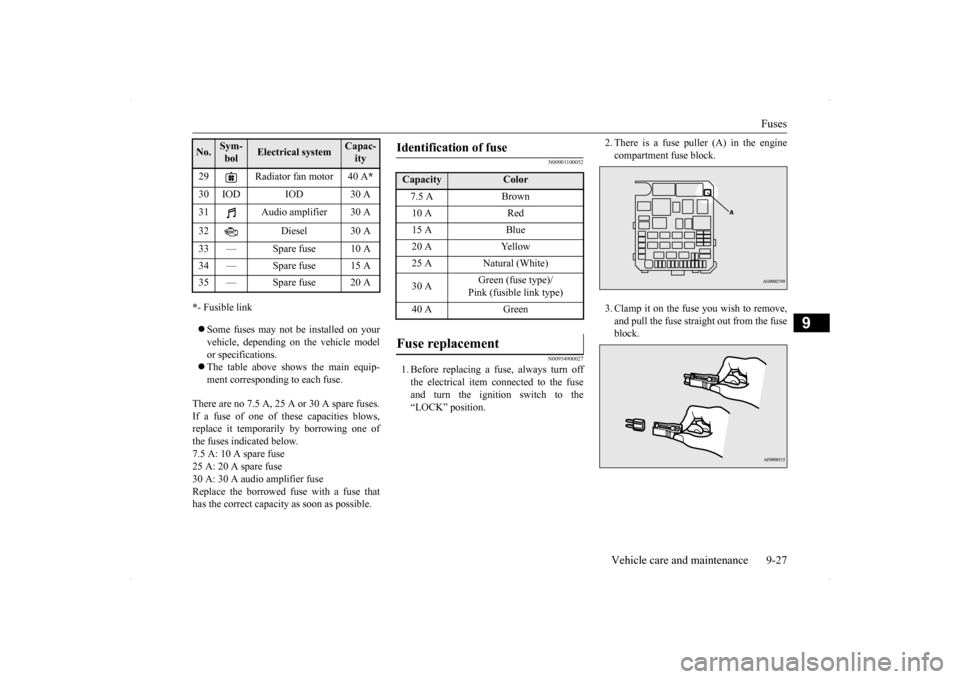
2. There is a fuse puller (A) in the engine compartment fuse block. 3. Clamp it on the fuse you wish to remove, and pull the fuse straight out from the fuse block.
29 Radiator fan motor 40 A
*
30 IOD IOD 30 A 31 Audio amplifier 30 A 32 Diesel 30 A 33 — Spare fuse 10 A 34 — Spare fuse 15 A35 — Spare fuse 20 ANo.
Sym- bol
Electrical system
Capac-ity
Identification of fuse Capacity
Color
7.5 A Brown10 A Red15 A Blue20 A Yellow25 A Natural (White) 30 A
Green (fuse type)/ Pink (fusible link type)
40 A Green
Fuse replacement
BK0200800US.bo
ok 27 ページ 2013年2月14日 木曜日 午後2時28分
Page 330 of 338

Alphabetical index
12-1
12
A
Accessory (installation)
.........................
3-6
ACD (Active center differential system) 5-71Active stability control (ASC)
..............
5-76
ASC OFF indicator
.........................
5-78
ASC operation display
....................
5-78
ASC warning display
......................
5-78
Air cleaner filter
...................
................
9-8
Air conditioning
Automatic air conditioning
.........
7-4
, 7-9
Important air conditioning operating tips
..
7-14
Air purifier
....................
.....................
7-15
All-wheel drive system
........................
5-70
Aluminum wheels
...............................
9-44
Antenna
Roof antenna
.................
.................
7-15
Anti-lock braking system
.....................
5-74
Warning light / display
....................
5-75
Arm rest
........................
.......................
4-5
ASC
..........................
........................
5-76
Assist grip
.....................
...................
5-168
AWC Control fluid
Fluid
......................
........................
11-5
AWC control fluid
................
................
9-9
AYC (Active yaw control system)
........
5-72
AYC fluid
Fluid
.......................
......................
11-5
B
Back-up lights
Bulb capacity
..................
...............
9-28
Replacement
...................
...............
9-37
Ball joint, steering linkage seals and drive shaft boots
.....................
..................
9-22
Battery
........................
......................
9-11
Charging system warning light
.......
5-123
Disconection and connection
...........
9-12
During cold weather
.......................
9-11
Specification
...................
...............
11-5
Bluetooth 2.0 interface
.......................
5-137
Bottle holder
....................
.................
5-167
Brake
Anti-lock braking system
................
5-74
Braking
.......................
....................
6-5
Fluid
....................
.................
9-10
, 11-5
Hose
.......................
......................
9-22
Parking brake
..................
...............
5-47
Parking brake lever stroke
...............
9-19
Pedal
.......................
......................
5-79
Pedal free play
................
...............
9-19
Power brakes
..................
...............
5-79
Service brake
..................
...............
5-79
Brake assist
......................
..................
5-80
Braking
Warning lights
..............................
5-122
Break-in period
.....................
................
5-3
Bulb capacity
.....................
.................
9-28
C
California Perchlorate Materials Requirements
.....................
................
3-7
Capacities
.....................
.....................
11-5
Card holder
............................
5-162
, 5-165
Cargo loads
...................
.....................
6-10
Catalytic converter
................
................
9-2
Certification label
...............................
11-3
Charging system warning light
...........
5-123
Chassis number
..................
.................
11-2
Child restraints
..................
.................
4-12
Child safety locks for rear door
............
5-37
Cleaning
Inside of your vehicle
......................
9-40
Outside of your vehicle
...................
9-42
Clutch
Clutch pedal operation
.....................
5-56
Fluid
..................
...................
9-10
, 11-5
Pedal free play
...............
.................
9-19
Coat hooks
....................
...................
5-168
Combination headlights and dimmer switch
Headlight reminder buzzer
.............
5-128
Light auto-cutout function
.............
5-127
Consumer information
.........................
10-2
BK0200800US.bo
ok 1 ページ 2013年2月14日 木曜日 午後2時28分