2014 MITSUBISHI LANCER EVOLUTION radio
[x] Cancel search: radioPage 173 of 338

Indicator light, warning light, an
d information screen display list
5-112 Features and controls
5
N00557900066
When there is information to be announced,
such as light reminder, the tone sounds an
d the screen switches to the displays show
n below. Refer to
the appropriate page and take the necessary measures.When the cause of the warning display is eliminated, the warning display goes out automatically. Refer to “Warning display list (With ignition switch in the “OFF” position)” on page 5-112. Refer to “Warning display list (With ignition
switch in the “ON” position)” on page 5-115.
Refer to “Other interrupt displays (With ignition switch in the “ON” position)” on page 5-119.
N00558000194
Information screen display list
NOTE
In the following cases, a warning may be displayed on the inform
ation screen and the buzzer may
sound for a few seconds, at tim
es.
This is caused by the system picking up interference such as stro
ng electromagnetic waves or nois
e, and is not a functional pro
blem.
• An extremely strong electromagnetic wave is received from a source
such as an illegal radio set,
a spark from a wire, or a rad
ar station.
• Abnormal voltage or a static electricity discharge is genera
ted by the operation of your vehicle’s electronics (including afte
r-market parts).
If the warning display has occurred a number of times, take your vehicle to an authorized Mitsubishi Motors dealer or a repair
facility of your choice and
have the system checked.
Warning display list (With ignition switch in the “OFF” position)
Screen
Cause
Do this (Reference)
You have forgotten to remove the key from the ignition switch.
Remove the key. Refer to “Key reminder system” on page 5-35.
BK0200800US.book
112 ページ 2013年2月14日 木曜日 午後2時28分
Page 212 of 338

Bluetooth® 2.0 interface
Features and controls 5-151
5
“
N00565800019
If an incoming phone call is received whilethe ignition switch is in the “ACC” or “ON”position, the audio system will be automati- cally turned on and switched to the incoming call, even when the audio system was origi-nally off. The voice guide announcement for the incoming call will be output from the frontpassenger’s seat speaker. If the CD player or radio was playing when the incoming call was received, the audio sys-tem will mute the sound from the CD player or radio and output only the incoming call. To receive the call, press the PICK-UP buttonon the steering wheel control switch. When the call is over,
the audio system will
return to its previous state.
N00565900010
At any time during a call, you can mute thevehicle microphone. Pressing the SPEECH button and then saying “Mute” during a call will turn ON the mute function and mute the microphone.Saying “Mute off” in the same way will turn off the mute function and cancel the mute on the microphone.
N00566600014
The Bluetooth
® 2.0 interface can switch
between hands-free mode (hands-free calls) and private mode (calls using cellular phone). If you press the SPEECH button and say“Transfer call” during a hands-free call, you can stop the hands-free mode and talk in pri- vate mode. To return to hands-free mode, press the SPEECH button again and say “Transfer call.”
N00566000018
The Bluetooth
® 2.0 interface has 2 types of
unique phonebooks that are different from thephonebook stored in the cellular phone. They
are the vehicle phonebook and the mobile phonebook. These phonebooks are used to register tele- phone numbers and make calls to desirednumbers via voice recognition function.
N00566101117
This phonebook is us
ed when making calls
with the voice recognition function. Up to 32 names can be registered in the vehi- cle phonebook per language.Also, each entry has 4 locations associated with: home, work, mobile and other. You can register one telephone number for each loca-tion. You can register a desired name as a name for any phonebook entry registered in the vehicle phonebook.Names and telephone numbers can be changed later on. The vehicle phonebook can be used with all paired cellular phones.
Receiving calls
Mute function Switching between hands-free mode and private mode Phonebook function
NOTE
Disconnecting the battery cable will not delete information registered in the phone- book.
Vehicle phonebook
BK0200800US.book
151 ページ 2013年2月14日 木曜日 午後2時28分
Page 219 of 338

USB input terminal 5-158 Features and controls
5
5. The voice guide will say “Importing the contact list from the mobile phonebook. This may take several minutes to com- plete. Would you like to continue?”Answer “Yes,” transferring to the mobile phonebook the phonebook stored in the cellular phone will start.Answer “No,” the system will return to the main menu.
6. When the transfer is complete, the voice guide will say “Import complete” and then the system will return to the main menu.
N00566300037
MODEL: MMC FCC ID: CB2MDGMY10IC: 279B-MDGMY10 Your Bluetooth
® 2.0 interface operates on a
radio frequency subject to Federal Communi- cations Commission (FCC) Rules (For vehi- cles sold in U.S.A.) and Industry CanadaRules (For vehicles sold in Canada). This device complies with Part 15 of the FCC Rules and RSS-210 of the Industry CanadaRules. Operation is subject to the following two conditions: This device may not cause harmful inter- ference. This device must accept any interference received, including interference that may cause undesired operation.
The term “IC:” before the radio certification number only signifies that Industry Canada technical specifications were met. The antenna used for this transmitter must notbe co-located or operating in conjunction with any other antenna or transmitter. End- users and installers must be provided withinstallation instructions and transmitter oper- ating conditions for satisfying RF exposure compliance.
N00566401093 N00566701038
You can connect your USB memory device or iPod
* to play music files stored in the USB
memory device or iPod. The following explains how to connect andremove a USB memory device or iPod.
NOTE
The transfer may take some time to complete depending on the number of contacts. If the Bluetooth
® 2.0 interface could not be
connected to the Bluetooth
® compatible cel-
lular phone, the voice guide will say “Unable to transfer contact list from phone” and then the system will return to the main menu. If you press the HANG-UP button or press and hold the SPEECH button during the datatransfer, the transfer will be cancelled and the system will return to the main menu. If an error occurs during the data transfer, all transfer will be cancelled and the voice guide will say “Unable to complete the phonebookimport” and then the system will return to the main menu. If there are no contacts in the phonebook, the voice guide will say “There are no contacts on the connected phone.”
General information
CAUTION Changes or modifications not expressly approved by the manufacturer for compli-ance could void the user’s authority to oper- ate the equipment.
Enrollment commands USB input terminal
BK0200800US.book
158 ページ 2013年2月14日 木曜日 午後2時28分
Page 236 of 338

Loading information Driving safety 6-7
6
Vehicle maximum load on the tire: load on an individual tire that is determined by distributing to each axle its share of the maximum loaded vehicle weight anddividing by two. Vehicle normal load on the tire: load on an individual tire that is determined by dis-tributing to each axle its share of the curb weight, accessory weight, and normal occupant weight and dividing by two. Maximum loaded vehicle weight: the sum of - (a) Curb weight; (b) Accessory weight;(c) Vehicle capacity weight; and (d) Production options weight. Curb weight: the weight of a motor vehi- cle with standard equipment including the maximum capacity of fuel, oil, and cool- ant. Accessory weight: the combined weight (in excess of those standard items which may be replaced) of automatic transmis-sion, power steering, power brakes, power windows, power seats, radio, and heater, to the extent that these items are availableas factory- installed equipment (whether installed or not). Vehicle capacity weight: the rated cargo and luggage load plus 150 lbs (68 kg)
*
times the vehicle’s designated seating capacity.
Production options weight: the combined weight of those installed regular produc- tion options weighing over 5 lbs (2.3 kg) in excess of those standard items whichthey replace, not previously considered in curb weight or accessory weight, includ- ing heavy duty brakes, ride levelers, roofrack, heavy duty battery, and special trim. Normal occupant weight: 150 lbs (68 kg)
*
times the number of specified occupants.(In your vehicle the number is 3) Occupant distribution: distribution of occupants in a vehicle as specified. (In your vehicle the distribution is 2 in front,1 in second row seat)
N00630100338
The tire and loading information placard is located on the driver’s door sill.
This placard shows the maximum number of occupants permitted to ride in your vehicle aswell as “the combined weight of occupants and cargo” (A), which is called the vehicle capacity weight. The weight of roof road isincluded in the definition of “cargo” when determining the vehicle capacity weight. This placard also tells you the size and recom-mended inflation pressure for the originalequipment tires on your vehicle. For more information, refer to “Tires” on page 9-12.
* :150 lbs (68 kg) is the weight of one person as defined by U.S.A. and Canadian regulations.
Tire and loading information placard
BK0200800US.bo
ok 7 ページ 2013年2月14日 木曜日 午後2時28分
Page 240 of 338

7
Comfort controlsVents ..........................................
.......................................................7-2
Automatic air conditioning with Fahr
enheit scale (if so equipped) .7-4
Automatic air conditioning with Cels
ius scale (if so equipped) .......7-9
Important air conditioning op
erating tips .......................................7-14
Air purifier .......................
...............................................................7-15
Antenna ................................................
...........................................7-15
General information about
your radio ............................................7-15
BK0200800US.bo
ok 1 ページ 2013年2月14日 木曜日 午後2時28分
Page 254 of 338

Air purifier
Comfort controls 7-15
7
The air conditioning should be operated for at least five minutes each week, even in coldweather. This includes the quick defrosting mode. Operating the air condition system weekly maintains lubrication of the compres-sor internal parts to keep the air conditioning in the best operating condition.
N00733800151
The air conditioning system is equipped with an air filter to remove pollen and dust. The air filter’s ability to collect pollen and dirt is reduced as it becomes dirty, so replaceit periodically. For the maintenance interval, refer to the “WARRANTY AND MAINTE- NANCE MANUAL”.
N00734200455
Turn the pole (A) counterclockwise. Screw the pole (A) clockwise into the base (B) until it is securely retained.
N00733901494
Your vehicle’s radio receives both AM and FM stations.The quality of your reception is affected by distance, obstacles, and signal interference. This radio complies with Part 15 of Federal Communications Commission (FCC) Rules(for vehicles sold in U.S.A.). Operation is subject to the following conditions: The device may not cause harmful inter- ference. This device must accept any interference recieved, including interference that may cause undesirable operation.
During a long period of disuse Air purifier
NOTE
Operation in certain conditions such as driv- ing on a dusty road and frequent use of the air conditioning can lead to reduction of ser- vice life of the filter.
When you feel that the
air flow is lower than
normal or when the
windshield or windows start to fog up easily, replace the air filter. Contact your Mitsubishi Motors dealer or arepair facility of your choice for assistance.
Antenna To remove To install
NOTE
Be sure to remove the roof antenna in the following cases: • When using an automatic car wash • When covering your vehicle with a car cover
• When driving into a structure that has a lowceiling.
General information about your radio
CAUTION Changes or modifications not expressly approved by the party meeting the above conditions could void the user’s authority to operate the equipment.NOTE
BK0200800US.bo
ok 15 ページ 2013年2月14日 木曜日 午後2時28分
Page 255 of 338
General information about your radio 7-16 Comfort controls
7
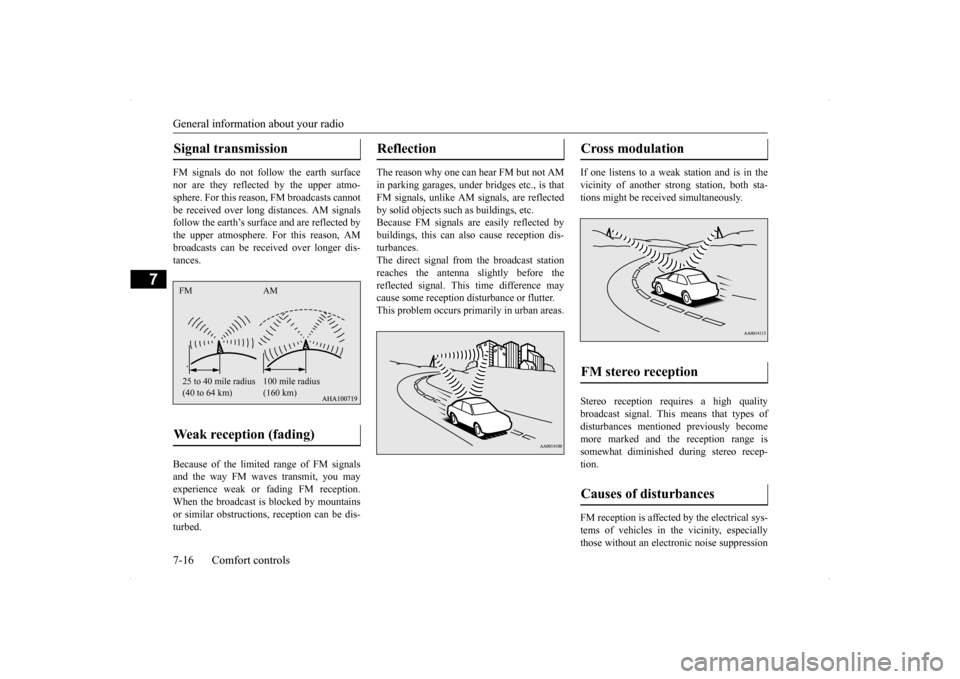
FM signals do not follow the earth surface nor are they reflected by the upper atmo- sphere. For this reason, FM broadcasts cannotbe received over long distances. AM signals follow the earth’s surface and are reflected by the upper atmosphere. For this reason, AMbroadcasts can be received over longer dis- tances. Because of the limited
range of FM signals
and the way FM waves transmit, you mayexperience weak or fading FM reception. When the broadcast is blocked by mountains or similar obstructions, reception can be dis-turbed.
The reason why one can hear FM but not AM in parking garages, under bridges etc., is that FM signals, unlike AM signals, are reflectedby solid objects such as buildings, etc. Because FM signals are easily reflected by buildings, this can also cause reception dis-turbances. The direct signal from the broadcast station reaches the antenna slightly before thereflected signal. This time difference maycause some reception disturbance or flutter. This problem occurs primarily in urban areas.
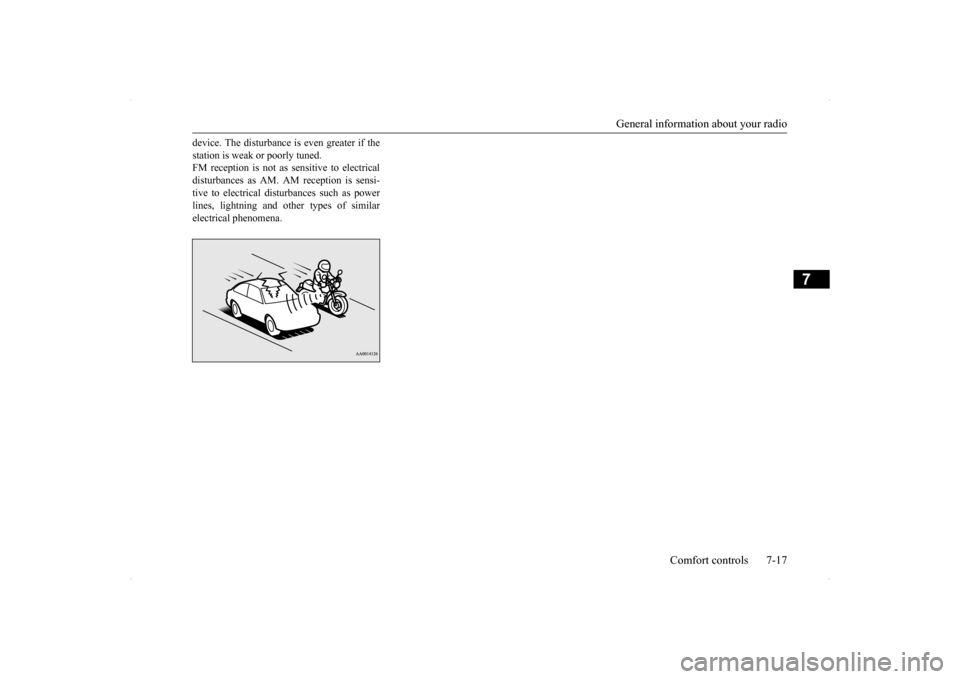
If one listens to a weak station and is in the vicinity of another strong station, both sta- tions might be received simultaneously. Stereo reception requires a high quality broadcast signal. This means that types of disturbances mentioned previously become more marked and the reception range issomewhat diminished during stereo recep- tion. FM reception is affected by the electrical sys- tems of vehicles in the vicinity, especially those without an electronic noise suppression
Signal transmission Weak reception (fading) FM AM 25 to 40 mile radius (40 to 64 km)
100 mile radius (160 km)
Reflection
Cross modulation FM stereo reception Causes of disturbances
BK0200800US.bo
ok 16 ページ 2013年2月14日 木曜日 午後2時28分
Page 256 of 338
General information about your radio
Comfort controls 7-17
7
device. The disturbance is even greater if the station is weak or poorly tuned. FM reception is not as sensitive to electrical disturbances as AM. AM reception is sensi-tive to electrical disturbances such as power lines, lightning and other types of similar electrical phenomena.
BK0200800US.bo
ok 17 ページ 2013年2月14日 木曜日 午後2時28分