2014 MITSUBISHI LANCER EVOLUTION child lock
[x] Cancel search: child lockPage 43 of 338
Child restraint systems 4-18 Seat and restraint systems
4
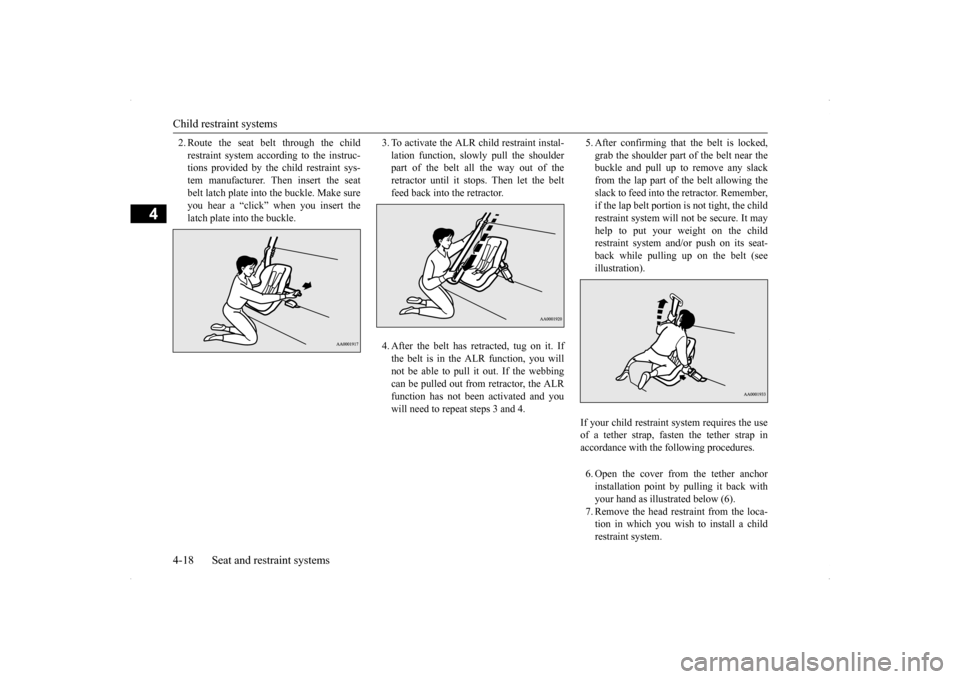
2. Route the seat belt through the child restraint system according to the instruc- tions provided by the child restraint sys- tem manufacturer. Then insert the seatbelt latch plate into the buckle. Make sure you hear a “click” when you insert the latch plate into the buckle.
3. To activate the ALR child restraint instal- lation function, slow
ly pull the shoulder
part of the belt all the way out of the retractor until it stops. Then let the beltfeed back into the retractor. 4. After the belt has retracted, tug on it. If the belt is in the ALR function, you willnot be able to pull it out. If the webbing can be pulled out from retractor, the ALR function has not been activated and youwill need to repeat steps 3 and 4.
5. After confirming that the belt is locked, grab the shoulder part of the belt near the buckle and pull up to remove any slack from the lap part of the belt allowing theslack to feed into the retractor. Remember, if the lap belt portion is not tight, the child restraint system will not be secure. It mayhelp to put your weight on the child restraint system and/or push on its seat- back while pulling up on the belt (seeillustration). 6. Open the cover from the tether anchor installation point by pulling it back with your hand as illustrated below (6).7. Remove the head restraint from the loca- tion in which you wish to install a child restraint system.
If your child restraint system requires the use of a tether strap, fasten the tether strap in accordance with the following procedures.
BK0200800US.bo
ok 18 ページ 2013年2月14日 木曜日 午後2時28分
Page 44 of 338

Maintenance and inspection of seat belts
Seat and restraint systems 4-19
4
8. Latch the tether strap hook (A) of the child restraint system to the tether anchor (B) as illustrated below (8) and tighten the top tether strap so it is securely fastened. 9. Before putting your child in the restraint, push and pull the restraint in all directions to be sure it is firmly secured. Do this before each use. If the child restraint sys-tem is not firmly secure, repeat steps 1 through 8.
10. To remove a child restraint system from
the vehicle and deactivate the ALR mode, remove the child from the restraint. Unlatch the buckle. Then remove the beltfrom the restraint and let the belt fully retract.
N00407600575
Children who have outgrown a child restraintsystem should be seated in the rear seat and wear the seat belt. If the shoulder belt crossestheir face or neck, and/or the lap belt crosses their stomach, a commercially available booster seat (including a booster cushion)must be used, to raise the child so that the shoulder belt crosses their shoulder and the lap belt remains positioned low across theirhips. The booster seat (including a booster cushion) should fit the vehicle seat and have a label certifying compliance with FederalMotor Vehicle Safety Standards or Motor Vehicle Restraint Systems and Booster Cush- ions Safety Regulations.
N00407000221
The seat belt webbing may be cleaned withmild soap or detergent solution. Do not use anorganic solvent. Allow the belts to dry in the shade. Do not allow them to retract until com- pletely dry. Do not attempt to bleach or re-dye the belts. The color may rub off and the webbing strength may be affected.
WA R N I N G Child restraint system tether anchors are designed only to withstand loads from cor-rectly fitted child restraint systems. Under no circumstances are they to be used for adult seat belts, or harnesses, or forattaching other items or equipment to the vehicle.
Children who have outgrown child restraint systems
WA R N I N G Any child who is too small to properly wear a seat belt must be properly restrained in an appropriate child restraint system, to reduce their risk of serious injury or death in an accident. A child should never be left unattended in, or unsupervised, around your vehicle.When you leave the vehicle, always take the child out as well. Children can die from he
at stroke if left or
trapped inside the vehicle, especially on hot days. Keep your vehicle locked and the trunk lid closed when not in use. Keep your vehiclekeys away from children. Never allow children to play in the trunk of your vehicle.
Maintenance and inspection of seat belts
BK0200800US.bo
ok 19 ページ 2013年2月14日 木曜日 午後2時28分
Page 45 of 338

Supplemental Restraint System (SRS) - airbag 4-20 Seat and restraint systems
4
Regularly check your seat belt buckles and their release mechanisms for positive engage- ment and release of the latch plate. Check the retractors for automatic locking when in theAutomatic Locking Retractor function. The entire seat belt assembly should be replaced if the webbing shows any obvious cuts, tears, increase in thickness in any sec-tion of the webbing from broken fibers, or severe fading from sunlight. All of these con- ditions indicate a weakening of the belt,which may adversely affect seat belt perfor-mance in an accident.
N00407701746
This vehicle is equipped with a SupplementalRestraint System (SRS), which includes air-bags for the driver and passengers.
The SRS front airbags are designed to supple- ment the primary protection of the driver and front passenger seat belt systems by provid- ing those occupants with protection againsthead and chest injuries in certain moderate to severe frontal collisions. The SRS front airbags, together with sensorsat the front of the vehicle and sensors attached to the front seats, form an advanced airbag system. The SRS driver’s knee airbag is designed to supplement the primary protection of thedriver’s seat belt system. It can reduce the forward movement of the driver’s lower legs and provide increased overall body protectionin certain moderate to severe frontal colli- sions. The SRS side airbags and the curtain airbags are also designed to supplement the seat belts.The SRS side airbags provide the driver and front passenger with protection against chest injuries by deploying the bag on the sideimpacted in moderate to severe side impact collisions. The SRS curtain airbags provide the driver and passengers on the front seatand rear outboard seat with protection against head injuries by deploying a bag on the side impacted in moderate to severe side impactcollisions.
The SRS airbags are NOT
a substitute for use
of the seat belts. For maximum protection in all types of accidents, seat belts must ALWAYS be worn by everyone who drives orrides in this vehicle (with infants and small children in an appropriate child restraint sys- tem in the rear seat, and older children buck-led in the rear seat). Refer to “Child restraint systems” on page 4-12.
WA R N I N G Do not attempt to repair or replace any part of the seat belt assemblies. This work should be done by an authorized Mitsubishi Motors dealer. Failure to havean authorized Mitsubishi Motors dealer perform the work could reduce the effec- tiveness of the belts and could result in aserious injury or death in an accident.
Supplemental Restraint Sys- tem (SRS) - airbag
WA R N I N G IT IS VERY IMPORTANT TO ALWAYS WEAR YOUR SEAT BELT PROPERLY EVEN WITH AN AIRBAG.• Seat belts help keep the driver and pas-sengers properly positioned. This reduces the risk of injury in all collisions,and reduces the risk of serious injuries or death when the airbags inflate. During sudden braking just before a col-lision, an unrestrained or improperly restrained driver or passengers can move forward into direct contact with, orwithin close proximity to, the airbag when it begins to inflate. The beginning stage of airbag inflation isthe most forceful and can cause serious injuries or death if the occupant comes in contact with the airbag at this time. • Seat belts reduce the risk of injury inrollovers, rear impact collisions, and in lower-speed frontal collisions, because the airbags are not designed to inflate inthose situations.
BK0200800US.bo
ok 20 ページ 2013年2月14日 木曜日 午後2時28分
Page 62 of 338

5
Features and controlsBreak-in period ................
.................................................................5-3
Keys .....................................................
.............................................5-3
Electronic immobilizer (Anti-theft starting system) .........................5-4 Keyless entry system (if so equipped) ..............................................5-7Free-hand Advanced Security Transmitter (F.A.S.T.-key) (if so equipped)................................
..................................................... 5-11
Door locks........................
...............................................................5-34
Power door locks .............
...............................................................5-36
“Child safety locks” for
rear door...................................................5-37
Trunk lid ....................................
.....................................................5-37
Inside emergency trunk lid
release .................................................5-39
Theft-alarm system ..........
...............................................................5-40
Power windows................
...............................................................5-42
Sunroof (if so equipped
) .........................................
........................5-44
Parking brake ...................
...............................................................5-47
Steering wheel tilt lock lever ..........................................................5-47Inside day/night rearview
mirror ....................................................5-48
Outside rearview mirr
ors ................................................................5-49
Ignition switch .................
...............................................................5-50
Steering wheel lock..........
...............................................................5-52
Starting and stopping the e
ngine ....................................................5-53
Turbocharger operation
...........................................
........................5-55
Clutch pedal operation (if so equipped)..........................................5-56Manual transaxle (if so equipped) ..................................................5-57 Twin Clutch SST (Sportronic Shif
t Transmission) (if so equipped)
...................................................................
..................................5-58
All-wheel drive system
...........................................
........................5-70
Cautions on handling of all-wheel drive vehicles ..........................5-70
S-AWC (Super-All Wheel
Control)................................................ 5-71
Anti-lock braking syst
em ......................................
......................... 5-74
Active stability control
(ASC) .....................
................................... 5-76
Limited-slip differenti
al.........................................
......................... 5-79
Service brake ..................
.................................................
............... 5-79
Brake assist system
................................................
......................... 5-80
Power steering system
...........................................
......................... 5-80
Cruise control .................
.................................................
............... 5-81
Tire pressure monitoring
system .................................................... 5-85
Instrument cluster .
.................................................
......................... 5-89
Multi-information disp
lay .....................................
......................... 5-91
Indicator light, warning light, and information screen display list
.................................................................
................................. 5-111
Indicators ..................................
.................................................... 5-121
Warning lights.................
.................................................
............. 5-122
Information screen disp
lay ...................................
....................... 5-123
Combination headlights and dimmer switch ............................... 5-125 Turn signal lever ...
.................................................
....................... 5-131
Hazard warning flasher
switch ..................................................... 5-131
Front fog light switch
............................................
....................... 5-131
Wiper and washer swit
ch ......................................
....................... 5-132
Electric rear window def
ogger switch .......................................... 5-136
Horn switch ..............................
.................................................... 5-137
Link System ..............................
.................................................... 5-137
Bluetooth
® 2.0 interface ...........
.................................................... 5-137
USB input terminal .........
.................................................
............. 5-158
Sun visors .................................
.................................................... 5-161
12 V power outlet ...........
.................................................
............. 5-162
BK0200800US.bo
ok 1 ページ 2013年2月14日 木曜日 午後2時28分
Page 95 of 338

Door locks 5-34 Features and controls
5
4. Install a new battery with the + side (A) up. 5. Close the remote control transmitter case firmly. 6. Check the keyless entry system to see thatit works.
N00509200518
Turn the key toward the front of the vehicle tolock the door. After checking that the door is
locked, turn the key back to the center and remove it.
NOTE
You may purchase a replacement battery at an electric appliance store. An authorized Mitsubishi Motors dealer can replace the battery for you if you prefer.CAUTION When the remote control transmitter case is opened, be careful to keep water, dust, etc. out. Also, do not touch the internal compo- nents.
+ side - side
Coin type bat- tery CR2032
Door locks
WA R N I N G Make sure all doors are tightly closed and locked while driving.• Locked doors, in combination with theuse of seat belts, can help reduce the risk of ejection in an accident.• Locked doors can help keep passengers,especially small children, from opening doors and falling out of moving vehicles.• Locked doors can help prevent outsidersfrom gaining access to your vehicle whenyou slow or come to a stop.
Lock your vehicle whenever you leave it. Children who get into unlocked vehicles may not be able to get out. Children trapped inside vehicles can quickly beovercome by heat and suffer serious injury or death due to heat stroke. Never leave children unattended inside a vehicle. In addition to the risk of heat stroke, children can activate switches andcontrols, resulting in an injury or fatal accident.
To lock or unlock the driver’s door with the key
1- Insert or remove the key 2- Lock 3- Unlock
NOTE
When locking or unlocking with the key, only the driver’s door will be locked or unlocked.To lock or unlock all doors, use the power door lock switch, the keyless entry system or the F.A.S.T.-key.Refer to “Power door locks” on page 5-36, “Keyless entry system” on pages 5-7 and 5-29, and “To operate using the F.A.S.T.-key” on page 5-14. In vehicles equipped with the F.A.S.T.-key, the driver’s door can be locked and unlocked using the emergency key. Refer to “Emergency key” on page 5-21.
BK0200800US.bo
ok 34 ページ 2013年2月14日 木曜日 午後2時28分
Page 98 of 338
“Child safety locks” for rear door
Features and controls 5-37
5
N00509400233
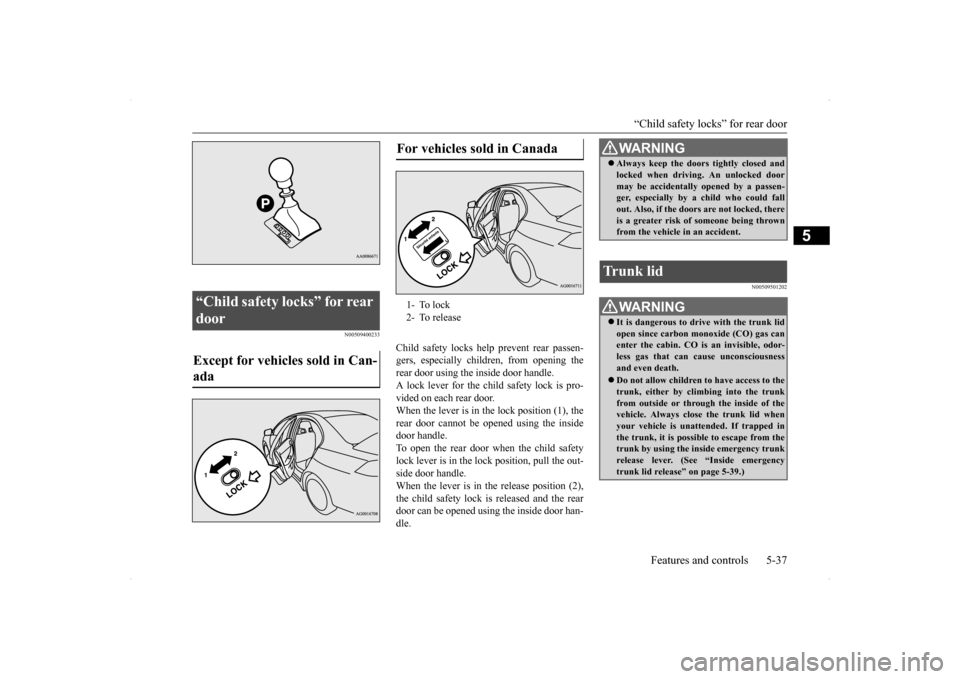
Child safety locks help prevent rear passen- gers, especially children, from opening therear door using the inside door handle. A lock lever for the child safety lock is pro- vided on each rear door.When the lever is in the lock position (1), the rear door cannot be
opened using the inside
door handle.To open the rear door when the child safety lock lever is in the lock position, pull the out- side door handle.When the lever is in th
e release position (2),
the child safety lock is released and the rear door can be opened using the inside door han-dle.
N00509501202
“Child safety locks” for rear door Except for vehicles sold in Can- ada
For vehicles sold in Canada 1- To lock 2- To release
WA R N I N G Always keep the doors tightly closed and locked when driving. An unlocked door may be accidentally opened by a passen- ger, especially by a child who could fall out. Also, if the doors are not locked, thereis a greater risk of someone being thrown from the vehicle in an accident.
Trunk lid
WA R N I N G It is dangerous to drive with the trunk lid open since carbon monoxide (CO) gas can enter the cabin. CO is an invisible, odor- less gas that can cause unconsciousnessand even death. Do not allow children to have access to the trunk, either by climbing into the trunk from outside or through the inside of the vehicle. Always clos
e the trunk lid when
your vehicle is unattended. If trapped in the trunk, it is possible to escape from the trunk by using the inside emergency trunk release lever. (See “Inside emergency trunk lid release” on page 5-39.)
BK0200800US.bo
ok 37 ページ 2013年2月14日 木曜日 午後2時28分
Page 100 of 338

Inside emergency trunk lid release
Features and controls 5-39
5
N00509800178
The emergency trunk lid release is designed to provide a way to open the trunk lid from inside the trunk. It was developed to help pre- vent death and serious injuries to childrenwho might become locked inside a vehicle trunk.
The emergency trunk lid release lever (see illustration) is mounted on the trunk lid. The lever glows in the dark after exposure to sunlight. You and your family should familiarize your- selves with the location and operation of the emergency trunk lid release lever. Childrenshould be taught not to play in or aroundvehicles.
To open the trunk from the inside, move the lever (A) in the direction of the arrow on thelever. Push up on the trunk lid to open the trunk and climb out.
NOTE
Gas struts (A) are installed in the locations illustrated to support the trunk lid. Please observe the following in order to prevent damage or faulty operation. • Do not touch, push or pull the gas struts when closing the trunk lid. • Do not attach any plastic material, tape, etc., to the gas struts. • Do not tie string, etc., around the gas struts. • Do not hang any object on the gas struts.
Inside emergency trunk lid release
WA R N I N G Children should never be left unsuper- vised in or around vehicles. Unsupervised children could lock them- selves in an open vehicle or trunk.
People trapped inside a vehicle or trunk, even if only for a short period of time, can quickly die from suffocation or heat stroke, especially on hot days. Interior temperatures in vehicles can rise in min-utes. Keep your vehicle doors locked and the trunk lid closed when not in use. Keep your vehicle keys away from children.CAUTION When loading the trunk, place your things so that they will not touch the emergency trunk lid release lever when you close the trunk. Otherwise you could damage the lever and make it unusable.WA R N I N G
BK0200800US.bo
ok 39 ページ 2013年2月14日 木曜日 午後2時28分
Page 103 of 338

Power windows 5-42 Features and controls
5
Use the following procedure to test the sys- tem: 1. Lower the driver’s window.
2. Arm the system as explained in “Armed stage”. 3. Make sure that the theft-alarm indicator comes on and flashes for approximately20 seconds. 4. Wait a few seconds and then unlock the driver’s side door by using the inside doorlock knob and open the door. 5. Check to be sure that the horn sounds intermittently and the headlights blink onand off when the door is opened.6. Disarm the system by unlocking all doors by the keyless entry system or the F.A.S.T.-key operation.
N00510800266
N00548700114
The main switch located on the driver’s door can be used to operate all door windows. A window can be opened or closed by operat- ing the corresponding switch.Press the switch down to open the window, and pull up the switch to close it. If the driver’s door window switch is fullypressed down/pulled up, the driver’s door window automatically opens/closes com- pletely.
NOTE
If the UNLOCK button is pressed when all doors are closed and no door is opened within approximately 30 seconds, re-armingwill automatically occur. The amount of time after unlocking until the vehicle relocks automatically can be adjusted. See an authorized Mitsubishi Motors dealer for details. Once the system has been disarmed, it can- not be rearmed except by repeating the arm-ing procedure.
Testing the theft-alarm system Disarm...by the keyless entry system or F.A.S.T.-key operation
Power windows 1- Open (down) 2- Close (up)
NOTE
Never try to operate the main switch and sub switch in different directions at the same time. This will freeze the window in posi- tion. Operating the power windows repeatedly with the engine stopped will run down the battery. Use the window switches only whilethe engine is running. WA R N I N G Before operating the power windows, make sure that nothing can be trapped(head, hands, fingers, etc.) in the window. Never leave the vehicle with the key in the ignition switch. Never leave a child alone in the vehicle.
Main switch
BK0200800US.bo
ok 42 ページ 2013年2月14日 木曜日 午後2時28分