2014 MERCEDES-BENZ SL-CLASS ROADSTER headlamp
[x] Cancel search: headlampPage 7 of 284

Assistance display (on-board
computer)
.......................................... 161
Assistance menu (on-board
computer) .......................................... 161
ASSYST PLUS Displaying a service message ........221
Hiding a service message ..............220
Resetting the service interval
displa y........................................... 221
Service message ............................ 220
Special service requirements ......... 221
ATA (Anti-Theft Alarm system)
Activating/deactivating ...................75
Function .......................................... .75
Switching off the alarm ....................75
ATTENTION ASSIST
Activating/deactivating .................161
Display message ............................ 163
Function/notes ............................. 148
Audio menu (on-board computer) ....161
Authorized Centers see Qualified specialist workshop
Authorized Mercedes-Benz Center
see Qualified specialist workshop
Authorized workshops
see Qualified specialist workshop
AUTO lights
Display message ............................ 163
Automatic engine start (ECO start/
stop function) .................................... 125
Automatic engine switch-off (ECO
start/stop function) ..........................125
Automatic headlamp mode ......107, 108
Automatic transmission Accelerator pedal position .............126
Automatic drive program ...............126
Changing gea r............................... 126
Display message ............................ 163
Driving tips .................................... 126
Emergency running mode ..............126
Kickdown ....................................... 126
Manual drive program ....................126
Manual drive program (vehicles
with Sports package AMG) ............126
Overview ........................................ 126
Problem (malfunction) ...................126
Program selector button ................126
Pulling away ................................... 124Selector lever
................................ 126
Starting the engine ........................123
Steering wheel paddle shifters ......126
Transmission position displa y........ 126
Transmission positions ..................126
Automatic transmission
emergency mode ............................... 126 B
Back button ....................................... 197
BAS (Brake Assist System) .................67
BAS PLUS (Brake Assist System
PLUS) .................................................... 68
Battery (SmartKey) Checking .......................................... 80
Important safety notes ....................80
Replacing ......................................... 81
Battery (vehicle)
Charging ........................................ 233
Important safety notes ..................231
Jump starting ................................. 235
Overview ........................................ 231
Blind Spot Assist
see Active Blind Spot Assist
Bluetooth ®
see also Digital Operator's Manual 188
Bottle holder ...................................... 206
Brake Assist see BAS (Brake Assist System)
Brake fluid
Display message ............................ 167
Notes ............................................. 276
Brake lamps
Display message ............................ 163
Brakes
ABS .................................................. 67
BAS .................................................. 67
BAS PLUS ........................................ 68
Brake fluid (notes) .........................276
Display message ............................ 164
Driving tips .................................... 131
High-performance brake system ....131
Important safety notes ..................131
Maintenance .................................. 131
Warning lamp ................................. 177 Index
5
Page 12 of 284

General notes
.................................. 69
Important safety information ...........69
Warning lamp ................................. 179
ETS (Electronic Traction System) ....... 69
Exhaust check ................................... 131
Exhaust tail pipe (cleaning
instructions) ...................................... 222
Exterior lighting Setting options .............................. 106
see Lights
Exterior mirrors
Adjusting ....................................... 102
Dipping (automatic) .......................102
Folding in when locking (on-board
computer) ...................................... 161
Storing settings (memory function) 103
Storing the parking position ..........102
Eyeglasses compartment .................204 F
Filler cap see Fuel filler flap
Filling capacities (Technical data) ...275
First-aid kit ......................................... 226
Flat tire MOExtended tires ..........................227
Preparing the vehicle .....................227
TIREFIT kit ...................................... 228
Floormats ........................................... 214
Front fog lamps Display message ............................ 163
Fuel
Consumption statistics ..................161
Displaying the current
consumption .................................. 161
Displaying the range ......................161
Driving tips .................................... 131
Fuel gauge ....................................... 35
Grade (gasoline) ............................ 276
Important safety notes ..................275
Premium-grade unleaded gasoline .276
Problem (malfunction) ...................130
Refueling ........................................ 127
Tank content/reserve fuel .............275
Fuel filler flap
Opening/closing ............................ 128Fuel level
Calling up the range (on-board
computer) ...................................... 161
Fuel tank
Capacity ........................................ 275
Problem (malfunction) ...................130
Fuse allocation chart (vehicle tool
kit) ...................................................... 226
Fuses Allocation chart ............................. 240
Before changing ............................. 240
Dashboard fuse box .......................241
Fuse box in the engine
compartment ................................. 241
Fuse box in the rear compartment .242
Important safety notes ..................240 G
Garage door opener Clearing the memory .....................214
Important safety notes ..................211
Opening/closing the garage door ..214
Programming (button in the rear-
view mirror) ................................... 212
Gasoline ............................................. 276
Gear indicator (on-board
computer) .......................................... 161
Gear or selector lever (cleaning
guidelines) ......................................... 223
Genuine parts ...................................... 26
Glass roof (sunblind) ...........................97
Glove box ........................................... 204
Google™ Local Search see also Digital Operator's Manual 188 H
HANDS-FREE ACCESS .......................... 86
Hazard warning lamps ......................106
Head bags Display message ............................ 168
Operation ........................................ .50
Headlamps
Cleaning system (notes) ................278
Fogging up ..................................... 106
see Automatic headlamp mode
Head level heating (AIRSCARF) ........101 10
Index
Page 13 of 284
Head restraints
Adjusting ....................................... 101
see NECK-PRO head restraints
Heating
see Climate control
High-beam headlamps
Display message ............................ 163
Switching Adaptive Highbeam
Assist on/off ................................. 110
Switching on/off ........................... 108
Hill start assist .................................. 124
HOLD function Activating ....................................... 141
Deactivating ................................... 141
Function/notes ............................. 140
Home address
see also Digital Operator's Manual 188
Hood
Closing .......................................... .217
Display message ............................ 175
Important safety notes ..................216
Opening ......................................... 216
Hydroplaning ..................................... 131I
Ignition lock see Key positions
Immobilizer .......................................... 75
Indicator lamps see Warning and indicator lamps
Instrument cluster
Overview .......................................... 35
Warning and indicator lamps ...........36
Instrument cluster lighting ..............160
Intelligent Light System Activating/deactivating .................161
Interior lighting
Automatic control ..........................110
Delayed switch-off (on-board
computer) ...................................... 161
Emergency lighting ........................110
Manual control ............................... 110
Overview ........................................ 110
Reading lamp ................................. 110Setting the brightness of the
ambient lighting (on-board
computer)
...................................... 161
Setting the color of the ambient
lighting (on-board computer) .........161
Internet
Calling up the carousel view ..........200
Conditions for access ....................198
Entering the URL ............................ 200
Internet radio
Calling up ....................................... 199
Searching for stations .................... 199
iPod ®
see also Digital Operator's Manual 188 J
Jack Storage location ............................ 226
Using ............................................. 265
Jump starting (engine) ......................235 K
KEYLESS-GO Display message ............................ 163
Locking ............................................ 79
Start/Stop button .......................... 121
Starting the engine ........................123
Unlocking ......................................... 79
Key positions
KEYLESS-GO .................................. 121
SmartKey ....................................... 121
Kickdown
Driving tips .................................... 126
Knee bag .............................................. 49 L
Lamps see Warning and indicator lamps
Lane Keeping Assist
see Active Lane Keeping Assist
Lap time (RACETIMER) ......................161
LATCH-type (ISOFIX) child seat
anchors ................................................ 65
License plate lamp (display
message) ............................................ 163 Index
11
Page 14 of 284
Light function, active
Display message ............................ 163
Lighting
Light switch ................................... 106
Lights
Activating/deactivating the
interior lighting delayed switch-
off.................................................. 161
Active light function .......................109
Automatic headlamp mode .... 107, 108
Cornering light function .................108
Driving abroad ............................... 106
Hazard warning lamps ...................106
High beam flasher .......................... 108
High-beam headlamps ...................108
Low-beam headlamps ............107, 108
Parking lamps ................................ 108
Setting the brightness of the
ambient lighting (on-board
computer) ...................................... 161
Setting the color of the ambient
lighting (on-board computer) .........161
Standing lamps .............................. 108
Switching Adaptive Highbeam
Assist on/off ................................. 161
Switching the daytime running
lamps on/off (on-board
computer) ...................................... 161
Switching the exterior lighting
delayed switch-off on/off (on-
board computer) ............................ 161
Switching the spotlight on/off .......161
Switching the surround lighting
on/off (on-board computer) ..........161
Turn signals ................................... 108
see Replacing bulbs
Light sensor (display message) .......163
Loading aid (trunk) Raising/lowering the roof ..............204
Locking
see Central locking
Locking (doors)
Automatic ........................................ 84
Emergency locking ........................... 84
From inside (central locking
button) ............................................. 84
Locking centrally
see Central locking Locking verification signal (on-
board computer)
............................... 161
Low-beam headlamps Display message ............................ 163
Setting for driving abroad
(symmetrical) ................................. 106
Switching on/off ...................107, 108
Luggage cover
see Trunk partition
Lumbar support
Adjusting the 4-way lumbar
support .......................................... 101 M
MAGIC SKY CONTROL .........................97
Malfunction message see Display messages
Matte finish (cleaning instructions) 222
mbrace Call priority .................................... 211
Display message ............................ 163
Downloading destinations
(COMAND) ..................................... 207
Downloading routes .......................207
Emergency call .............................. 208
General notes ................................ 207
Geo fencing ................................... 207
Locating a stolen vehicle ...............207
MB info call button ........................210
Remote vehicle locking ..................207
Roadside Assistance button ..........209
Search & Send ............................... 207
Self-test ......................................... 207
Speed alert .................................... 207
System .......................................... 207
Triggering the vehicle alarm ........... 207
Vehicle remote malfunction
diagnosis ....................................... 207
Vehicle remote unlocking ..............207
Mechanical key
Function/notes ................................ 80
Locking vehicle ................................ 84
Unlocking the driver's door ..............84
Memory card (audio) .........................161
Memory function ............................... 103
Message memory (on-board
computer) .......................................... 16312
Index
Page 38 of 284

Warning and indicator lamps
Function Page
:
L
Low-beam
headlamps ~
;
T
Parking lamps ~
=
÷
ESP® 179
?
K
High-beam
headlamps ~
A
Electric parking brake (red)
F
(USA only) !
(Canada only) ~
B
!
Electric parking brake
(yellow) ~
C
·
Distance warning 184
D
#!
Turn signals ~
E
h
Tire pressure monitor 185 Function Page
F
6
SRS 182
G
ü
Seat belt 176
H
M
SPORT handling
mode (AMG vehicles) 180
I
?
Coolant 183
J
;
Check Engine ~
K
8
Reserve fuel ~
L
å
ESP®
OFF 179
M
!
ABS 177
N
Brakes 177
$
(USA only) J
(Canada only) 36
Instrument clusterAt a glance
Page 108 of 284

Useful information
i This Operator's Manual describes all
models and all standard and optional
equipment of your vehicle available at the
time of publication of the Operator's
Manual. Country-specific differences are
possible. Please note that your vehicle may
not be equipped with all features
described. This also applies to safety-
related systems and functions.
i Read the information on qualified
specialist workshops: (Y page 30).Exterior lighting
General notes
For reasons of safety, Mercedes-Benz
recommends that you drive with the lights
switched on even during the daytime. In some
countries, operation of the headlamps varies
due to legal requirements and self-imposed
obligations. Driving abroad
Symmetrical low-beam headlamps Switch the headlamps to symmetrical low
beam in countries in which traffic drives on
the opposite side of the road from the country
where the vehicle is registered. This prevents
glare to oncoming traffic. When using
symmetrical lights, the edge of the road is not
lit as widely and as far ahead as normal.
Have the headlamps converted at a qualified
specialist workshop as close to the border as
possible before driving in these countries.
Asymmetrical low beam Have the headlamps converted back to
asymmetrical low-beam headlamps at a
qualified specialist workshop as soon as
possible after crossing the border again. Information in the Digital Operator's
Manual
In the Digital Operator's Manual you will find
information on the following topics:
R Hazard warning lamps
R Headlamps fogged up on the inside Setting the exterior lighting
Setting options Exterior lighting can be set using:
R
the light switch
R the combination switch (Y page 108)
R the on-board computer (Y page 161)
Light switch Operation
1W
Left-hand standing lamps
2X Right-hand standing lamps
3T Parking lamps, license plate and
instrument cluster lighting
4Ã Automatic headlamp mode,
controlled by the light sensor
5L Low-beam/high-beam headlamps
If you hear a warning tone when you leave the
vehicle, the lights may still be switched on.
X Turn the light switch to Ã.106
Exterior lightingLights and windshield wipers
Page 109 of 284

The exterior lighting (except the parking/
standing lamps) switches off automatically if
you:
R remove the SmartKey from the ignition lock
R open the driver's door with the SmartKey
in position 0.
Automatic headlamp mode G
WARNING
When the light switch is set to Ã, the low-
beam headlamps may not be switched on
automatically if there is fog, snow or other
causes of poor visibility due to the weather
conditions such as spray. There is a risk of an
accident.
In such situations, turn the light switch to
L.
The automatic headlamp feature is only an
aid. The driver is responsible for the vehicle's
lighting at all times.
à is the favored light switch setting. The
light setting is automatically selected
according to the brightness of the ambient
light (exception: poor visibility due to weather
conditions such as fog, snow or spray):
R SmartKey in position 1in the ignition lock:
the parking lamps are switched on or off
automatically depending on the brightness
of the ambient light.
R With the engine running: if you have
activated the daytime running lamps
function via the on-board computer, the
daytime running lamps or the low-beam
headlamps and parking lamps are switched
on or off automatically depending on the
brightness of the ambient light.
X To switch on automatic headlamp
mode: turn the light switch to Ã.
Only for Canada:
The daytime running lamps improve the
visibility of your vehicle during the day. The
daytime running lamps function is required by
law in Canada. It cannot therefore be
deactivated. When the engine is running and the vehicle is
stationary: if you move the selector lever from
a drive position to
P, the daytime running
lamps/low-beam headlamps go out after
three minutes.
When the engine is running, the vehicle is
stationary and in bright ambient light: if you
turn the light switch to T, the daytime
running lamps and parking lamps switch on.
If the engine is running and you turn the light
switch to L, the manual settings take
precedence over the daytime running lamps.
USA only:
The daytime running lamps improve the
visibility of your vehicle during the day. To do
this, the daytime running lamps function must
be switched on using the on-board computer
(Y page 161).
If the engine is running and you turn the light
switch to TorL, the manual settings
take precedence over the daytime running
lamps.
Low-beam headlamps G
WARNING
When the light switch is set to Ã, the low-
beam headlamps may not be switched on
automatically if there is fog, snow or other
causes of poor visibility due to the weather
conditions such as spray. There is a risk of an
accident.
In such situations, turn the light switch to
L.
Even if the light sensor does not detect that
it is dark, the parking lamps and low-beam
headlamps switch on when the ignition is
switched on and the light switch is set to the
L position. This is a particularly useful
function in the event of rain and fog.
X To switch on the low-beam headlamps:
turn the SmartKey in the ignition lock to
position 2or start the engine.
X Turn the light switch to L.
The green Lindicator lamp in the
instrument cluster lights up. Exterior lighting
107Lights and windshield wipers Z
Page 110 of 284
Parking lamps
!
If the battery has been excessively
discharged, the parking lamps or standing
lamps are automatically switched off to
enable the next engine start. Always park
your vehicle safely and sufficiently lit
according to legal standards. Avoid the
continuous use of the Tparking lamps
for several hours. If possible, switch on the
X right or the Wleft standing lamp.
X To switch on: turn the light switch to
T.
The green Tindicator lamp in the
instrument cluster lights up.
Standing lamps
Switching on the standing lamps ensures the
corresponding side of the vehicle is
illuminated.
X To switch on the standing lamps: the
SmartKey is not in the ignition lock or it is
in position 0.
X Turn the light switch to W(left-hand side
of the vehicle) or X(right-hand side of
the vehicle).
Information in the Digital Operator's
Manual In the Digital Operator's Manual you will find
information on the following topics:
R Automatic headlamp mode
R Low-beam headlamps
R Parking lamps
R Standing lamps Combination switch
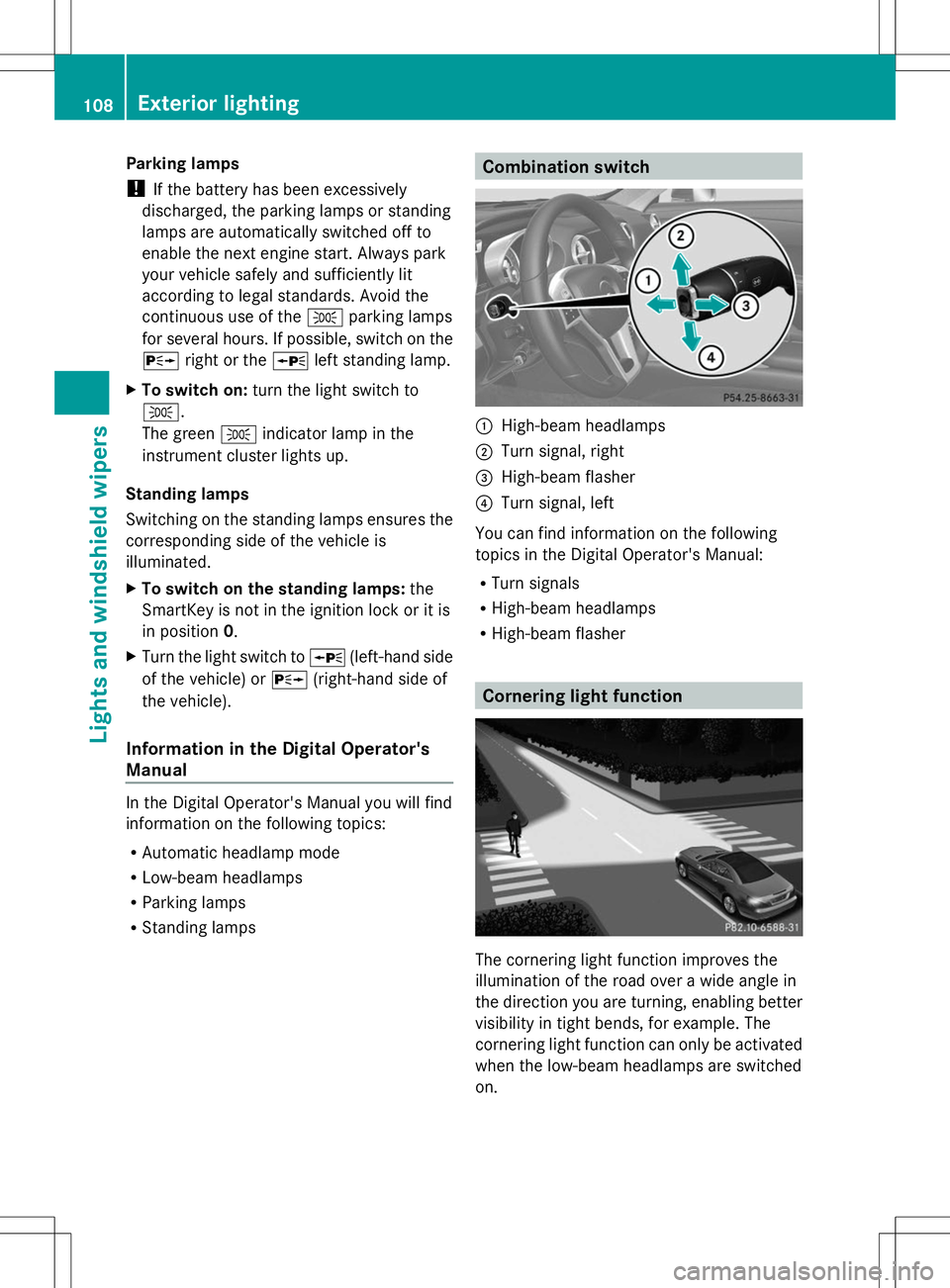
:
High-beam headlamps
; Turn signal, right
= High-beam flasher
? Turn signal, left
You can find information on the following
topics in the Digital Operator's Manual:
R Turn signals
R High-beam headlamps
R High-beam flasher Cornering light function
The cornering light function improves the
illumination of the road over a wide angle in
the direction you are turning, enabling better
visibility in tight bends, for example. The
cornering light function can only be activated
when the low-beam headlamps are switched
on. 108
Exterior lightingLights and windshield wipers