2014 MERCEDES-BENZ SL-CLASS ROADSTER brake sensor
[x] Cancel search: brake sensorPage 137 of 284
!
If DISTRONIC PLUS or the HOLD function
is activated, the vehicle brakes
automatically in certain situations. To
prevent damage to the vehicle, deactivate
DISTRONIC PLUS and the HOLD function in
the following or other similar situations:
R when towing the vehicle
R in the car wash
If you fail to adapt your driving style,
DISTRONIC PLUS can neither reduce the risk
of accident nor override the laws of physics.
DISTRONIC PLUS cannot take into account
the road, traffic and weather conditions.
DISTRONIC PLUS is only an aid. You are
responsible for the distance to the vehicle in
front, for vehicle speed, for braking in good
time and for staying in lane.
Do not use DISTRONIC PLUS:
R in road and traffic conditions which do not
allow you to maintain a constant speed e.g.
in heavy traffic or on winding roads
R on slippery road surfaces. Braking or
accelerating could cause the drive wheels
to lose traction and the vehicle could then
skid
R when there is poor visibility, e.g. due to fog,
heavy rain or snow
DISTRONIC PLUS may not detect narrow
vehicles driving in front, e.g. motorcycles, or
vehicles driving on a different line.
In particular, the detection of obstacles can
be impaired if:
R there is dirt on the sensors or anything else
covering the sensors
R snow or heavy rain
R interference by other radar sources
R strong radar reflections, for example, in
parking garages
If DISTRONIC PLUS no longer detects a
vehicle in front, DISTRONIC PLUS may
unexpectedly accelerate the vehicle to the
stored speed. This speed may:
R
be too high if you are driving in a filter lane
or an exit lane
R be so high when driving in the right-hand
lane that you overtake vehicles in the left-
hand lane
R be so high when driving in the left-hand lane
that you overtake vehicles in the right-hand
lane
If there is a change of drivers, advise the new
driver of the speed stored.
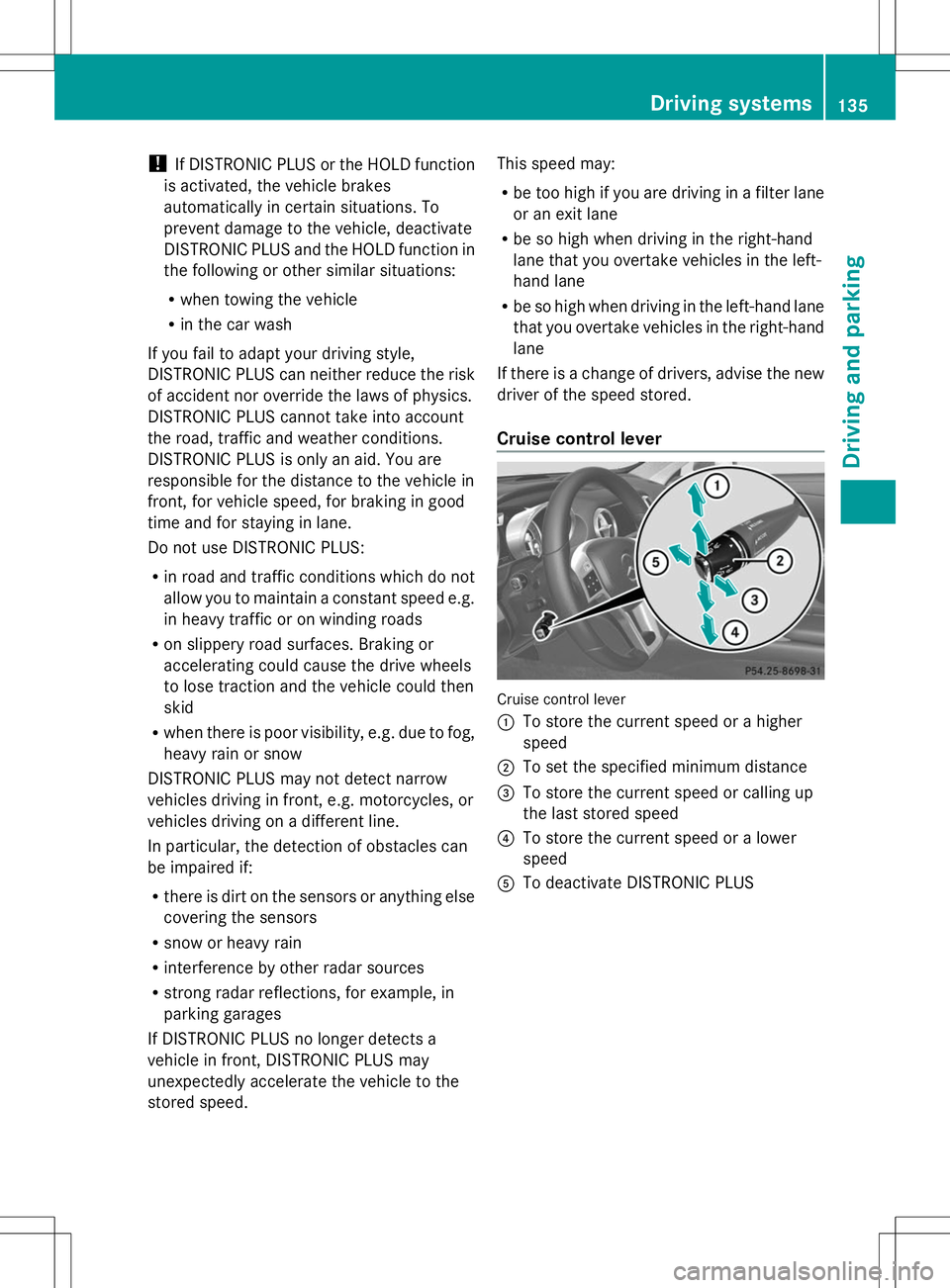
Cruise control lever Cruise control lever
:
To store the current speed or a higher
speed
; To set the specified minimum distance
= To store the current speed or calling up
the last stored speed
? To store the current speed or a lower
speed
A To deactivate DISTRONIC PLUS Driving systems
135Driving and parking Z
Page 146 of 284
X
Make sure that the engine is running or that
it has been switched off by the ECO start/
stop function.
X If icon ;
;is shown: press=or;
on the steering wheel to select the
DriveAssist
DriveAssist menu.
X Press the 9or: button to select
Vehicle Level Vehicle Level.
X Press the abutton.
The following message appears: Vehicle
Vehicle
Level Press 'OK' to Lower
Level Press 'OK' to Lower.
X Press the abutton.
Icon ;is faded out. The vehicle is adjusted
to normal level.
The "Raised level" setting is canceled if you:
R are driving faster than approximately
75 mph (120 km/h).
R drive for approximately three minutes at a
speed over 50 mph (80 km/h).
Suspension tuning You can find information about this in the
Digital Operator's Manual.
Driving conditions menu in the
COMAND display You can find information about this in the
Digital Operator's Manual. PARKTRONIC
Important safety notes PARKTRONIC is an electronic parking aid with
ultrasonic sensors. It indicates visually and
audibly the distance between your vehicle
and an object.
PARKTRONIC is only an aid. It is not a
replacement for your attention to your
immediate surroundings. You are always
responsible for safe maneuvering, parking
and exiting a parking space. When
maneuvering, parking or pulling out of a
parking space, make sure that there are no persons, animals or objects in the area in
which you are maneuvering.
!
When parking, pay particular attention to
objects above or below the sensors, such
as flower pots or trailer drawbars.
PARKTRONIC does not detect such objects
when they are in the immediate vicinity of
the vehicle. You could damage the vehicle
or the objects.
The sensors may not detect snow and other
objects that absorb ultrasonic waves.
Ultrasonic sources such as an automatic
car wash, the compressed-air brakes on a
truck or a pneumatic drill could cause
PARKTRONIC to malfunction.
PARKTRONIC may not function correctly on
uneven terrain.
PARKTRONIC is activated automatically when
you:
R switch on the ignition.
R shift the transmission to position D,Ror
N.
R release the electric parking brake.
PARKTRONIC is deactivated at speeds above
11 mph (18km/h). It is reactivated at lower
speeds.
PARKTRONIC monitors the area around your
vehicle using six sensors in the front bumper
and four sensors in the rear bumper.
Range of the sensors General notes
PARKTRONIC does not take objects into
consideration that are:
R
below the detection range, e.g. people,
animals or objects
R above the detection range, e.g.
overhanging loads, truck overhangs or
loading ramps. 144
Driving systemsDriving and parking
Page 155 of 284

Problems with Night View Assist Plus
Problem Possible causes/consequences and
M
MSolutions The picture quality of
Night View Assist Plus
has deteriorated. The windshield is fogged up on the inside.
X
Fold down camera cover (Y page 223).
X Defrost the windshield (Y page 116). The windshield is iced up.
X
De-ice the windshield (Y page 116). The windshield wipers are smearing the windshield.
X
Replace the wiper blades (Y page 111). The windshield is smeared after the vehicle has been cleaned in a
car wash.
X
Clean the windshield (Y page 222). There is windshield chip damage in the camera's field of vision.
X
Replace the windshield. The pedestrian and
animal recognition is
not available. The infrared camera in the radiator grill is dirty.
X
Use a soft cloth and water to clean the infrared camera. Active Driving Assistance package
General notes The Active Driving Assistance package
consists of DISTRONIC PLUS (Y
page 133),
Active Blind Spot Assist (Y page 153) and
Active Lane Keeping Assist (Y page 156).
Active Blind Spot Assist General notes
Active Blind Spot Assist uses a radar sensor
system to monitor the side areas of your
vehicle which are behind the driver. A warning
display in the exterior mirrors draws your
attention to vehicles detected in the
monitored area. If you then switch on the
corresponding turn signal to change lanes,
you will also receive an optical and audible
collision warning. If a risk of lateral collision
is detected, corrective braking may help you avoid a collision. To support the course-
correcting brake application, Active Blind
Spot Assist also uses the forward-facing radar
sensor system.
Active Blind Spot Assist supports you from a
speed of approximately 20 mph (30 km/h).
For Active Blind Spot Assist to assist you
when driving, the radar sensor system must
be operational.
Important safety notes
Active Blind Spot Assist is only an aid. It may
fail to detect some vehicles and is no
substitute for attentive driving.
G
WARNING
Active Blind Spot Assist does not react to:
R vehicles overtaken too closely on the side,
placing them in the blind spot area
R vehicles which approach with a large speed
differential and overtake your vehicle Driving systems
153Driving and parking
Z
Page 169 of 284
Display messages Possible causes/consequences and
M
MSolutions $(USA
only)
J(Canada
only)
Check Brake Fluid Check Brake Fluid
Level Level There is not enough brake fluid in the brake fluid reservoir.
In addition, the
$(USA only)/ J(Canada only) warning
lamp lights up in the instrument cluster and a warning tone
sounds.
G WARNING
The braking effect may be impaired.
There is a risk of an accident.
X Pull over and stop the vehicle safely as soon as possible, paying
attention to road and traffic conditions. Do not continue driving
under any circumstances.
X Secure the vehicle against rolling away ( Ypage 130).
X Consult a qualified specialist workshop.
X Do not add brake fluid. This does not correct the malfunction. PRE-SAFE PRE-SAFE
Inoperative See Inoperative See
Operator's Manual Operator's Manual
Important functions of PRE-SAFE
®
have failed. All other occupant
safety systems, e.g. air bags, remain available.
X Visit a qualified specialist workshop immediately. PRE-SAFE PRE-SAFE
Functions Functions
Currently Limited Currently Limited
See Operator's See Operator's
Manual Manual
PRE-SAFE
®
Brake is deactivated or temporarily inoperative.
Possible causes are:
R function is impaired due to heavy rain or snow.
R the sensors in the radiator grill and the bumper are dirty.
R the radar sensor system is temporarily inoperative, e.g. due to
electromagnetic radiation emitted by nearby TV or radio
stations or other sources of electromagnetic radiation.
R AMG vehicles: ESP ®
is deactivated.
R the system is outside the operating temperature range.
R the on-board voltage is too low.
When the causes stated above no longer apply, the display
message disappears.
PRE-SAFE ®
Brake is operational again.
X Pull over and stop the vehicle safely as soon as possible, paying
attention to road and traffic conditions.
X Secure the vehicle against rolling away ( Ypage 130).
X Clean the sensors in the radiator grill and the bumper
(Y page 222).
X Restart the engine.
X AMG vehicles: reactivate ESP ®
(Y page 71). Display
messages
167On-board computer and displays Z
Page 224 of 284
should drive for a few minutes after
cleaning. Braking heats the brake discs and
the brake pads/linings, thus drying them.
The vehicle can then be parked.
Regular care of your vehicle is a condition for
retaining the quality in the long term.
Use care products and cleaning agents
recommended and approved by Mercedes-
Benz. Exterior care
Automatic car wash G
WARNING
Braking efficiency is reduced after washing
the vehicle. There is a risk of an accident.
After the vehicle has been washed, brake
carefully while paying attention to the traffic
conditions until full braking power is restored.
! If DISTRONIC PLUS or the HOLD function
is activated, the vehicle brakes
automatically in certain situations. To
prevent damage to the vehicle, deactivate
DISTRONIC PLUS and the HOLD function in
the following or other similar situations:
R when towing the vehicle
R in the car wash
! It is preferable to use car washes with
adjustable high-pressure pre-cleaning that
corresponds to the specification for the
Cabriolet program. In car washes that use
high water pressures, there is a risk that a
small amount of water may leak into the
vehicle.
! Vehicles with HANDS-FREE ACCESS: if a
SmartKey with KEYLESS-GO is within the
detection range of the KEYLESS-GO
antenna, the following situations could lead
to the unintentional opening of the trunk
lid:
R using a car wash
R using a power washer Make sure that the SmartKey is at least
6.5 ft (2 m) away from the vehicle.
! Never clean your vehicle in a Touchless
Automatic Car Wash as these use special
cleaning agents. These cleaning agents can
damage the paintwork or plastic parts.
! Make sure that the automatic
transmission is in position Nwhen washing
your vehicle in a tow-through car wash. The
vehicle could be damaged if the
transmission is in another position.
! Make sure that:
R the side windows and the roof are
completely closed
R the climate control blower is switched off
R the windshield wiper switch is at position
0
The vehicle could otherwise be damaged.
You can wash the vehicle in an automatic car
wash from the very start.
If the vehicle is very dirty, pre-wash it before
cleaning it in an automatic car wash.
After using an automatic car wash, wipe off
wax from the windshield and the wiper
blades. This will prevent smears and reduce
wiping noises caused by residue on the
windshield.
Information in the Digital Operator's
Manual In the Digital Operator's Manual you will find
information on the following topics:
R
Washing by hand
R Power washers
R Cleaning the wheels
R Cleaning the paintwork
R Matte finish care
R Cleaning the windows
R Cleaning wiper blades
R Cleaning the exterior lighting
R Cleaning the mirror turn signals
R Cleaning the sensors 222
CareMaintenance and care