Page 33 of 413
Cockpit
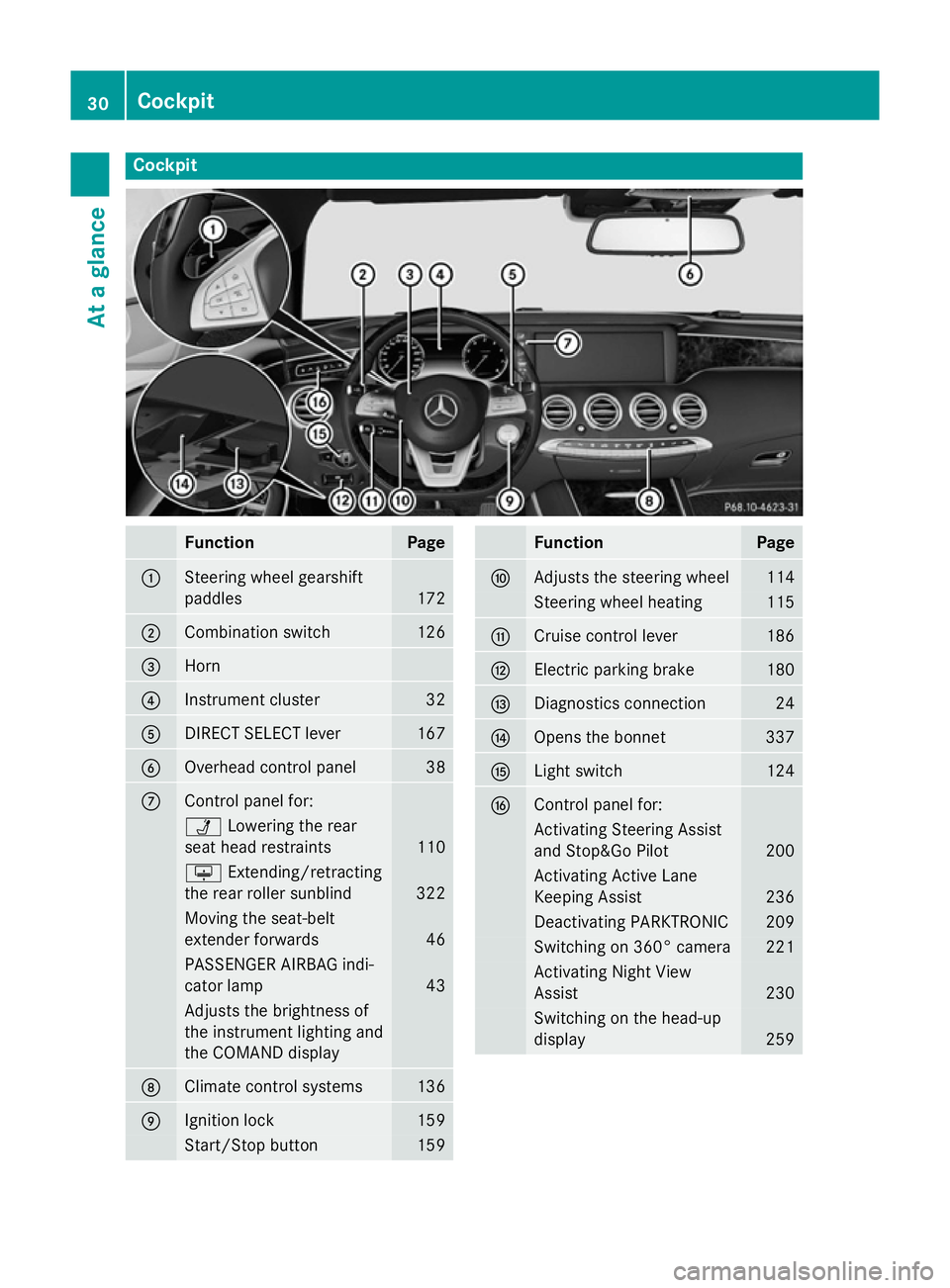
Function Page
:
Steering wheel gearshift
paddles
172
;
Combination switch 126
=
Horn
?
Instrument cluster 32
A
DIRECT SELECT lever 167
B
Overhead control panel 38
C
Control panel for:
Ü
Lowering the rear
seat head restraints 110
u
Extending/retracting
the rear roller sunblind 322
Moving the seat-belt
extender forwards 46
PASSENGER AIRBAG indi-
cator lamp
43
Adjusts the brightness of
the instrument lighting and
the COMAND display
D
Climate control systems 136
E
Ignition lock 159
Start/Stop button 159 Function Page
F
Adjusts the steering wheel 114
Steering wheel heating 115
G
Cruise control lever 186
H
Electric parking brake 180
I
Diagnostics connection 24
J
Opens the bonnet 337
K
Light switch 124
L
Control panel for:
Activating Steering Assist
and Stop&Go Pilot
200
Activating Active Lane
Keeping Assist 236
Deactivating PARKTRONIC 209
Switching on 360° camera 221
Activating Night View
Assist 230
Switching on the head-up
display
25930
CockpitAt a glance
Page 34 of 413
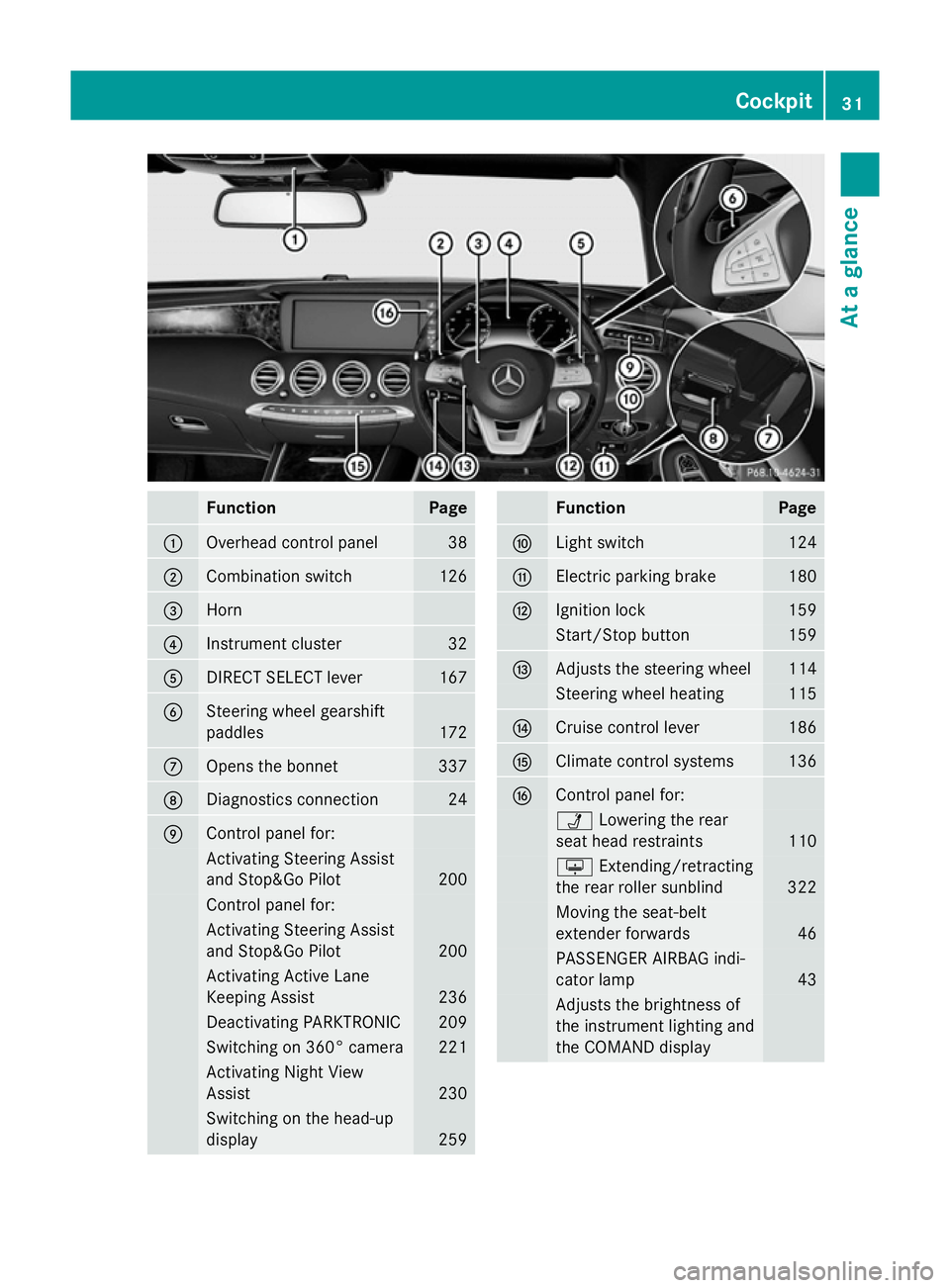
Function Page
:
Overhead control panel 38
;
Combination switch 126
=
Horn
?
Instrument cluster 32
A
DIRECT SELECT lever 167
B
Steering wheel gearshift
paddles
172
C
Opens the bonnet 337
D
Diagnostics connection 24
E
Control panel for:
Activating Steering Assist
and Stop&Go Pilot 200
Control panel for:
Activating Steering Assist
and Stop&Go Pilot
200
Activating Active Lane
Keeping Assist
236
Deactivating PARKTRONIC 209
Switching on 360° camera 221
Activating Night View
Assist
230
Switching on the head-up
display
259 Function Page
F
Light switch 124
G
Electric parking brake 180
H
Ignition lock 159
Start/Stop button 159
I
Adjusts the steering wheel 114
Steering wheel heating 115
J
Cruise control lever 186
K
Climate control systems 136
L
Control panel for:
Ü
Lowering the rear
seat head restraints 110
u
Extending/retracting
the rear roller sunblind 322
Moving the seat-belt
extender forwards
46
PASSENGER AIRBAG indi-
cator lamp
43
Adjusts the brightness of
the instrument lighting and
the COMAND display Cockpit
31At a glance
Page 138 of 413
Useful information
............................136
Overview of climate control sys-
tems ................................................... 136
Operating the climate control sys-
tem ..................................................... 139
Adjusting the air vents .....................154 135Climate control
Page 139 of 413
Useful information
i This Owner's Manual describes all mod-
els, series and optional equipment for your
vehicle that were available at the time of
going to press. National variations are pos- sible. Note that your vehicle may not be
equipped with all of the functions descri-
bed. This is also the case for systems and
functions relevant to safety.
i Read the information on qualified special-
ist workshops: (Y page 25). Overview of climate control systems
Important safety notes
Keep the settings recommended on the fol-
lowing pages. The windows could otherwise
mist up.
To prevent the windows from misting up:
R switch off climate control only briefly
R switch on air-recirculation mode only
briefly
R switch on the cooling with air dehumidifi-
cation function
R switch on the "demist windscreen" function
briefly, if required
Climate control regulates the temperature
and air humidity in the vehicle interior. The air filter cleans the air, thus improving the inte-
rior climate.
The cooling with air dehumidification function is only available when the engine is running.
Optimum climate control is only achieved
with the side windows and roof closed.
The residual heat function can only be acti-
vated or deactivated with the ignition
switched off (Y page 146).
i Ventilate the vehicle for a brief period
during warm weather, e.g. using the con-
venience opening feature (Y page 100).
This will speed up the cooling process and
the desired interior temperature will be
reached more quickly. i
The integrated filter filters out most par-
ticles of dust and soot and completely fil-
ters out pollen. It also reduces gaseous pol-
lutants and odours. A clogged filter reduces the amount of air supplied to the vehicle
interior. For this reason, you should alwaysobserve the interval for replacing the filter,
which is specified in the Service Booklet. As this depends on environmental conditions,
e.g. heavy air pollution, the interval may be shorter than stated in the Service Booklet.
i It is possible that the blower may be acti-
vated automatically 60 minutes after the
key has been removed depending on vari-
ous factors, e.g. the outside temperature.
The vehicle is then ventilated for
30 minutes to dry the automatic climate
control. 136
Overview of climate control systemsClimate control
Page 140 of 413
Automatic climate control panel
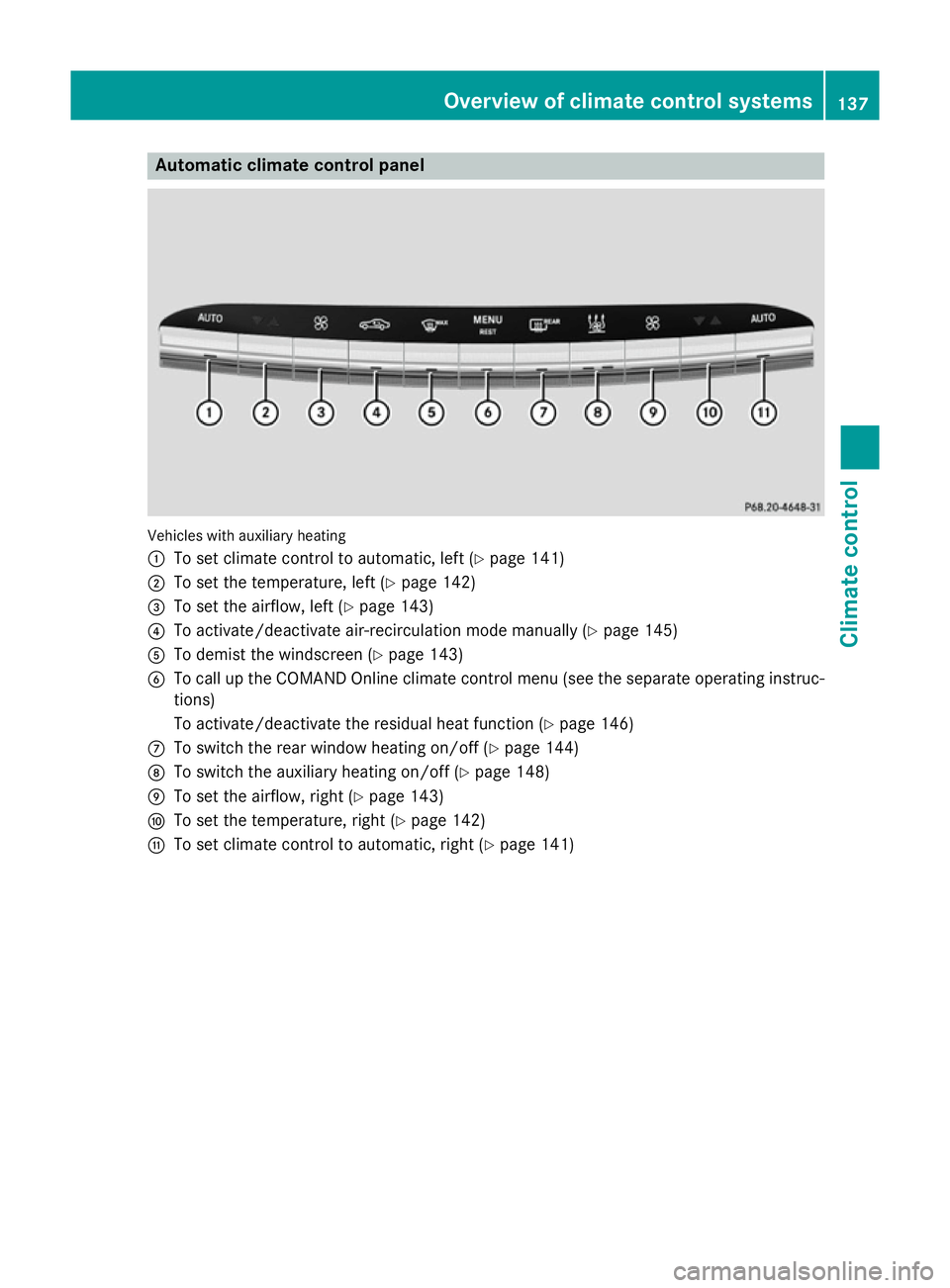
Vehicles with auxiliary heating
:
To set climate control to automatic, left (Y page 141)
; To set the temperature, left (Y page 142)
= To set the airflow, left (Y page 143)
? To activate/deactivate air-recirculation mode manually (Y page 145)
A To demist the windscreen (Y page 143)
B To call up the COMAND Online climate control menu (see the separate operating instruc-
tions)
To activate/deactivate the residual heat function (Y page 146)
C To switch the rear window heating on/off (Y page 144)
D To switch the auxiliary heating on/off (Y page 148)
E To set the airflow, right (Y page 143)
F To set the temperature, right (Y page 142)
G To set climate control to automatic, right (Y page 141) Overview of climate control systems
137Climate control
Page 141 of 413
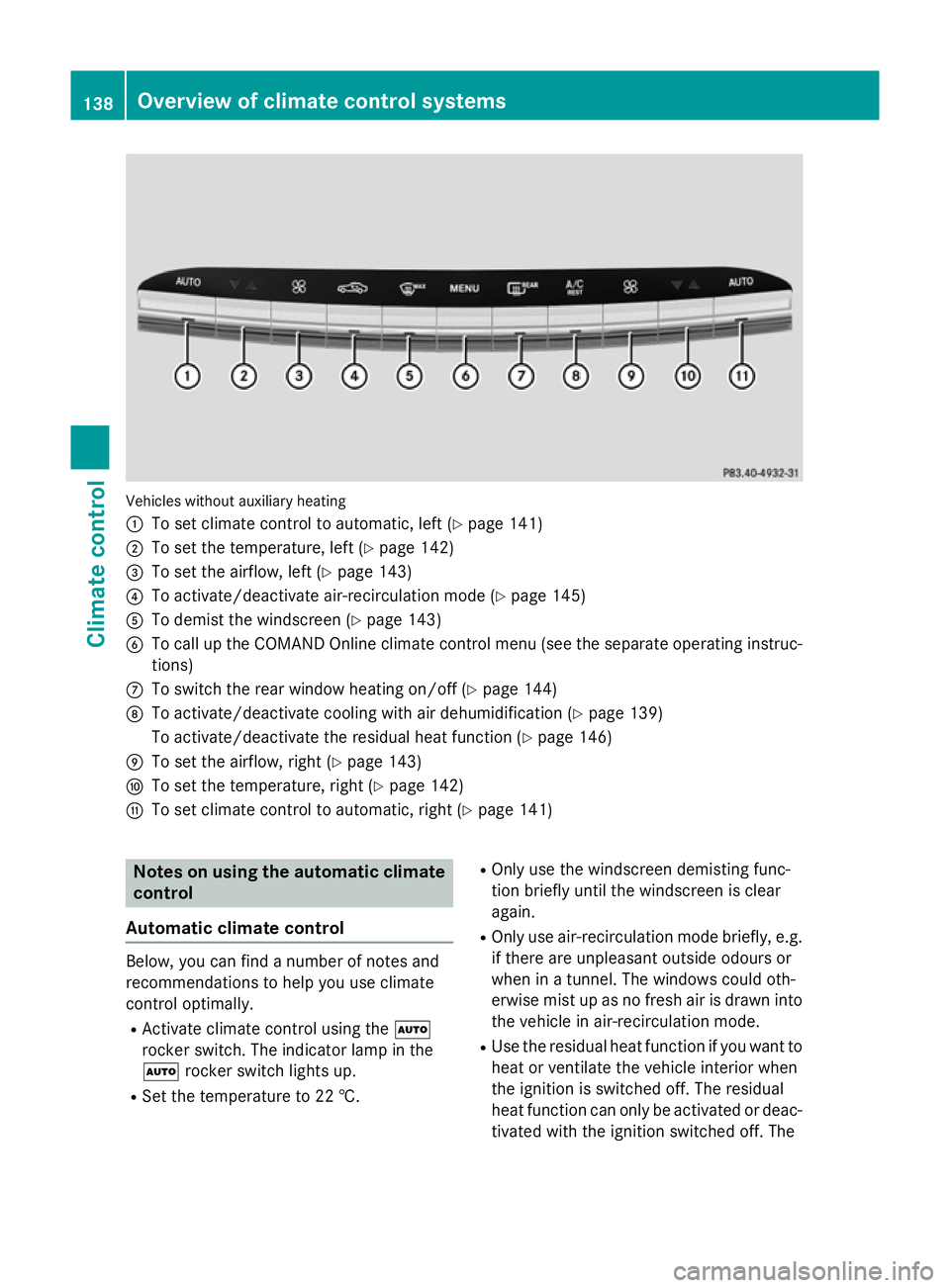
Vehicles without auxiliary heating
:
To set climate control to automatic, left (Y page 141)
; To set the temperature, left (Y page 142)
= To set the airflow, left (Y page 143)
? To activate/deactivate air-recirculation mode (Y page 145)
A To demist the windscreen (Y page 143)
B To call up the COMAND Online climate control menu (see the separate operating instruc-
tions)
C To switch the rear window heating on/off (Y page 144)
D To activate/deactivate cooling with air dehumidification (Y page 139)
To activate/deactivate the residual heat function (Y page 146)
E To set the airflow, right (Y page 143)
F To set the temperature, right (Y page 142)
G To set climate control to automatic, right (Y page 141)Notes on using the automatic climate
control
Automatic climate control Below, you can find a number of notes and
recommendations to help you use climate
control optimally.
R Activate climate control using the Ã
rocker switch. The indicator lamp in the
à rocker switch lights up.
R Set the temperature to 22 †. R
Only use the windscreen demisting func-
tion briefly until the windscreen is clear
again.
R Only use air-recirculation mode briefly, e.g.
if there are unpleasant outside odours or
when in a tunnel. The windows could oth-
erwise mist up as no fresh air is drawn into
the vehicle in air-recirculation mode.
R Use the residual heat function if you want to
heat or ventilate the vehicle interior when
the ignition is switched off. The residual
heat function can only be activated or deac-
tivated with the ignition switched off. The 138
Overview of climate control systemsClimate control
Page 142 of 413
residual heat function is deactivated when
the ignition is switched on.
ECO start/stop function During automatic engine switch-off, the cli-
mate control only operates at a reduced capa- city. If you require the full climate control out-
put, you can switch off the ECO start/stop
function by pressing the ECO button
(Y page 164). Operating the climate control system
Switching climate control on/off
General notes When the climate control is switched off, the
air supply and air circulation are also
switched off. The windows could mist up.
Therefore, only switch off climate control
briefly.
Switch on climate control primarily using theà rocker switch (Y page 141).
Activating/deactivating X
Turn the key to position 2in the ignition
lock (Y page 159).
X To activate (vehicles with auxiliary
heating): press the!rocker switch up
or down.
The COMAND Online climate control menu
opens.
X To activate (vehicles without auxiliary
heating): press thetrocker switch up
or down.
The COMAND Online climate control menu
opens.
X Activate climate control via the air-condi-
tioning setting bar in COMAND Online (see
the separate operating instructions). X
To deactivate (vehicles with auxiliary
heating): press the!rocker switch up
or down.
The COMAND Online climate control menu
opens.
X To deactivate (vehicles without auxili-
ary heating): press thetrocker switch
up or down.
The COMAND Online climate control menu
opens.
X Deactivate climate control via the air-con-
ditioning setting bar in COMAND Online
(see the separate operating instructions). Activating/deactivating the cooling
with air dehumidification function
General notes If you deactivate the "Cooling with air-dehu-
midification" function, the air inside the vehi-
cle will not be cooled. The air inside the vehi-
cle will also not be dehumidified. The win-
dows can mist up more quickly. Therefore,
only switch off cooling with air dehumidifica-
tion for a short period.
The cooling with air dehumidification function is only available when the engine is running.
The air inside the vehicle is cooled and dehu-midified according to the temperature selec-
ted.
Condensation may drip from the underside of
the vehicle when cooling mode is active. This is normal and not a sign that there is a mal-
function.
Activating/deactivating the cooling
with air dehumidification function Vehicles with auxiliary heating
X Activate/deactivate the cooling with air
dehumidification function via COMAND
Online (see the separate operating instruc-
tions). Operating the climate control system
139Climate control
Page 143 of 413
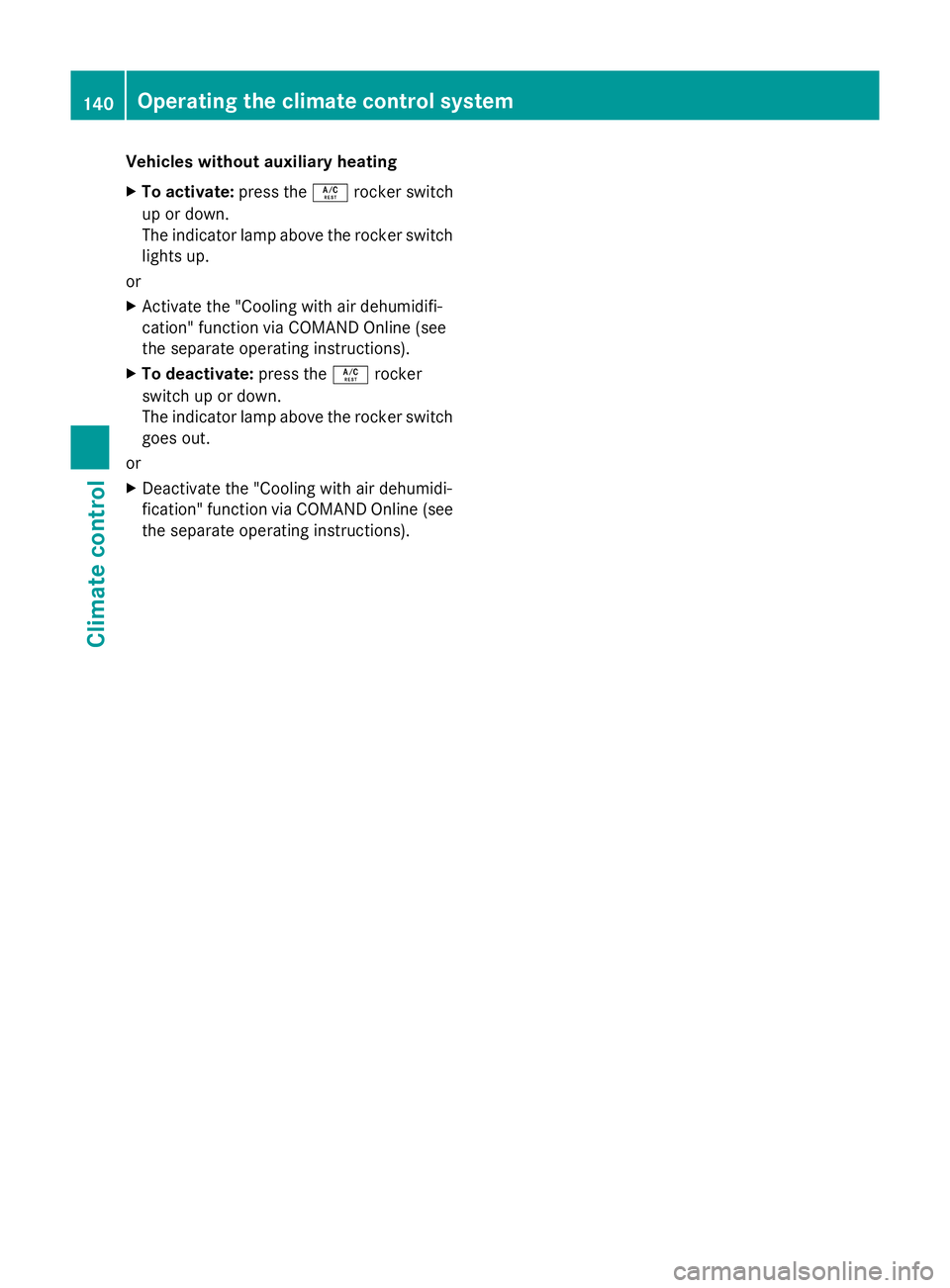
Vehicles without auxiliary heating
X To activate: press theÁrocker switch
up or down.
The indicator lamp above the rocker switch lights up.
or
X Activate the "Cooling with air dehumidifi-
cation" function via COMAND Online (see
the separate operating instructions).
X To deactivate: press theÁrocker
switch up or down.
The indicator lamp above the rocker switch goes out.
or
X Deactivate the "Cooling with air dehumidi-
fication" function via COMAND Online (see
the separate operating instructions). 140
Operating the climate control systemClimate control