2014 MERCEDES-BENZ G-Class Low range
[x] Cancel search: Low rangePage 169 of 354

Driving over obstacles
!
Obstacles could damage the floor of the
vehicle or components of the chassis. Ask
passengers for guidance when driving over
large obstacles. The passenger should
always keep a safe distance from the
vehicle when doing so in order to avoid
injury as a result of unexpected vehicle
movements. After driving off-road or over
obstacles, check the vehicle for possible
damage, especially to the underbody and
the components of the chassis.
! Drive with particular care when driving
over an obstacle while driving up or down
a steep slope.
The vehicle could otherwise tilt and slide
sideways or tip over. Observe the following rules when driving over
tree stumps, large stones and other
obstacles:
R Observe the safety notes (Y page 164) and
the general notes (Y page 164) on off-road
driving.
R Shift the transfer case to LOW
RANGE( Ypage 194).
R Avoid high engine speeds.
R Restrict the shift range to 1(Ypage 150).
R Make sure that you have enough ground
clearance before driving across an
obstacle.
R Drive very slowly.
R Try to drive straight over the center of
obstacles: front wheel first, then rear
wheel. Traveling uphill
Approach/departure angle G
WARNING
If you drive on a steep incline at an angle or
turn when driving on an incline, the vehicle
could slip sideways, tip and rollover. There is
a risk of an accident.
Always drive on a steep incline in the line of
fall (straight up or down) and do not turn the
vehicle. i
Always observe the approach/departure
angle values ( Ypage 351).
R Observe the safety notes (Y page 164) and
the general notes (Y page 164) on off-road
driving.
R Do not drive at an angle on slopes, inclines
or gradients, but instead follow the direct
line of fall. Note that the climbing ability of
your vehicle depends on the terrain
conditions.
R Before driving on extreme uphill and
downhill gradients, shift the transfer case
to LOW RANGE( Ypage 194).
R Engage the differential locks, if necessary
(Y page 196).
R Drive slowly.
R Accelerate gently and make sure that the
wheels are gripping.
R Avoid high engine speeds, except when
driving on sandy and muddy routes with
high driving resistance. Driving tips
167Driving and pa rking Z
Page 170 of 354

R
Avoid high engine speeds – drive at an
appropriate engine speed (maximum
3,000 rpm).
R When driving down an incline, make use of
the engine's braking effect. Observe the
engine speed; do not overrev the engine.
i Further information on the maximum
engine speed: (Y page 206).
R Select a shift range appropriate to the
gradient.
R Before tackling steep downhill gradients,
select shift range 1(Ypage 150).
R Always check the brakes after driving off-
road.
i Hill start assist will aid you when pulling
away on a hill.
For more information, see "Hill start assist"
(Y page 141).
Maximum gradient-climbing capability Accelerate carefully and make sure that the
wheels do not spin when driving on steep
terrain.
i If the load on the front axle is reduced
when pulling away on a steep uphill slope,
the front wheels have a tendency to spin.
4ETS detects this and brakes the wheels
accordingly. The rear wheel torque is
increased, making it easier to drive off.
Always observe the maximum gradient
climbing ability values (Y page 351).
Hilltops When driving on an uphill gradient, reduce
pressure slightly on the accelerator
immediately before reaching the top of the hill
(do not shift the transmission to position N).
Use the vehicle's own impetus to drive over
the top of the hill. This style of driving prevents:
R
the vehicle from lifting off the ground on the
brow of a hill
R loss of traction
R the vehicle from traveling too quickly down
the other side
Driving downhill R
Before tackling steep downhill gradients,
select shift range 1(Ypage 150).
This way you use the engine's braking
effect to reduce the speed. If this is not
sufficient, brake gently. When doing so,
make sure that the vehicle is facing in the
direction of the line of fall.
R Observe the notes on driving in
mountainous terrain (Y page 168).
R Drive slowly.
R Do not drive at an angle down steep
inclines. Steer into the line of fall and drive
with the front wheels aligned straight.
Otherwise, the vehicle could slip sideways,
tip and roll over.
R Check that the brakes are working normally
after a long downhill stretch.
i The special off-road ABS setting
(Y page 61) enables repeated, brief,
precise locking of the front wheels, which
leads to the wheels digging into the loose
ground. Note that when the front wheels
are fully braked, they slide easily over the
surface of the ground, making it difficult to
steer. Driving systems
Cruise Control
Important safety notes G
WARNING
The brake pedal moves when cruise control
brakes the vehicle. A foot in the area under
the brake pedal could become trapped. The
movement of the pedal, and therefore the 168
Driving systemsDriving an
d parking
Page 171 of 354
vehicle's ability to brake, may be restricted by
objects in the area under the brake. There is
a risk of an accident and injury.
Do not place your foot under the brake pedal.
Keep the area under the brake pedal free from
obstructions.
If you fail to adapt your driving style, cruise
control can neither reduce the risk of
accident nor override the laws of physics.
Cruise control cannot take account of road,
weather and traffic conditions. Cruise control
is only an aid. You are responsible for the
distance to the vehicle in front, for vehicle
speed and for braking in good time. Adjust
your driving style to the traffic conditions.
Only engage cruise control when the current
road, weather and traffic conditions permit it
to be done safely. Drive carefully and
maintain a suitable distance to the vehicle in
front.
Do not use cruise control:
R in traffic conditions that do not allow you
to drive at a constant speed, e.g. heavy
traffic, on winding roads or off-road
R on slippery road surfaces. Braking or
accelerating could cause the drive wheels
to lose traction and the vehicle could then
skid
R when there is poor visibility, e.g. due to fog,
heavy rain or snow
General notes Cruise control maintains a constant road
speed for you. On long and steep downhill
gradients, especially if the vehicle is laden,
you must select shift range 1,2or 3in good
time. By doing so, you will make use of the
braking effect of the engine, which relieves
the load on the brake system and prevents
the brakes from overheating and wearing too
quickly.
Use cruise control only if road and traffic
conditions make it appropriate to maintain a
steady speed for a prolonged period. You can store any road speed above 20 mph
(30 km/h).
i
Cruise control should not be activated
during off-road driving.
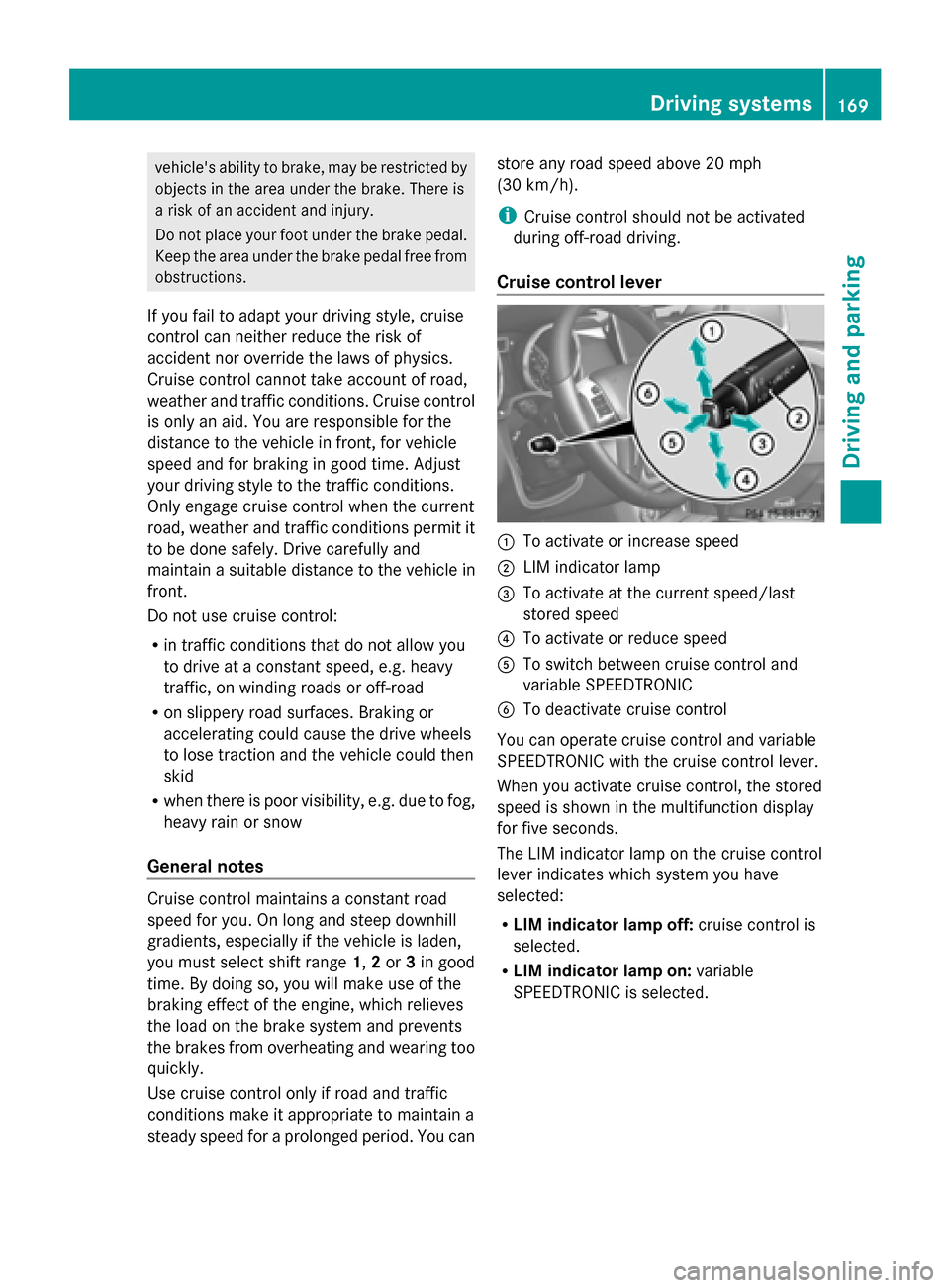
Cruise control lever 0043
To activate or increase speed
0044 LIM indicator lamp
0087 To activate at the current speed/last
stored speed
0085 To activate or reduce speed
0083 To switch between cruise control and
variable SPEEDTRONIC
0084 To deactivate cruise control
You can operate cruise control and variable
SPEEDTRONIC with the cruise control lever.
When you activate cruise control, the stored
speed is shown in the multifunction display
for five seconds.
The LIM indicator lamp on the cruise control
lever indicates which system you have
selected:
R LIM indicator lamp off: cruise control is
selected.
R LIM indicator lamp on: variable
SPEEDTRONIC is selected. Driving systems
169Driving and parking Z
Page 176 of 354

or
X
Briefly press the cruise control lever in the
direction of arrow 0083.
Variable SPEEDTRONIC is selected. LIM
indicator lamp 0044in the cruise control lever
lights up.
Cruise control is automatically deactivated if:
R you apply the parking brake
R you are driving at less than 20 mph
(30 km/h)
R ESP ®
intervenes or you deactivate ESP ®
R you shift the transmission to position N
while driving
i The last speed stored is cleared when you
switch off the engine. SPEEDTRONIC
Important safety notes G
WARNING
If you rest your foot on the brake pedal while
driving, the braking system can overheat. This
increases the stopping distance and can even
cause the braking system to fail. There is a
risk of an accident.
Never use the brake pedal as a footrest. Never
depress the brake pedal and the accelerator
pedal at the same time.
! Depressing the brake pedal constantly
results in excessive and premature wear to
the brake pads.
If you fail to adapt your driving style,
SPEEDTRONIC can neither reduce the risk of
accident nor override the laws of physics.
SPEEDTRONIC cannot take account of road,
weather and traffic conditions.
SPEEDTRONIC is only an aid. You are
responsible for the distance to the vehicle in
front, for vehicle speed, for braking in good
time and for staying in lane. Only engage
SPEEDTRONIC when the current road,
weather and traffic conditions permit it to be done safely. Drive carefully and maintain a
suitable distance to the vehicle in front.
General notes SPEEDTRONIC brakes automatically so that
you do not exceed the set speed. On long and
steep downhill gradients, especially if the
vehicle is laden or towing a trailer, you must
select shift range
1,2or 3in good time. By
doing so, you will make use of the braking
effect of the engine, which relieves the load
on the brake system and prevents the brakes
from overheating and wearing too quickly. If
you need additional braking, depress the
brake pedal repeatedly rather than
continuously.
i The speed indicated in the speedometer
may differ slightly from the limit speed
stored.
Cruise control lever 0043
To store the current speed or a higher
speed
0044 LIM indicator lamp
0087 To call up the last speed stored
0085 To store the current speed or a lower
speed
0083 To switch between cruise control and
variable SPEEDTRONIC
0084 To deactivate variable SPEEDTRONIC
You can operate cruise control and variable
SPEEDTRONIC with the cruise control lever. 174
Driving systemsDriving and parking
Page 180 of 354

fulfilled (Y
page 179) and the radar sensor
system must be operational.
General notes DISTRONIC PLUS regulates the speed and
automatically helps you maintain the
distance to the vehicle detected in front.
DISTRONIC PLUS brakes automatically so
that the set speed is not exceeded.
On long and steep downhill gradients,
especially if the vehicle is laden or towing a
trailer, you must select shift range 1,2or 3
in good time. By doing so, you will make use
of the braking effect of the engine, which
relieves the load on the brake system and
prevents the brakes from overheating and
wearing too quickly.
If DISTRONIC PLUS detects a slower-moving
vehicle in front, your vehicle is braked in order
to maintain the preset distance to the vehicle
in front.
If there is no vehicle in front, DISTRONIC
PLUS operates in the same way as cruise
control in the speed range between 20 mph
(Canada: 30 km/h) and120 mph (Canada:
200 km/h). If a vehicle is driving in front of
you, it operates in the speed range between
0 mph (0 km/h) and 120 mph (Canada:
200 km/h).
Do not use DISTRONIC PLUS while driving on
roads with steep gradients.
As DISTRONIC PLUS transmits radar waves,
it can resemble the radar detectors of the
responsible authorities. You can refer to the
relevant chapter in the Operator's Manual if
questions are asked about this.
i USA only:
This device has been approved by the FCC
as a “Vehicular Radar System”. The radar
sensor is intended for use in an automotive
radar system only. Removal, tampering, or
altering of the device will void any
warranties, and is not permitted by the
FCC. Do not tamper with, alter, or use in
any non-approved way. Any unauthorized modification to this
device could void the user’s authority to
operate the equipment.
i Canada only: This device complies with
RSS-210 of Industry Canada. Operation is
subject to the following two conditions:
1. This device may not cause interference,
and
2. this device must accept any interference
received, including interference that may
cause undesired operation of the device.
Removal, tampering, or altering of the
device will void any warranties, and is not
permitted. Do not tamper with, alter, or use
the device in any non-approved way.
Any unauthorized modification to this
device could void the user's authority to
operate the equipment.
Cruise control lever 0043
To activate or increase speed
0044 To set the specified minimum distance
0087 LIM indicator lamp
0085 To activate at the current speed/last
stored speed
0083 To activate or reduce speed
0084 To switch between DISTRONIC PLUS and
variable SPEEDTRONIC
006B To deactivate DISTRONIC PLUS
With the cruise control lever, you can operate
DISTRONIC PLUS and variable
SPEEDTRONIC. 178
Driving systemsDriving and parking
Page 181 of 354

X
To switch between variable
SPEEDTRONIC and DISTRONIC PLUS:
press the cruise control lever in the
direction of arrow 0084.
LIM indicator lamp 0087on the cruise control
lever indicates which function you have
selected:
R LIM indicator lamp 0087 0087off: DISTRONIC
PLUS is selected.
R LIM indicator lamp 0087
0087 on: variable
SPEEDTRONIC is selected.
Activating DISTRONIC PLUS Activation conditions
In order to activate DISTRONIC PLUS, the
following conditions must be fulfilled:
R the engine must be started. It may take up
to two minutes after pulling away before
DISTRONIC PLUS is operational.
R the parking brake must be released.
R the differential lock must be deactivated.
R ESP ®
must be active, but not intervening.
R the transmission must be in position D.
R the driver's door must be closed when you
shift from Pto Dor your seat belt must be
fastened.
R the front-passenger door and rear doors
must be closed.
R the vehicle must not skid.
R the DISTRONIC PLUS function must be
selected (Y page 178).
R the transfer case must be in the HIGH
RANGE transmission position.
R the vehicle must not be on an uphill or
downhill gradient of more than 22-25%.
R the radar sensor must be free from dirt
(Y page 291). Activating while driving
When driving at speeds below 20 mph
(30 km/h) you can activate DISTRONIC PLUS
if the vehicle in front has been detected and
is shown in the multifunction display. If the
vehicle in front is no longer detected and
displayed, DISTRONIC PLUS switches off and
a tone sounds.
X
Briefly pull the cruise control lever towards
you 0085, or press it up 0043or down 0083.
DISTRONIC PLUS is selected.
X Press the cruise control lever up 0043or
down 0083repeatedly until the desired speed
is set.
X Remove your foot from the accelerator
pedal.
Your vehicle adapts its speed to that of the
vehicle in front, but only up to the desired
stored speed.
i If you do not fully release the accelerator
pedal, the DISTRONIC PLUS Passive DISTRONIC PLUS Passive
message appears in the multifunction
display. The set distance to a slower-
moving vehicle in front will then not be
maintained. You will be driving at the speed
you determine by the position of the
accelerator pedal. Driving systems
179Driving and parking Z
Page 188 of 354

Always observe the traffic conditions
carefully, and maintain a safe lateral distance.
Blind Spot Assist is only an aid. It may fail to
detect some vehicles and is no substitute for
attentive driving.
In particular, the detection of obstacles can
be impaired if there is:
R dirt on the sensors or anything else
covering the sensors.
R visibility is poor, e.g. due to fog, heavy rain
or snow.
R there is a narrow vehicle traveling in front,
e.g. a motorcycle or bicycle.
R the road has very wide lanes.
R the road has narrow lanes.
R you are not driving in the middle of the lane.
R there are barriers or other road boundaries.
i USA only:
This device has been approved by the FCC
as a “Vehicular Radar System”. The radar
sensor is intended for use in an automotive
radar system only. Removal, tampering, or
altering of the device will void any
warranties, and is not permitted by the
FCC. Do not tamper with, alter, or use in
any non-approved way.
Any unauthorized modification to this
device could void the user’s authority to
operate the equipment.
General notes Blind Spot Assist uses a radar sensor system
to monitor both the left and right sides of your
vehicle. It supports you from a speed of
approximately 20 mph (30 km/h). A warning
display in the exterior mirrors draws your
attention to vehicles detected in the
monitored area. If you then switch on the
corresponding turn signal to change lane, you
will also receive an optical and audible
collision warning. For this purpose, Blind Spot
Assist uses sensors in the rear bumper. Monitoring range of the sensors
Blind Spot Assist monitors the area up to
10 ft (3 m) behind your vehicle and directly
next to your vehicle, as shown in the diagram.
If the lanes are narrow, vehicles driving in the
lane beyond the lane next to your vehicle may
be indicated, especially if the vehicles are not
driving in the middle of their lane. This may
be the case if the vehicles are driving on the
inner side of their lane.
Due to the nature of the system:
R
warnings may be issued in error when
driving close to crash barriers or similar
solid lane borders.
R the warning is canceled when driving for an
extended period next to long vehicles, such
as trucks.
The two sensors for Blind Spot Assist are
integrated into the sides of the rear bumper.
Make sure that the bumper is free from dirt,
ice or slush around the sensors. The rear
sensors must not be covered, for example by
bicycle racks or overhanging loads. Following
a severe impact or in the event of damage to
the bumpers, have the function of the radar
sensors checked at a qualified specialist
workshop. Blind Spot Assist may otherwise
not work properly. 186
Driving systemsDriving and parking
Page 189 of 354

Indicator and warning display
G
WARNING
Blind Spot Assist does not react to:
R vehicles overtaken too closely on the side,
placing them in the blind spot area
R vehicles approaching and driving by with a
speed difference of more than 6.8 mph
(11 km/h)
As a result, Blind Spot Assist may not give
warnings in such situations. There is a risk of
an accident.
Always observe the traffic conditions
carefully, and maintain a safe lateral distance. 0043
Yellow indicator lamp/red warning lamp
When Active Blind Spot Assist is activated,
indicator lamp 0043in the exterior mirrors lights
up yellow at speeds of up to
20 mph(30 km/h). At speeds above 20 mph
(30 km/h) the indicator lamp goes out and
Blind Spot Assist is operational.
If a vehicle is detected within the monitoring
range of Blind Spot Assist at speeds above
20 mph (30 km/h), warning lamp 0043on the
corresponding side lights up red. This warning
is always emitted when a vehicle enters the
blind spot monitoring range from behind or
from the side. When you overtake a vehicle,
the warning only occurs if the difference in
speed is less than 7 mph (12 km/h).
The yellow indicator lamp goes out if reverse
gear is engaged. In this event, Blind Spot
Assist is no longer active. The brightness of the indicator/warning
lamps is adjusted automatically according to
the ambient light.
Collision warning 0043
Yellow indicator lamp/red warning lamp
If a vehicle is detected in the monitoring range
of Blind Spot Assist and you switch on the
corresponding turn signal, a double warning
tone sounds. Red warning lamp 0043flashes. If
the turn signal remains on, vehicles detected
are indicated by the flashing of red warning
lamp 0043. There are no further warning tones.
Switching on Blind Spot Assist 0043
Yellow indicator lamp/red warning lamp Driving systems
187Driving and parking Z