2014 MERCEDES-BENZ E-SEDAN manual radio set
[x] Cancel search: manual radio setPage 17 of 430

Parking aid
Active Parking Assist .....................212
see Exterior mirrors
see PARKTRONIC
Parking brake
Display message ............................ 260
Notes/function .............................. 183
Warning lamp ................................. 287
Parking lamps
Switching on/off ........................... 130
PARKTRONIC
Deactivating/activating .................211
Driving system ............................... 208
Function/notes ............................. 208
Important safety notes ..................208
Problem (malfunction) ...................212
Range of the sensors .....................209
Warning displa y............................. 210
PASSENGER AIR BAG OFF
Problem (malfunction) .....................52
Problems (malfunction) .................. 265
PASSENGER AIR BAG OFF indicator
lamp ...................................................... 48
Plastic hooks ..................................... 306
Plastic trim (cleaning instructions) .347
Power washers .................................. 343
Power windows see Side windows
PRE-SAFE ®
(anticipatory occupant
protection) Display message ............................ 261
Operation ........................................ .54
PRE-SAFE ®
Brake
Activating/deactivating .................247
Display message ............................ 261
Function/notes ................................ 76
Important safety notes ....................76
Warning lamp ................................. 295
Program selector button ..................171
Protection of the environment General notes .................................. 22
Pulling away
Automatic transmission .................162 Q
Qualified specialist workshop ...........26 R
RACE START (AMG vehicles) .............203
RACETIMER (on-board computer) ....254
Radiator cover ................................... 337
Radio Selecting a station .........................244
see separate operating instructions
Radio-wave reception/
transmission in the vehicle
Declaration of conformity ................26
Reading lamp ..................................... 135
Rear compartment Setting the airflow .........................152
Setting the air vents ......................156
Setting the temperature ................151
Rear fog lamp
Display message ............................ 267
Switching on/off ........................... 130
Rear seats
Display message ............................ 283
Folding the backrest forwards/
back ............................................... 303
Rear sill protector ............................. 314
Rear view camera Cleaning instructions .....................346
Function/notes ............................. 217
Switching on/off ........................... 217
Rear-view mirror
Anti-glare (manual) ........................122
Dipping (automatic) .......................124
Rear window blind ............................318
Rear window defroster Problem (malfunction) ...................154
Switching on/off ........................... 153
Rear window wiper
Replacing the wiper blade .............. 141
Switching on/off ........................... 139
Refrigerant (air-conditioning
system)
Important safety notes ..................425
Refueling
Fuel gauge ....................................... 31
Important safety notes ..................175
Refueling proces s.......................... 176
see Fuel Index
15ProCarManuals.com
Page 28 of 430
In situations like this, the body, the
undercarriage, chassis parts, wheels or
tires could be damaged without the
damage being visible. Components
damaged in this way can unexpectedly fail
or, in the case of an accident, no longer
withstand the strain they are designed to.
If the underbody paneling is damaged,
combustible materials such as leaves,
grass or twigs can gather between the
underbody and the underbody paneling. If
these materials come in contact with hot
parts of the exhaust system for an
extended period, they can catch fire.
In such cases, have the vehicle checked
and repaired immediately at a qualified
specialist workshop. If on continuing your
journey you notice that driving safety is
impaired, pull over and stop the vehicle
immediately, paying attention to road and
traffic conditions. In such cases, visit a
qualified specialist workshop. Declarations of conformity
Vehicle components which receive
and/or transmit radio waves USA:
"The wireless devices of this vehicle
comply with Part 15 of the FCC Rules.
Operation is subject to the following two
conditions: 1) These devices may not cause
harmful interference, and 2) These devices
must accept any interference received,
including interference that may cause
undesired operation. Changes or
modifications not expressly approved by the
party responsible for compliance could void
the user’s authority to operate the
equipment."
Canada: "The wireless devices of this vehicle
comply with Industry Canada license-exempt
RSS standard(s). Operation is subject to the
following two conditions: (1) These devices
may not cause interference, and (2) These
devices must accept any interference, including interference that may cause
undesired operation of the device." Diagnostics connection
The diagnostics connection is only intended
for the connection of diagnostic equipment at
a qualified specialist workshop. G
WARNING
If you connect equipment to the diagnostics
connection in the vehicle, it may affect the
operation of the vehicle systems. As a result,
the operating safety of the vehicle could be
affected. There is a risk of an accident.
Do not connect any equipment to a
diagnostics connection in the vehicle. G
WARNING
Objects in the driver's footwell can restrict the
pedal travel or obstruct a depressed pedal.
The operating and road safety of the vehicle
is jeopardized. There is a risk of an accident.
Make sure that all objects in the vehicle are
stowed correctly, and that they cannot enter
the driver's footwell. Install the floormats
securely and as specified in order to ensure
sufficient clearance for the pedals. Do not use
loose floormats and do not place floormats on
top of one another.
! If the engine is switched off and
equipment on the diagnostics connection
is used, the starter battery may discharge.
Connecting equipment to the diagnostics
connection can lead to emissions monitoring
information being reset, for example. This
may lead to the vehicle failing to meet the
requirements of the next emissions test
during the main inspection. Qualified specialist workshop
An authorized Mercedes-Benz Center is a
qualified specialist workshop. It has the
necessary specialist knowledge, tools and 26
IntroductionProCarManuals.com
Page 85 of 430
If you do not open the vehicle within
approximately 40 seconds of unlocking:
R
the vehicle is locked again.
R the theft deterrent locking system is
armed again.
X To lock centrally: press the&button.
The SmartKey centrally locks/unlocks:
R the doors
R the trunk lid/tailgate
R the fuel filler flap
The turn signals flash once when unlocking
and three times when locking.
You can also set an audible signal to confirm
that the vehicle has been locked. The audible
signal can be activated and deactivated using
the on-board computer (Y page 252).
When it is dark, the surround lighting also
comes on if it is activated in the on-board
computer (Y page 251). KEYLESS-GO
General notes Bear in mind that the engine can be started
by any of the vehicle occupants if there is a
KEYLESS-GO key in the vehicle.
Locking/unlocking centrally
You can start, lock or unlock the vehicle using
KEYLESS-GO. To do this, you only need carry
the SmartKey with you. You can combine the
functions of KEYLESS-GO with those of a
conventional SmartKey. Unlock the vehicle
by using KEYLESS-GO, for instance, and lock
it using the
&button on the SmartKey.
When locking or unlocking with KEYLESS-GO,
the distance between the SmartKey and the
corresponding door handle must not be
greater than 3 ft (1 m). A check which periodically establishes a radio
connection between the vehicle and the
SmartKey determines whether a valid
SmartKey is in the vehicle. This occurs, for
example:
R
when the external door handles are
touched
R when starting the engine
R while the vehicle is in motion X
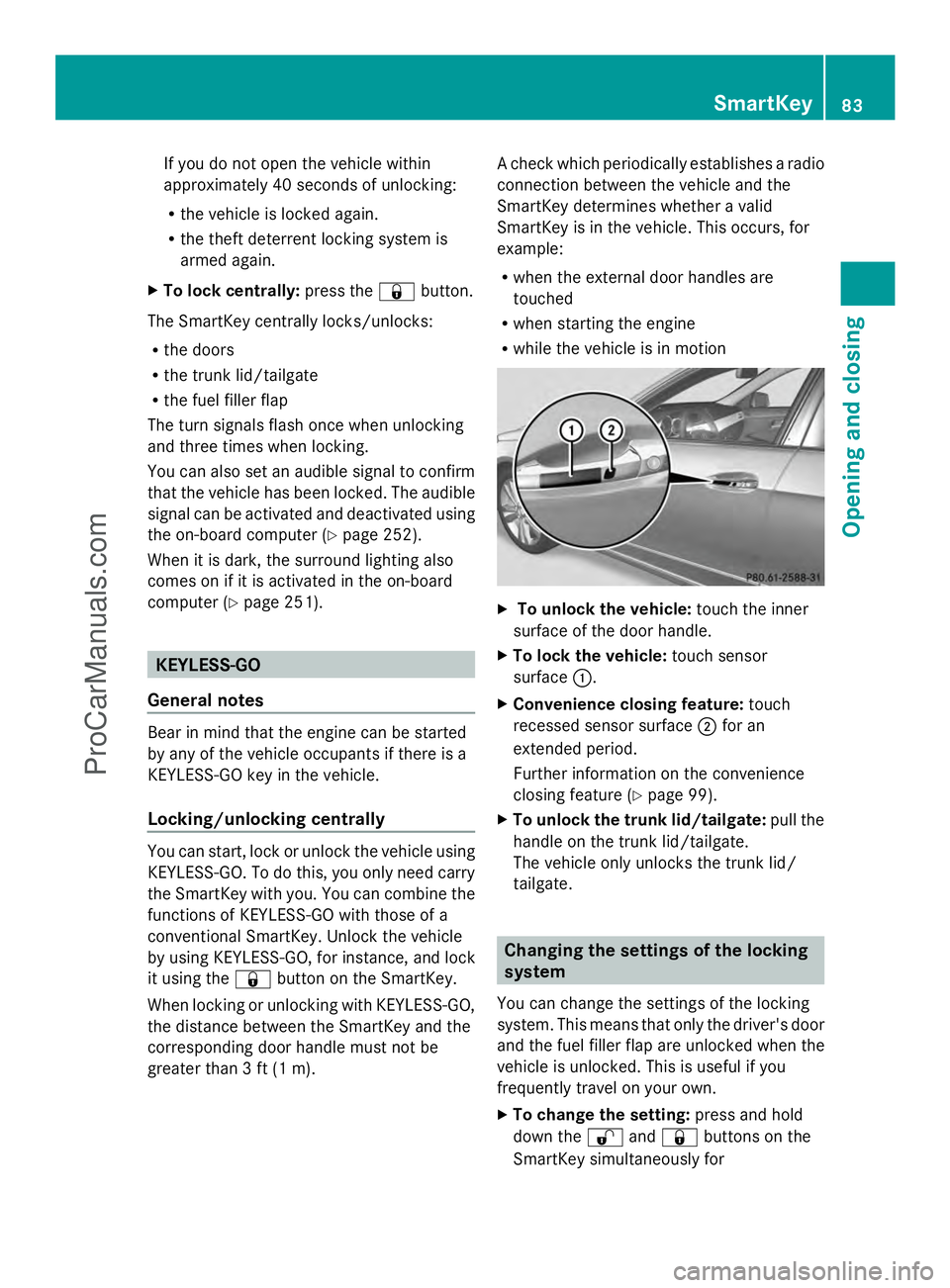
To unlock the vehicle: touch the inner
surface of the door handle.
X To lock the vehicle: touch sensor
surface :.
X Convenience closing feature: touch
recessed sensor surface ;for an
extended period.
Further information on the convenience
closing feature (Y page 99).
X To unlock the trunk lid/tailgate: pull the
handle on the trunk lid/tailgate.
The vehicle only unlocks the trunk lid/
tailgate. Changing the settings of the locking
system
You can change the settings of the locking
system. This means that only the driver's door
and the fuel filler flap are unlocked when the
vehicle is unlocked. This is useful if you
frequently travel on your own.
X To change the setting: press and hold
down the %and& buttons on the
SmartKey simultaneously for SmartKey
83Opening and closing Z
ProCarManuals.com
Page 90 of 430
Problem Possible causes/consequences and
M
MSolutions You have lost the
mechanical key. X
Report the loss immediately to the vehicle insurers.
X If necessary, have the locks changed as well. The engine cannot be
started using the
SmartKey. The on-board voltage is too low.
X
Switch off non-essential consumers, e.g. seat heating or interior
lighting, and try to start the engine again.
If this does not work:
X Check the starter battery and charge it if necessary
(Y page 360).
or
X Jump-start the vehicle (Y page 362).
or
X Consult a qualified specialist workshop. The engine cannot be
started using KEYLESS-
GO. The SmartKey is in
the vehicle. The vehicle is locked.
X
Unlock the vehicle and try to start the vehicle again. There is interference from a powerful source of radio waves.
X
Start your vehicle with the SmartKey in the ignition lock. Doors
Important safety notes
G
WARNING
If children are left unsupervised in the vehicle,
they could:
R open the doors, thus endangering other
people or road users.
R get out and disrupt traffic.
R operate the vehicle's equipment.
Additionally, children could set the vehicle in
motion if, for example, they:
R release the parking brake.
R shifting the automatic transmission out of
park position P
R Start the engine.
There is a risk of an accident and injury.
When leaving the vehicle, always take the
SmartKey with you and lock the vehicle. Never
leave children or animals unattended in the vehicle. Always keep the SmartKey out of
reach of children.
G
WARNING
If persons, particularly children are subjected
to prolonged exposure to extreme heat or
cold, there is a risk of injury, possibly even
fatal. Never leave children unattended in the
vehicle.
Ideally, place luggage or loads in the trunk/
cargo compartment. Observe the loading
guidelines (Y page 298). Unlocking and opening doors from
the inside
You can open a door from inside the vehicle
even if it has been locked. If the vehicle has
been locked with the SmartKey or with
KEYLESS-GO, opening a door from the inside 88
DoorsOpening and closing
ProCarManuals.com