2014 MERCEDES-BENZ E-SEDAN height
[x] Cancel search: heightPage 114 of 430

Rear seat head restraints
Lowering the rear seat head restraints
from the front X
Turn the SmartKey to position 2in the
ignition lock (Y page 159).
X Press button :.
Adjusting the rear seat head restraint
height Example: Sedan
X
To raise: pull the head restraint up to the
desired position.
X To lower: press release catch :and push
the head restraint down until it is in the
desired position.
i If you pull the head restraint forward
slightly, you will require less effort when
making adjustments. Adjusting the rear seat head restraint
angle
Example: Sedan
X
Pull or push the top of the head restraint
until it is in the desired position.
Removing and installing the rear seat
head restraints G
WARNING
If head restraints are not installed and
adjusted correctly, they cannot provide
protection as intended. There is an increased
risk of injury in the head and neck area, e.g.
in the event of an accident or when braking.
Always drive with the head restraints
installed. Before driving off, make sure for
every vehicle occupant that the center of the
head restraint supports the back of the head
at about eye level. Example: Sedan
The rear head restraints can only be removed
and re-installed on vehicles with the through-
loading facility.112
SeatsSeats, steering wheel and mirrors
ProCarManuals.com
Page 115 of 430
X
Release the rear seat backrest and fold it
slightly forwards ( Ypage 303).
X To remove: pull the head restraint up to
the stop.
X Press release catch :and pull the head
restraint out of the guides.
X To re-install: replace the head restraint so
that the notches on the bar are on the left
when viewed in the direction of travel.
X Push the head restraint down until you hear
it engage in position.
X Fold back the rear seat backrest until it
engages. Adjusting the active multicontour
seat
Overview i
Depending on the vehicle's equipment,
operation is performed using COMAND or
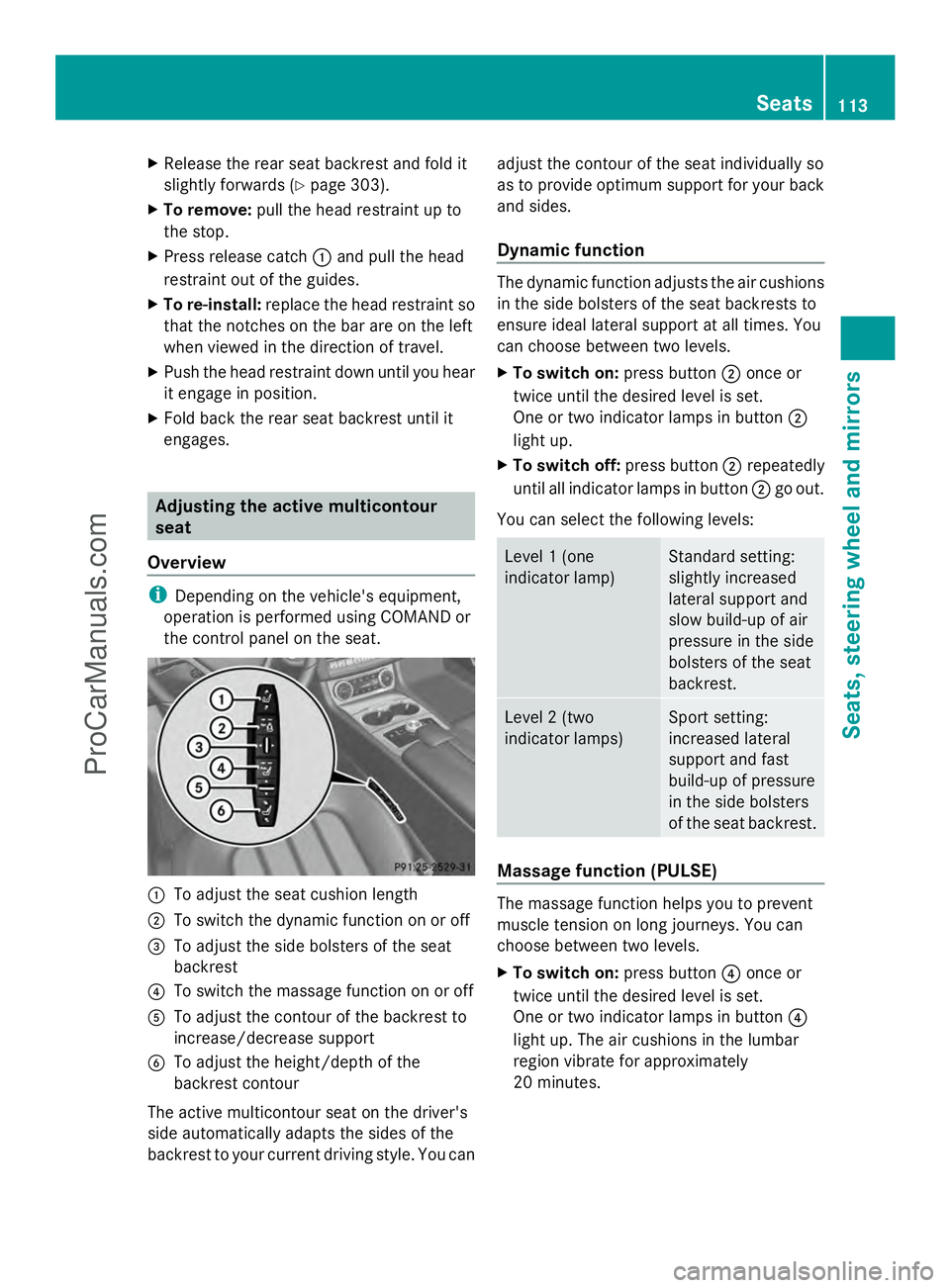
the control panel on the seat. :
To adjust the seat cushion length
; To switch the dynamic function on or off
= To adjust the side bolsters of the seat
backrest
? To switch the massage function on or off
A To adjust the contour of the backrest to
increase/decrease support
B To adjust the height/depth of the
backrest contour
The active multicontour seat on the driver's
side automatically adapts the sides of the
backrest to your current driving style. You can adjust the contour of the seat individually so
as to provide optimum support for your back
and sides.
Dynamic function The dynamic function adjusts the air cushions
in the side bolsters of the seat backrests to
ensure ideal lateral support at all times. You
can choose between two levels.
X
To switch on: press button;once or
twice until the desired level is set.
One or two indicator lamps in button ;
light up.
X To switch off: press button;repeatedly
until all indicator lamps in button ;go out.
You can select the following levels: Level 1 (one
indicator lamp) Standard setting:
slightly increased
lateral support and
slow build-up of air
pressure in the side
bolsters of the seat
backrest. Level 2 (two
indicator lamps) Sport setting:
increased lateral
support and fast
build-up of pressure
in the side bolsters
of the seat backrest. Massage function (PULSE)
The massage function helps you to prevent
muscle tension on long journeys. You can
choose between two levels.
X
To switch on: press button?once or
twice until the desired level is set.
One or two indicator lamps in button ?
light up. The air cushions in the lumbar
region vibrate for approximately
20 minutes. Seats
113Seats, ste ering wheel and mirrors Z
ProCarManuals.com
Page 121 of 430
Problems with the seat ventilation
Problem Possible causes/consequences and
M
MSolutions The seat ventilation has
switched off
prematurely or cannot
be switched on. The on-board voltage is too low because too many electrical
consumers are switched on.
X
Switch off electrical consumers that you do not need, such as
the rear window defroster or interior lighting.
Once the battery is sufficiently charged, the seat ventilation will
switch back on automatically. Steering wheel
Important safety notes
G
WARNING
You could lose control of your vehicle if you
do the following while driving:
R adjust the driver's seat, head restraint,
steering wheel or mirrors
R fasten the seat belt
There is a risk of an accident.
Adjust the driver's seat, head restraint,
steering wheel and mirror and fasten your
seat belt before starting the engine. G
WARNING
Children could injure themselves if they
adjust the steering wheel. There is a risk of
injury.
When leaving the vehicle, always take the
SmartKey with you and lock the vehicle. Never
leave children unsupervised in the vehicle. Adjusting the steering wheel
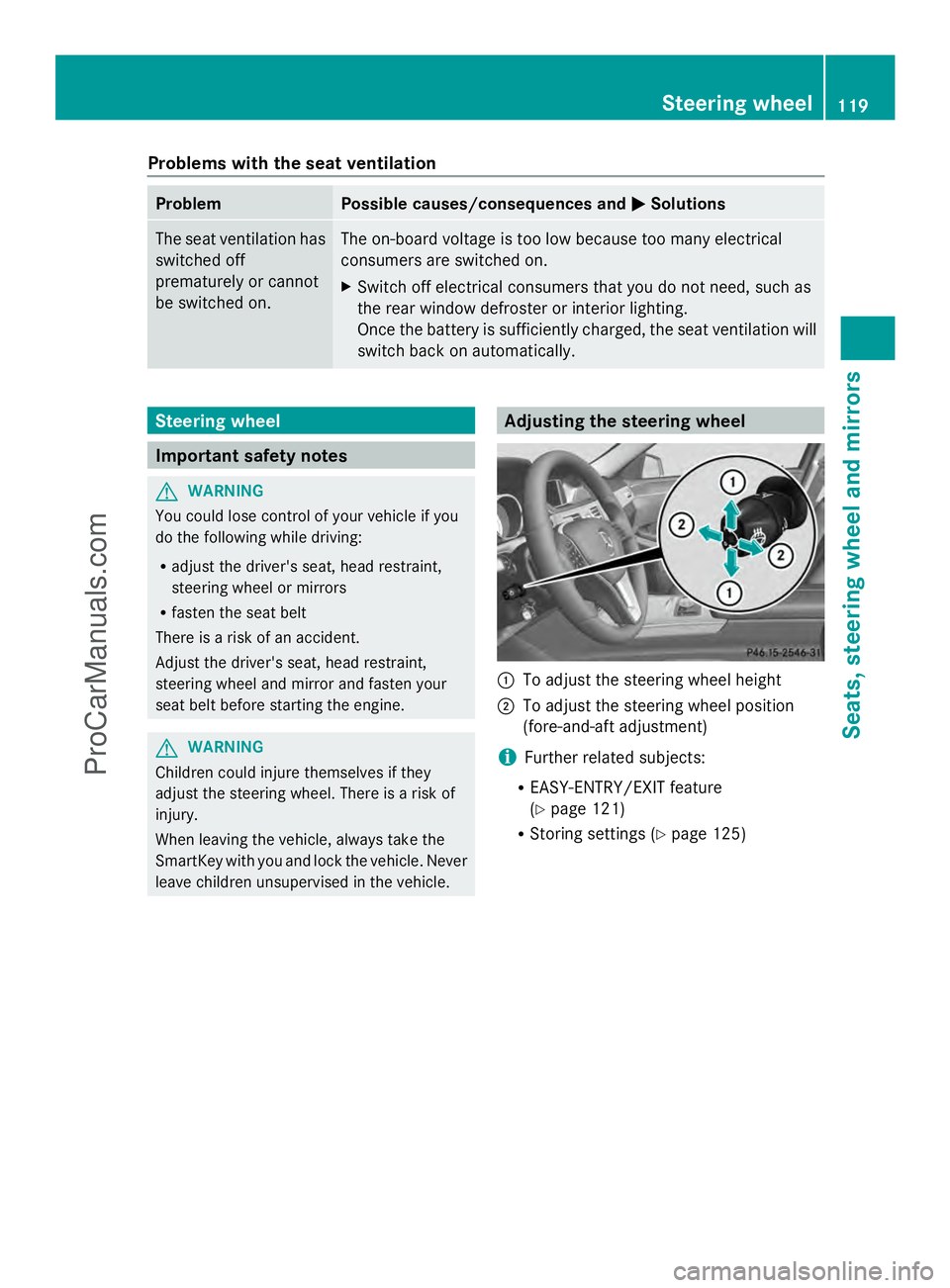
:
To adjust the steering wheel height
; To adjust the steering wheel position
(fore-and-aft adjustment)
i Further related subjects:
R EASY-ENTRY/EXIT feature
(Y page 121)
R Storing settings (Y page 125) Steering wheel
119Seats, steering wheel and mirrors Z
ProCarManuals.com
Page 206 of 430
X
Fully depress the accelerator pedal.
The engine speed rises to approximately
3,500 rpm.
The RACE START Release brake to
RACE START Release brake to
start start message appears in the
multifunction display.
i If you do not release the brake pedal
within five seconds, RACE START is
canceled. The RACE START Canceled
RACE START Canceled
message appears in the multifunction
display.
X Take your foot off the brake, but keep the
accelerator pedal depressed.
The vehicle pulls away at maximum
acceleration.
The RACE RACE START
START Active
Active message appears
in the multifunction display.
RACE START is deactivated when the vehicle
reaches a speed of approximately 30 mph
(Canada: 50 km/h). Drive program S+is
activated. SPORT handling mode remains
activated.
RACE START is deactivated immediately if
you release the accelerator pedal during
RACE START or if any of the activation
conditions are no longer fulfilled. The RACE
RACE
START Not Possible See Operator's START Not Possible See Operator's
Manual Manual message appears in the multifunction
display.
i If RACE START is used repeatedly within
a short period of time, it is only available
again after the vehicle has been driven a
certain distance. AIRMATIC
Vehicle level Important safety notes
G
WARNING
When the vehicle is being lowered, people
could become trapped if their limbs are
between the vehicle body and the wheels or underneath the vehicle. There is a risk of
injury.
Make sure no one is underneath the vehicle
or in the immediate vicinity of the wheel
arches when the vehicle is being lowered.
G
WARNING
Vehicles with level control:
The vehicle is slightly lowered if:
R you have selected comfort suspension
tuning and
R you lock the vehicle within approximately
60 seconds of switching off the engine
You and people in the vicinity of the wheel
arch or the underbody may thus become
trapped. There is a risk of injury.
Make sure that nobody is in the vicinity of the
wheel arch or the underbody when you lock
the vehicle.
! The vehicle is lowered by about 15 mm if:
R you have selected "Comfort tuning"
R you switch off the engine and then
R you lock the vehicle within approximately
60 seconds
When parking, position your vehicle so that
it does not make contact with the curb as
the vehicle is lowered. Your vehicle could
otherwise be damaged.
If you unlock the vehicle within 60 seconds of
having switched the engine off, the vehicle is
lowered slightly when Comfort suspension
mode is selected.
Your vehicle regulates its height
automatically. All-round level control ensures
the best possible suspension and constant
ground clearance, even with a laden vehicle.
When you drive fast, the vehicle is lowered
automatically to improve driving safety and to
reduce fuel consumption. 204
Driving systemsDriving and parking
ProCarManuals.com
Page 207 of 430
The following vehicle levels are possible:
R
Normal
R Raised: the vehicle is raised by
approximately 0.80 in (20 mm) when
compared with the normal level
R Lowered: the vehicle is raised by
approximately 0.40 in (10 mm) when
compared with the normal level
The "Normal" and "Raised" vehicle levels can
be set manually.
The "Lowered” vehicle level is set
automatically:
R at speeds above 70 mph (113 km/h)
R if you have selected "Sports tuning"
(Y page 205)
Setting the vehicle level
Select the "Normal" setting for normal road
surfaces and "Raised" for driving with snow
chains or on particularly poor road surfaces.
Your selection remains stored even if you
remove the SmartKey from the ignition lock.
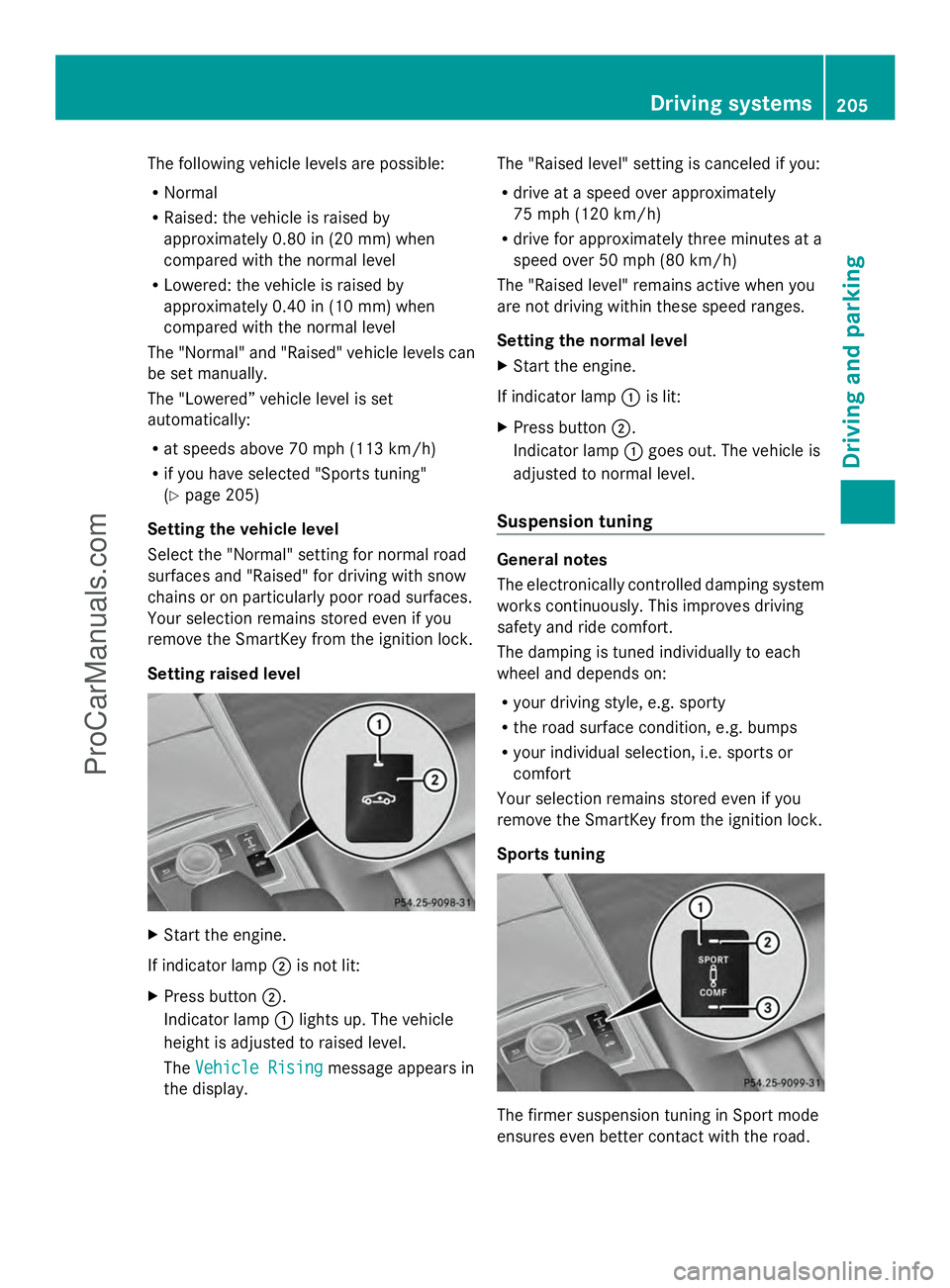
Setting raised level X
Start the engine.
If indicator lamp ;is not lit:
X Press button ;.
Indicator lamp :lights up. The vehicle
height is adjusted to raised level.
The Vehicle Rising Vehicle Rising message appears in
the display. The "Raised level" setting is canceled if you:
R
drive at a speed over approximately
75 mph (120 km/h)
R drive for approximately three minutes at a
speed over 50 mph (80 km/h)
The "Raised level" remains active when you
are not driving within these speed ranges.
Setting the normal level
X Start the engine.
If indicator lamp :is lit:
X Press button ;.
Indicator lamp :goes out. The vehicle is
adjusted to normal level.
Suspension tuning General notes
The electronically controlled damping system
works continuously. This improves driving
safety and ride comfort.
The damping is tuned individually to each
wheel and depends on:
R
your driving style, e.g. sporty
R the road surface condition, e.g. bumps
R your individual selection, i.e. sports or
comfort
Your selection remains stored even if you
remove the SmartKey from the ignition lock.
Sports tuning The firmer suspension tuning in Sport mode
ensures even better contact with the road. Driving systems
205Driving and parking Z
ProCarManuals.com
Page 210 of 430
lowers; with an increase in temperature,
the vehicle level rises.
Changing the rear axle ride height
This function is only available for the E 63
AMG 4MATIC.
The vehicle level at the rear axle depends on
the selected suspension tuning and the
vehicle speed.
The vehicle level at the rear axle changes
during the journey depending on the selected
suspension tuning:
R Comfort: +0.4 in (+10 mm)
R Sport + and Sport: -0.6 in (-15 mm)
When switching from Comfort to Sport or
Sport +, the rear axle lowers by approximately
1.0 in (25 mm). When switching from Sport
or Sport + to Comfort, the rear axle raises by
approximately 1.0 in (25 mm). This level
change also takes place when the vehicle is
stationary.
If you drive faster than 105 mph (170 km/h),
the rear axle ride height is set to a medium
level. This increases driving safety and
reduces air resistance. If you then drive at
speeds below 93 mph (150 km/h), the rear
axle ride height is readjusted to the selected
suspension tuning.
Load compensation
The vehicle can compensate differences in
the vehicle level by raising or lowering the
rear axle. This is the case, for example, if
people get out or if luggage is being loaded.
Load compensation takes place if:
R a door or the trunk lid/tailgate is opened
R the parked vehicle is unlocked
For larger level changes, the engine must be
running. 4MATIC (permanent four-wheel drive)
If you fail to adapt your driving style, 4MATIC
can neither reduce the risk of accident nor
override the laws of physics. 4MATIC cannot take account of road, weather and traffic
conditions. 4MATIC is only an aid. You are
responsible for the distance to the vehicle in
front, for vehicle speed, for braking in good
time and for staying in your lane.
If a drive wheel spins due to insufficient grip:
R
Only depress the accelerator pedal as far
as necessary when pulling away.
R Accelerate less when driving.
! Never tow the vehicle with one axle
raised. This may damage the transfer case.
Damage of this sort is not covered by the
Mercedes-Benz Limited Warranty. All
wheels must remain either on the ground
or be fully raised. Observe the instructions
for towing the vehicle with all wheels in full
contact with the ground.
i In wintry driving conditions, the maximum
effect of 4MATIC can only be achieved if
you use winter tires (M+S tires), with snow
chains if necessary.
4MATIC ensures that all four wheels are
permanently driven. Together with ESP ®
, it
improves the traction of your vehicle
whenever a drive wheel spins due to
insufficient grip. PARKTRONIC
Important safety notes PARKTRONIC is an electronic parking aid with
ultrasonic sensors. It indicates visually and
audibly the distance between your vehicle
and an object.
PARKTRONIC is only an aid. It is not a
replacement for your attention to your
immediate surroundings. You are always
responsible for safe maneuvering, parking
and exiting a parking space. When
maneuvering, parking or pulling out of a
parking space, make sure that there are no
persons, animals or objects in the area in
which you are maneuvering. 208
Driving systemsDriving and parking
ProCarManuals.com
Page 215 of 430
Parking tips:
R
On narrow roads, drive as close to the
parking space as possible.
R Parking spaces that are littered or
overgrown might be identified or measured
incorrectly.
R Parking spaces that are partially occupied
by trailer drawbars might not be identified
as such or be measured incorrectly.
R Snowfall or heavy rain may lead to a parking
space being measured inaccurately.
R Pay attention to the PARKTRONIC
(Y page 210) warning messages during the
parking procedure.
R You can intervene in the steering procedure
to correct it at any time. Active Parking
Assist will then be canceled.
R When transporting a load which protrudes
from your vehicle, you should not use
Active Parking Assist.
R Never use Active Parking Assist when snow
chains are installed.
R Make sure that the tire pressures are
always correct. This has a direct influence
on the parking characteristics of the
vehicle.
Use Active Parking Assist for parking spaces:
R that are parallel or at right-angles to the
direction of travel
R that are on straight roads, not bends
R that are on the same level as the road, e.g.
not on the pavement
Detecting parking spaces Objects located above the height range of
Active Parking Assist will not be detected
when the parking space is measured. These
are not taken into account when the parking
procedure is calculated, e.g. overhanging
loads, tail sections or loading ramps of goods
vehicles. G
WARNING
If there are objects above the detection range:
R Active Park Assist may steer too early
R the vehicle may not stop in front of these
objects.
You may cause a collision as a result. There is
a risk of an accident.
If there are objects above the detection range,
stop and deactivate Active Parking Assist.
For further information on the detection
range (Y page 209).
Active Parking Assist does not support you
with parking spaces at right-angles to the
direction of travel if:
R two parking spaces are located directly
next to one another
R the parking space is directly next to a low
obstacle such as a low curb
R you park forwards
Active Parking Assist does not support you
with parking spaces that are parallel or at
right-angles to the direction of travel if:
R the parking space is on a curb
R the system reads the parking space as
being blocked, for example by foliage or
grass paving blocks
R the area is too small for the vehicle to
maneuver into
R the parking space is bordered by an
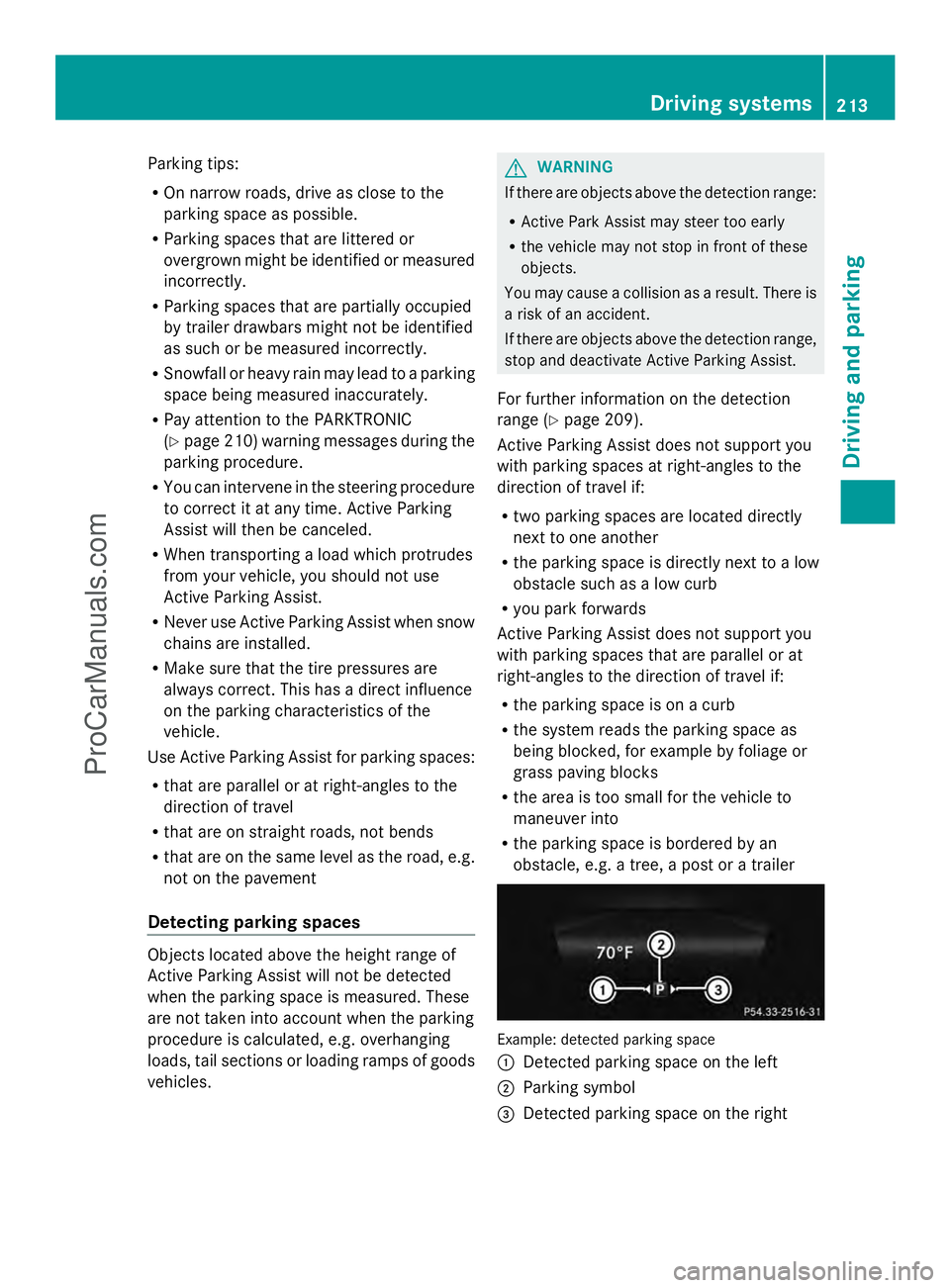
obstacle, e.g. a tree, a post or a trailer Example: detected parking space
:
Detected parking space on the left
; Parking symbol
= Detected parking space on the right Driving systems
213Driving and parking Z
ProCarManuals.com
Page 312 of 430
!
When the EASY-PACK trunk box is pulled
out, no objects may be placed on the frame
of the box, nor should the frame be pushed
from above. Otherwise, the box could be
damaged.
! Sharp-edged, pointed or fragile objects
can damage the EASY-PACK trunk box and
then be thrown out. There is a risk of injury.
Do not transport sharp-edged, pointed or
fragile objects in the EASY-PACK trunk box.
Always store and secure these or similar
objects in the trunk outside of the EASY-
PACK trunk box.
! If you exceed the maximum permitted
load of the EASY-PACK trunk box, objects
can be thrown out of the EASY-PACK trunk
box and strike vehicle occupants. There is
a risk of injury, particularly in the event of
sudden braking or a sudden change in
direction.
Always observe the maximum permitted
load of the EASY-PACK trunk box. Always
store and secure heavy objects in the trunk
outside of the EASY-PACK trunk box.
The maximum permitted load of the EASY-
PACK trunk box is 22 lbs (10 kg). With a load
of above approx. 11 lbs (5kg), the bottom of
the box moves downward until it is rests on
the mat of the trunk floor. Thus, overloading
of the box is avoided.
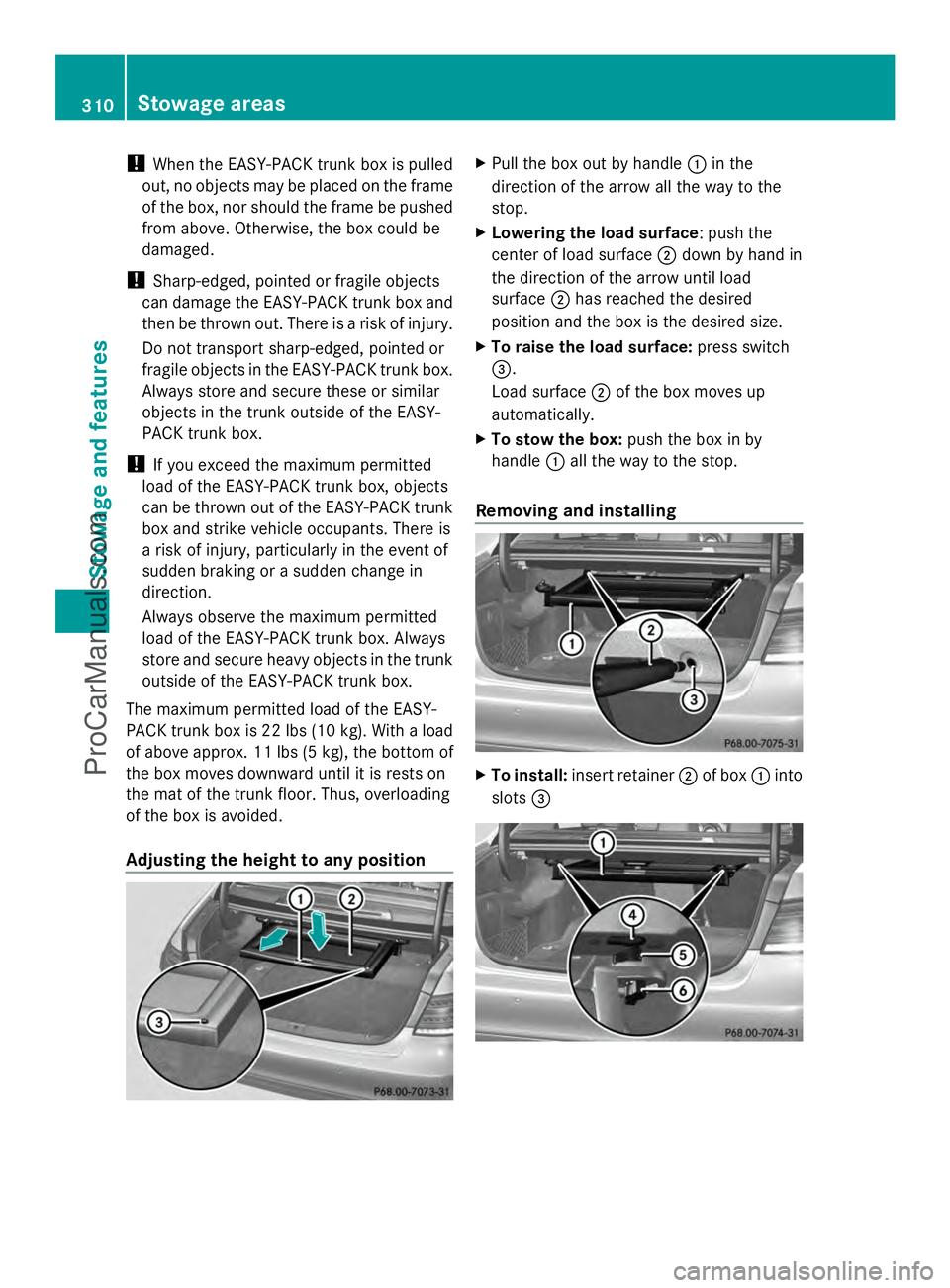
Adjusting the height to any position X
Pull the box out by handle :in the
direction of the arrow all the way to the
stop.
X Lowering the load surface: push the
center of load surface ;down by hand in
the direction of the arrow until load
surface ;has reached the desired
position and the box is the desired size.
X To raise the load surface: press switch
=.
Load surface ;of the box moves up
automatically.
X To stow the box: push the box in by
handle :all the way to the stop.
Removing and installing X
To install: insert retainer ;of box :into
slots = 310
Sto
wage areasStowage an d features
ProCarManuals.com